Lovable vs Webflow: Which Platform Should You Choose in 2026?
Choosing between Lovable and Webflow gets confusing before you even open either platform.
Both can help you launch online, but they solve different problems.
Webflow gives you detailed control over layouts, responsive design, and content. Lovable focuses on turning prompts into functional apps with databases, user accounts, and custom logic.
The wrong choice usually becomes obvious later.
You may build a beautiful website that can’t support your product features—or generate an app quickly, only to struggle with precise design changes and content management.
This guide compares Lovable vs Webflow across design control, app functionality, SEO, pricing, code ownership, and maintenance.
I’ll also look at Vitara.ai, an AI full-stack development platform built for creating web and mobile applications from natural-language prompts.
By the end, you’ll know which platform fits your project—and when Vitara.ai may be the better option.

Build full-stack web and mobile apps with AI prompts, React frontend, Supabase backend, editable code, and deployment support.
Start Building with Vitara.ai →
TL;DR — Lovable vs Webflow: Who Should You Pick?
- Vitara.ai: Best for building full-stack web and mobile apps with AI, editable code, and built-in deployment.
- Lovable: Best for founders who want to turn prompts into working web apps quickly.
- Webflow: Best for polished marketing websites that need precise design control and a visual CMS.
| Feature | Lovable ↗ | Webflow ↗ | Vitara.ai ↗ |
|---|---|---|---|
| Primary Focus | AI web app building | Visual website building | Full-stack AI development |
| Building Method | Natural-language prompts | Visual canvas and AI | Prompts and code editing |
| Backend Support | Yes, Lovable Cloud | Developer setup required | Yes, built in |
| Visual CMS | Limited | ✔ Advanced | Custom database setup |
| Code Access | ✔ GitHub sync | Static export only | ✔ Download and GitHub |
| Starting Price | $25/month | $15/month annually | $20/month |
| Best For | SaaS MVPs and portals | Marketing sites and blogs | Web and mobile apps |
Lovable includes cloud infrastructure and shared usage credits, while Webflow’s paid Site plans now start at $15 per month when billed annually. Vitara.ai positions its Build plan at $20 per month with code download, private projects, and higher usage limits.
Lovable vs Webflow: Feature-by-Feature Comparison
Now let’s look beyond the basic “apps versus websites” explanation.
I compared Lovable and Webflow across nine areas that affect how quickly you can build, how much control you keep, and how difficult the project becomes once it grows.
To keep the comparison practical, I’ll use the same example throughout: a SaaS customer portal with a marketing page, user login, dashboard, database, and responsive layout.
This first part covers the building workflow, design control, and backend capabilities.
1. AI Generation and Building Workflow
The way a platform starts your project shapes everything that follows.
A prompt-first tool may produce a working first version faster. A visual builder gives you more control over each decision, but you’ll spend more time creating the structure yourself.
Here’s how Lovable and Webflow approach the build process.
Lovable — Prompt-First App Creation
Lovable starts with a conversation.
You describe the product you want to create, including its pages, users, features, and visual style. Lovable then generates a working application with editable code behind it.
For a customer portal, your first prompt could be:
“Build a customer portal where users can create an account, view active projects, upload files, check invoice status, and message their account manager.”
Lovable can generate the initial interface and application flow from that description. You continue improving it through follow-up prompts, while Visual Edits lets you select individual elements and change text, colours, images, or layout details directly.
This makes the first build feel quick, especially when you already know what the app should do.
The friction appears when your instructions become too broad.
Lovable’s own documentation recommends making one change at a time and checking the preview after each update. That matters because a request such as “redesign the dashboard and improve the navigation” gives the AI room to change more than you intended.
One Reddit user described the problem clearly: “Ask it to do too much, and things will break, hard.” The same user found that very small instructions created a slow, micromanaged workflow. (source)
Lovable works best when you break the project into controlled steps: create the layout, check it, add authentication, test it, then connect the database.
Webflow — Visual Building With AI Assistance
Webflow gives you more ways to start.
You can use a template, begin with a blank canvas, or let its AI site builder generate a responsive, multi-page website. The AI builder can create the page structure, initial copy, visual theme, and common pages such as Home, About, Services, Blog, and Contact.
Once the first version is ready, you move into Webflow’s visual Designer.
Instead of repeatedly describing changes in a chat, you select an element and adjust its spacing, typography, position, class, or responsive behaviour yourself. The result is slower at the beginning, but more predictable when you know how Webflow works.
Webflow can also generate React components for features such as calculators, galleries, and multi-step forms. However, these AI components don’t support databases, authentication, API secret management, or CMS data connections.
Webflow previously introduced App Gen for generating full-stack applications from prompts, but the company has paused its development and started the deprecation process. Existing App Gen projects continue to run for now, but it shouldn’t be the main reason you choose Webflow for a new application.
Winner: Lovable
Lovable offers the more direct AI app-building workflow. You can move from a product brief to a clickable application without manually constructing every section.
Webflow’s workflow is stronger when the website’s layout and visual presentation matter more than application logic.
Want to compare more tools before deciding? Read these next:
Why Vitara.ai Is Better Suited to Full-Stack Product Creation
Vitara.ai follows the same prompt-first direction as Lovable, but it positions the workflow around complete web and mobile products rather than web applications alone.
You describe the product in natural language, and Vitara generates a React frontend with a Supabase backend. It also supports GitHub integration, manual code editing, deployment, and downloadable source code.
That creates a clearer path for projects that may move between AI generation and traditional development.
A founder can use prompts to create the first version. A developer can then open the code, review the application structure, fix specific behaviour, and continue working through GitHub.
Vitara.ai is the stronger option here when you need:
- Web and mobile app development from the same platform
- A defined React and Supabase technology stack
- Editable code that can move into a developer-led workflow
- Frontend, backend, authentication, and deployment in one workspace
Webflow remains easier to control visually. Lovable has a more established prompt-and-preview experience. Vitara’s advantage is giving product teams a direct route from an AI-generated idea to an editable full-stack codebase.
2. Design Control and Responsive Layouts
A fast first draft isn’t enough if the finished product looks generic or falls apart on mobile.
Good design control means you can adjust spacing, typography, layouts, animations, and responsive behaviour without fighting the platform.
This is where the difference between an AI app builder and a visual website builder becomes much clearer.
Lovable — Fast Design Direction, Less Manual Precision
Lovable has improved its design workflow.
Before generating a project, it can show three visual directions or ask questions about your preferred typography, colours, and layout. This helps the first version land closer to the style you had in mind.
After generation, you can select elements inside the preview and make visual edits. Simple changes such as replacing an image, updating a heading, or changing a colour don’t always require another full prompt.
Lovable also includes desktop and mobile previews, and it can create mobile-friendly web applications. It does not, however, offer the same visible CSS and breakpoint controls that Webflow places inside its Designer.
Suppose the pricing cards look cramped on tablets but fine on desktop and mobile.
In Lovable, you would usually explain the issue through a prompt, use a visual selection, or edit the underlying code. You’re asking the system to interpret the design correction.
That approach is convenient for broad changes. It becomes less comfortable when you need exact control over a specific viewport, spacing value, grid behaviour, or animation sequence.
Webflow — Detailed Control Over Every Breakpoint
Webflow treats the page like a visual frontend-development environment.
You can control flexbox, CSS Grid, margins, padding, positioning, typography, sizing, overflow, and display behaviour from the Style panel. Classes and variables make those decisions reusable across the site.
Its responsive workflow is also more explicit.
Webflow includes desktop, tablet, mobile landscape, and mobile portrait breakpoints, along with optional breakpoints for larger screens. You can override styles at each size and see how those changes cascade across the design.
Variables add another layer of control. You can create reusable values for colours, fonts, spacing, and sizes, then assign different values at specific breakpoints. Change one variable, and every connected element updates.
Webflow also supports visual GSAP-powered interactions for scroll effects, hover states, page animations, and reusable motion sequences.
The trade-off is the learning curve.
One Webflow user put it well: “No-code doesn’t mean you don’t have to know code; it just means you don’t have to write it.” (source)
You don’t need to become a frontend developer, but understanding CSS classes, flexbox, relative sizing, and style inheritance makes Webflow much easier to use.
Winner: Webflow
Webflow gives you more precise visual and responsive control.
Lovable can produce an attractive interface quickly, but Webflow is the safer choice when the project has strict brand guidelines, custom animations, or layouts that need careful adjustments at several screen sizes.
Where Vitara.ai Fits for Application UI Design
Vitara.ai generates responsive React interfaces and lets you change the design through prompts or direct code editing.
That makes it more suitable for product interfaces than for highly art-directed marketing pages.
For example, a developer can open the React components behind a dashboard, adjust the Tailwind or CSS styles, replace a generated component, and commit the changes through GitHub. You aren’t limited to asking the AI to interpret every visual correction.
Vitara.ai does not replace Webflow’s visual canvas for pixel-level website design.
Its advantage appears when the interface belongs to a larger software product. The design, application logic, database connection, and mobile experience can remain inside the same editable project instead of being split between a website builder and a separate development environment.
3. Backend, Database, and Authentication
A landing page can work without a backend.
A customer portal cannot.
As soon as users need to register, save information, upload files, manage subscriptions, or view private records, the platform must handle data and server-side logic securely.
Lovable — Built-In Backend Through Lovable Cloud
Lovable includes a managed backend called Lovable Cloud.
When your project requires a database, authentication, file storage, or server-side functions, Lovable can enable the backend and generate the required structure from your prompt.
Lovable Cloud includes:
- A relational database
- User authentication
- File storage
- Real-time updates
- Edge functions and scheduled jobs
- Secret storage for private API keys
- Backend logs and usage monitoring
The system uses Supabase’s open-source foundation, but you don’t need to create and configure a separate Supabase project for every new application. Existing projects can still connect directly to Supabase when that workflow makes more sense.
For the customer portal example, you could ask Lovable to add email registration, create separate client and administrator roles, store project records, and let users upload documents.
That is much closer to a complete app-building experience than connecting several third-party services manually.
You still need to inspect permissions, test user roles, and review database security before launching. Lovable runs automated checks, but its documentation makes clear that these checks aren’t a replacement for a full security audit.
Webflow — Capable, but More Developer-Led
Webflow’s native website-building workflow no longer includes its old Logic automation system or User Accounts. Logic was discontinued in 2025, and native User Accounts were disabled in January 2026.
That means you cannot build a membership portal by dragging a login form onto the Webflow canvas and connecting it to a native user database.
You have two main options.
The first is to connect external tools such as Memberstack, Outseta, Supabase, Xano, or custom APIs.
The second is to build a Next.js or Astro application and deploy it through Webflow Cloud. Webflow Cloud supports server-side code and built-in storage options, including SQLite, key-value storage, and object storage.
This makes Webflow more capable than older comparisons suggest.
But it is still a developer workflow. You need to prepare the database schema, create migration files, write application logic, manage the GitHub repository, and connect authentication yourself.
Webflow can host a full-stack app. It does not provide the same prompt-to-database experience as Lovable.
Winner: Lovable
Lovable wins for founders and small teams that want authentication, database records, storage, and business logic without assembling the backend manually.
Webflow Cloud is a serious option for developers who want to place a custom application alongside a Webflow marketing site, but it requires more technical setup.
Why Vitara.ai Outperforms Both for Web and Mobile Backend Workflows
Vitara.ai combines a React frontend with a Supabase backend, giving each generated project a recognisable full-stack structure.
It can generate database-connected forms, authentication, application flows, APIs, and responsive interfaces from the same product description. The code remains editable and can be downloaded or moved into GitHub for continued development.
The biggest difference is mobile support.
Lovable focuses on web applications and can create mobile-friendly experiences, but it does not position itself as a native mobile app builder. Webflow Cloud currently focuses on Next.js and Astro web projects. Vitara.ai is designed for both web and mobile application creation.
That makes Vitara.ai a better fit when the same product may need a browser application and a mobile version.
The generated backend still needs testing. Vitara’s own terms state that it does not guarantee generated code will be bug-free, secure, or ready for production without review. That is an honest limitation, and it applies to AI-generated software in general.
The benefit is that you can review and improve the actual code rather than rebuilding the product once the prototype becomes serious.
Create user logins, dashboards, databases, APIs, and mobile-ready product flows with a prompt-based React and Supabase workflow.
Build Full-Stack with Vitara.ai →
4. CMS and Content Publishing
A database can store content, but that doesn’t automatically make it a useful CMS.
Marketing teams need a simple way to draft articles, update landing pages, manage authors, schedule campaigns, and publish changes without touching application code.
Here’s how each platform handles ongoing content work.
Lovable — Flexible Content, but No Traditional Visual CMS
Lovable can generate a blog, resource centre, directory, or knowledge base and store the content in Lovable Cloud or Supabase.
For a SaaS portal, you could ask it to create an announcements table with fields for the headline, body, author, publication date, and featured image. Lovable can then generate an internal admin page where your team adds or edits those announcements.
That works well for content tied directly to your application.
The experience becomes more complicated when several marketers need to publish regularly. You must define the database structure, build the editing interface, manage permissions, and test each publishing action yourself.
Lovable also connects with dedicated content platforms:
- WordPress.com can manage posts, pages, media, and publishing workflows while Lovable controls the frontend.
- Contentful can supply structured content for blogs, documentation, product catalogues, and multilingual pages.
- Storyblok can manage visual content and draft previews outside the Lovable codebase.
These integrations solve Lovable’s editorial weakness, but they introduce another platform, subscription, and workflow.
A Reddit user discussing AI-built client sites raised the same concern: “None of the AI converters I see come with a decent easy to use CMS.” (source)
Lovable can create the CMS experience you need. It just doesn’t give every project a mature, marketer-ready content system by default.
Webflow — A Visual CMS Built for Marketing Teams
Webflow treats content management as a core part of the platform.
You organise content inside Collections. Each Collection represents one type of information, such as:
- Blog posts
- Authors
- Customer stories
- Job openings
- Events
- Products
- Team members
You then add fields for information such as the title, image, category, publication date, author, or SEO description.
Once the structure is ready, Webflow generates a reusable Collection page. Design that template once, and every new item follows the same layout automatically.
This is useful for more than blogs.
A SaaS company could create separate Collections for feature pages, customer stories, integrations, comparison pages, and help articles. Marketers update the content while designers maintain the underlying templates.
Webflow also supports CSV imports and exports, which makes it easier to migrate or update large content sets. Content editors can change copy, images, and CMS items without gaining access to structural design settings or custom code.
That separation is helpful when handing a website to a client.
The client can publish an article or replace a case study without accidentally deleting a section, changing a global class, or breaking the responsive layout.
Webflow’s CMS still has limits. Content editors cannot create new Collections, change Collection settings, or redesign templates. Those tasks require someone with broader site permissions.
For most marketing teams, that restriction is a benefit rather than a problem.
Winner: Webflow
Webflow offers the stronger content-management experience.
Lovable can power dynamic content and connect with external headless CMS platforms, but Webflow makes structured publishing easier for marketers, agencies, and clients from the start.
Where Vitara.ai Fits for Custom Content Systems
Vitara.ai takes an application-first approach similar to Lovable.
Its React and Supabase stack can support product catalogues, admin dashboards, user-generated content, directories, and other database-driven experiences. Vitara’s ecommerce builder also promotes content libraries, product management, SEO settings, redirects, and reusable site sections.
That makes Vitara.ai useful when content is part of a larger product.
For example, you could build a marketplace where vendors manage their own listings, images, prices, and availability from a private dashboard. That requires application permissions and database logic, not just a traditional blog editor.
Based on Vitara’s current public product information, it doesn’t offer a documented editorial CMS comparable to Webflow Collections. You would generate or code the content-management interface around your project’s Supabase data.
Vitara.ai is the better fit for custom admin systems. Webflow remains more practical when writers and marketers simply need to publish content.
5. SEO, AEO, and Website Performance
SEO is often reduced to title tags and sitemaps.
Those settings matter, but they’re only part of the job. Your platform must also produce crawlable pages, support structured content, handle redirects, load efficiently, and let your team publish useful pages consistently.
Here’s how Lovable and Webflow compare.
Lovable — Much Stronger SEO Tools Than Older Reviews Suggest
Lovable now includes a dedicated SEO and AI search review.
It can scan a project for issues involving:
- Page titles and meta descriptions
- Canonical tags
- Sitemaps and robots.txt
- Semantic HTML
- Image alt text
- Indexing settings
- Mobile usability
- Accessibility
- Page performance
Lovable can apply many recommended fixes through the AI agent, although doing so uses normal message credits. It also connects with Google Search Console and uses Semrush data for keyword, competitor, backlink, and ranking research.
Rendering has improved as well.
New Lovable applications created after 13 May 2026 use TanStack Start with server-side rendering. This means browsers and crawlers receive rendered HTML rather than waiting for the entire interface to load through client-side JavaScript.
Older React and Vite projects use on-request prerendering for verified search engines, social preview tools, and supported AI crawlers.
That corrects a common claim in older comparisons that Lovable applications are automatically poor for SEO.
Still, having the right technical setup doesn’t make Lovable the best platform for a large content strategy.
Suppose you plan to publish 100 comparison pages, each with its own author, FAQs, schema, screenshots, category, and update date. Lovable can support that structure, but you may need to create a custom editing system or connect a headless CMS first.
The technical SEO foundation is there. The editorial workflow takes more planning.
Webflow — Stronger for Content-Led Search Growth
Webflow gives you direct control over SEO settings for static and CMS pages.
You can edit titles, descriptions, URLs, Open Graph information, canonical tags, sitemap indexing, redirects, and schema markup. CMS fields can also populate SEO information dynamically, so every blog post or landing page doesn’t need to be configured manually.
For example, you could create a CMS template where:
- The article title becomes the SEO title
- The excerpt becomes the meta description
- The featured image becomes the Open Graph image
- The author field appears in article schema
- The updated date changes whenever the content is revised
Webflow automatically generates a sitemap and adds its location to the site’s robots.txt file. You can also create and import 301 redirects when URLs change.
Its AI tools now audit missing titles, descriptions, alt text, schema, and accessibility information. Webflow can then generate suggested content for those fields.
Team and Enterprise customers also have access to broader AEO tools that scan the site and prioritise recommendations for search engines and AI answer platforms.
There are still gaps.
Webflow’s standard audit doesn’t check image alt text inside every component, lightbox, or CMS context. AI-generated metadata and schema also need human review before publishing.
Performance depends heavily on how the site is built.
A simple Webflow page can load quickly. A page packed with autoplay videos, large images, tracking scripts, and complex animations can still perform badly. Lovable has the same problem when an application ships too much JavaScript or makes unnecessary database requests.
Neither platform should receive a performance win without testing the published project through Lighthouse and Core Web Vitals.
Winner: Webflow
Webflow wins for blogs, comparison pages, resource centres, and other content-led SEO strategies.
Lovable now provides serious technical SEO and AEO tools, but Webflow combines those controls with a more mature CMS and a cleaner workflow for publishing at scale.
How Vitara.ai Handles SEO
Vitara.ai gives you access to the generated React code, so developers can control metadata, rendering behaviour, structured data, routing, and performance directly.
Its ecommerce builder also advertises editable titles, meta descriptions, URL slugs, SEO-friendly product pages, and a redirect manager.
This gives Vitara more flexibility than a closed website builder, but flexibility and convenience are different things.
A developer can add custom schema, optimise route loading, or change how pages render. A non-technical marketer may find those changes harder than opening Webflow’s Page Settings panel.
Vitara’s current public material doesn’t document an SEO and AEO auditing system as broad as the tools offered by Lovable or Webflow.
Vitara.ai makes the most sense when search optimisation belongs inside a custom application workflow. Webflow is still easier for managing a large marketing website, while Lovable currently provides the stronger built-in AI SEO review for prompt-led app projects.
6. Code Ownership, Export, and Vendor Lock-In
It’s easy to say that a platform lets you “own your website.”
The more useful question is what you can actually take with you.
Can you download the frontend? Can you move the database? Will authentication, forms, CMS content, and payments still work after migration?
That’s where Lovable and Webflow differ significantly.
Lovable — Full Application Code With Git Sync
Lovable lets you synchronise projects continuously with GitHub or GitLab.
Once connected, you can clone the repository, edit the code locally, use another development tool, deploy through a different hosting provider, or continue development outside Lovable.
You aren’t limited to downloading a visual copy of the frontend.
Lovable states that users own both their code and their data. Database schemas, stored information, files, and configuration can be migrated to infrastructure you control. Its applications are built on standard open-source technologies rather than a proprietary frontend framework.
This creates a practical workflow for growing products.
A founder might build the initial MVP inside Lovable, connect it to GitHub, and later bring in a developer. The developer can inspect the repository, create branches, replace generated components, and deploy the application elsewhere without starting again.
Moving the code is still easier than moving the entire running system.
You may need to reconfigure:
- Environment variables
- Authentication providers
- Database permissions
- File storage
- Domains and DNS
- Scheduled functions
- Deployment pipelines
Code ownership lowers lock-in. It doesn’t remove migration work.
Winner: Lovable
Lovable offers the clearest route from AI-generated application to an independently managed codebase.
Webflow — Useful Static Export With Major Exclusions
Webflow allows eligible Workspace users to export the site’s HTML, CSS, JavaScript, and assets as a ZIP file.
You can edit those files and host the exported site elsewhere. Webflow does not require attribution or an active plan after the exported static site moves to another server.
That sounds similar to Lovable until you look at what the export leaves behind.
Webflow’s code export does not include functioning:
- CMS Collections or Collection lists
- Ecommerce products and checkout
- User Accounts
- Form processing
- Site search
- Password protection
- Code components
- Localised versions beyond the primary locale
CMS, ecommerce, and account data can be downloaded separately as CSV backups, but the exported files do not recreate those systems on another host.
Consider a Webflow blog with 500 articles.
You can export the static layout and download the content as CSV files. But if you want writers to keep publishing after leaving Webflow, you must connect another CMS, rebuild the templates, import the content, and create a new editorial workflow.
For a five-page brochure site, Webflow export is genuinely useful.
For a content-heavy or ecommerce website, leaving the platform requires much more rebuilding than downloading a ZIP file suggests.
Winner: Lovable
Lovable provides better portability for full-stack products.
Webflow’s export is strongest when the project is mostly static and doesn’t rely heavily on hosted platform features.
Vitara.ai — Editable Full-Stack Code With a Familiar Stack
Vitara.ai says users retain ownership of generated code and can edit it inside the platform, connect it to GitHub, download it, or move it into another development environment. Its standard stack combines a React frontend with Supabase for backend data, authentication, and APIs.
That gives Vitara a portability advantage over Webflow for software products.
Instead of receiving static HTML and losing the application layer, you retain code that a React developer can continue maintaining. Supabase also uses familiar database and authentication patterns, which reduces the risk of depending on a proprietary backend.
Vitara’s terms clearly state that generated code belongs to the user, while also warning that the platform does not guarantee the code will be secure, bug-free, or ready for production without review.
That distinction matters.
Owning generated code means you can improve it. It doesn’t mean the architecture has already been checked by an experienced engineer.
Vitara.ai is worth considering when you want:
- Full-stack code rather than a static website export
- Direct access to React components
- GitHub-based collaboration
- A Supabase backend that can continue outside the builder
- One codebase that may extend into web and mobile products
Lovable currently provides more detailed public documentation around deployment and data migration. Vitara.ai offers a similarly open direction, but teams should confirm the exact export and migration process for their project before relying on it for a production system.
7. Maintenance, Debugging, and Production Readiness
The first generated version is rarely the hardest part.
The real test starts when you add features, fix bugs, change permissions, or return to the project three months later.
Lovable — Helpful Testing Tools, but AI Changes Need Review
Lovable includes browser testing, frontend tests, version history, security scans, and the option to restore a stable version when a change causes problems. Its security tools can also flag vulnerable dependencies and code-level risks.
This gives non-developers more help than most traditional builders.
Still, every generated change needs testing. A prompt may update several connected files, and fixing one issue can sometimes create another. Lovable’s documentation also recommends reviewing automated security fixes before continuing development.
Lovable works well for prototypes and early products. Larger applications benefit from Git version control, repeatable tests, and a developer who can inspect the code.
Webflow — Easier to Maintain for Standard Websites
Webflow is more predictable when you’re maintaining a marketing website.
Designers can select the exact element they want to change, while content editors can update copy and CMS items without touching the layout. Webflow also creates automatic backups, and paid Site plans can restore previous versions.
There is less hidden application logic to break.
That advantage becomes smaller when you build custom functionality through Webflow Cloud. A Next.js application still needs code reviews, database testing, monitoring, and developer maintenance.
Winner: Webflow for website maintenance
Webflow is easier to manage when the project mainly contains pages, content, forms, and animations.
Lovable is better equipped to test functional applications, but those applications naturally require more technical oversight.
Vitara.ai — More Control Through Editable Code
Vitara.ai lets teams edit the generated code directly and connect the project to GitHub for version control and continued development.
This gives developers a clearer way to diagnose bugs instead of relying only on additional prompts.
But code access doesn’t guarantee clean code. Vitara’s terms state that generated output may still contain bugs or security issues and should be reviewed before production use.
Vitara.ai is the stronger fit when you want AI speed at the beginning but expect developers to take greater control as the product grows.
8. Collaboration and Project Handoff
The best collaboration workflow depends on who will manage the project after launch.
A developer, designer, and content marketer need different levels of access.
Lovable — Strong for Founders and Product Teams
Lovable allows teams to invite collaborators to individual projects or entire workspaces. Members can receive viewer, editor, admin, or owner permissions and see changes while working together.
Workspaces support unlimited members without per-seat charges. Everyone uses the same shared credit balance, and administrators can set usage limits for each person.
GitHub and GitLab sync also make developer handoff easier. A developer can continue inside a normal repository without rebuilding the project elsewhere.
The main thing to watch is shared credit usage. A busy team can consume the workspace balance quickly if several people generate large changes.
Webflow — Better for Designers, Marketers, and Clients
Webflow offers a clearer separation between design and content work.
A designer can control classes, components, layouts, and animations. A content editor can change text, media, SEO settings, and CMS entries without modifying the site structure.
Teams can also work on the same page in real time, with presence indicators showing which elements other members are editing.
This makes Webflow easier to hand over to a marketing team or agency client.
Winner: Webflow
Webflow provides the cleaner collaboration setup for websites with several designers, writers, and marketers.
Lovable is better suited to product teams working around prompts, application requirements, and Git repositories.
Vitara.ai — Developer-Friendly Handoff
Vitara.ai’s collaboration strength comes mainly from GitHub integration.
Teams can keep the generated React and Supabase project inside a familiar version-control workflow, where developers create branches, review changes, and manage deployments.
That is useful for agencies handing applications to client developers.
Vitara.ai currently provides less public detail about visual comments, editorial permissions, and marketer-focused collaboration than Webflow. Its workflow is better suited to technical product handoff than day-to-day website editing.
9. Pricing and Total Cost
Pricing was checked against the platforms’ official pages in July 2026.
All amounts below are in USD. The cheapest plan isn’t always the cheapest project once you include credits, hosting, external services, and maintenance.
Lovable Pricing
Lovable uses workspace-level credit pricing rather than charging for each member.
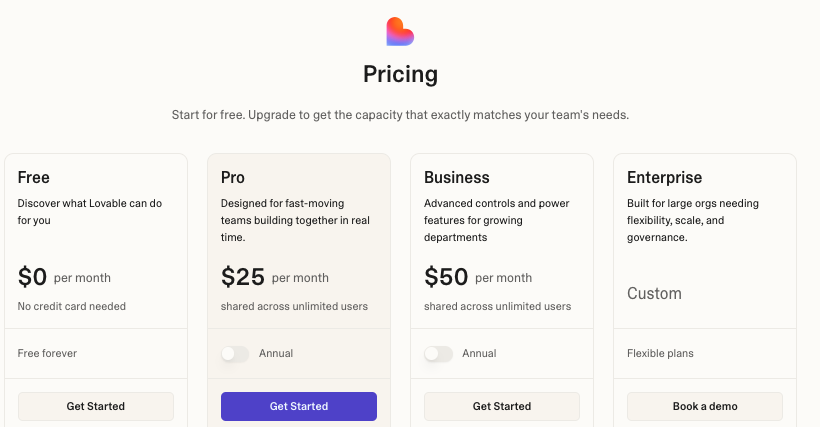
Current plans include:
- Free: Five daily build credits, capped at 30 per month
- Pro: $25 per month with 100 monthly credits
- Business: $50 per month with 100 monthly credits and additional team controls
- Enterprise: Custom pricing
Paid plans also include daily build and Cloud grants. Credits can be used for building, running the deployed application, and powering AI features inside it. Larger or busier applications may consume additional credits.
Lovable’s pricing works well for small collaborative teams because adding members doesn’t increase the subscription price.
The harder part is predicting usage. Frequent regenerations, AI features, and growing traffic can raise the real monthly cost.
Webflow Pricing
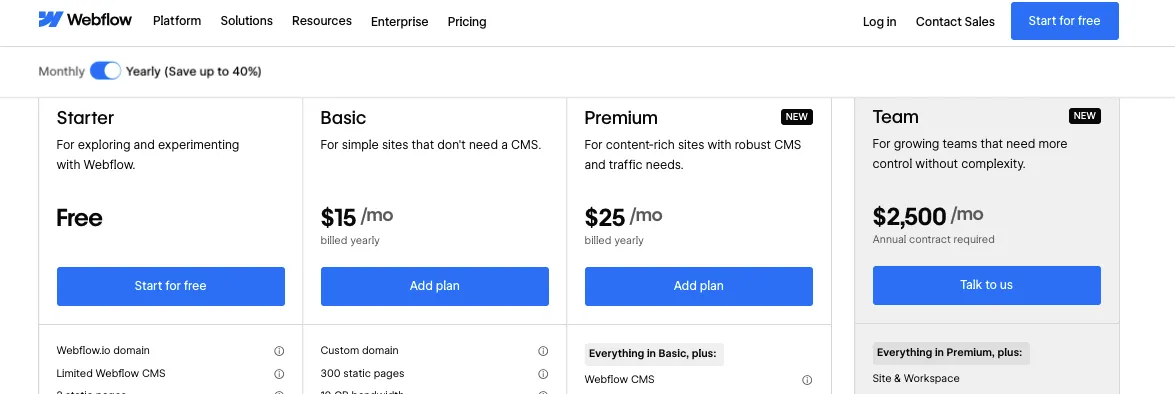
Webflow prices its standard website plans per site.
Its current Site plans are:
- Starter: Free
- Basic: $15 per month when billed yearly
- Premium: $25 per month when billed yearly
- Team platform plan: $2,500 per month with an annual contract
- Enterprise: Custom pricing
Basic supports simple websites without a full CMS. Premium adds Webflow CMS, code components, site search, file uploads, and higher Webflow Cloud limits.
Webflow is affordable for one marketing website.
Costs increase when you need several sites, paid Workspace seats, localization, ecommerce, optimisation tools, or higher bandwidth.
Vitara.ai Pricing
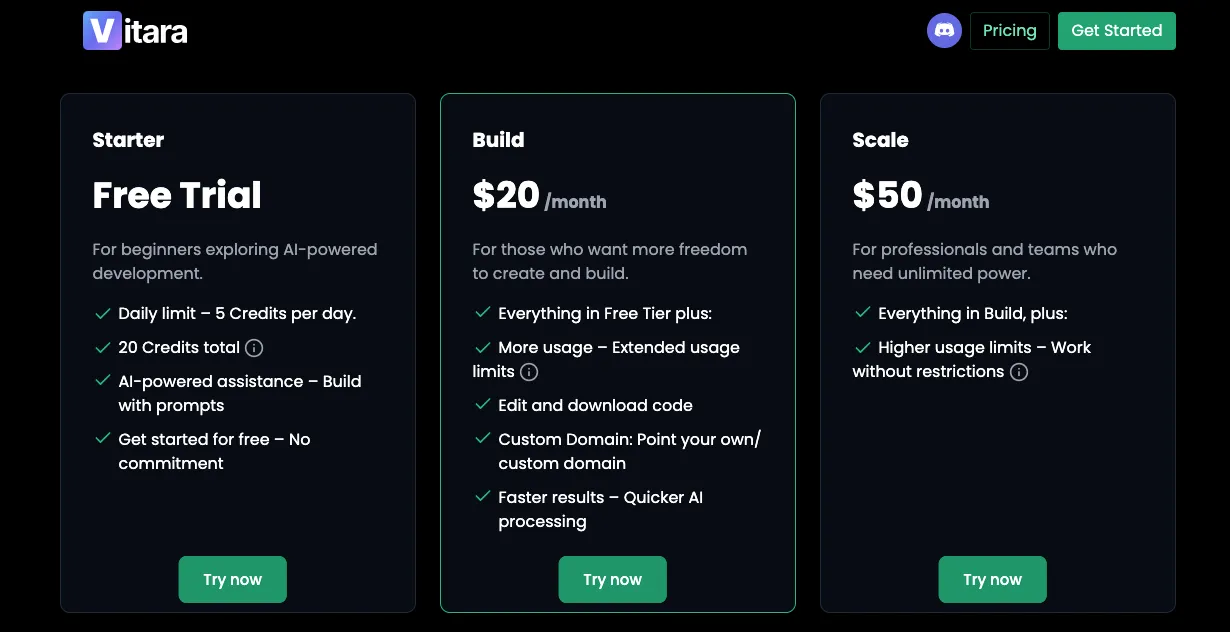
Vitara.ai keeps its public pricing relatively simple:
- Starter: Free, with five daily credits and 20 one-time credits
- Build: $20 per month with 100 monthly credits
- Scale: $50 per month with 250 monthly credits
- Custom: Tailored pricing for higher requirements
The Build plan includes code editing, code download, faster AI processing, and custom-domain support.
That gives Vitara.ai a lower paid entry point than Lovable for users who specifically need an AI app builder with downloadable code.
Heavy users may still need the Scale plan, but the fixed monthly credit allowance makes the starting cost easier to understand.
Winner: Vitara.ai for app-building value
Vitara.ai offers the strongest entry-level value for full-stack projects that need code access and a custom domain.
Webflow remains the more cost-effective choice for a straightforward marketing website. Lovable costs slightly more than Vitara.ai at the starting paid level, but it currently offers a more developed workspace, testing, security, and managed-cloud ecosystem.
Webflow is great for marketing websites. Lovable is strong for prompt-built web apps. Vitara.ai gives you AI-powered web and mobile app development with editable code, GitHub integration, and more control as your product grows.
Explore Vitara.ai →
Final Verdict: Lovable vs Webflow — Which Should You Choose?
Both Lovable and Webflow are capable platforms, but they solve different problems.
Choose Lovable if you want to turn prompts into a functional web app with authentication, a database, and backend logic.
Choose Webflow if you need a polished marketing website with precise design control and a visual CMS.
The biggest limitation with both?
Lovable can feel less predictable during detailed design changes, while Webflow requires extra development work for full-stack app features.
That’s where Vitara.ai becomes a strong alternative.
It combines AI-powered web and mobile app creation with editable React code, a Supabase backend, GitHub integration, and deployment tools. This gives founders a faster building workflow while giving developers more control as the product grows.
Still comparing platforms? These guides can help:
Frequently Asked Questions About Lovable vs Webflow
Is Lovable better than Webflow?
Lovable is better for building functional web apps with authentication, databases, and custom logic. Webflow is better for marketing websites that need stronger visual control and structured content management.
Can Lovable replace Webflow?
Lovable can replace Webflow for SaaS MVPs, dashboards, customer portals, internal tools, and simple business websites.
It may not be the best replacement for a large blog or content-heavy marketing site because Webflow offers a more mature visual CMS and editorial workflow.
Which is easier for beginners: Lovable or Webflow?
Lovable usually gets beginners to a working first version faster because they can describe what they want in plain language.
- Lovable: Easier for rapid app generation
- Webflow: Easier to control once you understand classes, layouts, and breakpoints
- Best choice: Depends on whether you prefer prompting or visual editing
Webflow now has an AI site builder, but most detailed changes still happen inside its visual Designer.
Which is better for building a SaaS MVP?
Lovable is usually the stronger choice. Lovable Cloud includes a database, authentication, storage, server functions, and hosting, so you can build a working product without connecting several separate services.
Webflow Cloud can host full-stack Next.js and Astro applications, but that workflow requires more development knowledge and GitHub-based setup.
Which is better for a marketing website or blog?
Webflow is the better option when content and brand presentation drive the project.
It gives marketing teams:
- A visual CMS for reusable content types
- Detailed responsive design controls
- SEO settings for static and CMS pages
- Safer editing permissions for writers and clients
Lovable can build marketing pages, but ongoing content management may require a custom admin panel or external CMS.
Is Lovable good for SEO?
Yes. New Lovable projects use server-side rendering, and its SEO review can check metadata, canonical tags, sitemaps, indexing, semantic HTML, accessibility, and performance.
Webflow still has an advantage for content-led SEO because its CMS makes it easier to publish and update large numbers of structured pages.
Can Webflow build full-stack web apps?
Yes. Developers can deploy Next.js and Astro applications through Webflow Cloud and run them alongside a Webflow website.
Webflow also introduced prompt-generated App Gen, but further development has been paused and the feature is moving towards deprecation.
For a new app, Webflow Cloud is better viewed as a developer platform than a direct replacement for Lovable’s prompt-to-backend workflow.
Which platform offers better code ownership?
Lovable provides better portability for complete web applications.
- Lovable projects can sync with GitHub or GitLab.
- You can edit the source code locally or inside Lovable.
- The code can be deployed outside Lovable.
- Webflow can export HTML, CSS, JavaScript, and assets on eligible Workspace plans.
Webflow’s export does not preserve working CMS, ecommerce, search, forms, code components, or user-account functionality.
Is Lovable or Webflow better for ecommerce?
Webflow is usually better for a traditional online store. It includes product and category Collections, inventory tools, carts, checkout design, order management, shipping, and tax settings.
Lovable makes more sense for custom commerce experiences, such as:
- A multi-vendor marketplace
- A subscription-based SaaS product
- A private ordering portal
- A checkout flow connected to custom user data
Those projects depend more on databases and application logic than on standard storefront management.
Can Lovable and Webflow be used together?
Yes. A common setup is to use Webflow for the public website and Lovable for the logged-in product.
For example, the marketing site could run on www.example.com, while the customer dashboard runs on app.example.com. This gives marketers Webflow’s CMS and gives the product team Lovable’s full-stack app workflow.
The trade-off is maintaining two platforms, two design systems, and potentially two hosting bills.
Is Lovable suitable for production applications?
Lovable can support production applications through managed hosting, separate test and live environments, databases, authentication, storage, and security checks.
That does not mean every generated app is ready to launch immediately.
Before publishing, review database permissions, authentication flows, error handling, mobile behaviour, backups, and security policies. Lovable specifically recommends checking row-level security after changes to authentication or database structure.
Can Lovable build mobile apps?
Lovable builds web applications, including responsive apps that work on mobile browsers. It does not currently generate native iOS or Android applications.
Lovable itself has an iOS and Android app for building and reviewing projects, but that should not be confused with native mobile-app development.
Which is cheaper: Lovable or Webflow?
Webflow is generally easier to budget for when you need one standard website because its costs are mainly tied to the site and selected plan.
Lovable uses a shared credit system for building, hosting, and AI-powered app features. It does not charge per workspace member, but costs can vary as the project grows or consumes more cloud resources.
The cheaper platform depends on the project:
- Simple marketing website: Usually Webflow
- Functional MVP with a backend: Often Lovable
- High-traffic application: Compare hosting and usage costs before committing