Lovable vs WeWeb: Which No-Code App Builder Is Better?
Here’s a pattern I keep seeing with founders and product teams.
They pick an AI app builder, create a quick prototype, launch a few core features, and then a few months later, they start comparing other platforms.
The reasons are usually the same.
Limited design control, workflows that become harder to manage, or AI credits disappearing faster than expected.
And if you’re facing the same problem, you’ve probably landed here searching for “Lovable vs WeWeb” two popular platforms that promise to help you build web apps without starting from scratch.
But once you compare them beyond their landing pages, the differences become much clearer. Lovable focuses heavily on prompt-based development, while WeWeb gives you more visual control over how your app looks, works, and connects to your backend.
This comparison guide breaks down where Lovable and WeWeb stand, feature by feature.
I’ll also show you how Vitara approaches the same challenges these platforms try to solve.
Design limitations, complex workflows, and unpredictable development costs.
By the end, you’ll know which platform fits your project and why Vitara may be the option that helps you build without switching tools later.
TL;DR — Should You Choose Lovable or WeWeb?
Vitara: Best if you want to turn a prompt into a full-stack web or mobile app with editable React code and a Supabase backend.
Lovable: Best if you want to create and publish a web app quickly through an AI-first, conversational workflow.
WeWeb: Best if you want AI-assisted building with detailed visual control over your app’s interface, data, and workflows.
| Feature | Lovable ↗ | WeWeb ↗ | Vitara ↗ |
|---|---|---|---|
| Building Style | Prompt-first AI builder | AI + visual no-code editor | Prompt-first vibe coding |
| App Support | Web apps | Web apps | Web and mobile apps |
| Backend | Lovable Cloud, Supabase, APIs | Native backend or external services | Supabase |
| Visual Editing | Yes | Yes, with granular control | Yes |
| Code Ownership | GitHub sync and code export | Vue.js export and self-hosting | Editable and downloadable React code |
| Starting Price | Free; Pro starts at $25/mo | Free to build; paid plans for advanced building and hosting | Free; Build starts at $20/mo |
| Best For | Fast MVPs and web apps | Complex SaaS apps and internal tools | Full-stack apps with editable code |

Build full-stack web and mobile apps with AI prompts, a React frontend, a Supabase backend, and editable source code.
Start Building with Vitara.ai →
Lovable vs WeWeb: Feature-by-Feature Comparison
Now, let’s look beyond the marketing pages.
I’ve compared Lovable and WeWeb across eight areas that matter when you’re choosing an AI app builder for an MVP, SaaS product, internal tool, or client project.
Let’s start with the part most people care about first: how quickly each platform can turn an idea into a working app.
1. AI App Generation and Build Speed
Build speed determines how quickly you can move from an idea in your head to an app that people can actually use.
Faster generation means less time setting up pages, writing boilerplate code, connecting a database, and fixing basic UI problems.
That’s why the first thing I compared was how Lovable and WeWeb handle the initial app-building process.
I looked at what each platform can generate from a prompt, how much manual work you need after the first build, and how easy it is to make changes without breaking something that already works.
Lovable — Fast, Prompt-First App Generation
Lovable gives you a simple starting point: describe the app you want, and the AI begins building it.
You can ask it to create something specific, such as a customer portal with user authentication, a searchable dashboard, subscription plans, and an admin panel. Lovable can generate the frontend, backend structure, database, authentication, and integrations from that description.
This prompt-first workflow makes Lovable one of the easier options for getting an initial version on the screen.
You don’t have to choose every layout block, create each page manually, or set up the basic project structure before you can see a result. Lovable handles much of that work for you.
It also gives you Plan mode for thinking through a feature before changing the app. When you need a smaller UI update, you can select an element in the preview and change its text, color, spacing, or layout through Visual Edits instead of rewriting the whole prompt.
The experience works well when your instructions are clear.
For example, asking Lovable to “create a project management dashboard” may give you a usable starting point. But asking for a dashboard with three user roles, task dependencies, recurring projects, approval workflows, and separate client workspaces requires a more detailed prompt and several rounds of refinement.
That’s where build speed can become less predictable.
The first version may appear quickly, but every additional prompt can change existing code. You need to review each update carefully, especially when the app contains connected pages, database rules, and role-based permissions.
WeWeb — AI Generation With a Visual Building System
WeWeb also lets you describe an app in natural language, but it places the generated result inside a more structured visual editor.
Its AI can help create responsive layouts, database structures, workflows, formulas, API connections, and custom components. Once the AI generates something, you can open the visual editor and adjust the result yourself.
This gives WeWeb a different building rhythm.
You can ask the AI to create a dashboard, then manually change its spacing, responsive behavior, component states, data bindings, and workflows without sending a new prompt for every adjustment.
That extra control helps once your app starts becoming more complex.
At the same time, WeWeb may feel slower during the first build. You need to understand how pages, elements, variables, collections, workflows, and data sources fit together. Even with AI handling part of the setup, the editor gives you more decisions to make.
Imagine you’re building a client portal with login, document uploads, approval statuses, and automated email notifications.
Lovable can generate much of that experience directly from a detailed prompt. WeWeb can also help build it, but you may spend more time reviewing the visual workflows and configuring how each component connects to the underlying data.
That takes longer at the beginning, but it can make later changes easier to inspect and control.
Winner: Lovable
Lovable wins for initial app generation and speed.
Its conversational workflow removes more setup work, making it easier to go from a written idea to a functional first version. WeWeb catches up when the project needs repeated visual changes or more complex workflows, but Lovable usually offers the faster starting point.
Why Vitara Outperforms Both for Full-Stack Build Speed
Vitara takes the prompt-first experience and combines it with a predefined development stack.
It generates the frontend with React and uses Supabase for the backend, including the database, user authentication, real-time updates, and automatically generated APIs. It also provides browser-based development and GitHub integration, so you can start building without configuring a local environment first.
That fixed stack removes several decisions that can slow down an AI-assisted build.
You don’t need to stop and choose a frontend framework, decide how to structure the backend, or work out how version control will fit into the project. Vitara gives you a clear React-and-Supabase path from the start.
Here’s where that matters.
Suppose you want to build a subscription-based client portal. You need a responsive dashboard, secure login, customer records, real-time status updates, file storage, and an admin panel.
Lovable can generate the app quickly, but you may need several prompt rounds to refine the code and confirm how each backend feature works.
WeWeb gives you more visual control, but you’ll spend extra time configuring components, data sources, and workflows inside its editor.
Vitara can generate the full-stack foundation while still giving you editable code, downloadable source files, and GitHub access. That means you can use AI for speed without giving up the option to inspect the React code or continue development outside the platform.
For founders, freelancers, and small development teams, that balance can save time after the first build too.
You get a quick starting point, a familiar technical stack, and a clearer route from prototype to a product you can keep developing.
2. Ease of Use and Learning Curve
Generating an app is only the first step. You still need to understand what the AI created, make changes, fix problems, and add new features as your product grows.
A platform may feel simple during the first prompt but become frustrating when you need to change a user role, connect new data, or fix a workflow without affecting the rest of the app.
So, the next thing I compared was how easy Lovable and WeWeb are to learn and use beyond the initial build.
Lovable — Easier to Start, Harder When Prompts Get Complex
Lovable has one of the simpler onboarding experiences.
You create a project, describe your idea in plain English, and let the platform generate the first version. You don’t need to understand components, database relationships, or frontend frameworks before you start.
For example, you can enter:
Create a client portal where customers can log in, upload documents, view project updates, and send messages to their account manager.
Lovable will create the pages and basic functionality without asking you to build each part manually.
That makes the platform approachable for founders, marketers, product managers, and other users who don’t have a development background.
Lovable also separates planning from implementation.
Plan mode lets you discuss a feature, inspect possible approaches, and review an implementation plan before the platform changes your code. Agent mode handles the actual building and attempts to verify the result.
For small design changes, you can select an element in the app preview and edit its text, color, spacing, or layout through Visual Edits. You don’t always need to write another full prompt just to change a button label or background color.
The learning curve starts to rise when your app becomes more complex.
You need to learn how to write clear prompts, provide enough context, and tell Lovable what it shouldn’t change. A vague request such as “improve the dashboard” gives the AI too much room to interpret your intentions.
A more useful prompt would explain which page to update, what result you expect, and which components must stay untouched.
Lovable’s own best-practice guide recommends using project knowledge, planning changes before implementation, and isolating features to avoid unintended edits. It also suggests switching to Plan mode when repeated fixes fail or when you’re debugging complicated logic.
That’s the trade-off.
Lovable removes much of the technical setup, but it replaces some of that work with prompt management. When a generated feature doesn’t behave as expected, non-technical users may struggle to understand whether the problem sits in the interface, database, permissions, or application code.
You can open and edit the generated code through Code mode, but doing that requires development knowledge.
WeWeb — More to Learn, but More Control Over Changes
WeWeb also lets you begin with a natural-language description, but the platform places the generated app inside a detailed visual development environment.
Instead of managing most changes through chat, you can open the editor and work directly with pages, elements, styles, variables, data collections, and workflows.
This gives you a clearer view of how the application works.
Suppose you want a button to appear only when a logged-in user has an administrator role.
In WeWeb, you can select the button, inspect its display conditions, connect the condition to user data, and control the logic visually. You don’t have to ask the AI to find and rewrite the relevant code every time you change the rule.
That control comes with a steeper learning curve.
You need to understand how the page hierarchy works, how data moves between the frontend and backend, and how workflows trigger actions. You’ll also come across concepts such as variables, formulas, API requests, conditions, classes, and component states.
WeWeb doesn’t require you to become a developer, but basic web development knowledge helps.
Its documentation explains that understanding HTML, CSS, and JavaScript makes it easier to organize components, style interfaces, build complex workflows, troubleshoot problems, and extend the app with custom code.
The styling system shows this difference clearly.
WeWeb lets you create reusable classes, combine multiple classes, and control which styles override others. That works much like CSS in traditional web development. It gives you detailed control, but a complete beginner may need time to understand how those classes affect elements across the app.
WeWeb offers learning roadmaps, tutorials, courses, templates, documentation, community support, and coaching resources for different skill levels. Still, you should expect to spend more time learning the editor than you would with Lovable’s prompt-first workflow.
Once you understand the system, changes often feel more predictable.
You can see the workflow, inspect the data source, select the affected element, and change the relevant setting. You don’t need to rely on the AI to interpret every adjustment.
Winner: Lovable
Lovable wins for overall beginner-friendliness.
Its chat-based workflow lets you start building without learning a visual development system first. You can describe what you need, review the output, and make basic visual changes with little technical knowledge.
WeWeb takes longer to learn because it exposes more of the app’s structure.
That extra complexity isn’t always a drawback. For designers, no-code professionals, and teams maintaining a complex SaaS app, WeWeb’s visual controls may become easier to manage over time.
But for someone building their first AI-generated app, Lovable offers the smoother starting point.
Also Read:
Still deciding? Check out the best alternatives:
Top Lovable Alternatives
Best Weweb Alternatives
Why Vitara Outperforms Both on Practical Ease of Use
Vitara follows the same plain-language approach that makes Lovable easy to start with, but it keeps the development setup focused around React and Supabase.
You describe the product you want to build, and Vitara generates the frontend and backend foundation inside a browser-based development environment. You don’t need to install development tools, configure a local project, or connect separate services before creating the first version.
That fixed setup reduces the number of technical choices you need to make.
With WeWeb, you may need to decide how to structure visual workflows, which backend to use, how to connect data collections, and how each page should respond to different states.
Lovable handles more of those choices through AI, but you still need to guide the platform carefully as the generated codebase grows.
Vitara gives you a more defined path.
React handles the interface, while Supabase provides the database, authentication, real-time updates, storage, and generated APIs. Vitara also supports prompt-based updates, editable code, source-code downloads, and GitHub integration.
Consider the client portal example again.
You could ask Vitara to create customer authentication, project dashboards, document uploads, and status updates from one prompt. Once the foundation exists, you can continue changing the design or functionality through prompts.
When you need more control, you can inspect and edit the underlying React code rather than rebuilding the project in a different tool.
This gives non-technical users a simple place to begin while leaving a familiar codebase for developers who join later.
You’re not forced to learn a large visual development system before building your first feature. You’re also not limited to treating the generated app as a black box.
For founders and small teams, that middle ground matters.
You can start with a description, build in the browser, connect your work to GitHub, and bring in a developer when the app needs deeper customization—all without changing the project’s core stack.
3. UI Design, Responsiveness, and Figma Workflow
The quality of your app’s interface determines whether users trust the product or leave after the first screen.
A fast AI-generated layout gives you something to show. Detailed design controls help you turn that first draft into an interface that matches your brand and works properly on desktop, tablet, and mobile.
Here’s how Lovable and WeWeb handle UI design, responsive layouts, and Figma-based workflows.
Lovable — Fast Design Generation Through Prompts
Lovable creates complete interfaces from natural-language instructions.
You can describe the visual direction, page structure, colors, typography, spacing, and components you want. The platform then generates the interface and shows it inside a live preview.
For example, you could ask Lovable to create:
A clean SaaS analytics dashboard with a collapsible sidebar, four metric cards, a revenue chart, a customer table, and a mobile navigation menu.
The clearer your prompt, the closer the first version usually comes to what you imagined.
Lovable recommends defining the design direction early and building the interface component by component rather than generating an entire application in one large prompt. You can specify styles such as rounded cards, muted colors, generous spacing, or a compact data-heavy layout to guide the result.
Once Lovable creates the page, its preview toolbar lets you select specific elements and request focused changes.
You can point at a button and ask Lovable to change its color, select several cards and adjust their spacing, edit text directly, or draw an annotation to show where an element should move. Direct text edits don’t require you to write a new prompt, although prompt-based visual changes can consume credits.
Lovable also lets you use screenshots from an existing Figma design as visual references.
You can upload a high-resolution screenshot and ask the AI to recreate the layout. This works well when you need a fast starting point, but it isn’t the same as importing the original Figma structure, components, variables, and design tokens.
The AI interprets the image and generates a new interface from it.
That means you may need several rounds of prompting to fix exact spacing, font sizes, responsive behavior, or component alignment. A dashboard that looks right on a laptop can still need extra work when cards start stacking on a phone or a navigation bar runs out of space.
Lovable gives you a quick route to a polished-looking first draft.
But when you need pixel-level adjustments across several breakpoints, the prompt-led workflow can feel less direct. You often need to explain the change, wait for the AI to update the code, and then check whether that update affected another part of the page.
WeWeb — Granular Visual Control and Native Figma Import
WeWeb gives you more direct control over how each part of the interface looks and behaves.
You can select an element inside the visual editor and adjust its layout, width, height, padding, margin, typography, borders, position, display rules, and responsive behavior.
You can also create reusable classes and components to keep the design consistent across multiple pages.
For example, you could create one card class with the correct border radius, shadow, padding, and background. Apply it to every dashboard card, and a later class update can change the shared styling without forcing you to edit each card separately.
This approach takes longer to learn, but it gives you a clearer way to handle detailed design work.
WeWeb supports responsive layouts inside its editor, so you can review how the page behaves at different screen sizes and adjust the styling for each breakpoint. Its visual system focuses on giving builders direct control over responsive pages and layouts instead of routing every change through an AI prompt.
WeWeb also offers a dedicated Figma-to-no-code plugin.
You can select a frame in Figma, export it through the WeWeb plugin, and paste the generated JSON into WeWeb’s Figma import wizard. The import process can detect and map colors, typography, spacing, images, Google Fonts, and other design tokens. You can even import design tokens without importing the full layout.
That makes WeWeb a better fit for teams that already have completed product designs in Figma.
Instead of asking AI to visually recreate a screenshot, you can bring the design structure and styling system into the editor. Repeated Figma components can also be mapped to real WeWeb components, helping you keep the app consistent as the number of pages grows.
The import still needs review.
WeWeb recommends checking container widths, spacing, alignment, fonts, and responsive breakpoints after bringing a design across. Some visual effects may require manual styling changes, especially when the original Figma file doesn’t use clean frames or Auto Layout.
So, you shouldn’t expect a perfect one-click conversion.
But compared with recreating a Figma screenshot through repeated prompts, WeWeb gives designers and no-code builders a more structured starting point.
Winner: WeWeb
WeWeb wins for UI design control, responsive editing, and Figma workflow.
Lovable can generate an attractive interface faster, especially when you provide a clear prompt and a strong visual reference.
WeWeb gives you more control after that first version.
Its visual editor, reusable styling system, responsive controls, and dedicated Figma import make it easier to refine detailed product interfaces without asking AI to rewrite the design each time.
Why Vitara Stands Out for React-Based UI Control
Vitara takes a different approach to frontend design.
Instead of placing your interface inside a traditional no-code editor, it generates the UI with React. You can describe the screen or design change you want through a prompt, then inspect and edit the underlying code when you need more control.
Suppose you’re building a customer dashboard that needs a desktop sidebar, a mobile bottom navigation bar, reusable data cards, and different layouts for account owners and team members.
You can ask Vitara to generate that interface and make it responsive.
If the generated result needs deeper changes, a developer can open the React components and adjust the layout, state, styles, or responsive rules directly. Vitara also lets users edit generated code inside its development environment or export it to another editor.
This gives you three practical ways to improve the interface:
- Describe a design change through a prompt.
- Edit the generated React code inside Vitara.
- Export the project and continue development in your preferred coding environment.
WeWeb remains the stronger option for designers who want a detailed visual editor and a direct Figma import workflow.
Lovable remains useful when you want to generate an attractive interface quickly without working with code.
Vitara fits the space between AI generation and traditional frontend development.
You can start with plain-language instructions, build a responsive React interface, and still give a developer full access to the components when the product needs more detailed design work. That makes Vitara a practical choice for teams that want AI-assisted UI generation without giving up control of the frontend code.
4. Backend, Database, Authentication, and Data Flexibility
Building the interface is only part of creating an app.
What matters next is whether you can store user data, control access, upload files, run server-side logic, and connect the app to other services without rebuilding the backend somewhere else.
Here’s how Lovable and WeWeb handle the technical work behind your app.
Lovable — Fast, Managed Full-Stack Setup
Lovable gives you two main ways to build a backend:
- Lovable Cloud
- Your own Supabase project
Lovable Cloud comes with a database, authentication, file storage, edge functions, scheduled jobs, secrets management, and AI features. It uses Supabase’s open-source foundation, but Lovable handles the infrastructure inside its own platform.
This makes backend setup straightforward.
Suppose you’re building a customer portal where users can create accounts, upload contracts, view project updates, and receive email notifications.
You can describe those requirements in the chat, and Lovable can generate the database tables, login flow, storage buckets, and server-side functions needed to support them.
You don’t have to write SQL, configure a server, or manually connect each form to the database.
Lovable also lets you connect a Supabase project that you own. In that setup, Lovable can design the database schema, run approved migrations, deploy edge functions, and connect the interface to your Supabase data from the chat.
That gives you access to features such as:
- PostgreSQL database tables and relationships
- Email, password, and social authentication
- File storage
- Real-time updates
- Server-side functions
- Secure API secrets
- External API connections
The managed approach works well when you want the AI to handle most backend decisions.
The trade-off appears when you need more control over the architecture.
Each Lovable project can connect to only one Supabase project at a time. Lovable also doesn’t provide a one-click migration between Lovable Cloud and a Supabase project you own, so choosing the wrong setup early can create extra work later.
Some features also depend on Lovable Cloud.
For example, certain in-editor backend views, managed infrastructure controls, signed-in browser testing, custom emails, and built-in payment features aren’t available in the same way when you bring your own Supabase backend.
For a founder launching an MVP, Lovable’s managed backend removes a lot of setup work.
For a team with an existing database, unusual infrastructure requirements, or several backend services, the choices can feel more limited.
WeWeb — More Backend Choice and Visual Control
WeWeb gives you a built-in backend, but it doesn’t force you to use it.
You can create database tables, views, REST APIs, authentication rules, user roles, and server-side workflows directly inside WeWeb. You can also connect external services such as Supabase, Xano, Airtable, or a custom REST API.
That flexibility becomes useful when your app relies on more than one data source.
Imagine you’re building an operations dashboard that pulls customer data from a CRM, order details from an internal API, user information from Supabase, and delivery updates from a logistics provider.
In WeWeb, you can connect those services and control how the frontend reads, filters, and updates the data.
You can also use WeWeb’s built-in Data & API tools to:
- Create tables and database views
- Build REST API endpoints
- Add conditions, loops, and middleware
- Manage users and roles
- Protect pages, APIs, and table views
- Run backend workflows
- Connect external business tools
WeWeb lets you handle filtering, sorting, pagination, and relationships on the backend rather than loading everything into the browser. This matters once your app contains large tables or complex data queries.
The downside is setup time.
WeWeb gives you more backend choices, which means you need to make more backend decisions.
You need to think about where the data should live, which operations belong on the server, how user roles should work, and how each API should handle errors.
Lovable often makes those decisions for you through AI.
WeWeb shows you the underlying structure and lets you control it visually.
For a basic member portal, that extra setup may feel unnecessary. For a multi-tenant SaaS platform with several user roles, external APIs, and custom data rules, the control becomes much more valuable.
Winner: WeWeb
WeWeb wins for backend and data flexibility.
Lovable offers the faster route to a working database, authentication system, and file storage setup. Its managed backend works well for MVPs and apps built around a conventional Supabase-style architecture.
WeWeb supports a wider range of backend setups and gives you more direct control over databases, APIs, user roles, and server-side workflows.
That makes it the stronger choice when your app needs to connect multiple services or follow an existing backend architecture.
Why Vitara Outperforms Both on Full-Stack Ownership
Vitara uses a defined full-stack setup instead of giving you a long list of backend choices.
The frontend runs on React, while Supabase handles the database, authentication, real-time subscriptions, and automatically generated APIs. Vitara can generate both frontend and backend code from a natural-language prompt inside its browser-based development environment.
Here’s what you get:
- React frontend code
- Supabase database
- User authentication
- Real-time data updates
- Automatically generated APIs
- Full-stack code generation
- Editable source code
- Code download and deployment access
- GitHub integration for version control
That fixed React-and-Supabase stack makes the backend easier to understand and hand over.
Consider a SaaS app where customers create workspaces, invite team members, upload files, and view live project updates.
Vitara can generate the React interface and connect it to Supabase for user accounts, workspace data, file storage, and real-time changes.
When the app needs custom backend logic, a developer can inspect and change the generated code instead of trying to translate a visual workflow into a traditional codebase.
Lovable can also create a Supabase-backed app quickly, but some of its easiest managed features sit inside Lovable Cloud.
WeWeb gives you more backend options, but those options can add setup and learning time.
Vitara keeps the technical foundation clear from the beginning.
Your team knows which frontend framework powers the interface, which service controls the database, and where the authentication and APIs come from.
You also maintain ownership of the generated code and data. Vitara says you can edit the code inside its environment, download it, connect it to GitHub, and deploy it elsewhere.
For teams that want the widest possible choice of backend services, WeWeb still has the advantage.
But if you want a predictable full-stack foundation that developers already understand, Vitara gives you a cleaner path from AI-generated MVP to an app your team can continue building.
Turn your idea into a working app with React, Supabase, authentication, database setup, and APIs generated from your prompts.
Build a Full-Stack App with Vitara.ai →
5. Workflows, Integrations, and Debugging
Once your app stores data, the next question is what it can actually do with it.
How easily you can automate tasks, connect tools, and fix broken logic affects how far your product can grow.
Here’s how each platform handles workflows and integrations.
Lovable — Fast, but Prompt-Dependent
Lovable lets you create workflows by describing the result in plain English.
You can ask it to save a form, upload a file, send an email, call an API, or show content based on a user’s role.
It supports app connectors, MCP-based chat connectors, and custom APIs. Private keys can be stored securely and used through an Edge Function instead of appearing in the frontend.
The trade-off appears when several conditions and API calls depend on one another.
Lovable can run tests, inspect logs, and use “Try to Fix,” but debugging still relies on clear prompts. If the AI changes the wrong part, you may need to revert and explain the logic again.
WeWeb — More Visual and Easier to Inspect
WeWeb displays workflows as a sequence of actions inside its visual editor.
You can add triggers, conditions, branches, API requests, data updates, and custom JavaScript without hiding the process behind a prompt.
For example, you can create a flow that checks a user’s plan, creates a ticket, uploads a file, and sends a confirmation email.
If one step fails, WeWeb’s debugger shows which workflow ran and how each action behaved.
Winner: WeWeb
WeWeb gives you better control over multi-step workflows.
Why Vitara Outperforms Both on Custom Logic
Vitara generates routing, form handling, backend logic, and API integrations as editable code.
You can start with a prompt, inspect the React and Supabase project, and change the exact function when the logic needs deeper customization. It also supports GitHub integration for version control.
You’re not limited to repeated prompts or locked into a visual workflow editor.
For developer-led teams, Vitara provides a direct path from AI-generated logic to code they can test, review, and extend.
6. Code Ownership, GitHub, and Developer Handoff
Once you’ve built a working app, you need to know what happens when a developer joins the project.
Some platforms give your team direct access to the source code. Others let you export the finished app but expect you to keep making changes inside their editor.
Here’s how each platform handles code ownership and developer handoff.
Lovable — Strong Two-Way GitHub Workflow
Lovable lets you connect a project to GitHub and automatically sync the generated source code to your repository.
Changes made in Lovable appear in GitHub, while updates pushed to the repository’s default branch sync back into Lovable. Your developers can use branches, pull requests, code reviews, and their usual deployment tools without abandoning the AI builder.
This makes the handoff process fairly natural.
A founder can create the first version through prompts, then invite a developer to review the code, fix a feature locally, or move the app to another hosting provider.
Lovable also provides Code mode, where you can inspect and manually edit individual project files without leaving the platform.
The main limitation is that Lovable works best when the project starts inside Lovable.
You currently can’t take an existing GitHub repository and import it as a new Lovable project. Moving the full app outside Lovable Cloud may also require manual work, including migrating data, changing authentication settings, and configuring a new hosting environment.
WeWeb — Full Export, but Limited Round-Trip Editing
WeWeb lets you export your project as a standalone Vue.js application.
The export includes your pages, components, workflows, styles, and assets. You can host it on AWS, Google Cloud, Azure, Cloudflare, Netlify, Vercel, or your own servers without a WeWeb runtime dependency.
You can also push the exported application to GitHub and connect it to your existing CI/CD pipeline.
That gives your technical team control over hosting, monitoring, security headers, and deployment infrastructure.
The trade-off is how future changes work.
Code edited outside WeWeb doesn’t sync back into the visual editor. You also can’t import an exported project back into WeWeb. The normal workflow is to make changes inside WeWeb, export a fresh build, and deploy it again.
That works well when your team wants to keep WeWeb as the main building environment.
It’s less convenient when developers want to take over the codebase and continue making regular code-level changes while keeping the visual editor in sync.
Winner: Lovable
Lovable offers the smoother developer handoff because of its two-way GitHub synchronization.
WeWeb gives you strong deployment freedom, but the exported application follows a one-way workflow. Once developers change the code outside WeWeb, those updates don’t return to the editor.
Why Vitara Outperforms Both on Code Ownership
Vitara treats the generated source code as a core part of the development workflow.
You can inspect and edit the code inside Vitara, download the project, connect it to GitHub, or open it in your preferred development environment. Vitara also states that you retain ownership of both your code and data.
The project uses a familiar React frontend and Supabase backend.
That gives developers a clear codebase to work with instead of a compiled visual-builder export.
A founder can use prompts to generate the first version, while a developer can later review components, change backend logic, create branches, and manage deployment through GitHub.
Unlike WeWeb, the handoff isn’t centered on repeatedly exporting fresh builds from a visual editor.
And unlike Lovable, Vitara positions editable and downloadable source code as part of the same browser-based full-stack workflow.
For teams that expect developers to take over after the MVP stage, that flexibility matters.
You can use AI to move quickly at the start without treating the generated application as a temporary prototype that must be rebuilt once the product becomes serious.
7. Deployment, Hosting, Scalability, and Security
The best AI app builder can still hold you back if publishing is difficult or the hosting setup can’t support your product as traffic grows.
Custom domains, self-hosting, security checks, and infrastructure control determine how confidently you can move from an MVP to a production app.
Here’s how each platform handles deployment.
Lovable — Fastest Managed Deployment
Lovable offers one-click publishing through Lovable Cloud.
You can publish your app to a Lovable URL, connect a custom domain on a paid plan, and let the platform manage SSL, global delivery, infrastructure, and environment updates.
Lovable also includes security scanning for exposed API keys, unsafe database access rules, vulnerable dependencies, and common application risks.
This setup works well when you want to launch without managing servers.
You can deploy outside Lovable Cloud through GitHub and external hosting providers, but moving the backend may require manual work with databases, authentication, secrets, and environment variables.
WeWeb — Greater Hosting Control
WeWeb lets you host your application on its managed infrastructure or export it for self-hosting.
The exported Vue.js app can run on services such as Cloudflare, AWS, Netlify, Vercel, or your own servers. This gives your team more control over infrastructure, monitoring, regional hosting, and security policies.
The deployment process takes more technical knowledge when you self-host.
Your team becomes responsible for configuring domains, environment variables, caching, security headers, monitoring, and future deployments.
For companies with strict infrastructure requirements, that responsibility can be worth it.
Winner: WeWeb
WeWeb offers more deployment freedom, especially for teams that want full control over where and how the app runs.
Why Vitara Outperforms Both on Deployment Flexibility
Vitara connects AI app generation to a developer-friendly deployment workflow.
You can build with a React frontend and Supabase backend, connect the project to GitHub, use continuous deployment, and publish the app on a custom domain. Vitara also provides editable and downloadable source code, so your deployment options aren’t tied to one hosting environment.
That gives you a clearer path as the product grows.
You can launch quickly, keep the project in version control, and move to a different hosting setup when traffic or security requirements change.
Lovable provides the easiest managed publishing experience, while WeWeb offers strong self-hosting freedom.
Vitara combines prompt-based development, code ownership, GitHub integration, and flexible deployment in the same full-stack workflow.
8. Lovable vs WeWeb Pricing
Pricing for AI app builders is rarely straightforward.
Build credits, AI tokens, hosting, and team access can add up differently depending on how often you update your app and where you deploy it.
Here’s what each platform actually costs when you break it down.
Lovable Pricing
Lovable pricing offers a free plan with 5 daily build credits, capped at 30 per month.
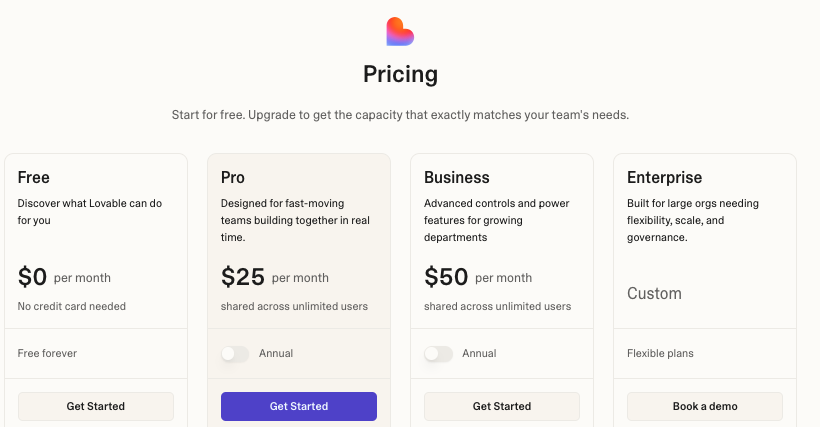
The Pro plan starts at $25/month, or $21/month with annual billing. It includes 100 monthly credits, daily build credits, private projects, custom domains, and branding removal.
Business starts at $50/month, or $42/month annually, and adds SSO, restricted projects, design templates, and more workspace controls. Enterprise pricing is custom.
One thing to watch: Lovable doesn’t charge the same number of credits for every request.
Plan Mode costs 1 credit per message, while build tasks vary by complexity. A button change may use less than one credit, while authentication or a complete landing page can use more.
Monthly credits expire after two months, while purchased top-up credits remain valid for 12 months.
WeWeb Pricing
WeWeb separates builder access from cloud hosting.
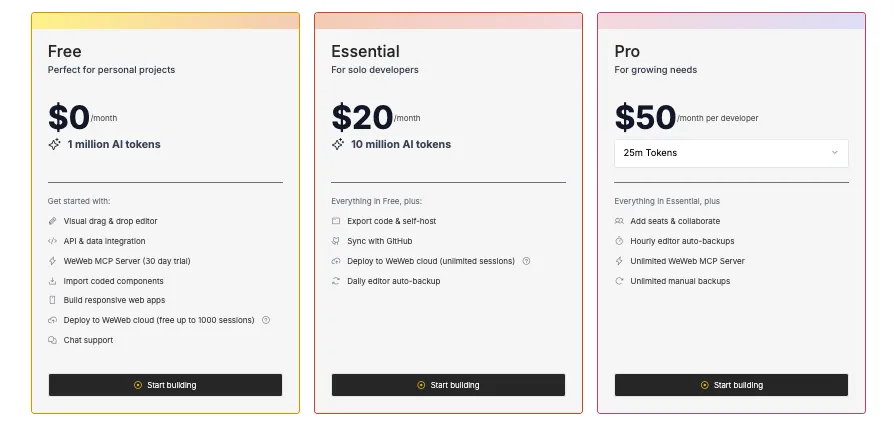
You can build and preview an app for free. Paid workspace plans currently start at around $20/month for Essential, while Pro costs around $50/month and adds higher AI limits and collaboration features.
If you publish through WeWeb Cloud, a separate hosting plan may apply based on bandwidth, storage, and usage.
You can avoid that charge by exporting and self-hosting the app, but you’ll still pay for your own hosting, backend, and external services.
WeWeb doesn’t charge per app user, which can make it cost-effective for SaaS products and customer portals with growing user bases.
Vitara Pricing
Vitara’s free Starter plan includes 5 daily credits and 20 one-time credits.
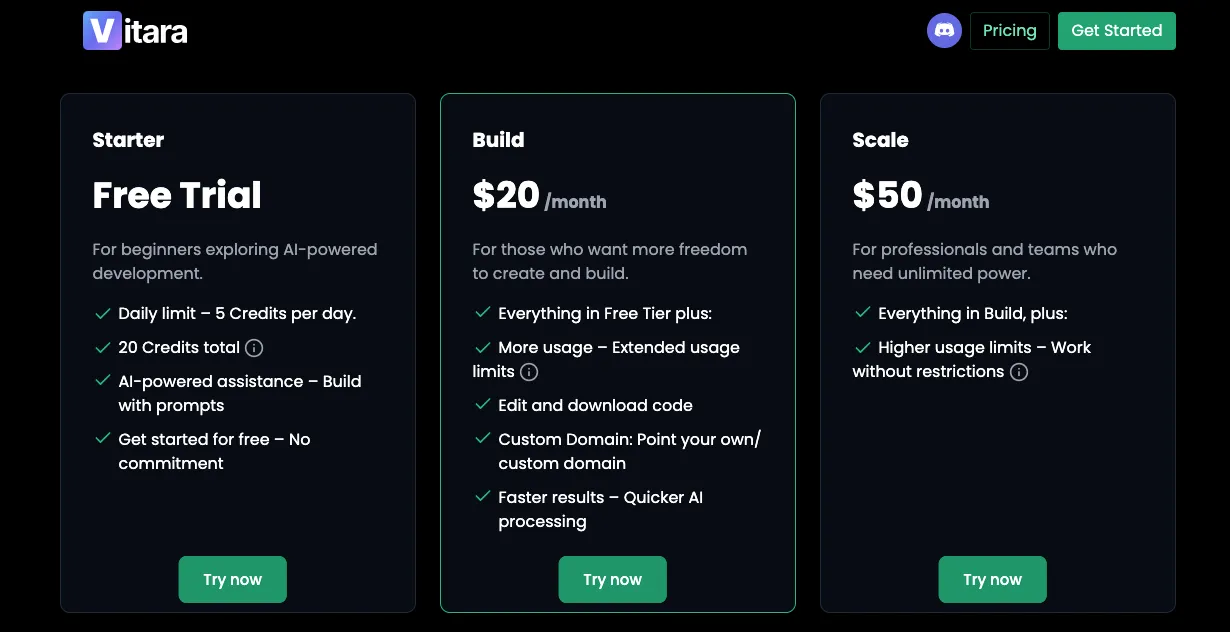
The Build plan costs $20/month with 100 monthly credits. It also unlocks code editing, code downloads, custom domains, and faster AI processing.
Scale costs $50/month and includes 250 monthly credits. Custom plans are available for teams that need more usage.
Here are three things that make Vitara’s pricing easier to plan:
- Paid plans show a fixed monthly credit allowance.
- Code download and custom-domain access start on the $20 Build plan.
- You can begin free and upgrade only when your usage grows.
Lovable offers strong workspace value, but complexity-based credit use can make active months harder to predict.
WeWeb starts at a similar builder price, but cloud hosting may sit on top.
Vitara keeps its main AI development features and credit limits inside a simpler monthly plan.
Try a full-stack AI app builder that combines prompt-based development, React, Supabase, GitHub integration, and downloadable code.
Try Vitara.ai for Free →
Final Verdict — Lovable or WeWeb?
Both Lovable and WeWeb are capable app builders, but they solve different problems.
Choose Lovable if you want to turn a prompt into a working web app quickly with minimal technical setup.
Choose WeWeb if you need detailed visual control, flexible backend connections, and workflows you can manage without relying on repeated prompts.
But the biggest limitation with both?
Lovable can become prompt-dependent as your app grows, while WeWeb requires more time to learn and configure.
That’s where Vitara comes in as a stronger alternative.
It combines prompt-based full-stack development, a React frontend, a Supabase backend, editable source code, GitHub integration, and flexible deployment in one platform. You get the speed of AI generation without giving up the code access your team may need as the product grows.
Still comparing platforms? These guides can help:
FAQs About Lovable vs WeWeb
Is WeWeb better than Lovable?
WeWeb is better when you need detailed visual control, visible workflows, flexible backend connections, and the ability to manage complex app logic without relying on prompts for every change.
Lovable is better when speed matters more. Its conversational workflow makes it easier to turn an idea into a working web app without first learning a visual development system.
The right choice depends on whether you value faster generation or greater hands-on control.
Which is easier for beginners, Lovable or WeWeb?
Most beginners will find Lovable easier.
You can start with a sentence like, “Build a customer portal with login, file uploads, and a dashboard,” and Lovable will create a first version for you.
WeWeb asks you to understand more from the beginning. You’ll work with components, variables, workflows, data collections, and responsive settings.
That feels slower at first, but it can become useful later because you can see exactly how the app works instead of asking AI to handle every change.
Which is better for building a production SaaS app?
Lovable works well for launching an MVP quickly, especially when your product follows a familiar structure such as a dashboard, customer portal, marketplace, or subscription app.
WeWeb becomes more attractive when the product needs complex workflows, several user roles, custom data sources, or detailed responsive design.
For a production SaaS product, don’t judge either platform only by the first build. Consider how easily your team can debug, maintain, deploy, and extend the app six months later.
Can Lovable and WeWeb apps be self-hosted?
Yes, but the process differs.
Lovable can sync your code with GitHub and lets you deploy the frontend and backend on external infrastructure. You become responsible for areas such as deployment automation, security, monitoring, and infrastructure maintenance.
WeWeb lets eligible users export a standalone Vue.js application and host it elsewhere. Changes made to the exported code don’t return to the WeWeb editor, so future visual updates usually require a new export.
Does Lovable let you export and edit the code?
Yes.
You own the code Lovable generates and can connect the project to GitHub. The integration supports two-way synchronization, which means changes made in Lovable can appear in GitHub, while code committed to the connected branch can sync back to Lovable.
Developers can also clone the repository, work in their preferred code editor, use branches, review changes, and deploy the application through an external hosting provider.
Does WeWeb have an AI app builder?
Yes. WeWeb isn’t only a traditional no-code editor anymore.
You can describe a page, workflow, database structure, or component, and its AI can help create it.
What makes WeWeb different is what happens next. The generated result appears inside the visual editor, where you can adjust the design, data, and logic yourself.
You don’t need to send another prompt every time you want to change the padding, update a condition, or connect a different data source.
Which platform has better backend support?
Lovable offers the faster backend setup for many projects. You can use Lovable Cloud or connect Supabase to add a database, authentication, storage, and server-side functions.
WeWeb gives you more architectural choice. It includes backend tools for databases, APIs, roles, and server-side workflows, while also letting you connect external services.
Lovable wins for speed. WeWeb wins when you need to combine several data sources or control more of the backend structure.
Can Lovable or WeWeb build mobile apps?
They’re mainly built for web applications.
You can create responsive apps that work well on phones and tablets, but that isn’t the same as generating a native iOS or Android app.
WeWeb can also create Progressive Web Apps, which users can install on their devices and open much like a regular mobile app.
For a customer portal, internal tool, or mobile-friendly dashboard, either platform may work. For a true native app that needs deep access to phone features, you’ll likely need another development approach.
Which is cheaper, Lovable or WeWeb?
Lovable may cost less when you’re building a small project alone, but its credit-based system means frequent AI changes can increase your usage.
WeWeb separates editor access from hosting. Your total cost depends on the number of builder seats, the features you need, and whether you use WeWeb hosting or export the application.
Compare the cost of building, hosting, debugging, and maintaining the app—not just the lowest advertised plan.
What’s New?