Lovable vs Appsmith: Which App Builder Should You Choose?
Choosing between Lovable and Appsmith usually starts with one question:
Do you want AI to generate a web app from a prompt, or do you need a low-code platform for building internal tools around existing data?
That difference sounds simple, but it affects everything from setup and customisation to hosting, integrations, and long-term maintenance.
Lovable is designed for fast MVPs and public-facing apps. Appsmith is better suited to dashboards, admin panels, and database-driven workflows.
After comparing both across real use cases, the gap between them becomes much clearer than their feature pages suggest.
This guide breaks down Lovable vs Appsmith feature by feature.
I’ll also explain where Vitara.ai fits for teams looking for a different balance of speed, flexibility, and control.
By the end, you’ll know which app builder makes the most sense for your project.

Turn your app idea into a working web or mobile product with AI prompts, React frontend, Supabase backend, and downloadable code.
Start Building with Vitara.ai →
Lovable vs. Appsmith: A Quick Side-by-Side Comparison
Before getting into the details, here’s a quick TL;DR of the main differences between Lovable, Appsmith, and Vitara.ai.
| Category | ⭐ 1st Runner-Up: Lovable | 🏆 Winner: Vitara.ai | ⭐ 2nd Runner-Up: Appsmith |
|---|---|---|---|
| Core purpose | AI app builder that turns plain-English prompts into working web applications | AI-powered platform for building full-stack web and mobile applications with greater code control | Open-source low-code platform for creating internal tools connected to databases and APIs |
| Starting price | From $25/month | From $20/month | Business plans from $15/user/month |
| Free option | ✔ Free plan | ✔ Free plan | ✔ Free Community Edition |
| AI app generation | ✔ Prompt-to-app generation | ✔ Full-stack AI development | ✘ Not primarily designed for AI-first full-app generation |
| Web app development | ✔ | ✔ | ✔ |
| Mobile app development | Limited | ✔ | Limited |
| Editable code | ✔ | ✔ | JavaScript customisation within Appsmith |
| Downloadable code | ✔ | ✔ | App configuration can be exported, but it is designed to run on Appsmith |
| GitHub integration | ✔ | ✔ | ✔ Git-based version control |
| Database support | ✔ Lovable Cloud, Supabase, and external services | ✔ Supabase and backend integrations | ✔ Native database and API connectors |
| Self-hosting | ✘ The Lovable builder cannot be self-hosted | Depends on the selected deployment setup | ✔ Open-source self-hosting |
| Best for | Founders launching web MVPs and public-facing products quickly | Teams building full-stack products with more flexibility and code ownership | Developers creating internal dashboards, admin panels, and CRUD tools |
| Main advantage | Fastest route from an idea to a polished web application | Balances AI development speed with deeper control over the final product | Strong control over internal data, workflows, hosting, and integrations |
| Main limitation | Complex applications may require manual development outside the AI workflow | Smaller ecosystem and less established than the two alternatives | Requires more manual setup and technical knowledge than prompt-based builders |
Lovable vs. Appsmith: Feature Comparison
To choose between Lovable and Appsmith, you need to look at how each performs during real app-building workflows—not just what appears on its feature page.
Both platforms help you build software faster, but they approach the job from opposite directions.
Here’s how they compare across the first three areas:
- AI app generation and building experience
- UI design and customisation
- Backend, databases, and business logic
1. Lovable vs. Appsmith: Which Offers the Better App-Building Experience?
The first difference appears before you write a single line of code.
Lovable asks you to describe the application. Appsmith asks you to assemble it.
Lovable
Lovable follows an AI-first workflow. You explain what you want to build, and Agent mode creates or modifies the application for you.
You can start with a prompt such as:
Build a customer portal with email login, subscription management, and a dashboard showing recent invoices.
Lovable then works across the frontend, backend, authentication, and configuration. You can review its progress, inspect file changes, and refine the result through follow-up prompts.
For more complicated features, Plan mode lets you review the proposed approach before Lovable changes the code. This helps when you’re planning database tables, user roles, APIs, or a multi-step workflow.
What you get:
- Natural-language app generation
- Plan mode for reviewing technical decisions
- Agent mode for implementing and checking changes
- Direct access to the generated source code
The experience feels fast when your requirements are clear. The trade-off is that unclear prompts can create extra revision rounds, especially once several features depend on each other.
Appsmith
Appsmith takes a more hands-on route.
You connect a database or API, drag widgets onto the canvas, and bind those widgets to queries. JavaScript handles calculations, conditions, data transformations, and other custom behaviour.
A typical Appsmith workflow looks like this:
- Connect PostgreSQL, MongoDB, REST, or another datasource
- Add a table, form, chart, or input widget
- Write queries and connect them to button clicks or page events
This gives developers tighter control over each step, but you won’t get the same prompt-to-working-app experience Lovable provides.
Winner: Lovable
Lovable wins for initial building speed.
It can turn a product idea into a working web application without requiring you to manually arrange every component or write each query first.
Appsmith makes more sense when you already know which data sources, queries, and interface elements the tool needs. Lovable works better when you’re starting with a product description.
Why Vitara.ai Stands Out
Vitara.ai follows a prompt-based workflow similar to Lovable, but it positions the experience around full-stack web and mobile product development.
Its DevStack includes:
- React frontend development
- Supabase backend support
- Browser-based building
- GitHub integration and downloadable code
That gives Vitara.ai an advantage for teams that want AI generation but don’t want to limit the project to browser-based web applications. Lovable officially focuses on web apps, while Vitara.ai also promotes mobile app development.
Vitara.ai helps you build full-stack web and mobile apps from prompts while keeping access to editable and downloadable source code.
Try Vitara.ai for Free →
2. Lovable vs. Appsmith: Which Offers Better UI Design and Customisation?
A working app still needs to look and feel right.
This is where the difference between generated interfaces and widget-based layouts becomes more noticeable.
Lovable
Lovable can generate complete customer-facing pages from a written design brief, uploaded image, sketch, or screenshot.
You can ask it to create a particular visual direction or specify details such as:
- Typography and colour palette
- Card layouts and spacing
- Mobile-responsive behaviour
Lovable may also show three design directions before beginning the full build. You can compare the options, refine one, and then use it as the visual foundation for the application.
Once the page is generated, Visual Edits lets you select elements in the preview and change text, colours, images, margins, borders, and other styling details without spending another prompt on every small adjustment.
This works especially well for landing pages, SaaS dashboards, portfolios, and customer portals where presentation matters.
Appsmith
Appsmith gives you a library of pre-built widgets that you position on a visual canvas.
You can build interfaces using elements such as tables, forms, charts, buttons, date pickers, and containers. The layout is predictable and practical, particularly for applications centred on records and business data.
Appsmith is a good fit for:
- Admin panels
- Inventory interfaces
- Approval dashboards
- Customer-support consoles
The limitation is visual freedom.
You can style widgets and extend the interface with custom code, but creating a highly distinctive public-facing product usually takes more work than it does in an AI frontend generator.
Appsmith’s interface system prioritises function and data visibility. That’s helpful for internal tools, though it can feel restrictive when you want unusual layouts, branded interactions, or detailed animation.
Still comparing platforms? These guides can help:
Winner: Lovable
Lovable wins for visual variety and public-facing design. Appsmith wins only when your definition of a good interface is a clear, dependable collection of tables, filters, charts, and forms.
Why Vitara.ai Stands Out
Vitara.ai generates responsive interfaces using React and gives users access to the resulting code. That matters when the AI gets the layout mostly right but a developer needs to adjust a component, interaction, or responsive state manually.
It sits between Lovable’s prompt-led design experience and Appsmith’s developer-controlled interface building. You can move quickly at the beginning without giving up the ability to work directly inside the frontend code later.
3. Lovable vs. Appsmith: Which Handles Backend and Business Logic Better?
“Full-stack” can mean very different things across app builders.
One platform may generate a backend for you. Another may connect an interface to the backend your company already uses.
Lovable
Lovable can build backend features through Lovable Cloud or its native Supabase integration. It can also connect the application to third-party APIs.
This allows you to add:
- User authentication
- Database tables
- File storage
- API connections
- Server-side or edge functions
For a new SaaS MVP, this setup is convenient. You can ask Lovable to create registration, store user records, protect private pages, and display data without configuring every part manually.
Problems can appear when the data model becomes more complicated. A change to one table may affect authentication, permissions, queries, and existing pages. Lovable can help repair those connections, but the developer still needs to review what changed.
Lovable’s own guidance also warns that reverting application code does not automatically reverse Supabase schema changes. Database-linked features should be tested carefully before publishing.
Appsmith
Appsmith usually sits on top of an existing backend rather than trying to replace it.
You connect the platform to databases or APIs, create queries, and use JavaScript to control how the interface reads, changes, and displays data.
This model works well when a company already has:
- Operational databases
- Internal REST APIs
- CRM or support data
- Established authentication and business rules
For example, an operations team could connect Appsmith to PostgreSQL, display customer records in a table, and add buttons that approve, reject, or update each record.
The setup requires more technical work, but it gives developers clear control over which query runs and what happens afterward.
Winner: Appsmith
Appsmith wins when the application needs to connect with existing business systems, databases, and developer-managed logic.
Lovable is the better option when you’re building a new product and want the platform to create much of the initial backend for you.
So the choice depends on where your project begins:
Starting with an idea? Choose Lovable.
Starting with an existing backend? Choose Appsmith.
Why Vitara.ai Stands Out
Vitara.ai combines AI-generated frontend and backend development around React and Supabase.
You can use natural-language prompts to create:
- Database-backed user flows
- Authentication and APIs
- Full-stack web or mobile features
The generated code remains editable and downloadable, which gives developers a clearer path when the project grows beyond what prompt-based revisions can comfortably handle.
Create database-backed user flows, authentication, APIs, and full-stack app features with AI-powered React and Supabase development.
Build Full-Stack with Vitara.ai →
4. Lovable vs. Appsmith: Which Offers Better Integrations?
Integrations decide whether an app builder fits your existing workflow or creates more setup work.
Lovable and Appsmith both connect to outside services, but they handle those connections differently.
Lovable
Lovable lets you add integrations through prompts instead of configuring every request manually.
It supports app connectors, MCP-based chat connectors, and custom APIs. You can connect services such as:
- Supabase for authentication and data
- Stripe or Paddle for payments
- Resend for transactional emails
Lovable can generate the interface, server-side function, and connection logic after you explain what the feature should do. This is useful when you want to add payments or email notifications without building the complete integration from scratch.
The downside is visibility. When the AI creates an integration, you still need to inspect the code, protect API keys, and test what happens when the external service fails.
Appsmith
Appsmith is built around connecting interfaces to existing systems.
You can work with:
- PostgreSQL, MySQL, MongoDB, and Snowflake
- REST and GraphQL APIs
- Salesforce, HubSpot, Zendesk, and Slack
- OpenAI, Anthropic, and Google AI
- Services without native connectors through APIs or cURL
You configure each query, choose its parameters, and bind the response to tables, forms, charts, or other widgets. Appsmith also supports write actions such as POST, PUT, PATCH, and DELETE.
This takes more setup than asking Lovable to add an integration. Still, it gives developers a clearer view of where data comes from and what each action changes.
Winner: Appsmith
Appsmith wins for integration depth.
It is a better fit when your app must combine several databases, APIs, SaaS products, or internal systems in one interface.
Lovable is easier when you want AI to create a common product integration quickly. Appsmith gives you more direct control over complex data connections.
Why Vitara.ai Stands Out
Vitara.ai centres its development stack around React, Supabase, and GitHub.
That combination covers the main requirements of many new products:
- Supabase authentication, database, and APIs
- GitHub-based version control and deployment
It does not present the same broad connector catalogue as Appsmith. Its advantage is a simpler full-stack workflow for teams already comfortable using Supabase as their backend.
5. Lovable vs. Appsmith: Which Offers Better Code Ownership and Hosting?
Code ownership is easy to claim but harder to define.
The real question is whether you can move the application, edit it outside the builder, and keep running it without depending on the original platform.
Lovable
Lovable lets you sync your application code with GitHub or GitLab.
Once connected, changes can move between Lovable and the repository. Developers can clone the project, work in a local editor, review pull requests, and use an external deployment service.
You can host a Lovable-generated application on platforms such as Vercel, Netlify, Cloudflare, AWS, Azure, or your own infrastructure. The frontend and backend can also be moved separately.
There is one important distinction:
You can self-host the application created with Lovable, but you cannot self-host Lovable’s editor or AI agent.
Another limitation is that Lovable cannot currently begin a project by importing an existing GitHub repository. The workflow starts inside Lovable and then syncs outward.
Appsmith
Appsmith approaches ownership at the platform level.
Its Community Edition is open source under the Apache 2.0 licence, and you can run Appsmith on your own infrastructure. Teams can also connect applications to Git for branching, pull requests, version history, and deployment workflows.
You can choose between:
- Appsmith Cloud
- Self-hosted deployment
- Docker or Kubernetes infrastructure
- Air-gapped deployment on applicable enterprise setups
However, an Appsmith application is not exported as a normal standalone React product. Its pages, widgets, queries, and logic are designed to run within the Appsmith platform.
Winner: It’s a Tie
Choose Lovable when you want ownership of a conventional application codebase that developers can continue editing elsewhere.
Choose Appsmith when you want control over the builder, hosting environment, and internal-tool runtime.
Both reduce lock-in, but they solve different ownership problems.
Why Vitara.ai Stands Out
Vitara.ai says users own the generated code and can download, modify, or deploy it outside the platform. It also provides GitHub integration for version control and collaboration.
This creates a practical handoff path: begin with prompt-based generation, then move the project into GitHub or a local development environment when deeper changes are needed.
6. Lovable vs. Appsmith: Which Offers Better Security and Team Collaboration?
Security is not just a login checkbox.
You need to consider application vulnerabilities, data permissions, workspace access, infrastructure control, and how easily your team can review changes.
Lovable
Lovable includes automated security tools that check several common risk areas:
- Row-level security policies
- Database configuration
- Application code vulnerabilities
- Vulnerable npm dependencies
These scans can run while you build and before publishing. Lovable also detects exposed API keys and guides you towards server-side functions and secret storage. The platform clearly states that these checks do not replace a professional security review for sensitive applications.
For teams, Lovable provides shared workspaces, project-level access, separate controls for published websites, and Git-based collaboration. Business and Enterprise plans add features such as workspace SSO and a central security dashboard, while Enterprise includes SCIM and audit logs.
Appsmith
Appsmith gives organisations more control over where the platform and its data run.
Self-hosting allows teams to place Appsmith inside their own infrastructure and connect it to private databases or internal APIs without exposing those systems publicly.
Its security and governance options include:
- Standard or custom access roles
- Audit logs on the Business plan
- SAML or OIDC SSO on Enterprise
- SCIM, private embedding, and air-gapped options on Enterprise
Appsmith’s Free plan includes three standard roles, while Business adds custom permissions and audit logs. Enterprise is aimed at teams that need central identity management, restricted infrastructure, and stronger deployment controls.
Appsmith does not automatically review every query or JavaScript block for you. Developers remain responsible for protecting credentials, limiting datasource permissions, and validating user input.
Winner: Appsmith
Appsmith wins for infrastructure control and enterprise deployment.
Its self-hosting, role-based access, audit logging, SSO, and air-gapped options make it better suited to internal applications that handle sensitive company data.
Lovable has the stronger AI-assisted security workflow. Its scanners can help smaller teams catch common code, database, and dependency problems before release.
Why Vitara.ai Stands Out
Vitara.ai states that code and data are encrypted at rest and in transit, while users retain ownership of both.
Its public security documentation is less detailed than the material available from Lovable and Appsmith. Vitara.ai also warns that generated code is not guaranteed to be secure or production-ready without review. Teams building sensitive applications should include manual code testing and an independent security check before launch.
7. Lovable vs. Appsmith: Which Offers Better Testing and Debugging?
Building quickly is useful, but only when the finished app works as expected.
Lovable focuses on AI-assisted testing. Appsmith gives developers tools for tracing queries, JavaScript, and widget errors manually.
Lovable
Lovable can test an application inside a real browser environment.
Its agent can:
- Click buttons and navigate between pages
- Complete forms and test authenticated flows
- Inspect console logs and network requests
- Run frontend and edge-function tests
This makes it easier to verify a login flow, reproduce a checkout error, or check whether a page works on different screen sizes.
The main advantage is convenience. You can describe what needs testing instead of writing every test manually.
You should still review important workflows yourself. AI verification can catch common failures, but it should not replace a proper quality-assurance process for payments, permissions, or sensitive data.
Appsmith
Appsmith’s Debugger is designed for developers who want to see exactly where an error started.
It provides separate views for errors, system logs, console output, and entity relationships. Clicking an error can take you directly to the affected query, widget, or JavaScript binding.
This works well when a database query fails or a widget receives the wrong data type. Because the queries and bindings are visible, developers can follow the data flow without asking an AI agent to diagnose it first.
Winner: Lovable
Lovable wins for faster, AI-assisted workflow testing.
Appsmith offers better manual error tracing, but Lovable can actively interact with the application and verify complete user journeys.
Why Vitara.ai Stands Out
Vitara.ai provides editable and downloadable application code, so developers can move the project into their preferred testing environment.
However, Vitara.ai’s public documentation does not currently explain a built-in testing system in the same detail as Lovable. Teams should expect to handle deeper automated testing through their own development workflow.
8. Lovable vs. Appsmith: Which Is Better for Scalability and Maintenance?
Scalability is not only about handling more users.
You also need to consider how safely your team can change the application six months after launch.
Lovable
Lovable Cloud provides managed databases, authentication, storage, server functions, logs, and usage monitoring. Lovable states that the infrastructure can scale from early prototypes to applications serving much larger audiences.
The generated code can also be moved to an external hosting provider when you need more infrastructure control.
Maintenance becomes harder when one prompt changes several connected features. Adding a new role, editing the database structure, or replacing authentication may affect multiple pages.
Lovable now supports browser, frontend, and backend verification, but Git reviews and manual testing are still useful before publishing major changes.
Appsmith
Appsmith scales differently because it normally sits on top of your existing databases and services.
Application performance depends on three areas:
- The Appsmith platform
- The amount of logic running in the browser
- The speed and design of connected datasources
Appsmith recommends optimising queries, limiting unnecessary data, and keeping self-hosted installations updated. Larger deployments can use Kubernetes, high availability, or managed Enterprise hosting with auto-scaling.
Its visible widgets, queries, and JavaScript make routine internal-tool maintenance easier for developers. The trade-off is that self-hosting adds infrastructure, upgrade, and monitoring work.
Winner: It’s a Tie
Choose Lovable for a public-facing application that needs a standard codebase and flexible hosting.
Choose Appsmith for an internal platform where developers want predictable queries, controlled infrastructure, and clear connections to existing systems.
Why Vitara.ai Stands Out
Vitara.ai generates React applications with a Supabase backend and lets users edit, download, and manage the code through GitHub. The company positions this structure as easier to extend when a project grows.
That portability is useful, although Vitara.ai publishes less detailed information about monitoring and large-scale infrastructure than Lovable or Appsmith.
9. Lovable vs. Appsmith: Which Offers More Cost-Effective Pricing?
The cheapest plan is not always the cheapest way to finish an application.
Lovable charges around shared credits. Appsmith charges according to the number of users accessing the platform.
Lovable
Lovable currently offers:
- Free: $0 with five daily build credits, capped at 30 per month
- Pro: $25/month, or $21/month billed annually, with 100 monthly credits
- Business: From $50/month, or $42/month billed annually
- Enterprise: Custom volume-based pricing
Workspaces support unlimited members. Everyone uses the same credit balance, and sending more complex prompts may consume more credits than a small design change. Credits can also cover building, hosting, and AI functionality inside deployed applications.
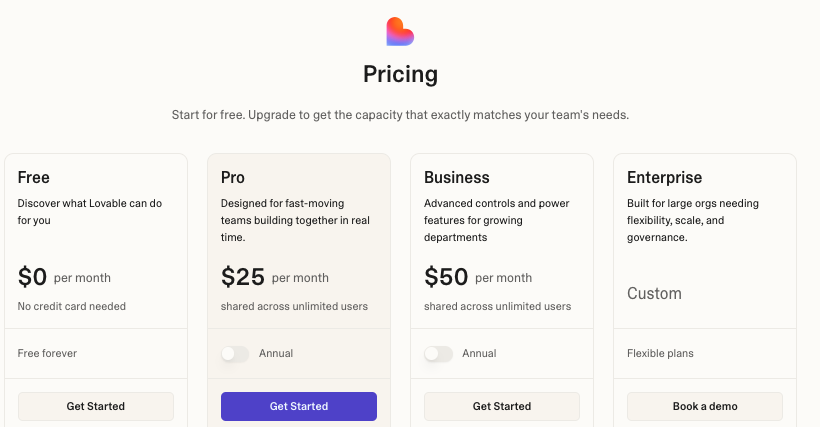
This model can work well for a small product team. Costs are less predictable when an application needs frequent prompts, heavy traffic, or substantial AI usage.
Appsmith
Appsmith’s Free plan supports up to five cloud users, five workspaces, and three Git repositories.
The Business plan costs $15 per user per month and adds unlimited workspaces and Git repositories, workflows, custom roles, audit logs, and premium integrations. Enterprise starts at $2,500 per month for 100 users. New accounts receive a 15-day Business trial.
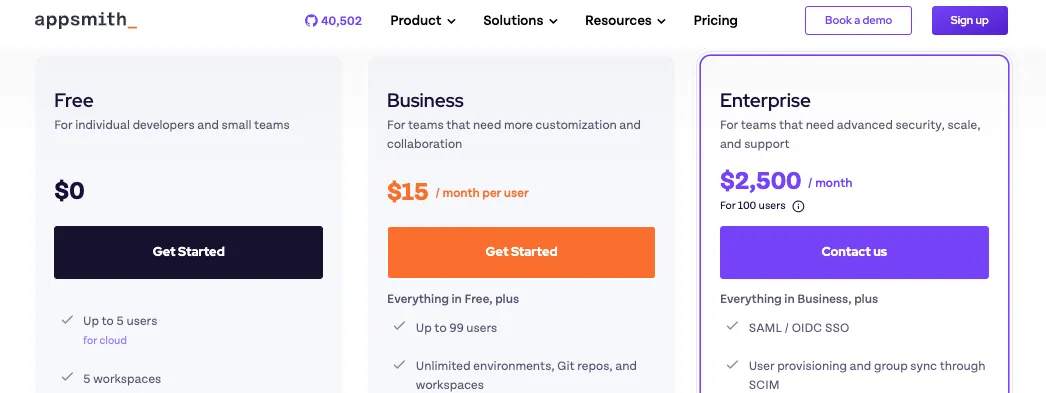
Appsmith can be affordable for a small developer team. Costs rise quickly when many employees need direct access because each workspace member counts as a paid user on Business.
Looking for a complete pricing guide:
Winner: It Depends
Lovable offers better value for founders or teams building a customer-facing product with many external users.
Appsmith’s Free plan is attractive for a small internal team, while its per-user Business pricing makes more sense when access is limited to a defined group of employees.
Why Vitara.ai Stands Out
Vitara.ai currently offers a limited Free plan, a Build plan at $20 per month with 100 credits, and a Scale plan from $50 per month with higher usage limits. Paid features include code editing, code download, and custom-domain support.
Vitara.ai costs slightly less than Lovable at the first paid tier. That makes it worth considering when you want prompt-based full-stack development and downloadable code without starting at $25 per month.
Lovable is fast for web MVPs. Appsmith is strong for internal tools. Vitara.ai gives you AI-assisted full-stack development with editable code, GitHub integration, and web + mobile app support.
Explore Vitara.ai →
Final Verdict: Which Is the Better Tool, Lovable or Appsmith?
I have compared Lovable and Appsmith feature by feature.
The difference is not about which platform is “better” overall.
It comes down to the type of app you want to build.
Here is how to choose.
- Lovable makes more sense when you want to turn a written idea into a polished web app quickly. It works best for founders, product teams, and creators building MVPs, customer portals, or public-facing SaaS products.
- Appsmith is the better fit when you need an internal dashboard, admin panel, or CRUD tool connected to existing databases and APIs. It suits developer-led teams that value self-hosting, predictable workflows, and direct control over business data.
- Vitara.ai is best for teams that want AI-assisted full-stack development with editable code, GitHub integration, and support for both web and mobile app projects.
Also Read Related Tool Comparisons:
Frequently Asked Questions
Is Lovable better than Appsmith?
Lovable is better for quickly generating public-facing web apps, prototypes, and SaaS MVPs from natural-language prompts. Appsmith is better for developer-led internal tools connected to existing databases, APIs, and company systems.
Neither platform wins every use case. The right choice depends on whether you’re starting with a product idea or an established backend.
What is the main difference between Lovable and Appsmith?
Lovable generates a full-stack web application from a description, while Appsmith gives developers a visual canvas for building interfaces over existing data and services.
In practical terms:
- Lovable: Prompt first, code generated afterward
- Appsmith: Datasource first, interface assembled afterward
Which platform is easier for non-technical users?
Lovable has the easier starting point. You can describe the pages, features, and design you want without manually configuring every widget or database query.
Appsmith now supports natural-language assistance, but its core workflow still involves widgets, queries, APIs, and JavaScript. It feels more comfortable for developers and technically confident operators.
Is Appsmith better than Lovable for internal tools?
Usually, yes.
Appsmith is designed around internal dashboards, admin panels, CRUD applications, approval tools, and support interfaces. It can connect directly to databases, REST APIs, GraphQL endpoints, and business software.
It is especially useful when you need:
- Clear control over queries and data changes
- Access to private company systems
- Self-hosting and role-based permissions
- Tables, forms, filters, and operational workflows
Can Lovable build internal tools?
Yes. Lovable can generate dashboards, portals, approval flows, and database-backed business applications from prompts.
It makes sense when you want to create the tool and its backend together. Appsmith may be the stronger option when the interface must sit on top of several systems that your company already operates.
Can Appsmith build customer-facing apps?
Appsmith can create portals, dashboards, and embedded interfaces for customers. It also supports public applications and private embedding on applicable plans.
It is less suited to highly branded websites, marketing pages, or consumer products that need unusual layouts and detailed visual interactions. Those projects usually fit Lovable’s generated frontend approach better.
Is Appsmith an AI app builder?
Appsmith now includes AI-assisted features. You can use natural-language prompts to generate custom widgets and workflow logic, then edit the resulting JavaScript, HTML, or CSS.
However, Appsmith is not primarily a prompt-to-complete-app generator like Lovable. Its main building process still combines:
- Drag-and-drop widgets
- Database and API queries
- JavaScript customisation
- Git-based deployment workflows
Can you self-host Lovable and Appsmith?
The answer is different for each platform.
- Lovable: You can host the application and its backend on your own infrastructure, but Lovable’s editor and AI agent remain managed services.
- Appsmith: You can self-host the Appsmith platform itself, including its Community, Business, or Enterprise edition. Appsmith also supports Docker, Kubernetes, and air-gapped enterprise deployments.
Appsmith gives you more control over the builder and runtime. Lovable gives you portability for the application it generates.
Do I own the code created with Lovable?
Yes. Lovable states that you own your generated projects and code.
You can sync the project with GitHub, clone it, edit it in a local development environment, and deploy it through another hosting provider. The GitHub connection supports two-way syncing between Lovable and the repository.
Does Appsmith provide standalone source code?
Appsmith supports Git version control for your pages, widgets, queries, and application configuration. This allows teams to use branches, pull requests, and established review workflows.
However, an Appsmith application is built to run on the Appsmith platform. It is not the same as receiving a conventional standalone React application that you can deploy without Appsmith.
Which is better for building a production app?
Lovable is the stronger starting point for a new customer-facing product because it can generate the frontend, backend connections, authentication, and deployment setup together.
Appsmith is often more dependable for production internal tools because developers can see the queries, data bindings, and JavaScript controlling each action.
In both cases, you should manually review permissions, database rules, error handling, and important user flows before launch.
Which is cheaper, Lovable or Appsmith?
Lovable and Appsmith charge in different ways, so the cheaper platform depends on how your team works.
- Lovable Pro: Starts at $25 per month with 100 monthly credits and unlimited workspace members
- Appsmith Business: Costs $15 per user per month
- Appsmith Free: Supports up to five cloud users
- Lovable Free: Includes five daily build credits, capped at 30 per month
Lovable may offer better value for a small team building a product for many outside users. Appsmith can be cheaper for a small internal team, but per-user costs rise as more employees need access.
Can Lovable and Appsmith be used together?
Yes. They can cover different sides of the same product.
A practical setup might use:
- Lovable for the customer-facing SaaS application
- Appsmith for the support dashboard, admin panel, or operations console
- A shared database or API to keep information consistent between both applications
This approach lets each platform handle the workflow it is better suited to.
Can Lovable replace Appsmith?
Lovable can replace Appsmith for a simple dashboard or internal portal, especially when you’re creating the backend from scratch.
It is less likely to be a direct replacement when the tool must connect to several private databases, reuse existing APIs, run inside company infrastructure, or follow strict enterprise access controls.
What is a good alternative to both Lovable and Appsmith?
Vitara.ai is worth considering when you want prompt-based full-stack development with editable and downloadable code.
It supports React, Supabase, GitHub integration, and both web and mobile app development. That positions it between Lovable’s rapid AI generation and Appsmith’s emphasis on developer control.