A complete guide to Launchpad.io pricing in 2026
I’ve been looking into Launchpad.io pricing, and the more I study it, the more it feels less like a normal SaaS bill and more like planning around actual app usage. Instead of charging mainly per seat, Launchpad.io uses Launchpad Units, so I wanted to break down how the plans work, what LPUs really mean, and what you’re actually paying for each month.

Launchpad.io pricing plans: At a glance
Launchpad.io pricing plans are built around Launchpad Units, or LPUs. Instead of paying for every developer, admin, or subscriber seat, you pay based on the amount of app usage and platform resources your product consumes.
Below is an overview of what you get from each plan:
| Plan | Price (billed monthly) | Best for | Key features |
|---|---|---|---|
| Explore | $0 per month | Testing and exploration | Blueprint creation, app planning, and access to the Launchpad Units Estimator |
| Startup Launchpad | $500 per month | Early stage startups | For startups under $2M in revenue with access to Launchpad’s build platform at a lower starting price |
| Ignite | $900 per month | Teams launching production apps | 5,000,000 Launchpad Units per month, unlimited apps, unlimited developers and admins, and unlimited subscribers and users |
| Accelerate | Custom | Scaling SaaS teams | Higher LPU usage, expanded support, and pricing based on production needs |
| Catalyst Program | One time fee | Teams needing guided launch support | MVP definition, onboarding, training, coaching, and premium development support |
Launchpad.io pricing plans breakdown
Launchpad.io pricing looks simple at first, with a free Explore option, a $900/month Ignite plan, and custom pricing for larger teams. But what you actually pay depends on your Launchpad Unit consumption, which changes based on how complex your app is and how much your users actually do inside it.
A small internal tool with a few lightweight workflows will burn fewer units than a customer-facing SaaS app running onboarding flows, service requests, AI steps, storage, and subscriber activity every day.
Explore plan: $0/month
Explore is the free starting point for Launchpad.io. It’s built for planning, testing, and estimating your app before you move into production.
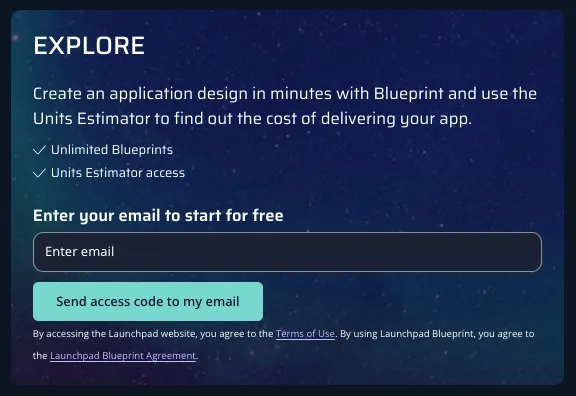
This plan is not really about launching a live SaaS product. It’s about turning your idea into a Blueprint, then using the Launchpad Units Estimator to understand what the app might cost once real users start using it.
What’s included:
- Unlimited Blueprints
- Launchpad Units Estimator access
⭐ Best For:
Founders, product teams, and developers who want to map out an app idea and estimate Launchpad.io cost before talking to sales or starting a production build.
Pros:
- No upfront spend to start exploring Launchpad.io.
- Unlimited Blueprints make it easier to test different app ideas or workflow designs.
- The Units Estimator helps you understand potential usage costs before you commit to a paid plan.
Cons:
- It’s focused on app design and estimation, not full production usage.
- You’ll still need a paid plan when you’re ready to build and run a real Launchpad app.
Ignite plan: $900/month
Ignite is the main public Launchpad.io pricing tier for teams ready to build their first production app. It gives you enough Launchpad Units to onboard subscribers and start running real workflows without paying per developer or per end user.
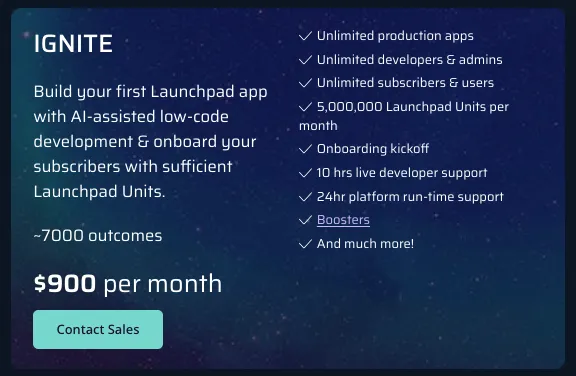
Launchpad lists Ignite at $900 per month and includes 5,000,000 Launchpad Units per month. The pricing page says that supports around 7,000 outcomes, using Launchpad’s average estimate of about 750 units for one business outcome, such as a service request or customer onboarding process.
What’s included:
- Unlimited production apps
- Unlimited developers and admins
- Unlimited subscribers and users
- 5,000,000 Launchpad Units per month
- Around 7,000 outcomes
- Onboarding kickoff
- 10 hours of live developer support
- 24-hour platform runtime support
- Boosters
- Premium Support included
⭐ Best For:
SaaS teams, AI app builders, and B2B product companies that are ready to launch their first production app and want predictable starting capacity without seat-based pricing.
Pros:
- Unlimited users and subscribers make the plan attractive for multi-tenant SaaS products.
- 5,000,000 monthly Launchpad Units gives teams a clear starting pool for production usage.
- Included onboarding, developer support, and runtime support reduce the pressure on small teams.
- You can build more than one production app without paying for each app separately.
Cons:
- $900/month is a serious starting price if you’re still validating the idea.
- The real value depends on how efficiently your app uses Launchpad Units.
- If your workflows are complex or your subscriber base grows quickly, you may need a larger plan sooner than expected.
Accelerate plan: Custom pricing
Accelerate is for teams that have outgrown the Launchpad Units included in Ignite or need more hands-on support as they scale.
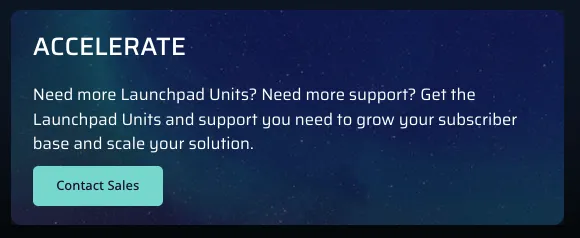
Launchpad does not list a public monthly price for Accelerate. Instead, the pricing page points users to Contact Sales, which makes sense for teams with heavier usage, larger subscriber bases, or more complex production requirements.
What’s included:
- More Launchpad Units based on your needs
- Expanded support
- Help scaling your subscriber base
- Production support for larger Launchpad apps
- Premium Support included
⭐ Best For:
Growing SaaS companies and enterprise-style teams that need more Launchpad Units, stronger support, or pricing matched to a larger production workload.
Pros:
- You can size the plan around your actual app usage instead of squeezing into a fixed tier.
- Better fit for products with growing subscriber activity and heavier workflow volume.
Cons:
- No public price means you’ll need a sales conversation.
- Budgeting is harder until Launchpad reviews your usage, app design, or Blueprint.
- Custom pricing may add procurement time for larger teams.
Launchpad for Startups: Custom/startup program
Launchpad for Startups is aimed at early-stage companies that want to build and launch faster. The main pricing page does not show a fixed monthly price for this plan, but it does point startups to a separate “Learn more” path.
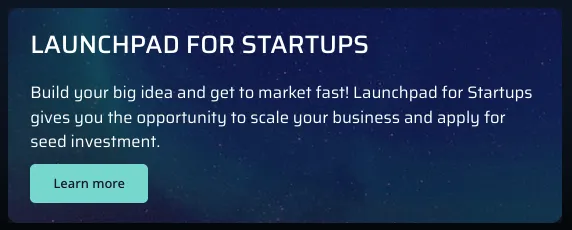
This option is worth checking if you’re building a new SaaS product, especially if you’re pre-scale and want access to Launchpad without jumping straight into a larger production contract.
What’s included:
- Startup-focused Launchpad access
- Support for building and getting to market
- Ability to apply for seed investment
- Startup program resources
⭐ Best For:
Early-stage founders and startup teams building a B2B SaaS or AI-native product and looking for a lower-friction path into Launchpad.
Pros:
- Startup-focused support can be useful when you’re still shaping the product.
- The program is designed around getting to market faster, not just buying software.
- Seed investment opportunities may be relevant for qualified startups.
Cons:
- The pricing page does not show a fixed public price for this option.
Catalyst Program: $12,000 one-time fee
The Catalyst Program is not a normal app subscription tier. It’s a guided support package for teams that want more help defining, onboarding, and starting their MVP work.
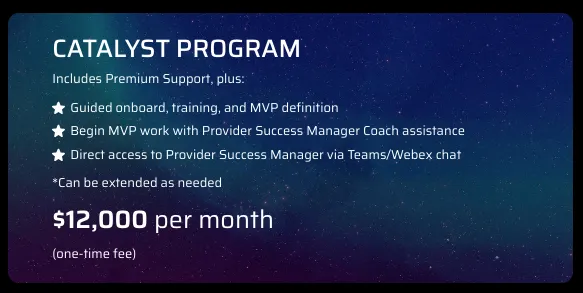
Launchpad’s pricing page lists Catalyst at “$12,000 per month” and then labels it as a “one-time fee,” so I’d treat this as something to confirm with sales before making budget decisions. The intent is clear, though: Catalyst gives you Premium Support plus more direct help from Launchpad’s team.
What’s included:
- Everything in Premium Support
- Guided onboarding
- Training
- MVP definition
- Provider Success Manager Coach assistance
- Direct access to a Provider Success Manager via Teams or Webex chat
- Option to extend as needed
⭐ Best For:
Teams that want a more guided Launchpad.io rollout, especially when the first MVP needs product strategy, training, and hands-on support.
Pros:
- Helpful if your team is new to Launchpad and wants expert guidance from day one.
- MVP definition support can save time before developers start building.
- Direct access to a Provider Success Manager can reduce confusion during setup.
Cons:
- The $12,000 figure is a meaningful upfront cost.
- The pricing wording should be confirmed because the page shows both “per month” and “one-time fee.”
Which Launchpad.io plan should you choose?
Choose Explore if you:
- Want to test whether Launchpad.io works for your SaaS or AI app idea
- Need to create Blueprints and estimate Launchpad Units before paying
- Are still mapping workflows, users, and app structure
Choose Ignite if you:
- Are ready to launch your first production app
- Want unlimited apps, developers, admins, subscribers, and users
- Need 5,000,000 Launchpad Units per month to start
Choose Accelerate if you:
- Expect heavier app usage than the Ignite plan can support
- Need more Launchpad Units as your subscriber activity grows
- Want expanded support for a business-critical Launchpad app
Choose Launchpad for Startups if you:
- Are an early-stage startup building a B2B SaaS or AI-native product
- Want startup-focused access, support, or program benefits
- Need a lower-friction path before moving into a larger production plan
Choose Catalyst Program if you:
- Want guided onboarding, training, and MVP definition support
- Need direct help from a Provider Success Manager
- Prefer a hands-on launch process instead of figuring out everything alone
Is Launchpad.io worth the cost?
After studying Launchpad.io pricing and how its Launchpad Units model works, here’s my honest take.
Launchpad.io is worth it if you:
- Need to build and launch a production-ready B2B SaaS app without assembling a full infrastructure team
- Like the idea of unlimited apps, developers, admins, subscribers, and users under the Ignite plan
- Can estimate your workflows clearly, since app complexity and usage drive your real Launchpad.io cost
Skip Launchpad.io if you:
- Only need a simple prototype, landing page, or lightweight internal tool
- Want predictable per-seat pricing instead of usage-based pricing tied to Launchpad Units
- Need full control over every backend, database, UI, and deployment decision
Launchpad.io alternatives & pricing comparison
If you like Launchpad.io’s production-focused SaaS approach but want a lower starting price, more code control, or a simpler app-builder experience, there are a few strong alternatives.
Here’s a side-by-side comparison:
| Tool | Starting price (billed monthly) | Best for | Key advantage |
|---|---|---|---|
| Vitara.ai | Free plan; paid plans start at $20 per month | AI powered app development with editable code | Build with prompts, edit or download code, use custom domains, and scale with higher credit limits |
| Lovable | Free plan; paid plans start at $25 per month | Prompt to app builders and fast MVPs | Simple AI app building flow with credits for prototypes, internal tools, and early validation |
| Bubble | Free plan; paid plans start at $59 per month annually for web and mobile | No code web and mobile apps | Visual builder with hosting, database, deployment, and production ready app features |
| Retool | Free plan; paid plans start at $10 per month per builder | Internal tools, admin panels, and workflows | Fast internal app building with database connections, workflows, permissions, and AI prompting |
Vitara.ai vs Launchpad.io: Which should you choose?
Vitara.ai is better for: Building AI-powered apps when you want a faster, more flexible starting point than Launchpad.io. It works well for founders, indie hackers, and small teams that want to create apps with prompts, edit the code, and launch without jumping straight into a high monthly platform cost.
- You want to build from prompts but still keep access to editable code.
- You prefer a lower starting price before committing to production-scale infrastructure.
- You need custom domains, app exports, or more hands-on control over the final product.
- You’re still validating the idea and don’t want Launchpad Unit usage to shape your budget yet.
Launchpad.io is better for: Building production-focused B2B SaaS products where workflows, subscribers, hosting, runtime, support, and usage-based scaling matter more than low-cost experimentation.
Use both if: You want Vitara.ai for early AI app building, MVP testing, and editable-code flexibility, then Launchpad.io for larger B2B SaaS products that need managed infrastructure and subscriber-scale workflows.

My bottom line on Launchpad.io pricing
Launchpad.io’s pricing makes the most sense when you think of outcomes, not seats. That’s the big shift. You’re not asking, “How many users do I have?” as much as, “How much work is my app doing for those users?”
That model can be powerful for B2B SaaS teams, especially if you have lots of subscribers who use the product at different levels. But it also means you need to understand your workflows before you commit.
Before choosing a plan, map out the basics:
- How many business outcomes will users complete each month?
- How complex are those workflows?
- Will your app use AI steps, storage, or heavy automation?
- How quickly do you expect subscriber activity to grow?
My honest take: don’t treat the $900/month Ignite plan like a simple flat SaaS subscription. Treat it like a production starting point. Build your Blueprint, run the Launchpad Units Estimator, and check whether your expected usage fits inside the included 5,000,000 LPUs.
Also, know when to use another tool. If you’re still validating a rough idea, Vitara.ai or Lovable may feel lighter and cheaper. If you’re building a serious B2B SaaS product with workflows, subscribers, hosting, and runtime support, Launchpad.io starts to make a lot more sense.
Want to compare costs before choosing a tool? Read these next:
FAQs about Launchpad.io pricing
How much does Launchpad.io cost?
Launchpad.io has a free Explore plan for creating Blueprints and estimating usage. The main public production plan is Ignite, which starts at $900/month and includes 5,000,000 Launchpad Units per month. Larger teams can move to Accelerate, which uses custom pricing based on app usage and support needs.
Does Launchpad.io have a free plan?
Yes. Launchpad.io has a free Explore option. It’s useful if you want to map out your app idea, create Blueprints, and estimate potential Launchpad Unit usage before paying for a production plan.
What are Launchpad Units?
Launchpad Units, or LPUs, are the usage metric Launchpad.io uses to measure how much work your app performs. They can include:
- Workflow execution
- App runtime
- Storage
- Compute
- AI workflow steps
- Subscriber activity
In simple terms, the more your app does, the more LPUs it uses.
Is Launchpad.io priced per user?
No. Launchpad.io does not mainly price around user seats. The Ignite plan includes unlimited developers, admins, subscribers, and users. Your cost is tied more closely to Launchpad Unit usage than to the number of people using the app.
What is included in the Launchpad.io Ignite plan?
The Ignite plan includes:
- 5,000,000 Launchpad Units per month
- Unlimited production apps
- Unlimited developers and admins
- Unlimited subscribers and users
- Onboarding kickoff
- Live developer support
- Runtime support
- Boosters
- Premium Support
Is Launchpad.io good for startups?
Yes, Launchpad.io can work well for startups building B2B SaaS or AI-native apps, especially if they need:
- Workflow automation
- Hosting
- Subscriber management
- Production infrastructure
- AI-powered app workflows
That said, very early teams should start with Explore or check the Launchpad for Startups option before committing to Ignite.
What happens if I use more than 5,000,000 Launchpad Units?
Launchpad.io does not clearly show public overage pricing on the main pricing page. If you expect to go beyond the included 5,000,000 LPUs in Ignite, you should talk to Launchpad sales and ask how extra usage is billed.
Is Launchpad.io expensive?
Launchpad.io can feel expensive if you compare it to simple no-code tools or AI app builders. But it’s priced more like a production SaaS platform. If you need managed hosting, workflows, subscribers, runtime support, and scaling infrastructure, the cost may be easier to justify.
Who should use Launchpad.io?
Launchpad.io is best for teams building:
- Production-ready B2B SaaS apps
- AI-native products
- Workflow automation tools
- Service portals
- Subscriber-based business software
It’s less ideal for simple websites, quick prototypes, or side projects that don’t need managed production infrastructure.
Is Launchpad.io better than Lovable or Vitara.ai?
It depends on what you’re building.
- Choose Launchpad.io if you need production B2B SaaS, workflows, subscribers, and managed runtime support.
- Choose Lovable if you want fast MVPs and prompt-to-app experimentation.
- Choose Vitara.ai if you want AI app building with more editable-code flexibility and a lower starting cost.
Do I need to contact sales for Launchpad.io pricing?
You can see the Ignite starting price publicly, but you’ll likely need to contact sales for Accelerate, higher Launchpad Unit usage, startup program details, Catalyst Program support, or any custom production setup.
How do I estimate my Launchpad.io monthly cost?
Start with three steps:
- Create a Blueprint for your app.
- Use the Launchpad Units Estimator.
- Estimate how many outcomes your app will process each month.
A simple app with light workflows will use fewer LPUs than a complex SaaS product with AI steps, storage, and heavy automation.
What’s New?