Bolt.new vs Cursor: Which AI Coding Tool Is Better in 2026?
Bolt.new vs Cursor looks straightforward until you see how differently the two tools approach building software.
Bolt.new starts with an idea. You describe what you want, generate the app in your browser, preview it, edit when needed, and move toward deployment without setting up a traditional local environment.
Cursor starts with code. It is an AI-first editor for developers who want to work directly with repositories, files, terminals, dependencies, and existing codebases.
In this Bolt.new vs Cursor comparison, I’ll look at setup, prototyping, code control, full-stack development, deployment, scalability, and pricing.
I’ll also show where Vitara.ai fits if you want a prompt-first full-stack workflow for web or mobile products.
TL;DR: Bolt.new vs Cursor at a Glance (2026)
If your priority is getting from an idea to a working app quickly, Bolt.new is easier to start with. If your priority is controlling, debugging, and extending a serious codebase, Cursor gives developers more depth.
- Choose Bolt.new if: You want a browser-based AI app builder, fast MVP creation, live previews, built-in deployment, and minimal setup.
- Choose Cursor if: You understand code and want repository context, terminal access, multi-file editing, and granular control.
- Want a prompt-first full-stack workflow? Vitara.ai is worth considering if you want to generate a web or mobile product from natural-language instructions while retaining access to the code.
| Feature | Bolt.new | Cursor | Vitara.ai |
|---|---|---|---|
| Core workflow | Browser AI app builder | AI code editor | Prompt-first full-stack builder |
| Best for | MVPs and prototypes | Developers and complex codebases | Web/mobile product building |
| Local setup | Not required | Developer-managed | Not required |
| Code control | Available | Extensive | Code ownership |
| Deployment | Built in | External workflow | Product-building workflow |

Build full-stack web and mobile apps from prompts while keeping access to the code as your product grows.
Start Building with Vitara.ai →
Bolt.new vs Cursor: Feature-by-Feature Comparison
I narrowed the comparison to six areas that change how you build: setup, app generation, code control, backend and deployment, production scalability, and user fit.
1. Development Environment & Ease of Setup
The first difference appears before you generate a line of code.
Bolt.new
Bolt.new runs in the browser and removes much of the setup that normally comes before development. You can describe an application, let Bolt create the project, and see a live preview in the same environment.
That makes Bolt.new for beginners especially appealing. You do not need to begin by configuring a local environment or opening an existing repository.
Bolt is also more developer-friendly than many older comparisons suggest. Its Code View lets you inspect and edit project files directly instead of relying only on prompts.
For more background
see what Bolt.new is, what Cursor AI is, and our guide to vibe coding.
Cursor
Cursor stays closer to a traditional development workflow.
You work with repositories, files, the terminal, dependencies, and project structure while Cursor’s AI helps search the codebase, edit files, generate code, and carry out development tasks.
For experienced developers, that control is the point.
Bolt.new or Cursor: Which Is Easier to Start With?
Bolt.new wins for pure setup speed.
You can move from a blank browser session to a running project without preparing a local development environment first.
Cursor becomes easier when “easy” means understanding what changed and having direct control over implementation.
Keep reading:
See our best AI coding tools comparison if you’re evaluating more than Bolt and Cursor.
2. Prompt-to-App Speed & Prototyping
Next, I compared how quickly Bolt.new and Cursor can turn an idea into something usable.
This is where the difference between an AI app builder and an AI code editor becomes obvious.
Bolt.new
Bolt.new is built around starting from a prompt.
You can describe the product you want, let Bolt generate the project structure, and watch the app appear in a live preview. For founders, designers, or developers testing an idea, that cuts out a lot of early setup work.
You can also iterate conversationally. Ask for a new page, change the layout, add a form, or update an interaction, and Bolt modifies the project while keeping the preview visible.
That makes it especially useful for MVPs, landing pages, dashboards, and early product experiments.
The tradeoff is that speed can hide complexity. Once the project grows, you may need to spend more time understanding generated code, fixing edge cases, and controlling exactly what changes.
Cursor
Cursor can also build features from natural-language instructions, but it approaches the task from inside the codebase.
Its Agent can create and edit files, search the repository, run terminal commands, and help implement multi-step changes. That is powerful, but Cursor assumes you are comfortable reviewing what it produces.
For an existing application, this is often faster than moving the project into a separate AI builder.
For a blank idea, Bolt usually gets to the first visible result faster.
Which Is Better for Building an MVP Fast?
Bolt.new wins.
If the goal is to move from idea to working prototype with the least friction, Bolt.new has the more direct workflow.
Cursor wins when the MVP already has a codebase, custom architecture, or technical requirements that need closer developer control.
If you’re comparing other prompt-first tools as well
see our Bolt.new vs v0 and chat-based AI app builders guides.
Where Vitara.ai Fits for Prompt-First Building
Vitara.ai follows the prompt-first approach but focuses on generating full-stack web and mobile products.
That makes it worth considering if you like Bolt’s idea-to-app workflow but want another option built around frontend, backend, and code ownership in the same product-building process.
Generate your app’s frontend, backend, and product workflow from natural-language instructions without starting inside a traditional IDE.
Build with Vitara.ai →
3. Code Control, AI Editing & Debugging
Fast generation matters at the start. Code control matters once something breaks.
This is where Cursor starts to pull ahead.
Cursor
Cursor is designed for developers who want AI inside the development environment rather than above it.
Its Agent can inspect files, search across the repository, edit multiple files, run commands, and help trace problems through an existing codebase.
That makes debugging more deliberate. You can inspect the affected files, review the diff, test the fix, and keep control over what gets accepted.
Cursor is also better suited to refactoring. When a feature touches several components, APIs, or shared utilities, working directly with the repository is usually easier than repeatedly prompting an app builder to make broad changes.
Bolt.new
Bolt.new gives you more code control than older comparisons often suggest.
Its Code View lets you inspect and edit files directly, target specific parts of the project, and move between code and preview without leaving the browser.
That is enough for many smaller apps.
But the center of gravity is still prompt-led building. If you spend most of your day debugging implementation details, reviewing architecture, or making precise multi-file changes, Cursor feels more natural.
Bolt vs Cursor: Which Gives You More Control Over Code?
Cursor wins.
Bolt.new lets you access and edit the code. Cursor is built around the code.
That difference becomes more important as projects get larger, more customized, or harder to debug.
Keep reading:
Compare Windsurf vs Cursor or see our guide to secure vibe coding practices.
4. Backend, Database, Mobile Apps & Deployment
Building the interface is only part of the job. Next, I compared what happens when you need a backend, database, mobile support, and an actual deployment workflow.
Bolt.new
Bolt.new keeps more of this process inside one environment.
You can build the application, connect database functionality, work with services such as Supabase, preview changes, and publish the project without piecing together a traditional development stack first.
Built-in hosting is one of its biggest advantages for rapid launches. You can move from generated app to a live URL without setting up a separate deployment platform.
Bolt also supports GitHub and mobile development workflows through Expo, which makes it more capable than a simple landing-page generator.
For someone trying to validate an idea quickly, fewer moving parts matter.
Cursor
Cursor takes the opposite approach.
It helps you build the code, but it does not try to become your hosting provider, database platform, or deployment service.
That means developers can choose the stack they want: Supabase, Firebase, AWS, Vercel, Railway, their own servers, or something else entirely.
Cursor’s approach requires more setup, but it also gives experienced developers more architectural freedom.
Which Is Better for Going From Prompt to Deployed App?
Bolt.new wins for the shorter path.
You can generate, preview, and deploy from a much more integrated workflow.
Cursor wins when you already know exactly how you want the backend, infrastructure, and deployment pipeline configured.
If deployment flexibility matters
our Bolt.new vs Replit comparison is also worth reading.
Where Vitara.ai Fits for Full-Stack Development
Vitara.ai’s full-stack app builder focuses on generating both frontend and backend application code from prompts.
It is another option for builders who want the simplicity of prompt-driven development without beginning inside a traditional IDE.
5. Git, Existing Codebases & Production Scalability
A prototype can look impressive after ten prompts. The harder question is what happens after hundreds of changes.
Bolt.new
Bolt has improved considerably here.
You can connect projects to GitHub, work with version history, inspect source code, and move the project outside Bolt when you need a different development workflow.
That makes it more practical for longer-running projects than early versions of the platform were.
Still, Bolt remains strongest when AI is doing a large share of the building.
As the codebase grows, debugging a specific architectural problem or controlling changes across many interconnected files can require more hands-on engineering.
Cursor
This is where Cursor has the advantage.
It is comfortable with existing repositories, project structures, dependencies, branches, terminal commands, and multi-file changes because those are already part of its normal workflow.
For a developer maintaining a production application, that matters more than how quickly the first screen was generated.
Which Is Better for a Large or Existing Codebase?
Cursor wins.
Bolt accelerates the beginning. Cursor gives you more control over what happens after the beginning.
That does not mean you have to choose one permanently.
A practical workflow can be:
Idea → Bolt.new prototype → GitHub → Cursor for deeper development
If you’re comparing developer-focused options
see Cursor alternatives and our Bolt.new vs Windsurf comparison.
6. Beginners, Developers & the Bolt-to-Cursor Workflow
At this point, the Bolt.new vs Cursor decision becomes much easier.
- Non-technical founder building an MVP: Bolt.new
- Developer working on an existing product: Cursor
- Founder validating an idea quickly: Bolt.new
- Engineer debugging or refactoring complex code: Cursor
- Team moving from prototype to production: Using both can make sense
Do You Actually Need Both Bolt.new and Cursor?
Not always.
A small application may stay entirely inside Bolt.new. A developer starting with an existing repository may have no reason to use Bolt at all.
The combined workflow makes the most sense when you want Bolt’s rapid starting point and Cursor’s deeper control later.
For a broader view of this category, see Cursor vs Lovable vs Bolt and our guide tovibe coding tools for enterprises.
For a broader view of this category
see Cursor vs Lovable vs Bolt and our guide to vibe coding tools for enterprises.
Bolt.new vs Cursor Pricing Comparison (2026)
Pricing looks simple at first, but Bolt.new and Cursor charge for different kinds of work.
Bolt.new Pro starts at $25/month, while Cursor Pro starts at $20/month. That does not automatically make Cursor the better value.
Bolt.new Pricing
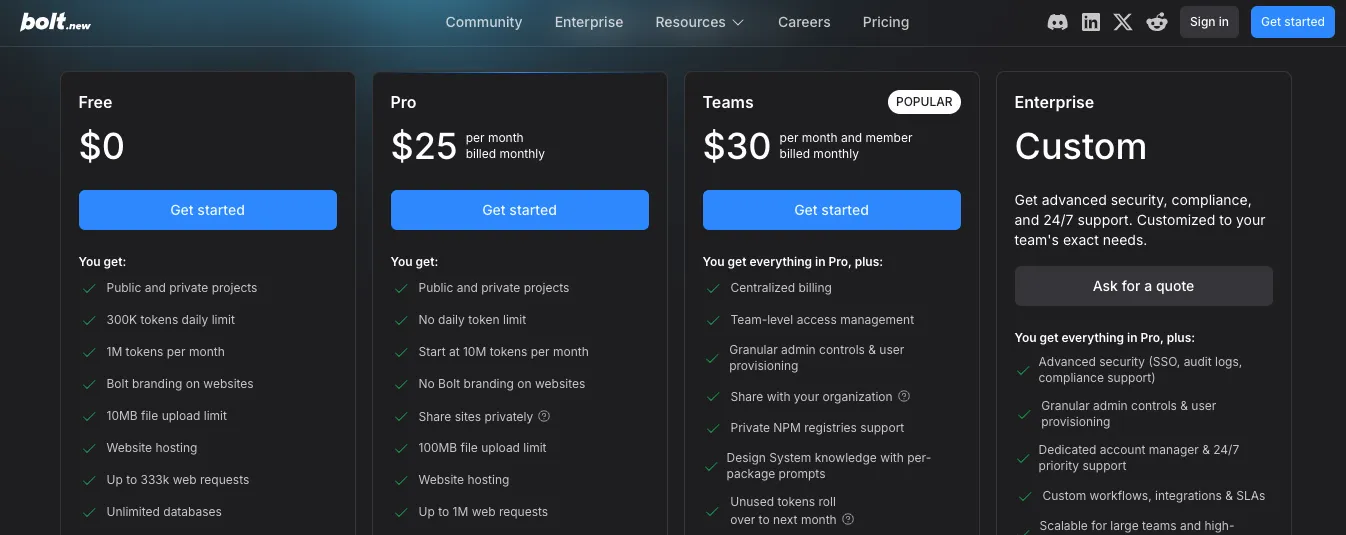
Bolt offers a free plan with 1M monthly tokens, while Pro removes the daily token limit and starts at 10M monthly tokens.
The Teams plan starts at $30/member/month and adds centralized billing, access controls, and collaboration features. Hosting is included across Bolt’s plans.
For the complete breakdown, see our Bolt.new pricing guide.
Cursor Pricing
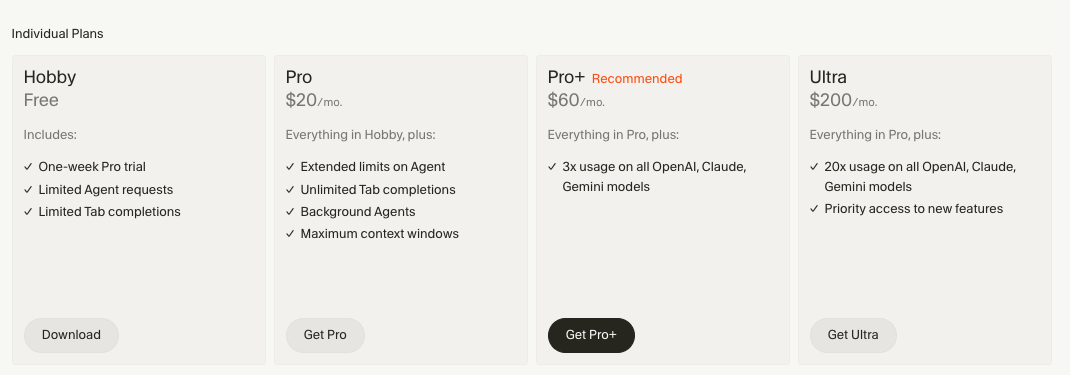
Cursor also offers a free Hobby plan.
Its individual plans currently include Pro at $20/month, Pro+ at $60/month, and Ultra at $200/month. Teams Standard starts at $40/user/month.
See our Cursor pricing guide for the plan-by-plan details.
| Pricing | Bolt.new | Cursor |
|---|---|---|
| Free plan | Yes | Yes |
| Entry paid plan | $25/mo | $20/mo |
| Team plan | From $30/member | From $40/user |
| Built-in app hosting | Yes | No |
Which Gives Better Value?
It depends on what you are paying to avoid.
Bolt bundles more of the idea-to-deployment workflow. Cursor gives developers a deeper coding environment but leaves deployment and infrastructure decisions in their hands.
You can compare more options in our AI coding tools guide or check Vitara.ai pricing.
Bolt.new vs Cursor Pros & Cons
| Platform | Pros | Cons |
|---|---|---|
| Bolt.new | Fast setup, browser-based building, live preview, built-in deployment | Token usage can increase with larger projects; less natural for complex codebase maintenance |
| Cursor | Deep code control, repository context, terminal and agent workflows | Steeper learning curve; deployment stack is separate |
| Vitara.ai | Prompt-first full-stack workflow, web/mobile focus, code ownership | Best fit depends on how much manual coding you want |
Still comparing?
Explore Bolt.new alternatives and Cursor alternatives.
Bolt.new vs Cursor: And the Winner Is
Bolt.new wins for getting from an idea to a running app quickly.
It is the stronger choice for fast prototyping, minimal setup, and an integrated path to deployment.
Cursor wins when developers need deeper control over a serious or growing codebase.
The simple answer:
- Starting from an idea → Bolt.new
- Starting from an existing codebase → Cursor
- Want prompt-first full-stack web/mobile building with code ownership →Vitara.ai
For some teams, the most practical workflow is Bolt first and Cursor later.
Use Vitara.ai when you want fast AI app creation, editable code, web/mobile support, and a smoother handoff to developers.
Try Vitara.ai Free →
FAQs About Bolt.new vs Cursor
Is Bolt.new better than Cursor?
Bolt.new is better for rapid app generation. Cursor is better when code control, debugging, and long-term development matter more.
Is Bolt.new or Cursor better for beginners?
Bolt.new. Its browser-first workflow removes much of the development setup that Cursor expects users to understand.
Is Cursor better for professional developers?
Usually, yes. Cursor fits existing repositories, multi-file editing, debugging, and developer-controlled infrastructure more naturally. See v0 vs Cursor for another comparison.
Can you move a Bolt.new project to Cursor?
Yes. You can move the project through GitHub and continue working with the repository inside Cursor.
Which is cheaper: Bolt.new or Cursor?
Cursor Pro currently starts at $20/month, compared with $25/month for Bolt Pro. Their included workflows differ, so price alone should not decide the winner.
What is the best alternative to Bolt.new and Cursor?
If you want prompt-first full-stack generation for web and mobile with code ownership, consider Vitara.ai. You can also compare Replit vs Cursor before choosing.