v0 vs Cursor (2026): Which AI Coding Tool Should You Actually Use?
AI coding tools can now do much more than autocomplete a few lines of code.
They can design interfaces, build features, understand repositories, fix bugs, and even help ship complete applications.
That brings us to two popular choices: v0 and Cursor.
But which one should you actually use?
Well, in this v0 vs Cursor comparison, I’ll put both tools head-to-head based on:
- UI generation and visual design
- Full-stack development
- Codebase understanding
- AI coding agents
- GitHub and deployment
- Ease of use
- Pricing
And much more!
Here’s one thing you should know before we start.
The usual “v0 is for frontend, Cursor is for coding” explanation is becoming outdated.
v0 can now work on full-stack applications, connect databases, create backend endpoints, and even import existing GitHub repositories.
Cursor, meanwhile, remains much more focused on deep engineering work inside a real codebase.
Its Agent can explore your project, modify multiple files, run commands, and fix errors while working on a task.
So, v0 vs Cursor in 2026 is a much closer comparison than it used to be.
Let’s find out which one fits your workflow.
New to either tool?
Start with our guides on what Vercel v0 is and what Cursor AI is before comparing them feature by feature.
v0 vs Cursor? A Quick 30-Second Breakdown
Don’t have time for the entire Vercel v0 vs Cursor comparison?
No worries!
Here’s the quick answer.
v0 is better suited to people who want to turn an idea, screenshot, or design into a working web application quickly.
Its browser-based workflow combines AI generation, live preview, visual editing, code editing, integrations, GitHub, and Vercel deployment.
Cursor takes a different approach.
It is built around the developer’s existing codebase and gives AI much deeper access to files, folders, commands, refactoring, debugging, and ongoing engineering work.
Here’s how they stack up.
| Feature | v0 | Cursor | Vitara.ai |
|---|---|---|---|
| Best For | Rapid visual app building | Deep AI-assisted software engineering | Prompt-to-full-stack app building |
| Starting Point | Prompt, screenshot, Figma, or GitHub repo | Existing or new codebase | Natural-language prompt |
| Visual Editing | ✔ Strong | Limited compared with v0 | ✔ |
| Frontend Development | ✔ | ✔ | ✔ |
| Backend Development | ✔ | ✔ | ✔ |
| Database Support | Integrations such as Supabase, Neon, Upstash | Developer-controlled integrations | ✔ |
| Deep Codebase Work | Improving | ✔ Strong | Project-focused |
| Multi-File Editing | ✔ | ✔ Strong | ✔ |
| GitHub Workflow | ✔ | ✔ | ✔ |
| Built-In Visual Preview | ✔ | Developer workflow | ✔ |
| Deployment | Strong Vercel integration | Uses your preferred stack/workflow | Built into app-building workflow |
| Free Option | ✔ | ✔ | ✔ |
v0 is therefore not simply an AI UI generator anymore.
But visual application creation is still where it feels especially strong.
Cursor goes much deeper once your work starts looking like traditional software engineering.
And if you are exploring the broader shift toward building software through prompts, our guide to vibe coding explains how this development approach works.
Now, let’s compare both tools properly.
v0 vs Cursor Feature Comparison
A quick table is useful.
But it doesn’t tell the whole story.
Because choosing between Cursor vs v0 depends heavily on what you are trying to build and where you are in the development process.
So, I compared both tools across the areas that matter most:
- UI and visual development
- Full-stack capabilities
- Existing codebase handling
- AI agents
- GitHub and deployment
- Ease of use
Let’s start with one of v0’s biggest strengths.
Which Tool Is Better for UI Generation and Visual Design?
First, I wanted to see which tool makes it easier to go from an idea to a polished interface.
After all, your application can have brilliant backend logic…
But users still have to look at it!
So, how does v0 vs Cursor for frontend development play out?
Here’s the comparison.
| Feature | v0 | Cursor | Vitara.ai |
|---|---|---|---|
| Prompt-to-UI | ✔ Strong | ✔ | ✔ |
| Screenshot-Based Generation | ✔ | Possible through AI workflow | ✔ |
| Figma Support | ✔ | Not a core visual workflow | — |
| Visual Editing | ✔ Design Mode | Code-focused | ✔ |
| Live App Preview | ✔ | Depends on dev environment | ✔ |
| React Development | ✔ | ✔ | ✔ |
| Design Iteration Without Manual CSS | ✔ Strong | Less visual | ✔ |
| Existing Project Editing | ✔ Git import | ✔ Strong | ✔ |
v0
This is where v0 immediately feels different from a traditional AI code editor.
You can describe the interface you want and let v0 generate the application visually.
Then you can keep refining it through prompts.
But the feature I find more interesting is Design Mode.
Instead of asking AI to change every tiny design detail, you can select an element directly in the preview and adjust its styling visually.
Those changes are then applied back to the source code.
That makes v0 particularly useful when you are experimenting with:
- Landing pages
- SaaS dashboards
- Admin panels
- Product interfaces
- React components
- MVP designs
v0 can also use Figma references as part of its design-system workflow, alongside GitHub repositories, screenshots, and documentation.
So, for someone who thinks visually first, there is considerably less friction between “this is what I want” and “this is what the app looks like.”
Want to compare v0 with another visual AI builder?
Read our v0 vs Lovable comparison to see how both handle AI-powered app creation.
Cursor
Cursor can absolutely build beautiful frontend interfaces.
That isn’t the problem.
You can ask its Agent to create components, change layouts, update styles, or modify several frontend files together.
The difference is how you work.
Cursor is still centered around your codebase.
Its Agent is designed to explore files, make multi-file changes, run commands, and resolve errors rather than giving you a dedicated visual design-first experience.
That makes Cursor very powerful for a developer who already knows the application structure.
But if your starting point is:
“Here’s a screenshot. Build something like this.”
v0 generally gives you the more natural workflow.
Winner?
For pure UI generation and visual design, v0 wins.
Its combination of prompting, live preview, Design Mode, Figma references, and direct visual iteration makes frontend experimentation much faster.
Cursor becomes more attractive once that interface is part of a larger application requiring deeper engineering work.
And that brings us to the real question:
What happens when you move beyond the frontend?
That’s where the v0 vs Cursor comparison gets much more interesting.
How Does Vitara.ai Stand Out?
Vitara approaches the problem from another direction.
Instead of starting with a traditional IDE, you can describe the product you want and generate frontend and backend code through a browser-based workflow. Vitara also states that generated code remains editable and can be exported to another editor.
So, it can be useful when you want the simplicity of prompt-based app building without stopping at the interface.

Build the UI, backend, APIs, database logic, and application flow from the same idea.
See how Vitara works as a full-stack AI app builder →
Which Tool Is Better for Full-Stack Development?
A good-looking interface is only one part of an application.
Sooner or later, you’ll need databases, authentication, APIs, server logic, and persistent data.
And this is where the v0 vs Cursor for full-stack development comparison gets interesting.
Why?
Because calling v0 a “frontend-only tool” is no longer accurate.
Let’s see how both handle full-stack development.
| Feature | v0 | Cursor | Vitara.ai |
|---|---|---|---|
| Frontend Development | ✔ | ✔ | ✔ React |
| Backend Development | ✔ | ✔ | ✔ |
| API Development | ✔ | ✔ | ✔ |
| Database Integration | Supabase, Neon, Upstash & more | Developer chooses stack | Supabase |
| Authentication | Can implement through integrations | Developer-controlled | ✔ |
| Server-Side Logic | ✔ | ✔ | ✔ |
| Framework Flexibility | Best optimized for Next.js | Very flexible | React-based stack |
| Full-Stack Generation From Prompt | ✔ | Agent-assisted development | ✔ |
| Built-In Preview | ✔ | Uses development environment | ✔ |
| Best For | Rapid full-stack web apps | Custom engineering | Idea-to-app development |
v0
This is where v0 has changed considerably.
You can now ask it to take a prototype and add actual backend functionality.
That includes:
- Database persistence
- API calls
- Authentication
- CRUD functionality
- Server-side logic
- External integrations
v0 defaults to Next.js and can create backend endpoints using App Router conventions and server-side capabilities.
You can also connect databases such as Supabase, Neon, and Upstash directly to a project.
For example, you could start by asking v0 to create a project-management dashboard.
Then say:
Add authentication and a Supabase database so each user can create, edit, and delete their own projects.
That moves v0 well beyond static mockups.
Vercel itself now describes v0 as an AI agent for building real code and full-stack applications, rather than simply a UI generator.
But there is a catch.
v0 says it can work with frameworks other than Next.js, but its documentation describes Next.js as the option that produces the most reliable results.
So, v0 makes a lot of sense if your stack already revolves around:
React + Next.js + Vercel + modern web integrations.
It is less about giving you unlimited infrastructure choices and more about getting a web product working quickly.
Cursor
Cursor approaches full-stack development completely differently.
It doesn’t try to give you one predefined application stack.
Instead, it works alongside the stack you are already using.
Cursor supports major programming languages and can be extended similarly to VS Code, while its Agent can search a project, edit files, and execute terminal commands.
That means you can use Cursor while building:
- React or Next.js frontends
- Node.js APIs
- Python backends
- Database migrations
- Authentication systems
- Tests
- Internal services
- Existing enterprise applications
And you are not locked into a Vercel-centered workflow.
That freedom becomes important when your project already has its own architecture.
Suppose your application has 100 existing files, custom APIs, background jobs, a PostgreSQL database, and its own deployment pipeline.
In that scenario, you probably don’t want AI rebuilding everything around a new opinionated stack.
You want AI to understand what is already there.
That is where Cursor starts pulling ahead.
Winner?
There isn’t one universal winner here.
It depends on where you are starting.
Choose v0 if you want to go from an idea to a functional full-stack web application as quickly as possible.
Its integrated Next.js, database, preview, and deployment workflow removes a lot of setup work.
Choose Cursor if you need more freedom over architecture, languages, frameworks, and existing application logic.
So, in the Cursor vs v0 full-stack battle:
Speed from scratch → v0
Engineering flexibility → Cursor
Simple!
How Does Vitara.ai Stand Out?
Vitara tries to combine prompt-based app building with a complete application stack.
Its current platform generates React frontend code and uses Supabase for backend functionality, including authentication, real-time capabilities, and APIs. The generated source code can also be manually edited or exported.
That makes it worth considering when you want more than an AI coding assistant but still don’t want to manually assemble every part of your stack.
Idea → Frontend → Backend → Working App
All from the same browser-based workflow.
Which Tool Has Better Codebase Context, Multi-File Editing, and Debugging?
Now things get serious.
Generating a new project is relatively easy for AI.
Understanding a large project that somebody has already been working on for two years?
That’s a very different challenge.
So, I wanted to see how Vercel v0 vs Cursor handles real repositories, multi-file changes, debugging, and refactoring.
Here’s how they compare.
| Feature | v0 | Cursor | Vitara.ai |
|---|---|---|---|
| Existing GitHub Repository | ✔ | ✔ | ✔ GitHub integration |
| Private Repositories | ✔ | ✔ | ✔ |
| Monorepo Support | ✔ | ✔ | Project dependent |
| Codebase Context | ✔ Improving | ✔ Strong | Project-level |
| Multi-File Editing | ✔ | ✔ Strong | ✔ |
| Codebase Search | AI-assisted | ✔ Semantic indexing | AI-assisted |
| Terminal Control | Preview environment | ✔ Native terminal tools | Integrated workflow |
| Run Tests | Possible in project environment | ✔ Agent can run them | Project dependent |
| Automated Error Fixing | ✔ | ✔ | ✔ |
| Large Existing Codebases | Capable | Best fit | Better for app-building workflow |
v0
This is another area where older v0 vs Cursor comparisons can be misleading.
v0 can now import an existing GitHub repository and work directly with the actual source code.
That includes:
- Public repositories
- Private repositories
- Organization repositories
- Monorepos
If you have write access, v0 can work on a separate branch and let you create a pull request when the changes are ready.
That’s a big improvement.
And it gets better.
The 2026 version of v0 also includes a fuller VS Code-style editor alongside its AI agent and previews.
So, you’re no longer limited to repeatedly prompting an isolated generated component.
You can bring in a genuine application and continue working on it.
v0’s Git import preview environment also runs with a full Node.js runtime, installs the actual project dependencies, and supports file-system access and background processes.
Pretty impressive.
But this is where Cursor still has an advantage.
Cursor
Cursor was designed around the idea that AI should understand the codebase you are already working in.
When you open a project, Cursor indexes the codebase so its AI can retrieve relevant context from existing files and implementations.
Its Agent can then autonomously:
- Search the codebase
- Read relevant files
- Edit multiple files
- Create or delete files
- Run terminal commands
- Run tests
- Fix errors
Cursor documents Agent mode specifically for complex features and refactoring that require autonomous exploration and multi-file edits.
Imagine you ask:
Refactor our authentication system, update every affected API route, fix the tests, and run the test suite.
That is exactly the sort of repository-wide task where Cursor’s workflow makes sense.
It can inspect the project, find connected files, make edits, execute commands, and react to errors produced by the runtime.
And that becomes increasingly valuable as the codebase grows.
Considering another AI-first IDE?
Our Windsurf vs Cursor comparison breaks down how the two handle agentic coding and developer workflows.
Winner?
This one goes to Cursor.
v0 has made major progress with Git imports, full-project editing, branching, pull requests, and a proper code editor.
But Cursor’s core experience is still much more deeply centered on understanding, modifying, debugging, and refactoring existing repositories.
So if your biggest requirement is:
“Help me build something new quickly.”
v0 is extremely compelling.
But if your requirement is:
“Understand this complicated codebase without breaking everything.”
I’d pick Cursor.
Especially for larger, long-running applications.
And whichever AI coding tool you use, repository-wide autonomous edits deserve proper review, testing, and security checks before production.
Our guide to secure vibe coding practices covers those safeguards in more detail.
How Does Vitara.ai Stand Out?
Vitara is aimed at a somewhat different starting point.
Rather than making a mature existing repository the center of the experience, it focuses on helping users turn an idea into a complete application through natural-language development.
Vitara provides React frontend generation, a Supabase-based backend stack, GitHub integration, and editable source code.
So, if deep repository surgery is your priority, Cursor remains the stronger choice.
But if your goal is to build the complete application faster without living inside a traditional coding environment, Vitara takes a simpler route.
Build first. Own the code. Edit whenever you need.
That’s the difference.
Which Tool Offers Better AI Agents and Developer Control?
So far, v0 has looked stronger for visual app building.
Cursor has pulled ahead for deeper codebase work.
But AI development in 2026 is increasingly about something bigger:
Agents.
Instead of asking AI to complete one function at a time, you can now give it a task and let it plan, edit files, run commands, test changes, and keep working.
So, which tool gives you the better agentic coding experience?
Let’s compare.
| Feature | v0 | Cursor | Vitara.ai |
|---|---|---|---|
| AI Agent | ✔ | ✔ Strong | ✔ |
| Autonomous Multi-Step Tasks | ✔ | ✔ Strong | ✔ |
| Multi-File Changes | ✔ | ✔ | ✔ |
| Terminal Access | Sandbox environment | ✔ | Integrated environment |
| Run & Fix Code | ✔ | ✔ | ✔ |
| Cloud/Background Agents | Project-based agent workflow | ✔ | — |
| MCP Support | ✔ | ✔ Extensive | — |
| Project Rules/Instructions | Prompt/project context | ✔ Project Rules | Prompt-based |
| Manual Developer Control | ✔ | ✔ Strong | ✔ Editable code |
| Best For | Building apps conversationally | Autonomous engineering tasks | Prompt-to-product workflow |
v0
v0’s AI agent sits at the center of the building experience.
You describe what you need.
The agent creates or edits the application.
You preview the result.
Then you continue refining it through conversation or direct code editing.
The newer v0 workflow also runs each chat inside an isolated Vercel Sandbox containing the code, development server, terminal, and agent tools.
That means its agent can do far more than generate a block of JSX.
It can work on an actual application environment.
v0 also supports MCP integrations, giving the agent access to external tools and services beyond the immediate codebase.
This works particularly well when your goal sounds like:
“Build this feature for me.”
Rather than:
“Help me carefully engineer this feature myself.”
That distinction matters.
v0 tries to reduce how much of the development workflow you need to manage manually.
Cursor
Cursor takes agentic development much further into traditional software engineering.
Its Agent has tools for:
- Searching the codebase
- Reading files
- Editing files
- Running terminal commands
- Accessing the web
- Using MCP servers
- Automatically fixing errors
Cursor does not impose a fixed number of tool calls during an Agent task, allowing it to continue using its available tools as needed.
But Cursor’s biggest advantage is probably its cloud agents.
A cloud agent can work in an isolated development environment while you continue doing something else.
It can build the feature, run the application, test its changes, and return a merge-ready pull request with artifacts such as screenshots, videos, and logs.
That changes the workflow completely.
You could assign one agent:
Fix the checkout bug and add regression tests.
Then continue working locally on another feature.
Cursor also supports reusable Project Rules, allowing teams to encode architecture decisions, coding conventions, workflows, or project-specific instructions that the Agent can repeatedly follow.
And then there is MCP.
Cursor’s official MCP directory includes integrations for services such as GitHub, Figma, Linear, Sentry, Vercel, Playwright, databases, and other development tools.
So, for developers who want AI embedded deeply into their engineering workflow, there is much more room to customize how Cursor operates.
Winner?
For AI agent depth and developer control, Cursor wins.
v0’s agent is excellent when you want to tell AI what application or feature to build and quickly see the result.
Cursor is stronger when your agent needs to behave more like an autonomous software engineer.
It can work across the repository, use terminal tools, connect to external services, follow project-specific rules, and even continue tasks remotely through cloud agents.
So the distinction is:
Build through conversation → v0
Delegate engineering work → Cursor
How Does Vitara.ai Stand Out?
Vitara keeps the agent workflow simpler.
Its goal is not to turn your IDE into an endlessly configurable AI engineering environment.
Instead, you describe the product or feature you want and let Vitara generate the full-stack application around it.
Vitara combines a React frontend, Supabase backend, browser-based development environment, editable code, and GitHub integration.
That makes it more approachable for founders, product teams, and builders who want AI to handle more of the initial development process.
Less configuration. More building.
Which Tool Is Better for GitHub, Deployment, and Production Workflow?
Building an application is one thing.
Shipping it is another.
You eventually need version control, branches, pull requests, environment variables, deployment, and somewhere to host the application.
And v0 vs Cursor takes two very different approaches here.
| Feature | v0 | Cursor | Vitara.ai |
|---|---|---|---|
| GitHub Integration | ✔ Native | ✔ | ✔ |
| Automatic Branching | ✔ | Agent/Git workflow | ✔ GitHub workflow |
| Pull Requests | ✔ | ✔ | GitHub-based |
| Auto Commits | ✔ | Developer/agent controlled | Git-based |
| One-Click Deployment | ✔ Vercel | Depends on hosting setup | ✔ |
| Custom Hosting | Code can move outside v0 | ✔ Strong | ✔ Code ownership |
| Environment Variables | ✔ Vercel integration | Developer controlled | ✔ |
| Infrastructure Freedom | More Vercel-centered | ✔ Strong | Exportable code |
| Best For | Fastest path to Vercel | Existing DevOps workflows | Simplified app shipping |
v0
Deployment is one of v0’s biggest advantages.
Once your app is ready, you can publish it directly to Vercel from inside v0.
v0 handles the build and creates a production deployment with a live Vercel URL.
No separate hosting setup.
No manually wiring your project into another deployment platform.
Click Publish, and your app can go live.
The GitHub integration is also surprisingly complete.
When a repository is connected, v0 can automatically create a branch for a chat and commit code changes without pushing directly to main.
When the work is ready, you can create a pull request and merge it.
That makes the workflow roughly:
Prompt → Preview → GitHub → PR → Deploy
Pretty smooth!
And because v0 is tightly integrated with Vercel, environment variables, domains, GitHub connections, and deployments can all flow through the same project setup.
Considering another browser-based AI builder?
Read our v0 vs Replit comparison to see how their building and deployment workflows differ.
Cursor
Cursor doesn’t give you the same one-click hosting experience.
But that’s not necessarily a disadvantage.
Cursor works around your development infrastructure.
You can keep using:
- GitHub
- GitLab
- Vercel
- AWS
- Railway
- Your own servers
- Existing CI/CD pipelines
Cursor’s MCP ecosystem even includes tools such as GitHub, GitLab, Vercel, Railway, and other development services.
Background agents can also clone a GitHub repository, work on a separate branch, and push changes back for handoff.
So Cursor gives you something v0 doesn’t emphasize as heavily:
Infrastructure freedom.
If your company already has a mature production workflow, that is usually preferable.
You don’t want your AI coding tool deciding how your entire application should be hosted.
Winner?
Another split decision!
v0 wins for deployment simplicity.
The Vercel integration makes the path from generated app to public URL extremely short.
Cursor wins for production flexibility.
You can fit it into almost any existing Git, hosting, CI/CD, and infrastructure workflow.
So:
Fastest deployment → v0
Maximum infrastructure control → Cursor
If you want another close comparison around fast browser-based development, check out Bolt.new vs v0.
How Does Vitara.ai Stand Out?
Vitara tries to keep deployment simple without making generated code a black box.
It offers GitHub integration for version control and continuous deployment, while users retain ownership of the generated code and can download and deploy it elsewhere.
That gives you two options.
Build and ship inside the streamlined workflow.
Or take your code elsewhere when your requirements grow.
That flexibility can matter a lot once an MVP becomes a real business.
Which Tool Is Easier to Use?
Now for the simplest comparison of all.
Which one will get you productive faster?
The answer depends heavily on whether you already think like a developer.
v0
v0 has the easier starting point for most beginners.
Open the browser.
Describe what you want.
See the application.
Ask for changes.
Publish it.
You can still dig into the code when needed, especially now that v0 includes a full VS Code-style editor.
But you don’t have to begin there.
That makes v0 particularly comfortable for:
- Designers
- Product managers
- Founders
- Frontend developers
- People learning AI-assisted development
The visual feedback also makes mistakes easier to spot.
If the button looks wrong, you can see it immediately.
Cursor
Cursor has a steeper learning curve.
Not because the interface is unnecessarily complicated.
But because software development itself is complicated.
You’ll get much more from Cursor if you already understand things like:
Git.
Repositories.
Frameworks.
Terminal commands.
Dependencies.
APIs.
Debugging.
Cursor reduces the amount of code you need to write manually, but it doesn’t remove the underlying engineering concepts.
For a professional developer, that can actually make Cursor feel easier.
You’re already working in an editor-style environment, and the AI fits into that workflow rather than replacing it. Cursor describes itself as an AI-powered code editor designed around understanding and changing your codebase through natural language.
Winner?
For beginners → v0
For experienced developers → Cursor
v0 lowers the barrier between an idea and a working application.
Cursor lowers the friction between a developer and a complex codebase.
Those sound similar.
But they solve very different problems.
How Does Vitara.ai Stand Out?
Vitara is designed to push the barrier even lower.
You can build full-stack web and mobile applications through natural-language prompts without setting up a traditional local development environment.
Yet the resulting code remains editable and exportable.
So, if Cursor feels too developer-heavy and you want more than a visual prototype, Vitara sits somewhere in between.
Describe the idea.
Generate the app.
Edit the code when you need to.
That’s a useful balance for non-technical founders, indie hackers, and teams trying to ship faster.
v0 vs Cursor Pricing Comparison (2026)
Features matter.
But eventually, pricing enters the conversation.
And with AI coding tools, the cheapest monthly subscription does not always mean the cheapest tool to use.
Why?
Because both v0 and Cursor also place limits around AI usage.
So, let’s break down the v0 vs Cursor pricing before picking our final winner.
| Plan / Pricing | v0 | Cursor | Vitara.ai |
|---|---|---|---|
| Free Plan | ✔ $0 | ✔ Hobby – $0 | ✔ Starter – Free |
| Starting Paid Plan | Plus – $30/user/mo | Pro – $20/mo | Build – $20/mo |
| Mid-Tier Plan | — | Pro+ – $60/mo | Scale – $50/mo |
| Higher Individual Plan | — | Ultra – $200/mo | Custom |
| Team Plan | Plus – $30/user/mo | Teams – $40/user/mo | Custom |
| Business Plan | $100/user/mo | Enterprise – Custom | Custom |
| Included Usage Model | Credits | Agent/model usage | Credits |
| Code Editing / Ownership | ✔ | ✔ | ✔ |
| Best Value For | Visual app building + Vercel | AI-assisted coding | Full-stack prompt building |
v0 Pricing
v0 has changed its pricing structure.
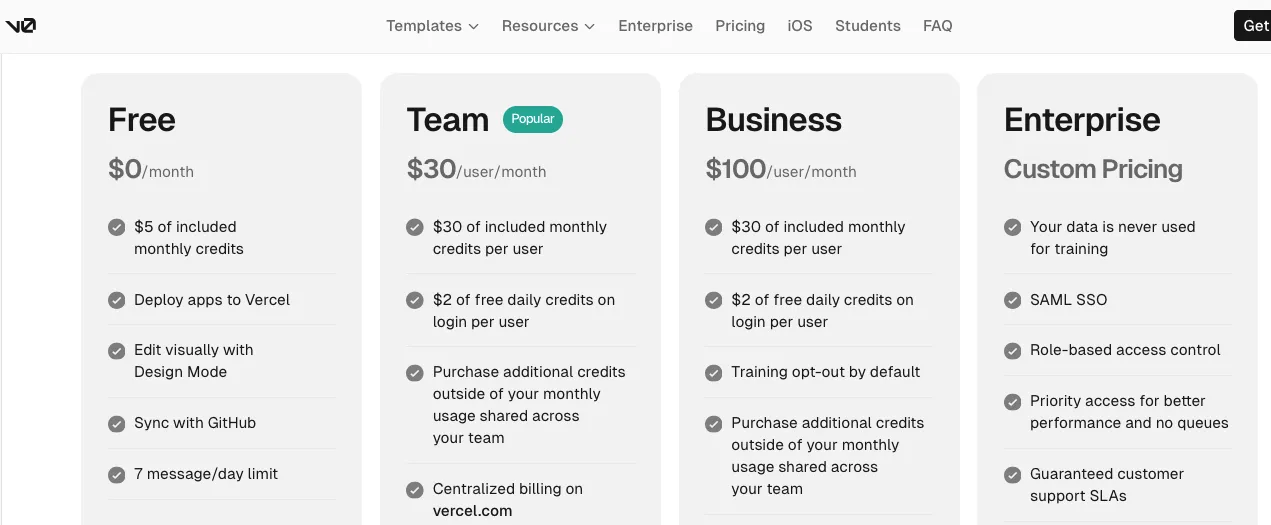
Its current public pricing page lists:
- Free: $0/month
- Plus: $30/user/month
- Business: $100/user/month
- Enterprise: Custom pricing
The Free plan includes $5 in monthly credits, GitHub sync, Design Mode, Vercel deployment, and a seven-message-per-day limit.
The Plus plan costs $30 per user per month and includes $30 in monthly credits per user, plus $2 in free daily credits when the user logs in.
And here’s something important.
v0 is usage-based.
So, your $30 subscription does not necessarily mean you can prompt and regenerate without thinking about usage.
Different models consume tokens at different rates, and v0 also lets paid users purchase additional credits when they need more.
Therefore, the actual cost depends heavily on how often you:
- Generate applications
- Make major changes
- Iterate with AI
- Use more powerful models
- Work across multiple projects
If you build occasionally, the Free plan may be enough to understand the platform.
If you’re actively shipping applications, Plus is the more realistic starting point.
Want the complete breakdown?
Read our Vercel v0 pricing guide before choosing a plan.
Cursor Pricing
Cursor starts slightly cheaper for an individual developer.
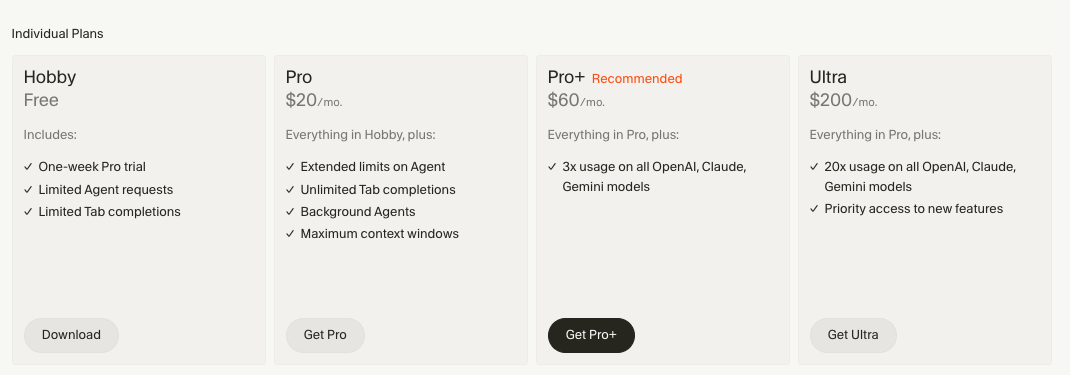
Its Hobby plan is free, while the standard Pro plan costs $20/month. Teams starts at $40 per user per month, with Enterprise available through custom pricing.
Cursor also offers heavier individual tiers.
Pro+ costs $60/month, while Ultra costs $200/month and is designed for much heavier Agent usage. Cursor’s own documentation describes Pro+ as including substantially more API agent usage than Pro, with Ultra offering considerably more again.
But there’s another new option for Indian developers.
Cursor launched Cursor Start on July 28, 2026, priced at ₹649/month, tax-inclusive.
It includes expanded access to Grok 4.5 and Composer, cloud agents, Cursor for iOS, plugins, MCP servers, hooks, and skills. The plan is currently designed for users in India and supports payment through UPI or card.
That’s a pretty attractive entry point if you’re in India.
Still, just like v0, Cursor’s real cost depends on how heavily you rely on AI agents and frontier models.
Confused by Cursor’s plans and usage limits?
See our complete Cursor pricing breakdown.
Which Is More Affordable?
At the standard global paid-entry level:
Cursor Pro → $20/month
v0 Plus → $30/user/month
So, Cursor has the cheaper entry price.
But I wouldn’t choose between v0 vs Cursor based on those $10 alone.
You’re buying two different workflows.
With v0, you are paying for a browser-based app-building environment with visual generation, editing, GitHub sync, and Vercel deployment.
With Cursor, you’re paying primarily for AI-assisted engineering inside your codebase, with Agent functionality, frontier models, MCPs, cloud agents, and other developer tools.
So, value depends on what replaces more work for you.
How Does Vitara.ai Stand Out?
Vitara keeps its pricing comparatively simple.
The current plans are:
- Starter: Free
- Build: $20/month
- Scale: $50/month
- Custom: For larger requirements
The Build plan provides 100 monthly credits and includes features such as code editing, code download, custom-domain support, and faster AI processing.
Scale increases that allowance to 250 monthly credits for $50/month.
So, if your priority is building a complete application while retaining access to your generated code, the $20 Build plan makes Vitara an interesting alternative.
Generate your frontend, backend, and working application from the same idea.
Build your full-stack app with Vitara.ai →
v0 vs Cursor: And the Winner Is
So, after comparing v0 vs Cursor features, pricing, agents, frontend development, full-stack capabilities, codebase context, and deployment…
Which one wins?
Well…
Neither tool wins every category.
And that’s actually the most important conclusion from this comparison.
They solve different parts of software development.
Choose v0 If:
v0 makes more sense if you:
- Want to turn an idea into an application quickly
- Care heavily about UI and visual iteration
- Start from prompts, screenshots, or designs
- Mostly build React and Next.js applications
- Want a browser-based workflow
- Want one-click Vercel deployment
- Don’t want to configure a traditional development environment first
v0 is particularly strong for greenfield projects where you’re starting with an idea rather than maintaining a mature repository. Vercel itself positions v0 around this type of design-led and rapid application creation.
So, for prototypes, landing pages, SaaS dashboards, MVPs, and design-heavy web apps…
I’d start with v0.
Choose Cursor If:
Cursor makes more sense if you:
- Already have an existing codebase
- Work across many files
- Regularly debug and refactor code
- Build in different programming languages
- Want deep terminal and Git workflows
- Need AI to understand repository-wide context
- Want more control over infrastructure and architecture
- Are comfortable with a developer-first environment
This is where Cursor really separates itself.
It isn’t trying to hide software engineering.
It’s trying to make software engineers much faster.
Vercel’s own comparison similarly places Cursor around production repositories, multi-file changes, backend work, refactoring, testing, and engineering tasks that depend on understanding an existing codebase.
So, for professional development work…
Cursor wins.
Still looking beyond Cursor and V0?
Compare the best Cursor alternatives and Top Vercel V0 Alternatives before making your final decision.
What About Vitara.ai?
There is also a third type of user.
You might not want to:
Design the application in one tool.
Move to another tool for backend development.
Configure everything manually.
Then connect another deployment workflow.
That’s where an all-in-one AI app builder becomes interesting.
Vitara is designed around generating full-stack applications through prompts while keeping the resulting code editable and exportable. Its current workflow centers on React frontend generation, backend capabilities, GitHub integration, and code ownership.
So the decision becomes:
v0 → Best for design-led rapid app creation
Cursor → Best for deep codebase engineering
Vitara.ai → Best when you want a simpler idea-to-full-stack-app workflow
And if you’re comparing several AI builders before deciding, our Cursor vs Lovable vs Bolt comparison is a good next read.
Can You Use v0 and Cursor Together?
Absolutely.
In fact, v0 and Cursor together may be better than choosing only one.
Here’s the workflow:
Idea → v0 → GitHub → Cursor → Production
Start in v0.
Generate the first version of your interface.
Refine the layout and visual states.
Connect the project to GitHub.
Then open that repository in Cursor.
From there, use Cursor for:
- Complex backend logic
- Refactoring
- Tests
- Debugging
- Repository-wide changes
- Infrastructure work
- Production polish
This isn’t just theoretical.
Vercel’s July 2026 comparison describes essentially the same workflow: teams create an initial project or UI in v0, push it through GitHub, and then continue repository-level engineering in Cursor.
That makes sense.
You don’t need to force one tool to do everything.
Use each where it is strongest.
v0 gets you moving.
Cursor takes you deeper.
If this prompt-first workflow interests you, you may also want to explore our guide to the best vibe coding tools.
FAQs: v0 vs Cursor
Is v0 Better Than Cursor for Frontend Development?
For rapid UI generation and visual experimentation, v0 is generally the better choice.
It starts from prompts, screenshots, or Figma designs and gives you an immediate browser preview, while its workflow is optimized around React, Next.js, Tailwind, and shadcn/ui.
Cursor can also build frontend code effectively.
But Cursor becomes more valuable when that frontend is already part of a larger repository requiring deeper engineering changes.
So:
Rapid visual frontend → v0
Frontend inside an established codebase → Cursor
Can v0 Replace Cursor in 2026?
For some projects, yes.
For every project? No.
v0 has grown far beyond simple component generation and can now create full-stack Next.js applications and work with GitHub-based projects.
But Cursor remains stronger for deep repository context, polyglot codebases, major refactors, debugging, tests, and ongoing software engineering.
So v0 can replace Cursor for some browser-first projects.
It doesn't replace the need for an engineering-focused IDE in every workflow.
Can You Use v0 and Cursor Together?
Yes.
And this might actually be the best approach.
Use v0 to create and visually refine the initial application.
Sync the project to GitHub.
Then open the repository in Cursor for complex backend development, debugging, tests, refactoring, and production engineering. Vercel documents this same general handoff as a common workflow.
Think of it as:
v0 for creation → Cursor for engineering.
Which Is Better for Beginners, v0 or Cursor?
For most complete beginners, v0 is easier to start with.
You can begin in a browser with a natural-language prompt and immediately see your application taking shape.
Cursor assumes more familiarity with concepts such as repositories, files, dependencies, terminals, frameworks, and debugging.
But for someone learning professional software development, Cursor gives you much more exposure to how a real codebase works.
So:
Non-technical beginner → v0
Aspiring/professional developer → Cursor
Want prompt-based full-stack building with editable code → Vitara.ai
That ultimately sums up the entire v0 vs Cursor comparison.
Can v0 Build a Full-Stack App Without Cursor?
Yes. v0 can build full-stack applications with frontend interfaces, backend endpoints, databases, authentication, and external APIs. It currently supports integrations such as Supabase, Neon, and Upstash, with Next.js providing its most reliable full-stack workflow.
You only need Cursor afterward if you want deeper repository-level engineering, custom architecture, extensive debugging, or complex refactoring.
Can Cursor Do Everything v0 Can Do?
Cursor can generate frontend components and build complete applications, but it doesn’t provide the same design-first experience as v0.
v0 is particularly strong when you want to:
- Generate UI visually from prompts
- Edit elements through Design Mode
- Preview changes instantly
- Iterate on layouts without manually changing CSS
- Publish directly to Vercel
Design Mode lets you visually select elements, change their styles, and apply those edits back to the actual source code.
So, Cursor can write similar code—but the workflow is different.
Is v0 or Cursor Better If I Don’t Know How to Code?
v0 is generally easier for non-coders and beginners.
You can start with a natural-language prompt, visually inspect the generated application, request changes conversationally, and deploy without setting up a traditional local development environment.
Cursor becomes more useful once you understand files, repositories, frameworks, dependencies, Git, and debugging.
Which Is Better for Building a SaaS MVP: v0 or Cursor?
For getting a SaaS MVP running quickly, I’d usually start with v0.
It can help generate the interface, add APIs and database functionality, connect services such as Supabase, and deploy the application through Vercel.
But once the MVP grows into a larger product with custom architecture and lots of interconnected code, Cursor becomes more valuable.
So the practical workflow can be:
- MVP creation → v0
- Complex engineering → Cursor
- Use both → when the product grows
Is Cursor Better Than v0 for Existing Codebases?
Yes, Cursor is generally the stronger choice for working deeply inside an established codebase.
Its value comes from combining repository context with agentic coding, allowing developers to work across connected files rather than treating each generated screen as an isolated task.
That said, v0 has improved considerably here. It now supports GitHub repositories, automatic branches, commits, and pull requests, so it should no longer be described as useful only for brand-new projects.
Does v0 Work With Existing GitHub Repositories?
Yes.
You can connect v0 to GitHub and work with existing repositories while using a branch-based workflow. v0 automatically creates dedicated branches, commits code changes, protects main, and lets you create pull requests when your changes are ready.
This is one of the biggest reasons the v0 vs Cursor comparison is much closer in 2026 than it was previously.
Is v0 Better Than Cursor for React and Next.js?
For quickly generating and visually refining a React or Next.js application, v0 has an advantage.
v0 defaults to Next.js for full-stack applications because its documentation says Next.js currently produces its most reliable results, including server actions, API routes, and backend functionality.
Cursor is better when you need:
- Greater architectural control
- Complex refactoring
- Large repository context
- Multiple frameworks or languages
- Existing development infrastructure
So, Next.js-first rapid building → v0. Deeper engineering flexibility → Cursor.
Should I Build in v0 and Then Move to Cursor?
Yes—and for many developers, this is probably the most practical approach.
Start with v0 when speed and visual iteration matter most.
Then move the GitHub repository into Cursor when the project needs more complex engineering.
A typical workflow looks like:
Prompt → v0 → UI + MVP → GitHub → Cursor → Refactor + Test + Scale
v0's current GitHub workflow supports branching, automatic commits, and pull requests, making this handoff much easier than older versions of the platform.
Which Is Better for Vibe Coding: v0 or Cursor?
Both qualify as powerful vibe coding tools, but they represent different styles of vibe coding.
v0: Tell AI what product you want and visually iterate on what it builds.
Cursor: Tell AI what engineering task you want completed inside your codebase.
Which Is Cheaper: v0 or Cursor?
At their standard global paid entry levels, Cursor is cheaper.
Cursor Pro currently starts at $20/month, while v0 Plus starts at $30 per user/month. Cursor also offers a free Hobby plan.
But price alone doesn't tell you which delivers better value.
v0 bundles visual building and Vercel deployment into its workflow, while Cursor focuses much more heavily on AI-assisted engineering.
For Indian developers, Cursor also introduced Cursor Start at ₹649/month in July 2026.
Do I Need v0 If I Already Have Cursor?
Not necessarily.
If you're comfortable designing interfaces directly through code and Cursor already handles your entire development workflow, you may not need v0.
But v0 can still save time when you want to quickly:
- Explore several UI concepts
- Turn a design into an application
- Prototype a dashboard
- Create landing pages
- Make visual changes without repeatedly editing CSS
So, think of v0 as a speed layer for visual creation, rather than something every Cursor user must have.
Is v0 Only for Frontend Development?
No—and this is an important outdated misconception to avoid in the article.
v0 can now build full-stack applications, create backend endpoints, connect databases, use APIs, and handle server-side functionality. It also added a VS Code-style editor and improved project previews in its 2026 update.
Its strength is still visual web application development, but calling it a frontend-only generator is no longer accurate.
What’s New?