Bolt.new vs Vitara.ai: Which AI App Builder Should You Use in 2026?
Picking between Bolt.new and Vitara.ai?
Bolt.new promises fast app and website creation, clean prompts, GitHub import, and quick browser based development.
But is it the right choice when your idea needs more than a quick prototype?
Vitara.ai takes a more complete route with web app development, mobile app development, backend support, editable code, GitHub integration, and code download.
But does it really work better for founders, developers, and product teams building serious apps?
So, I compared Bolt.new and Vitara.ai across the areas that matter most.
I looked at setup, app generation, frontend quality, backend control, code ownership, deployment, pricing, and long term product flexibility.
Keep reading to see which AI app builder makes more sense for your next product in 2026.
Bolt.new vs Vitara.ai: Quick Feature Breakdown
In a hurry?
I put together what we concluded in this blog.
You can compare both AI app builders and choose the best platform for your product idea, SaaS MVP, internal tool, or full stack app.
| Feature | Bolt.new | Vitara.ai | Who Wins? |
|---|---|---|---|
| Best For | Builders who want to create apps, websites, landing pages, and prototypes fast by chatting with AI | Founders, developers, and product teams that want to build web apps, mobile apps, and backend powered products from one platform | Bolt.new for quick prototypes, Vitara.ai for complete products |
| Pricing | Free plan available. Pro starts at $25 per month and Teams starts at $30 per member per month | Free starter plan available. Build plan starts at $20 per month and Scale plan starts at $50 per month | Vitara.ai |
| App Building Approach | Prompt based app and website creation inside a browser workspace with Figma and GitHub import | Prompt based full stack app development for websites, mobile applications, and backend systems | Vitara.ai |
| Frontend Development | Strong for quick visual output, design systems, UI generation, and website prototypes | Uses React frontend to create responsive user interfaces with editable source code | Tie |
| Backend Support | Bolt Cloud includes hosting, databases, integrations, user management, authentication, SEO, analytics, and custom domains | Uses Supabase backend with authentication, real time subscriptions, automatic APIs, database logic, and backend code generation | Vitara.ai |
| Mobile App Support | Good for apps and websites, but mainly focused on browser based app and website creation | Clearly supports web and mobile app development from one AI powered platform | Vitara.ai |
| Code Ownership | Good for building inside the Bolt ecosystem with cloud based workflows and GitHub support | Lets users keep ownership of code and data, edit generated code, download it, and deploy it | Vitara.ai |
| GitHub Workflow | Supports GitHub import, which helps users bring existing projects into Bolt | Offers GitHub integration for version control, collaboration, and continuous deployment | Tie |
| Deployment | Includes website hosting, custom domains, SEO boosting, analytics, and database options in paid plans | Supports deployment flexibility with editable and downloadable code, custom domain support, and full stack app structure | Vitara.ai |
| Scalability | Works well for fast builds, larger projects, hosted websites, and team based workflows | Better suited for growing products that need frontend, backend, database, APIs, authentication, and source code control | Vitara.ai |
| Non Technical Users | Easy to start with AI prompts, especially for fast prototypes and website ideas | Easy to start with prompts, but gives more control when the app grows into a serious product | Vitara.ai |
| Developers | Useful for quick builds, AI assisted fixes, GitHub imports, and fast UI work | Stronger for developers who want React, Supabase, GitHub, editable code, export, and deployment freedom | Vitara.ai |
| Overall Verdict | Bolt.new is a strong choice for quick app prototypes, websites, and visual product ideas | Vitara.ai is a better Bolt.new alternative for full stack apps, mobile apps, backend control, code ownership, and long term product development | Vitara.ai |

Use AI prompts to create web and mobile apps with React frontend, Supabase backend, editable code, and custom domain support.
Bolt.new vs Vitara.ai Feature Comparison
I’m not here to throw a biased “Vitara.ai is better than Bolt.new” statement at you.
Both tools can work, depending on what you want to build.
So let’s walk through each feature one by one and see how Bolt.new and Vitara.ai stack up in real product building use cases.
Here’s what we’ll compare:
- AI app building approach
- Frontend and UI generation
- Backend and database support
- Web and mobile app development
- Code ownership and export
- GitHub and developer workflow
- Deployment and hosting
- Pricing and usage limits
- Best use cases for founders, developers, and teams
AI App Building Comparison: Bolt.new or Vitara.ai?
When it comes to AI app builders, the first question is simple.
How quickly can you move from an idea to a working product?
That’s where Bolt.new gets attention. It lets you create apps and websites by chatting with AI. You can start from a prompt, bring in a GitHub project, or import from Figma if you already have a design direction.
That makes Bolt.new useful for fast visual builds.
But speed alone does not solve everything.
Once your app needs backend logic, authentication, database workflows, mobile app support, editable code, and future scalability, Vitara.ai starts to feel more practical.
Vitara.ai focuses on building full stack apps with AI. It helps users create web apps, mobile apps, and backend systems from one platform.
Bolt.new Strengths
- Good for quick prototypes
- Useful for browser based app and website generation
- Supports Figma and GitHub import
- Works well for landing pages, product demos, and early app ideas
- Helps users create a first working version fast
Vitara.ai Strengths
- Builds web apps, mobile apps, and backend systems
- Supports full stack app development from one platform
- Uses React frontend and Supabase backend
- Helps with UI, APIs, authentication, and database logic
- Gives more control when the product grows beyond the first version
Verdict
Bolt.new is strong when you want to build something quickly.
Vitara.ai is better when you want to build something complete.
If your goal is a quick prototype, Bolt.new works well. If your goal is a full stack product with backend logic, mobile support, editable code, and long term control, Vitara.ai wins this round.
Frontend and UI Generation Comparison
Frontend quality matters a lot.
A product can have strong logic in the background, but if the interface feels messy, users will not stay for long.
Bolt.new does a good job with visual generation. It can create app screens, websites, landing pages, and product interfaces from prompts. It also supports design systems, which helps when teams want cleaner and more consistent UI.
Vitara.ai also supports frontend creation, but its advantage comes from using React. That matters when developers need to edit components, connect screens with backend logic, and continue development outside the AI builder.
Bolt.new UI Features
- Fast UI generation from prompts
- Good for landing pages and website layouts
- Useful for product mockups and visual prototypes
- Supports design system based building
- Helps designers and founders see ideas quickly
Vitara.ai UI Features
- React based frontend development
- Responsive interface generation
- Editable frontend code
- Better fit for SaaS dashboards, portals, and internal tools
- Easier developer handoff for long term development
Verdict
Bolt.new is great for quick visual output.
Vitara.ai is better when the frontend needs to connect with backend logic, database workflows, authentication, and future product changes.
For simple screens, Bolt.new is enough. For a real product interface, Vitara.ai gives more room to grow.
Backend and Database Support Comparison
This is where the comparison gets serious.
Many AI app builders look impressive during the first prompt. But the real test starts when the app needs users, saved data, permissions, APIs, dashboards, and business logic.
Bolt.new offers backend support through Bolt Cloud. It includes hosting, databases, user management, authentication, analytics, SEO support, and custom domains.
That makes setup easier for users who want everything in one place.
Vitara.ai takes a more full stack focused path. It uses Supabase for backend development, which gives users authentication, database logic, real time features, and automatic APIs.
Bolt.new Backend Features
- Built in hosting support
- Database support through Bolt Cloud
- Authentication and user management
- Analytics and custom domain options
- Helpful for users who want less setup work
Vitara.ai Backend Features
- Supabase backend support
- Authentication and database workflows
- API generation support
- Real time app capabilities
- Better fit for SaaS apps, dashboards, marketplaces, booking apps, and business tools
Verdict
Bolt.new makes backend setup convenient.
Vitara.ai gives stronger backend control.
If you want a quick hosted app, Bolt.new is useful. If you want backend logic that developers can understand, extend, and maintain, Vitara.ai is the better option.
Web and Mobile App Development Comparison
A lot of users start with a web app.
Then the product grows.
Now they need a mobile app, a customer app, a responsive dashboard, or a mobile friendly workflow.
Bolt.new is strong for browser based app and website creation. It works well when the product is mainly web focused.
Vitara.ai clearly supports web and mobile app development, which gives it an advantage for founders and teams thinking beyond the first launch.
Bolt.new App Support
- Good for websites
- Good for browser based apps
- Useful for web first prototypes
- Helpful for landing pages and quick product demos
- Better when the project does not need deep mobile app planning
Vitara.ai App Support
- Supports web app development
- Supports mobile app development
- Helps build backend powered apps
- Better for multi screen product workflows
- Useful for founders who want one platform for web, mobile, and backend
Verdict
Bolt.new works well for web first builds.
Vitara.ai is better when your product roadmap includes mobile users, customer apps, admin dashboards, or mobile friendly business workflows.
Turn your idea into a real full-stack app with AI, clean code, backend support, and room to scale.
Code Ownership and Export Comparison
Code ownership is not a small detail.
It becomes very important when your product starts getting users, revenue, customer data, or investor attention.
Bolt.new supports GitHub workflows, which gives users a way to manage code history and continue development.
That is helpful.
But Vitara.ai makes code ownership a stronger part of its value. Users can edit code, download code, and deploy it. This gives founders and developers more confidence when they want to keep long term control over the product.
Bolt.new Code Control
- Supports GitHub based workflows
- Lets users work with existing projects
- Helps developers keep project history
- Useful for AI assisted development inside an existing workflow
Vitara.ai Code Control
- Gives editable code
- Allows code download
- Supports code ownership
- Makes developer handoff easier
- Gives more freedom for custom deployment and future changes
Verdict
Bolt.new gives useful GitHub based control.
Vitara.ai gives stronger ownership with editable and downloadable code.
If you want to avoid getting locked into one AI app builder, Vitara.ai is the safer choice.
GitHub and Developer Workflow Comparison
Modern software teams need more than prompt based app generation.
They need version control, collaboration, project history, review workflows, and deployment support.
Bolt.new supports GitHub import, which helps users bring existing projects into the platform.
Vitara.ai also supports GitHub integration, but it fits into a broader full stack development workflow with frontend, backend, database, and deployment support.
Bolt.new Developer Workflow
- GitHub import support
- Useful for existing projects
- Helps developers work faster with AI
- Good for editing and improving app code through prompts
Vitara.ai Developer Workflow
- GitHub integration support
- Better full stack development flow
- Works with React and Supabase
- Helps teams manage frontend and backend together
- Better fit for startups and agencies that need project handoff
Verdict
Both tools support developer workflows.
Bolt.new is good for GitHub import and AI assisted project work.
Vitara.ai is stronger when GitHub needs to support a complete product development process.
Deployment and Hosting Comparison
Deployment is the point where a fun prototype becomes a real product.
Bolt.new has strong built in hosting support through Bolt Cloud. Users can host apps, connect domains, use analytics, and manage parts of the app infrastructure in one workspace.
Vitara.ai gives more deployment freedom because users can edit, download, and deploy the code.
That difference matters when a product needs custom hosting, developer review, or future migration.
Bolt.new Deployment Features
- Built in hosting
- Custom domain support
- Analytics support
- Database and authentication support
- Useful for fast web publishing
Vitara.ai Deployment Features
- Code export support
- Custom deployment freedom
- Editable app structure
- Better for long term hosting control
- Useful when teams want to move beyond one platform
Verdict
Bolt.new is strong for fast publishing.
Vitara.ai is stronger for deployment freedom.
If you want quick hosting, Bolt.new works well. If you want to control where your product lives, Vitara.ai is better.
Pricing and Usage Limits Comparison
Pricing can look simple at first.
But with AI app builders, the real cost depends on usage.
Bolt.new uses a token based model. That works fine for small experiments, but larger projects can use more tokens as the AI reads and updates bigger project files.
Vitara.ai uses a credit based model. Its paid plan starts lower than Bolt.new, and it includes useful features like code editing and code download.
Bolt.new Pricing Points
- Free plan available
- Pro plan starts at $25 per month
- Token based usage model
- Good for users who want to test fast
- Usage can grow as the project becomes larger
Vitara.ai Pricing Points
- Free starter plan available
- Build plan starts at $20 per month
- Credit based usage model
- Includes edit and download code in paid plan
- Better value for users who want ownership and full stack control
Verdict
Bolt.new gives a strong free start.
Vitara.ai gives better paid value for users who care about code ownership, full stack development, and long term product control.
Best Use Case Comparison
This is the practical part.
Bolt.new and Vitara.ai are not built for exactly the same type of user.
Bolt.new is great when you want speed, visual output, and quick browser based app creation.
Vitara.ai is better when you want a complete product with frontend, backend, mobile support, editable code, and deployment flexibility.
Choose Bolt.new If
- You want to build a quick prototype
- You need a landing page or website fast
- You want to import from Figma or GitHub
- You care more about speed than long term control
- You’re testing an idea before investing more time
Choose Vitara.ai If
- You want to build a full stack app
- You need web and mobile app support
- You want React frontend and Supabase backend
- You care about code ownership and code download
- You want to build a SaaS MVP, dashboard, portal, marketplace, booking app, or internal tool
Verdict
Bolt.new is a good choice for quick prototypes and fast visual builds.
Vitara.ai is the better Bolt.new alternative for serious app development.
If you want to test an idea quickly, Bolt.new makes sense. If you want to build, own, edit, deploy, and scale a real product, Vitara.ai is the stronger choice.
Create apps with AI speed, code ownership, backend flexibility, and a developer-friendly workflow from day one.
Bolt.new Vs. Vitara.ai: Pricing Comparison
Vitara.ai’s Build plan starts at $20/month.
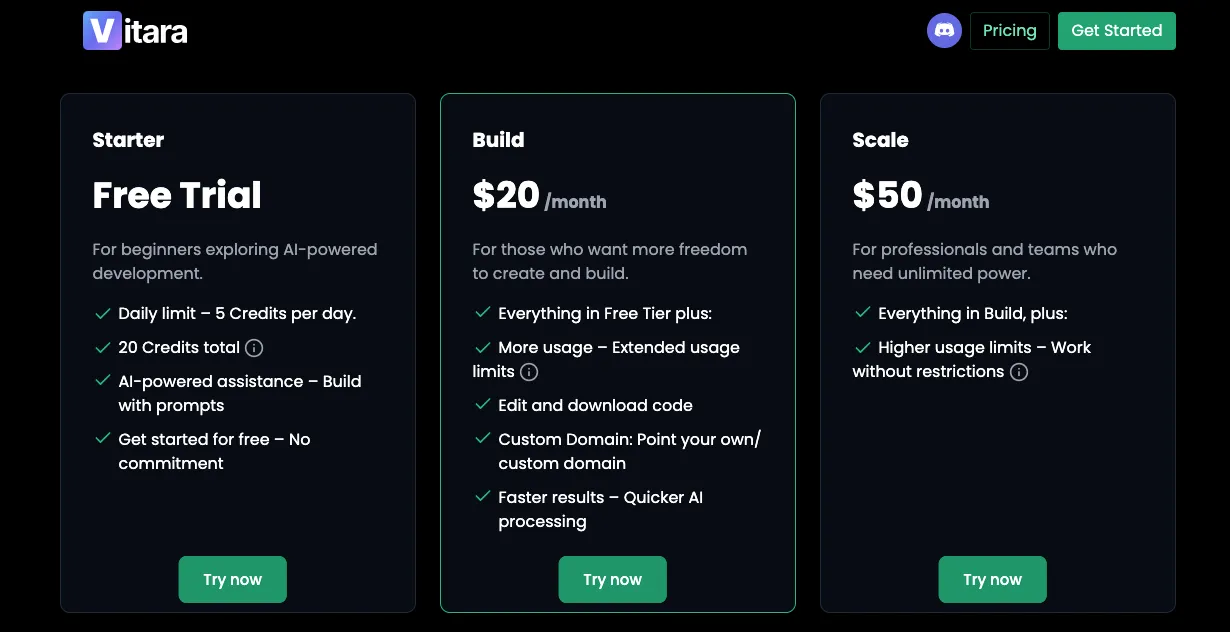
For that, you get:
- 100 monthly credits
- AI powered app building with prompts
- Edit and download code
- Custom domain support
- Faster AI processing
Vitara.ai also offers a free Starter plan with 5 credits per day and 20 one time credits. For heavier usage, the Scale plan starts at $50/month with 250 monthly credits.
Bolt.new’s Pro plan starts at $25 per month.
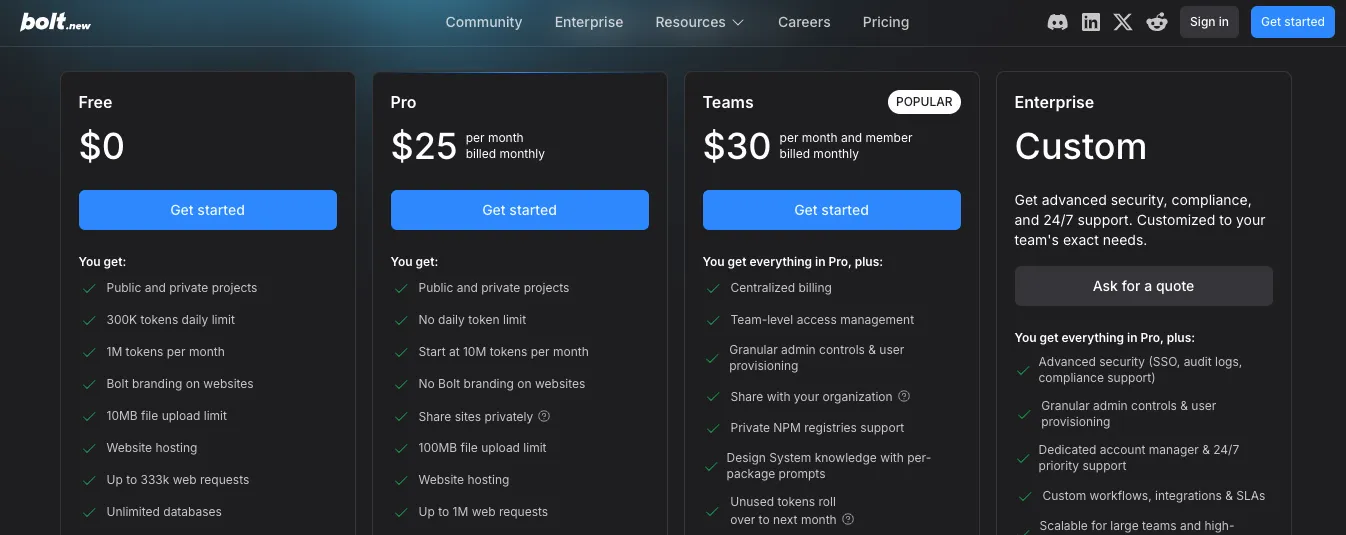
For that, you get:
- No daily token limit
- 10M monthly tokens to start
- Public and private projects
- Website hosting
- Custom domain support
- SEO boosting
- Unlimited databases
- Image editing with AI
Bolt.new also has a free plan with 300K daily tokens and 1M monthly tokens. Its Teams plan starts at $30 per member per month and includes centralized billing, team access management, admin controls, private NPM registry support, and design system knowledge.
Here is the part most builders should watch closely: Bolt.new uses a token based pricing system.
That means your usage depends on how much the AI needs to read, understand, and update your project. Bolt.new explains that larger projects can use more tokens per message because most token usage comes from syncing the project file system with the AI.
Vitara.ai uses a credit based model, which feels easier to understand for many founders and small teams. You know how many credits you get, and the paid plan clearly includes code editing, code download, and custom domain support.
Real cost comparison for a team of 5:
- Bolt.new Teams plan at $30/user/month = $150/month
- Vitara.ai Build plan = $20/month for standard paid usage
- Vitara.ai Scale plan = $50/month for higher monthly usage
If your main goal is quick website hosting and AI assisted web app building, Bolt.new’s Pro plan gives you a strong package.
But if you care about lower paid entry, editable code, code download, custom domain support, and long term product control, Vitara.ai gives better value for builders who want to move beyond the prototype stage.
Bolt.new vs Vitara.ai: And The Winner Is
Here is how I see it after comparing both AI app builders side by side.
Choose Bolt.new if you need:
- Fast app and website creation from prompts
- Figma import for design based workflows
- GitHub import for working with existing projects
- Built in hosting, database, authentication, analytics, and custom domain support
- A quick way to build landing pages, prototypes, product demos, and web first apps
Bolt.new works well for builders who want to move fast, test product ideas, and create working web experiences without spending too much time on setup.
Choose Vitara.ai if you want:
- Web app, mobile app, and backend development from one AI app builder
- React frontend and Supabase backend for a cleaner full stack structure
- Editable code that developers can review, improve, and extend
- Code download and stronger ownership over the product
- GitHub integration for version control, collaboration, and developer handoff
- A better fit for SaaS MVPs, dashboards, portals, booking apps, marketplaces, and internal business tools
- Lower paid entry with more focus on long term product control
For quick prototypes and web experiments, Bolt.new is a solid choice.
But for founders, developers, startup teams, and businesses that want to build a real product with backend logic, mobile support, editable code, and ownership, Vitara.ai gives you more control after the first version is built.
That’s why Vitara.ai stands out as the better Bolt.new alternative for serious app development in 2026.
Still comparing tools? These guides can help:
FAQs
1. Which is better, Bolt.new or Vitara.ai?
Vitara.ai is better if you want to build full stack apps with frontend, backend, mobile app support, editable code, and code download. Bolt.new is better for quick app prototypes, websites, landing pages, and fast visual product ideas.
2. Is Vitara.ai a good Bolt.new alternative?
Yes. Vitara.ai is a strong Bolt.new alternative for founders, developers, and product teams that want more control after the first version is built. It supports web apps, mobile apps, backend development, GitHub integration, editable code, and code download.
3. Which tool is more beginner friendly?
Bolt.new may feel easier at the start because it focuses on quick app and website creation through prompts.
Vitara.ai is also beginner friendly, but it gives more value when the project grows because users can manage frontend, backend, code, and deployment from one place.
4. Which tool is better for full stack app development?
Vitara.ai is better for full stack app development.
It supports:
- React frontend
- Supabase backend
- Authentication
- Database workflows
- API generation
- Editable and downloadable code
Bolt.new also offers backend features, but Vitara.ai gives a stronger full stack development path for serious app building.
5. Which tool is better for building SaaS MVPs?
Vitara.ai is better for SaaS MVP development because SaaS products usually need login, dashboards, user roles, database logic, backend workflows, and future code changes.
Bolt.new works well for quick SaaS prototypes. Vitara.ai fits better when the MVP needs to become a real product.
6. Can I build mobile apps with Vitara.ai and Bolt.new?
Vitara.ai clearly supports web and mobile app development from one platform. That makes it a better choice if your roadmap includes mobile app users.
Bolt.new is strong for apps and websites, but it is more commonly positioned around browser based app and website creation.
7. Which platform gives better code ownership?
Vitara.ai gives better code ownership because users can edit, download, and deploy their code. This matters when a product needs developer handoff, custom hosting, long term maintenance, or future scaling.
Bolt.new supports GitHub workflows, but Vitara.ai puts code ownership more clearly at the center of the product.
8. Which tool is more affordable, Bolt.new or Vitara.ai?
Vitara.ai has a lower paid entry plan. Its Build plan starts at $20 per month, while Bolt.new Pro starts at $25 per month.
The better value depends on usage. Bolt.new uses tokens, while Vitara.ai uses credits. For users who want code download and full stack control, Vitara.ai gives stronger value.
9. Should I switch from Bolt.new to Vitara.ai?
Switch to Vitara.ai if you want:
- Full stack app development
- Mobile app support
- Backend and database control
- Editable code
- Code download
- GitHub workflow
- Better long term product ownership
If you only need quick websites, landing pages, or early prototypes, Bolt.new can still work well.
10. Is Bolt.new good for production apps?
Bolt.new can help users build and host real apps, especially web based projects. It includes features like hosting, databases, authentication, analytics, custom domains, and GitHub workflows.
But for teams that want deeper backend control, code export, mobile app support, and long term ownership, Vitara.ai is usually the better fit.
11. Which tool is better for developers?
Vitara.ai is better for developers who want a cleaner full stack workflow with React, Supabase, GitHub integration, editable code, and code download.
Bolt.new is useful for developers who want to quickly prototype, import projects from GitHub, or speed up frontend and web app creation.
12. Which tool is better for non technical founders?
Vitara.ai is better for non technical founders who want to build a real product, not just a quick prototype. It gives them a path to create web apps, mobile apps, backend systems, and editable code without starting from scratch.
Bolt.new is a good choice for founders who want to test an idea quickly.
13. Does Vitara.ai support backend development?
Yes. Vitara.ai supports backend development through Supabase. It helps with authentication, database logic, APIs, and backend workflows.
That makes it useful for apps like SaaS dashboards, booking platforms, marketplaces, CRM tools, customer portals, and internal business systems.
14. Does Bolt.new support backend development?
Yes. Bolt.new supports backend features through Bolt Cloud, including hosting, databases, authentication, user management, analytics, and custom domains.
It works well for users who want a fast setup. Vitara.ai is better when backend control, code ownership, and long term flexibility matter more.
15. What is the main difference between Bolt.new and Vitara.ai?
The main difference is product depth.
Bolt.new is strong for fast app and website creation. Vitara.ai is stronger for full stack app development with web apps, mobile apps, backend support, editable code, code download, and GitHub integration.
So the choice depends on whether you want a fast prototype or a product you can keep building.
What’s New?