Base44 vs Windsurf: Which AI App Builder Should You Choose in 2026?
AI app builders are getting seriously capable.
You can describe an idea, ask AI to build it, and watch a working product appear much faster than traditional development.
But Base44 and Windsurf don’t take the same route to get you there.
Base44 is built around natural-language app creation. You describe the product, and it can handle the frontend, backend, database, authentication, and hosting inside one managed platform.
Windsurf is much closer to traditional software development—but with an AI agent working beside you. It is an agentic IDE designed to understand codebases, edit files, work with development tools, and help developers complete coding tasks faster.
So, in the Base44 vs Windsurf battle, which one should you actually choose?
Well, I’m going to compare them based on:
- AI app building
- Coding capabilities
- Backend and database
- Deployment
- Code control
- Ease of use
- Pricing
And that’s not all.
I’ll also show you where Vitara.ai fits between these two approaches.
Because what if you want the simplicity of an AI app builder without completely giving up control over your code?
Let’s find out.
New to this way of building software?
Start with our guide to vibe coding to understand how prompt-based development actually works.
Base44 vs Windsurf: Quick 30-Second Breakdown
Short on time?
No worries.
Here’s the easiest way to understand Base44 vs Windsurf.
Base44 is an AI app builder first.
You tell it what you want to build, and it takes care of much of the application stack for you.
Windsurf is an AI coding environment first.
You still work with a real development project, but its AI agents help you understand, write, change, and ship the code faster. Windsurf’s current product positioning emphasizes an IDE where developers and agents work together on the same codebase.
And Vitara.ai?
It sits somewhere in the middle.
Vitara is a browser-based full-stack development platform that lets you build through natural-language prompts while retaining ownership and access to the generated code.
Here’s the Base44 vs Windsurf comparison at a glance:
| Feature | Base44 | Windsurf | Vitara.ai |
|---|---|---|---|
| Best For | Non-coders, founders & fast MVPs | Developers & technical teams | Founders, developers & product builders |
| Primary Experience | Conversational AI app builder | Agentic IDE | Browser-based full-stack AI builder |
| Prompt-Based Building | ✔ | ✔ | ✔ |
| Built-In Backend | ✔ | ✖ Bring your own stack | ✔ |
| Built-In Database | ✔ | ✖ Bring your own | ✔ |
| Authentication | ✔ | Depends on project | ✔ |
| Direct Code Editing | ✔ | ✔ | ✔ |
| Existing Codebase Work | Possible, but not its main strength | ✔ Strong | ✔ |
| GitHub Workflow | ✔ Builder+ | ✔ | ✔ |
| Hosting / Deployment | Built in | Netlify App Deploys in beta | Deployment-ready workflow |
| Coding Knowledge Needed | Low | Medium–High | Low–Medium |
| Free Option | ✔ | ✔ | ✔ |
| Starting Paid Price | $16/mo annually | $20/mo Pro | $20/mo Build |
Base44’s current Starter plan is $16/month when billed annually, while GitHub integration starts from its Builder tier. Windsurf’s current individual Pro plan is listed at $20/month.
Quick Verdict?
If you’re a non-technical founder who wants to go from:
“I have an app idea” → “Here’s my working app”
with as little setup as possible, Base44 has the advantage.
If you’re a developer who wants AI to work inside a real codebase while you retain deep technical control, Windsurf is stronger.
And if you want prompt-driven full-stack development while keeping editable and downloadable code, Vitara.ai becomes an interesting Base44 alternative and Windsurf alternative. Vitara currently offers a free tier, while its paid Build plan includes code editing and code download.
Still comparing platforms?
Check out our guide to the best vibe coding tools before making your final choice.
Now, let’s get into the actual features.
Base44 vs Windsurf Feature Comparison
The quick comparison gives you the big picture.
But that isn’t enough to choose an AI app builder.
Because once you actually start building, the differences become much more obvious.
So, I’m breaking down Base44 vs Windsurf features across the things that matter during a real development workflow.
We’ll start with the most obvious question.
Which one can take you from an idea to an actual app faster?
Which Tool Is Better for Building an App From Scratch?
Imagine you want to create a SaaS client portal.
Nothing too unusual.
You need:
- User signup and login
- Customer profiles
- A dashboard
- Database-backed forms
- Different user roles
- Business logic
- A working backend
- Deployment
Now you have two options.
You could ask AI to build most of that infrastructure for you.
Or you could use AI to help you build and control each part yourself.
That difference sums up a large part of the Base44 or Windsurf decision.
Here’s how they compare:
| App Building Feature | Base44 | Windsurf | Vitara.ai |
|---|---|---|---|
| Build From Natural Language | ✔ | ✔ | ✔ |
| Frontend Generation | ✔ | ✔ | ✔ |
| Backend Generated/Included | ✔ | Depends on chosen stack | ✔ |
| Database Included | ✔ | Depends on chosen stack | ✔ |
| Authentication Included | ✔ | Requires project setup | ✔ |
| Browser-Based Builder | ✔ | ✖ Desktop IDE focused | ✔ |
| Instant Hosted App Workflow | ✔ | Partial | ✔ |
| Technical Setup Required | Low | Higher | Low |
| Suitable for Non-Coders | ✔ | Limited | ✔ |
Base44
This is probably Base44’s strongest use case.
You don’t start with an empty code editor.
You start with your idea.
For example:
“Build a CRM for my recruitment agency with candidate profiles, job openings, interview stages, notes, and an admin dashboard.”
Base44 interprets that prompt and generates the application’s structure, interface, logic, database, and other core functionality. Base44 describes its platform as capable of generating the frontend, backend, database, authentication, payments, and related application infrastructure from natural-language instructions.
From there, you keep talking to it.
Need another dashboard?
Ask for one.
Want a new database field?
Tell it.
Don’t like the layout?
Change it through another prompt or the visual editor.
That dramatically reduces the amount of technical setup required before you see something working.
And deployment?
Base44 handles hosting automatically. Its documentation states that newly created apps are live and shareable without requiring users to configure a separate deployment process.
That’s a big deal for beginners.
Because building an app is only half the job.
Normally, you also need to think about:
- Database hosting
- Authentication
- Environment configuration
- Deployment providers
- Build settings
- Infrastructure
Base44 hides much of that complexity.
And there’s another important point.
Some older Base44 vs Windsurf comparison articles make Base44 sound like a completely closed no-code box.
That’s outdated.
Base44 now provides code access and project export options, while Builder and higher plans can use two-way GitHub synchronization for local development and version control.
So you get more developer flexibility than older Base44 reviews may suggest.
Want to understand the platform in more detail?
Read our complete guide on what Base44 is.
Windsurf
Windsurf can absolutely help you start a new application too.
But it approaches the job differently.
Windsurf doesn’t try to make software development disappear.
Instead, it tries to make software development faster.
Its IDE is built around agents working directly with your codebase. Windsurf currently describes its product as an agentic IDE where the developer and AI agent operate side-by-side on the same project.
That means you can ask it to create:
- Components
- Pages
- APIs
- Database logic
- Tests
- Configuration files
- Entire features
And the agent can work across multiple files rather than only generating a single code snippet.
Pretty powerful.
But here’s the difference.
With Windsurf, you generally still need to know what stack you’re building with.
React or Next.js?
Supabase or Firebase?
PostgreSQL or MongoDB?
Which authentication provider?
Which packages?
How should the project be structured?
Where should it eventually run?
Windsurf can help with those decisions and execute much of the work.
But you’re still operating in a developer environment.
That’s exactly what experienced developers often want.
For a complete beginner?
It can also mean more decisions.
Windsurf has made deployment easier too. Its App Deploys feature can currently deploy supported Next.js, React, Vue, and Svelte web projects to Netlify directly through Cascade. However, Windsurf still labels the feature beta and says it is mainly intended for previews.
So the old claim that “Windsurf doesn’t deploy apps” isn’t really accurate anymore.
But deployment still isn’t the core product experience in the way it is with Base44.
Want to explore Windsurf separately?
Read our complete guide on what Windsurf is.
Winner?
For building a new application from scratch as quickly and simply as possible, my pick is:
Base44.
Why?
Because Base44 removes more decisions from the process.
Your database, authentication, backend, hosting, and app-building workflow already live inside the same platform.
Windsurf gives you more technical freedom.
But that freedom comes with more responsibility.
So:
Non-coder or first-time founder → Base44
Developer who wants stack-level control → Windsurf
Pretty simple.
But there’s a third option worth looking at.
How Does Vitara.ai Stand Out as an Alternative to Base44 & Windsurf?
Vitara.ai tries to close the gap between these two workflows.
Like Base44, you can start with a prompt.
You don’t need to spend the first hour manually configuring an entire development environment.
But like a developer-focused tool, the end result isn’t meant to be something you can never touch.
Vitara supports full-stack development through a browser-based environment, and its current product materials emphasize code ownership plus the ability to edit and download generated code.
For its standard full-stack workflow, Vitara uses a React frontend with Supabase-backed services for app data and related backend functionality.
So you can use AI to handle much of the heavy lifting while still getting a recognizable development stack.
That makes Vitara useful if you’re thinking:
“Base44 looks easy, but I want more control.”
Or:
“Windsurf looks powerful, but I don’t want to assemble every part of my app manually.”
That’s where Vitara fits.

Build your frontend and backend from a simple prompt, then edit or download the code when you need more control.
Build Your App With Vitara.ai →
Which Tool Offers Better AI Coding and Existing Codebase Control?
Building a new app is one thing.
Working on a real, growing codebase is another.
Once your project has dozens of components, APIs, dependencies, and files, your AI tool needs to understand more than your latest prompt.
This is where the Base44 vs Windsurf comparison gets interesting.
| Coding Feature | Base44 | Windsurf | Vitara.ai |
|---|---|---|---|
| Direct Code Editing | ✔ | ✔ | ✔ |
| Codebase Indexing | Limited vs IDE workflow | ✔ | Project-aware |
| Multi-File Changes | ✔ | ✔ Strong | ✔ |
| Terminal Access | Developer workflow available | ✔ | Browser-based workflow |
| Refactoring Existing Apps | ✔ | ✔ Strong | ✔ |
| Planning Before Coding | AI-assisted | ✔ Plan Mode | AI-assisted |
| Codebase Q&A | ✔ | ✔ Ask Mode | ✔ |
| Install Dependencies | Possible in developer workflow | ✔ Through Cascade | Managed workflow |
| Best for Large Existing Repositories | Good | Excellent | Good |
Base44
Base44 is no longer just:
Prompt → generate app → never touch the code.
That description is outdated.
Base44 now provides direct access to the React/Vite codebase through its Code tab.
You can inspect files, edit components, debug API calls, connect GitHub, and even move into a local development environment.
That gives technical users much more freedom.
And I like that direction.
Because eventually, most serious applications need something that prompts alone can’t fix perfectly.
Maybe you need to:
- Rewrite a component
- Debug an API request
- Adjust custom logic
- Change a dependency
- Work locally
- Hand the project to a developer
Base44 now gives you paths for doing that.
Its two-way GitHub integration can also keep changes made locally and inside Base44 synchronized on Builder and higher plans.
But there’s an important distinction.
Code editing is becoming a powerful part of Base44.
It still isn’t the center of the experience.
Base44’s main strength remains generating and managing an application around its own app-building environment and managed backend.
Windsurf flips that around.
Windsurf
This is where Windsurf starts showing its developer DNA.
Windsurf doesn’t simply look at the file you currently have open.
Its context engine indexes your local codebase and retrieves relevant code as you work, ask questions, or give instructions to its AI.
That matters.
Imagine you tell an AI:
“Change our subscription logic so canceled users retain access until the end of their billing period.”
That change might affect:
- Billing functions
- User records
- API endpoints
- UI states
- Permission checks
- Tests
You don’t want an AI that understands only one file.
You want it to understand how those files relate.
That’s much closer to what Windsurf is designed for.
Its Cascade agent currently gives you three useful modes.
- Code Mode: Creates, edits, and deletes files, runs terminal commands, installs dependencies, searches the codebase, and completes multi-step tasks.
- Plan Mode: Examines the codebase and creates an implementation plan before making changes.
- Ask Mode: Lets you investigate and understand the project without changing anything.
I particularly like the separation between planning and coding.
For a complex feature, immediately letting AI modify ten files isn’t always the best idea.
Sometimes you first want:
“Show me how you’d implement this.”
Then:
“Okay. Now build it.”
That’s where Windsurf feels much closer to an AI pair programmer than a traditional AI app builder.
Winner?
For AI coding and existing codebase control, Windsurf wins.
And this one isn’t particularly close.
Base44’s developer tools have become much better.
But if your daily workflow involves:
- Existing repositories
- Large codebases
- Refactoring
- Debugging
- Terminal commands
- Dependency management
- Multi-file feature development
Windsurf is built for that job.
Want to compare it with another developer-first AI editor?
Read our detailed Windsurf vs Cursor comparison.
You can also explore our guide to the top AI coding tools if repository-level AI assistance is your main priority.
How Does Vitara.ai Stand Out as an Alternative to Base44 & Windsurf?
Vitara.ai isn’t trying to turn itself into another Windsurf.
And that’s actually the point.
Instead of giving you an empty development environment and helping you construct every layer, Vitara tries to generate more of the full-stack foundation upfront.
Its DevStack currently centers on:
- React frontend
- Supabase backend
- Authentication and backend services
- Browser-based development
- GitHub integration
That means you can get the first version built through prompts and then continue working with the generated project rather than assembling every piece yourself.
So:
Windsurf → AI helps you engineer the codebase.
Vitara.ai → AI helps create more of the codebase before you engineer it further.
Different job.
Different advantage.
Which Tool Is Better for Backend, Database & Deployment?
Frontend demos are easy to impress people with.
A real app?
That’s where the backend starts causing headaches.
You need somewhere to store data.
You need authentication.
You may need APIs, server-side logic, permissions, and hosting.
So, which platform handles this side of Base44 vs Windsurf better?
| Backend Feature | Base44 | Windsurf | Vitara.ai |
|---|---|---|---|
| Managed Backend | ✔ | ✖ | ✔ Supabase |
| Built-In Database | ✔ NoSQL | Your choice | ✔ Supabase |
| Authentication | ✔ | Your choice | ✔ |
| Backend Functions | ✔ | Build with chosen stack | ✔ |
| Real-Time Data | ✔ | Depends on stack | ✔ |
| Hosting | Built in | Netlify App Deploys | Deployment workflow |
| Infrastructure Setup | Very Low | Higher | Low |
| Infrastructure Freedom | Medium | Very High | High within React/Supabase stack |
Base44
Backend convenience is one of Base44’s biggest strengths.
Its managed backend includes data storage, authentication, backend functions, integrations, and hosting.
So when your prompt says:
“Users should create accounts, save projects, and invite teammates.”
You aren’t necessarily stopping to decide:
Which database?
Which authentication library?
Where will the backend run?
How do I connect everything?
Base44 can handle much of that infrastructure inside the same ecosystem.
Its current application stack includes a managed NoSQL database, built-in authentication, serverless backend functions, and realtime updates.
And hosting is even simpler.
Base44 says apps are hosted automatically, so a generated app can become live without setting up a conventional deployment pipeline first.
For non-technical builders?
That’s a massive convenience.
If infrastructure simplicity is important to you, our Base44 vs Replit comparison explores another all-in-one development approach.
Windsurf
Windsurf gives you almost the opposite experience.
Want Supabase?
Use Supabase.
Want Firebase?
Use Firebase.
Want PostgreSQL with your own backend?
Go for it.
The AI can help write and configure the code, but Windsurf isn’t forcing your application onto one built-in backend architecture.
That gives developers enormous freedom.
It also means you own more of the infrastructure decisions.
And there’s one outdated Windsurf claim worth clearing up.
You may see comparisons saying Windsurf can’t deploy applications.
That’s no longer completely true.
Windsurf currently offers App Deploys, which can publish supported Next.js, React, Vue, and Svelte projects to Netlify through Cascade.
But there’s a catch.
The feature is still in beta, and Windsurf says App Deploys are primarily intended for previews. For sensitive production applications, it recommends claiming the deployment and following the provider’s production security practices.
So Windsurf has made deployment easier.
But it still isn’t an all-in-one managed app platform in the same sense as Base44.
Winner?
This depends on what you mean by better.
Want the least backend setup?
Base44 wins.
Want complete freedom to choose your database, backend framework, hosting provider, and architecture?
Windsurf wins.
That’s the real trade-off.
Base44 gives you infrastructure convenience.
Windsurf gives you infrastructure freedom.
How Does Vitara.ai Stand Out as an Alternative to Base44 & Windsurf?
Vitara takes a more opinionated middle route.
Instead of making you choose every backend component, its DevStack pairs a React frontend with Supabase for backend services, including authentication, real-time capabilities, and APIs.
That removes a lot of setup.
But Supabase is also a recognizable backend platform that developers can work with directly.
So you’re not starting completely from scratch like you might with an IDE-first workflow.
And you’re not relying on a totally abstract backend either.
For SaaS dashboards, portals, internal tools, and database-driven MVPs, that can be a practical balance.
Build a React frontend with a Supabase-backed application from one AI-driven workflow.
Start Building with Vitara,ai →
Which Tool Builds Better UI and Frontend?
Your app can have the smartest backend in the world.
But if the interface looks unfinished?
Users will notice that first.
So, the next thing I wanted to compare in Emergent vs v0 was frontend development.
Both platforms can generate responsive interfaces from natural-language prompts.
But their approach to design is noticeably different.
| Frontend Feature | Emergent | v0 | Vitara.ai |
|---|---|---|---|
| Responsive Web UI | ✔ | ✔ | ✔ |
| React Support | ✔ | ✔ Strong | ✔ |
| Next.js Expertise | ✔/Project-dependent | ✔ Strong | ✔ |
| Tailwind CSS | ✔ | ✔ | ✔ |
| Screenshot-Based Design Input | ✔ | ✔ | ✔ |
| Figma Import | — | ✔ | — |
| Visual Design Editing | Prompt-led changes | ✔ Design Mode | ✔ |
| Direct Code Editing | ✔ | ✔ | ✔ |
| Design System Support | Prompt-driven | ✔ Strong | ✔ |
| Best For | Functional product UI | Design-forward web apps | Full-stack apps with responsive React UI |
v0
This is where v0 really flexes its muscles.
Although v0 has expanded into a full-stack AI app builder, frontend development is still one of its strongest areas.
You can start with:
- A text prompt
- Screenshot
- Wireframe
- Mockup
- Figma design
And turn that input into a working interface. v0 specifically documents high-fidelity UI generation from mockups and designs, with strong support for Next.js, React, Tailwind CSS, and shadcn/ui.
But what I like more is what happens after the first generation.
You don’t have to keep typing prompts just to move a button 20 pixels.
v0’s Design Mode lets you select an element directly in the preview and adjust its styling visually or through natural-language instructions.
Once you’re happy, those changes are applied back to the source code.
That’s useful when you’re dealing with things like:
- Spacing
- Typography
- Layout
- Component styling
- Responsive behavior
- Colors
- UI polish
v0 also supports custom design systems and reusable component registries, which makes it more attractive for product teams that already have established UI standards.
So, for someone building a SaaS dashboard, landing page, ecommerce interface, or polished web application, v0 has a very strong frontend story.
Want to see how it performs against another design-focused AI builder?
Check our v0 vs Lovable comparison.
You can also see how it compares with another popular vibe coding platform in our Bolt.new vs v0 comparison.
Emergent
Emergent can also build complete responsive frontends.
But the design workflow feels more agent and prompt-driven.
You tell Emergent what you want the interface to look like, and the agent generates or modifies it for you.
Emergent’s own design guidance recommends giving the agent specific instructions around colors, spacing, typography, animations, breakpoints, and individual UI elements. It also supports using screenshots as visual references while refining a design.
For example, rather than saying:
Make this dashboard look better.
You’d get a better result by specifying exactly what should change:
- Increase card spacing
- Change button styling
- Adjust heading weight
- Modify the mobile layout
- Slow down an animation
That works well if you prefer conversational iteration.
You describe the visual outcome.
Emergent makes the changes.
And if the result still isn’t right, you continue refining it through prompts.
The platform also supports separate web and mobile frontends that can share the same backend and database, which becomes useful if you’re planning to take the same product across platforms.
But if your main priority is extremely detailed browser-based visual refinement, v0 currently provides more specialized design tooling for that workflow.
Winner?
For UI and frontend development, I’m giving this round to v0.
Why?
Because frontend isn’t simply something v0 can generate.
It’s an area where the platform has dedicated workflows around:
- High-fidelity UI generation
- Screenshot and Figma input
- Design Mode
- React and Next.js
- Tailwind CSS
- shadcn/ui
- Design systems
That gives developers and designers more ways to control exactly what the final interface looks like.
Emergent isn’t bad at UI.
Far from it.
But its biggest advantage lies more in building the complete product for you, rather than giving you the deepest design-specific workflow.
So this round goes to:
🏆 Winner: v0
How Does Vitara.ai Stand Out as an Alternative to Emergent & v0?
Here’s where Vitara.ai takes a slightly different route.
Vitara doesn’t treat the frontend as an isolated part of the product.
Its DevStack combines a React frontend with a Supabase-powered backend, so the interface you generate can be connected to authentication, APIs, real-time data, and application logic from the same development workflow.
That means you can build:
- Responsive React interfaces
- Dashboards
- Forms
- User accounts
- Data-driven screens
- Full product workflows
Without designing the UI first and figuring out how to connect everything later.
So if v0’s design-first approach is attractive but you want the frontend and backend built as one system, Vitara.ai is worth considering.
Build responsive React interfaces and the full-stack functionality behind them.
Build a Full-Stack App With Vitara.ai →
Which Tool Is Better for Backend, Database & Authentication?
Now we’re getting to the part where an AI-generated prototype becomes an actual application.
Because a landing page is easy.
A product with users, saved data, permissions, APIs, and business logic?
That’s a different game.
So, in this round of Vercel v0 vs Emergent, I compared how both platforms handle:
- Backend logic
- Databases
- Authentication
- APIs
- Data persistence
- CRUD operations
- External services
And this comparison is especially important because a lot of older content still describes v0 as a frontend-only tool.
That’s no longer accurate.
Here’s how things currently stack up.
| Backend Feature | Emergent | v0 | Vitara.ai |
|---|---|---|---|
| Full-Stack Generation | ✔ | ✔ | ✔ |
| Backend Logic | ✔ Agent-generated | ✔ | ✔ |
| Database Support | ✔ | ✔ | ✔ Supabase |
| Authentication | ✔ | ✔ | ✔ Supabase Auth |
| CRUD Operations | ✔ | ✔ | ✔ |
| API Generation | ✔ | ✔ Next.js routes | ✔ |
| Real-Time Data | ✔ with supported services | ✔ with integrations | ✔ Supabase |
| External APIs | ✔ | ✔ | ✔ |
| How Much Setup AI Handles | High | Medium–High | High |
| Best For | Automated end-to-end app building | Developer-guided full-stack apps | Full-stack apps with code ownership |
v0
Let’s clear up the biggest misconception first.
Yes, v0 can build backends.
And yes, it can build full-stack applications.
v0 defaults to Next.js for full-stack projects and can create backend endpoints using App Router conventions while connecting frontend and backend code inside the same application.
You can also ask it to connect databases such as:
- Supabase
- Neon
- Upstash
And then add features such as:
- User authentication
- CRUD operations
- API routes
- Data persistence
- Real-time functionality
v0’s own full-stack documentation actually demonstrates an incremental workflow where you first create the UI, then add the data layer, authentication, CRUD operations, and other backend features.
That’s an important detail.
Because it tells you something about how v0 thinks.
It gives you an AI-assisted development workflow rather than hiding the entire architecture from you.
You can tell it:
Add a Supabase database.
Then:
Create tables for users and projects.
Then:
Add authentication.
Then:
Make sure users can only access their own projects.
And keep building incrementally.
For developers, that’s a big plus.
You can understand what’s being added while still letting AI write much of the code.
v0 can also install integrations through Vercel’s marketplace for databases, storage, queues, AI models, and other services.
So no—v0 isn’t just making pretty React screens anymore.
If you’re interested in another full-stack comparison
our v0 vs Replit guide goes deeper into this developer-oriented workflow.
Emergent
Emergent goes further toward:
“Tell me what the application needs, and I’ll handle the implementation.”
Its core positioning is full-stack app generation from natural-language prompts, covering frontend, backend, authentication, testing, integrations, and deployment.
Let’s say you’re building a marketplace.
You might need:
- User registration
- Seller accounts
- Product listings
- Database storage
- Protected routes
- Payments
- Admin functionality
With Emergent, you can describe those requirements at the product level and have the agent work through the implementation.
You don’t necessarily have to decide every route, schema, or library manually before getting started.
Emergent can also integrate with Supabase for PostgreSQL databases, authentication, CRUD operations, storage, and real-time subscriptions. Its documentation shows workflows for generating both backend API endpoints and frontend data access around Supabase.
And that’s the real difference.
v0 says:
Let’s build the technical layers together.
Emergent leans closer to:
Tell me the outcome and let the agent assemble more of those layers for you.
For founders or non-technical builders, that can remove a lot of friction.
Want to see how this approach compares with another full-stack vibe coding platform?
Read our Emergent vs Bolt.new comparison.
Winner?
This round is much closer than several older Emergent AI vs v0 comparisons suggest.
Both can build:
- Backend logic
- Databases
- Authentication
- APIs
- Full-stack applications
So declaring Emergent the winner simply because “v0 can’t do backend” would be misleading in 2026.
The actual question is:
How much of the backend-building process do you want the AI to manage?
If you’re a developer who wants to choose services, inspect implementation details, and build your application incrementally, v0 is very capable.
But if your priority is reducing infrastructure and implementation decisions as much as possible?
Emergent has the edge.
Its workflow is built around letting agents take more responsibility for the finished application, from backend and authentication through testing and deployment.
So for this category:
🏆 Winner: Emergent — for maximum backend automation.
v0 remains the stronger choice if developer control matters more than automation.
How Does Vitara.ai Stand Out as an Alternative to Emergent & v0?
This is one of the most interesting areas for Vitara.ai.
Vitara’s stack combines a React frontend with Supabase for backend functionality.
Supabase provides the application with capabilities such as:
- Authentication
- Database storage
- Real-time subscriptions
- Automatic APIs
And Vitara builds around that stack directly in the browser.
Why does that matter?
Because there are two problems you may want to avoid.
With an extremely autonomous platform, you might want more visibility and control over what’s happening underneath.
With a developer-oriented platform, you may not want to manually stitch together every service just to launch an MVP.
Vitara aims for the middle.
Use AI to build the product, but keep a conventional full-stack architecture you can continue working with.
That can be particularly useful when you’re moving from:
“I have an idea.”
to:
“I need an actual product my developers can maintain.”
For a head-to-head breakdown, see our Emergent vs Vitara.ai comparison.
Or, if you’re researching this entire category, check our guide to the top AI coding tools.
Build the complete product without giving up control of the code behind it.
Start building With Vitara.ai →
Which Tool Gives Better Code Ownership, GitHub & Customization?
Building quickly feels great.
Until you need to change something the AI builder wasn’t designed for.
That’s when code ownership and customization start mattering a lot more.
Can you inspect the source code?
Can a developer take over?
Can you move the project into GitHub?
And what happens if your app eventually outgrows the platform?
Let’s compare.
| Code & Customization Feature | Base44 | Windsurf | Vitara.ai |
|---|---|---|---|
| View Source Code | ✔ | ✔ | ✔ |
| Edit Code Directly | ✔ | ✔ | ✔ |
| Download Project Code | ✔ | ✔ Already local/repository based | ✔ |
| GitHub Integration | ✔ Builder+ | ✔ | ✔ |
| Local Development | ✔ | ✔ Core workflow | ✔ |
| Use External Developer Tools | ✔ | ✔ | ✔ |
| Choose Your Own Stack | Partial | ✔ Full freedom | React + Supabase |
| Developer Handoff | ✔ | ✔ | ✔ |
| Raw Codebase Flexibility | High | Very High | High |
Base44
This is one area where older Base44 reviews can be misleading.
Base44 gives you much more code access today than it did earlier.
You can open the Code tab and inspect or edit the source code powering your application. Its current documentation also allows projects to be exported as ZIP files.
Need GitHub?
That’s available too.
On Builder and higher plans, Base44 supports two-way GitHub synchronization, meaning you can work in Base44 or your local development environment and keep the repository synchronized.
That’s a meaningful improvement.
You can:
- Work on the app locally
- Use version control
- Edit React code
- Make developer-level changes
- Connect external development workflows
- Hand the project over to technical teammates
Base44 has even expanded its developer tooling with a CLI and a backend-as-a-service workflow that can be used independently of the main visual app editor.
So saying:
“Base44 locks you in and you can never access your code”
wouldn’t be accurate anymore.
But there’s still a difference between having access to code and starting with complete architectural freedom.
Apps created through Base44’s main builder are designed around Base44’s services and JavaScript SDK. Developers can work outside the editor, but the Base44 backend remains an opinionated part of that workflow unless they replace or restructure it themselves.
That won’t matter to everyone.
In fact, the managed architecture is exactly why Base44 is so easy to use.
But it can matter once your project becomes more customized.
Windsurf
Windsurf approaches ownership from the opposite direction.
There isn’t really a separate “export my project” moment.
You’re already working with the codebase.
Your files, framework, packages, database integration, Git repository, backend architecture, and deployment workflow can all remain part of your normal development stack.
Windsurf’s AI operates inside that development environment rather than wrapping the project inside an all-in-one no-code platform.
That changes the relationship you have with the AI.
You’re not asking:
“Can I get access to the code?”
You’re asking:
“What should we change in the code?”
And for experienced developers, that’s a significant difference.
Need to replace a library?
Do it.
Want to migrate databases?
You can.
Need a custom backend architecture?
Build it.
Want to use your team’s existing Git workflow?
No problem.
The trade-off is obvious.
More freedom = more responsibility.
Windsurf won’t automatically make architecture, infrastructure, and maintenance disappear.
But for developers who want maximum control, that’s usually the point.
Winner?
For pure code ownership and customization, Windsurf wins.
You’re working directly with the project from the beginning.
However, Base44 deserves more credit here than many older comparisons give it.
Its ZIP export, Code tab, local development options, backend tooling, and two-way GitHub synchronization have narrowed the gap considerably.
So I’d put it like this:
Base44 → easier managed development with growing code access
Windsurf → maximum developer freedom from day one
Want more platforms with developer-level control?
See our guide to the best Windsurf alternatives.
How Does Vitara.ai Stand Out as an Alternative to Base44 & Windsurf?
This is probably one of Vitara.ai’s strongest arguments in this Base44 vs Windsurf comparison.
You can begin with AI-generated full-stack development.
But you still retain ownership of the resulting code.
Vitara states that generated code can be inspected, manually edited, downloaded, and deployed outside its development environment.
Its standard development approach also gives you a recognizable stack instead of hiding everything behind a proprietary visual layer.
That means:
- React frontend
- Supabase backend
- Editable source code
- Code download
- GitHub workflow
- Developer handoff
So if your concern with Base44 is:
“What happens when my developer needs to take over?”
Vitara is worth considering.
And if your concern with Windsurf is:
“Do I really need to assemble the entire project myself?”
Vitara addresses that from the other side.
Want the direct comparison?
Read our complete Base44 vs Vitara.ai comparison.
Generate the full-stack starting point, customize the source code, and continue developing as your product grows.
Build Your App With Vitara.ai →
Which Tool Is Easier for Non-Technical Users and Teams?
Features don’t matter much if you can’t actually use them.
And here, the Base44 or Windsurf decision becomes pretty straightforward.
Base44
Base44 has the lower learning curve.
You can start with a normal-language description instead of needing to understand repositories, package managers, terminals, or framework architecture.
Base44 itself positions the main App Editor as the faster, guided option for users who prefer visual and conversational building over a code-first workflow.
That makes it a strong fit for:
- Startup founders
- Product managers
- Small business owners
- Marketers
- Students
- Non-technical teams
You can still dive into the code later.
But you don’t need to begin there.
That’s an important difference.
Windsurf
Windsurf is easy for a coding IDE.
But that doesn’t automatically make it easy for someone who has never developed software.
A beginner may still encounter terms like:
- Repository
- Terminal
- Dependencies
- Environment variables
- API routes
- Build errors
- Git branches
Windsurf’s AI can help explain and handle many of these tasks.
But understanding what the agent is doing still becomes increasingly useful as the application gets more complex.
So Windsurf makes developers faster.
It doesn’t necessarily remove the need to understand development.
Winner?
For beginners?
Base44 wins.
For developers?
Windsurf will probably feel more natural.
This is why I don’t think asking which platform is “easier” gives us the complete answer.
It depends on who is sitting behind the keyboard.
If beginner-friendly AI building is your priority
also check our Lovable vs Base44 comparison.
Where Does Vitara.ai Fit?
Vitara.ai aims at users who want to start conversationally without being permanently separated from the underlying application.
Vitara describes itself as a browser-based full-stack platform where users can generate web and mobile applications through natural-language prompts, while the resulting code remains editable.
So a founder can start with:
“Build this for me.”
Then a developer can later move toward:
“Let me modify this myself.”
That’s a useful handoff.
Want more platforms built around that conversational workflow?
Explore our guide to chat-based AI app builders.
Which Tool Is Better for Production Apps and Long-Term Scaling?
Getting V1 working is exciting.
But there’s a question people often forget to ask:
What happens after people actually start using it?
Your MVP may eventually need:
- More complex permissions
- New integrations
- Custom business logic
- Performance improvements
- Developer collaboration
- Better testing
- Infrastructure changes
- Major refactoring
That’s when the difference between fast creation and long-term development becomes important.
Base44
Base44’s biggest production advantage is convenience.
Its platform can manage authentication, data, backend functions, hosting, integrations, and other backend concerns without requiring users to assemble all of those services separately.
That reduces infrastructure work.
And Base44’s newer developer tooling gives growing teams more escape routes than before.
For example, developers can export code, use GitHub, work locally, or even eject an existing Base44 app into a separate local project for more advanced development workflows.
That’s useful as an app becomes more serious.
But the convenience still comes from adopting Base44’s managed ecosystem.
For some teams, that’s a benefit.
For others, it becomes a trade-off.
If you’re reaching the point where you want to explore other workflows
see our guide to the best Base44 alternatives.
Windsurf
Windsurf gives you far fewer architectural guardrails.
But that also means fewer architectural ceilings imposed by the editor itself.
You can choose your:
- Framework
- Backend
- Database
- Hosting
- CI/CD workflow
- Testing stack
- Cloud provider
- Application architecture
That’s valuable when a project has an engineering team behind it.
But Windsurf isn’t magically responsible for making the resulting architecture scalable.
Your team still is.
The AI can help write, review, debug, and change the code.
The technical decisions remain yours.
Winner?
There isn’t one universal winner here.
Base44 wins for teams that want fewer infrastructure decisions.
Windsurf wins for teams that want maximum control over those decisions.
And that distinction matters much more than simply asking which tool has more AI features.
How Does Vitara.ai Stand Out?
Vitara.ai sits between those two extremes again.
It gives you an AI-first route to a working full-stack application while keeping the generated code editable and downloadable.
That can make it attractive for founders who need to move quickly today but don’t want today’s prototype workflow to dictate every technical decision tomorrow.
In short:
Base44 → managed simplicity
Windsurf → engineering freedom
Vitara.ai → AI-first development with code ownership
And that’s probably the clearest way to understand the three platforms.
For a deeper look at this approach, see Vitara.ai’s full-stack app builder.
Base44 vs Windsurf: Pricing Comparison (2026)
Now comes the part that can completely change your decision.
Pricing.
Because the cheapest-looking AI app builder is not always the cheapest once you actually start building.
You need to think about:
- AI usage limits
- Code editing
- GitHub access
- Backend features
- Deployment
- Model access
- Extra usage
- What happens when your app grows
So, how does Base44 vs Windsurf pricing actually compare?
Here’s the breakdown.
| Pricing Factor | Base44 | Windsurf | Vitara.ai |
|---|---|---|---|
| Free Plan | ✔ | ✔ | ✔ |
| Starting Paid Plan | Starter – $16/mo annually | Pro – $20/mo | Build – $20/mo |
| AI Usage | 100 message + 2,000 integration credits on Starter | Increased AI quotas on Pro | 100 monthly credits on Build |
| Code Editing | ✔ Starter+ | ✔ | ✔ Build |
| Code Download / Ownership | ✔ | ✔ | ✔ |
| GitHub Integration | Builder+ | ✔ Standard dev workflow | ✔ |
| Custom Domain | Builder+ | Deployment dependent | ✔ Build |
| Next Major Plan | Builder – $40/mo annually | Usage can be purchased additionally | Scale – $50/mo |
| Higher Usage | Pro $80 / Elite $160 annually | Extra usage at API pricing | Scale – 250 credits/mo |
Base44 Pricing
Base44 gives you quite a few pricing options.
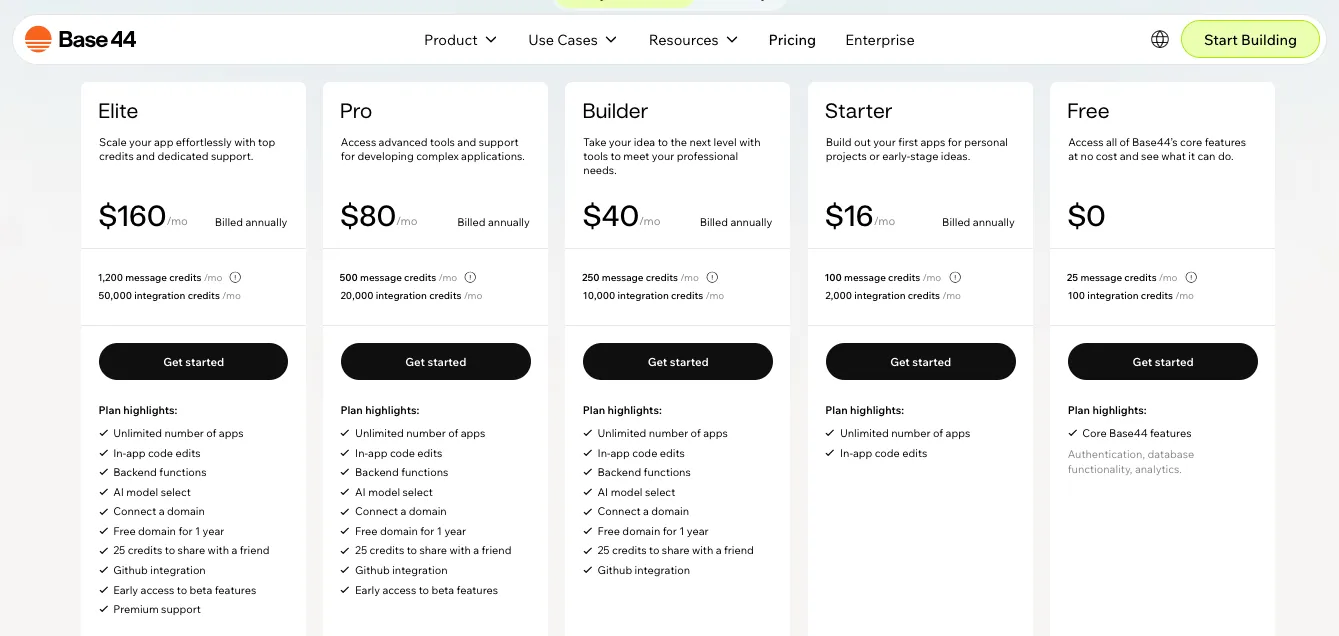
Its current plans are:
- Free: $0
- Starter: $16/month billed annually
- Builder: $40/month billed annually
- Pro: $80/month billed annually
- Elite: $160/month billed annually
The Free plan includes 25 monthly message credits and 100 integration credits.
Starter increases that to 100 message credits and 2,000 integration credits while adding unlimited apps and in-app code editing.
But there’s something important here.
If you’re building a more serious product and want features such as backend functions, a custom domain, GitHub integration, and AI model selection, you’ll need the $40/month Builder plan or higher.
So yes, Base44 starts at $16/month.
But the plan you’ll actually need depends heavily on how far you want to take the app.
That’s why I wouldn’t choose it based on the $16 figure alone.
Planning to use Base44?
Check our complete Base44 pricing guide before choosing a plan.
Windsurf Pricing
Windsurf keeps its individual pricing much simpler.
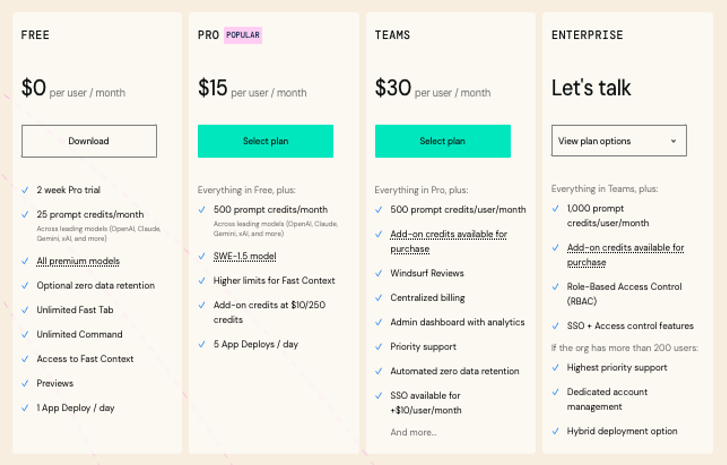
You currently have:
Free – $0
You get:
- Light agent usage
- Limited AI model availability
- Unlimited inline edits
- Unlimited Tab completions
Then there’s:
Pro – $20/month
Pro increases your AI usage limits and unlocks broader access to frontier OpenAI, Claude, and Gemini models.
It also includes access to cloud agents and lets you purchase additional usage when the included quota isn’t enough.
Windsurf currently offers first-time users a two-week Pro trial as well.
Pretty straightforward.
But remember:
You’re paying for an AI development environment.
Your database, cloud infrastructure, hosting provider, authentication service, and other external services may still have their own costs.
That’s different from Base44, where more infrastructure is bundled into the platform itself.
Want the complete breakdown before upgrading?
Read our Windsurf pricing guide.
Where Does Vitara.ai Pricing Fit?
Vitara.ai keeps the paid entry point at $20/month.
Its current published plans include:
- Starter: Free with limited usage
- Build: $20/month with 100 monthly credits
- Scale: $50/month with 250 monthly credits
- Custom: For higher usage requirements
Build includes features that matter once you’re moving beyond experimentation, including code editing, code download, custom-domain support, and faster AI processing.
That makes the comparison interesting.
Base44 technically has the cheaper paid starting point at $16/month annually.
But GitHub, backend functions, and custom-domain features sit on its $40/month Builder tier.
Vitara’s $20 Build tier focuses more quickly on code control and taking the application beyond a basic prototype.
Pricing Winner?
There isn’t one answer for everyone.
Base44 wins for the lowest paid entry price.
Windsurf offers straightforward value for developers who primarily need an AI coding environment.
Vitara.ai looks attractive if editable/downloadable code and a custom domain matter early in your project.
So don’t just compare:
$16 vs $20 vs $20.
Compare what you actually need to ship your application.
That’s the number that matters.
Base44 vs Windsurf: And the Winner Is…
After comparing everything, here’s what became clear.
There isn’t one universal winner in the Base44 vs Windsurf battle.
These tools are built for different people.
Choose Base44 if…
You want to describe an idea and get a functioning application without thinking too much about traditional development infrastructure.
It’s especially suitable if you:
- Aren’t a developer
- Want a fast MVP
- Prefer conversational building
- Want database and authentication handled
- Don’t want to configure hosting manually
- Prefer an all-in-one ecosystem
For that audience, Base44 is hard to ignore.
Choose Windsurf if…
You already think like a developer.
You want AI inside your existing development workflow rather than a platform that abstracts the workflow away.
Windsurf is the stronger choice for:
- Existing codebases
- Complex repositories
- Multi-file development
- Debugging
- Refactoring
- Terminal-heavy workflows
- Custom architectures
- Professional engineering teams
Its agentic IDE approach is fundamentally built around working directly with code rather than replacing the development environment.
Choose Vitara.ai if…
You find yourself stuck somewhere between those two.
Maybe Base44 looks convenient…
But you want stronger long-term code control.
Or Windsurf looks powerful…
But you don’t want to manually assemble every part of your full-stack application.
Vitara.ai gives you a prompt-first development workflow while keeping generated code available to edit, download, and continue developing. Vitara also states that users own the code generated through its platform.
That creates a useful middle ground.
Base44 → build without thinking much about code.
Windsurf → use AI while working deeply with code.
Vitara.ai → let AI build more of the full stack, then keep control of the code.
That’s the simplest way I’d make the decision.
Still comparing Base44 with other prompt-first platforms? Read Base44 vs Bolt.new.
Prefer developer-oriented AI tools? Our Windsurf vs Lovable comparison shows how the IDE-first and AI-builder approaches differ.
Describe your idea, generate the full-stack starting point, and keep building when your product gets serious.
Start Building With Vitara.ai →
FAQs: Base44 vs Windsurf
Is Base44 better than Windsurf for beginners?
Yes, Base44 is generally easier for complete beginners because its core workflow is conversational and manages more of the application's backend, database, authentication, and infrastructure for you. Base44 specifically positions the platform as usable without coding experience.
Windsurf is easier to appreciate once you're comfortable with software-development concepts.
Can Windsurf build a complete app from a prompt?
Yes, Windsurf's AI agents can create files, modify code, and help complete multi-step development tasks.
But it's not the same experience as Base44.
Windsurf works inside a developer-focused environment, so you retain more responsibility for choosing and managing the application's stack, architecture, infrastructure, and external services.
That’s why I’d describe Windsurf as an agentic IDE rather than a traditional no-code AI app builder.
Does Base44 let you export your code?
Yes.
This is one of the biggest outdated claims you'll find in older Base44 vs Windsurf comparison articles.
Base44 says users own their apps and code, and its current Builder and higher plans support two-way GitHub synchronization. It also provides in-app code-editing capabilities across paid tiers.
So Base44 is no longer accurately described as a platform where you can never access your source code.
Which is better for developers: Base44 or Windsurf?
For experienced developers working with existing applications, Windsurf is the stronger choice.
Its biggest advantage is that AI works directly inside your development workflow rather than requiring you to build around an app-builder abstraction.
Base44 makes more sense when the priority is getting a complete application running quickly while reducing infrastructure work.
So:
Developer control → Windsurf
App-building convenience → Base44
What Is the Best Alternative to Base44 and Windsurf?
If you're looking for an alternative that sits between an all-in-one app builder and a developer-focused AI coding environment, Vitara.ai is worth considering.
You can use natural-language prompts to build applications, while paid plans provide code editing and code download. Vitara's published pricing currently puts Build at $20/month and Scale at $50/month.
That makes it useful for founders and product builders who want to move fast without treating the generated source code like a black box.
Build quickly now. Keep control when the product grows.
Is Base44 the Same as Windsurf?
No. Base44 and Windsurf use AI for software development, but their workflows are quite different.
Base44 is primarily an AI app builder, while Windsurf is an agentic coding IDE designed to work deeply with source code and existing codebases. Windsurf indexes local code and uses that context while coding, answering questions, and making changes.
Can Base44 Replace Windsurf?
For a non-technical founder building a new MVP, Base44 may replace the need for Windsurf because it handles much more of the initial application setup automatically.
However, Windsurf is stronger when your work involves:
- Large existing repositories
- Complex refactoring
- Debugging across multiple files
- Terminal-heavy workflows
- Custom architecture
So Base44 can replace Windsurf for some builders, but not necessarily for professional development teams.
Can Windsurf Replace Base44?
Yes, technically—but you may have to do more yourself.
Windsurf can help create features, modify files, run commands, and work across an application. However, it doesn't provide the same managed all-in-one app-building workflow that makes Base44 attractive to non-coders.
If you want maximum control, Windsurf makes sense.
If you want fewer technical decisions, Base44 is easier.
Can I Build an App in Base44 and Continue Developing It in Windsurf?
Yes, this is actually an interesting workflow.
Base44 supports project-code export and GitHub integration, while Builder and higher plans support two-way GitHub synchronization for local development.
You could therefore:
- Build the first version in Base44
- Move or sync the project through GitHub
- Open the codebase in Windsurf
- Continue development with Cascade
Since Windsurf indexes local codebases, this can give you Base44's fast starting point plus Windsurf's deeper coding workflow.
Which Is Better for an MVP: Base44 or Windsurf?
For most non-technical founders, Base44 is better for getting an MVP running quickly because hosting and core application infrastructure are handled inside the platform. Base44 says generated apps are automatically hosted and become live without a separate deployment process.
Windsurf becomes more attractive when the MVP already has technical founders or developers who want complete control over how it is built.
Which Is Better for an Existing Codebase: Base44 or Windsurf?
Windsurf.
This is one of the clearest differences in the entire Base44 vs Windsurf comparison.
Windsurf is specifically built to understand and work across codebases. It indexes local project files and retrieves relevant code as you write, ask questions, or give Cascade development tasks.
That makes it better suited to:
- Existing SaaS products
- Mature repositories
- Refactoring
- Debugging
- Ongoing feature development
Base44 makes more sense when you're starting a new application through an AI-first builder.
Do I Need Coding Knowledge to Use Base44 or Windsurf?
You can use Base44 without knowing how to code, especially for initial app generation, editing, and deployment.
Windsurf can also generate significant amounts of code for you, but some development knowledge becomes much more valuable because you're working with files, dependencies, repositories, terminals, and application architecture.
So think of it this way:
Base44 → coding is optional at the beginning.
Windsurf → AI reduces coding work, but development knowledge still helps a lot.
Which Gives Me More Control Over My Code: Base44 or Windsurf?
Windsurf gives you greater raw control because the codebase itself is the development environment.
Base44 has improved considerably, though. It now supports code editing, ZIP export, local development, and GitHub synchronization rather than functioning as a completely closed no-code system.
The difference is therefore less about:
“Can I access my Base44 code?”
and more about:
“Do I want my workflow centered around a managed app platform or around the codebase itself?”
Can Base44 and Windsurf Build Mobile Apps?
They can both contribute to mobile-app workflows, but not in exactly the same way.
Base44 can prepare apps for Apple App Store and Google Play submission on eligible plans. Its current mobile approach uses a secure web-view wrapper around the published Base44 application, and some native-only capabilities such as full offline mode and push notifications remain limited.
Windsurf is an IDE, so it can assist with mobile codebases and frameworks, but you'll still manage the framework, build process, signing, infrastructure, and app-store workflow yourself.
Can Windsurf Deploy Apps Like Base44?
Yes—but not in the same all-in-one way.
Windsurf currently supports App Deploys to Netlify for frameworks including React, Next.js, Vue, and Svelte. However, Windsurf labels the feature beta and says it is primarily intended for previews.
Base44's hosting is more central to its product experience.
So:
- Base44: build + host inside one managed workflow
- Windsurf: develop freely + deploy through your preferred development workflow
Base44 vs Windsurf: Which One Should a Startup Founder Choose?
If you're a non-technical founder trying to validate an idea quickly, I'd lean toward Base44.
If you're a technical founder building a product you expect to customize heavily, Windsurf gives you more engineering freedom.
And if you want something between those two approaches—prompt-first full-stack development plus editable and downloadable code—that’s where Vitara.ai can be worth comparing.
A useful decision shortcut is:
Fastest managed MVP → Base44
Deepest developer control → Windsurf
AI-first full stack + code ownership → Vitara.ai
What’s New?