Base44 vs Replit: Which AI Platform is Right for You?
AI-powered app builders are changing the game. What once took weeks of coding, debugging, and deploying can now be done in hours, sometimes minutes. Whether you’re launching your first startup or streamlining internal tools, platforms like Base44 and Replit make vibe coding, building apps through natural language and AI collaboration, faster and easier than ever.
But with both promising speed, automation, and flexibility, the real question is: Which one is right for you?

In this guide, we will break down the key differences between Base44 and Replit, exploring their features, pricing, and performance.
Whether you’re a solo creator, a technical founder, or part of a growing team, this comparison will help you choose the best AI app builder for your goals in 2026.
What is Base44?

Base44 is a low-code AI app builder designed to help teams and non-technical users build full-stack applications quickly. It uses natural language prompts to generate code, set up databases, and design user interfaces, all within a simple visual workflow. With built-in features like authentication, hosting, and cloud deployment, Base44 makes it easy to launch production-ready apps without writing complex code.
What is Replit?
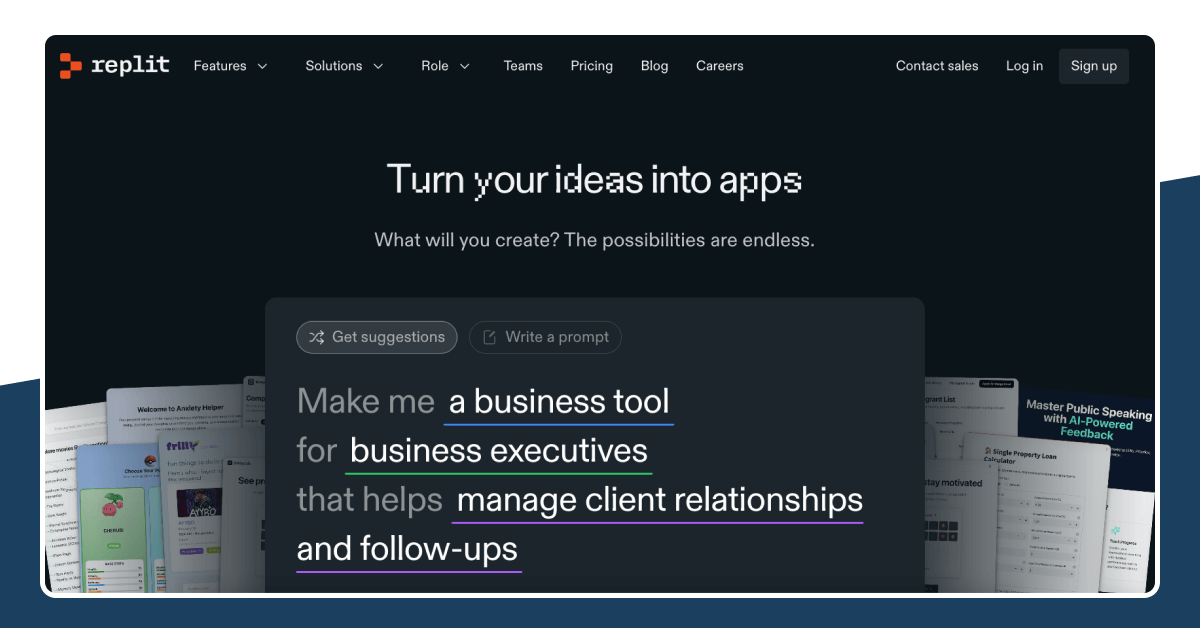
Replit is a browser-based development environment that lets users write, run, and deploy code from anywhere. Originally built for coding in the cloud, it has evolved into a powerful AI-driven platform with tools like Ghostwriter, its AI coding assistant. Replit supports dozens of programming languages, real-time collaboration, and full-stack development, making it ideal for developers who want full control without setting up local environments.
Base44 vs Replit: Key Differences
Both Base44 and Replit aim to simplify app development using AI, but they cater to different types of users and workflows. Here’s a side-by-side breakdown of their core features to help you choose the right platform.
| Feature | Base44 | Replit |
|---|---|---|
| AI Code Generation | Full-stack generation from natural language prompts | AI assistance with Ghostwriter inside the code editor |
| Development Approach | Low-code visual builder | Traditional coding with optional AI help |
| IDE / Editor | Basic built-in editor focused on simplicity | Powerful in-browser IDE with advanced dev tools |
| Database | Auto-generated schema, managed in the background | Replit DB or external integrations (PostgreSQL, etc.) |
| Deployment | Cloud hosting included by default | Replit Deployments with scaling options |
| Authentication | Built-in user auth out of the box | Requires setup or external integrations |
| Real-time Collaboration | Limited, designed for solo or small teams | Yes, real-time editing and team workspaces |
| Target Users | Startups, non-coders, product teams | Solo devs, learners, hobbyists, open-source coders |
| Learning Curve | Very low – minimal coding required | Moderate – suitable for those with coding experience |
| Code Control | Limited access to generated code | Full access and editability of all code |
| Pricing | Usage-based, scales with app complexity | Free plan available, with Pro tiers for extra features |
Which should you choose? Base44 or Replit
Choosing between Base44 and Replit depends on your skill level, goals and preferred workflow.
- Go with Base44 if you want to build a full‑stack app fast, using natural language and minimal code. It shines for rapid MVPs, prototypes and teams without heavy developer resources.
- Choose Replit if you are comfortable coding, want a browser‑based IDE with full control, collaboration and AI support (such as Ghostwriter). It works well for hobbyists, solo devs and teams who value flexibility.
Pick the platform that aligns with your current skill set and project phase. If you need speed and fewer technical demands, start with Base44. If you plan to build something scalable and want to code directly, pick Replit.
Also Read:
Pricing and Plans Explained: Base44 vs Replit
Here’s a clear breakdown of both platforms’ pricing tiers and what they offer. Use this to see how each aligns with your budget, project stage, and team size.
Base44
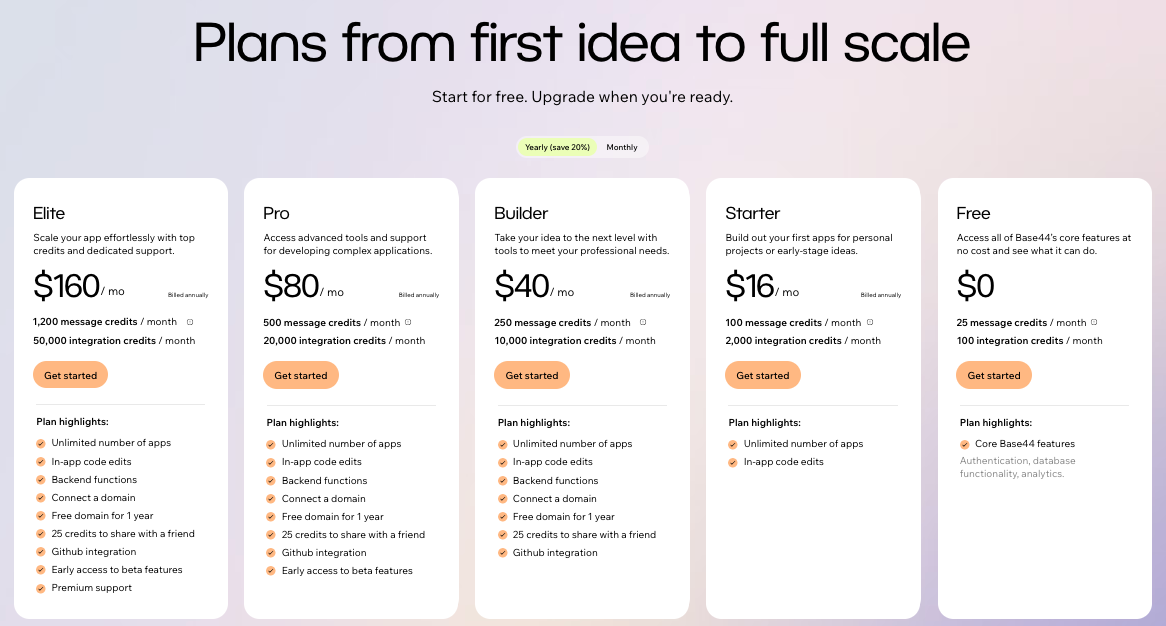
- Free Plan: $0/month. Includes full core features, 25 message credits per month, and 100 integration credits.
- Starter Plan: $16/month (billed annually). Includes 250 message credits, 2,000 integration credits, unlimited apps, and custom domain support.
- Builder Plan: $40/month (billed annually). Includes 250 message credits, 10,000 integration credits, in-app code editing, backend functions, and unlimited apps.
- Pro Plan: $80/month (billed annually). Offers 500 message credits, 20,000 integration credits, and advanced tools with enhanced support.
- Elite Plan: $160/month (billed annually). Includes 1,200 message credits, 50,000 integration credits, premium support, early feature access, unlimited apps, and a free domain for one year.
- Enterprise: Custom pricing. Designed for large organizations needing advanced integrations, support, and scale.
Replit
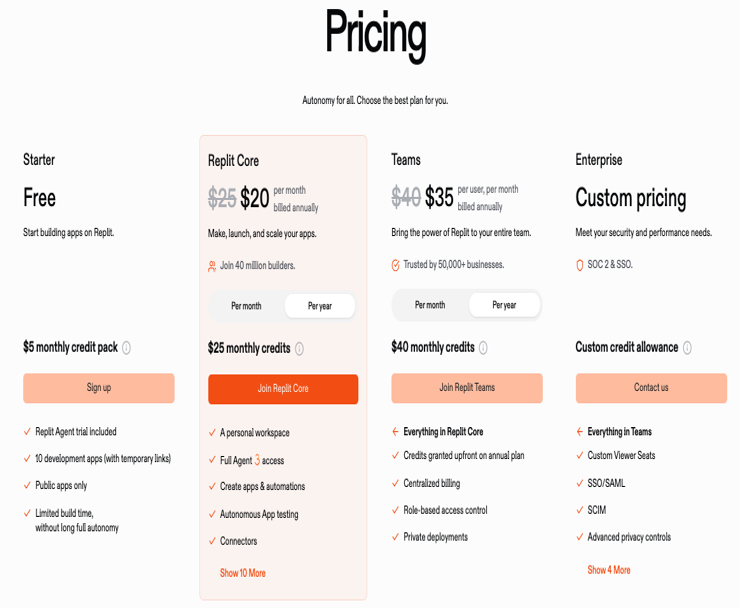
- Starter (Free): $0/month. Allows building public apps with limited resources. Great for learners and hobbyists.
- Core Plan: $20/month (billed annually). Unlocks AI tools like Ghostwriter, includes $25 in usage credits, supports private apps, and enables live deployments.
- Teams Plan: $35 per user/month (billed annually). Adds $40 in monthly usage credits, private deployments, team billing, and role-based access.
- Enterprise: Custom pricing. Built for organizations that require high-level security, centralized control, and large-scale deployments.
Also Read: Replit Pricing
Top Alternative to Base44 and Replit for You to Try
If you’re exploring other AI app builders beyond Base44 and Replit, a strong standout is Vitara AI. Unlike many tools that focus only on UI or basic code generation, Vitara delivers full-stack applications from simple language prompts. It builds the front end, back end, and handles deployment in a single flow.

Why Vitara AI Stands Out
- You describe your app idea in plain language, and Vitara turns it into working full-stack code
- You keep full ownership of the code, with the ability to export, edit, and deploy anywhere
- It runs entirely in the browser, so there’s no setup required
- It includes team-friendly features like version control, secure data handling, and collaboration
When to Consider Vitara AI
- You need to build an MVP quickly without writing complex code
- You want more control than no-code tools offer, without going fully manual
- You expect to scale and want to own your codebase from day one
- You prefer a single tool that handles front end, back end, database, and hosting together
Recommend To Also Read This:
- Top Base44 Alternatives
- Top Replit Alternatives
- Emergent vs Lovable
- Base44 vs Bolt.new
- Emergent vs Base44
Conclusion: Choosing the Right AI App Builder for You
The choice between Base44 and Replit ultimately depends on how you like to build.
If you prefer fast, AI-powered automation with minimal coding, Base44 is a strong option for getting full-stack apps up and running quickly.
If you enjoy coding, want full control, and thrive in a collaborative, browser-based IDE, Replit delivers a flexible and powerful environment with AI support built in.
Looking for something in between? Vitara AI is an excellent vibe coding tool. It gives you full-stack code from natural language, with more control than low-code tools and less complexity than starting from scratch.
As AI continues to reshape how software is built, the best platform is the one that matches your goals, your skills, and your pace. Whether you’re building a quick prototype or scaling a product, choose the tool that helps you build smarter, collaborate better, and launch with confidence.
Frequently Asked Questions
What is the main difference between Base44 and Replit?
Base44 is built for speed and simplicity ideal for users who want to build full-stack apps using natural language and minimal coding. It offers a low-code visual builder, automatic backend setup, and built-in deployment, making it perfect for startups, product teams, and non-coders.
Replit, on the other hand, is designed for developers who prefer writing and controlling their own code. It provides a full in-browser IDE, real-time collaboration, and an AI assistant (Ghostwriter) to support traditional coding workflows.
In short:
- Base44 = fast app building with minimal code
- Replit = full coding environment with AI-powered support
Which platform is better for non-coders or beginners?
For non‑coders or beginners who want to launch something fast with minimal technical overhead, Base44 is likely the better fit.
If you’re a beginner but are willing to learn code, enjoy tinkering, and want the flexibility to expand later, then Replit can still serve you well just expect more hands‑on work.
Can I build full‑stack applications using Replit?
Yes, you absolutely can build full‑stack applications on Replit. The platform offers browser‑based tooling, back‑end support and deployment options that let you go beyond front‑end only projects.
Does Base44 allow me to access and export the generated code?
Yes, Base44 allows you to access and export the generated code, especially for frontend components. You can push projects to GitHub and continue development outside the platform. However, full export access may require a paid plan, and some backend features may still rely on Base44’s infrastructure.
What are the pricing differences between Base44 and Replit?
Both platforms offer free tiers and scale pricing based on usage and features but their structures cater to different types of users. Here's a quick breakdown:
Base44 Pricing:
- Free Plan – $0/month: Includes core features, 25 message credits, and 100 integration credits.
- Starter to Elite Plans – $16 to $160/month (billed annually): Higher message/integration limits, in-app editing, custom domains, and premium support.
- Enterprise – Custom pricing for large-scale teams.
Replit Pricing:
- Starter (Free) – $0/month: Build public apps with limited resources.
- Core Plan – $20/month: Unlocks Ghostwriter AI, private apps, and live deployments.
- Teams Plan – $35/user/month: Adds usage credits, team billing, and role-based access.
- Enterprise – Custom pricing for org-wide control and security.
Which is more suitable for team collaboration: Base44 or Replit?
Replit is more suitable for real-time team collaboration, offering live editing, role-based access, and developer-focused tools.
Base44 supports collaboration too, but it’s more limited ideal for small teams working in a low-code environment with shared app workflows.
Choose Replit for coding teams, Base44 for product or non-technical teams.
Is there a better alternative to Base44 and Replit for AI app building?
Yes, one standout option is Vitara AI, which offers a hybrid approach combining the speed of AI‑driven app generation and the control of full‑stack code.
What’s New?