How to Build a Real Estate Website in Under 2 Hours Using Vibe Coding
Building a real estate website is not just about adding photos, listings, and a contact form.
A good website should help visitors search properties, compare options, understand locations, contact the agent, and book viewings without confusion.
But building all of that manually can take time, especially when you need property cards, filters, lead forms, mobile-friendly pages, and app-like features.
That’s where Vitara AI helps.
With Vitara, you can use vibe coding to describe your website in plain language and create a fast first version in under 2 hours.
How? Let’s find out..

Create property listings, search filters, lead forms, and mobile-friendly pages with AI-powered vibe coding.
Start Building with Vitara.ai →
What Is Vibe Coding and Why Does It Work for Real Estate Websites?
Vibe coding is a simple idea.
You explain what you want to build, and an AI tool helps turn that idea into working software. Instead of writing every line of code yourself, you guide the tool with prompts, check the output, and keep improving it through follow-up instructions.
For example, you can type something like:
“Create a real estate website for a property agent with featured listings, search filters, agent profile, viewing request form, testimonials, and mobile-friendly design.”
A good vibe coding platform should understand the purpose of the website and generate a usable starting point.
This works well for real estate websites because the structure is usually clear. Most real estate websites need similar sections:
- Homepage
- Featured properties
- Property listing page
- Property detail page
- Search and filters
- Agent or agency profile
- Contact form
- Book a viewing form
- Neighborhood or city pages
- Testimonials
- Call-to-action sections
- Footer with contact details
You don’t need to reinvent the full structure every time. You need a tool that can create the foundation quickly, then let you refine it based on the agent, city, property type, and target audience.
That’s where Vitara becomes helpful.
A normal AI website builder may create a nice-looking homepage, but a real estate website often needs more than that. Once you add listings, forms, filters, user flows, and backend logic, the website starts acting more like a web app.
Vitara’s platform is built around creating websites, mobile apps, and backend systems in one place. It includes React frontend support, Supabase backend support, browser-based development, GitHub integration, prompt-based iterations, and editable code.
In simple words, it gives you more room to build something practical, not just a static real estate landing page.
Why Use Vitara AI to Build a Real Estate Website?
Vitara is useful for this type of project because real estate websites often sit between a normal website and a custom web app.
A basic website shows information.
A real estate website should help users take action.
Someone may land on the homepage, search for a 2 BHK apartment, open a property detail page, check the location, fill out a viewing form, and wait for the agent to call back. That full journey needs more planning than a simple brochure website.
Vitara helps because you can describe that journey in a prompt.
You can ask it to create a homepage, property listing section, filters, detail pages, contact forms, booking forms, and lead capture areas. If the first version is too simple, you can ask Vitara to improve it with follow-up prompts.
That’s helpful if you’re a freelancer building websites for real estate agents. It’s also useful if you’re an agent, broker, or property consultant who wants to launch quickly without waiting weeks for a custom build.
Vitara says its vibe coding tool can generate frontend and backend code, handle UI, APIs, databases, authentication, routing, form handling, and prompt-based changes. It also says users can inspect, edit, export, and deploy the source code, which gives more control than many closed no-code tools.
This matters because a real estate website may grow later.
You may start with five featured properties. Then you may want property filters. Then a seller inquiry form. Then an admin dashboard. Then user login. Then a CRM connection.
If your website builder is too limited, you may need to rebuild later.
Vitara gives you a faster starting point while still keeping the project flexible. That’s the main reason it works well as an AI real estate website builder, especially for MVPs, property showcase websites, agent websites, and lead generation websites.
Use Vitara to generate listing pages, property detail pages, inquiry forms, and booking flows from simple prompts.
Create Your Website Now →
What Features Should a Real Estate Website Include?
Before you start building inside Vitara, it helps to understand what the website actually needs.
A real estate website should not be just a gallery of property photos. It should help visitors trust the agent, browse listings easily, and send an inquiry without friction.
Here are the main features worth adding.
Property Listings
This is the core of the website.
Each property card should show the most useful details quickly. That includes the property image, price, location, property type, number of bedrooms, bathrooms, area, and availability status.
A good property card should also include a clear button like “View Details” or “Book a Viewing.”
This is helpful because visitors don’t want to open every listing just to understand the basics.
Property Detail Pages
Each listing should have its own detail page.
This page can include:
- Larger image gallery
- Full property description
- Amenities
- Nearby landmarks
- Map section
- Pricing details
- Agent contact box
- Similar properties
If you’re building a property listing website with AI, don’t skip this page. A detail page gives buyers or renters the information they need before they contact the agent.
Search and Filters
Search filters make the website easier to use.
Visitors should be able to filter properties by location, price range, property type, bedrooms, bathrooms, and sale or rental status.
For example, someone may only want:
- Apartments in Bandra
- Villas under ₹3 crore
- Commercial spaces in Gurgaon
- 2 BHK flats for rent in Pune
- Luxury homes in South Delhi
These filters make the browsing experience feel more useful and less random.
Lead Capture Forms
A real estate website should generate leads.
That means you need forms in the right places. You can add:
- Contact agent form
- Book a viewing form
- Request a callback form
- Seller inquiry form
- Buyer requirement form
- Property valuation form
Keep the forms simple.
Ask for:
- Name
- Phone number
- Preferred location
- Budget
- Message
If you ask for too much information too early, people may leave without submitting anything.
Agent or Agency Profile
Trust matters a lot in real estate.
People are not just buying a product. They are making a big financial decision. Your website should clearly show who the agent or agency is, what areas they serve, what type of properties they handle, and why visitors can trust them.
Add:
- Profile photo
- Short bio
- Contact details
- Experience
- Service areas
- Testimonials
- Office location
Neighborhood Pages
Neighborhood pages are useful for both users and SEO.
Instead of only targeting broad terms like “real estate agent,” you can create pages around local searches like:
- Homes for sale in Andheri
- Apartments for rent in Whitefield
- Luxury villas in Goa
- Commercial property in Noida
- Best neighborhoods to buy property in Mumbai
These pages help buyers understand the area and give search engines more location-specific content to rank.
Mobile-Friendly Design
Many users will open your real estate website from a phone.
They may click from Google, WhatsApp, Instagram, Facebook ads, or a property listing link shared by an agent.
If your website is hard to use on mobile, you may lose leads.
That’s why every real estate website should have:
- Mobile-friendly property cards
- Readable text
- Easy-to-tap buttons
- Simple forms
- Clean navigation
Step-by-Step Guide to Building a Real Estate Website with a Vibe Coding Platform
Step 1: Plan Your Real Estate Website Before Opening Vitara
The fastest way to build with AI is to plan before you prompt.
That may sound boring, but it saves time.
If you open Vitara without a clear idea, you may end up with a generic website that looks fine but doesn’t match the business. A strong plan helps the AI understand what to build and reduces the number of corrections you’ll need later.
Start by answering a few simple questions:
- Who is the website for?
- Is it for a solo agent, real estate agency, broker, builder, rental business, or property consultant?
- Which location are you targeting?
- Is the website focused on one city, multiple neighborhoods, or a specific property type?
- What kind of properties will be listed?
- Residential apartments, villas, commercial spaces, rental homes, luxury properties, new construction projects, or land?
- What should visitors do?
- Should they call the agent, book a viewing, request a valuation, submit property requirements, or browse featured listings?
For this guide, let’s use a simple example.
We’ll build a real estate website for a local property agent who wants to showcase homes, collect buyer leads, and let visitors request property viewings.
That gives Vitara a clear direction.
Step 2: Write a Strong Prompt for Vitara AI
The prompt is where most of the quality comes from.
A weak prompt creates a weak first version. A clear prompt gives Vitara enough information to build something much closer to what you need.
Instead of writing:
“Build a real estate website.”
Use a detailed prompt like this:
“Create a modern real estate website for a property agent in Mumbai. The website should include a homepage, featured property listings, property detail pages, search filters by location, price, property type, bedrooms, and status, an agent profile section, contact form, book a viewing form, testimonials, neighborhood guide section, and mobile-friendly design. Use a clean layout with strong calls to action for buyer leads and seller inquiries.”
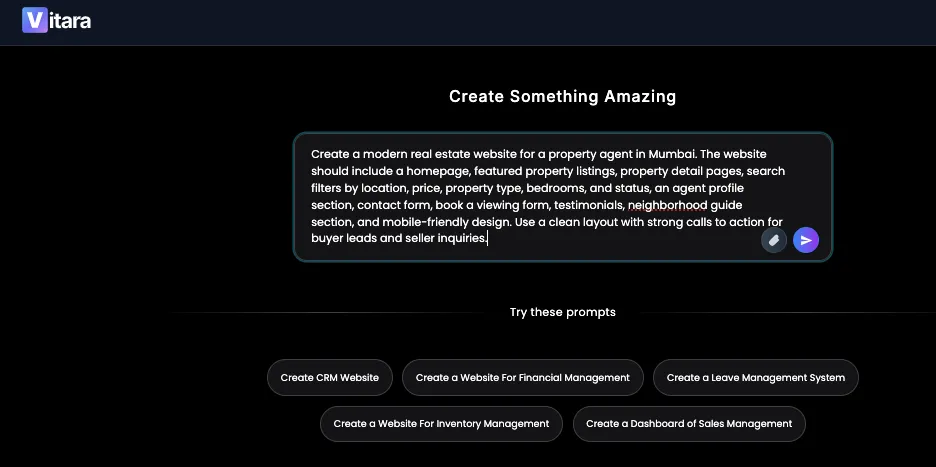
This prompt works because it tells Vitara the full picture.
It explains:
- The business type
- The target location
- The pages needed
- The property features
- The search filters
- The lead capture forms
- The mobile-friendly design requirement
- The conversion goal
That last part is important. A real estate website should not only look professional. It should help generate buyer leads, seller inquiries, and viewing requests.
You can also make the prompt more specific based on your project.
For a luxury real estate website, you can ask for:
- Premium layout
- Large property images
- Elegant typography
- High-end neighborhood sections
For a rental website, you can ask for:
- Rent filters
- Availability status
- Tenant inquiry forms
- Property manager details
For a builder website, you can ask for:
- Project pages
- Floor plans
- Amenities
- Construction status
- Brochure download forms
This is the advantage of using a prompt to website builder like Vitara. You can shape the website around the real estate business instead of forcing the business into a fixed template.
Step 3: Generate the First Version of the Website
Once your prompt is ready, enter it into Vitara and let the platform generate the first version.
At this stage, don’t expect perfection.
The goal is to get a strong working base in place quickly. You want the main structure, pages, layout, and user flow to appear so you can start reviewing and improving.
For a real estate website, the first version should ideally include:
- Homepage hero section
- Featured property cards
- Search and filter section
- Property listing layout
- Property detail page structure
- Agent profile section
- Lead capture form
- Book a viewing form
- Testimonials
- Neighborhood guide section
- Footer with contact details
- Mobile-friendly layout
This is where Vitara can save a lot of time.
Normally, you would have to design the layout, create the components, build property cards, write form logic, connect pages, and check responsiveness manually. With Vitara, you can start from an AI-generated version and improve it through follow-up prompts.
For example, after the first version is generated, you might ask:
- “Make the featured property cards more visual and add price, location, bedrooms, bathrooms, and area.”
- “Add a sticky contact button for mobile users.”
- “Create a separate property detail page with image gallery, amenities, map section, and book a viewing form.”
- “Make the homepage more focused on buyer leads.”
- “Add a seller inquiry section for people who want to list their property.”
This kind of prompt-based editing is what makes vibe coding useful.
You’re not locked into the first output. You can keep guiding the website until it feels closer to what a real agent or property business needs.
Step 4: Add Property Listings and Property Detail Pages
After the first version is ready, focus on the most important part of the website: the property listings.
This section needs to be clear, useful, and easy to browse.
A real estate visitor usually wants quick answers:
- What is the price?
- Where is the property?
- How many bedrooms does it have?
- Is it for sale or rent?
- How big is it?
- What does it look like?
- How do I contact the agent?
Your listing cards should answer those questions without making users work too hard.
A good property card can include:
- Property image
- Property title
- Price
- Location
- Property type
- Bedrooms
- Bathrooms
- Area
- Sale or rent status
- Short description
- View Details button
- Contact Agent button
You can prompt Vitara like this:
“Improve the property listing cards. Each card should show image, price, location, property type, bedrooms, bathrooms, area, sale or rent status, and two buttons: View Details and Contact Agent.”
Once the listing page looks good, move to the property detail page.
This page should give buyers or renters more confidence before they send an inquiry.
Ask Vitara to include:
- Large image gallery
- Full property description
- Amenities
- Floor area
- Bedroom and bathroom count
- Location section
- Nearby landmarks
- Agent contact form
- Book a viewing CTA
- Similar properties
A good property detail page can turn a casual visitor into a serious lead. If the page feels thin or unclear, people may leave and continue searching somewhere else.
This is also where your website starts feeling more like a real product, not just a basic landing page.
Step 5: Add Lead Capture Forms That Actually Help Agents
A real estate website should not only show properties. It should help agents get leads.
This is where many property websites fail. They have nice photos, polished sections, and a professional-looking homepage, but they don’t make it easy for visitors to take action.
If someone likes a property, they should not have to search for your phone number. If a seller wants a valuation, they should not have to guess where to submit their details. If a buyer wants to book a viewing, the form should be right there.
With Vitara, you can prompt the platform to add lead capture forms in the right places.
For a real estate website, you can include forms like:
- Contact agent form
- Book a viewing form
- Request a callback form
- Seller inquiry form
- Buyer requirement form
- Property valuation form
- Newsletter or market update signup form
Keep these forms simple.
A good real estate lead form can ask for:
- Name
- Phone number
- Email address
- Preferred location
- Budget
- Property type
- Message
- Preferred viewing time
You don’t need to ask for everything at once. The goal is to start the conversation, not scare the visitor away with a long form.
You can use a prompt like this inside Vitara:
“Add lead capture forms across the real estate website. Include a contact agent form on property detail pages, a book a viewing form, a seller inquiry form, and a buyer requirement form. Keep the forms simple and mobile-friendly.”
This is helpful because Vitara can update the website around real conversion goals. Instead of having one basic contact form hidden at the bottom, you can place forms where users are most likely to take action.
For agents, brokers, and real estate freelancers, this matters because the website should work like a lead generation tool, not just an online brochure.
Step 6: Make the Website Mobile-Friendly and Fast
Most real estate visitors will not sit at a desktop and carefully browse every page.
Many people will open your website from a phone. They may click a property link from WhatsApp, Instagram, Google search, Facebook ads, or a message from an agent.
So your real estate website needs to feel smooth on mobile.
The property cards should be easy to scroll. The buttons should be easy to tap. The text should be readable. The forms should not feel cramped. The images should look clean without making the page feel slow.
Ask Vitara to improve the mobile experience with prompts like:
- “Make the property listing page fully mobile-friendly.”
- “Turn the desktop navigation into a clean mobile menu.”
- “Make property cards easier to browse on small screens.”
- “Make the book a viewing form fit properly on mobile.”
- “Add sticky call and WhatsApp buttons for mobile users.”
- “Make the property image gallery easier to swipe on mobile.”
This is one reason a vibe coding platform is useful. You don’t have to manually redesign every section from scratch. You can review the website, spot what feels off, and ask Vitara to adjust it.
Also check page speed.
A real estate website often uses many images, and large property photos can slow things down. Before publishing, make sure images are optimized and the website does not feel heavy.
A fast, mobile-friendly real estate website gives visitors fewer reasons to leave.
Step 7: Add Local SEO Pages for Real Estate Traffic
If you want the website to get traffic from Google, don’t rely only on the homepage.
Real estate SEO is usually local.
People don’t just search for “real estate website” or “property agent.” They search for specific places, property types, and buying needs.
For example:
- Homes for sale in Mumbai
- Apartments for rent in Bandra
- Luxury villas in Goa
- 2 BHK flats in Pune
- Commercial property in Gurgaon
- Real estate agent in Whitefield
- Best neighborhoods to buy property in Noida
This is why local SEO pages are useful.
You can use Vitara to create location-focused pages that target the cities, neighborhoods, and property types your real estate business serves.
Useful local SEO pages can include:
- Homes for sale in [City]
- Apartments for rent in [Area]
- Luxury villas in [Location]
- Commercial property in [City]
- New construction projects in [City]
- Best neighborhoods to buy property in [City]
- Property investment guide for [City]
- First-time home buyer guide for [City]
- Rental properties near [Landmark]
- Real estate agent in [Neighborhood]
These pages should not be thin or copied. Each page should include useful local information.
For example, a neighborhood page can include:
- Area overview
- Average property type
- Nearby schools
- Transport options
- Local amenities
- Popular property categories
- Buyer tips
- Featured listings
- Contact form
You can prompt Vitara like this:
“Create a neighborhood guide page for Bandra real estate. Include area overview, property types, average buyer profile, nearby schools, transport options, lifestyle highlights, featured listings, and a lead capture form.”
This helps your real estate website become more useful for both visitors and search engines.
A generic website can look professional, but local pages help it compete for real search traffic.
Step 8: Review, Test, and Refine the Website Before Publishing
Vibe coding can help you build faster, but you still need to review the website carefully.
This is especially true for real estate websites because property details must be accurate. A wrong price, wrong location, broken contact form, or missing phone number can cost you a lead.
Before publishing, test the website like a real visitor.
Check these areas:
- Homepage layout
- Property listing cards
- Property detail pages
- Search filters
- Contact forms
- Book a viewing forms
- Seller inquiry forms
- Buyer requirement forms
- Mobile navigation
- Image galleries
- CTA buttons
- Footer contact details
- Local SEO pages
- Page speed
- Spelling and grammar
- Property prices and locations
Also test the main user journey.
For example:
- Can a buyer find a property quickly?
- Can they open the property detail page?
- Can they contact the agent easily?
- Can they book a viewing from mobile?
- Can a seller submit their property details?
- Is the agent’s phone number easy to find?
- Does every page have a clear next step?
This review step is what makes the website feel polished.
AI can generate the first version quickly, but your judgment makes it ready for real users.
Vitara AI vs Traditional Website Builders for Real Estate Websites
You can build a real estate website with many tools, but not every tool gives you the same level of flexibility.
A traditional website builder may be fine for a simple agent website. A basic AI website builder may help you create a quick landing page. But if you want a real estate website with listings, filters, lead forms, custom workflows, and app-like features, Vitara gives you more room to build.
| Feature | Traditional Website Builder | Basic AI Website Builder | Vitara AI |
|---|---|---|---|
| Best for | Simple business websites | Fast landing pages | Real estate websites with app-like features |
| Coding needed | Low | Low | Minimal to start |
| Property listings | Template-based | Basic | Customizable through prompts |
| Search filters | Limited | Limited | Can be prompted and refined |
| Backend support | Often limited | Usually limited | Better suited for app workflows |
| Lead forms | Yes | Yes | Yes, with more flexibility |
| Code control | Often limited | Often limited | More flexible |
| Good for beginners | Yes | Yes | Yes |
| Good for developers | Sometimes limiting | Often limiting | Useful for faster first drafts |
| Best use case | Brochure sites | Quick website drafts | Property sites, MVPs, portals, dashboards, and lead tools |
The main difference is flexibility.
Vitara makes more sense when your real estate website needs to behave like a real web app. That includes things like property data, search filters, forms, booking flows, admin sections, and future backend features.
A basic website builder may be enough if you only need:
- Homepage
- About section
- Contact form
- A few static property images
But Vitara is a better fit if you want:
- Property listing pages
- Property detail pages
- Lead capture forms
- Buyer and seller inquiry flows
- Search filters
- Mobile-friendly app-like layout
- Future backend or dashboard features
- Editable code and more control
That’s why Vitara works well as an AI real estate website builder for agents, freelancers, agencies, and property businesses that want more than a basic site.
Who Should Use Vitara to Build a Real Estate Website?
Vitara is a good fit for people who want to build a real estate website quickly but still want flexibility.
It works well for:
- Real estate agents
- Property consultants
- Brokers
- Real estate agencies
- Freelancers building websites for agents
- Web designers creating working prototypes
- Developers who want faster first drafts
- Builders showcasing new projects
- Rental businesses
- Property management companies
- Startup founders building real estate MVPs
You’ll probably like Vitara if you want to build a website that includes more than static pages.
For example, it’s useful if your real estate website needs:
- Property listings
- Search filters
- Property detail pages
- Contact forms
- Booking forms
- Seller inquiry forms
- Local SEO pages
- Mobile-friendly layouts
- Future dashboard or backend features
Vitara may not be the best fit if you only need a simple one-page website with your name, phone number, and a short bio. In that case, a basic website builder may be enough.
It may also not be enough by itself if you need advanced MLS or IDX integration, deep CRM automation, custom compliance workflows, or a large property marketplace from day one. Those projects may still need extra technical setup.
But for a fast first version of a real estate website, Vitara is a strong choice.
Realistic Limitations of Building a Real Estate Website with AI
Vitara can help you move fast, but you should still be realistic.
An AI website builder or vibe coding platform can create a strong first version. It can save hours of setup work. It can help you generate pages, sections, forms, and layouts quickly.
But you should not publish a real estate website without reviewing it.
Here are a few things to check carefully:
- Property prices
- Property locations
- Property images
- Bedroom and bathroom counts
- Area measurements
- Contact details
- Form submissions
- Lead routing
- Mobile layout
- Local SEO content
- Legal or licensing information
- Any MLS or IDX requirements
If you want live MLS listings, you may need IDX integration depending on your region and real estate data provider. Vitara can help you build the website structure, but real-time property data may need separate setup.
Also, SEO pages still need original local content. AI can help create the structure, but you should add real neighborhood insights, market details, and useful buyer information.
The best way to use Vitara is simple:
Use it to build faster, then review like a professional.
That gives you speed without sacrificing trust.
Use Vitara AI to create property listings, filters, forms, local SEO pages, and a polished first version in less time.
Start Building with Vitara.ai →
Final Verdict: Can You Build a Real Estate Website in Under 2 Hours with Vitara?
Yes, you can build a first version of a real estate website in under 2 hours using Vitara.
This works especially well for agent websites, property showcase sites, lead generation pages, rental websites, neighborhood pages, and simple real estate MVPs.
Vitara helps because it lets you describe the website in plain language, generate the first version, and refine it with follow-up prompts. You can create property listings, detail pages, lead forms, mobile-friendly sections, and local SEO pages much faster than starting from scratch.
Just be clear about what “under 2 hours” means.
You can build a strong first version quickly. But if you need live IDX listings, CRM automation, advanced search, user accounts, or production-level security review, you’ll need more time for testing and setup.
For real estate agents, freelancers, and agencies that want to build faster, Vitara is a practical AI tool to try.
Compare Vitara with other leading app builders:
Emergent vs VItara ai
Bolt.new vs Vitara.ai
Base44 vs VItara ai
Frequently Asked Questions
Can I build a real estate website with AI?
Yes. You can use an AI website builder or vibe coding platform like Vitara to create a real estate website with property listings, contact forms, agent profile sections, local SEO pages, and lead capture forms.
What is the best AI tool to build a real estate website?
Vitara is a strong option if you want to build more than a simple static website. It can help create real estate websites with listings, filters, forms, property detail pages, and app-like workflows.
Can I build a real estate website in under 2 hours?
Yes, you can build a first version of a real estate website in under 2 hours using a vibe coding platform. More advanced features like live IDX listings, CRM integration, payment workflows, or complex automation may take extra time.
What should a real estate website include?
A real estate website should include:
- Homepage
- Property listings
- Property detail pages
- Search filters
- Contact forms
- Book a viewing forms
- Agent or agency profile
- Testimonials
- Neighborhood pages
- Clear calls to action
- Mobile-friendly design
Do I need coding skills to use Vitara AI?
You can start with Vitara using natural language prompts. You don’t need to write everything from scratch. Basic technical understanding is still helpful when testing forms, reviewing pages, editing content, and preparing the website for launch.
Can Vitara create property listing pages?
Yes. You can prompt Vitara to create property listing pages, property cards, detail pages, search filters, image galleries, contact forms, and viewing request sections for a real estate website.
Do I need IDX for my real estate website?
You may need IDX if you want to show live MLS property listings on your website. If you’re manually adding featured properties or building a simple property showcase website, you may not need IDX at the start.
Is Vitara better than a normal website builder?
Vitara is better suited when you need a real estate website with app-like features, such as property filters, forms, listing workflows, dashboards, or backend logic. A normal website builder may be enough for a simple brochure-style website.
Can freelancers use Vitara to build real estate websites for clients?
Yes. Freelancers can use Vitara to build real estate websites faster for agents, brokers, builders, property consultants, and rental businesses. It can help create a first version quickly, then the freelancer can refine the content, layout, forms, and SEO pages before delivery.
Should I test an AI-generated real estate website before publishing?
Yes. Always test the website before publishing. Check property details, contact forms, booking forms, mobile layout, page speed, local SEO pages, and all call-to-action buttons. AI can help you build faster, but the final quality still depends on review and testing.
What’s New?