Zite Pricing Explained: Is It Right for Your Use Case in 2026?
I’ve been exploring Zite’s app builder and pricing setup, and the more I looked into it, the more the limits felt tied to usage rather than a simple monthly fee. That pushed me to break down how AI credits, workflow runs, database records, and each pricing tier actually work.
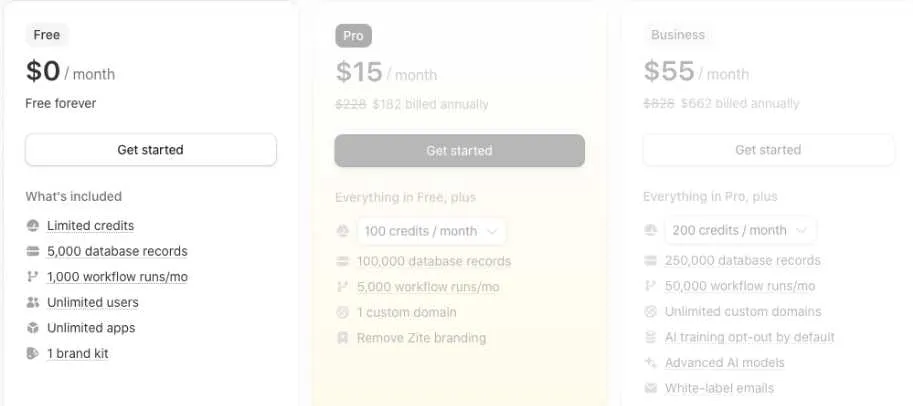
Zite pricing plans: At a glance
Zite pricing plans include monthly allowances for AI credits, database records, workflow runs, and attachment storage. If you reach a plan limit, you may need to wait for the next reset or upgrade to a higher tier.
Below is an overview of what you get from each plan:
| Plan | Price | Best for | Key features |
|---|---|---|---|
| Free | $0/month | Testing and exploration | 50 monthly credits, 5,000 database records, 1,000 workflow runs, and unlimited apps and users |
| Pro | $15/month, billed annually | Solo builders and small teams | 100+ monthly credits, 100,000 records, 5,000 workflow runs, one custom domain, and no Zite branding |
| Business | $55/month, billed annually | Active business apps | 200+ monthly credits, 250,000 records, 50,000 workflow runs, advanced AI models, and unlimited custom domains |
| Team | Contact sales | Growing teams with higher usage | 800+ monthly credits, one million records, 250,000 workflow runs, and added team controls |
| Enterprise | Custom | Large organizations needing security and support | Custom credits, unlimited workflow runs, higher storage, advanced security, and dedicated support |

Build full-stack web and mobile apps with AI prompts, backend logic, authentication, GitHub support, and downloadable source code.
Start Building with Vitara.ai →
Zite pricing plans breakdown
Zite’s pricing looks simple, with three standard plans and two scale options ranging from free to enterprise. But the value you get each month depends on how quickly you use AI credits, database records, workflow runs, and storage.
Large app changes use more credits than small edits. Clear prompts usually cost less because Zite has less to inspect and change, while vague requests can lead to extra rebuilding.
Free plan: $0/month
The Free plan is made for testing, not a busy production app. It gives you enough room to explore Zite’s AI app builder, database, and workflows before paying.
What’s included:
- 50 monthly credits
- 5,000 database records
- 1,000 workflow runs per month
- 1 GB attachment storage
- Unlimited apps and users
- One brand kit
⭐Best For
Beginners testing Zite’s prompt-to-app workflow or building a small internal prototype.
Pros:
- No financial risk while learning the platform.
- Unlimited users and apps make it more useful than a typical free trial.
Cons:
- The daily message limit can interrupt longer build sessions.
- Zite branding remains, and custom domains aren’t included.
Pro plan: $19/month, or $15/month billed annually
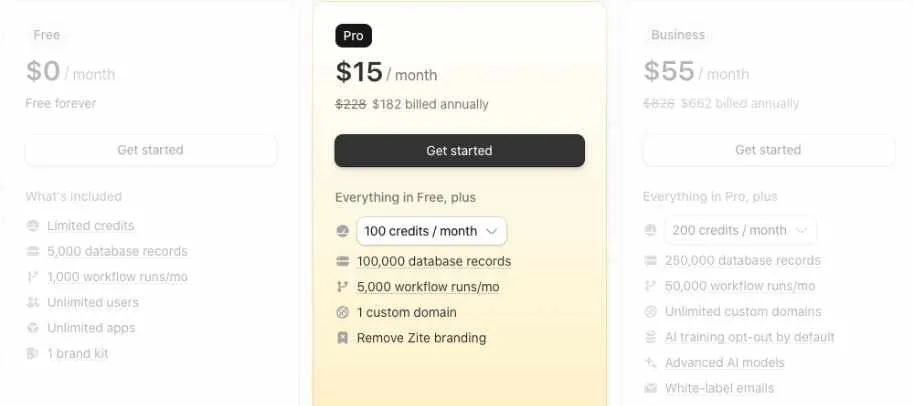
Pro is the first Zite pricing tier suited to a real project. It raises the main usage limits, supports one custom domain, and removes Zite branding.
What’s included:
- Everything in the Free plan
- 100 monthly credits
- 100,000 database records
- 5,000 workflow runs per month
- 10 GB attachment storage
- One custom domain
- Remove Zite branding
⭐Best For
Solo founders, freelancers, and small teams building internal apps, portals, dashboards, or SaaS MVPs.
Pros:
- A custom domain makes your app look more professional.
- There’s no per-user charge as more people start using the app.
Cons:
- 100 credits may run out during a heavy building sprint.
- One domain can feel restrictive when you’re managing several client projects.
Business plan: $69/month, or $55/month billed annually
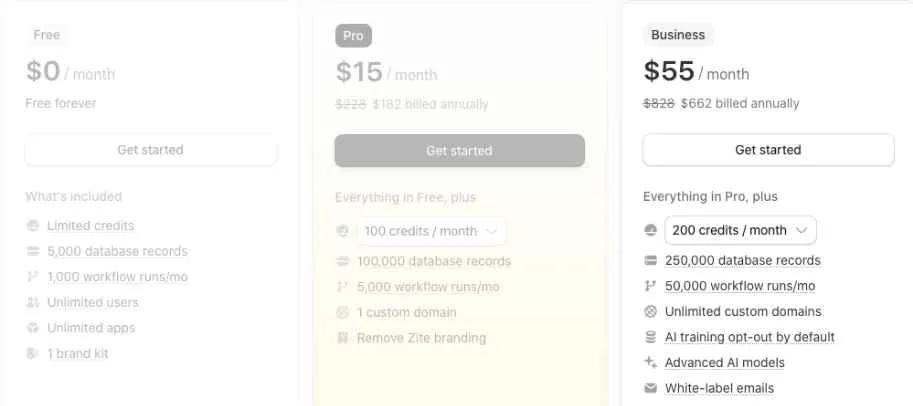
Business is designed for active apps that need more automation, database capacity, and publishing control. The biggest upgrade is workflow usage, which rises from 5,000 to 50,000 runs per month.
What’s included:
- Everything in the Pro plan
- 200 monthly credits
- 250,000 database records
- 50,000 workflow runs per month
- 100 GB attachment storage
- Unlimited custom domains
- Advanced AI models
- AI training opt-out by default
- White-label emails
⭐Best For
Startups, agencies, and operations teams running multiple apps or customer-facing workflows.
Pros:
- Ten times more workflow runs than Pro.
- Unlimited domains work well for agencies and multi-brand teams.
Cons:
- The price rises faster than the monthly credit allowance.
- Smaller teams may not use the added publishing and privacy features.
Team bundle: $250/month, billed annually
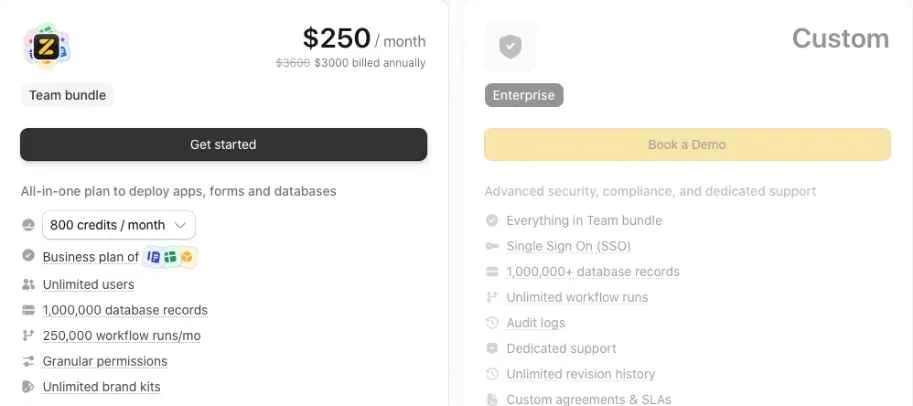
The Team bundle adds much higher usage limits and bundled access across apps, forms, and databases. It’s better suited to companies managing several production tools.
What’s included:
- 800 monthly credits
- 1,000,000 database records
- 250,000 workflow runs per month
- Unlimited users
- Granular permissions
- Unlimited brand kits
- Enforced two-factor authentication
- Regional end-user data options
⭐Best For
Growing teams that need shared capacity, stronger permissions, and tighter security controls.
Pros:
- Much higher AI credit and workflow allowances.
- Bundled products can simplify purchasing and administration.
Cons:
- Annual billing requires a large upfront commitment.
- Small teams may not use enough capacity to justify the cost.
Enterprise plan: Custom pricing
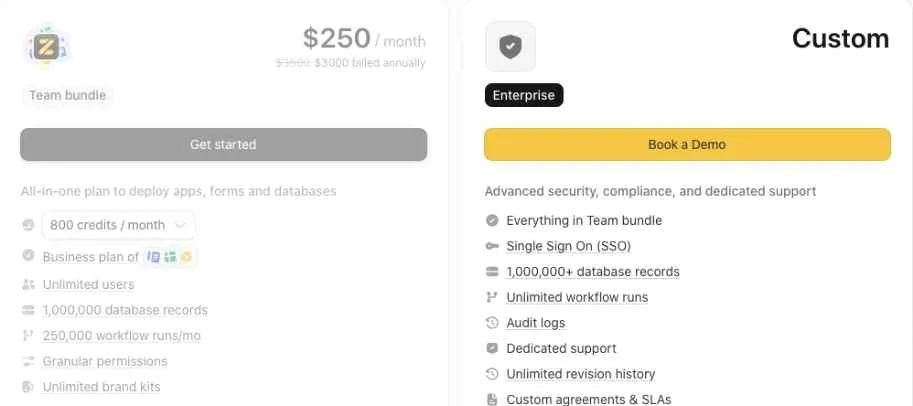
Enterprise is for organizations that need formal security, compliance, support, and procurement options.
What’s included:
- Everything in the Team bundle
- Custom monthly credits
- 1,000,000+ database records
- Unlimited workflow runs
- 1 TB+ attachment storage
- Single sign-on
- Audit logs
- Dedicated support
- Unlimited revision history
- Custom agreements and SLAs
⭐Best For
Large organizations deploying important internal software across departments or regulated environments.
Pros:
- Unlimited workflow runs remove a major scaling limit.
- SSO, audit logs, and dedicated support suit enterprise rollouts.
Cons:
- You need a sales conversation to learn the final price.
How credits work in Zite
Zite uses credits for AI-powered work inside your workspace. Usage depends on the request, selected model, app size, and how many screens, files, tables, or workflows Zite needs to inspect.
Here are a few estimates from Zite’s documentation:
- Editing colors, spacing, or fonts: 0.5–0.7 credits
- Adding a new page or view: 1.5–2.25 credits
- Adding user authentication: 2.5–3.5 credits
Click the brain icon below a message to see the model used, work completed, files changed, and credits consumed.
Vitara.ai lets you create apps with AI, edit the source code, download your project, and continue development outside the platform.
Try Vitara.ai for Free →
How to add more credits
Zite doesn’t offer separate one-time top-ups. If you run out mid-project, upgrade your Apps plan or raise your monthly credit allowance through Billing & Usage.
Upgrading a paid plan increases your limit without resetting usage. If you’ve used 80 credits and move from 100 to 200, you’ll have 120 credits left for that cycle.
What happens to unused credits?
Unused credits do not roll over. They reset monthly on the exact day and time you subscribed, even when you pay annually. Any remaining credits are lost.
Zite credits and workflow pricing explained
Zite separates AI building usage from activity inside published apps. Credits cover tasks such as generating or modifying apps, using the Database Agent, running AI database fields, and creating documents.
App visits don’t consume credits. Manual design edits, standard database operations, editor workflow tests, and the “Fix it for me” tool are also free.
Published workflows use a separate allowance. One successful execution counts as one workflow run, whether it updates data, calls an API, or connects to another service.
Your plan limits:
- AI building and modification work
- Database records
- Published workflow runs
- Attachment storage
If you exceed the workflow allowance, existing apps keep running, but you can’t publish edits until the limit renews or you upgrade.
Which Zite plan should you choose?
Choose Free if you:
- Want to test Zite’s prompt-to-app workflow
- Are building a lightweight prototype
Choose Pro if you:
- Need one custom domain and no Zite branding
- Expect moderate AI and workflow usage
Choose Business if you:
- Run multiple active apps or automations
- Need advanced models, white-label emails, or unlimited domains
Choose Team if you:
- Need much higher shared limits
- Want stronger permissions and team controls
Choose Enterprise if you:
- Require SSO, audit logs, support, or custom agreements
- Expect very high workflow and storage usage
Is Zite worth the cost?
After reviewing Zite’s plans and limits, here’s my practical take.
Zite is worth it if you:
- Need to build internal tools, dashboards, portals, or workflows quickly
- Want unlimited users without per-person pricing
- Prefer one platform for AI building, databases, workflows, and hosting
Skip Zite if you:
- Need complete control over code and hosting
- Expect heavy AI iteration but don’t want monthly credits to expire
Zite alternatives & pricing comparison
If you like Zite but want more control over code, AI usage, or the development workflow, there are several useful Zite alternatives. Some follow the same prompt-to-app approach. Others work as AI code editors or generate full-stack apps you can customize directly.
Here’s a side-by-side comparison:
| Tool | Starting price (billed monthly) | Best for | Key advantage |
|---|---|---|---|
| Vitara.ai | $20/month | Beginners building apps with prompts | Lets you edit and download code, connect a custom domain, and build with AI assistance. |
| Cursor | $20/month | Developers who want AI-assisted coding | Works inside a code editor and provides direct control over the project’s codebase. |
| Replit | $25/month | Building and hosting full-stack apps | Combines an AI app builder, database, collaborative workspace, and deployment tools. |
| v0 | $30/user/month | Building design-focused web apps | Generates editable full-stack code with visual editing, GitHub syncing, and Vercel deployment. |
Vitara.ai vs Zite: Which should you choose?
Vitara.ai is better for: Building full-stack apps when you want direct access to the code. It supports backend logic, databases, authentication, GitHub integration, code downloads, and built-in deployment. This gives developers more freedom to inspect, edit, and move a project outside the platform.
Zite is better for: Creating business software such as client portals, dashboards, CRMs, databases, and automated workflows without writing code. Its visual editing tools and built-in database let non-technical users make smaller changes without sending another AI prompt.
Use both if: You want Vitara.ai for code-heavy SaaS products or customer-facing apps and Zite for internal tools that business teams can manage without developer support.
Use Vitara.ai to generate frontend, backend, database, authentication, and deployment-ready apps, then edit or download the code when you’re ready.
Explore Vitara.ai →
My bottom line on Zite pricing
Zite’s pricing works well when your app has many users but a predictable level of building and automation. There are no per-user fees, but you still have to watch AI credits, database records, workflow runs, and storage separately.
To save credits, plan larger features before asking Zite to build them. Describe the page, expected behavior, data source, and anything that shouldn’t change. For simple text, color, spacing, or button edits, use the visual editing tools instead of spending another prompt.
You should also know when the platform no longer fits the project. When you need deep code customization, portable source code, or a development workflow built around GitHub, Vitara.ai may give you more control. When you’re building portals, dashboards, approval systems, or other business apps, Zite’s database and visual workflows may save more time.
Want to compare costs before choosing a tool? Read these next:
Softr Pricing Explained
Retool Pricing Explained
Framer Pricing Explained
Frequently asked questions about Zite pricing
How much does Zite cost per month?
Zite has a Free plan at $0. Pro costs $19 per month or $15 per month with annual billing, while Business costs $69 monthly or $55 per month when billed annually. Team and Enterprise plans are available for larger organizations with higher usage and security needs.
Is Zite free to use?
Yes. Zite’s Free plan lets you build and publish apps without entering payment details.
The plan includes:
- 50 monthly AI credits
- 5,000 database records
- 1,000 workflow runs per month
- 1 GB of attachment storage
- Unlimited apps and users
You’ll still have Zite branding, limited daily messages, and no included custom domain.
What is a Zite credit?
A credit measures AI work inside Zite. Building an app from a prompt, asking the AI to change a feature, using the Database Agent, generating documents, and running AI database fields can consume credits.
Visitors opening or using your published app don’t consume credits. Manual edits to text, colors, spacing, and layouts are also free.
How many credits does each Zite plan include?
The standard plans currently provide:
- Free: 50 credits per month
- Pro: 100+ credits per month
- Business: 200+ credits per month
- Team: 800+ credits per month
- Enterprise: A custom allowance
These limits apply across your organization rather than giving every app its own credit balance.
How many Zite credits does it take to build an app?
There isn’t one fixed cost because credit usage changes with the size of your app and the complexity of your request.
For context, Zite estimates that a small visual edit may use 0.5–0.7 credits, creating a database may use 2–3 credits, and adding authentication may use 2.5–3.5 credits. A larger app with several pages and workflows will naturally use more.
Do unused Zite credits roll over?
No. Unused credits expire when your monthly usage cycle resets.
This also applies to annual subscriptions. You pay for the year upfront, but your credits are still released and reset monthly based on the date and time you originally subscribed.
Can I buy extra Zite credits without changing plans?
Zite currently handles additional credits through plan upgrades rather than separate one-time credit packs. You can upgrade from the Billing & Usage page when you need a higher allowance.
When moving between paid plans, your current usage doesn’t reset. Your total allowance simply increases to the new plan’s limit for the existing billing cycle.
What happens when I run out of Zite credits?
Your published apps can remain available to users, but you won’t be able to continue making AI-powered changes normally. You’ll need to wait for your next monthly reset or upgrade to a plan with more credits.
If usage limits have been exceeded, Zite may also stop you from publishing new edits until the allowance renews or the plan is upgraded.
What is a workflow run in Zite?
A workflow run is one successful execution of a workflow from a published app. It might update a database record, send an email, call an API, or move information between connected tools.
A workflow with three steps and one with thirty steps both count as one run when completed successfully. Editor tests, failed runs, and timeouts don’t count.
Do Zite workflow runs also consume credits?
Not always. Credits and workflow runs are tracked separately.
- A standard published workflow uses one workflow run.
- A workflow using Zite’s OpenAI key may use one run plus AI credits.
- A workflow using your own OpenAI key still uses one workflow run but doesn’t consume Zite credits for that AI step.
- Testing a workflow inside the editor uses neither allowance.
Are Zite usage limits per app or per workspace?
Usage limits are shared across your entire organization. Your credits, database records, storage, and workflow activity aren’t reset for every new app.
This means five moderately active apps could use your allowance faster than one busy app, even though Zite lets you create unlimited apps.
Does Zite charge per user?
No. Zite includes unlimited users, editors, and apps across its standard plans, including Free.
You’re charged according to the selected plan and its usage limits instead. More users may indirectly create more workflow runs and database records, but they don’t create a separate seat fee.
Does Zite include a database?
Yes. Zite includes a built-in database, and every plan allows unlimited databases. The limit applies to the combined number of records stored across your organization.
The current record allowances are:
- Free: 5,000 records
- Pro: 100,000 records
- Business: 250,000 records
- Team: 1,000,000 records
- Enterprise: 1,000,000+ records
Does Zite charge for app visitors?
No. People can visit and use your published Zite apps without consuming AI credits, and Zite doesn’t set a limit on the number of app users or visitors.
Their actions can still trigger workflows or create database records, so an active app may use those separate monthly allowances.
Can I connect a custom domain to Zite?
Yes, but custom-domain access depends on your plan. Pro includes one custom domain, while Business includes unlimited custom domains.
Pro and Business users can also purchase up to three domains through Zite for a combined price of $15 per year. Domains purchased inside Zite can only be connected to the app, so use an external registrar when you need email or full DNS control.
Is Zite cheaper with annual billing?
Yes. Annual billing lowers the effective monthly price:
- Pro: $15 per month annually instead of $19 monthly
- Business: $55 per month annually instead of $69 monthly
Your credits don’t arrive as one yearly balance. They continue to refresh each month.
Can I cancel my Zite subscription at any time?
Yes. Your paid features remain active until the end of the current billing period, after which the organization moves to the Free plan.
Your apps can remain hosted on Free if they aren’t using a custom domain, but Zite branding will appear again and Free-plan usage limits will apply.
Is Zite pricing separate from Fillout pricing?
Yes. Zite Apps and Fillout Forms use separate subscriptions and allowances. Canceling your Zite Apps plan won’t automatically cancel an existing Fillout Forms subscription.
This matters if your workflow uses both products because you may need to track two separate plans.
Which Zite plan is best for beginners?
Start with Free when you’re learning the builder or testing whether Zite can handle your app idea. Move to Pro once you need a custom domain, higher limits, and the option to remove Zite branding.
Business is better suited to active production apps that need:
- More workflow capacity
- Unlimited custom domains
- Advanced AI models
- White-label emails
- AI training opt-out by default
Is Zite Pro enough for a real app?
Pro can work well for one moderately active portal, dashboard, CRM, or internal tool. It includes 100+ monthly credits, 100,000 database records, 5,000 workflow runs, and 10 GB of attachment storage.
You may find it limiting when several apps share the same organization allowance or when users trigger workflows frequently.
Is Zite worth paying for?
Zite makes the most sense when you need to build business software for many users without paying a separate fee for every person. The built-in database, visual workflows, AI builder, and unlimited apps can keep the setup simpler than combining several tools.
It may feel less predictable when your project needs frequent AI revisions. You’ll need to monitor credits and workflow runs separately, and unused credits won’t carry into the next month.
What’s New?