Softr Pricing Explained 2026: Plans, Features, and Real Cost
Softr is a popular no-code app builder for creating client portals, internal tools, directories, and business apps.
And at first glance, its pricing looks simple enough.
But does Softr stay affordable once you add more users, custom domains, workflows, AI credits, and advanced data sources?
That is exactly what this breakdown will help you figure out.
In this guide, I will:
- Explain every Softr pricing plan in detail
- Show you the extra costs and usage limits that many teams miss at first
- Compare Softr’s pricing with similar no-code and AI app builders
Let’s see whether Softr gives you the right value for your money!
Softr Pricing Overview 2026
Need a quick overview of Softr pricing?
I have got you covered!
Here is a complete but concise breakdown of Softr pricing plans:
| Plan | Monthly Price | Annual Price | Best For | Key Limits | Main Upgrade Trigger |
|---|---|---|---|---|---|
| Free | $0/month | $0/month | Testing Softr, learning no-code, and building small personal apps | 10 app users, 5,000 Softr Database records, 500 workflow actions, 5 AI credits/month, Softr branding | Upgrade when you need more users, more records, a cleaner brand experience, or a serious client-facing app |
| Basic | $59/month | $49/month billed annually | Makers, freelancers, and small teams building simple portals or directories | 20 app users, 50,000 database records, 2,500 workflow actions, 10 AI credits/month, default user groups | Upgrade when your app needs more users, custom user groups, no Softr branding, or stronger portal features |
| Professional | $167/month | $139/month billed annually | Companies building client portals, internal tools, and business apps | 100 app users, 500,000 database records, 10,000 workflow actions, 50 AI credits/month, 3 custom user groups | Upgrade when you need advanced data sources, more workflow actions, SQL/REST API access, or unlimited user groups |
| Business | $323/month | $269/month billed annually | Growing teams building advanced internal systems and scalable portals | 500 app users, 1M database records, 25,000 workflow actions, 100 AI credits/month, unlimited user groups | Upgrade when you need custom usage limits, SSO, audit logs, SOC2 reporting, IP blocking, or priority support |
| Enterprise | Custom | Custom | Larger companies with security, compliance, and high-volume usage needs | Custom limits, custom agreements, SLAs, SSO, SOC2 reporting, audit logging, advanced security | Choose Enterprise when your team needs stronger security, custom support, and company-level controls |
Check out a detailed breakdown of the yearly plan below 👇🏼

Build web and mobile apps with AI prompts, React frontend, Supabase backend, and downloadable code.
Start Building with Vitara.ai →
Softr Pricing Plans Breakdown
In this section, I will walk you through a detailed breakdown of Softr pricing plans, including what each plan includes, where it works well, and where you may start feeling the limits.
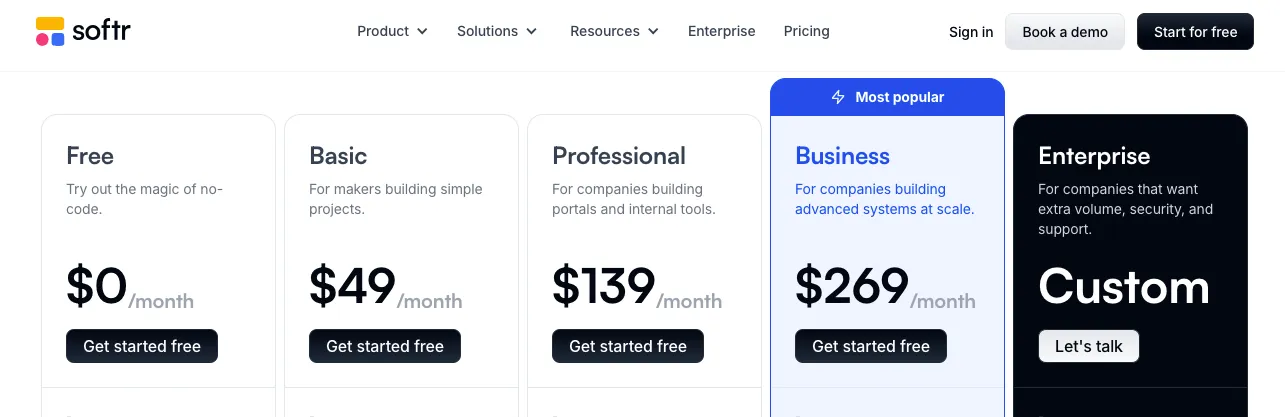
Softr currently offers five pricing plans:
Free Plan
Basic Plan
Professional Plan
Business Plan
Enterprise Plan
1. Free Plan — $0/month
Softr’s Free plan costs $0/month.
That sounds great, and honestly, it is a useful starting point if you only want to test the platform.
You can build a basic app, connect your data source, play with Softr blocks, test user login, and understand how Softr works before paying anything.
So, what does Softr offer in return?
Let’s find out.
Key Features
- App Users: You can add up to 10 app users. That is enough for testing a private tool, a small demo, or a personal project.
- Softr Database Records: You get 5,000 Softr Database records. If you are building a simple directory, resource hub, or small internal database, this gives you enough room to experiment.
- Workflow Actions: Softr gives you 500 workflow actions. These actions help you automate basic tasks inside your app.
- AI Credits: You get 5 AI credits per month. This is useful if you want to test Softr’s AI features, but it will not support heavy AI usage.
- Data Sources: You can connect common data sources like Airtable, Google Sheets, Notion, SmartSuite, Xano, and Coda.
- Unlimited Apps and Collaborators: You can create unlimited apps and work with unlimited collaborators, which makes the Free plan helpful for testing different ideas.
Limitations
There are a few clear limitations of this plan:
- You only get 10 app users.
That means the Free plan will not work for a real customer portal, partner portal, or growing internal tool. - You only get 5 AI credits per month.
So, if your app depends on AI-powered tasks, you will hit the limit quickly. - You get only 500 workflow actions.
That may be enough for testing, but not for a live business app where users submit forms, trigger updates, or move data across systems. - You do not get advanced user groups.
So, if you need different access levels for clients, admins, vendors, or team members, you will need a higher plan.
Who is This Plan Best For?
I would recommend the Free plan to founders, makers, students, and small teams that want to test Softr before paying.
It is not suited for anyone who wants to launch a serious client portal, customer dashboard, marketplace, or internal business app.
2. Basic Plan — $49/month Billed Annually
Softr’s Basic plan starts at $49/month when billed annually. If you choose monthly billing, the cost is higher.
This is the first paid Softr plan, and it is made for makers building simple projects.
Think of apps like a small client portal, a lightweight business directory, a member-only resource library, or a simple internal dashboard.
So, what do you get with the Basic plan?
Key Features
- App Users: You get 20 app users. This works for a small private app or a limited-access portal.
- Softr Database Records: You get 50,000 Softr Database records. That is a big jump from the Free plan and gives you more room for real data.
- Workflow Actions: You get 2,500 Softr Workflow actions. This helps when your app needs basic automation, such as form submissions, status updates, or simple notifications.
- AI Credits: You get 10 AI credits per month. This is still light, but it gives you more space than the Free plan.
- Data Sources: You can still connect Softr with popular tools like Airtable, Google Sheets, Notion, SmartSuite, Xano, and Coda.
- Default User Groups: You can manage basic user access, which works for simple apps where user roles are not too complex.
Limitations
The Basic plan has a few limits that matter once your app becomes more serious.
- You only get 20 app users.
That may be fine for a small team, but it can feel tight if you are building a client portal for multiple customers. - You do not get custom user groups.
This can be a problem if you want different roles like admin, client, manager, vendor, and team member. - You only get 10 AI credits per month.
If you want to use AI inside your business app regularly, you may need extra credits. - You do not get the advanced data sources available in higher plans.
So, if your app needs tools like Supabase, HubSpot, BigQuery, PostgreSQL, MySQL, SQL Server, or REST API, Basic will not be enough.
Who is This Plan Best For?
I would recommend the Basic plan to solopreneurs, freelancers, and small teams building simple no-code apps.
It is good for small directories, lightweight portals, resource hubs, and early MVPs.
It is not the right fit if your app needs advanced permissions, larger user access, SQL databases, REST API connections, or deeper automation.
Also Read:
Compare Softr with other leading app builders:
Best Softr Alternatives
3. Professional Plan — $139/month Billed Annually
Softr’s Professional plan starts at $139/month when billed annually.
This is where Softr starts to feel more practical for real business use.
The Free and Basic plans are good for testing or small projects. But if you are building a client portal, internal tool, partner dashboard, or business app that people will actually use every day, Professional usually makes more sense.
Let’s break it down.
Key Features
- App Users: You get 100 app users. This gives you more breathing room for client portals, internal teams, and private business apps.
- Extra App Users: Softr allows extra app users on this plan at an added cost, which helps if your user count grows slowly instead of jumping straight to Business.
- Softr Database Records: You get 500,000 Softr Database records. That is enough for larger directories, CRM-style apps, inventory views, and customer dashboards.
- Workflow Actions: You get 10,000 workflow actions. This works better for business apps where users submit forms, update records, trigger emails, or move data through simple workflows.
- AI Credits: You get 50 AI credits per month. This is more useful if you want to test AI features across your app without running out too quickly.
- Custom User Groups: You get 3 custom user groups. This matters when different users need different access inside the same app.
- More Data Sources: Professional adds more data source options, including tools like monday.com, Supabase, and ClickUp.
Limitations
There are still a few things to watch.
- You only get 3 custom user groups.
That may work for simple roles like admin, client, and team member. But if you need more complex access rules, you may outgrow it. - Advanced databases are still limited.
If you need PostgreSQL, MySQL, BigQuery, SQL Server, MariaDB, or REST API, you will need the Business plan. - You get 100 app users by default.
That is good for many teams, but customer-facing apps can grow past this limit faster than expected. - You do not get Enterprise-level security.
SSO, audit logs, SOC2 reporting, IP blocking, custom agreements, and SLAs sit under the Enterprise plan.
Who is This Plan Best For?
I would recommend the Professional plan to businesses building serious client portals, internal tools, partner dashboards, and team apps.
It is a strong fit for agencies, service businesses, operations teams, and SaaS-like portals that need better access control and cleaner app experiences.
It is not ideal if your app depends on SQL databases, REST API connections, large-scale automation, or enterprise security.
4. Business Plan — $269/month Billed Annually
Softr’s Business plan starts at $269/month when billed annually.
This plan is built for companies creating advanced systems at scale.
The jump from Professional to Business is not just about more users. You also get more workflow actions, more records, unlimited user groups, and access to advanced data sources.
That makes Business a better fit when Softr is not just a simple portal builder anymore. It becomes part of your daily operations.
Key Features
- App Users: You get 500 app users. This gives growing companies enough space for larger portals, customer apps, vendor apps, and internal systems.
- Softr Database Records: You get 1 million Softr Database records. That is useful for larger data-heavy apps.
- Workflow Actions: You get 25,000 workflow actions. If your app handles approvals, form updates, database changes, or repeated internal processes, this limit matters.
- AI Credits: You get 100 AI credits per month. This gives your team more space to use AI features inside business workflows.
- Unlimited User Groups: This is one of the biggest reasons to choose Business. You can create different roles for admins, customers, vendors, managers, staff, partners, and other user types.
- Advanced Data Sources: Business unlocks more serious data connections, including HubSpot, BigQuery, PostgreSQL, SQL Server, MariaDB, MySQL, and REST API.
Limitations
The Business plan is powerful, but it is not cheap.
- The price jump is noticeable.
Moving from Professional to Business can make sense, but only if you truly need advanced data sources, unlimited user groups, or higher usage limits. - Enterprise security is still not included.
You do not get SSO, audit logging, SOC2 reporting, IP blocking, custom SLAs, or dedicated success support unless you move to Enterprise. - You may still pay for other tools.
If your Softr app connects with Airtable, Xano, Supabase, HubSpot, Make, Zapier, or another database, your total monthly cost may be higher than Softr alone.
Who is This Plan Best For?
I would recommend the Business plan to companies building advanced internal tools, customer portals, vendor portals, operations dashboards, and database-driven business apps.
It is best for teams that need SQL, REST API, large user access, and detailed permission control.
It is not the right choice for a simple directory or early MVP unless you already know you need advanced integrations from day one.
5. Enterprise Plan — Custom Pricing
Softr’s Enterprise plan comes with custom pricing.
That means Softr does not show a fixed public price for this plan. You need to contact the sales team and discuss your usage, security needs, support needs, and company requirements.
Enterprise is made for larger companies that need more control than standard plans can offer.
Key Features
- Custom Usage Limits: You can discuss higher limits for app users, database records, workflow actions, and other usage needs.
- SSO: Enterprise supports single sign-on options like SAML and OpenID. This helps larger teams manage secure access through their existing identity systems.
- Custom Agreements and SLAs: Larger companies often need legal, support, and uptime terms before they approve a tool. Enterprise gives room for that.
- SOC2 Reporting: This matters for companies with strict security and compliance review processes.
- Advanced App Security: Enterprise includes stronger security options like IP blocking.
- Audit Logging: Your team can track important user and system activity, which helps with accountability and compliance.
- Dedicated Success Manager: You get a dedicated contact to help with setup, growth, and support.
- Priority Support: Enterprise users get faster support compared with standard plans.
Limitations
- Enterprise pricing is not transparent.
You will not know the exact cost until you speak with Softr. - It may be too much for small teams.
If you only need a simple portal or internal tool, Business or Professional may already be enough. - You need to be clear about your requirements.
Before contacting Softr, list your expected users, records, workflows, data sources, security needs, and support expectations. That will help you avoid paying for things you do not need.
Who is This Plan Best For?
I would recommend the Enterprise plan to large companies, regulated businesses, fast-growing teams, and organizations with strict security requirements.
It is best for teams that need SSO, audit logs, custom limits, SOC2 reporting, SLAs, IP blocking, and dedicated support.
It is not built for small MVPs or basic no-code apps. For those, Free, Basic, or Professional will usually make more sense.
Build full-stack apps with AI prompts, backend logic, database support, and code you can actually control.
Try Vitara.ai for Free →
Softr Add-Ons and Extra Costs to Watch
Speaking of extra costs, Softr has a few pricing details you should watch closely.
They are not always “hidden,” but they can change your real monthly cost once your no-code app starts growing.
Let me break them down for you:
| Add-On / Extra Cost | What It Does | Starting Cost |
|---|---|---|
| AI Credit Add-Ons | Gives you more AI credits when your included monthly credits are not enough | From $10/month for 100 extra credits |
| Extra App Users | Lets more users log into your Softr app beyond the plan limit | $10/month per extra 10 users on Professional |
| Extra Custom Domain | Lets you connect more than one custom domain to your workspace | $13/month per extra domain |
| Workflow Usage | Covers automation actions that run inside Softr workflows | Included by plan, upgrade needed if usage grows |
| Advanced Data Sources | Unlocks tools like HubSpot, BigQuery, PostgreSQL, MySQL, SQL Server, and REST API | Requires Business plan or higher |
| External Tools | Covers tools you connect with Softr, like Airtable, Xano, Make, Zapier, or Supabase | Depends on the tool |
How Much Does Softr Actually Cost? Practical Example
As you can see, Softr pricing depends on more than the plan you choose.
The plan price is only the starting point. Your real cost can change when you add more app users, AI credits, custom domains, workflows, or external tools like Airtable, Xano, Make, Zapier, or Supabase.
So, how much will you actually end up paying if you build a real client portal on Softr?
Let me give you a practical example to clarify this:
- Let’s say you want to build a client portal for 120 users.
- You need a clean branded experience without Softr branding.
- You also want one extra custom domain for a separate client workspace.
- And you need extra AI credits because your team uses Softr AI features often.
For this, you will end up paying:
| Component | Monthly Cost | Annual Cost | Why It Is Needed |
|---|---|---|---|
| Professional Plan | $139 | $1,668 | Supports serious client portals, 100 users, custom user groups, and better app features |
| Extra App Users | $20 | $240 | Needed because the portal has 120 users, which is 20 more than the included limit |
| Extra Custom Domain | $13 | $156 | Useful when you need a second branded domain for another portal or client app |
| Extra AI Credits | $10 | $120 | Helps when included AI credits are not enough for regular AI-assisted work |
| External Tools | Depends on tool | Depends on tool | Airtable, Xano, Make, Zapier, or Supabase may add separate monthly costs |
Is Softr Worth the Price?
If you are still not sure whether Softr is worth the price, I can help you decide whether it’s the right tool for your app idea.
Check out this breakdown of its pros and cons to see whether the strengths outweigh the weaknesses:
Pros ✅
- Easy to use, even if you do not have a technical background.
- Works well for client portals, internal tools, directories, dashboards, and membership apps.
- Connects with popular data sources like Airtable, Google Sheets, Notion, SmartSuite, Xano, and Supabase.
- Offers ready-made blocks and templates, so you can build faster without starting from scratch.
- Supports user login, permissions, forms, lists, charts, and basic workflows.
- Gives teams a faster way to turn existing business data into a working no-code app.
- The Free plan is helpful if you want to test Softr before paying.
Cons ❌
- Paid plans can feel expensive once you need more app users, workflows, or advanced data sources.
- The Basic plan is limited for serious client portals because it gives you fewer users and no custom user groups.
- Advanced data sources like SQL databases and REST API access require the Business plan.
- You may still need paid tools like Airtable, Xano, Zapier, Make, or Supabase to run your full setup.
- Native mobile app development is not Softr’s strongest area.
- Complex backend logic can feel harder compared to full-stack app builders or custom development.
As you can see, Softr is worth the price if you want to build portals, internal tools, or simple business apps quickly.
But if you need a full-stack AI app builder, deeper backend control, native mobile app development, or lower scaling costs, Softr may not be the best long-term fit.
Softr Pricing Compared to Alternatives
The best way to find out whether Softr is the right no-code app builder is to compare it with other platforms in the market.
To help you do this, I have briefly compared Softr pricing with 3 popular alternatives.
- Softr vs Vitara
- Softr vs Glide
- Softr vs Bubble
Let’s get into it!
1. Softr vs Vitara Pricing
Like Softr, Vitara helps users build apps faster without writing everything from scratch.
But the way both platforms work is different.
Softr is more of a no-code portal and internal tool builder. You connect your data source, add blocks, set permissions, and create apps like client portals, directories, dashboards, and internal tools.
Vitara, on the other hand, is built more around AI-powered app creation. You describe what you want to build, and the platform helps you generate the app structure, frontend, backend logic, and code faster.
Head-to-head, Vitara is cheaper.
Softr’s first paid plan starts at $49/month with annual billing, while Vitara’s Build plan starts at $20/month. Vitara’s higher plan also costs less than Softr’s Professional and Business plans.
But that is not all.
Vitara also makes more sense if you want to build with prompts instead of manually arranging every screen, block, list, and workflow. This can save time when you are creating an MVP, SaaS idea, AI tool, dashboard, or full-stack app.
I would recommend Vitara over Softr if you want an AI app builder with lower pricing, faster prompt-based development, and more control over generated code.
But if you already have your data ready and only need a polished client portal or internal tool, Softr can still be a good choice.
Create apps faster with AI prompts, React frontend, Supabase backend, and editable full-stack code.
Build Your App with Vitara.ai →
2. Softr vs Glide Pricing
Glide is another popular no-code app builder, especially for teams that want to turn spreadsheets into business tools.
It works well for internal apps, operational dashboards, mobile-friendly tools, field team apps, approval systems, inventory views, and simple CRMs.
Softr and Glide overlap in many use cases.
Both can help you build apps from existing business data. Both support portals, dashboards, and internal tools. And both can become more expensive as your users, data, and workflows grow.
Glide’s Business plan starts at $199/month with annual billing. In return, you get 30 users included, unlimited apps, 5,000 updates, workflows, API actions, and spreadsheet data source support.
Softr’s Professional plan starts lower than Glide Business, but Softr Business costs more. The difference is that Softr Business gives you 500 app users, 1M Softr Database records, 25,000 workflow actions, unlimited user groups, and advanced data sources like PostgreSQL, MySQL, SQL Server, BigQuery, HubSpot, and REST API.
So, pricing is not a simple “this one is cheaper” comparison.
Glide may feel better if you need a spreadsheet-powered internal tool for a smaller team. But the user and update limits matter. If your team updates data often, extra usage can increase your monthly bill.
Softr may feel better if you need a client portal, customer dashboard, partner portal, or directory with stronger user group control.
I would recommend Glide if your app mainly runs on spreadsheet data and your team wants a clean internal tool.
I would recommend Softr if you are building a portal-first app where user roles, branded pages, and external data connections matter more.
3. Softr vs Bubble Pricing
Bubble is a much deeper no-code app builder than Softr.
With Bubble, you can build custom web apps, SaaS products, marketplaces, CRMs, booking platforms, dashboards, and even web plus mobile apps. It gives you more design freedom, more backend logic, and more control over how your app works.
But that control comes with a learning curve.
Softr is easier to start with. You pick templates, connect a data source, add blocks, and publish a portal or internal tool. Bubble needs more setup because you build more of the app logic yourself.
From a pricing point of view, Bubble’s Web & Mobile Starter plan starts at $59/month with annual billing. Softr’s Basic plan starts at $49/month with annual billing.
So at the entry level, both are close.
But Bubble pricing depends heavily on workload units. That means your real cost can grow when your app gets more traffic, runs more workflows, processes more data, or handles more user actions.
Softr pricing feels easier to understand at first because it focuses on app users, records, workflow actions, AI credits, data sources, and plan features.
I would recommend Bubble over Softr if you want to build a custom SaaS product, marketplace, or complex web app with deeper logic.
I would recommend Softr if you want to build a client portal, internal tool, resource directory, or customer dashboard quickly without managing too many technical details.
Also Read:
Want to see how Bubble compares to other tools?
Top Bubble Alternatives
Bubble vs Lovable
Here’s the simple way to think about it:
- Choose Softr if you want speed, simplicity, and portal-style apps.
- Choose Vitara if you want AI-powered full-stack app building at a lower price.
- Choose Glide if you want spreadsheet-powered internal tools.
- Choose Bubble if you want deeper customization and you are ready to spend more time learning the platform.
Softr Pricing: Final Verdict
If you want to build client portals, internal tools, directories, or simple business apps on top of existing data, Softr can be a good option.
But does it offer value for money?
Does it give you everything you need to build and scale apps affordably?
My answer: yes, but only for the right use case.
Softr’s Free plan is useful for testing, but it is not enough for real business apps.
The Basic plan works for small projects, but the user and feature limits can feel tight pretty quickly.
And once you need custom user groups, advanced data sources, workflows, AI credits, or more app users, the cost starts moving up.
That does not make Softr a bad platform.
It just means you should choose it when your app fits Softr’s strengths: portals, dashboards, directories, membership apps, and internal tools.
Compare this to Vitara.
Vitara is more useful if you want to build apps through AI prompts, generate full-stack app structure faster, and avoid manually arranging every block, screen, and workflow from scratch.
Plus, it starts at a lower price than Softr’s paid plans.
So, here’s the simple verdict.
Choose Softr if you already have data in tools like Airtable, Google Sheets, Notion, SmartSuite, or Xano and want to turn that data into a polished app.
Choose Vitara if you want a faster AI-powered app builder that helps you create full-stack apps with less manual setup.
Still not sure?
Try Vitara for free, and see for yourself whether building apps with AI feels faster, easier, and more cost-effective than Softr.
Want to compare costs before choosing a tool? Read these next:
Framer Pricing Explained
Bolt.new Pricng Explained
Lovable Pricing Explained
FAQs About Softr Pricing
How much does Softr cost?
- Softr has a Free plan at $0/month for testing small apps.
- The Basic plan costs $59/month with monthly billing or $49/month when billed annually.
- The Professional plan costs $167/month with monthly billing or $139/month when billed annually.
- The Business plan costs $323/month with monthly billing or $269/month when billed annually.
- The Enterprise plan comes with custom pricing for larger teams that need SSO, audit logs, SOC2 reporting, custom limits, SLAs, and priority support.
Does Softr have a free plan?
Yes, Softr offers a Free plan. It is good for testing the platform, learning how Softr works, and building small personal apps. But it comes with limits on app users, database records, workflow actions, and AI credits, so it is not ideal for serious business apps.
Which Softr plan is best for client portals?
The Professional plan is usually the better choice for client portals. It gives you more app users, more database records, more workflow actions, AI credits, and custom user groups. The Basic plan can work for a very small portal, but most client-facing apps outgrow it quickly.
Does Softr charge per user?
Softr includes a fixed number of app users in each plan. For example, the Free, Basic, Professional, and Business plans come with different user limits. If you need more users, your cost may increase depending on the plan and whether extra user packs are available.
Are there hidden costs in Softr pricing?
Softr pricing is fairly clear, but your real cost can increase with extra app users, AI credits, custom domains, workflows, and third-party tools. If your app uses Airtable, Xano, Make, Zapier, Supabase, or another database tool, you may need to pay for those separately.
Is Softr good for building internal tools?
Yes, Softr works well for internal tools, especially when your data already lives in Airtable, Google Sheets, Notion, SmartSuite, Xano, or Supabase. It is useful for dashboards, approval systems, resource hubs, team portals, and lightweight business apps that do not need complex backend logic.
What is the best Softr alternative?
The best Softr alternative depends on what you want to build. Vitara is a strong option if you want AI-powered full-stack app building. Glide is good for spreadsheet-based internal tools. Bubble works better for custom web apps that need deeper logic and more design control.
Is Softr worth it for startups?
Softr is worth it for startups that want to build a portal, directory, dashboard, or internal tool quickly. It helps you launch faster without hiring a full development team. But if your startup needs complex backend logic, AI-generated app development, or native mobile apps, compare alternatives before paying.
What’s New?