Launchpad.io Review 2026: Best AI SaaS Builder or Overhyped Low-Code Platform?
I’ve been researching AI SaaS builders and low-code SaaS platforms closely, and Launchpad.io stands out because it’s not built for quick toy apps. It’s designed for teams that want to build real B2B SaaS products with AI, workflows, users, roles, integrations, and deployment handled in one place.
In this Launchpad.io review, I’ll cover everything: what it does well, where it falls short, pricing, user feedback, and how it compares to alternatives like Vitara.ai, Bubble, Lovable, OutSystems, Retool, and Pega. 
What is Launchpad.io?
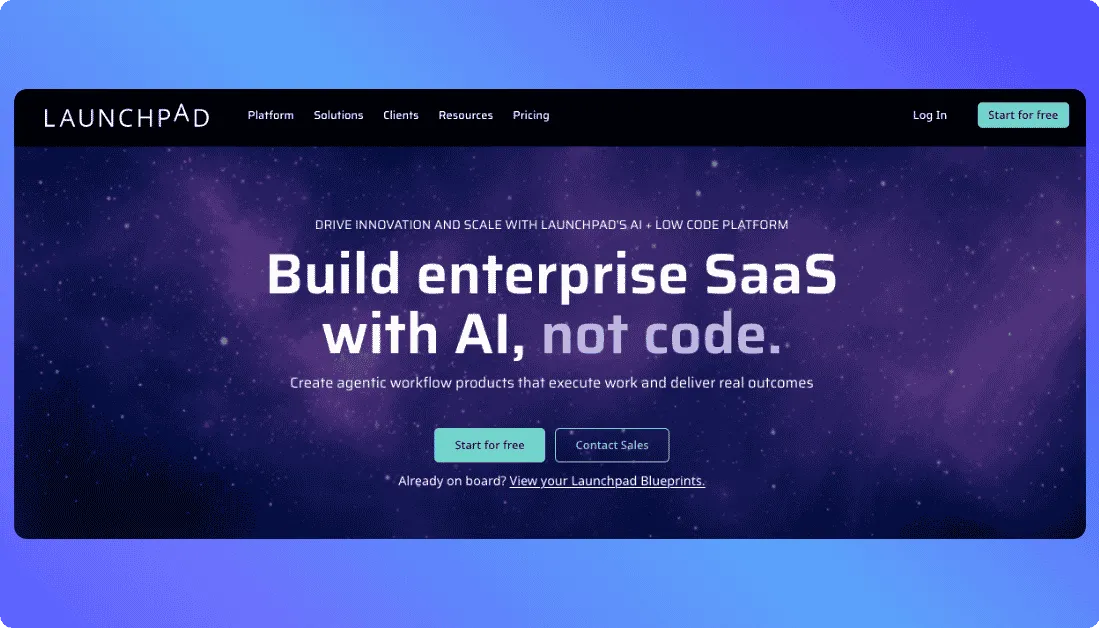
Launchpad.io is an AI-powered low-code SaaS builder that helps teams turn business ideas into production-ready B2B applications. Instead of starting from a blank codebase, you describe the app you want to build, and Launchpad helps generate the blueprint, workflows, data model, user roles, integrations, and deployment setup.
Key capabilities:
- AI-assisted app blueprint creation
- Built-in workflow automation for business processes
- Multi-tenant SaaS architecture for serving multiple customers
- User roles, permissions, security, and compliance controls
- Managed cloud runtime, database, monitoring, and scaling
Bottom line: Launchpad.io is built for serious B2B SaaS teams that want to create AI-powered workflow applications faster without managing every layer of infrastructure themselves.
Who Is Launchpad.io Best For?
Launchpad.io is best for teams building serious B2B SaaS products, not simple side projects or basic web apps.
B2B SaaS Companies
Launchpad.io fits companies that need workflow-heavy SaaS apps with multitenancy, user roles, subscriber management, security, and managed infrastructure built in.
Startups Building Enterprise Software
It’s useful for startups that want to launch a real SaaS product faster, especially if the app involves approvals, automation, case management, or internal business workflows.
Software Companies Modernizing Old Products
Launchpad.io can help teams rebuild legacy software, reduce technical debt, or add AI-powered features to an existing product.
Product Teams Adding AI Workflows
It works well when AI needs to do more than answer questions, like routing tasks, triggering actions, handling approvals, or supporting business decisions.
Who Should Not Use Launchpad.io?
Launchpad.io is powerful, but it’s not the right fit for every builder or product team.
People Building Simple MVPs
If you only need a landing page, basic mobile app, directory, marketplace, or small personal project, Launchpad.io may feel too heavy. A simpler AI SaaS and App builder or no-code tool will likely be faster and cheaper.
Teams That Need Pixel-Perfect UX Control
Launchpad.io may not be ideal if your product depends on a highly custom interface. Some users have pointed out limits around UI and UX customization, so design-heavy apps may feel restricted.
Teams Looking for the Cheapest No-Code Builder
Launchpad.io is not a budget no-code tool. Its free Explore plan is useful for creating Blueprints, but the Ignite plan starts at $900/month, which puts it closer to enterprise SaaS platforms than beginner app builders.
Launchpad.io Key Features
Launchpad.io packs in more than basic app generation. It focuses on the parts B2B SaaS teams usually have to build again and again.
AI Blueprint
Launchpad Blueprint helps turn prompts into app plans. It can map out things like:
- UI screens
- Workflows
- Data models
- Integrations
- Dashboards
This is useful when you want to move from idea to structured prototype without starting from scratch.
Low-Code App Development
Launchpad uses low-code tools, reusable components, and prebuilt app layers to speed up development. You still need product thinking, but you don’t have to hand-code every workflow, role, or backend service.
Workflow Automation
This is one of Launchpad.io’s strongest areas. It’s built for apps that need business logic, not just pretty screens.
| Workflow feature | Example use case |
|---|---|
| Approvals | Expense requests, onboarding steps |
| Routing | Assigning tasks to the right team |
| Scheduling | Follow ups, reminders, renewals |
| Decisions | Rules based business actions |
Agentic AI Workflows
Launchpad.io is designed for AI workflows where agents need structure. That means the AI can work inside a controlled process with rules, guardrails, security, and clear business steps.
Managed Cloud Runtime
Launchpad handles much of the infrastructure layer for you, including:
- Cloud hosting
- Database
- Monitoring
- Identity
- Scaling
- Compliance controls
That’s a big reason it feels more like an AI SaaS builder than a simple AI app builder.
Multitenancy and Subscriber Management
Launchpad supports multi-tenant SaaS products, which means one app can serve multiple customers or client accounts. It also includes user roles, subscriber controls, configuration, and usage reporting.
Security and Compliance
Launchpad.io is built with enterprise security in mind. It supports zero-trust architecture, secure defaults, and compliance needs like SOC 2, ISO 27001, GDPR, and HIPAA.
Integrations and Live Data
Launchpad can connect with APIs, REST services, OpenAI, Swagger, serverless functions, and live data sources. This helps teams build SaaS apps that work with real business systems, not isolated demos.
Launchpad.io Pricing in 2026
Launchpad.io uses usage-based pricing, so your cost depends on how many Launchpad Units your app consumes. These units are based on app usage and complexity. Launchpad says around 750 Launchpad Units can power one business outcome, like a service request or customer onboarding process.
| Plan | Price | Best For |
|---|---|---|
| Explore | Free | Creating app blueprints and estimating usage costs |
| Ignite | $900 per month | Building your first Launchpad app with production usage |
| Accelerate | Custom | Teams that need more Launchpad units, support, and scale |
| Launchpad for Startups | Custom or application based | Startups that want to build and scale a SaaS product faster |
| Catalyst Program | $12,000 one time fee | Guided onboarding, training, MVP planning, and coach support |
The Explore plan is the easiest place to start. You can create unlimited Blueprints and use the Units Estimator to understand what your app might cost before you commit.
The Ignite plan starts at $900 per month and includes unlimited production apps, unlimited developers and admins, unlimited subscribers and users, 5,000,000 Launchpad Units per month, onboarding kickoff, 10 hours of live developer support, and 24-hour platform runtime support.
The big thing to know: Launchpad.io is not priced like a beginner no-code app builder. It’s aimed at teams building serious B2B SaaS products where infrastructure, support, scaling, and subscriber management matter.
Launchpad.io Pros and Cons
Launchpad.io has a clear strength: it helps teams build serious SaaS products faster. But it also has limits, especially if you want full design freedom or a cheap MVP tool.
Pros
| Pro | Why It Matters |
|---|---|
| Fast time to market | Teams can move from idea to working product faster than building everything from scratch |
| Strong SaaS foundation | Runtime, cloud hosting, database, multitenancy, security, and monitoring are already built in |
| Great for workflow apps | Works well for approvals, routing, task management, case handling, and business rules |
| Scalable architecture | Designed for pilots, growing teams, and enterprise grade SaaS products |
| AI assisted design | Blueprint turns prompts into app structure, workflows, screens, and data models |
| Less infrastructure work | Teams can focus more on product idea, customer experience, and business logic |
Cons
| Con | Why It Matters |
|---|---|
| Limited UX customization | May not work well for products that need a pixel perfect or highly branded interface |
| Pricing can be hard to estimate | Usage based Launchpad Units may require modeling before understanding real monthly costs |
| Still newer than older enterprise platforms | Some advanced use cases may not feel as proven as long running low code platforms |
| Can feel restrictive for developers | Low code tools save time but may limit deep custom logic and full code level control |
| Not a cheap MVP builder | The $900 per month Ignite plan may be too expensive for hobby projects or small experiments |
What Real Users Say About Launchpad.io
Most real user feedback I found comes from G2. I didn’t find a useful Reddit thread about this specific Launchpad.io AI SaaS builder; most Reddit results are about unrelated crypto launchpads or other products with similar names.
Positive User Feedback
Users on G2 mostly praise Launchpad.io for speed, scalability, ease of use, integrations, and faster movement from prototype to production.
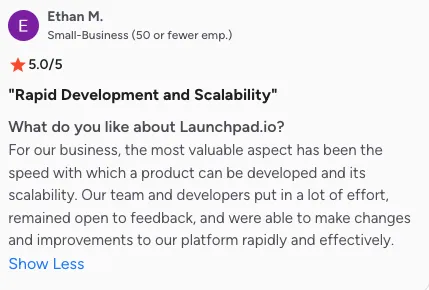
One G2 reviewer called out the “speed with which a product can be developed” and said scalability was one of the most valuable parts of the platform.
Source: G2
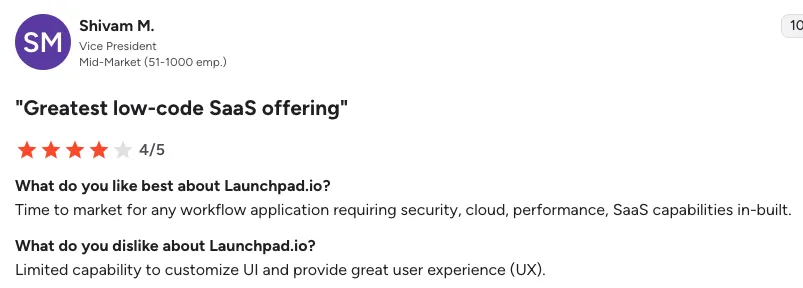
Another G2 review describes Launchpad.io as useful for teams that need workflow applications with security, cloud, performance, and SaaS capabilities built in.
Source: G2
G2’s pros and cons summary also shows the same pattern. Users repeatedly mention scalability, rapid development speed, customizability, ease of use, and integration with existing environments as common positives.
Source: G2
My read: users like Launchpad.io because it removes a lot of the slow setup work behind SaaS products workflows, users, infrastructure, integrations, and scaling so teams can focus more on building the actual product.
Negative User Feedback
The main complaints around Launchpad.io are about limited customization, missing advanced features, pricing clarity, and early platform maturity.
On G2, users mention that Launchpad.io can feel restrictive when teams need advanced configuration or a highly tailored user experience. One reviewer said: “Limited capability to customize UI and provide great user experience (UX).”
Source: G2
Another reviewer pointed out that Launchpad.io has “Limited advanced configuration compared to the full Pega platform” and said “Custom branding and complex logic layers can be restrictive for enterprise-grade solutions.”
Source: G2
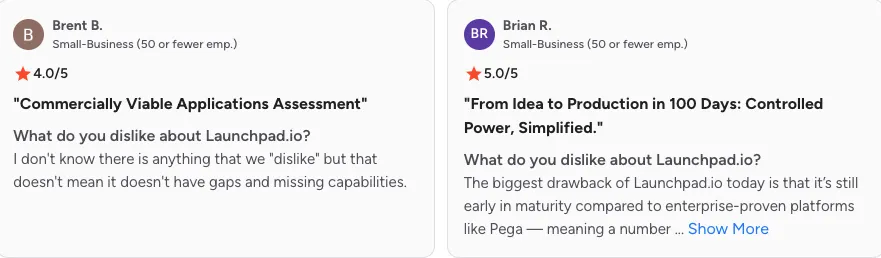
G2’s summary also notes that some users see “gaps and missing capabilities” because Launchpad.io is still early compared with more established enterprise platforms.
Source: G2
The AWS Marketplace listing repeats similar G2-backed feedback around UI customization and advanced configuration limits.
Source: AWS Amazon
My read: Launchpad.io’s biggest weakness comes from the same thing that makes it useful. It abstracts infrastructure, workflows, and SaaS plumbing, which saves time. But that also means teams may hit limits when they want deep UX control, unusual logic, or full developer-level customization.
Launchpad.io Alternatives
Launchpad.io sits closer to an AI SaaS builder than a basic no-code app builder, so the right alternative depends on what you’re trying to build. Here’s the quick comparison.
| Alternative | Better For | How It Compares to Launchpad.io |
|---|---|---|
| Bubble | No code web apps, marketplaces, directories, MVPs, and custom interfaces | Bubble gives more flexibility for general web apps. Launchpad.io is stronger for B2B SaaS products with workflows, multitenancy, compliance, user roles, and managed infrastructure |
| Lovable | Fast AI generated prototypes, MVPs, and full stack web app experiments | Lovable is better for quick prompt to app builds. Launchpad.io is better for production SaaS architecture, workflows, subscriber management, and enterprise controls |
| OutSystems | Enterprise low code development, large IT teams, and complex internal systems | OutSystems is more established in enterprise low code. Launchpad.io is more focused for B2B SaaS teams using AI assisted product creation and workflow automation |
| Vitara.ai | AI app generation, startup MVPs, SaaS prototypes, and faster product builds | Vitara.ai is more flexible and modern for most builders with AI driven app creation. Launchpad.io is stronger for large B2B SaaS teams needing multitenancy, managed runtime, compliance, and governed workflows |
| Retool | Internal tools, admin panels, dashboards, database apps, and operations workflows | Retool is stronger for internal business tools. Launchpad.io is better for commercial B2B SaaS products with subscribers, workflows, and multi tenant architecture |

Final Verdict: Is Launchpad.io the Best AI SaaS Builder in 2026?
Launchpad.io is one of the strongest AI SaaS builders for B2B teams that need workflows, multitenancy, security, integrations, and managed deployment in one platform.
It’s not the best choice for everyone. If you want a simple MVP, custom UI freedom, or a cheaper AI app builder, tools like Vitara.ai, Lovable, or Bubble may feel easier.
The biggest strength of Launchpad.io is how much SaaS infrastructure it handles for you. The biggest weakness is that this structure can limit flexibility when you need deep customization.
So, is Launchpad.io the best AI SaaS builder in 2026? Yes, for serious B2B SaaS and workflow products but not for every founder, developer, or startup team.
FAQs About Launchpad.io
Is Launchpad.io the best AI SaaS builder in 2026?
Launchpad.io is one of the better AI SaaS builders for B2B teams that need workflows, multitenancy, security, integrations, and managed cloud deployment. It’s not the best option for simple MVPs or highly custom consumer apps.
What is Launchpad.io used for?
Launchpad.io is used to build AI-powered B2B SaaS applications, workflow automation tools, customer portals, case management apps, and enterprise software products without coding every layer from scratch.
Is Launchpad.io an AI app builder?
Yes, but it’s more accurate to call it an AI SaaS builder. It focuses on building production-ready SaaS products with workflows, users, roles, data models, integrations, and deployment support.
Is Launchpad.io good for startups?
Launchpad.io can be good for startups building serious B2B SaaS products. But if you only need a quick MVP, landing page, or simple prototype, a lighter tool like Vitara.ai, Lovable, Bubble, or Bolt may be easier.
How much does Launchpad.io cost?
Launchpad.io has a free Explore plan for creating Blueprints. Its Ignite plan starts at $900/month, while larger plans use custom pricing based on usage, support, and scale.
What are Launchpad Units?
Launchpad Units are part of Launchpad.io’s usage-based pricing model. Your app consumes units based on usage and complexity, so the final cost depends on how your SaaS product runs in production.
Is Launchpad.io better than Bubble?
Launchpad.io is better for B2B SaaS apps that need workflows, multitenancy, security, compliance, and managed infrastructure. Bubble is better for flexible no-code web apps, marketplaces, directories, and smaller MVPs.
Is Launchpad.io better than Lovable?
Launchpad.io is better for production SaaS products with governed workflows and enterprise requirements. Lovable is better for fast AI-generated MVPs, prototypes, and full-stack app experiments.
Is Launchpad.io better than Vitara.ai?
For most builders, Vitara.ai may feel like the better overall AI app builder because it’s lighter, faster, and easier to use for MVPs and SaaS prototypes. Launchpad.io is stronger when you need enterprise-grade B2B SaaS infrastructure.
Does Launchpad.io require coding?
Launchpad.io is a low-code platform, so you don’t need to hand-code everything. But technical knowledge still helps, especially when working with APIs, integrations, workflow logic, data models, and production SaaS planning.
Can Launchpad.io build a full SaaS product?
Yes. Launchpad.io is designed to help teams build full B2B SaaS products with user roles, workflows, subscriber management, integrations, security, observability, and managed runtime.
What are the main drawbacks of Launchpad.io?
The biggest drawbacks are limited UI/UX customization, pricing complexity, possible restrictions around custom logic, and the fact that it may feel too heavy for small projects or early MVPs.
Who should not use Launchpad.io?
You should probably skip Launchpad.io if you’re building a simple app, a small side project, a design-heavy product, or a low-budget MVP. It’s built more for serious SaaS teams than casual no-code users.
Is Launchpad.io owned by Pega?
Yes, Launchpad.io comes from Pegasystems, the company behind Pega. That’s why it has a strong focus on workflows, enterprise software, automation, and business process logic.
Can Launchpad.io replace developers?
No. Launchpad.io can reduce repetitive development work, but it doesn’t replace product thinking, technical planning, UX decisions, integration design, or engineering judgment. It’s better seen as a way to help teams build faster.
What’s New?