Features You Can Instantly Add to Your Florist Website with Vitara

Flower Collections

Organize bouquets, arrangements, plants, and gifts into clear product collections.

Product Pages

Show flower photos, descriptions, prices, sizes, and arrangement details.

Occasion Categories

Help customers shop for birthdays, anniversaries, sympathy, weddings, holidays, and other occasions.

Seasonal Flowers

Highlight Valentine’s Day, Mother’s Day, Christmas, and other seasonal arrangements.

Product Add-Ons

Offer chocolates, cards, balloons, vases, or other extras with flower orders.

Shopping Cart

Let customers add multiple flower arrangements, gifts, and extras before checkout.

Online Checkout

Allow customers to complete flower purchases directly through your website.

Online Payments

Connect payment providers so customers can pay for orders online.

Personalized Messages

Let customers add card messages or special notes to their flower orders.

Order Confirmation

Show or send clear confirmation after a customer completes an order.

Delivery Date Selection

Let customers choose an available date for their flower delivery.

Same-Day Delivery

Set order cutoffs for arrangements that qualify for same-day delivery.

Delivery Zones

Control delivery availability based on ZIP codes, distance, or service areas.

Delivery Fees

Apply different delivery charges based on the customer’s location.

Store Pickup

Give local customers the option to collect orders from your shop.

Wedding Inquiry Forms

Collect wedding dates, budgets, styles, venues, and floral requirements.

Event Consultation Forms

Capture details for parties, corporate events, celebrations, and other occasions.

Wedding Portfolio

Show bouquets, centerpieces, ceremony flowers, and previous event work.

Custom Arrangement Requests

Let customers request flowers for a specific idea, style, or occasion.

Consultation Booking

Give wedding and event clients a way to request a planning conversation.

Floral Gallery

Display completed bouquets, arrangements, installations, and event floral work.

Homepage Banners

Feature seasonal collections, promotions, popular arrangements, and special offers.

Custom Branding

Match colors, typography, layouts, and visuals to your flower shop.

Customer Reviews

Show feedback from flower buyers, wedding clients, and event customers.

Email Signup

Collect customer emails for offers, seasonal reminders, and shop updates.

Flower Subscriptions

Offer recurring weekly, monthly, or scheduled flower deliveries.

Special Offers

Promote discounts, holiday collections, bundles, and seasonal campaigns.

Local SEO Pages

Create pages around flower delivery and florist services in specific locations.

Social Media Integration

Connect your website with Instagram and other social channels.

Contact Forms

Let customers ask questions about flowers, deliveries, orders, or custom arrangements.

Order Notifications

Send customers and staff updates about new or active flower orders.

Delivery Information

Explain service areas, delivery times, cutoffs, and other fulfillment details clearly.

Substitution Policy

Publish how flower, color, or container substitutions are handled.

Product Management

Add, update, organize, or remove products and floral collections.

Order Dashboard

Keep online orders and customer information organized in one place.

Delivery Management

Manage delivery dates, service areas, fees, and fulfillment rules.

Inventory Updates

Change product availability when flowers, arrangements, or add-ons sell out.

Analytics Dashboard

Track website visits, product interest, customer actions, and online orders.

How to Use the Florist Website Builder

1

Give the Prompt

Describe your flower shop, products, branding, delivery area, and the features you want, such as online ordering, occasion categories, subscriptions, or wedding inquiries.

2

Generate

Vitara turns your prompt into a working florist website with product pages, forms, shopping flows, backend functionality, and the features you requested.

3

Review

Check your flower collections, pricing, delivery options, checkout flow, event forms, photos, and design. Use additional prompts to update content, layouts, or functionality.

4

Publish

Publish your florist website, connect your domain, and let customers browse arrangements, order flowers, schedule delivery, or request custom floral services.

Key Features That Make Vitara Perfect for Building Florist Websites

End-to-End Florist Website

End-to-End Florist Website

Build your flower shop pages, product catalog, ordering flows, delivery options, forms, and backend functionality together instead of connecting separate tools for every part of the website.

  • Complete Website Generation

    Create product pages, collections, forms, galleries, and ecommerce features from your requirements.

  • Built-In Backend

    Handle orders, customer data, form submissions, and website logic without setting up the backend separately.

  • Connected Florist Experience

    Keep products, orders, delivery information, customer details, and website actions connected within the same application.
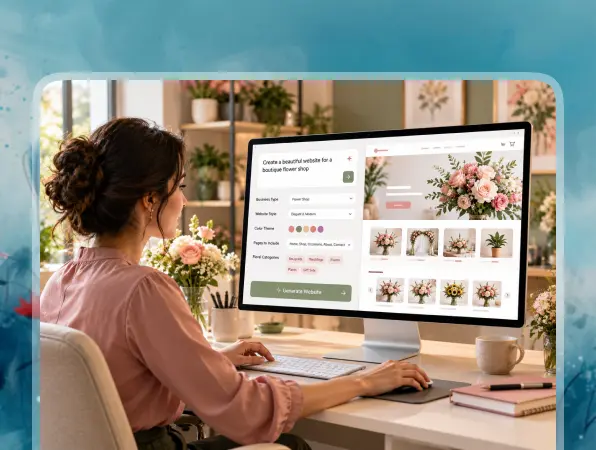
Prompt-Based Website Building

Prompt-Based Website Building

Turn written instructions into working florist pages, forms, and ecommerce functionality without manually building every section from the beginning.

  • Build with Natural Language

    Describe your flower collections, pages, forms, or customer workflows using clear text prompts.

  • Generate Functional Features

    Vitara turns your instructions into working storefront pages, forms, checkout flows, and connected backend logic.

  • Refine with More Prompts

    Change layouts, update content, or add new features by describing what you want to modify.

Dynamic Floral Catalog

Dynamic Floral Catalog

Create clear, visual product collections that help customers find flowers for specific occasions, styles, budgets, or seasonal needs.

  • Occasion-Based Collections

    Organize flowers for birthdays, anniversaries, sympathy, weddings, holidays, and other common occasions.

  • Detailed Product Pages

    Show photos, descriptions, pricing, sizes, add-ons, and other useful arrangement details.

  • Easy Product Updates

    Change products, images, pricing, or availability when your flower inventory or seasonal offerings change.
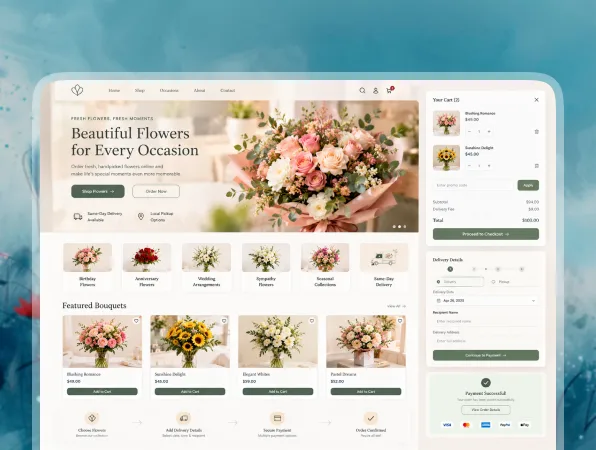
Online Ordering and Payments

Online Ordering and Payments

Let customers choose arrangements, personalize their order, and complete checkout directly through your florist website.

  • Shopping Cart

    Allow customers to combine flowers, gifts, cards, and other add-ons in one order.

  • Online Checkout

    Create a clear checkout flow for delivery, pickup, customer details, and order confirmation.

  • Payment Workflows

    Connect payment services so customers can complete flower purchases online.
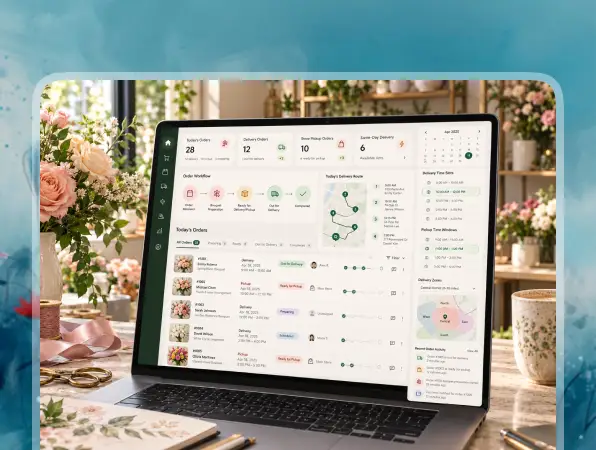
Delivery and Pickup Workflows

Delivery and Pickup Workflows

Build fulfillment options around the way local flower shops manage deliveries, pickup orders, service areas, and same-day requests.

  • Delivery Scheduling

    Let customers choose an available date for flower delivery during checkout.

  • Local Delivery Rules

    Set delivery zones, fees, availability, and same-day order cutoffs based on your business.

  • Pickup Options

    Give nearby customers the option to collect completed orders directly from your flower shop.

Instant Florist Customization

Instant Florist Customization

Update products, delivery rules, seasonal collections, and website content as your flower shop changes throughout the year.

  • Update Products Anytime

    Change flower photos, descriptions, pricing, sizes, add-ons, or availability when needed.

  • Refresh Seasonal Collections

    Switch featured arrangements for Valentine’s Day, Mother’s Day, weddings, holidays, or seasonal flowers.

  • Add Features with Prompts

    Create new pages, forms, integrations, or customer workflows by describing the functionality you need.
FAQ About Florist Website Builder Vitara

A florist website builder helps flower shops create websites for displaying arrangements, selling flowers online, managing local delivery, and collecting customer inquiries. Common features include product collections, checkout, pickup scheduling, wedding forms, galleries, and order management.

Yes. With Vitara, you can describe the florist website you want using text prompts. You can define flower collections, product pages, ordering flows, delivery options, event forms, branding, and other requirements, then refine the website with additional prompts.

A florist website should make it easy for customers to browse and order flowers. Common sections include product collections, occasion categories, prices, delivery information, pickup options, contact details, online checkout, wedding services, customer reviews, and floral galleries.

Yes. You can build an online flower shop with product pages, a shopping cart, checkout, and payment workflows. Customers can choose arrangements, add extras such as cards or vases, enter delivery details, and complete their order online.

Yes. You can create delivery and pickup workflows that let customers choose available dates. You can also set delivery zones, fees, pickup options, and same-day order cutoffs based on how your flower shop operates.

Yes. You can create categories for birthdays, anniversaries, sympathy, weddings, holidays, congratulations, thank-you gifts, or other occasions. This helps customers find suitable arrangements without searching through the entire catalog.

Yes. You can create custom forms for weddings, parties, corporate events, and other celebrations. These forms can collect the event date, venue, budget, floral style, arrangement needs, and customer contact information.

Yes. You can build subscription workflows for recurring flower deliveries, such as weekly office flowers, monthly home arrangements, or scheduled gift deliveries. The exact billing and delivery setup can depend on the workflow you create.

Yes. You can update flower collections, prices, photos, descriptions, availability, delivery rules, and seasonal products after publishing. This makes it easier to keep the website current when inventory or holiday offerings change.

Yes. You can connect a custom domain to your florist website and export the generated source code when you need more control over development, deployment, integrations, or future customization.

Know what’s trending in AI-powered web app development

Best Noloco Alternatives

I Compared the 7 Best Noloco Alternatives: Here’s What I Found

12 minutes read
Best FlutterFlow Alternatives

7 Best FlutterFlow Alternatives in 2026 (Free, AI & Native App Builders)

13 minutes read
Best Blackbox AI Alternatives

7 Best Blackbox AI Alternatives in 2026 for Coding & App Development

16 minutes read