Base44 vs Bubble: Which App Builder Should You Choose?
Picking between Base44 and Bubble for building your app?
Base44 promises an AI app builder that turns a simple prompt into a working product with pages, database, authentication, backend logic, and hosting handled for you.
Bubble promises a mature no-code platform where you can design pages, build workflows, manage data, connect plugins, and launch web apps without writing code.
Both sound great on their landing pages.
But here is the thing. Landing pages show what a tool can do. The real question is what happens when you try to build something beyond a basic demo.
I compared both platforms across app generation, workflows, database control, integrations, pricing, code ownership, and long-term flexibility.
And the split is clear.
Base44 is faster when you want to move from idea to MVP quickly. Bubble gives you more control, but it also takes more setup, patience, and product thinking.
Things get more complicated once you add user roles, payments, permissions, APIs, and custom logic.
In this comparison, I will walk you through:
- How both tools approach app building
- Which one is easier for beginners
- How they handle workflows, data, integrations, and design
- What to know about pricing, ownership, and scalability
- Who each tool is best for
Let us get into it.

Use AI to build real app foundations with frontend, backend, database, and code you can actually work with.
Start Building on Vitara.ai →
TL;DR: Base44 vs Bubble
If you are short on time, here is the honest verdict.
- Choose Base44 if you want to build an app from natural language prompts, launch an MVP quickly, and let AI generate the first version of your frontend, backend, database, authentication, and hosting setup.
- Choose Bubble if you need deeper control over workflows, UI design, database relationships, plugins, permissions, and complex app logic.
Base44 is better for non-technical founders, solo creators, operators, and teams that want to move fast without learning visual programming first.
Bubble is better for serious no-code builders who are willing to spend more time setting things up in exchange for more control.
Keep reading for the full breakdown of app building style, workflows, database control, pricing, integrations, code ownership, and scalability.
| Feature | Base44 | Bubble |
|---|---|---|
| Best For | Fast MVPs, internal tools, dashboards, CRMs, admin panels, simple SaaS apps | Complex SaaS apps, marketplaces, booking platforms, customer portals, multi-user dashboards |
| Building Style | Prompt-based AI app generation | Visual no-code app building |
| Ease of Use | Easier for beginners | Steeper learning curve |
| Setup Speed | Faster first version | Slower but more controlled |
| App Logic | Better for standard workflows | Better for complex workflows |
| Database Control | AI-generated structure | Manual database setup and control |
| UI Customization | Good for quick, clean interfaces | Stronger for detailed visual control |
| Integrations | Useful for common app needs | Larger plugin ecosystem and API flexibility |
| Code Ownership | Better path to code/GitHub handoff on supported plans | App stays inside Bubble’s ecosystem |
| Best User | Non-technical founder or fast-moving team | No-code builder or team needing deep control |
One-sentence verdict: Base44 is better for speed and beginner-friendly AI app generation, while Bubble is better for complex no-code apps that need deeper control over workflows, UI, data, and integrations.
Base44 vs Bubble Feature Comparison
In the previous section, I shared a quick verdict on how Base44 and Bubble stack up against each other.
Now, it’s time to break them down feature by feature.
I’ve compared the core features that matter most when choosing between an AI app builder and a no-code app builder, including:
- AI app generation
- Ease of use
- Database and backend control
- Workflow automation
- UI design flexibility
- Integrations
- Code ownership
- Pricing
- Scalability
- Best use cases
P.S. — I’ve also included real user feedback where it helps explain what each tool feels like outside the landing page.
Keep reading!
Which Tool Is Better for AI App Generation?
First, I wanted to compare the most obvious difference between Base44 and Bubble.
Base44 is built around AI-first app generation.
Bubble is built around visual no-code development.
That sounds simple, but once you actually compare how both tools approach app building, the difference becomes much bigger.
Let’s see who comes out as the winner.
| Feature | Base44 | Bubble |
|---|---|---|
| Starting Price | Free plan available; paid plans start at $16/mo billed annually | Free plan available; Web & Mobile paid plans start at $59/mo billed annually |
| Main Building Style | Natural language prompts | Visual no-code editor |
| AI App Generation | Yes, core product experience | Available, but not the main building model |
| Frontend Generation | AI can generate screens and layouts | Mostly manual visual design |
| Backend Generation | AI can create backend logic and database structure | Manual setup through Bubble’s editor |
| Authentication | Included in core features | Available through Bubble setup |
| Hosting | Included | Included |
| Best For | Fast MVPs, dashboards, internal tools, admin panels | Complex web apps, SaaS products, marketplaces |
| Winner | ✅ Faster for AI app generation | Better for manual control |
Base44
Base44 is the stronger choice if your main goal is to turn an idea into a working app quickly.
You can describe what you want in plain English, and Base44 can generate the first version of your app with screens, data structure, backend logic, authentication, and hosting already handled.
For example, you could prompt something like:
“Build a client portal where users can log in, submit support requests, upload files, and track request status from a dashboard.”
Base44 can take that and create a working app structure around it.
That is the biggest advantage here.
You’re not starting with a blank canvas. You’re starting with a generated app that you can refine.
This is helpful if you’re a non-technical founder, product manager, operator, freelancer, or solo creator who doesn’t want to spend the first few days figuring out how to structure pages, databases, and workflows.
Base44 also works well for common app types like:
- Internal tools
- CRMs
- Admin dashboards
- Customer portals
- Task management apps
- Approval systems
- Simple SaaS MVPs
- Data tracking tools
But here’s where you need to be careful.
AI app generation feels amazing when the app is simple or moderately complex. The moment your app needs advanced rules, multiple user roles, payments, edge cases, or very specific logic, you’ll need to review what the AI generated.
Base44 can get you moving fast, but you still need to test the app carefully before treating it like a production-ready product.
Base44 User Review
One Base44 reviewer on G2 said:
“It’s extremely simple to use. You just enter a prompt, and the platform analyzes it, generates both the backend and frontend, and displays the result in either web or mobile format.”
Read the full review on G2: source
That pretty much explains why people like Base44. It removes a lot of the early setup work that normally slows down app building.
But Reddit users also point out the limit. One user said Base44 is best for fast prototyping and shared that they eventually exported the code and started fixing things themselves when the project became more complex.
Read the full discussion on Reddit: source
So, Base44 is excellent when you want speed.
But if you expect the AI to perfectly handle every complex product requirement without review, you may run into friction.
Bubble
Bubble takes a very different path.
It does not feel like a prompt to app builder in the same way Base44 does. Bubble is more like a full visual development platform where you manually build your app piece by piece.
You create pages.
You design layouts.
You set up data types.
You build workflows.
You configure privacy rules.
You connect plugins and APIs.
This takes longer, but it also gives you much more control.
That makes Bubble better if you already know how your app should work and you want to control the logic carefully.
For example, if you’re building a marketplace, you may need:
- Buyer accounts
- Seller accounts
- Listings
- Search filters
- Payments
- Reviews
- Disputes
- Admin approvals
- Refund logic
- Messaging
- Notifications
In Base44, you can prompt your way toward a first version.
In Bubble, you can manually define how each piece behaves.
That is slower, but for complex apps, it can be safer.
Bubble is especially useful when your app logic matters more than launch speed.
Bubble User Review
One Bubble reviewer on G2 said:
“Its offering is expansive, theres a bit of a learning curve but its intuitive and robust in functionality.”
Read the full review on G2: source
That is the trade-off with Bubble.
It gives you a lot, but you need to learn how to use it.
You may not get a polished MVP as fast as you would with Base44, but once you understand Bubble’s editor, workflows, database, and privacy rules, you get much deeper control over your app.
Winner?
For AI app generation, Base44 is the clear winner.
It is faster, easier to start with, and better suited for people who want an AI app builder for beginners.
If your goal is to describe an app idea and get a working first version quickly, Base44 wins.
Bubble is better when you want to manually build and control the app yourself.
So, the simple answer is:
Choose Base44 if you want AI to generate your app.
Choose Bubble if you want to visually build and control your app.
Which Tool Is Easier to Use for Beginners?
The next thing I wanted to compare was ease of use.
This matters a lot because both tools are often marketed to people who don’t want to code.
But “no code” does not always mean “easy.”
Some no-code tools still require you to think like a developer. You may not write JavaScript or SQL, but you still need to understand databases, workflows, conditions, permissions, and app logic.
So, let’s compare Base44 vs Bubble from a beginner’s point of view.
| Feature | Base44 | Bubble |
|---|---|---|
| Beginner Friendliness | Very beginner-friendly | Beginner-friendly after learning curve |
| First App Setup | Prompt-based | Manual setup |
| Blank Canvas Problem | Lower | Higher |
| Learning Curve | Easier at the start | Steeper |
| Technical Thinking Required | Lower for simple apps | Higher |
| Best Beginner User | Founder, operator, solo creator, product manager | Serious no-code builder willing to learn |
| Winner | ✅ Base44 | Better after experience |
Base44
Base44 is easier for beginners because it starts with language.
You do not need to understand how to create a database schema before seeing your first app.
You do not need to manually decide how every page connects.
You do not need to start by dragging elements onto an empty screen.
You can simply explain the app you want.
That makes Base44 feel much more approachable for people who are new to AI app builders, vibe coding tools, or no-code AI development platforms.
This is helpful if you have an idea but don’t know how to translate it into technical steps.
For example, a beginner might say:
“Create an app for a small gym where members can book classes, trainers can manage schedules, and admins can see attendance reports.”
Base44 can understand that as an app structure and start generating the pieces.
That kind of experience is much easier than manually creating:
- A User data type
- A Class data type
- A Booking data type
- Different user roles
- Booking workflows
- Admin dashboards
- Conditional visibility rules
You’ll still need to review and improve the output, but the starting point is much friendlier.
Where Base44 may feel limiting is when you want to fine-tune everything.
Beginners will love how fast it creates the first version. More advanced builders may eventually want more direct control over exactly how the logic is written.
Bubble
Bubble is beginner-friendly in the sense that you don’t need traditional coding.
But it is not instantly easy.
Bubble has its own way of thinking.
You need to learn concepts like:
- Data types
- Fields
- Repeating groups
- Workflows
- Custom states
- Conditions
- Privacy rules
- Backend workflows
- API calls
- Responsive design
None of these are impossible, but they do take time.
This is why Bubble often feels less like a simple website builder and more like visual programming.
For beginners who want to build one simple app quickly, Bubble can feel slow at the start.
But for beginners who are serious about learning no-code app development, Bubble can be a strong long-term skill.
Once you understand how Bubble works, you can build much more complex apps than you could with many simpler no-code tools.
That is the real difference.
Base44 helps you move fast before you understand every technical detail.
Bubble rewards you after you learn how app logic works.
Winner?
Base44 wins for beginner ease of use.
It has a shorter path from idea to working app, especially for non-technical founders and solo creators.
Bubble is better for beginners who are willing to become serious no-code builders.
So, if you want the easiest starting point, choose Base44.
If you want to learn a deeper no-code development platform and build more complex products over time, choose Bubble.
Which Tool Has Better Database and Backend Control?
Now let’s talk about the part most beginners ignore at first.
The backend.
This is where your app stores data, handles logic, manages users, connects services, and performs actions behind the scenes.
In simple words:
The frontend is what users see.
The backend is what makes the app actually work.
This is where Base44 and Bubble start to feel very different.
| Feature | Base44 | Bubble |
|---|---|---|
| Database Setup | AI-generated | Manually created |
| Backend Logic | AI-assisted | Visual workflow-based |
| Data Relationships | Good for standard use cases | Strong for complex relationships |
| User Roles | Good for simple roles | Better for detailed permission systems |
| Privacy Rules | Easier to start | More granular control |
| Backend Functions | Available on higher paid plans | Built into Bubble’s workflow system |
| Best For | Standard apps and quick MVPs | Complex SaaS, marketplaces, and data-heavy apps |
| Winner | Faster setup | ✅ Better control |
Base44
Base44 can generate your backend and database structure from a prompt.
That is a big deal.
If you tell it to build a CRM, it can create records for contacts, companies, deals, tasks, and users.
If you tell it to build a support portal, it can create tickets, user accounts, statuses, comments, and admin views.
This is very useful when you need a working foundation quickly.
You do not have to manually think through every table, field, or relationship before seeing progress.
Base44 also includes core features like authentication, database functionality, and analytics on its free plan. Paid plans add more credits and higher-level capabilities, with Builder and above including backend functions and GitHub integration.
That makes Base44 a strong AI full stack app builder for early MVPs.
But here’s the catch.
AI-generated backend logic still needs review.
If your app is simple, this may not be a big problem.
But if your app has complicated relationships, like teams, organizations, roles, permissions, subscriptions, usage limits, invoices, and admin approvals, you need to inspect the structure carefully.
Base44 is great when the backend follows a common pattern.
It can feel less comfortable when the backend needs highly specific rules.
For example, Base44 can probably help you create a basic task app very quickly.
But if your task app needs advanced permissions where managers can only see certain projects, clients can comment but not edit, admins can override deadlines, and contractors can only access assigned tasks during active contract dates, you’ll need to test everything closely.
Bubble
Bubble gives you more manual backend and database control.
You can create your data types yourself.
For example:
- User
- Company
- Project
- Task
- Invoice
- Subscription
- Booking
- Message
- Review
Then you can add fields to each one.
For example, a Task might have:
- Title
- Description
- Status
- Due date
- Assigned user
- Related project
- Priority
- Created by
- Completed date
After that, you can build workflows around those data types.
This is why Bubble is stronger for complex no-code apps.
You can decide exactly what happens when:
- A user signs up
- A form is submitted
- A payment succeeds
- A subscription fails
- A seller publishes a listing
- An admin approves a request
- A user changes their role
- A customer cancels an order
Bubble also gives you more control over privacy rules, which matters a lot when different users should see different data.
For example, in a client portal, you may want:
- Clients to see only their own files
- Team members to see assigned projects
- Admins to see everything
- Contractors to see only limited records
Bubble is better suited for that kind of detailed permission setup.
The downside is that you have to build and manage it yourself.
If you make a mistake in your privacy rules or workflows, Bubble will not magically fix the logic for you.
So yes, Bubble gives you more control.
But it also gives you more responsibility.
Winner?
Bubble wins for database and backend control.
Base44 is better if you want the backend generated quickly and you’re building a standard app.
Bubble is better if your app has complex data relationships, user roles, permissions, backend workflows, or business rules.
So, here’s the practical verdict:
Choose Base44 if you want the AI to create your backend foundation quickly.
Choose Bubble if your backend logic is the heart of your product.
Build full-stack apps with AI prompts, modern code, backend support, and the flexibility to keep improving.
Try Vitara.ai →
Which Tool Offers the Best Workflow Automation?
The next feature I wanted to compare is workflow automation.
This is one of the most important parts of any app builder.
Why?
Because nice screens are not enough. Your app also needs to do something when a user clicks a button, submits a form, updates a record, pays for a plan, books a slot, or changes their account details.
So, let’s see how Base44 and Bubble handle workflows.
| Feature | Base44 | Bubble |
|---|---|---|
| Workflow Setup | AI-generated from prompts | Manually created in visual editor |
| Best For | Simple and standard workflows | Complex, conditional workflows |
| Multi-Step Logic | Good for basic app flows | Stronger for detailed logic |
| User Role Logic | Good for simple roles | Better for complex permissions |
| Payment Workflows | Possible, but needs testing | More flexible with setup |
| Backend Workflows | Available on higher paid plans | Strong visual backend workflow system |
| Workflow Debugging | Prompt-based fixes | Manual testing and debugging |
| Winner | Faster for simple workflows | ✅ Better for complex workflows |
Base44
Base44 is very helpful when your app needs common workflows.
For example, if you want users to:
- Submit a form
- Create a task
- Update a dashboard
- Approve a request
- Upload a file
- Log in to a portal
- View their own records
- Trigger a simple notification
Base44 can usually create a working version of that flow from your prompt.
That makes it useful for internal tools, admin panels, approval apps, CRMs, and simple SaaS MVPs.
You don’t have to manually create every workflow from scratch. You can simply explain what should happen.
For example:
“When a client submits a support ticket, save it, mark it as open, show it in the admin dashboard, and let the client track the status.”
That is the kind of workflow Base44 is built for.
But here’s where it gets interesting.
The more conditions you add, the more carefully you need to test the result.
If your workflow has different user roles, payment states, approval levels, email alerts, API calls, and exceptions, you can’t just assume the AI got everything right.
Base44 is great for getting the first version working.
But for serious app logic, you still need to review the workflow like a product builder.
Base44 User Review
One Reddit user said Base44 is best for fast prototyping, but as app logic becomes more complex, the platform can struggle to keep editing its own code cleanly.
Read the full discussion on Reddit: source
That feels like a fair way to look at Base44.
It helps you move fast, especially at the beginning.
But once your app becomes logic-heavy, you need stronger testing, cleaner prompts, and maybe developer help.
Bubble
Bubble is stronger when workflows are the heart of your app.
You can manually define what happens step by step.
For example, when a user clicks “Book Now,” you can tell Bubble to:
- Check if the slot is still available
- Create a booking record
- Charge the user
- Send a confirmation email
- Notify the service provider
- Update the calendar
- Hide unavailable slots
- Trigger a refund workflow if the payment fails
This is where Bubble feels more powerful.
You are not depending on AI to guess your workflow.
You build the logic yourself.
That takes longer, but it gives you much more control.
Bubble’s workflow builder is especially useful for:
- SaaS apps
- Marketplaces
- Booking platforms
- Customer portals
- Membership sites
- Internal approval systems
- Multi-user dashboards
- Apps with complex permissions
The downside?
Bubble can feel overwhelming if you’re new.
You need to understand how data types, privacy rules, workflow actions, conditions, and custom states work together.
If you miss one small condition, the app may behave differently than expected.
Bubble User Review
One G2 review summary notes that users praise Bubble’s flexibility for creating complex apps, but some mention a steep learning curve for advanced features.
Read the full review on G2: source
That sums up Bubble pretty well.
It gives you more workflow power, but you have to earn it.
Winner?
Bubble wins for workflow automation.
Base44 is faster when your workflows are simple.
But Bubble is better when your app has complex logic, user roles, permissions, payment flows, and multi-step journeys.
So, here’s the practical verdict:
Choose Base44 if your workflows are easy to explain in one or two sentences.
Choose Bubble if your workflows need conditions, branches, exceptions, and careful control.
Which Tool Offers Better UI Design Flexibility?
Now let’s talk about design.
This matters because your app should not only work. It should also feel easy to use.
A dashboard that looks clean is helpful.
A customer portal that feels confusing is a problem.
So, I compared Base44 and Bubble based on how much control they give you over the user interface.
| Feature | Base44 | Bubble |
|---|---|---|
| UI Creation | AI-generated screens | Manual visual design |
| Design Speed | Very fast | Slower |
| Custom Layout Control | Limited compared to Bubble | Strong |
| Responsive Design | AI-assisted | Manual responsive controls |
| Pixel-Level Editing | Basic to moderate | Stronger |
| Best For | Quick dashboards and MVPs | Branded web apps and complex UI |
| Design Learning Curve | Easier | Higher |
| Winner | Faster design output | ✅ Better design control |
Base44
Base44 is good at creating clean first versions quickly.
If you ask it to build a dashboard, it can usually create something that looks organized enough to test with users.
This works well for:
- Admin panels
- CRMs
- Internal tools
- List views
- Tables
- Forms
- Simple dashboards
- Customer portals
- Task management screens
For many MVPs, this is enough.
You do not need a perfect interface on day one.
You need something clear enough to test the idea.
That is where Base44 is helpful.
Instead of dragging buttons, cards, tables, and forms onto a page manually, you can describe the layout you want and let the AI create a starting point.
For example:
“Create a clean admin dashboard with stats cards at the top, a table of recent orders, filters by status, and a sidebar menu.”
That kind of prompt can save a lot of time.
But Base44 may feel limiting if you need exact design control.
If you want to match a Figma design perfectly, adjust every spacing value, control every responsive breakpoint, or create a very custom product experience, Bubble gives you more room.
Base44 is better for fast, usable design.
It is not always the best choice for pixel-perfect design.
Base44 User Review
One G2 reviewer said Base44 has a minimal learning curve and works well for product design-style use cases.
Read the full review on G2: source
That makes sense.
Base44 helps you see the product quickly.
You can go from idea to working interface without spending hours on layout setup.
Bubble
Bubble gives you much deeper UI control.
You can design pages visually and control how elements behave on different screen sizes.
You can create reusable elements, popups, dashboards, forms, cards, menus, and dynamic pages.
You can also control what users see based on conditions.
For example:
- Show an admin menu only to admins
- Hide payment buttons after subscription
- Display different dashboards for clients and team members
- Show warnings when a form is incomplete
- Change button states based on user actions
This makes Bubble stronger for serious web apps where design and logic are closely connected.
If you are building a marketplace, booking app, SaaS dashboard, or advanced customer portal, you’ll probably want this level of control.
But Bubble’s design system can take time to learn.
Some users find the responsive editor and layout controls frustrating at first.
You may spend more time adjusting containers, groups, spacing, and visibility rules than you expected.
Bubble User Review
One Reddit user complained that Bubble’s biggest problem is “friction,” saying even simple layouts can take longer than expected.
Read the full discussion on Reddit: source
That is the trade-off.
Bubble gives you control, but it can slow you down.
Winner?
Bubble wins for UI design flexibility.
Base44 wins if you want a clean first version quickly.
Bubble wins if you care about detailed layouts, custom dashboards, responsive behavior, reusable components, and branded product experiences.
So, choose Base44 if you want fast, presentable UI.
Choose Bubble if design control matters more than speed.
Which Tool Offers Better Integrations and API Support?
Integrations are important because most real apps do not live alone.
Your app may need to connect with:
- Stripe
- OpenAI
- Google Sheets
- Airtable
- HubSpot
- Slack
- Zapier
- Make
- Email tools
- Analytics tools
- Payment systems
- External databases
- Custom APIs
So, the question is simple:
Which tool gives you more flexibility when your app needs to talk to other tools?
| Feature | Base44 | Bubble |
|---|---|---|
| Common Integrations | AI-assisted and built-in options | Plugins and API Connector |
| API Flexibility | Useful for standard needs | Stronger for custom API calls |
| Plugin Marketplace | Smaller ecosystem | Large plugin marketplace |
| External Data Sources | Possible, depends on setup | Strong API/data flexibility |
| AI Integrations | Strong for AI-first workflows | Possible through APIs/plugins |
| Beginner Friendliness | Easier for basic integrations | More setup required |
| Winner | Easier for simple setup | ✅ Better integration depth |
Base44
Base44 is helpful if you want common integrations without getting too technical.
Because it works as an AI app builder, you can often explain what you want connected and let the platform guide the setup.
That is useful for common use cases like:
- Sending emails
- Adding AI features
- Connecting forms
- Building dashboards
- Using built-in services
- Creating AI-powered workflows
- Adding file uploads
- Connecting simple external tools
Base44 also uses integration credits for built-in service actions. So, if your app sends emails, calls an LLM, generates images, or uses built-in integrations, those actions can consume credits.
This is not necessarily bad.
But you need to understand it before building a live app with active users.
For a simple internal tool or MVP, Base44 can feel very smooth.
For a complex SaaS product with lots of API calls, heavy AI usage, file processing, or external data syncing, you need to watch credit usage carefully.
This is where the pricing model and integration model connect.
Your app may work fine technically, but the usage cost can change as people start using it more.
Bubble
Bubble is stronger for integrations because it has a mature plugin ecosystem and a powerful API Connector.
The API Connector lets your Bubble app connect to external APIs.
In simple words, it helps Bubble talk to other software.
For example, you can connect Bubble with:
- Stripe for payments
- OpenAI for AI features
- Google Maps for location data
- Airtable for external records
- HubSpot for CRM workflows
- SendGrid for emails
- Twilio for SMS
- Custom backend APIs
- Any tool with a compatible REST API
This makes Bubble much more flexible when your app needs custom integrations.
You can also use plugins when you don’t want to set up an API manually.
That saves time for common integrations.
But here’s the catch.
Bubble integrations require more technical thinking.
You may need to understand:
- API keys
- Headers
- Parameters
- JSON responses
- Authentication
- Webhooks
- Data mapping
- Error handling
You do not need to be a full developer, but you do need to understand what is happening.
If you are a beginner, this can feel confusing at first.
If you are building a serious app, this flexibility is a big advantage.
Bubble User Review
One Reddit user said Bubble can be ideal for getting MVPs out quickly if you already have some HTML, CSS, or JavaScript knowledge.
Read the full discussion on Reddit: source
That is especially true for integrations.
Bubble becomes much more useful when you understand how apps and APIs work.
Winner?
Bubble wins for integrations and API support.
Base44 is easier when you need simple, common integrations and want AI to help move things along.
Bubble is better when your app needs custom APIs, plugins, webhooks, third-party services, and more control over how data moves between tools.
So, here’s the simple verdict:
Choose Base44 if you want easier integration setup for standard app needs.
Choose Bubble if integrations are a serious part of your product.
Which Tool Gives Better Code Ownership and Export Options?
This is one of the biggest differences between Base44 and Bubble.
And honestly, it is one of the sections most people should read before choosing either platform.
Because building the app is only one part of the decision.
You also need to ask:
What happens if I want to leave later?
Can I export the code?
Can developers take over?
Can I host the app somewhere else?
Can I keep building outside the platform?
Let’s compare.
| Feature | Base44 | Bubble |
|---|---|---|
| Code Export | Available through supported options/plans | No full source code export |
| GitHub Integration | Available on Builder plan and above | Not a standard app export workflow |
| Developer Handoff | Easier path if code is exported | Usually requires rebuilding outside Bubble |
| Platform Lock-In | Lower than Bubble | Higher |
| Data Export | Available depending on app/data setup | Data can be exported |
| Best For | Teams that may move to code later | Teams staying inside Bubble long term |
| Winner | ✅ Base44 | Stronger if staying inside Bubble |
Base44
Base44 has an advantage here because it offers a better path toward code ownership.
On supported plans, Base44 includes GitHub integration, which makes it more attractive if you want developers to take over later.
This matters a lot for founders.
Why?
Because many people start with an MVP, validate the idea, then later hire developers to make the app more scalable, secure, or custom.
Base44 fits that path better than Bubble.
You can use Base44 to build the first version quickly, test the market, then move toward a more traditional development workflow if the product starts working.
That does not mean the handoff will always be perfect.
AI-generated code still needs review.
A developer may still need to clean up logic, improve structure, fix edge cases, and rebuild parts of the app.
But having a path to code is still better than being fully locked inside a platform.
This is helpful if you care about:
- GitHub access
- Developer handoff
- Long-term flexibility
- Self-hosting possibilities
- Moving beyond the AI app builder later
- Keeping more control over the underlying app
Base44 is not just useful because it builds fast.
It is useful because it gives you a better escape route if the project grows.
Bubble
Bubble is different.
Bubble gives you a lot of control inside Bubble, but it does not give you full source code export.
You can export your data, but you cannot simply download your Bubble app as normal application code and host it somewhere else.
That means your app lives inside Bubble’s ecosystem.
For many users, this is fine.
If Bubble works for your business, you may never need to leave.
Many founders, agencies, and no-code builders run serious apps on Bubble.
But if you know from day one that you may want full code ownership later, Bubble’s lock-in is something to think about carefully.
Leaving Bubble usually means rebuilding the app in another stack.
And that rebuild is not just about code.
You also have to recreate:
- Pages
- Workflows
- Database logic
- Privacy rules
- Plugins
- API connections
- User roles
- Admin panels
- Edge cases
- Internal business logic
That can become expensive if your app has been growing inside Bubble for years.
Bubble User Review
One Reddit discussion points out that rebuilding from Bubble is difficult because much of the product knowledge lives inside years of workflows and workarounds.
Read the full discussion on Reddit: source
That is a real concern.
Bubble can be great if you plan to stay there.
It is less ideal if your long-term plan depends on owning and moving the full codebase.
Winner?
Base44 wins for code ownership and export flexibility.
Bubble wins only if you are comfortable staying inside its ecosystem long term.
So, here’s the honest verdict:
Choose Base44 if code handoff, GitHub access, or future developer ownership matters to you.
Choose Bubble if you want a mature no-code environment and you are okay building inside Bubble for the long run.
Which Tool Has Better Pricing?
Pricing is where Base44 vs Bubble gets a little tricky.
Because you are not only comparing monthly plans.
You are comparing two completely different pricing models.
Base44 uses message credits and integration credits.
Bubble uses workload units.
Both can look simple at first, but the real cost depends on what you are building, how often you use AI, how many users your app has, and how many backend actions your app performs.
So, let’s break this down properly.
| Feature | Base44 | Bubble |
|---|---|---|
| Free Plan | ✅ Yes | ✅ Yes |
| Starting Paid Price | $16/mo billed annually | $59/mo billed annually for Web & Mobile |
| Pricing Model | Plan + message credits + integration credits | Plan + workload units + add-ons |
| Free Plan Limits | 25 message credits/mo and 100 integration credits/mo | 50K workload units/mo on Free |
| Main Usage Metric | AI messages and integration actions | Server work used by the app |
| Best Low-Cost Use Case | Quick MVPs and small apps | Building/testing before launch |
| Cost Risk | Heavy AI or integration usage | Heavy workflows, database searches, API calls, and traffic |
| Winner | ✅ Better starting price | Better for structured scaling if optimized well |
Base44
Base44 has the lower starting price.
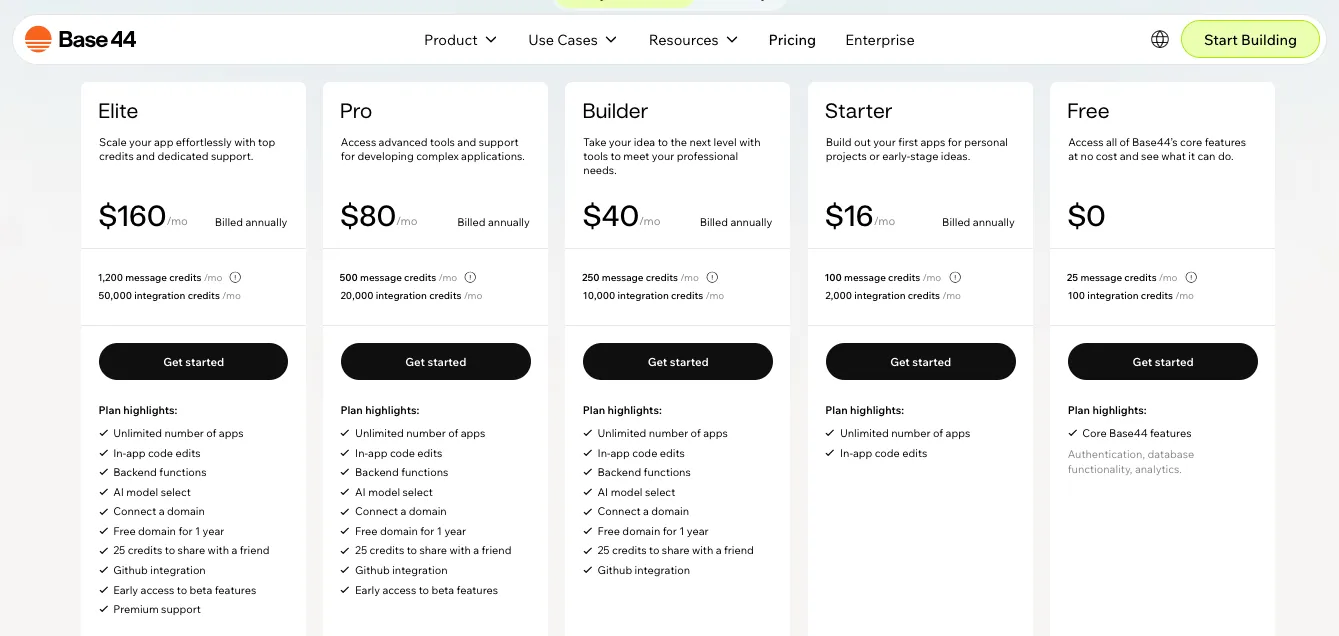
At the time of writing, Base44 offers:
- Free plan: $0/mo
- Starter: $16/mo billed annually
- Builder: $40/mo billed annually
- Pro: $80/mo billed annually
- Elite: $160/mo billed annually
The Free plan includes 25 message credits per month and 100 integration credits per month.
Starter gives you 100 message credits and 2,000 integration credits.
Builder gives you 250 message credits and 10,000 integration credits.
Pro gives you 500 message credits and 20,000 integration credits.
Elite gives you 1,200 message credits and 50,000 integration credits.
You can check the latest numbers on the official pricing page here: source
Here is what this means in plain English.
Message credits are used when you interact with the AI to build, edit, or fix your app.
Integration credits are used when your app performs actions that rely on integrations, such as calling an LLM, sending an email, uploading files, generating images, or using other built-in services.
This pricing model is easy to understand at the start.
But it can become harder to predict if your app uses AI features heavily.
For example, if your app has users triggering AI summaries, image analysis, email sending, file uploads, or LLM calls every day, your integration credits can become important very quickly.
For small MVPs, dashboards, internal tools, and early prototypes, Base44 can feel affordable.
But if your app becomes active and integration-heavy, you need to watch usage closely.
Base44 User Review
One Reddit user said:
“Base44 is best for fast prototyping. Yes, in theory you can create full-fledged web apps with it, but as the app logic becomes more complex, so does the codebase.”
Read the full discussion on Reddit: source
That matches the pricing story too.
Base44 is great when you are moving fast and testing an idea.
But once the app grows, you need to think beyond the monthly plan and look at credit usage, code quality, and long-term maintenance.
Bubble
Bubble pricing works differently.
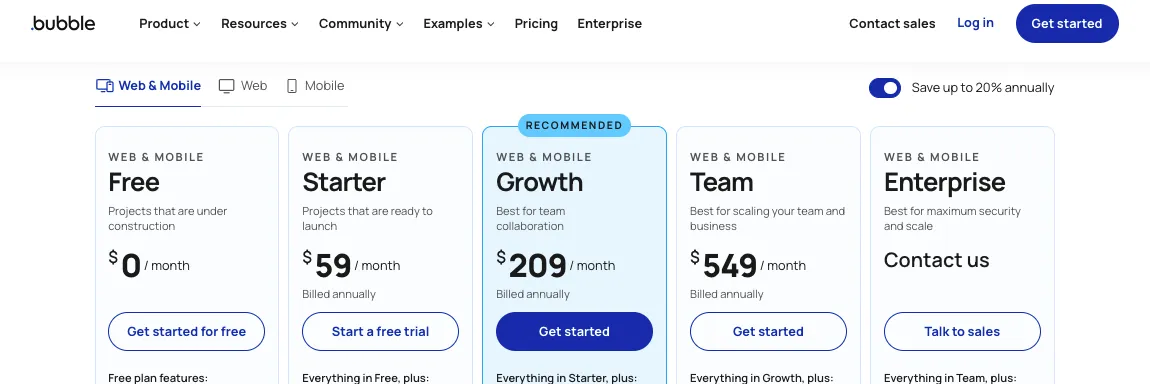
At the time of writing, Bubble’s Web & Mobile annual pricing includes:
- Free plan: $0/mo
- Starter: $59/mo billed annually
- Growth: $209/mo billed annually
- Team: $549/mo billed annually
- Enterprise: custom pricing
You can check the latest pricing here: source
Bubble’s plans include workload units.
In simple words, workload units measure the work Bubble does to run your app.
That can include things like:
- Loading pages
- Searching the database
- Running workflows
- Calling APIs
- Processing files
- Handling user actions
- Running backend workflows
- Supporting app traffic
Bubble’s Free plan includes 50K workload units per month.
Starter includes 175K workload units per month.
Growth includes 250K workload units per month.
Team includes 500K workload units per month.
So, Bubble may look more expensive than Base44 at the starting point.
But Bubble gives you a more mature no-code environment for complex apps.
The problem is that workload pricing can be hard for beginners to predict.
If your app is built well, Bubble can be cost-effective.
If your app is built poorly, costs can rise because inefficient workflows, heavy database searches, and too many API calls can use more workload.
Bubble User Review
One Bubble user on G2 said:
“Its offering is expansive, theres a bit of a learning curve but its intuitive and robust in functionality.”
Read the full review on G2: source
That is a good way to think about Bubble pricing.
You are paying for a more complete no-code development platform.
But you also need to understand how to build efficiently.
Winner?
Base44 wins on starting price.
It is cheaper to start, easier to test, and better if you want a quick AI MVP builder without spending much upfront.
Bubble is more expensive at the entry level, but it may make sense if you are building a serious no-code app and you know how to manage workload usage.
So, here’s the practical verdict:
Choose Base44 if you want a lower-cost way to build and validate an app idea quickly.
Choose Bubble if you are ready to invest more in a mature no-code app builder with deeper long-term control.
Which Tool Is Better for Scalability and Performance?
Scalability is one of those words that sounds technical, but the idea is simple.
Can your app keep working well as more people use it?
That is the real question.
A tool that works perfectly for 10 test users may feel very different when 1,000 users are logging in, searching records, uploading files, triggering workflows, and using integrations every day.
So, let’s compare Base44 and Bubble from a scaling point of view.
| Feature | Base44 | Bubble |
|---|---|---|
| Best Scaling Use Case | Simple apps, internal tools, MVPs | Complex no-code apps with optimized workflows |
| Performance Control | Less manual control | More manual optimization control |
| Usage Risk | Credits and AI-generated logic | Workload units and inefficient workflows |
| Best For Live Users | Standard apps with predictable usage | Larger apps if built carefully |
| Developer Handoff | Easier with GitHub on supported plans | Harder because full code export is not available |
| Scaling Difficulty | Can become tricky as logic grows | Depends heavily on app structure |
| Winner | Better for early validation | ✅ Better for complex no-code scaling |
Base44
Base44 is strong when you need to launch quickly.
It can help you build working apps, test ideas, and get something into users’ hands fast.
This is perfect for:
- MVPs
- Internal tools
- Admin panels
- CRMs
- Simple dashboards
- Approval tools
- Customer portals
- Lightweight SaaS prototypes
For these use cases, Base44 can be more than enough.
But scaling is where you need to slow down and think carefully.
Because Base44 is AI-generated, you need to make sure the app logic is clean, secure, and efficient before relying on it for a serious production product.
This is especially true if your app has:
- Many user roles
- Complex permissions
- Payment logic
- Large databases
- AI-heavy actions
- Frequent API calls
- Complex workflows
- High user activity
- Sensitive customer data
Base44 can help you move quickly, but it does not remove the need for testing.
You should test workflows, database structure, user permissions, integrations, and edge cases before scaling.
Here’s where Base44 has one real advantage.
If your app starts growing and you want developers to take over, Base44’s GitHub integration on Builder plan and higher gives you a better handoff path than Bubble.
That does not mean every export will be perfect.
But it does mean you are not fully stuck inside the app builder forever.
Base44 User Review
One Reddit user said:
“It works but it has limitations… Great for building an initial idea/concept but it struggles with full development.”
Read the full discussion on Reddit: source
That is probably the safest way to position Base44.
Great for early speed.
Useful for MVPs.
But serious scaling needs careful review.
Bubble
Bubble has been around longer and has a more mature no-code ecosystem.
That gives it an advantage for serious no-code apps.
You can build complex apps with:
- Custom database structure
- Backend workflows
- API integrations
- Payment flows
- Privacy rules
- User roles
- Conditional logic
- Reusable elements
- Admin dashboards
- Multi-user experiences
Bubble can scale, but only if the app is built properly.
This is the part many beginners miss.
Bubble performance depends heavily on how you build.
If you create inefficient database searches, run too many workflows, load too much data on a page, or rely on too many plugins, your app can become slow and expensive.
Bubble’s workload model makes this more visible because every app action consumes workload in some way.
That is not automatically bad.
It just means you need to optimize.
For example, instead of loading every record in your database, you may need to use filters carefully.
Instead of running five backend workflows when one would work, you need cleaner logic.
Instead of sending unnecessary API calls, you need better workflow planning.
Bubble gives you more control over performance, but it also gives you more responsibility.
Bubble User Review
One Reddit user with Bubble experience said:
“If you’re a skilled Bubble developer who understands the platform’s workflows and algorithms and structures your app well from the start, Bubble can be extremely cost-effective.”
Read the full discussion on Reddit: source
That is the key point.
Bubble is not automatically scalable just because it is mature.
It becomes scalable when the app is built well.
Winner?
Bubble wins for complex no-code scalability.
It gives you more control over workflows, databases, permissions, and optimization.
Base44 is better for quick validation and simpler production apps.
So, here’s the practical verdict:
Choose Base44 if you want to validate quickly and may hand the code to developers later.
Choose Bubble if you want to keep building inside a no-code platform and you are willing to optimize the app properly.
Which Tool Is Better for Real-World Use Cases?
Now let’s compare Base44 and Bubble by actual use case.
Because asking “which tool is better?” is not enough.
The better question is:
What are you trying to build?
A simple internal tool and a two-sided marketplace are not the same project.
A customer portal and a full SaaS product do not need the same level of control.
So, here is how I would choose between them.
| Use Case | Best Choice | Why |
|---|---|---|
| Simple MVP | Base44 | Faster first version from prompts |
| Internal Tool | Base44 | Great for dashboards, records, forms, and approvals |
| CRM | Base44 | Good for standard data tracking and admin workflows |
| Admin Panel | Base44 | Quick to generate and easy to iterate |
| Customer Portal | Depends | Base44 for simple portals, Bubble for complex permissions |
| SaaS MVP | Depends | Base44 for simple MVPs, Bubble for complex SaaS logic |
| Marketplace | Bubble | Better for buyers, sellers, payments, listings, and disputes |
| Booking App | Bubble | Stronger for availability, calendars, payments, and rules |
| Multi-User Dashboard | Bubble | Better control over roles and permissions |
| AI-Powered App | Depends | Base44 for faster AI-first apps, Bubble for custom API logic |
| Long-Term No-Code Product | Bubble | More mature no-code control |
| Future Code Handoff | Base44 | Better GitHub/code path on supported plans |
Base44
Base44 is best when speed matters more than perfect control.
If you are trying to validate an idea, impress a client, build an internal workflow, or create a functional demo, Base44 is a very strong option.
It works especially well when your app idea can be explained clearly in a few sentences.
For example:
“Build a dashboard where managers can track employee onboarding tasks, assign owners, upload documents, and view completion status.”
That is a Base44-friendly use case.
You have records, users, forms, statuses, and dashboards.
The logic is useful, but not overly complicated.
Base44 is also helpful if you are not technical and want to get unstuck quickly.
Instead of learning a full no-code development platform, you can start by describing what you want and improving the result.
This makes Base44 a good fit for:
- Non-technical founders
- Product managers
- Startup operators
- Agencies building quick demos
- Solo creators
- Consultants
- Small teams
- Internal operations teams
But you may want to skip Base44 if your app depends on highly specific business logic.
For example, if you are building a marketplace with seller payouts, buyer disputes, cancellation rules, refund flows, subscription tiers, admin approvals, and custom permissions, Base44 may not be the safest first choice.
It can help you prototype the idea.
But Bubble gives you more control for the full product.
Bubble
Bubble is best when control matters more than speed.
It takes longer to learn, but it gives you a lot more control over how your app behaves.
That makes Bubble better for apps like:
- Marketplaces
- SaaS platforms
- Booking systems
- Membership apps
- Complex customer portals
- Multi-role dashboards
- Payment-based apps
- Workflow-heavy internal tools
- Apps with advanced privacy rules
For example, imagine you are building a booking app.
You may need users to search available slots, book appointments, pay online, cancel within a time window, receive reminders, trigger refunds, notify providers, and block unavailable times.
That is not just one workflow.
That is a system of connected workflows.
Bubble is better suited for that kind of app because you can manually control the logic.
The downside is that Bubble asks more from you.
You need to plan your database.
You need to build workflows carefully.
You need to test privacy rules.
You need to optimize performance.
So, Bubble is not the fastest choice for every beginner.
But it is the stronger choice when your app needs depth.
Winner?
There is no single winner for every use case.
Base44 wins for speed-focused projects.
Bubble wins for control-focused projects.
So, here’s the simple rule:
Choose Base44 if your app is mostly forms, dashboards, records, simple roles, approvals, and standard workflows.
Choose Bubble if your app has many user types, payments, permissions, branching workflows, marketplace logic, or complex database relationships.
Which Tool Has Better Support and Learning Resources?
Support matters more than people think.
Because no matter how simple an app builder looks, you will eventually get stuck.
Maybe your workflow does not run.
Maybe your database is not showing the right records.
Maybe your integration fails.
Maybe your layout breaks on mobile.
Maybe your AI-generated app looks right but behaves wrong.
So, let’s compare support and learning resources.
| Feature | Base44 | Bubble |
|---|---|---|
| Official Docs | Available | Very detailed |
| Community | Growing | Large and mature |
| Learning Curve Help | AI chat and docs | Docs, forum, tutorials, courses |
| Third-Party Tutorials | Fewer | Many |
| Expert Marketplace | Smaller ecosystem | Larger expert and agency ecosystem |
| Best For Beginners | Easier to start | More learning resources once serious |
| Winner | Better guided start | ✅ Better long-term learning ecosystem |
Base44
Base44 is easier to start with because the product itself guides you through app building.
You can use AI chat to create and edit the app, which reduces the need to read long tutorials before doing anything useful.
That is one of its biggest strengths.
If you are a beginner, you can often learn by prompting.
For example, instead of searching how to create a login system, you can ask Base44 to add user authentication.
Instead of learning how to structure a table from scratch, you can ask it to create a dashboard with specific data fields.
That makes the learning experience feel lighter.
Base44 also has official docs for billing, credits, app building, GitHub integration, security, data permissions, and other core features.
But compared with Bubble, the broader learning ecosystem is still smaller.
You will find fewer advanced tutorials, fewer expert builders, fewer deep community answers, and fewer third-party courses.
That is normal because Bubble has been around longer.
So, Base44 is easier to start with.
But Bubble has more depth when you need help with complicated builds.
Base44 User Review
One G2 reviewer said:
“I mainly use it like Figma, but focused on product design, and the learning curve is very minimal.”
Read the full review on G2: source
That explains the Base44 experience well.
You can start quickly without feeling like you need to become a no-code developer first.
Bubble
Bubble has one of the strongest learning ecosystems in the no-code space.
You get:
- Official Bubble docs
- Bubble forum
- YouTube tutorials
- Templates
- Plugins
- Expert agencies
- Freelance Bubble developers
- Courses
- Community discussions
- Use-case examples
This is a big advantage.
Because when you get stuck in Bubble, there is a good chance someone else has faced the same issue before.
That matters when you are building serious apps.
Bubble’s learning curve is steeper, but the support ecosystem is much stronger.
You can learn how to build marketplaces, SaaS dashboards, booking apps, internal tools, admin panels, API integrations, and payment workflows.
The downside is that you may need to spend time searching, reading, testing, and rebuilding.
Bubble does not always feel simple in the beginning.
But if you are willing to learn, there is a lot of help available.
Winner?
Bubble wins for support and learning resources.
Base44 is easier to start with.
But Bubble has the stronger ecosystem for long-term learning, expert help, tutorials, plugins, and community knowledge.
So, here’s the practical verdict:
Choose Base44 if you want the tool to guide you quickly.
Choose Bubble if you want a bigger no-code ecosystem to learn from as your app becomes more serious.
Base44 vs Bubble: Final Feature Winner
After comparing both tools feature by feature, the pattern is pretty clear.
Base44 wins when speed matters.
Bubble wins when control matters.
That is the real difference.
| Category | Winner |
|---|---|
| AI App Generation | Base44 |
| Ease of Use | Base44 |
| Database and Backend Control | Bubble |
| Workflow Automation | Bubble |
| UI Design Flexibility | Bubble |
| Integrations and API Support | Bubble |
| Code Ownership and Export Options | Base44 |
| Pricing for Starting Out | Base44 |
| Complex App Scalability | Bubble |
| Support and Learning Resources | Bubble |
| Best for MVPs | Base44 |
| Best for Complex SaaS Apps | Bubble |
| Best for Marketplaces | Bubble |
| Best for Internal Tools | Base44 |
| Best for Non-Technical Founders | Base44 |
| Best for Serious No-Code Builders | Bubble |
Final Winner?
If I had to choose one overall winner, I would not call it the same way for every reader.
Base44 is the better choice if you want to move fast, build from prompts, launch an MVP, create internal tools, or test an app idea without learning visual programming first.
Bubble is the better choice if you need deeper control, complex workflows, advanced permissions, database relationships, custom integrations, and long-term no-code flexibility.
So, here is the honest verdict:
Choose Base44 if you want an AI app builder that helps you go from idea to working app quickly.
Choose Bubble if you want a mature no-code platform that gives you more control over how your app works.
If you are building a simple MVP, Base44 will probably feel faster and easier.
If you are building a serious SaaS product, marketplace, booking system, or multi-user platform, Bubble is usually the safer long-term choice.
And if you are still unsure, use this test:
Write down your three most complex workflows.
If each one can be explained in one sentence, Base44 may be enough.
If each one needs multiple roles, conditions, permissions, payments, exceptions, and database rules, choose Bubble.
Other Base44 and Bubble Alternatives Worth Considering
Base44 and Bubble are strong options, but they are not the only tools worth looking at.
If neither one feels like the right fit, here are a few alternatives that may work better depending on what you want to build.
1. Vitara.ai

Vitara.ai is a good alternative if you want an AI app builder that focuses on full-stack app development.
It is especially useful if you want to build web apps, mobile apps, dashboards, SaaS MVPs, and internal tools from natural language prompts.
Where Base44 is great for fast AI-generated apps, Vitara.ai feels like a strong option for users who want prompt-based development with more focus on real app structure, code, and deployment.
You may want to try Vitara.ai if you want:
- AI-powered full-stack app building
- Web and mobile app generation
- Faster MVP development
- Code-focused flexibility
- A vibe coding tool for real software projects
Create your first working version with AI-generated app screens, backend setup, and clean product flows.
Build with Vitara →
2. Lovable
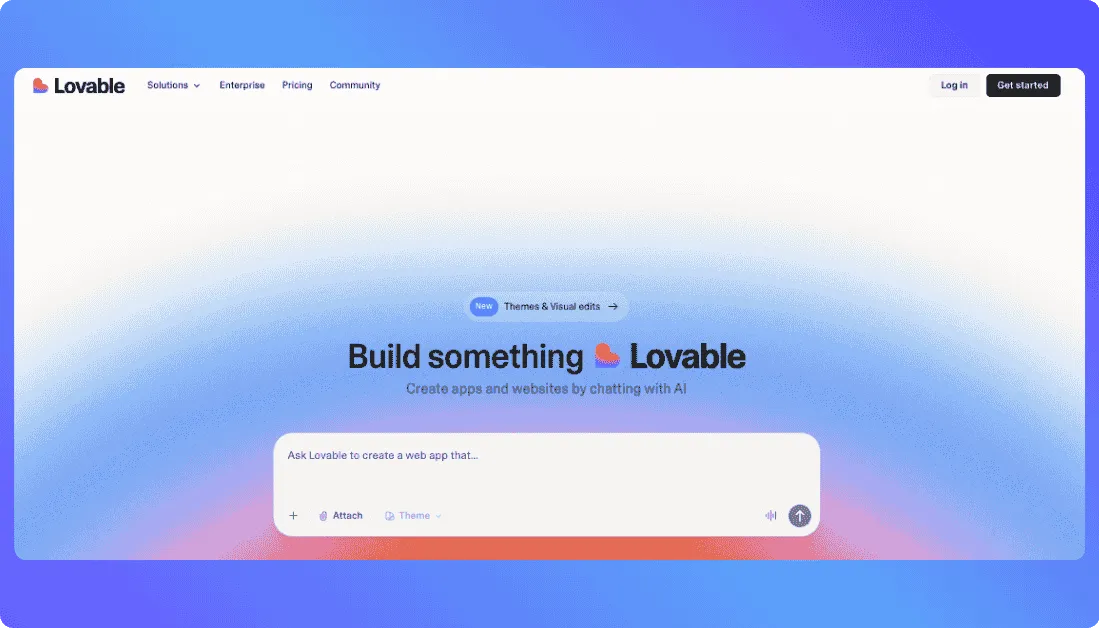
Lovable is another strong AI app builder, especially if you want to turn prompts into working web apps quickly.
It is a good fit for founders, product teams, and solo builders who want to create SaaS MVPs, dashboards, landing pages, and product prototypes without starting from scratch.
Lovable is worth checking out if you want a more code-oriented AI development platform than traditional no-code tools.
You may want to try Lovable if you want:
- Prompt-based web app development
- Fast frontend and app generation
- Real code output
- SaaS MVP prototyping
- A developer-friendly AI app builder
Also Read:
Still deciding? Check out this:
Best Lovable Alternatives
Lovable Pricing Explained
Glide vs Lovable
3. Softr
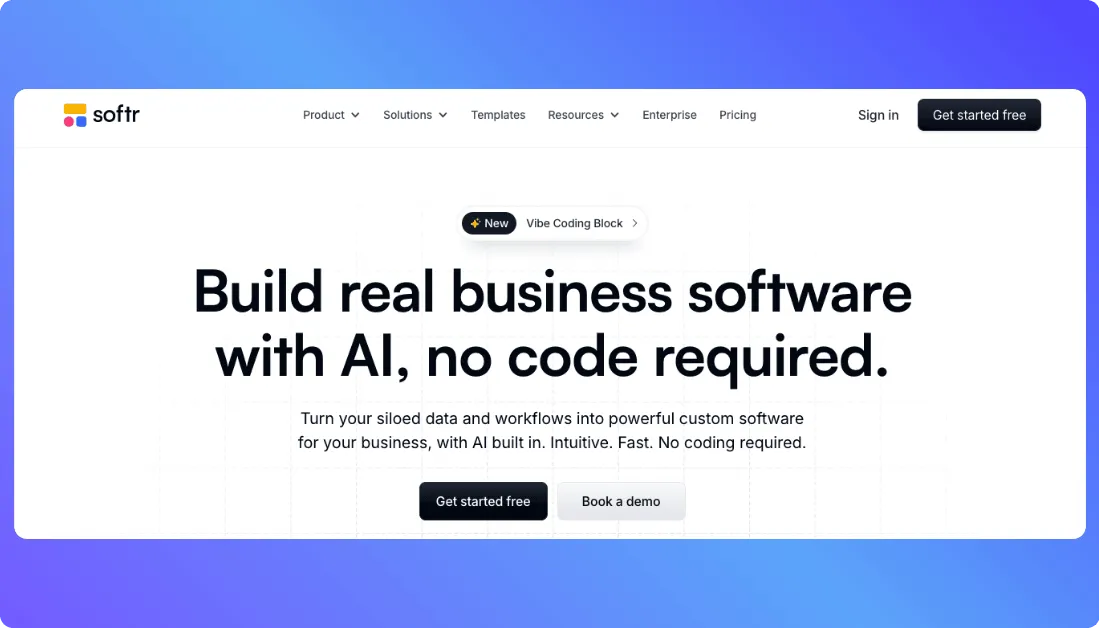
Softr is a better fit if you want to build business apps, portals, internal tools, and dashboards without dealing with too much technical setup.
It is not as developer-focused as Bubble or some AI coding tools, but it is very useful for teams that need practical software for everyday operations.
Softr works well for client portals, employee tools, approval systems, CRMs, directories, and simple business workflows.
You may want to try Softr if you want:
- No-code business apps
- Internal tools and portals
- Simple dashboards
- Database-backed apps
- A beginner-friendly Bubble alternative
Also Read:
Want to see how Softr compares to other tools?
Softr Review
Top Softr Alternatives
Quick Alternative Verdict
Choose Vitara.ai if you want an AI full-stack app builder for web and mobile apps.
Choose Lovable if you want a fast AI development platform for web apps and SaaS MVPs.
Choose Softr if you want a simple no-code tool for business apps, portals, and internal tools.
Base44 vs Bubble: My Honest Recommendation
If you want the fastest way to turn an idea into a working app, choose Base44.
It is better for non-technical founders, solo builders, product managers, and teams that want to build an MVP, dashboard, internal tool, CRM, admin panel, or simple SaaS app without spending weeks learning how everything works.
Base44 is the better pick when speed matters more than deep control.
But if your app needs complex workflows, advanced permissions, detailed database relationships, custom UI behavior, plugins, payments, or marketplace-style logic, Bubble is the safer choice.
Bubble takes longer to learn, but it gives you more control over how your app works.
So, here’s the simple way to decide:
Choose Base44 if you want to build fast, test an idea, and use AI to create your first version.
Choose Bubble if you want to build a more complex no-code product and you’re willing to spend time setting it up properly.
My honest recommendation?
For most early-stage MVPs, I’d start with Base44.
For serious SaaS products, marketplaces, booking apps, or apps with complex business logic, I’d choose Bubble.
Still comparing platforms? These guides can help:
Framer vs Lovable: Which AI Builder Should You Choose?
Hostinger Horizons vs Lovable: Which AI App Builder Should You Choose?
RapidNative vs Emergent: Which Is the Best AI App Builder?
Frequently Asked Questions
What is the main difference between Base44 and Bubble?
Base44 is an AI app builder that lets you create apps from natural language prompts.
Bubble is a no-code app builder where you manually design pages, create workflows, manage databases, and control how the app behaves.
Is Base44 better than Bubble?
Base44 is better if you want speed and an easier starting point.
Bubble is better if your app needs complex workflows, detailed database logic, custom UI control, and advanced integrations.
Is Bubble better than Base44 for serious apps?
Yes, Bubble is usually better for serious no-code apps with complex logic.
It gives you more control over workflows, privacy rules, database relationships, plugins, and user permissions.
Which tool is easier for beginners?
Base44 is easier for beginners because you can start with a simple prompt.
Bubble is beginner-friendly after some learning, but it still requires you to understand visual programming, workflows, databases, and app logic.
Can Base44 replace Bubble?
Base44 can replace Bubble for simple MVPs, dashboards, internal tools, CRMs, admin panels, and basic customer portals.
But it may not fully replace Bubble for marketplaces, booking apps, complex SaaS platforms, or apps with many user roles and conditions.
Which one is better for building an MVP?
Base44 is usually better for fast MVP development.
It helps you go from idea to working app quickly, which is useful when you want to test a product idea before spending too much time or money.
Which one is better for SaaS apps?
It depends on the SaaS app.
Choose Base44 for a simple SaaS MVP with standard dashboards, user accounts, and basic workflows.
Choose Bubble if your SaaS needs subscriptions, advanced roles, billing logic, permissions, reporting, and complex backend workflows.
Can I build a full app with Base44?
Yes, you can build full apps with Base44, especially if the app follows common patterns like dashboards, forms, portals, records, and simple workflows.
For more complex apps, you should test the generated logic carefully and consider developer review before launching to real users.
Can I build a full app with Bubble?
Yes, Bubble can be used to build full web apps without traditional coding.
You can build SaaS products, marketplaces, booking systems, CRMs, internal tools, customer portals, and multi-user dashboards.
Which one gives more design control?
Bubble gives more design control.
You can manually control layouts, responsive behavior, reusable elements, conditions, popups, dashboards, and how each page looks.
Base44 is better when you want fast, clean UI output without spending too much time designing from scratch.
Which one has better workflow control?
Bubble has better workflow control.
It is stronger for apps that need:
- Multiple user roles
- Payment flows
- Conditional logic
- Admin approvals
- Privacy rules
- Complex database actions
- Multi-step automations
Base44 is better for simpler workflows that can be explained clearly in a few sentences.
Does Base44 export code?
Base44 offers better code export and GitHub handoff options on supported plans.
This makes it more attractive if you want to start with AI app generation and later involve developers.
Can Bubble export code?
Bubble does not let you export your full app as normal source code that you can host somewhere else.
You can export data, but if you leave Bubble, the application logic usually needs to be rebuilt.
Which one is better for non-technical founders?
Base44 is usually better for non-technical founders.
You can describe your app idea in plain English and get a working first version faster than you would with a manual no-code builder.
Which one is better for developers?
Bubble is useful for developers who want to build and test no-code products quickly, especially when they understand databases, APIs, and logic.
Base44 is useful for developers who want AI to generate a fast starting point, then refine or export the project later.
Which one is better for marketplaces?
Bubble is the better choice for marketplaces.
Marketplaces usually need buyers, sellers, listings, payments, messaging, reviews, disputes, admin approvals, and complex permissions.
Base44 can help prototype a marketplace idea, but Bubble gives more control for the full product.
Which one is better for internal tools?
Base44 is better for simple internal tools.
It works well for admin panels, approval systems, CRMs, task trackers, dashboards, and record-based apps.
Bubble is better if the internal tool has complex roles, permissions, workflows, or custom integrations.
Is Base44 cheaper than Bubble?
Base44 usually has a lower starting price.
But the real cost depends on your usage, especially message credits, integration credits, AI actions, and how active your app becomes.
Bubble costs more to start, but pricing also depends on workload usage, plugins, storage, traffic, and how efficiently the app is built.
Which one is more scalable?
Bubble is usually better for complex no-code scalability if the app is built properly.
Base44 is better for quick validation, MVPs, and simpler production apps, especially if you may hand the code to developers later.
Which one should I choose if I want to launch quickly?
Choose Base44.
It is built for speed and works well when you want to turn a prompt into a working MVP, dashboard, internal tool, or simple SaaS app quickly.
Which one should I choose if I want long-term control?
Choose Bubble if you want long-term control inside a no-code platform.
Choose Base44 if long-term control means eventually exporting code or handing the project to developers.
Is Base44 good for AI apps?
Yes, Base44 is a good choice for fast AI-powered app prototypes and simple AI workflows.
If your AI app needs heavy API control, complex backend logic, custom data handling, or advanced workflow branching, Bubble may give you more manual control.
Is Bubble still worth using with AI app builders like Base44?
Yes, Bubble is still worth using.
AI app builders are great for speed, but Bubble still gives stronger control over complex workflows, databases, user roles, plugins, and app behavior.
What is the best alternative to Base44 and Bubble?
Vitara.ai is a strong alternative if you want an AI full-stack app builder for web apps, mobile apps, SaaS MVPs, dashboards, and internal tools.
Lovable and Softr are also worth checking out depending on whether you want code-focused AI development or simple no-code business apps.
What’s New?