Features You Can Instantly Add to Your Automotive Website with Vitara

Vehicle Listings

Display available cars with pricing, photos, mileage, and key specifications.

Inventory Search

Let shoppers search vehicles by make, model, price, year, and other criteria.

Advanced Filters

Help visitors narrow inventory by body type, fuel, transmission, mileage, or features.

Vehicle Detail Pages

Show photos, specifications, pricing, mileage, equipment, and availability for each vehicle.

Inventory Availability

Mark vehicles as available, reserved, sold, or temporarily unavailable.

Vehicle Comparison

Let shoppers compare pricing, specifications, and features across different vehicles.

Car Configurator

Allow customers to explore models, trims, colors, engines, and available options.

Finance Calculator

Help buyers estimate monthly payments based on vehicle price and financing details.

Price Information

Show clear vehicle pricing, offers, and other relevant purchase information.

Saved Vehicles

Let shoppers save cars they want to review or compare later.

Vehicle Inquiry Forms

Collect questions from shoppers directly from individual vehicle pages.

Test Drive Booking

Let customers request a preferred date and time for a test drive.

Trade-In Requests

Collect details about vehicles customers want to trade in.

Financing Forms

Capture financing inquiries and information from interested vehicle buyers.

Lead Routing

Send new inquiries to the right salesperson or dealership team.

Service Booking

Let customers request maintenance or repair appointments through your website.

Service Forms

Collect vehicle details, service needs, and customer contact information.

Parts & Accessories

Show available parts, accessories, or upgrades for supported vehicles.

Service Offers

Promote maintenance packages, seasonal checks, and limited-time service deals.

Dealership Locations

Show showroom addresses, directions, phone numbers, and contact details.

Opening Hours

Display current sales, showroom, and service department hours.

Sales Team Profiles

Introduce salespeople, managers, and automotive specialists to potential customers.

Customer Reviews

Show feedback from buyers and service customers on your website.

About the Dealership

Share your dealership story, brands, services, experience, and business values.

Special Offers

Promote vehicle discounts, finance deals, and limited-time dealership campaigns.

Featured Vehicles

Highlight selected cars or priority inventory on key website pages.

New Arrivals

Show recently added vehicles so shoppers can discover new inventory quickly.

News & Events

Publish dealership events, new model launches, announcements, and local updates.

Promotional Banners

Display finance offers, seasonal deals, and other important promotions.

CRM Integration

Send website leads and customer information into your connected CRM system.

Inventory Integration

Connect external vehicle stock data with your website inventory.

API Integration

Connect automotive tools, business applications, and third-party services.

Classified Integration

Connect vehicle inventory workflows with external automotive listing platforms.

Inventory Management

Add, edit, organize, or remove vehicles as dealership stock changes.

Lead Dashboard

Track inquiries, test drives, trade-ins, and financing requests in one place.

User Management

Control access for salespeople, managers, administrators, and other team members.

Analytics Dashboard

Track website activity, popular vehicles, customer actions, and lead performance.

Content Management

Update inventory, offers, dealership information, and website content when needed.

How to Use the Automotive Website Builder

1

Give the Prompt

Describe your dealership, vehicle inventory, branding, and the features you need, such as inventory search, test-drive booking, financing, trade-ins, or service forms.

2

Generate

Vitara turns your prompt into a working automotive website with vehicle pages, forms, frontend components, backend logic, and the customer workflows you requested.

3

Review

Check your inventory, vehicle details, lead forms, test-drive flow, dealership information, and design. Use additional prompts to update content, layouts, or functionality.

4

Publish

Publish your automotive website, connect your domain, and let customers browse vehicles, send inquiries, request financing, book test drives, or contact your dealership online.

Key Features That Make Vitara Perfect for Building Automotive Websites
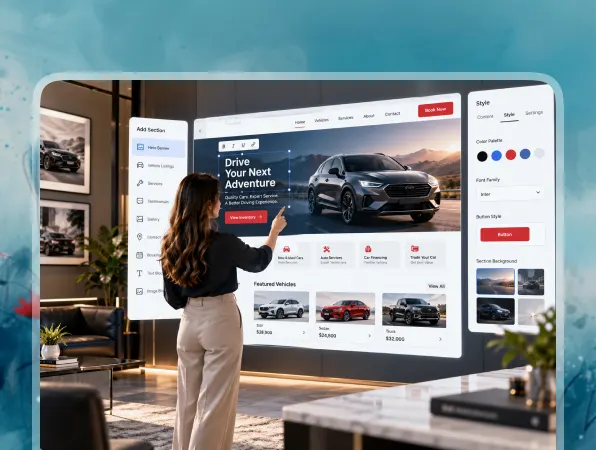
End-to-End Automotive Website

End-to-End Automotive Website

Build vehicle pages, inventory tools, customer forms, dashboards, and backend workflows together instead of connecting separate systems for every part of your automotive website.

  • Complete Website Generation

    Create inventory pages, vehicle details, lead forms, dealership pages, and customer features from your requirements.

  • Built-In Backend

    Handle vehicle data, form submissions, customer information, and website logic without setting up the backend separately.

  • Connected Automotive Experience

    Keep inventory, inquiries, bookings, customer actions, and dealership data connected within the same application.
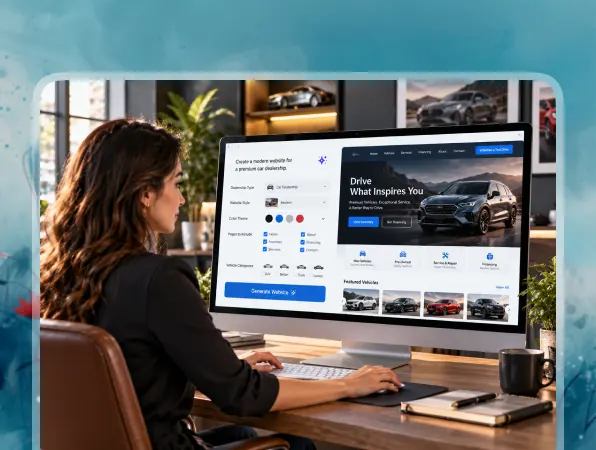
Prompt-Based Website Building

Prompt-Based Website Building

Turn written instructions into working automotive pages, forms, and functionality without manually building every component from the beginning.

  • Build with Natural Language

    Describe your dealership, vehicle pages, forms, or workflows using clear text prompts.

  • Generate Functional Features

    Vitara turns your instructions into working interfaces, backend logic, forms, and connected automotive website features.

  • Refine with More Prompts

    Change layouts, add new functionality, or update workflows by describing what you want to modify.
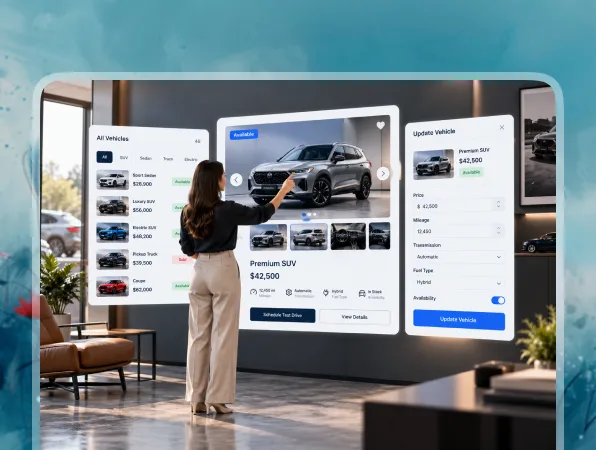
Dynamic Vehicle Inventory

Dynamic Vehicle Inventory

Create searchable vehicle inventory that helps shoppers find suitable cars and review the information they need before making an inquiry.

  • Searchable Vehicle Listings

    Let customers browse inventory by make, model, price, year, mileage, body type, or other criteria.

  • Detailed Vehicle Pages

    Show photos, specifications, pricing, mileage, equipment, and availability for each listed vehicle.

  • Easy Inventory Updates

    Add new cars, edit vehicle information, or remove sold inventory as dealership stock changes.
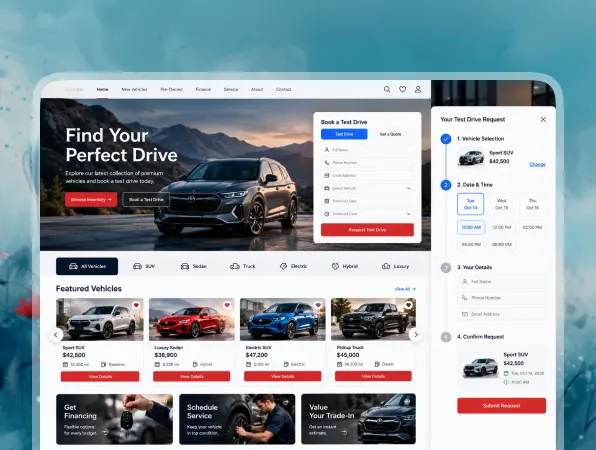
Lead and Test Drive Workflows

Lead and Test Drive Workflows

Turn vehicle interest into useful sales opportunities with inquiry forms, test-drive requests, and connected lead management.

  • Vehicle Inquiry Forms

    Collect questions and contact information from shoppers interested in specific vehicles.

  • Test Drive Booking

    Let customers select a vehicle and request a preferred date or time for a test drive.

  • Lead Management

    Keep vehicle inquiries, customer details, and follow-up information organized for your sales team.
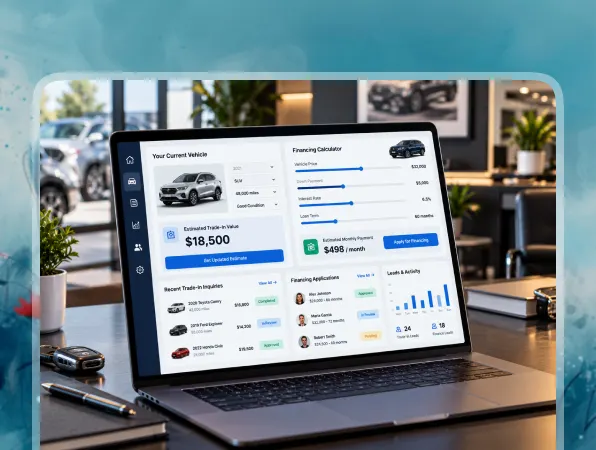
Trade-In and Financing Tools

Trade-In and Financing Tools

Give customers practical ways to move further into the buying process without leaving your dealership website.

  • Trade-In Forms

    Collect details about a customer’s current vehicle for trade-in inquiries or valuation workflows.

  • Financing Requests

    Create forms that collect customer information for financing or pre-qualification inquiries.

  • Payment Calculators

    Help shoppers estimate possible vehicle payments based on price, deposit, loan term, or other inputs.

Instant Automotive Customization

Instant Automotive Customization

Update inventory, pricing, dealership details, offers, and customer features as your automotive business changes.

  • Update Vehicles Anytime

    Change pricing, specifications, photos, mileage, or availability whenever your inventory changes.

  • Edit Dealership Details

    Update opening hours, locations, contact information, staff profiles, promotions, or other business details.

  • Add Features with Prompts

    Create new pages, forms, integrations, or workflows by describing the functionality you need.
FAQ About Automotive Website Builder Vitara

An automotive website builder helps dealerships and vehicle businesses create websites with features such as vehicle inventory, detailed car pages, lead forms, test-drive booking, financing requests, trade-in tools, service forms, and dealership information.

Yes. With Vitara, you can describe the automotive website you want using text prompts. You can define inventory pages, filters, dealership information, lead forms, test-drive workflows, financing tools, and other features, then refine the website with additional prompts.

A car dealership website should make it easy for shoppers to browse available vehicles and contact the dealership. Common features include searchable inventory, vehicle detail pages, pricing, photos, financing forms, trade-in requests, test-drive booking, contact details, and dealership locations.

Yes. You can build vehicle inventory with search and filtering options based on make, model, price, year, mileage, body type, fuel type, or other relevant details. Each vehicle can also have its own detailed listing page.

Yes. You can create test-drive forms that let customers choose a vehicle, enter their contact details, and request a preferred date or time. The submitted information can then be handled through the workflow you build.

Yes. You can create forms for trade-in requests, financing inquiries, or pre-qualification workflows. For example, a trade-in form can collect the current vehicle’s make, model, year, mileage, and customer contact information.

Yes. You can build service request forms for maintenance, repairs, inspections, or other workshop needs. Customers can submit vehicle details, describe the service they need, and request a preferred appointment time.

Yes. APIs can connect your automotive website with external CRM platforms, inventory systems, or other business tools. The exact connection depends on the API provided by the external service and the data you want to exchange.

Yes. You can update your inventory as dealership stock changes. Add newly arrived vehicles, change prices or specifications, upload new photos, edit mileage, or mark vehicles as reserved, sold, or unavailable.

Yes. You can connect a custom domain to your automotive website and export the generated source code when you need more control over development, deployment, integrations, or future customization.

Know what’s trending in AI-powered web app development

Best Website Builders for Musicians

5 Best Website Builders for Musicians I Tested in 2026

10 minutes read
Best AI Tools for Bookkeepers

5 Best AI Tools for Bookkeepers in 2026 (Tested)

10 minutes read
Best One-Page Website Builders

5 Best One-Page Website Builders I Tested in 2026

10 minutes read