Retool Pricing Explained: Is It Right for Your Use Case in 2026?
After seeing costs rise as I started building, I reviewed all of the Retool pricing tiers to find out what each offers. Below is a breakdown of each plan, plus extra fees and costs.
Retool pricing plans: At a glance
Before I get into details, here’s what each Retool plan offers:
| Plan | Annual builder price | Monthly builder price | Annual internal user price | Monthly internal user price | Key features |
|---|---|---|---|---|---|
| Free | $0 | $0 | $0 | $0 | Up to 5 users, 500 workflow runs, and 250 AI credits |
| Team | $10/month | $12/month | $5/month | $7/month | 5,000 workflow runs, staging, and app release versions |
| Business | $50/month | $65/month | $15/month | $18/month | Audit logs, rich permissions, portals, and custom branding |
| Enterprise | Custom | Custom | Custom | Custom | SSO, source control, white-labeling, and dedicated support |

Create full-stack web and mobile apps with AI prompts, React frontend, Supabase backend, editable code, and simple monthly pricing.
Start Building with Vitara.ai →
Retool pricing plans breakdown
Retool offers four plans, ranging from Free to Enterprise. The plan prices look straightforward, but your final bill depends on how many people edit apps, how many only use them, and whether you need external users, extra workflow runs, AI credit packs, or additional Agent runtime.
A user who builds or edits an app or workflow during the billing cycle is counted as a builder. An enabled employee who doesn’t make edits is billed at the lower internal-user rate.
Free plan: $0/month
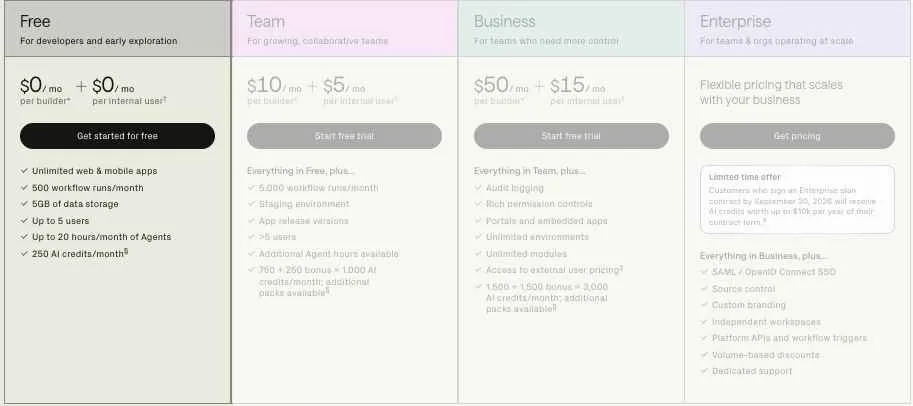
The Free plan is built for developers and small teams exploring Retool. You can create working web and mobile apps without paying, but the five-user limit makes it better suited to testing and small internal projects than company-wide deployment.
What’s included:
- Unlimited web and mobile apps
- Up to five users
- 500 workflow runs per month
- 5GB of data storage
- Up to five reusable modules
- Up to 20 Agent hours per month
- 250 AI credits per month
⭐Best For
Solo developers and small teams testing Retool or building a lightweight internal dashboard, admin panel, or approval tool.
Pros:
- You can build and deploy functional apps without paying.
- Unlimited apps give you room to test several internal-tool ideas.
- The included AI credits and Agent hours let you explore Retool’s AI features.
Cons:
- The five-user limit makes it difficult to share apps with a growing team.
- Staging resources, audit logs, and rich permissions aren’t included.
- You can’t purchase additional AI credit packs without moving to a paid plan.
Team plan: Starting at $10 per builder/month, billed annually
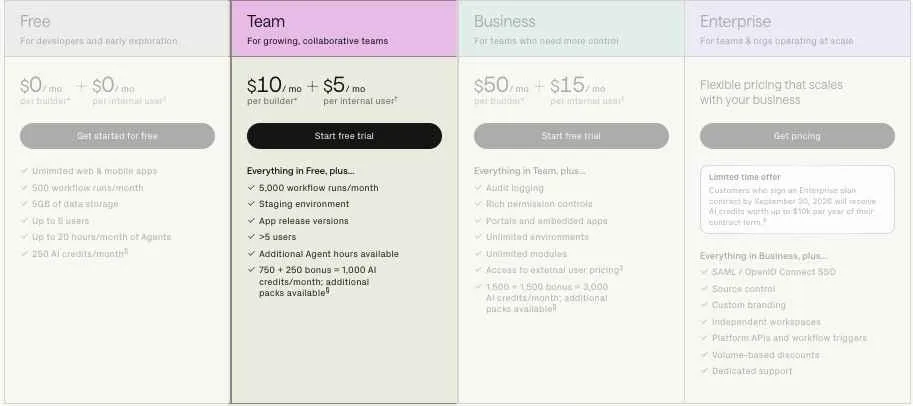
Team is Retool’s first paid plan for growing internal-tool teams. It costs $10 per builder and $5 per internal user each month when billed annually. Monthly billing increases those rates to $12 per builder and $7 per internal user.
This pricing model works well when a small group builds apps for a larger team. The cost can rise, however, when employees who normally use finished apps begin editing them and are counted as builders for that billing cycle.
What’s included:
- Everything in the Free plan
- More than five users
- 5,000 workflow runs per month
- Staging and production environments
- App release versions
- Additional Agent hours available
- 750 base AI credits plus 250 bonus credits
- 1,000 total AI credits per month
⭐Best For
Startups, developers, and operations teams building internal dashboards, admin panels, database tools, and automated workflows.
Pros:
- Lower internal-user pricing helps when only a few people need to build apps.
- Staging resources let you test changes before connecting them to production.
- App releases make it easier to publish updates and return to earlier versions.
Cons:
- Audit logs and rich permission controls aren’t included.
- External customer and partner apps require Business or Enterprise.
- Team still limits reusable modules to five.
- Users with editing access can become builders and increase the monthly bill.
Business plan: Starting at $50 per builder/month, billed annually
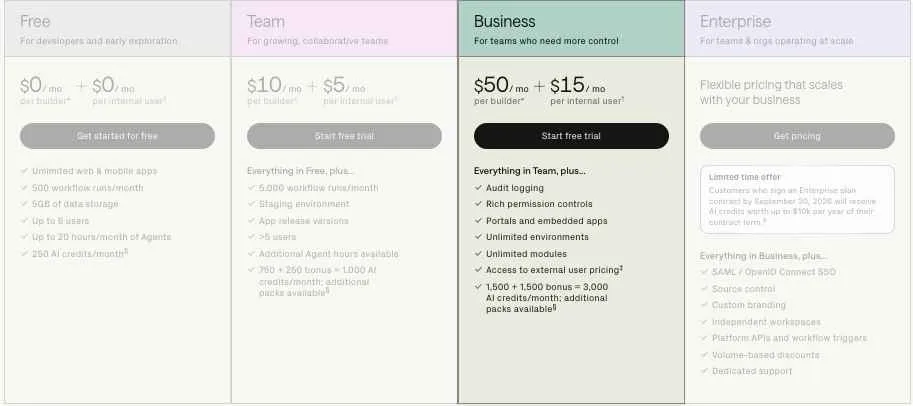
Business costs $50 per builder and $15 per internal user each month with annual billing. Monthly prices rise to $65 per builder and $18 per internal user.
The jump from Team is substantial, but this is where Retool adds the governance, branding, and external-app features many production teams need.
What’s included:
- Everything in the Team plan
- Audit logging
- Rich role-based permission controls
- Portals and authenticated embedded apps
- External-user pricing
- Unlimited resource environments
- Unlimited reusable modules
- Custom branding
- Offline mobile access
- Mobile push notifications
- 1,500 base AI credits plus 1,500 bonus credits
- 3,000 total AI credits per month
⭐Best For
Growing companies that need controlled access, audit trails, custom branding, customer portals, or apps for vendors and partners.
Pros:
- Permission groups can prevent selected employees from editing and help keep them at the internal-user rate.
- Audit logs record user actions and queries made against connected databases and APIs.
- Unlimited environments support more structured development, testing, and production setups.
- External apps let you build secure portals and embedded tools for people outside your company.
Cons:
- The annual builder rate is five times the Team builder price.
- Custom SSO and Git-compatible source control still require Enterprise.
- External users, workflow overages, AI packs, and Agent runtime can raise the final cost.
Cloud Business includes the first 50 external users at no additional cost. With annual billing, users 51–250 cost $8 each per month, users 251–500 cost $6 each, and users above 500 cost $4 each. Monthly Business rates for those tiers are $10, $7, and $5. Retool applies these prices progressively rather than charging every external user at the highest tier reached.
Enterprise plan: Custom pricing
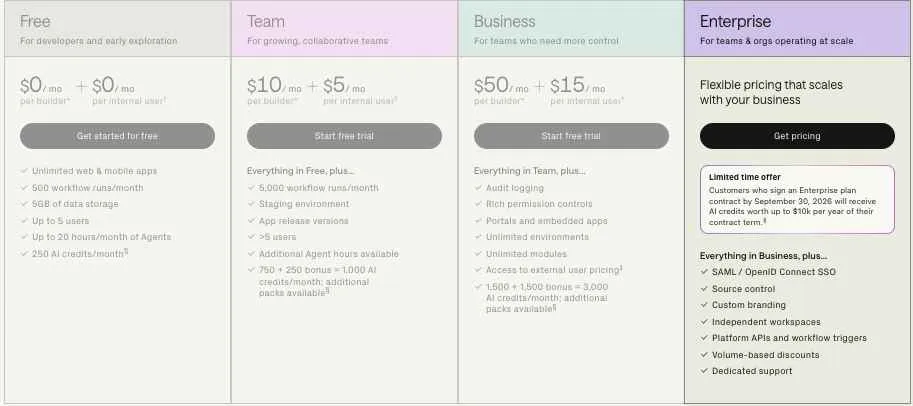
Enterprise is designed for larger organizations with stricter security, deployment, governance, and support requirements. Retool doesn’t publish a fixed price, so you’ll need to speak with its sales team for a quote.
Enterprise is also the plan you’ll need if you want to run the current version of Retool in your own cloud environment or private infrastructure rather than using Retool Cloud.
What’s included:
- Everything in the Business plan
- SAML and OpenID Connect SSO
- Git-compatible source control
- Error monitoring and observability
- Full white-labeling
- Independent workspaces
- Usage analytics
- Platform APIs and workflow triggers
- Self-hosted deployment
- Volume-based discounts
- Dedicated technical support
- 5,000 base AI credits plus 5,000 bonus credits
- 10,000 total AI credits per month
⭐ Best For
Large organizations that need centralized identity management, source-controlled development, self-hosting, separate workspaces, and dedicated support.
Pros:
- Source control supports branch-based development and structured code reviews.
- Independent workspaces separate teams, apps, integrations, permissions, and resources.
- SSO makes it easier to manage employee access through an existing identity provider.
- Volume discounts may make large deployments more cost-effective.
Cons:
- You need sales calls, contract negotiations, and procurement reviews.
- Pricing is difficult to compare before receiving a custom quote.
- Smaller teams may need Enterprise because of one security requirement, even when they don’t need the rest of the plan.
Retool is currently offering customers who sign an Enterprise contract by September 30, 2026, AI credits worth up to $10,000 per year of the contract term.
Vitara.ai helps you build full-stack apps from prompts without separate builder, internal-user, or external-user charges.
Try Vitara.ai for Free →
How user pricing works in Retool
Retool calculates builder and internal-user quantities during each billing cycle based on what enabled users do inside the platform.
Here are a few examples:
- Opening and using a finished dashboard: internal user
- Submitting information through an internal form: internal user
- Editing a table, form, or app layout: builder
- Creating or editing a workflow: builder
A user with editing permission isn’t automatically charged as a builder if they don’t edit anything during the billing period. Once that person builds or edits an app or workflow, Retool charges the builder rate for that cycle.
Business organizations can use permission groups to block selected employees from editing. This helps prevent people who only need to use apps from accidentally becoming builders.
How to add more Retool usage
Team and Business both include 5,000 successful workflow runs per month. You can add another 5,000 monthly runs for $75 if your automations exceed that allowance.
Paid Team and Business customers can also purchase 1,000 additional AI credits for $100. AI credits are shared across the organization rather than assigned to each builder.
Agents use separate hourly pricing and don’t consume your AI credit balance. Every plan includes up to 20 hours per month, while the price of additional runtime depends on the AI model being used.
What happens to unused AI credits?
The AI credits included with your plan renew each month and don’t roll over. Retool combines them into one shared organization-level pool covering AI-assisted app building and AI actions.
Purchased credit packs remain available until the end of the following billing cycle. Any purchased credits left after that point expire.
The extra bonus credits currently included with Team, Business, and Enterprise are promotional. Retool says these bonuses may change over time, so it’s safer to base long-term budgeting on the standard credit allocation rather than assuming the bonus will always remain.
Which Retool plan should you choose?
Choose Free if you:
- Want to test Retool without paying
- Have five or fewer enabled users
- Are building a prototype or small internal tool
- Don’t need detailed permissions or audit logs
Choose Team if you:
- Have more than five users
- Need staging and production resources
- Want controlled app releases
- Have a small group of builders supporting a larger internal team
- Don’t need portals, external users, or advanced governance
Choose Business if you:
- Need audit logs and granular permissions
- Want to prevent app users from becoming builders
- Need customer, vendor, or partner portals
- Want custom branding and unlimited environments
- Need authenticated embedded apps
Choose Enterprise if you:
- Require SAML or OpenID Connect SSO
- Need Git-compatible source control
- Want to self-host Retool
- Need separate workspaces for different teams
- Require dedicated support and custom contract terms
Is Retool worth the cost?
Based on its current plans and billing model, Retool offers the most value when a small group of builders creates apps for a much larger group of internal users.
Retool is worth it if you:
- Need to build dashboards, admin panels, approval systems, or database tools quickly
- Have a few developers or technical operators supporting many app users
- Want to connect apps directly to existing databases and APIs
- Need apps, workflows, AI actions, and Agents in one development platform
- Can save more in development time than you spend on Retool licenses
Skip Retool if you:
- Need SSO or source control but can’t justify an Enterprise contract
- Expect a large percentage of employees to edit apps regularly
- Need a high-volume customer-facing app with very low revenue per user
- Only need a simple form or dashboard that a cheaper tool already handles
- Want complete control over a heavily customized consumer-facing frontend
Retool alternatives & pricing comparison
Retool pricing works well when a small group of builders creates apps for a larger internal team. If you prefer credit-based AI development, simpler developer pricing, or fewer charges for app users, these are the Retool alternatives I’d compare first:
| Platform | Starting price (billed monthly) | Free plan | Database | Best for |
|---|---|---|---|---|
| Retool | $12/builder + $7/internal user | Up to 5 users | Built-in and external | Internal tools and portals |
| Vitara.ai | $20/month | 5 daily credits plus 20 one-time credits | Via Supabase | Full-stack web and mobile apps |
| UI Bakery | $25/developer | Free developer plan | Built-in PostgreSQL and external | Visual low-code apps |
| Superblocks | $125/AI Builder | 14-day trial | Via integrations | Governed AI internal apps |
These prices and plan limits come from each platform’s current official pricing information.
Vitara.ai: Vitara.ai is a better fit when you want to generate a complete web or mobile app from prompts instead of focusing mainly on internal business tools. Its $20 Build plan includes 100 monthly credits, editable and downloadable code, custom domains, and faster AI processing. Vitara uses React for the frontend and Supabase for database, authentication, and backend features. The tradeoff is that development is credit-based, so active projects may require the $50 Scale plan with 250 monthly credits.
UI Bakery: UI Bakery works well if you want a visual internal app builder with a hosted PostgreSQL database and unlimited public app users. Its paid Builder plan starts below Retool Business, though role-based access, audit logs, and stronger team controls require the higher Team plan.
Superblocks: Superblocks is better suited to teams that want AI-assisted app building with centralized security and enterprise deployment controls. Its Teams plan includes one hosted app and 100 AI credits per builder. The downside is the higher starting price and the $100 monthly charge for each additional hosted app.
Want to compare more tools before deciding? Read these next:
Vitara.ai vs Retool: Which should you choose?
Vitara.ai is the better choice when you want to generate a full-stack web or mobile app from prompts and keep access to the underlying code. It creates a React frontend, uses Supabase for backend features such as authentication and databases, and lets paid users edit or download the generated code.
Retool is better for internal dashboards, admin panels, approval systems, business workflows, and portals that connect to existing databases and APIs. Its stronger permissions and governance features make more sense when several employees need to use the finished tools.
Where Vitara.ai beats Retool:
Simpler starting price: Vitara’s Build plan costs $20 per month and includes 100 monthly credits. Retool charges separately for builders and internal users, so its cost grows as more employees build or use apps.
Downloadable source code: Vitara lets paid users edit and download generated code. This gives you the option to continue development in another editor or deploy the code outside the platform. Retool apps are designed to run on Retool’s governed platform rather than providing the same simple code-export path.
Full-stack app generation: Vitara can generate the frontend, backend, APIs, database structure, and authentication from natural-language prompts. Retool can also create apps with AI, but its main strength is building software on top of existing business data and systems.
React and Supabase foundation: Vitara uses React for the interface and Supabase for database, authentication, real-time features, and automatic APIs. This setup may feel more familiar if you want a conventional full-stack codebase rather than an app that depends on Retool’s component and resource system.
Better suited to customer-facing products: Vitara is built for websites and web or mobile applications, making it a stronger option for SaaS MVPs and product ideas. Retool can create external portals and embedded apps, but those features start on Business, which costs $50 per builder and $15 per internal user with annual billing.
Custom domains at a lower entry price: Vitara includes a custom domain on its $20 Build plan. Retool places custom branding on Business and full white-labeling on Enterprise, which can make a polished external launch more expensive.
Easier subscription changes: Vitara says you can upgrade or downgrade through your account settings, with the change reflected in the next billing cycle. Retool’s annual plans provide lower rates, but they require a yearly commitment and involve separate user classifications.
Where Retool is stronger:
Retool offers more mature controls for internal business software. Business includes audit logs, granular permissions, unlimited environments, external-user pricing, portals, and embedded apps. Enterprise adds SSO, source control, independent workspaces, platform APIs, and dedicated support.
It also connects directly to databases and APIs, includes visual workflow automation, and supports different prices for builders, internal employees, and external users. That model can work well when a few technical users build tools for a much larger operations team.
Generate frontend, backend, database, APIs, and authentication from prompts, then edit or download your source code when you’re ready.
Explore Vitara.ai →
My bottom line on Retool pricing
Retool’s Free and Team plans are enough to test the platform and build useful internal apps. Team is the practical starting point for growing teams because it removes the five-user limit and adds staging resources, app releases, and 5,000 monthly workflow runs.
Business is where Retool becomes suitable for governed production use. You get audit logs, richer permissions, portals, embedded apps, unlimited environments, and access to external-user pricing. The tradeoff is a sharp increase from $10 to $50 per builder when billed annually.
Vitara.ai is the stronger option when you want to turn prompts into an editable full-stack web or mobile product, use React and Supabase, download your code, and avoid separate builder and internal-user rates. Retool is the better choice when your main goal is secure internal software connected to company data, especially when permissions, workflows, audit history, and enterprise governance matter.
Still comparing platforms cost? These guides can help:
Retool pricing FAQs
How much does Retool cost per month?
Retool’s Free plan costs $0. With annual billing, Team starts at $10 per builder plus $5 per internal user each month, while Business starts at $50 per builder plus $15 per internal user.
Monthly billing raises Team to $12 and $7, and Business to $65 and $18. Enterprise pricing is customized.
Is Retool free to use?
Yes. Retool’s Free plan includes unlimited web and mobile apps, 500 monthly workflow runs, 5GB of database capacity, 5GB of file storage, and 250 AI credits.
The main limitation is that you can only have five enabled users, so it works better for testing and small projects than company-wide use.
Can I use Retool Free forever?
Retool doesn’t list a time limit for the Free plan. You can continue using it as long as its five-user, storage, workflow, and AI limits cover your project.
You’ll need to upgrade once you require more users, staging resources, audit logs, external apps, or stronger permissions.
What is a builder in Retool pricing?
A builder is an enabled user who creates or edits an app or workflow during the billing cycle. Retool calculates this from actual activity rather than relying only on a permanent job title or seat label.
What is an internal user in Retool?
An internal user is an enabled employee who uses Retool apps but doesn’t build or edit an app or workflow during that billing cycle.
Internal users cost less than builders because they’re mainly opening dashboards, submitting forms, reviewing records, or using finished internal tools.
Do employees who only view Retool apps cost money?
Yes, enabled employees normally count as internal users on paid plans, even when they only open and use finished apps.
The current annual internal-user prices are:
- Team: $5 per user/month
- Business: $15 per user/month
- Enterprise: Custom pricing
Can an internal user become a builder?
Yes. An internal user who edits an app or workflow during the billing cycle is charged at the builder rate for that cycle.
Business and Enterprise permission controls can block selected employees from editing, which helps prevent accidental builder charges.
Does having edit permission automatically make someone a builder?
Not by itself. A person can have editing access and still be billed as an internal user when they don’t make any edits during the month.
Once they build or edit an app or workflow, Retool counts them as a builder for that billing cycle.
Does Retool charge per app?
No. Retool includes unlimited web apps across its plans, so creating another dashboard or admin panel doesn’t automatically add a separate app fee.
Your cost is mainly affected by:
- Builders and internal users
- External users
- Workflow usage
- AI credit packs
- Retool Agent runtime
- Your selected plan
Why is my Retool bill higher than expected?
The most common reason is that more employees edited apps and became builders during the billing cycle. Annual customers can also receive monthly overage charges when usage exceeds the quantities purchased upfront.
Other possible causes include:
- Additional internal or external users
- Extra workflow-run capacity
- Purchased AI credits
- Agent runtime beyond the free allowance
- Annual-plan users exceeding the committed seat quantity
How does Retool annual billing work?
Annual billing gives you discounted per-user rates in exchange for paying upfront for a chosen number of builders and internal users. Retool advertises savings of 20% compared with monthly billing.
You can increase your annual commitment, but you can’t reduce it during the term. Canceling an annual subscription also doesn’t produce a prorated refund for unused time.
Usage above your prepaid quantities is billed each month at the higher monthly rate.
Is monthly or annual Retool pricing better?
Annual billing is usually better when you can predict how many builders and internal users you’ll need. The lower rates can create meaningful savings over a full year.
Monthly billing is safer when:
- You’re still testing Retool
- Headcount changes frequently
- Builder activity is unpredictable
- You’re unsure which plan features you need
How much does Retool Business cost for 15 users?
For five builders and ten internal users, Business costs $400 per month equivalent when billed annually:
- Five builders: 5 × $50 = $250
- Ten internal users: 10 × $15 = $150
- Annual upfront cost: $4,800
The same user mix costs $505 on monthly billing.
How does Retool external-user pricing work?
Cloud Business includes the first 50 external users at no extra cost. Users above that allowance are charged progressively rather than applying one rate to every user.
With annual Business billing:
- Users 51–250: $8 each/month
- Users 251–500: $6 each/month
- Users 501 and above: $4 each/month
Who counts as an external user?
External users are people outside your organization, such as customers, suppliers, partners, or vendors. They can access external apps or public links rather than your company’s normal internal Retool workspace.
Retool uses your configured internal email domains to help distinguish internal and external users.
Are the first 50 Retool external users free?
Yes, cloud organizations on the Business plan receive 50 external users per month at no additional cost. This standard external-user pricing isn’t available for self-hosted instances.
Can I classify employees as external users to lower the price?
That isn’t how Retool defines external users. Employees within your organization should normally be builders or internal users, while external pricing is intended for customers, partners, and vendors.
Trying to classify employees incorrectly may also create problems with permissions, access controls, and app management.
How many workflow runs does Retool include?
The Free plan includes 500 runs per month. Team and Business each include 5,000 monthly workflow runs, while Enterprise allowances depend on the contract.
A run is billable when a triggered workflow completes successfully. Failed runs and manual testing from the Workflow IDE aren’t billed.
What happens if I exceed Retool’s workflow limit?
Team and Business customers can add 5,000 monthly workflow runs for $75. Retool sends in-app and email notifications when an organization exceeds its included usage.
How many AI credits come with Retool?
Retool currently provides:
- Free: 250 credits
- Team: 750 base credits plus 250 bonus credits
- Business: 1,500 base credits plus 1,500 bonus credits
- Enterprise: Contract-based allocation
Credits are shared by all builders in the organization and cover Retool’s AI app-building features and AI actions.
Do Retool AI credits roll over?
No. Included AI credits renew at the start of each billing cycle and unused credits don’t carry into the following month.
Purchased packs remain valid until the end of the next billing cycle. Any credits left after that expire.
How much do extra Retool AI credits cost?
Team and Business customers can purchase 1,000 additional AI credits for $100. Free organizations must upgrade before they can buy credit packs.
Enterprise customers need to contact their account representative about additional credits or use their own AI provider key where supported.
What happens when Retool AI credits run out?
AI-powered features become unavailable until the organization’s credits renew. An admin on an eligible paid plan can purchase another credit pack to restore access sooner.
Your existing apps can still operate unless they depend on AI actions that need the exhausted credit pool.
Are Retool Agents included in the plan price?
Every organization receives $50 of free Agent usage each billing month, which can provide up to 20 hours depending on the model selected.
After that allowance is used, Team and Business customers receive monthly overage charges. Agent usage is separate from AI credits and is billed at model-dependent hourly rates.
Does Retool Business include SSO?
Business includes rich permission controls, audit logging, external apps, and custom branding, but SAML and OpenID Connect SSO are listed under Enterprise.
Enterprise also adds source control, independent workspaces, error monitoring, full white-labeling, and dedicated support.
Can I self-host Retool on the Team or Business plan?
Retool’s current pricing information places self-hosting under Enterprise. You can deploy Retool inside your own VPC, but you’ll need custom Enterprise pricing.
Self-hosting also brings separate infrastructure, maintenance, upgrade, monitoring, and backup costs that aren’t shown in the normal cloud seat prices.
Does Retool offer a startup discount?
Eligible startups can receive 100% off a monthly Team or Business subscription for one year, up to a stated value of $60,000. The program then provides 25% off during the second year.
The offer only applies to approved monthly plans, not annual subscriptions or Enterprise contracts.
Does Retool offer discounts for nonprofits and students?
Eligible nonprofits can receive a monthly coupon designed to cover 25 Business users. Eligible students and individual educators can apply for a 100% discount on a monthly Team or Business plan.
These programs require approval and can’t be combined with another Retool discount program.
Which Retool plan is best for a small team?
Free is enough when you have five or fewer users and only need a basic internal app. Team is usually the better fit once you need more users, staging resources, and controlled app releases.
Choose Business only when features such as audit logs, granular permissions, portals, external users, or custom branding justify the higher price.
Is Retool worth it for customer portals?
It can be, especially when you need a secure portal connected to existing company databases and APIs. Business includes external apps, embedded apps, user permissions, and the first 50 external users for free.
It may feel expensive for a high-volume consumer app because external-user charges grow with usage. Compare the expected user count with the revenue or operational value each portal user creates.
Is Retool worth the price?
Retool makes the most financial sense when a small number of builders create tools for many internal users. It can replace weeks of custom work for dashboards, admin panels, approval systems, and operational apps.
It may be less attractive when most users need editing access, your project requires Enterprise-only features, or external-user volume grows faster than the value produced by the app.
What’s New?