v0 vs Bubble: Which AI App Builder Is Better in 2026?
If you are trying to build an app faster with AI, you are probably asking one very practical question.
Which tool will actually help me launch a real product?
v0 and Bubble are two popular tools people compare when they want to build apps without starting from scratch.
But they solve two very different problems.
Bubble is built for visual no-code app development, where you can design screens, create workflows, manage a database, and launch from one platform. v0 is built more for AI-assisted frontend development, where you generate React and Next.js interfaces through prompts and refine them with code.
That’s why choosing between them can feel confusing.
One looks better for non-technical founders. The other feels stronger for developers who want clean frontend code and more control.
In this in-depth comparison, I’ll break down v0 vs Bubble across the factors that actually matter when you’re building an MVP or production-ready app, including:
- AI app building experience
- Frontend design and code quality
- Backend, database, and workflow support
- No-code flexibility vs developer control
- Deployment, scalability, and ownership
- Pricing and real-world usability
PS: I’ll also introduce you to Vitara.ai, an AI full-stack app builder.
It helps you build frontend, backend, database, and deployment from one place, so you don’t have to choose between a visual no-code tool and a code-first AI builder.
Let’s get into the comparison.
V0 vs Bubble: A Quick Side-by-Side Comparison
Before we get into the full breakdown, here is a quick TL;DR of what this blog explains.
| Feature | v0 | Bubble | Vitara.ai |
|---|---|---|---|
| Best For | Developers and technical teams | Non-technical founders and no-code builders | Founders, startups, and teams that want AI full-stack app building |
| Core Approach | AI-generated code for frontend development | Visual no-code app builder | AI full-stack app builder |
| Frontend Building | Yes, strong for React and Next.js UI | Yes, through visual drag-and-drop builder | Yes |
| Backend Support | Limited, usually requires external setup | Built-in backend workflows | Yes, supports backend building |
| Database | External database setup needed | Built-in database | Built-in / full-stack support |
| Code Ownership | Yes, code-based workflow | Limited traditional code ownership | Yes, code editing and code download |
| Ease of Use | Better for users with coding knowledge | Better for beginners and non-coders | Easier for teams that want AI help with full-stack building |
| Customization Flexibility | High, if you can code | Good within Bubble’s ecosystem | High |
| Deployment | Works well with Vercel deployment | Hosted within Bubble | Deployment-friendly workflow |
| Custom Domain | Yes | Yes | Yes |
| Mobile App Support | Mainly web frontends | Web apps + mobile app support | Depends on project scope, but strong for app development workflows |
| Starting Price | $30/user/mo | $59/mo | $20/mo |
| Free Plan / Trial | Free plan available | Free plan available | Free plan available |
| Best Choice If… | You want fast AI-generated frontend code | You want to build a full app without coding | You want a balance of AI speed, full-stack support, and code flexibility |
Quick takeaway
- Choose v0 if your main focus is generating clean frontend UI with React and Next.js.
- Choose Bubble if you want a true no-code platform with built-in database and workflows.
- Choose Vitara.ai if you want an AI full-stack app builder that gives you more flexibility across frontend, backend, and code control.

Vitara.ai helps you build full-stack apps faster while keeping room for code editing, code download, and future developer handoff.
Build Your App with Vitara.ai →
v0 vs Bubble: Feature-by-Feature Comparison
Now let’s get into the details.
I’ve compared v0 and Bubble across the areas that actually matter when you’re choosing an AI app builder or no-code app development platform.
Let’s break it down.
1. App Building Experience
The first thing you’ll feel when using v0 or Bubble is how differently they think about app building.
One starts with code.
The other starts with visual logic.
That difference shapes everything that comes after it.
v0: Prompt-to-Code App Building
v0 is built around a prompt-first development flow.
You describe what you want, and v0 turns that idea into working code. You can ask it to create a dashboard, SaaS landing page, admin panel, signup flow, pricing section, or even a full app structure. v0 can work with screenshots, mockups, Figma imports, and plain text prompts. From there, you can edit visuals in Design Mode, change code, connect APIs, link databases, sync with GitHub, and publish through Vercel.
That makes v0 feel very natural if you already understand the modern JavaScript stack.
If you know React, Next.js, Tailwind CSS, shadcn/ui, GitHub, and Vercel deployment, v0 can speed up the boring parts of frontend development. Instead of building every layout from scratch, you can generate a strong first version, clean it up, and move faster.
But here’s the catch.
v0 still expects you to think like a developer once the app gets serious.
You may start with a simple prompt like:
“Build a SaaS dashboard for tracking customer subscriptions.”
v0 can generate a good-looking dashboard quickly. But when you want subscription logic, database rules, user authentication, billing edge cases, admin permissions, error handling, and production-ready security, you’ll need technical judgment.
That doesn’t make v0 weak.
It just means v0 works best as an AI coding assistant for builders who are comfortable touching code.
A Reddit user who had used both Bubble and AI coding tools described the trade-off clearly: “AI coding gives better flexibility long-term,” while Bubble can become costly as apps scale.
Bubble: Visual No-Code App Building
Bubble takes a very different path.
Instead of giving you code first, Bubble gives you a visual app builder where you design screens, create workflows, manage data, and launch the app from one platform. Bubble says its platform combines AI prompting, visual editing, built-in logic, databases, servers, integrations, and security so users can build web and mobile apps without writing code.
That’s why Bubble feels more approachable for non-technical founders.
You don’t need to understand component structure, environment variables, package dependencies, Git branches, deployment pipelines, or backend architecture on day one. You can create a page, add a form, save data to the Bubble database, send a confirmation email, and show that data on a dashboard through visual workflows.
For example, say you want to build a marketplace MVP.
In Bubble, you can create:
- A user signup flow
- Buyer and seller profiles
- Product listings
- Search filters
- Payment workflows
- Admin dashboard
- Email notifications
You can do all of this visually.
That’s the real strength of Bubble. It doesn’t just help you design the app. It helps you connect the app’s screens, data, and actions without asking you to write backend code.
But Bubble also has a learning curve.
The editor looks simple at first, but once you start building complex workflows, privacy rules, reusable elements, database relations, and responsive layouts, you need patience. G2’s review summary says users praise Bubble’s flexibility and ability to create complex apps without coding, but some users also mention a steep learning curve for advanced features.
Winner: Bubble for Non-Coders, v0 for Developers
Bubble wins if you want to build a complete app without code.
v0 wins if you want AI-generated code and you’re comfortable working inside a developer workflow.
The difference is simple.
Bubble helps you build visually.
v0 helps you code faster.
Why Vitara.ai Performs Better for Full-Stack AI App Building
Vitara.ai sits between these two worlds.
It gives you the speed of AI app generation, but it doesn’t stop at frontend screens. Vitara.ai positions itself as an AI-powered full-stack development platform that helps users build web and mobile applications using natural language prompts.
That matters because most app ideas are not just screens.
A real app needs frontend, backend, database, authentication, deployment, and future customization. If you only generate UI, you still need to wire everything together. If you only use a no-code builder, you may feel limited when you need deeper code control.
Vitara.ai is stronger for teams that want:
- AI-assisted full-stack app generation
- Frontend and backend support
- Editable code
- Downloadable source code
- GitHub-friendly developer workflow
- Custom domain and deployment flexibility
So if Bubble feels too closed and v0 feels too developer-heavy, Vitara.ai gives you a more balanced path.
It’s especially useful for founders and agencies that want to launch quickly but still keep room for future developer handoff.
2. Frontend and UI Development
Frontend is where v0 gets a lot of attention.
And honestly, that attention makes sense.
If your main goal is to create clean React interfaces, modern dashboards, landing pages, SaaS screens, or component-based UI, v0 feels fast.
But Bubble has its own advantage. It connects UI directly with workflows and data.
So the real question is not “Which one designs better?”
The better question is:
Which one helps you turn UI into a working product faster?
v0: Strong for React, Next.js, and Modern UI
v0 is clearly stronger when it comes to AI-generated frontend code.
You can prompt it to create a pricing page, analytics dashboard, onboarding flow, settings page, CRM layout, or AI chatbot interface. It gives you working code that fits better into a modern React and Next.js workflow.
That’s a big deal for developers.
Instead of opening a blank file and building every component manually, you can ask v0 to create the first version. Then you can edit the code, adjust the layout, connect state, change components, and push the work into your development flow.
v0 also supports GitHub connection for version control, collaboration, CI/CD, and pull requests. That makes it easier for technical teams to track changes and manage production code like a normal software project.
Where v0 feels strongest:
- SaaS dashboards
- Admin panels
- Landing pages
- Form-heavy interfaces
- Component libraries
- Marketing website sections
- Next.js frontend prototypes
- Design-to-code workflows
For example, if you’re building an analytics dashboard for a SaaS product, v0 can quickly generate cards, tables, filters, charts, sidebars, empty states, and responsive layouts.
That saves hours.
But the output still needs review.
You may need to clean the component structure, check accessibility, connect real data, fix edge cases, and make sure the design fits your brand system. v0 gives you a strong starting point, not a finished product you should blindly ship.
Bubble: Strong for Functional Visual Interfaces
Bubble’s frontend experience is less code-focused and more product-focused.
You don’t generate React components. You build screens visually.
You drag elements onto the page, define styles, add reusable components, set responsive behavior, and connect each element to the database or workflow logic. That makes Bubble very useful for founders who don’t want to think in terms of components, props, hooks, or CSS classes.
For simple apps, Bubble’s UI builder works well.
A booking app, directory, internal CRM, customer portal, job board, marketplace, or event listing platform can all be built with Bubble’s visual editor.
The real benefit is that your frontend doesn’t sit alone.
A button can trigger a workflow.
A form can save data.
A repeating group can display database records.
A user role can control what someone sees.
That connection between design and logic is where Bubble helps non-coders move quickly.
But Bubble frontend design can feel slower if you’re coming from a developer or designer background.
You don’t get the same code-level control as a custom React app. You also need to understand Bubble’s responsive engine properly, especially if you want polished layouts across desktop, tablet, and mobile. For advanced UI work, Bubble can do a lot, but you need Bubble-specific experience.
Winner: v0 for Frontend Code, Bubble for Functional No-Code UI
v0 wins for frontend quality when your team wants clean React and Next.js code.
Bubble wins when your goal is to visually build functional screens connected to real workflows and database records.
Here’s the simplest way to think about it.
Use v0 when frontend code quality matters most.
Use Bubble when app functionality matters more than owning frontend code.
Why Vitara.ai Gives You More Practical Frontend Flexibility
Vitara.ai takes a more full-stack approach to frontend building.
It doesn’t just help you create screens. It helps you move from idea to application with frontend, backend, and code control in the same workflow. Vitara.ai’s own comparison content positions it as a better fit for users who want full-stack web and mobile app building with editable code, downloadable source code, backend flexibility, and long-term control.
That’s useful because frontend work rarely stays isolated.
Let’s say you build a SaaS dashboard.
You need:
- Login screen
- User dashboard
- Settings page
- Subscription page
- Admin panel
- Database connection
- Backend actions
- Deployment setup
v0 can help you move fast on the UI side. Bubble can help you visually connect UI to app logic. Vitara.ai is better when you want AI to generate more of the full product foundation while still keeping code flexibility.
That makes Vitara.ai a strong choice for startup MVPs, agency projects, and
founders who want more than a static prototype.
Also Read:
Still deciding? Check out the best alternatives:
Top Vercel V0 Alternatives
Best Bubble Alternatives
3. Backend, Database, and App Logic
This is where the v0 vs Bubble comparison becomes more serious.
A nice interface is not enough.
If your app needs users, payments, roles, dashboards, saved data, API calls, admin controls, notifications, or custom business rules, backend support matters a lot.
Frontend gets users into the app.
Backend makes the app work.
v0: Flexible, But More Developer-Led
v0 can help you build data-driven applications, but the backend side is still more technical than Bubble.
According to v0’s docs, users can connect databases, AI models, external APIs, and GitHub. v0 also supports publishing through Vercel, and its quickstart documentation shows database and external service integrations through the Connect panel or prompts like “Connect a database to my app.”
That’s powerful if you know what you’re doing.
You can connect v0-generated apps with tools like Supabase, Neon, PostgreSQL, authentication providers, payment APIs, AI models, and custom backend services. For a developer, that means flexibility. You can choose your stack instead of being locked into one platform’s database and logic system.
But for beginners, this can get uncomfortable quickly.
Once you move beyond a simple UI, you may need to answer questions like:
- Where should the database live?
- How do users authenticate?
- How do I protect private data?
- Where do environment variables go?
- How do I handle server actions?
- How do I test API failures?
- How do I deploy safely?
v0 can help, but it doesn’t remove the need for technical judgment.
So yes, v0 can be part of a full-stack app workflow. But if you’re a non-coder trying to build a production-ready SaaS app alone, you may still hit a wall when the backend becomes complex.
Bubble: Built-In Backend and Database
Bubble has a major advantage here.
Its database, workflows, user logic, and backend actions are built into the platform.
You can create database tables visually, define fields, connect forms, save user data, create privacy rules, and run workflows when users click buttons, submit forms, make payments, or update records.
Bubble’s manual describes workflows as the system that tells your app how to respond to user actions, such as button clicks, database changes, animations, page actions, and external API calls.
This is why Bubble works so well for full app MVPs.
For example, if you’re building a freelance marketplace, Bubble can help you create:
- User accounts
- Freelancer profiles
- Client profiles
- Project listings
- Applications
- Messaging workflows
- Payment flows
- Admin review screens
- Notification emails
You don’t need to set up a separate database server, write API endpoints, configure hosting, or manage deployment pipelines.
That is a huge win for non-technical founders.
Of course, Bubble is not magic.
As your app grows, you need to structure your database carefully. Poor data design, messy workflows, weak privacy rules, and heavy page loads can slow things down. Bubble gives you the backend tools, but you still need to build with discipline.
Winner: Bubble for Built-In Backend, v0 for Custom Stack Flexibility
Bubble wins if you want a backend, database, workflows, and user logic inside one no-code platform.
v0 wins if your team wants more freedom to choose the backend stack and manage the architecture through code.
In plain English:
Bubble gives you the backend included.
v0 lets you bring your own backend.
Why Vitara.ai Outperforms Both for Full-Stack Control
Vitara.ai is strongest when you don’t want to choose between no-code speed and developer control.
Bubble gives you a built-in backend, but you work inside Bubble’s ecosystem. v0 gives you frontend speed and stack flexibility, but you still need to handle more backend setup yourself.
Vitara.ai aims to cover both sides by helping users build full-stack web and mobile apps through natural language prompts. Its platform messaging focuses on generating complete applications faster with less traditional coding effort.
That makes it a better fit when your project needs more than UI but you don’t want a fully closed no-code system.
For example, if you’re building an AI-powered CRM, you’ll need:
- Frontend screens
- Lead database
- User accounts
- Notes and activity logs
- API integrations
- Admin views
- Deployment support
- Future code access
With Bubble, you can build this visually.
With v0, you can generate a clean frontend and wire the backend yourself.
With Vitara.ai, you can move faster across the full-stack layer while keeping room for code editing and developer handoff.
That’s why Vitara.ai becomes the stronger choice for MVPs that need to grow beyond the first version.
Create full-stack apps with AI prompts, backend logic, database support, editable code, and deployment-friendly workflows.
Try Vitara Full-Stack Builder →
4. Deployment and Hosting
Building the app is one side of the work.
Getting it live is the part where many builders slow down.
A tool can feel amazing during prototyping, but if deployment needs too many manual steps, hidden settings, or developer fixes, your launch timeline starts slipping fast.
So the real question is simple:
Can you build, test, and publish your app without creating a deployment headache?
v0: Strong Deployment Flow for Vercel Users
v0 has a natural advantage if your team already uses Vercel.
You can generate your app, preview it, sync the code with GitHub, and deploy it through Vercel. v0’s pricing page lists Vercel deployment, Design Mode, and GitHub sync even on the Free plan, which makes the publishing flow very friendly for developers and product teams that already live inside this stack.
That’s why v0 feels smooth for React and Next.js projects.
You’re not exporting random code and figuring out what to do next. You can connect the project to GitHub, push updates, and manage deployment like a normal web app. Vercel’s GitHub deployment flow also supports preview deployment URLs and automatic custom domain updates, which is useful when teams need to review work before pushing it live.
For example, if you’re building a SaaS landing page or internal dashboard, v0 can help you move from prompt to preview quickly.
You can:
- Generate the first version
- Edit the layout
- Push code to GitHub
- Deploy with Vercel
- Share the live preview with your team
That works well when the app is frontend-heavy.
But once the app needs backend services, environment variables, database credentials, authentication, payment APIs, and production security, deployment becomes more technical.
v0 can help you connect databases, APIs, AI models, and GitHub, and its docs describe a flow where users prompt, iterate, integrate, and ship apps through Vercel.
Still, someone needs to understand how the pieces fit together.
If you’re a developer, that flexibility is useful.
If you’re a non-coder, that same flexibility can feel like extra work.
Bubble: Built-In Hosting with Less Setup
Bubble keeps hosting much simpler.
You build inside Bubble, connect your domain, and publish the app through Bubble’s own hosting setup. You don’t need to manage GitHub, Vercel, server environments, build commands, deployment branches, or hosting configuration.
That’s a big reason non-technical founders choose Bubble.
Bubble’s pricing documentation explains that plans are selected at the project level and can cover web apps, mobile apps, or both, with shared data, workflows, and infrastructure inside the same project.
In day-to-day terms, this means you don’t need to think like a DevOps engineer.
If you’re launching a booking app, internal CRM, marketplace, client portal, or directory platform, Bubble gives you a cleaner path to go live. Build the app, test workflows, connect your domain, and publish.
That said, Bubble’s convenience comes with platform dependency.
Your app runs inside Bubble’s ecosystem. You don’t deploy it to your own Vercel account, AWS setup, or custom server in the traditional way. That’s fine for many MVPs and small businesses. But if your long-term plan includes full code ownership, custom infrastructure, or developer-led scaling, you need to think carefully before committing everything to Bubble.
Bubble gives you less deployment friction.
But it also gives you less deployment control.
Winner: Bubble for Simpler Launch, v0 for Developer-Controlled Deployment
Bubble wins if you want to publish your app without managing a technical deployment setup.
v0 wins if your team wants a code-based workflow with GitHub and Vercel.
Here’s the simple version:
Bubble is easier to launch.
v0 gives developers more control.
Why Vitara.ai Gives a Better Middle Path for Deployment
Vitara.ai works well for teams that want speed, but don’t want to lose control too early.
The problem with many AI app builders is that they stop at the prototype. You get a good-looking app, but then you still need to figure out code cleanup, hosting, backend setup, custom domain, and future handoff.
Vitara.ai takes a more practical route.
Its pricing page says the Build plan includes code editing, code download, custom domain support, and faster AI processing. The Scale plan increases usage limits for teams that need more room to build.
That matters for founders and agencies.
You can move fast during the first build, but you still keep more flexibility for launch and future development. You’re not stuck choosing between a fully closed no-code platform and a developer-heavy frontend tool.
For example, if you’re building an MVP for a client, you may need:
- Fast AI-generated screens
- Backend support
- Editable code
- Downloadable code
- Custom domain setup
- Future developer handoff
v0 handles the developer side well.
Bubble handles simple publishing well.
Vitara.ai gives you a more balanced deployment-friendly workflow when you want AI speed and long-term control together.
5. Scalability and Performance
Scalability is where many app builder comparisons get messy.
People often ask, “Can this tool scale?”
But that’s not the best question.
A better question is:
Can this tool scale for the type of app you’re building, with the team you actually have?
Because a simple internal tool, a SaaS dashboard, a consumer marketplace, and an AI-heavy web app all scale differently.
v0: Better for Developer-Led Scaling
v0 gives you a stronger path if your team wants to scale through a modern developer stack.
Since v0 works around React, Next.js, GitHub, and Vercel deployment, developers can optimize the app in ways that feel familiar. They can review code, restructure components, manage API routes, connect external databases, add caching, use server actions, monitor deployment behavior, and improve performance over time.
That’s a clear advantage for technical teams.
For example, if you’re building a SaaS analytics dashboard with thousands of users, your engineering team can connect v0-generated UI to a backend stack like Supabase, PostgreSQL, Neon, or custom APIs. v0’s documentation says it can connect databases, AI models, external APIs, and GitHub to build data-driven applications.
That flexibility helps when your product grows.
But it also means your team carries more responsibility.
You need to check generated code.
You need to secure API routes.
You need to manage environment variables.
You need to test edge cases.
You need to monitor performance after launch.
That’s not a weakness if you have developers.
It’s the normal cost of code ownership.
Where v0 becomes less ideal is when a non-technical founder expects the tool to handle everything automatically. It can help you build faster, but it won’t replace good engineering decisions when the app starts getting traffic, customers, payments, and private data.
Bubble: Scales Well When Built Carefully
Bubble can scale, but it rewards careful building.
That’s the part many new Bubble users miss.
Since Bubble gives you database, workflows, hosting, privacy rules, and app logic in one platform, it can support serious applications. But performance depends heavily on how you structure the app.
Bubble uses workload units to measure the server resources needed to host, run, and scale apps. Its documentation explains that workload aggregates the server resources used by different app processes.
This matters because Bubble pricing and performance are tied to how your app behaves.
A poorly built Bubble app can burn workload quickly.
Common issues include:
- Heavy searches on large data sets
- Too many workflows running at once
- Weak database structure
- Repeating groups loading too much data
- Privacy rules that were not planned properly
- Plugins that add extra overhead
- Pages that carry too many hidden elements
That doesn’t mean Bubble is bad for scaling.
It means Bubble needs no-code architecture.
If you’re building a marketplace, CRM, job board, booking platform, or SaaS MVP, Bubble can handle a lot when the database, workflows, and user permissions are planned properly. But as the app grows, you may need a Bubble expert to optimize workload, clean workflows, and improve performance.
So Bubble is easier at the start.
But at scale, it still needs skill.
Winner: v0 for Technical Scalability, Bubble for Managed No-Code Scaling
v0 wins if you have developers and want to scale with code, custom backend services, and Vercel infrastructure.
Bubble wins if you want managed no-code scaling and your app fits well inside Bubble’s workflow and database model.
The honest answer is this:
v0 scales better for technical teams.
Bubble scales better for no-code teams that build with discipline.
Why Vitara.ai Works Better for MVPs That Need to Grow
Vitara.ai is useful when your app is not just a weekend prototype.
A lot of founders start with a simple MVP, but the product quickly grows into something more serious. Suddenly they need better backend logic, custom features, code edits, deployment control, and maybe a developer team later.
This is where Vitara.ai has a stronger long-term angle.
Its Build plan includes edit and download code, custom domain support, and higher monthly usage than the free plan. Its Scale plan increases monthly credits further for professionals and teams.
That means you’re not only building inside a visual box.
You can start fast with AI and still keep space for future technical changes.
Let’s say you’re building an AI-powered CRM.
In the first version, you may only need lead records, notes, and user login. But after a few customers, you may want AI summaries, pipeline reports, role-based access, email integrations, and custom dashboards.
With Bubble, you can build quickly but stay inside Bubble’s ecosystem.
With v0, you can get code flexibility but may need developers earlier.
With Vitara.ai, you get a more practical full-stack path for founders who want speed now and room to grow later.
That makes Vitara.ai a strong choice for MVPs, SaaS products, internal tools, and agency-built client apps.
6. Pricing Comparison
Pricing in AI app builders is not always simple.
The monthly plan is only one part of the cost.
You also need to think about credits, usage limits, workload, extra services, hosting, plugins, developer time, and what happens when your app grows.
So instead of only asking “Which tool is cheaper?” ask this:
Which tool gives you the lowest real cost to build and launch the app you actually want?
v0 Pricing
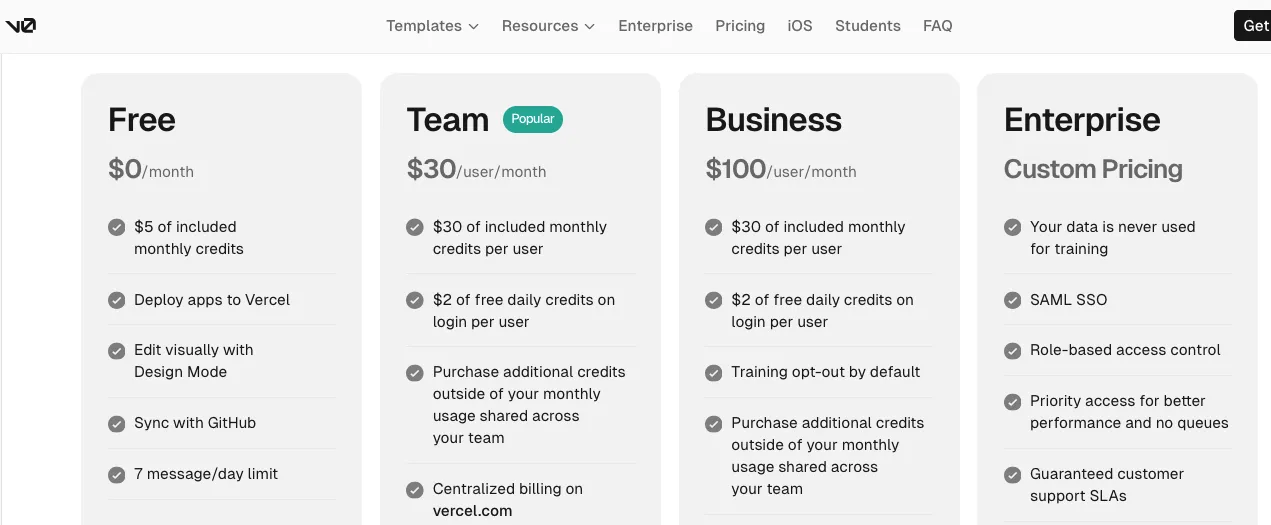
v0 offers a Free plan at $0/month with $5 of included monthly credits, Vercel deployment, Design Mode, GitHub sync, and a 7 message/day limit. Its Team plan costs $30/user/month and includes $30 of monthly credits per user, shared team collaboration, centralized billing, and extra credit purchasing. The Business plan costs $100/user/month and adds privacy-focused features like training opt-out by default. Enterprise uses custom pricing.
That pricing makes sense for developers and teams that use v0 as part of a coding workflow.
If you’re generating frontend components, dashboards, landing pages, UI sections, or product screens, the Free and Team plans can be useful.
But the real cost of v0 is not just the v0 subscription.
You may also need:
- Vercel usage
- Database hosting
- Authentication service
- Payment gateway setup
- Backend developer time
- Code review
- Security testing
- Maintenance after launch
For a developer, that’s normal.
For a non-coder, it can become confusing.
So v0 may look affordable at the tool level, but your total project cost depends heavily on how much technical work your app needs after the first AI-generated version.
Bubble Pricing
Bubble has a Free plan for building and testing. For live apps, Bubble’s Web & Mobile plans include Starter, Growth, Team, and Enterprise tiers. Bubble’s pricing docs explain that Starter includes what users need to go live, including custom domains, web or app store deployment, and backend workflows. Growth adds more workload and more control, while Team is built for collaboration and higher app usage. Enterprise adds custom infrastructure, advanced security, and scalability.
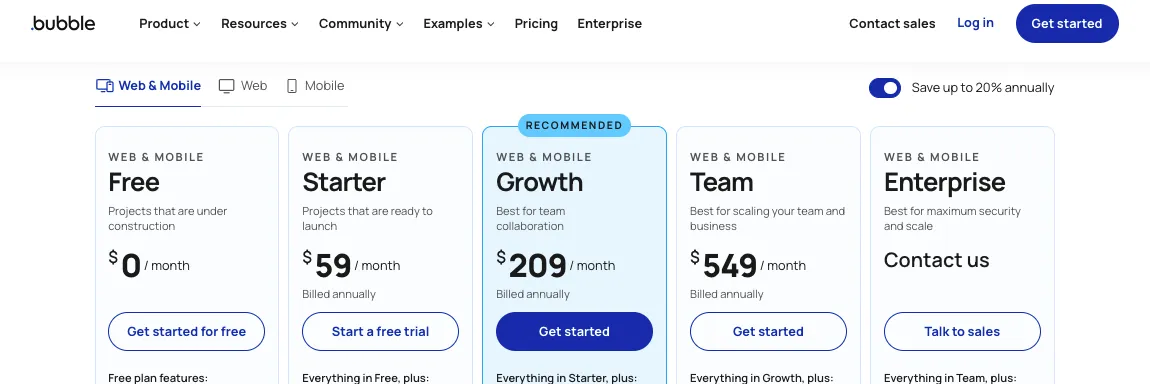
Bubble’s public pricing page also explains that users can buy workload tiers, pay for workload overages, add file storage, and pay for plugin subscriptions when needed.
That’s where Bubble pricing gets interesting.
For small MVPs, Bubble can be cost-effective because you don’t need separate tools for backend, database, hosting, user logic, and workflows.
But as the app grows, workload usage can change the math.
A marketplace with heavy searches, many workflows, file uploads, API calls, and active users may need more workload. You may also pay for plugins, templates, expert help, or performance optimization.
So Bubble’s value is strongest when you want an all-in-one no-code platform.
But you need to watch workload carefully once real users start using the app.
Winner: Bubble for All-in-One Cost, v0 for Developer Teams
Bubble gives non-technical founders more built-in value because one platform covers design, backend, workflows, hosting, and database.
v0 is better for technical teams that already have a development stack and only need AI help to speed up frontend and app generation.
If you already have developers, v0 can be cost-effective.
If you don’t have developers, Bubble may save money early because it removes many setup decisions.
But neither tool is automatically “cheap.”
The cheaper option depends on your app type, your team, and how much technical help you’ll need.
Why Vitara.ai Offers Better Pricing for Full-Stack AI App Building
Vitara.ai keeps the pricing easier to understand.
Its Starter plan is free with limited usage. The Build plan costs $20/month and includes 100 monthly credits, code editing, code download, custom domain support, and faster AI processing. The Scale plan costs $50/month and includes 250 monthly credits with higher usage limits. Custom plans are available for teams with larger needs.
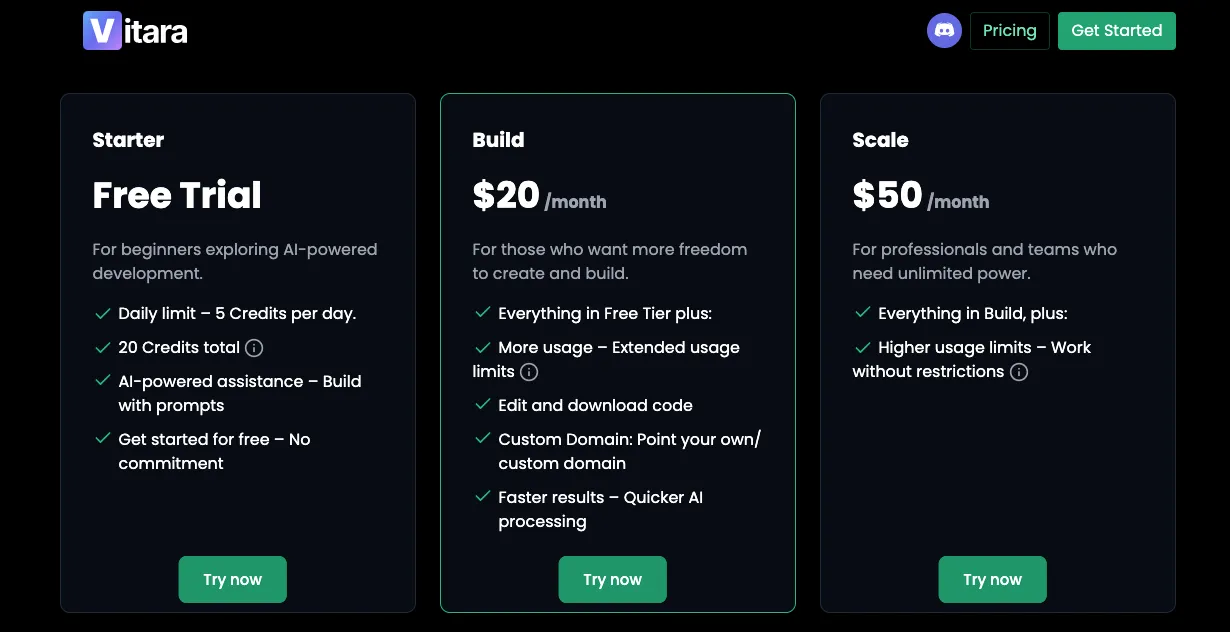
That makes Vitara.ai attractive for founders who want to build more than a frontend prototype without jumping straight into expensive development.
The important part is code control.
With Vitara.ai’s Build plan, you can edit and download code. That gives you more freedom than a closed no-code workflow and more full-stack direction than a frontend-first AI builder.
Here’s where the pricing feels practical:
- You can start free
- You can move to Build at $20/month
- You get code editing and download
- You get custom domain support
- You get more usage on Scale when the project grows
For early-stage founders, that’s a cleaner path.
You don’t have to start with a developer-heavy stack. You also don’t have to lock your entire product into a no-code system from day one.
So if you’re comparing v0 vs Bubble from a real MVP budget point of view, Vitara.ai deserves a serious look because it gives you a stronger mix of AI speed, full-stack support, and code flexibility at a lower starting paid price.
7. Code Ownership and Platform Lock-In
Code ownership matters more than most founders think.
At the start, you only care about building fast. Fair enough.
But once customers start using your app, the question changes.
Can you move your app somewhere else?
Can developers work on it easily?
Can you customize the architecture later?
Can you avoid being locked into one platform forever?
That’s where v0 and Bubble feel very different.
v0: Better for Code Ownership
v0 gives you a more code-first workflow.
You generate the app through prompts, edit it, connect it with GitHub, and deploy through Vercel. v0’s GitHub docs say you can connect chats with GitHub for version control, collaboration, CI/CD, and pull requests. That gives technical teams a cleaner path to manage the app like a normal software project.
This is a big advantage if your team cares about long-term flexibility.
A developer can review the code, restructure components, improve performance, connect a custom backend, and move parts of the project into a broader engineering workflow.
For example, if v0 generates a customer dashboard in Next.js, your team can later add:
- Custom authentication
- API routes
- Payment logic
- Database queries
- Role-based access
- Analytics tracking
- Test cases
- CI/CD rules
That’s hard to ignore.
But code ownership also comes with responsibility.
If something breaks, you need someone who can debug it. If the generated code has messy logic, you need someone to clean it. If the app needs security reviews, API protection, or backend restructuring, v0 won’t remove that work.
So v0 gives you more ownership.
But ownership means you also own the maintenance.
Bubble: Faster to Build, But More Platform-Dependent
Bubble gives you a complete visual app-building environment, but your app lives inside Bubble’s system.
That’s not automatically bad.
For many founders, it’s the whole point. You don’t want to manage code, hosting, servers, deployment pipelines, or backend infrastructure. You want one place to build, test, and launch.
Bubble does that well.
You can build screens, workflows, database logic, API calls, user permissions, and admin tools without writing traditional code. Bubble’s own material says users can build web and native mobile apps while defining behavior, database structure, and user permissions visually on one platform.
That setup is helpful when speed matters more than code control.
But the trade-off is real.
You don’t get the same traditional code export or developer-owned architecture that you’d get with a React or Next.js project. If your app grows and you want to move away from Bubble later, migration can take serious work. You may need to rebuild the app’s frontend, backend logic, database structure, workflows, and integrations in a different stack.
This is why Bubble works best when you’re comfortable staying inside the Bubble ecosystem for a while.
If you want speed, Bubble helps.
If you want full code ownership, Bubble feels limited.
Winner: v0
v0 wins for code ownership and developer control.
Bubble wins when you want to avoid code and stay inside one managed no-code platform.
The simple version:
v0 gives you more freedom.
Bubble gives you more convenience.
Why Vitara.ai Gives You a Better Balance
Vitara.ai is strong here because it gives you AI speed without completely removing code control.
Its pricing page says the Build plan includes code editing, code download, custom domain support, and faster AI processing. That means users can start with AI-generated development, but still keep more room for handoff, customization, and future technical work.
That matters for real MVPs.
Let’s say you’re building an AI SaaS tool. In version one, you may only need user login, a dashboard, a few API calls, and basic admin features. But after launch, you may need custom billing logic, more advanced workflows, AI usage limits, deeper analytics, and developer-led improvements.
With Bubble, you can move fast but stay inside the visual ecosystem.
With v0, you get code control but may need developers earlier.
With Vitara.ai, you get a more balanced path because you can build with AI, edit code, download code, and keep more ownership as the product grows.
That makes Vitara.ai useful for founders who don’t want to rebuild from scratch once the MVP starts working.
8. Integrations and External Services
No serious app lives alone.
At some point, you’ll need to connect payments, authentication, email, analytics, CRM tools, AI APIs, databases, file storage, or third-party services.
So integrations matter.
The real question is not just, “Can this tool connect to APIs?”
The better question is:
How much technical work does that connection need?
v0: Flexible for Developer-Led Integrations
v0 works well when your team already understands APIs, databases, and modern app architecture.
Its docs say v0 can connect databases, AI models, external APIs, and GitHub. That makes it a good fit for teams building with tools like Supabase, Neon, PostgreSQL, Stripe, Clerk, Auth.js, OpenAI, Resend, and custom backend APIs.
This gives v0 a lot of flexibility.
You’re not limited to a closed plugin system. You can bring your own stack and connect the services that make sense for your app.
For example, a developer can use v0 to generate a SaaS dashboard and then connect it with:
- Supabase for database and auth
- Stripe for subscriptions
- OpenAI for AI features
- Resend for emails
- Vercel Blob for file storage
- PostHog for product analytics
That’s powerful.
But again, it’s not beginner-friendly once the app gets serious.
You need to understand API keys, environment variables, server-side logic, database permissions, error handling, and deployment settings. v0 can assist with the code, but someone still needs to review the integration properly.
For technical teams, that’s fine.
For non-coders, it can feel like too many moving parts.
Bubble: Easier API and Plugin-Based Integrations
Bubble makes integrations more visual.
You can use Bubble’s plugin ecosystem or its API Connector to connect external services. Bubble’s manual says the API Connector is a Bubble-built plugin that lets your app connect to almost any external API, set headers and parameters, and use calls as actions or data sources.
That’s useful for non-technical founders.
You don’t need to write API code from scratch. You can configure the connection inside Bubble, test the response, and use the API data inside workflows or page elements.
For example, you can connect Bubble with:
- Stripe for payments
- SendGrid for emails
- Google Maps for location features
- OpenAI for AI responses
- Airtable or external databases
- CRMs and automation tools
- Analytics and marketing tools
Bubble also has plugins for many common use cases, which can save time.
But plugins come with their own trade-offs.
Some plugins are well maintained. Some are not. Some add performance overhead. Some lock important parts of your app logic into third-party plugin behavior. And when something breaks, debugging can be harder because you’re not always working directly with code.
So Bubble makes integrations easier to start.
But complex integrations still need planning.
Winner: Bubble for Non-Coders, v0 for Developers
Bubble wins if you want visual API setup and plugin-based integrations.
v0 wins if your team wants code-level control over services, APIs, and backend architecture.
Here’s the practical difference:
Bubble helps you connect tools without writing much code.
v0 helps developers connect tools exactly how they want.
Why Vitara.ai Works Better for Full-Stack Integrations
Vitara.ai is useful when you want integrations to be part of the full app-building flow, not an afterthought.
Vitara.ai positions itself as an AI-powered full-stack development platform for building web and mobile applications through natural language prompts. Its comparison content also highlights frontend, backend, APIs, databases, authentication, editable code, and downloadable source code as core strengths.
That makes it stronger than a simple UI generator.
If your app needs authentication, database logic, APIs, and backend flows, Vitara.ai gives you more room to build those pieces together instead of stitching everything manually later.
For example, if you’re building a customer support portal, you may need:
- User login
- Ticket database
- Admin panel
- Email notifications
- AI response suggestions
- Role-based access
- API connection with CRM
v0 can help with the frontend.
Bubble can help you connect it visually.
Vitara.ai gives you a more full-stack starting point with better code flexibility.
That’s why it fits teams that want faster app development, but still care about backend control and future developer handoff.
9. Mobile App Support
Mobile support is another area where people often compare v0 and Bubble incorrectly.
A mobile-friendly web app is not the same as a native mobile app.
A responsive web dashboard can work nicely on a phone browser.
But if you want App Store and Google Play publishing, push notifications, mobile-specific UX, and native app packaging, the decision changes.
v0: Better for Responsive Web Apps
v0 is mainly built for web application development.
It can generate responsive interfaces that look good on desktop, tablet, and mobile browsers. That makes it useful for SaaS dashboards, landing pages, admin tools, internal portals, AI tools, and customer-facing web apps.
If your app only needs to work well in a browser, v0 can help you move quickly.
For example, you can use v0 to create:
- Mobile-friendly landing pages
- Responsive SaaS dashboards
- Web-based customer portals
- Admin panels
- Mobile web forms
- AI chat interfaces
That’s enough for many products.
But v0 is not the same as a native mobile app builder.
If your goal is to publish a native iOS or Android app, v0 won’t give you the full mobile app publishing workflow by itself. You’d need a separate mobile stack, such as React Native, Expo, Flutter, or another app development setup.
So v0 works well for responsive web apps.
But it’s not the right tool if you want a no-code path to native mobile apps.
Bubble: Stronger for Native Mobile App Building
Bubble has a clear edge here.
Bubble’s official site says users can publish apps to iOS and Android with its native mobile app builder, and it positions Bubble as an AI-powered app builder for both web and mobile.
That makes Bubble more useful for non-technical founders who want one platform for both web and mobile app development.
The advantage is simple.
You can build your web and mobile experience in the Bubble ecosystem and share logic, data, workflows, and infrastructure across the product. That’s much easier than building a web app in one tool and then rebuilding the mobile version somewhere else.
For example, Bubble can be a better fit if you’re building:
- Booking apps
- Marketplaces
- Service provider apps
- Community apps
- Internal business apps
- Customer portals
- Lightweight SaaS mobile experiences
That said, Bubble mobile app building still requires careful product thinking.
Mobile screens need tighter UX. Workflows need to feel fast. Navigation needs to be simple. And if you’re building a highly custom consumer app with advanced native features, you may still need a dedicated mobile development team.
But for no-code founders, Bubble clearly gives a stronger mobile path than v0.
Winner: Bubble
Bubble wins for mobile app support because it offers a native mobile app builder.
v0 wins only if your need is a mobile-responsive web app, not a native mobile product.
The easy way to decide:
Use Bubble if you want web plus native mobile from one no-code platform.
Use v0 if you only need responsive web interfaces and developer control.
Why Vitara.ai Is Better for Web and Mobile App Development Flexibility
Vitara.ai also positions itself for web and mobile app development through natural language prompts. That gives it a broader product-building angle than frontend-only tools.
The value is flexibility.
If your product starts as a web app but may need mobile later, you don’t want to box yourself into a workflow that only creates static screens or frontend code.
Vitara.ai works better for teams that want:
- Full-stack app generation
- Web and mobile app direction
- Backend support
- Editable source code
- Code download
- Custom domain support
- Future developer handoff
For founders, that matters.
Your first version may be a simple web MVP. But after user feedback, you may need a mobile experience, more backend logic, API integrations, and custom development.
Vitara.ai gives you more room to move in that direction without starting from zero.
10. Real-World Usability and Learning Curve
Features look good on paper.
But the real test is simple.
Can you use the tool without getting stuck every few hours?
This is where v0 and Bubble both have strengths and frustrations.
They just frustrate different types of users.
v0: Fast for Developers, Tricky for Non-Coders
v0 feels fast when you know what to ask for.
If you understand frontend layouts, React components, API logic, and deployment basics, it can save real time. You can generate a strong first version of a screen, then guide the AI with better prompts and code-level edits.
That’s where v0 shines.
A developer can say:
“Create a Next.js SaaS dashboard with a sidebar, usage cards, billing table, team settings page, and empty states.”
v0 can generate something useful quickly.
But if you don’t know how apps are structured, you may struggle to judge the output.
A Reddit user reviewing v0 summed up the concern by saying it’s “good but not something I’d pay $20 per month for.” That kind of feedback usually comes from users who find the tool useful, but not always valuable enough for their workflow.
Other users have complained that v0 may miss instructions or create output that needs rework. One Reddit thread from the Vercel community criticized recent updates and said v0 “fails to follow clear” instructions.
That doesn’t mean v0 is poor.
It means v0 works best when a technical user can guide, test, and correct it.
For non-coders, the first prompt feels magical. The fifth production bug feels less fun.
Bubble: Easier to Start, Harder to Master
Bubble feels easier at the beginning because you can see what you’re building.
You drag, drop, connect workflows, create database fields, and publish without setting up a development environment. For non-technical founders, that lowers the barrier a lot.
But Bubble can get difficult once the app becomes more complex.
G2’s review summary says users praise Bubble’s ease of use and flexibility for building complex apps without coding, but also says the “learning curve can be steep” for advanced features.
That matches how Bubble feels in real projects.
A simple landing page or internal form is easy.
A full marketplace with roles, payments, admin approvals, privacy rules, search filters, notifications, and performance needs is a different story.
Bubble doesn’t require code, but it does require product logic.
You need to understand:
- Database structure
- Workflow conditions
- Privacy rules
- Responsive layouts
- App performance
- Plugin behavior
- User roles
- Data security
So Bubble is beginner-friendly, but not effort-free.
It gives non-coders a way to build serious apps, but serious apps still need careful planning.
Winner: Bubble for Beginners, v0 for Technical Builders
Bubble wins for non-technical users who want a visual learning path.
v0 wins for developers who already understand how frontend and backend pieces fit together.
So the winner depends on the user.
If you think visually, choose Bubble.
If you think in code, choose v0.
Why Vitara.ai Feels More Balanced for Modern Builders
Vitara.ai fits builders who want AI to do more than generate pretty screens.
It helps users build web and mobile apps using prompts, while giving more room for frontend, backend, code editing, code download, and deployment control.
That balance is important.
A lot of founders don’t want to become full-time developers. But they also don’t want to get trapped in a tool where every advanced change needs platform-specific workarounds.
Vitara.ai gives them a middle path.
You can start with natural language prompts, build faster, and still keep more technical flexibility when the app grows.
That makes it especially useful for:
- Startup MVPs
- SaaS products
- AI tools
- Internal business apps
- Agency client projects
- Founders who want code access later
So if Bubble feels too visual and v0 feels too technical, Vitara.ai gives you a practical third option.
It won’t remove every product-building challenge, but it gives you a better balance of speed, control, and full-stack support.
Bubble vs v0: Which One Is Better for Different Users?
Not every builder needs the same tool.
Some people want to launch a complete app without touching code. Some want clean React components they can move into a real developer workflow. That’s why the best choice depends less on the tool itself and more on who is building, what they’re building, and how much technical control they need.
| User Type | Best Choice | Reason |
|---|---|---|
| Non-technical founder | Bubble | Easier to build complete apps without writing code |
| Frontend developer | v0 | Faster way to generate React and Next.js UI |
| Startup MVP team | Bubble | Better for launching a working app with database, workflows, and hosting |
| SaaS engineering team | v0 | More control over code, architecture, GitHub, and deployment |
| Agency building client MVPs | Depends | Bubble works well for no-code clients, while v0 fits code-based product teams |
| Designer building prototypes | v0 | Stronger prompt-to-UI output for modern screens and layouts |
| Internal operations team | Bubble | Easier to create workflows, dashboards, forms, and databases without code |
| Mobile app founder | Bubble | Better choice when native mobile app support matters |
Quick Takeaway
Choose Bubble if your main goal is to build and launch a complete app without hiring developers early. It works well for marketplaces, booking apps, CRMs, internal tools, portals, and MVPs where database and workflows matter.
Choose v0 if you care more about frontend speed, code quality, and developer control. It’s a better fit for React teams, SaaS engineers, frontend developers, and product teams already working with Next.js, GitHub, and Vercel.
Bubble is great for no-code apps. v0 is strong for React UI. Vitara.ai gives you a balanced way to build full-stack web and mobile apps with AI.
Explore Vitara.ai →
Final Verdict: v0 vs Bubble
There is no universal winner in the v0 vs Bubble comparison. Bubble is the better choice for people who want to build a complete app without code. You get the visual builder, database, workflows, hosting, user logic, and app structure in one place.
v0 is the better choice for people who want AI-generated code, polished React interfaces, and control over a developer stack. It works best when you already understand frontend development or have a technical team that can connect the generated UI to APIs, databases, authentication, and deployment.
For most non-technical founders, Bubble is the safer path to launch. For developers building with Next.js and Vercel, v0 is the faster frontend companion. And if you want something that sits between both worlds, Vitara.ai is worth considering because it gives you AI full-stack app building with more flexibility across frontend, backend, code editing, and deployment.
Want to compare more tools before deciding? Read these next:
FAQs: v0 vs Bubble
What is the main difference between v0 and Bubble?
The main difference is how they help you build apps. Bubble is a visual no-code app builder where you create screens, database logic, workflows, and user actions without writing code. v0 is an AI coding tool that helps you generate React and Next.js interfaces faster through prompts.
Is v0 better than Bubble for developers?
Yes, v0 is usually better for developers because it gives them code-based output, React components, Next.js structure, GitHub sync, and more technical control. A developer can use v0 to speed up frontend development, then connect the app to APIs, databases, authentication, and custom backend services.
Is Bubble better than v0 for non-coders?
Yes, Bubble is better for non-coders because it gives you a visual way to build full apps. You can create pages, forms, workflows, database tables, user roles, and payment flows without setting up a codebase. v0 is easier if you understand code or have a developer nearby.
Can v0 build full-stack apps?
v0 can help with full-stack app development, but it works better when a developer guides the process. It can generate frontend code and help connect databases, APIs, and services. Still, you need technical knowledge for authentication, backend logic, environment variables, security, testing, and production deployment.
Can Bubble build mobile apps?
Yes, Bubble supports mobile app building along with web app development. It’s a stronger choice than v0 if you want a no-code path for mobile apps, shared backend logic, workflows, and database support. v0 is better for responsive web interfaces, not full native mobile app building by itself.
Which is better for MVPs, v0 or Bubble?
Bubble is better for most non-technical MVPs because it lets you build the frontend, backend, database, workflows, and hosting from one place. v0 is better for technical MVPs where the team wants React code, frontend speed, and control over the app stack.
Which is cheaper, v0 or Bubble?
v0 can look cheaper at the start, especially for developers who only need frontend generation. Bubble may cost more monthly, but it includes more app-building features in one platform. The real cost depends on your app type, developer needs, backend setup, plugins, workload usage, and long-term maintenance.
Can I use v0 and Bubble together?
Yes, but they don’t naturally work as one combined platform. You can use v0 to explore UI ideas, layouts, and frontend direction, then rebuild those ideas inside Bubble. This works well for design inspiration, but you won’t directly move a complete v0 React app into Bubble as native Bubble logic.
What’s New?