Bolt.new vs v0: Which AI App Builder Is Better in 2026?
Here’s a situation I keep seeing with people building apps using AI.
They start with a prompt, generate a clean-looking prototype, and feel like they’ve found the perfect tool.
Then the real work shows up.
The UI needs polish, the backend needs wiring, the database setup gets messy, or deployment takes longer than expected.
That’s usually when they start searching for “Bolt.new vs v0.”
Both tools can help you build faster, but they don’t solve the same problem in the same way.
This guide breaks down where Bolt.new and v0 stand, feature by feature.
I’ll also show you where Vitara.ai fits in, especially if you want an AI app builder that focuses on full-stack web and mobile app development from a simple prompt.
By the end, you’ll know which tool makes the most sense for your workflow: a polished frontend, a working SaaS prototype, or a full app you can build, edit, and launch faster.
TL;DR — Bolt.new vs v0: Who Should You Pick?
- Vitara.ai: Best if you want to build full-stack web and mobile apps from prompts, with frontend, backend, database, and code export in one place.
- Bolt.new: Best if you want a browser-based AI development environment where you can prompt, run, edit, and deploy full-stack apps without local setup.
- v0: Best if you want polished React, Next.js, Tailwind, and shadcn/ui interfaces, especially for dashboards, landing pages, and Vercel projects.
Bolt positions itself around building and deploying full-stack apps directly in the browser, v0 now describes itself as an AI agent for real code and full-stack apps, and Vitara.ai focuses on full-stack web and mobile app development from natural language prompts.
| Feature | Bolt.new ↗ | v0 ↗ | Vitara.ai ↗ |
|---|---|---|---|
| Main Focus | Browser-based full-stack app building | Polished UI and Vercel-native app building | Full-stack web and mobile app generation |
| Best For | MVPs, prototypes, internal tools | React UI, dashboards, landing pages | SaaS apps, mobile apps, full-stack products |
| Frontend Quality | Good | Excellent | Good |
| Backend Support | Yes | Yes, strongest with Next.js workflows | Yes |
| Database Support | Built-in database options and integrations | Works with tools like Supabase, Neon, Upstash | Supabase backend |
| Code Control | Edit and deploy inside browser | GitHub sync and Vercel workflow | Edit, download, and deploy code |
| Starting Paid Price | $25/month Pro | $30/user/month Team | $20/month Build |
| Best Pick If You Want | A fast AI coding workspace | Clean production-style UI | A full app from one prompt |
Public pricing pages currently list Bolt Pro at $25/month, v0 Team at $30/user/month, and Vitara Build at $20/month, so pricing should still be checked again before publishing.

Build web and mobile apps with AI prompts, React frontend, Supabase backend, and downloadable code.
Start Building with Vitara.ai →
Bolt.new vs v0: Feature-by-Feature Comparison
Now let’s get into the details.
I compared Bolt.new and v0 across the key areas that matter most when choosing an AI app builder.
Not just which tool gives you a nicer demo.
I looked at what actually matters when you’re trying to build something real.
Can it create a working app?
Can it handle backend logic?
Can it generate clean UI?
Can it connect databases, manage deployment, and give you enough control over the code?
I’ll also show where Vitara.ai fits in, because if you want to build full-stack web and mobile apps from prompts, it solves this problem from a different angle.
1. App Building Scope and Use Case
The first thing I tested was the actual building scope of each tool.
Because this is where most Bolt.new vs v0 comparisons oversimplify things.
People usually say:
- Bolt.new is for full-stack apps.
- v0 is for frontend UI.
- Use Bolt when you want an app.
- Use v0 when you want components.
That’s partly true, but it’s not the full picture anymore.
v0 now supports full-stack app workflows, too. Vercel’s docs describe v0 as an AI agent for creating real code, full-stack apps, live prototypes, and production deployments.
But even with that change, both tools still feel very different when you use them.
Bolt.new
Bolt.new feels more like a browser-based AI development workspace.
You type what you want to build, and it tries to generate a working project you can run, edit, and publish from the browser. Bolt’s own docs describe it as an AI-powered builder for websites, web apps, and mobile apps.
This makes Bolt useful when your prompt sounds like this:
“Build a client portal where users can sign up, create projects, upload files, invite team members, and track task progress.”
That’s not just a UI screen.
That’s an app flow.
Bolt works well when you want the AI to help with:
- project structure
- frontend pages
- backend logic
- package installation
- database setup
- preview errors
- deployment steps
In my testing, Bolt made the most sense when I wanted to go from “rough app idea” to “working prototype” quickly.
For example, if you’re building a SaaS MVP, a booking app, a CRM dashboard, or an internal admin tool, Bolt gives you a stronger starting point than a pure UI generator.
But there’s a trade-off.
The more you ask Bolt to build in one prompt, the more you need to watch the output closely.
Sometimes the app looks like it works, but one part of the logic is incomplete. Sometimes dependencies break. Sometimes the UI is usable, but not polished enough for a client demo.
So Bolt is fast, but you still need to guide it.
v0
v0 is strongest when the first thing you care about is the interface.
Ask it for a dashboard, pricing page, login flow, settings screen, analytics panel, or shadcn/ui component, and it usually gives you something cleaner than Bolt on the first try.
That’s why frontend developers like it.
v0 sits close to the React, Next.js, Tailwind, and Vercel ecosystem. It also supports full app previews with server-side code, API routes, database connections, and environment variables running inside Vercel Sandbox.
So no, v0 is not only a component generator anymore.
But the workflow still feels frontend-first.
It works best when you build in layers:
- First, generate the UI.
- Then refine layout, copy, and components.
- Then add database logic.
- Then connect APIs or auth.
- Then deploy through Vercel.
For example, I’d use v0 for a prompt like:
“Create a clean project management dashboard with a sidebar, task board, filters, activity feed, and responsive mobile layout.”
Then I’d follow up with:
“Connect this dashboard to Supabase and add task creation, editing, and deletion.”
That workflow feels natural in v0.
But if your first prompt is a large app idea with multiple roles, backend rules, billing logic, database relationships, and admin permissions, v0 may need more step-by-step direction.
Winner: Bolt.new
Bolt.new wins this round because it starts closer to a complete app-building environment.
v0 has become much better for full-stack work, especially if you’re building with Next.js and deploying on Vercel. But Bolt still feels more natural when your goal is:
“Take this app idea and make it run.”
Why Vitara.ai Fits Better for Full-Stack Web and Mobile Apps
Vitara.ai takes the prompt-to-app idea and points it directly at full-stack web and mobile development.
Its official site says Vitara.ai lets users build full-stack web and mobile applications using natural language, with no coding required.
That matters if your project is bigger than a frontend screen.
For example, Vitara.ai is a better fit when you want to build:
- a food delivery MVP
- a fitness tracking app
- a real estate listing platform
- a booking app with user roles
- a marketplace with buyers and sellers
- a simple CRM for a niche business
v0 can help you design these screens beautifully.
Bolt.new can help you build and run the app in the browser.
But Vitara.ai is easier to position when the real goal is full-stack app generation from a simple prompt.
It’s not just asking, “What should this screen look like?”
It’s asking, “What should this product do?”
That makes it useful for founders, agencies, freelancers, and non-technical teams who want to move from idea to usable product without splitting the work across too many tools.
2. UI Generation and Design Quality
The second thing I look at is simple.
Does the app look good enough that you’d actually show it to someone?
Because a working prototype with ugly UI creates a new problem. You save time on code, then lose time fixing spacing, typography, responsiveness, and visual hierarchy.
This is where v0 gets interesting.
Bolt.new
Bolt.new can generate decent UI, especially when your prompt gives it clear design direction.
For example, instead of saying:
“Build me a dashboard.”
You’ll get better results if you say:
“Build this with a clean SaaS dashboard layout, left sidebar, top navigation, soft cards, mobile responsiveness, and Tailwind styling.”
That kind of prompt usually gives you a usable interface.
For internal tools, admin panels, CRUD apps, and early MVPs, that’s often enough. Bolt.new is not bad at UI. It just doesn’t feel as design-native as v0.
The bigger strength of Bolt is that it connects the UI to the rest of the project.
You can ask it to create:
- login and signup pages
- dashboard screens
- database tables
- API calls
- user flows
- deployment setup
That’s useful when speed matters more than pixel-level polish.
Bolt also supports Figma imports through its Figma integration, which lets users load designs into Bolt and generate sites or UIs based on those designs.
Still, if you’re building a homepage for a venture-backed SaaS product, a polished onboarding flow, or a public dashboard that needs to look sharp on the first pass, Bolt may need more follow-up prompts.
You’ll often find yourself asking things like:
- “Make the cards less generic.”
- “Improve the spacing.”
- “Make this look more like a modern B2B SaaS product.”
- “Use better contrast and hierarchy.”
Bolt gets there, but you’ll probably need to steer it more.
v0
v0 is stronger for UI generation.
That’s the most obvious difference once you use both tools for frontend-heavy work.
It understands modern React product interfaces well, especially things like:
- dashboards
- navigation layouts
- pricing pages
- forms and modals
- tables and empty states
- settings pages
- landing pages
- shadcn/ui-style components
If your prompt is:
“Create a clean analytics dashboard for a B2B SaaS tool with usage charts, revenue cards, team activity, and a responsive layout.”
v0 is more likely to give you something that already feels close to a real product screen.
The reason is simple.
v0’s workflow sits close to the React, Next.js, Tailwind, and shadcn/ui ecosystem. It also includes Design Mode, where you can visually select elements, tweak styles, edit content, adjust spacing, and apply those changes back to the source code.
That changes how you iterate.
Instead of writing a long prompt like:
“Make the second card wider, reduce the top padding, change the headline size, and add more space between the icon and title.”
You can select the element and make the edit visually.
That feels much closer to how designers and frontend developers actually work.
v0 also gives you more frontend control through its built-in code editor, including:
- syntax highlighting
- global search
- diff views
- split editing
- file management
- direct browser-based code edits
So if you care about both the visual output and the code behind it, v0 gives you more precise control on the frontend side.
Winner: v0
v0 wins on UI quality.
Bolt.new can build functional interfaces, but v0 is better when the frontend needs to look polished fast. If your project depends on first impressions, like a SaaS landing page, investor demo, product dashboard, or client-facing portal, v0 gives you a cleaner starting point.
Why Vitara.ai Can Be Better When UI Is Only One Part of the Product
Vitara.ai is not trying to beat v0 only as a React UI generator.
That’s not the right comparison.
v0 is still the better pick if your main job is creating beautiful frontend components.
Vitara.ai makes more sense when UI is only one part of the bigger build.
For example, if you’re building a booking app, you don’t just need a nice calendar screen.
You also need:
- user roles
- booking logic
- availability rules
- forms
- data storage
- admin controls
- maybe mobile access too
That’s where Vitara.ai’s full-stack direction becomes useful.
Its positioning focuses on generating frontend and backend code from natural language, with support for APIs, databases, authentication, prompt-based iterations, code editing, and code download.
So the UI may not always feel as instantly refined as v0’s output, but the product workflow is broader.
If your main goal is “make this screen beautiful,” v0 wins.
If your goal is “turn this app idea into something I can build, edit, and launch,” Vitara.ai deserves a serious look.
3. Backend, Database, and Full-Stack Logic
Frontend is where most AI app builders look impressive.
Backend is where they start showing their real limits.
A tool can generate a beautiful dashboard in one minute. But can it handle login, data persistence, API routes, form submissions, user permissions, file uploads, and database updates without breaking the project?
That’s the real test.
Bolt.new
Bolt.new is strong here because it was designed around full-stack app building from the browser.
It can create JavaScript-based full-stack apps, connect databases, use integrations, and help you move from prompt to working product without setting up a local dev environment.
Bolt Cloud also gives projects databases, hosting, and domains in one place, so users do not need to set up separate services for every basic app build.
Bolt Database is one of the more useful parts of the current Bolt workflow.
Every project includes unlimited databases, and Bolt says users don’t need to create servers or manage setup files manually.
For a beginner, that removes a lot of friction.
You can prompt something like:
“Add user authentication, create a projects table, let each user create tasks, and show only their own tasks on the dashboard.”
Bolt can then generate the app logic around that.
It also supports Supabase if you prefer using it for:
- database
- authentication
- edge functions
- app data storage
- user-level permissions
The weak spot is debugging.
When Bolt gets the backend right, it feels fast. When it gets stuck, you may spend several prompts fixing things like:
- environment variables
- database rules
- broken imports
- package issues
- mismatched schemas
- incomplete API logic
That’s not unique to Bolt. It happens with most AI coding tools.
But because Bolt often tries to build more of the app at once, the errors can feel harder to untangle.
v0
v0 has improved a lot on backend and database support.
This is the part many older comparisons miss.
Vercel’s docs now say v0 can transform prototypes into full-stack apps. You can ask it to add data persistence, API calls, and backend logic.
It defaults to Next.js, and that matters because Next.js supports frontend pages, server actions, and API routes inside the same app structure.
That means v0 can now handle prompts like:
“Add a Supabase database with tables for tasks, users, and projects. Include API routes for managing tasks.”
Or:
“Add authentication so users only see their own records.”
v0 also supports database integrations with providers like:
- Supabase
- Neon
- Upstash
- Vercel Blob
You can connect a database from a chat thread or project settings. For SQL integrations, v0 can also generate and execute SQL.
So no, v0 is not “frontend only” anymore.
But I’d still describe it as frontend-first.
The best workflow in v0 usually looks like this:
- Start with the UI.
- Add the data layer.
- Connect auth.
- Add CRUD logic.
- Create API routes.
- Test the production flow.
If you try to generate a complex full-stack app in one huge prompt, v0 can still make assumptions you don’t want.
It works better when you build in layers.
Winner: Bolt.new
Bolt.new wins this section by a small margin because its full-stack workflow feels more central to the product.
v0 can absolutely build full-stack apps now, especially if you’re using Next.js and Vercel. But Bolt.new feels more natural when your starting prompt includes frontend, backend, database, and app logic together.
Why Vitara.ai Outperforms Both for Prompt-to-App Full-Stack Builds
Vitara.ai’s strongest angle is that it treats full-stack development as the default, not an add-on.
The platform says it can generate frontend and backend code from prompts, handle UI, APIs, databases, and authentication, and let users edit or export the generated code.
That matters for people who don’t want to think in separate layers.
A developer may be fine saying:
“First generate the UI. Now add API routes. Now connect Supabase. Now add auth. Now fix the schema.”
A founder or non-technical operator usually thinks differently.
They say:
“Build me a rental marketplace where property owners can list homes, renters can request bookings, and admins can approve listings.”
Vitara.ai is built around that kind of prompt.
It’s especially useful when the app needs both web and mobile direction.
Here’s the practical difference:
- Bolt.new is great when you want a browser-based AI coding workspace.
- v0 is great when you want polished Next.js UI and Vercel-native development.
- Vitara.ai is better when you want to start from a product idea and generate a fuller app structure from the beginning.
That’s why it belongs in this comparison.
For simple UI work, v0 is still the cleaner choice.
For browser-based full-stack prototyping, Bolt.new is hard to ignore.
For full-stack web and mobile app development from natural language prompts, Vitara.ai has the stronger positioning.
Turn your app idea into a full-stack product with frontend, backend, database, auth, and code control in one workflow.
Build Full-Stack Apps with Vitara.ai →
4. Deployment and Hosting
Building the app is only half the job.
At some point, you need to put it online.
And this is where AI app builders can either save you hours or create a new mess.
A good deployment workflow should answer a few simple questions:
- Can I publish the app quickly?
- Can I use a custom domain?
- Can I connect hosting without leaving the platform?
- Can I move the project somewhere else later?
- Can I trust the deployment path when the app gets bigger?
Here’s how Bolt.new and v0 handle that part.
Bolt.new
Bolt.new is strong when you want to build and publish from the same place.
Its docs say Bolt offers built-in hosting, so users can publish projects without setting up a separate server or third-party account. When you publish, Bolt puts the project online and gives you a live web address people can open in their browser. Free and Pro users can publish to a .bolt.host domain, while custom domains are available for Pro users.
That makes Bolt useful for quick MVP demos.
Let’s say you’re building a customer feedback app for a client.
You can prompt the app, preview it, fix the obvious layout issues, and publish a live version without setting up Vercel, Netlify, DNS, GitHub Actions, or local deployment scripts.
For a founder, that’s a big deal.
You can share a link with a potential customer the same day.
Bolt also supports Netlify publishing if you prefer that route. Its hosting docs mention resources for publishing new projects to Netlify, switching from Netlify to Bolt hosting, and managing older projects published through Netlify.
Where Bolt can feel less smooth is when your deployment needs become more advanced.
If you’re building a serious SaaS product with staging environments, deeper CI/CD, team review flows, environment-specific configs, or a custom backend setup outside the Bolt ecosystem, you may eventually want to move the project into GitHub and manage deployments more like a traditional dev team.
Bolt can still help you start fast.
But for long-term engineering workflows, you’ll want to treat Bolt as the launchpad, not the entire production process.
v0
v0 has a clear advantage if your app is going to live on Vercel.
That’s not surprising. v0 is built by Vercel, and the whole workflow points naturally toward Vercel deployment.
The v0 pricing page says even the free plan includes the ability to deploy apps to Vercel, edit visually with Design Mode, and sync with GitHub.
That makes v0 especially useful for developers already working with:
- Next.js
- React
- Tailwind CSS
- shadcn/ui
- GitHub
- Vercel projects
If your current workflow is already “push to GitHub, deploy on Vercel,” v0 feels familiar.
You can generate a UI, connect it to a project, push changes, and keep the deployment path close to your normal frontend workflow.
Vercel’s GitHub docs also explain that Vercel for GitHub can automatically deploy GitHub projects, create preview deployment URLs, and update custom domains.
That matters when you’re working with a team.
A solo founder may only need one live preview link.
A development team needs pull requests, preview URLs, review comments, staging links, and production deploys. v0 fits that style better than most prompt-to-app tools.
The trade-off is platform fit.
If you want to deploy somewhere outside the Vercel ecosystem, v0 may not feel as flexible as a more open coding workspace. It still gives you code, and GitHub helps with portability, but the smoothest path is clearly Vercel.
Winner: v0
v0 wins deployment if your app is built with Next.js and you already like the Vercel workflow.
Bolt.new is faster for “build and publish this demo right now.”
But v0 feels stronger when deployment is part of a longer developer workflow with GitHub, previews, and production hosting.
Why Vitara.ai Works Better for Prompt-to-Launch App Builders
Vitara.ai fits this section because it doesn’t just talk about generating screens.
Its website describes Vitara as a vibe coding tool that generates real code from your intent. It says users can inspect, edit, and deploy the actual source code, and it positions the product as a full-stack development engine that brings prompt understanding, code generation, hosting, and deployment into one platform.
That’s useful if you want a simpler path from idea to launch.
Vitara.ai makes sense when you want:
- prompt-based full-stack app generation
- editable source code
- app deployment from the same workflow
- less setup before your first live version
- a tool that supports both web and mobile app direction
This matters for non-technical founders and small agencies.
They don’t always want to think about hosting providers, deployment environments, and repo structure on day one.
They want to say:
“Build a booking app for fitness trainers with user profiles, packages, session requests, and an admin dashboard.”
Then they want a live version they can test.
Bolt.new can do this well for browser-based app building. v0 can do it well if the project fits Vercel and Next.js.
Vitara.ai fits better when the promise is broader: build, edit, download, and deploy a full-stack app from prompts.
5. Code Control, GitHub, and Developer Handoff
This is where a lot of AI app builders look good at first and then start to worry developers.
A tool can generate a working prototype.
Nice.
But can you actually own the code?
Can your developer inspect it, clean it up, commit it, refactor it, and keep building outside the tool?
That matters because most real products don’t stop at version one.
Bolt.new
Bolt.new gives you a lot of control because it works like a coding environment inside the browser.
You can inspect files, edit code, run the app, fix errors, and keep working inside the project.
Its GitHub integration is also important. Bolt’s GitHub docs say that when you connect Bolt to GitHub, your work gets backed up with a full history of changes, and you’re not locked into Bolt. You can build in Bolt, switch to GitHub, and come back to Bolt later.
That’s the part I’d pay attention to.
AI tools are useful, but lock-in is dangerous.
If you build your MVP in Bolt and later hire a developer, that developer should be able to open the repo, understand the structure, and continue the work without starting over.
Bolt supports that workflow better than many no-code-style builders because it creates actual code and lets you move it through GitHub.
In practice, I’d still be careful.
When you ask Bolt to make broad changes across the app, it may touch more files than you expect. That can be helpful when you’re moving fast, but risky when you already have working logic you don’t want broken.
So I’d use Bolt like this:
- connect GitHub early
- commit working versions often
- ask for smaller changes instead of huge rewrites
- review diffs before accepting major edits
- keep backup points before database or auth changes
Bolt is powerful, but you’ll get better results if you treat it like a junior developer with speed, not a senior engineer with perfect judgment.
v0
v0 is better when your project lives close to the frontend workflow.
Its GitHub docs say v0 lets you connect chats with GitHub for version control, collaboration, CI/CD, and pull requests. It can automatically create projects and track changes through connected repositories.
That makes v0 a good fit for teams that already review code through GitHub.
You can use v0 to generate or modify parts of an app, then use pull requests to review the changes before they hit production.
This is especially useful for frontend teams.
For example, a product manager could ask v0 to create a new settings page.
Then a frontend developer could review the output, clean up the component structure, check accessibility, connect the real data layer, and merge it.
That handoff feels natural.
v0 also has a browser-based code editor with practical editing features. Its docs mention syntax highlighting, global search, diff views, split editing, file management, and direct code edits in the browser.
The difference is focus.
v0 gives you strong control over the frontend and app structure, especially in a Next.js project.
Bolt gives you more of a general AI coding workspace.
So if the handoff is mainly to a React or Next.js developer, v0 feels cleaner.
If the handoff is for a broader full-stack prototype, Bolt may give you more of the app in one place.
Winner: v0
v0 wins for developer handoff if your team already uses GitHub, pull requests, Next.js, and Vercel.
Bolt.new is better for moving fast inside one browser workspace.
But v0 feels more natural when the goal is to generate production-style frontend code and pass it into an existing developer workflow.
Why Vitara.ai Outperforms Both on Code Ownership for Non-Technical Builders
Vitara.ai puts code ownership closer to the center of its offer.
Its official pricing page lists “Edit and download code” on the Build plan, along with custom domain support and faster AI processing.
That matters because many AI app builders are easy to start with but hard to leave.
Vitara.ai gives users a clearer path after the first generated version.
You can:
- build with prompts
- edit the generated code
- download the source code
- deploy the app
- hand the project to a developer later
That last point is important.
A founder may not care about code export on day one.
But they will care when the app starts getting users.
At that point, they may need custom payment flows, better database rules, analytics, admin permissions, or performance cleanup.
If the code is trapped inside a tool, scaling becomes painful.
Vitara.ai reduces that risk by giving users the ability to edit and download code on its paid plan. It’s not just “build inside our platform forever.”
It’s closer to:
“Start with AI, then keep control.”
For founders, agencies, and product teams, that’s the safer long-term bet.
6. Pricing Comparison
Pricing for AI app builders can get confusing fast.
The monthly plan is only part of the cost.
You also need to think about:
- credits or tokens
- daily usage limits
- hosting limits
- custom domains
- team seats
- code export
- extra usage
- how often the AI needs to regenerate files
A cheap plan can become expensive if one bug-fixing loop eats half your usage.
So here’s what each tool costs right now, based on their official pricing pages.
Bolt.new Pricing
Bolt.new has a free plan and paid plans.
The free plan costs $0 and includes public and private projects, a 300K daily token limit, 1M tokens per month, Bolt branding on websites, a 10MB file upload limit, website hosting, up to 333K web requests, and unlimited databases.
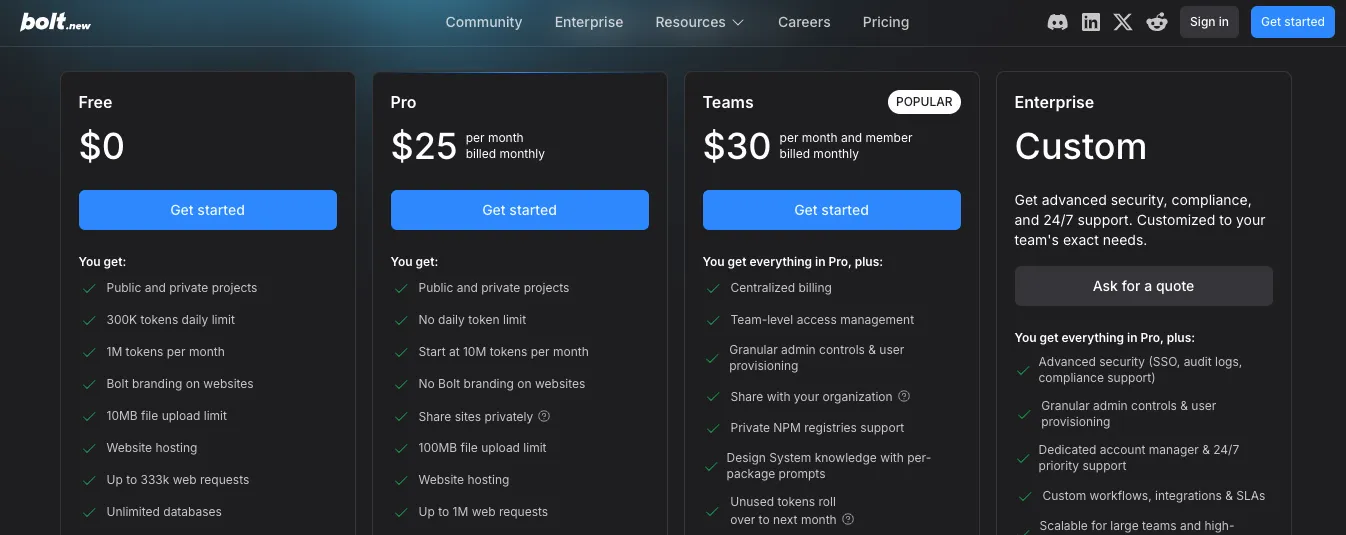
The Pro plan starts at $25/month when billed monthly.
It includes:
- public and private projects
- no daily token limit
- 10M tokens per month to start
- no Bolt branding
- private site sharing
- 100MB file upload limit
- website hosting
- up to 1M web requests
- custom domain support
- unlimited databases
- expanded database capacity
- unused token rollover for one extra month
Bolt also has a Teams plan at $30 per month per member, billed monthly. That plan adds centralized billing, team access management, admin controls, organization sharing, private NPM registry support, and design system knowledge. Enterprise pricing is custom.
The thing to watch with Bolt is token usage.
Bolt says most token usage comes from syncing your project’s file system to the AI. The larger your project gets, the more tokens each message can use.
That’s the hidden cost.
A small landing page may feel cheap.
A full-stack SaaS app with many files, dependencies, database logic, and repeated debugging prompts can burn through tokens much faster.
v0 Pricing
v0 pricing has a free plan, Team plan, Business plan, and Enterprise plan.
The free plan costs $0/month and includes $5 of monthly credits, Vercel app deployment, visual editing with Design Mode, GitHub sync, and a 7-message-per-day limit.
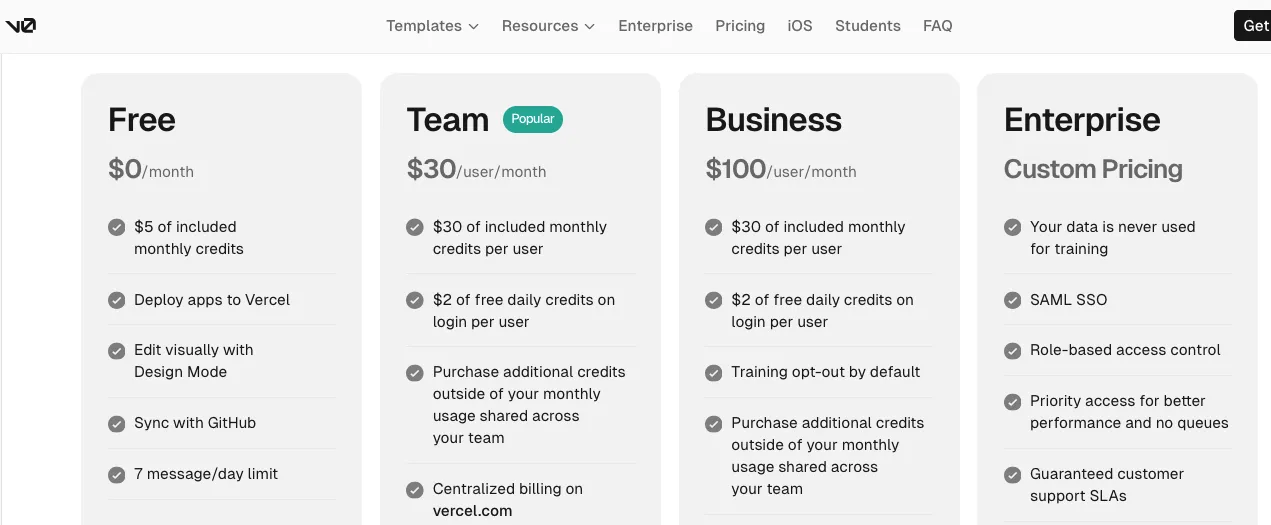
The Team plan costs $30/user/month.
It includes:
- $30 of monthly credits per user
- $2 of free daily credits on login per user
- shared additional credits for the team
- centralized billing on Vercel
- shared chats and team collaboration
The Business plan costs $100/user/month and includes the same $30 monthly credits per user and $2 daily login credits, plus training opt-out by default. Enterprise pricing is custom and includes items like SAML SSO, role-based access control, priority access, and support SLAs.
v0 also shows model-level token pricing for v0 Mini, v0 Pro, v0 Max, and v0 Max Fast. Output tokens get more expensive as you move up to stronger models, with v0 Max Fast priced higher than the others.
The nice part is that v0’s pricing feels easier to understand if you already think in Vercel terms.
The risk is the same as any credit-based AI tool.
If you keep regenerating large screens, changing app structure, or asking for full-stack fixes, credits can disappear quickly.
For UI work, v0 can feel efficient.
For large app builds, you need to be more careful with prompt scope.
Vitara.ai Pricing
Vitara.ai keeps pricing simpler than both.
Its official pricing page lists three public plans: Starter, Build, and Scale.
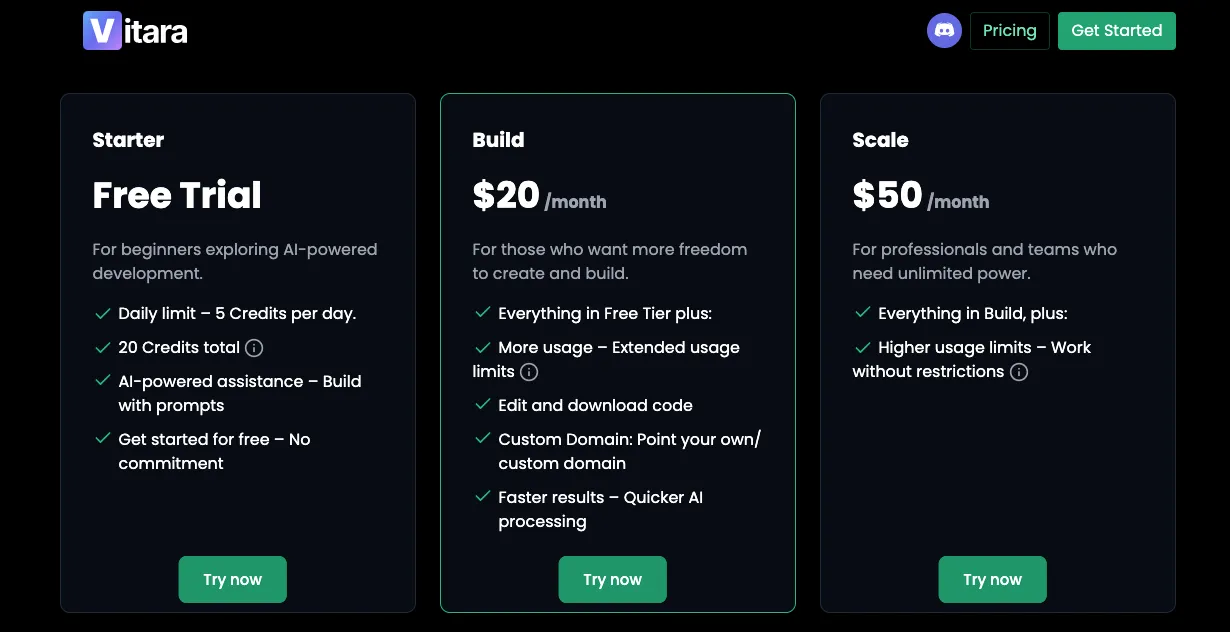
The Starter plan is free and gives beginners limited access to the AI-powered development platform. It includes 5 credits per day and 20 total one-time credits.
The Build plan costs $20/month.
It includes everything in the free tier, plus:
- 100 monthly credits
- edit and download code
- custom domain support
- faster AI processing
The Scale plan costs $50/month and includes everything in Build, plus a higher monthly usage limit of 250 credits. Vitara.ai also mentions custom solutions for users who need more than the standard plans.
That makes Vitara.ai easier to evaluate for smaller teams.
You don’t have to compare model token rates or think too deeply about per-seat pricing at the beginning.
The main thing to watch is credit volume.
If you’re building a serious product with many iterations, 100 monthly credits on Build may feel limiting. But the $20/month starting point is attractive if you want code editing, code download, custom domains, and a simpler full-stack app builder workflow.
Winner: Vitara.ai
Vitara.ai wins on entry-level pricing because its Build plan starts at $20/month and includes edit and download code.
Bolt.new gives you more tokens and a stronger browser-based development environment at $25/month.
v0 gives you the strongest Vercel-native workflow at $30/user/month for teams.
But if someone asks, “Which one gives me the simplest paid starting point for building and owning a full-stack app?” Vitara.ai has the cleaner pitch.
Why Vitara.ai Outperforms Both on Pricing Simplicity
Bolt.new and v0 are powerful, but their pricing takes more effort to understand.
Bolt uses tokens.
v0 uses credits and model-based token pricing.
Vitara.ai uses credits too, but the plan structure is simpler for the average builder.
Here’s where Vitara.ai stands out:
- lowest public paid starting price in this comparison
- code editing and code download included on the Build plan
- custom domain support included on the Build plan
- simple jump from Build to Scale
- easier for solo founders to estimate monthly cost
That doesn’t mean Vitara.ai is always cheaper in practice.
If your app needs heavy daily iteration, Bolt’s larger token allowance may be better. If your app belongs on Vercel and needs team collaboration, v0 may justify the higher price.
But for someone who wants a full-stack AI app builder with source-code access and a lower starting price, Vitara.ai is the easiest to understand.
Start with Vitara.ai Build plan and get code editing, code download, custom domain support, and faster AI processing.
Try Vitara Build Plan →
7. Integrations and Ecosystem
Integrations matter more than most people think.
At first, you’re just trying to generate an app.
But once the app starts looking real, you need other things around it.
A database.
Authentication.
Payments.
GitHub.
Design imports.
Deployment.
Maybe even mobile support.
That’s where the ecosystem starts to matter.
A good AI app builder should not only generate code. It should also connect that code to the tools you already use.
Bolt.new
Bolt.new has a solid integration set for people who want to build complete apps in the browser.
Its docs mention integrations with Figma, GitHub, Expo, and Stripe. Bolt also supports Supabase for database, authentication, and edge functions, which gives you an alternative to Bolt’s own database setup.
That gives Bolt a practical full-stack workflow.
You can use:
- Figma for bringing in design direction
- GitHub for version control and collaboration
- Supabase for database and auth
- Expo for mobile app development
- Stripe for payment handling
- Netlify or Bolt hosting for publishing
This makes Bolt useful when you’re building something like a paid SaaS MVP.
For example, you could prompt Bolt to build a subscription-based client portal, then connect Supabase for users and Stripe for billing. Bolt’s Stripe docs say Stripe can be added to projects using Bolt Database or Supabase for database, authentication, and edge functions.
That’s a strong setup for early-stage products.
But Bolt’s ecosystem still feels more builder-focused than enterprise-focused.
It gives you the main pieces you need to ship an MVP, but if your team already has a complex stack with internal APIs, custom CI/CD, advanced monitoring, and multiple environments, you’ll need more manual developer control.
Bolt works best when the goal is:
“Help me build this app quickly and connect the major services.”
Not:
“Fit perfectly into our mature engineering platform from day one.”
v0
v0 has the stronger ecosystem if you’re already in the Vercel world.
That’s its biggest advantage.
v0 connects naturally with GitHub, Vercel deployments, Next.js projects, database providers, and Vercel Marketplace integrations. Vercel’s docs say v0 supports database integrations with Supabase, Neon, Upstash, and Vercel Blob.
That matters because v0 is not trying to be a random app builder.
It’s built around a specific developer stack.
React.
Next.js.
Tailwind.
shadcn/ui.
GitHub.
Vercel.
If that’s already your stack, v0 feels smooth.
You can generate the UI, connect the repo, add database logic, and deploy through Vercel without constantly switching mental models.
v0 also supports tool calls through Vercel Marketplace integrations, which means you can connect external services directly inside v0 chats.
That gives v0 more room to grow as an AI development workflow, not just a UI generator.
The trade-off is obvious.
v0 is strongest when you accept the Vercel-native path.
If your team uses another backend stack, another hosting provider, or a non-Next.js architecture, v0 can still help with frontend generation. But you may not get the same smooth experience as someone building inside the Vercel ecosystem.
Also Read:
Compare Vercel V0 with other leading app builders:
Top Vercel V0 Alternatives
Winner: v0
v0 wins on ecosystem.
Bolt has the practical integrations most MVP builders need. But v0 has the stronger developer ecosystem around GitHub, Vercel, databases, marketplace integrations, and production-style frontend workflows.
Why Vitara.ai Works Better for Simpler Full-Stack App Building
Vitara.ai is not trying to win by having the biggest integration marketplace.
Its pitch is simpler.
Build the app.
Edit the code.
Download the code.
Connect a custom domain.
Move faster from prompt to launch.
Vitara’s pricing page lists code editing, code download, custom domain support, and faster AI processing on the Build plan.
That makes it easier for people who don’t want to think through a long integration stack on day one.
For example, a solo founder building a fitness app may not care about marketplace integrations yet.
They care about:
- Can I describe the app?
- Can I get a working version?
- Can I edit it?
- Can I own the code?
- Can I launch it without hiring a full team first?
That’s where Vitara.ai fits well.
v0 is better if your stack is already Vercel and Next.js.
Bolt.new is better if you want a powerful browser-based AI coding environment.
Vitara.ai is better if you want the shortest path from product idea to editable full-stack app, especially when code ownership and app launch matter more than ecosystem depth.
8. User Reviews and Real-World Learning Curve
Feature pages tell you what a tool can do.
User reviews tell you where people actually struggle.
And with AI app builders, this matters a lot.
Because almost every tool looks magical in the first five minutes.
The real test starts after that.
Can you fix bugs?
Can you control the output?
Can you stop the AI from rewriting things badly?
Can a beginner understand what happened when the app breaks?
That’s where Bolt.new and v0 start to feel different.
Bolt.new
Bolt.new gets a lot of attention because it can generate more than a single screen.
One Reddit user described Bolt as a tool that can generate a “whole codebase with files and directories,” install packages, work with backends, and let you edit code. Source:
That matches the real experience.
Bolt feels exciting because it gives you a complete project quickly.
You don’t just get a button component.
You get files, pages, dependencies, previews, and app logic.
For beginners, that can feel amazing.
But it can also become confusing when something breaks.
If Bolt creates ten files and the app fails because of one import, one schema mismatch, or one environment variable, a non-technical user may not know what went wrong.
That’s why Bolt works best when you use it carefully:
- start with smaller prompts
- build one feature at a time
- connect GitHub early
- save working versions
- ask Bolt to explain errors before fixing them
- avoid asking for huge rewrites once the app works
There are mixed user opinions here.
In one Reddit discussion comparing Bolt and v0, a user summed up the common view as: “Bolt is better for the backend and V0 for the frontend.” Source:
That’s not a perfect rule anymore, because v0 now supports full-stack workflows too.
But it still captures how many users experience both tools.
Bolt feels broader.
v0 feels cleaner on UI.
v0
v0 has an easier learning curve if your main goal is UI.
You can ask for a dashboard, landing page, login page, pricing section, or form layout, and the output usually looks close to something you’d actually use.
That makes v0 less intimidating for frontend work.
One Reddit user said v0 helped them move past the point where they were “stuck sometimes trying to come up with UI’s” so they could get to coding sooner. Source:
That’s exactly where v0 shines.
It helps you skip the blank-page problem.
Instead of spending an hour deciding how a settings page should look, you can ask v0 for a clean version, then refine it.
For developers, that’s useful.
For non-designers, it’s even more useful.
The weak spot is expectations.
Some users expect v0 to generate a complete production app with no changes required. That’s where disappointment starts.
v0 is good, but you still need to review the code, test the flows, check responsiveness, connect real data, and handle production logic carefully.
Even in Reddit discussions, people often describe v0 as useful for kickstarting UI rather than replacing the whole development process.
So the best way to use v0 is simple:
Use it to get a strong frontend direction.
Then let a developer clean up the logic, wire the backend properly, and make sure the app behaves correctly in production.
Winner: v0
v0 wins on learning curve for most users.
It gives cleaner visual results faster, especially for frontend-heavy tasks. Bolt.new gives you more app-building power, but that power comes with more moving parts.
If you’re a developer, Bolt’s broader control is useful.
If you’re a beginner trying to create something polished without getting buried in project structure, v0 feels easier.
Why Vitara.ai Outperforms Both for Non-Technical App Builders
Vitara.ai has a cleaner pitch for people who don’t want to learn how an AI coding environment works.
That matters.
A lot of founders don’t wake up thinking:
“I want to manage files, database rules, auth callbacks, package versions, and deployment settings.”
They think:
“I have an app idea. Can I build a first version?”
Vitara.ai focuses on that kind of user.
It positions itself as an AI app builder for creating full-stack web and mobile apps from natural language prompts, with code editing and code download available on paid plans.
That makes the learning curve feel less technical at the start.
The user does not need to begin with:
- Which frontend framework should I use?
- Should I use Supabase or Neon?
- Where should I deploy?
- How do I structure API routes?
- How do I export the project?
They can start with the product idea first.
For example:
“Build a marketplace app where local chefs can list meals, customers can order, and admins can manage listings.”
That’s the kind of prompt where Vitara.ai’s full-stack app-building direction makes sense.
v0 is better if you want beautiful frontend output.
Bolt.new is better if you want an AI coding workspace with deeper project control.
Vitara.ai is better if you want a more direct path for non-technical users who care about getting a full app started, owning the code, and moving toward launch.
9. Final Verdict: Bolt.new vs v0
After testing both tools, I wouldn’t describe this as a simple “which one is better?” comparison.
That’s the wrong question.
The better question is:
What are you trying to build?
Because Bolt.new and v0 solve different problems, even though they overlap more than they used to.
Choose Bolt.new If You Want a Browser-Based AI Coding Workspace
Bolt.new is the better choice if you want to build a working app from a prompt and keep everything inside one browser-based development environment.
It’s especially useful for:
- SaaS MVPs
- internal tools
- CRUD apps
- dashboards with real logic
- prototypes with backend workflows
- apps that need database or auth setup
- builders who don’t want local development setup
Bolt.new feels like the better pick when your prompt starts with the full product idea.
Something like:
“Build a customer support portal where users can submit tickets, admins can assign them, and teams can track status changes.”
That’s where Bolt makes sense.
It may not always give you the cleanest UI on the first try, but it gives you more of the app structure upfront.
Choose v0 If You Want Polished Frontend and Vercel-Native Development
v0 is the better choice if frontend quality matters most.
It’s ideal for:
- React interfaces
- Next.js apps
- SaaS landing pages
- admin dashboards
- shadcn/ui components
- pricing pages
- onboarding flows
- Vercel-based projects
If your prompt sounds like:
“Create a modern analytics dashboard with a sidebar, usage cards, revenue chart, team activity, and responsive mobile layout.”
v0 is usually the stronger starting point.
It gives you cleaner layouts, better visual hierarchy, and a smoother workflow if you already use GitHub and Vercel.
v0 can build full-stack apps now, so calling it “frontend only” is outdated.
But it still feels best when you start with the product experience and then add backend logic step by step.
Winner: Depends on the Project
Bolt.new wins for broader app generation.
v0 wins for frontend quality and Vercel-native development.
If I had to simplify it:
Use Bolt.new when you want to build the app.
Use v0 when you want to design the app well.
Use both if you want v0’s UI quality and Bolt’s broader app-building workflow.
Why Vitara.ai Is the Better Alternative for Full-Stack Web and Mobile App Builders
Vitara.ai fits this comparison because many people searching for Bolt.new vs v0 are not really looking for a UI tool or a coding workspace.
They’re looking for a faster way to build an app.
That’s a different intent.
They don’t want to compare every framework.
They want to know:
- Which tool can turn my idea into a usable product?
- Which one gives me frontend and backend?
- Which one helps with web and mobile apps?
- Which one lets me edit and download code?
- Which one can help me launch without bouncing between five tools?
That’s where Vitara.ai becomes the stronger alternative.
Vitara.ai gives you a more direct prompt-to-app workflow for full-stack web and mobile development. Its paid Build plan also includes edit and download code, custom domain support, and faster AI processing.
So here’s the clean recommendation.
If you’re a developer building inside the Vercel ecosystem, pick v0.
If you want a powerful browser-based AI coding environment, pick Bolt.new.
If you want to build a full-stack web or mobile app from a simple prompt and keep control of the code, Vitara.ai is the better tool to test first.
It gives you the thing most builders actually want:
Not just a pretty screen.
Not just a generated codebase.
A clearer path from idea to app.
Bolt.new vs v0: Which One Should You Choose?
By this point, the choice should feel a lot clearer.
But I’ll make it simple.
Don’t choose based on which tool looks more exciting in a demo.
Choose based on what you’re actually trying to build.
Because Bolt.new and v0 both help you build faster, but they shine in different parts of the workflow.
Choose Bolt.new if:
You should choose Bolt.new if your main goal is to turn an app idea into something that runs quickly.
It’s a better fit when you want the AI to help with more than the interface.
For example, Bolt makes sense if you’re building:
- a SaaS MVP
- a client portal
- a booking app
- an internal dashboard
- a CRUD app with user data
- a prototype with backend logic
- a small business tool you want to publish fast
Bolt is especially useful if you don’t want to set up a local development environment.
You can prompt, run, edit, and deploy full-stack applications directly from the browser, which makes the early building process feel much lighter. Bolt’s GitHub page describes it as an AI-powered web development agent for prompting, running, editing, and deploying full-stack apps in the browser with no local setup required.
So if your thought process is:
“I have an idea for an app, and I want to see a working version today.”
Bolt.new is probably the better first stop.
It gives you more of the app structure upfront:
- frontend pages
- backend logic
- package setup
- project files
- database direction
- deployment workflow
- browser-based development
The trade-off is that you need to guide it carefully.
Bolt can move fast, but fast AI-generated code still needs review. If you ask it to build too much at once, you may spend time fixing logic, dependencies, or design details later.
Choose v0 if:
You should choose v0 if the frontend matters most.
And by frontend, I don’t just mean “a screen.”
I mean the part of the product users actually see and judge first.
The dashboard.
The landing page.
The onboarding flow.
The pricing page.
The settings screen.
The admin panel.
v0 is a better fit if you already work with:
- React
- Next.js
- Tailwind CSS
- shadcn/ui
- GitHub
- Vercel
Vercel describes v0 as a tool for generating working apps, syncing with GitHub, starting from templates, editing with Design Mode, and publishing live websites quickly.
That makes it a strong choice when you want clean, modern React UI without starting from a blank page.
Use v0 when your prompt sounds like:
“Create a polished analytics dashboard with revenue cards, charts, filters, team activity, and a responsive mobile layout.”
Or:
“Build a modern SaaS landing page with a hero section, pricing cards, testimonials, and a clean call-to-action.”
This is where v0 feels better than Bolt.
It usually gives you a cleaner visual starting point, and Design Mode makes it easier to adjust spacing, layout, and styles visually. v0’s docs say Design Mode lets you visually edit your app and apply changes live in preview before committing them.
v0 can also build full-stack apps now, so calling it “frontend only” is outdated.
Its docs say it can create backend endpoints using Next.js App Router conventions and connect to databases like Supabase, Neon, and Upstash.
But even with those full-stack features, v0 still feels strongest when you start with the product experience first, then add backend logic step by step.
Use both if:
You should use Bolt.new and v0 together if you want the best parts of both workflows.
This is honestly one of the smartest ways to use them.
Use v0 when you need:
- polished UI
- clean React components
- better layout direction
- shadcn/ui-style screens
- frontend ideas for dashboards or landing pages
Then use Bolt.new when you need:
- broader app structure
- backend logic
- database workflows
- package setup
- browser-based debugging
- a faster path to a working prototype
For example, you could start in v0 and generate a polished SaaS dashboard.
Then you could bring that direction into Bolt.new and ask it to build the wider product around it:
“Use this dashboard style and build a full project management app with user login, projects, tasks, comments, and admin controls.”
That workflow makes sense because you’re not forcing one tool to do everything.
You’re letting each one do what it does best.
v0 gives you the cleaner interface direction.
Bolt.new gives you the broader app-building environment.
Choose Vitara.ai if you want a more direct full-stack app builder
There’s one more option worth considering here.
If your real goal is not just “compare Bolt.new and v0,” but “find the easiest way to build a full-stack app from a prompt,” then Vitara.ai should be on your list too.
Vitara.ai positions itself around building full-stack web and mobile applications from natural language prompts, with a focus on speed and simplicity for non-technical users and teams.
That makes it a strong fit if you want:
- web and mobile app generation
- frontend and backend in one workflow
- less technical setup at the start
- a simpler prompt-to-app experience
- a tool built around product ideas, not just UI screens
So the short version is:
- Choose Bolt.new if you want a browser-based AI coding workspace.
- Choose v0 if you want polished React and Next.js UI.
- Choose Vitara.ai if you want to build full-stack web and mobile apps from prompts with a simpler path from idea to launch.
v0 helps with polished UI. Bolt.new helps with browser-based prototyping. Vitara.ai helps you build full-stack web and mobile apps from simple prompts.
Create Your App with Vitara.ai →
Final Verdict
Bolt.new is better for turning an idea into a working app.
v0 is better for turning an interface idea into polished React and Next.js code.
But in 2026, the old comparison of “Bolt is full-stack and v0 is frontend only” doesn’t really hold up anymore.
v0 has moved further into full-stack development. It can work with backend endpoints, databases, GitHub, Vercel deployments, and full app workflows.
So the real difference is workflow.
Bolt.new feels like an AI development environment.
It’s the better choice when you want to build, run, edit, and deploy a full-stack app from the browser.
v0 feels like a Vercel-native AI product builder.
It’s the better choice when you want polished UI, clean React components, design-system support, and a smooth path into the Next.js and Vercel ecosystem.
Here’s how I’d decide:
- If you’re building a quick SaaS MVP, internal tool, or CRUD app, start with Bolt.new.
- If you’re building a landing page, dashboard, frontend flow, or Vercel-based product, start with v0.
- If you want a full-stack web or mobile app builder that starts from a simple prompt and keeps the workflow focused on app creation, test Vitara.ai.
For most builders, the best answer is not about picking the most popular tool.
It’s about picking the tool that matches the stage of your product.
Use v0 when the screen needs to look right.
Use Bolt.new when the app needs to work.
Use Vitara.ai when you want a faster path from idea to full-stack product.
Also Read Related Tool Comparisons:
FAQs: Bolt.new vs v0
Is Bolt.new better than v0?
Bolt.new is better when your goal is to build a working app quickly, especially when the project needs frontend, backend logic, database setup, and deployment in one browser-based workspace. Bolt describes itself as an AI-powered builder for websites, web apps, and mobile apps.
v0 is better when your goal is polished React and Next.js UI, especially for dashboards, landing pages, forms, and Vercel-based projects. v0 describes itself as an AI agent for creating real code, full-stack apps, and live prototypes.
Is v0 only for frontend?
No, v0 is not only for frontend anymore.
That’s one of the biggest outdated claims in many Bolt.new vs v0 comparisons.
v0 can now help with full-stack apps, backend endpoints, database schema, API routes, and data persistence. Vercel’s docs recommend building full-stack apps in v0 step by step: start with the UI, then add the data layer, then connect backend logic.
That said, v0 still feels strongest when the first priority is UI quality.
Can Bolt.new build full-stack apps?
Yes. Bolt.new can build full-stack apps when your project needs server-side logic or a database. Bolt’s glossary defines full-stack as an app with both frontend and backend, and says Bolt builds full-stack apps when the project needs that kind of logic.
That makes Bolt a strong option for:
- SaaS MVPs
- CRUD apps
- booking platforms
- internal tools
- dashboards with user data
- prototypes with authentication or database logic
Which is better for UI design, Bolt.new or v0?
v0 is better for UI design.
It works especially well for modern React interfaces, Tailwind layouts, shadcn/ui components, landing pages, dashboards, pricing sections, and onboarding flows.
v0 also supports custom design systems with Tailwind and shadcn/ui, which helps teams generate UI that matches their brand instead of getting generic-looking screens.
Bolt.new can still create good UI, but you’ll usually need more prompting to make the design feel polished.
Which is better for backend and database work?
Bolt.new is usually the better starting point when the app needs frontend, backend, and database logic from the first prompt.
Bolt supports Supabase for database, authentication, and edge functions, and Bolt also has its own database workflow.
v0 can also connect to databases like Supabase, Neon, Upstash, and Vercel Blob, but it works best when you build in layers: UI first, then database, then API routes, then production logic.
Which is better for beginners?
Bolt.new is easier for beginners who want to describe an app and see a working version quickly.
You don’t need to set up a local development environment, install packages manually, or configure a full project from scratch. Bolt is built around turning an idea into a working product from a chat-based workflow.
v0 is easier for beginners who care mostly about creating beautiful screens. It’s less intimidating when the task is something like:
- “Create a login page.”
- “Design a SaaS dashboard.”
- “Build a pricing section.”
- “Make a landing page.”
Which is better for developers?
v0 is usually better for frontend developers working with React, Next.js, Tailwind, shadcn/ui, GitHub, and Vercel.
It connects well with GitHub, supports version control, collaboration, CI/CD, and pull requests.
Bolt.new is better for developers who want a browser-based AI coding workspace that can handle broader app structure, packages, files, backend logic, and deployment flow.
Can I use Bolt.new and v0 together?
Yes, and that workflow makes a lot of sense.
Use v0 first when you need polished UI. Generate the dashboard, landing page, onboarding screen, or component layout.
Then use Bolt.new when you need to turn that direction into a broader working app with backend logic, database structure, and deployment.
A practical workflow looks like this:
- Generate the UI in v0.
- Refine the layout and components.
- Bring the idea or code direction into Bolt.new.
- Build the full app around it.
- Review the code before shipping.
Which is better for a SaaS MVP?
Bolt.new is usually better for a SaaS MVP when the MVP needs more than screens.
For example, Bolt makes more sense when the MVP needs:
- user login
- dashboards
- project records
- forms
- database tables
- backend logic
- deployment
v0 is better when the MVP’s biggest weakness is frontend quality. It can help you create a cleaner product experience before you build the deeper app logic.
Which tool is better for landing pages?
v0 is the better pick for landing pages.
It’s stronger at generating polished SaaS-style layouts, hero sections, pricing tables, feature grids, testimonials, forms, and responsive marketing pages.
Bolt.new can build landing pages too, but v0 usually gives you a cleaner visual starting point, especially when you’re using React, Tailwind, and shadcn/ui.
Can v0 deploy apps?
Yes. v0 can deploy apps to Vercel.
Vercel’s deployment docs say you can publish a v0 chat to production, and v0 will build and deploy the code to Vercel’s platform.
v0 also provides a unique Vercel URL, and you can add a custom domain for a branded web address.
Can Bolt.new deploy apps?
Yes. Bolt.new supports publishing projects through Bolt hosting, and it can also connect projects to Netlify for deployment.
This makes Bolt useful when you want to build, preview, and publish from the same workflow without setting up a full local development environment.
Does Bolt.new work with GitHub?
Yes. Bolt supports GitHub integration.
Bolt’s GitHub docs say you can import repositories into Bolt, load them as Bolt projects, and use GitHub for version control.
That matters because you don’t want your app trapped inside one AI builder. GitHub makes it easier to review, back up, and hand off the code.
Does v0 work with GitHub?
Yes. v0 supports GitHub connections for version control, collaboration, CI/CD, and pull requests.
That makes v0 a strong fit for teams that already use GitHub and Vercel in their development workflow.
Which is cheaper, Bolt.new or v0?
Bolt.new’s Pro plan currently starts at $25/month, while v0’s Team plan starts at $30/user/month. Bolt also has a free plan with 300K daily tokens and 1M monthly tokens, while v0’s free plan includes $5 of monthly credits and a 7-message-per-day limit.
But pricing depends on usage.
Bolt uses tokens.
v0 uses credits and model-based token pricing.
So the cheaper tool depends on how often you regenerate code, how large your project is, and how many fixes you ask the AI to make.
What is the difference between Bolt.new and v0 in simple words?
Bolt.new is more like an AI coding workspace in the browser.
v0 is more like an AI product builder for polished React and Next.js apps.
Use this simple rule:
- Bolt.new is better when the app needs to work.
- v0 is better when the interface needs to look sharp.
- Both together work well when you need polished UI plus broader app-building support.
Can Bolt.new or v0 build mobile apps?
Bolt.new is more directly positioned for mobile app building because Bolt’s docs describe it as a builder for websites, web apps, and mobile apps.
v0 is strongest for web apps, especially React and Next.js projects. It can help create responsive web interfaces that work well on mobile screens, but its main strength is still web app development inside the Vercel ecosystem.
Is Bolt.new good for production apps?
Bolt.new can help you build and publish working apps, but you should still review the code before using it in production.
That means checking:
- authentication rules
- database permissions
- environment variables
- API security
- error handling
- performance
- deployment settings
AI can help you move fast, but production apps still need human review.
Is v0 good for production apps?
v0 can generate full-stack apps and deploy them to Vercel, but you should still treat the generated code like a strong first draft.
It’s great for getting clean UI and app structure quickly. Before production, a developer should review the code, test the flows, secure the backend, and make sure the app behaves correctly with real users and real data.
Where does Vitara.ai fit in the Bolt.new vs v0 comparison?
Vitara.ai fits best when you’re not just looking for UI generation or a browser coding workspace.
It’s built for people who want to create full-stack web and mobile apps from natural language prompts. Vitara.ai says it supports full-stack web and mobile app development with no coding required, and its paid Build plan includes code editing, code download, custom domain support, and faster AI processing.
So the choice becomes:
- Use Bolt.new for browser-based full-stack prototyping.
- Use v0 for polished React, Next.js, and Vercel-native UI.
- Use Vitara.ai for prompt-to-app full-stack web and mobile development with code ownership.
What’s New?