V0 vs Replit: One-to-One Comparison
v0 or Replit…?
Both platforms help you:
- Turn prompts into working app ideas.
- Build faster without starting from a blank screen.
- Create prototypes, websites, and MVPs with AI support.
But which one is the better fit for your use case?
You probably don’t need both tools. Unless your workflow actually needs a UI-first builder and a full-stack coding workspace.
If you’re confused about whether to choose v0 or Replit, this blog is for you.
I’ll break down each tool, compare their strengths and weaknesses, and help you understand which one fits your project, skill level, and app-building needs better.
So, let’s dive into this clear-cut v0 vs Replit showdown…
Quick Verdict: V0 vs Replit
V0 and Replit are both useful AI development tools, but they solve different problems.
V0 is better when you want to create clean, modern UI fast. Replit is better when you want to build, run, test, and deploy a working app from one place.
| Feature | V0 | Replit | Winner |
|---|---|---|---|
| Best for | UI design, frontend pages, React components | Full-stack apps, backend logic, deployment | Depends on use case |
| Ease of use | Very easy for creating interfaces | Easier for building complete apps in one workspace | Tie |
| UI quality | Strong, polished, modern layouts | Good, but often needs more design prompting | V0 |
| Full-stack app building | Limited compared to Replit | Stronger for apps with backend, database, and APIs | Replit |
| Backend support | Works better with external tools and Vercel workflows | Better built-in coding environment for backend logic | Replit |
| Database support | Usually needs external setup | Better for database-connected projects | Replit |
| Code control | Strong for frontend code | Better control over the whole project | Replit |
| Deployment | Best with Vercel | Built-in deployment from the Replit workspace | Tie |
| Best for beginners | Great for generating app screens | Better for learning and building working apps | Replit |
| Best for developers | Helpful for frontend speed | Helpful for full project building and testing | Depends on workflow |
| Best for MVPs | Good for landing pages and UI prototypes | Better for working SaaS MVPs and app prototypes | Replit |
Choose V0 if:
- You want to generate beautiful app screens, landing pages, dashboards, or React components quickly.
- You care more about frontend design than backend logic.
- You already use React, Next.js, Tailwind, shadcn/ui, or Vercel.
- You want a fast way to turn product ideas into clean UI before development starts.
Choose Replit if:
- You want to build a working app, not just the interface.
- Your project needs a backend, database, authentication, APIs, or deployment.
- You want an AI app builder that also gives you a real coding workspace.
- You’re a beginner, founder, student, or solo builder who wants everything in one place.
The simple way to look at it is this: V0 helps you design the product faster. Replit helps you build and ship the product faster.
For many real projects, the smartest workflow is to use both. Start with V0 to create polished UI, then use Replit to build the app logic, connect the database, fix errors, and deploy the final project.

Build web and mobile apps with AI prompts, React frontend, Supabase backend, and downloadable code.
Start Building with Vitara.ai ➜
V0 vs Replit: General Feature Comparisons
1. Zero-Setup Development Environment
V0
When you look closer, V0 lets you start building directly from the browser by describing the UI you want in plain language. You don’t need to install a local code editor or set up a full project just to create a landing page, dashboard, or React component.
Replit
At its core, Replit gives you a complete browser-based development workspace. You can write code, run the app, use the terminal, preview changes, and work with AI from one place without setting up anything on your computer.
2. UI and Frontend Generation
V0
In everyday use, V0 is stronger when your main goal is clean and modern UI. It works well for React components, Next.js pages, Tailwind layouts, shadcn/ui blocks, dashboards, forms, pricing pages, and SaaS-style interfaces.
Replit
When you break it down, Replit can also generate frontend code, but the design output usually needs more guidance. It’s better when the interface is part of a larger working app rather than the main focus of the project.
3. Full-Stack App Building
V0
On the surface, V0 can help you create app screens and frontend code quickly, but it’s not mainly built as a complete full-stack app builder. For backend logic, databases, authentication, and APIs, you’ll usually need other tools or extra setup.
Replit
In real use, Replit is much stronger for full-stack app building. You can create the frontend, backend, database logic, API routes, and deployment workflow inside one browser-based workspace, which makes it useful for MVPs and working prototypes.
4. Database and Backend Support
V0
At a glance, V0 is more frontend-focused, so database setup is usually handled separately. You may connect tools like Supabase, Vercel Postgres, Neon, Firebase, or another backend service, but V0 itself is not where most database work happens.
Replit
When put into practice, Replit gives you more room to build backend features directly. If your app needs user data, server-side logic, API calls, file handling, or database-connected features, Replit feels more practical for the full development process.
5. Deployment
V0
When you look closer, V0 works best with Vercel. This makes sense if you’re building with Next.js and want to move frontend code into a Vercel-based workflow with fast previews and clean deployment options.
Replit
At its core, Replit is built for people who want to build and publish from the same place. You can create the app, test it, fix issues, and deploy it without jumping between multiple development tools.
6. AI-Powered Code Generation and Assistance
V0
In everyday use, V0 is very helpful when you want AI to generate polished frontend code. It’s especially useful for turning prompts, screenshots, or rough product ideas into clean React components and modern interface layouts.
Replit
When you break it down, Replit’s AI is more useful for building and editing the whole project. It can help generate code, explain errors, debug problems, update files, connect app logic, and move the project closer to something you can actually run and share.
7. Security and Authentication
V0
When put into practice, V0 can help you create login pages, signup screens, account settings layouts, and authentication-related UI components quickly. But the actual login system usually needs to be connected separately through tools like Clerk, Auth.js, Supabase Auth, Firebase, or your own backend setup.
Replit
In real use, Replit is better suited when your app needs working authentication, protected pages, backend validation, and user data handling. You still need to review the code carefully before using it in production, but Replit gives you a more complete space to build, test, debug, and connect secure app flows.
V0 vs Replit Pricing
Pricing is one of the most important parts of the V0 vs Replit comparison because both tools can look affordable at first, but the real cost depends on how you use them.
V0 pricing is mainly tied to AI generation, credits, collaboration, and Vercel-style workflows. Replit pricing is broader because it covers AI coding, app building, cloud workspaces, publishing, collaborators, and usage-based credits.
V0 Pricing
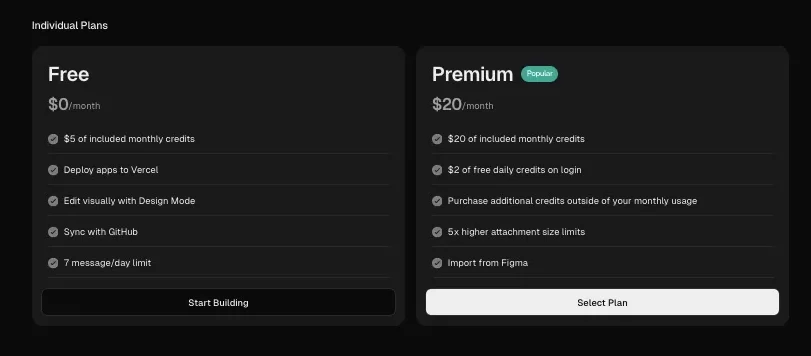
Free Plan: $0/month
V0 has a free plan for people who want to explore the tool before paying. It includes $5 in monthly credits, which is enough for basic testing, small UI experiments, and trying simple prompts.
This plan is useful if you want to see how V0 handles landing pages, dashboards, app screens, and React components. But if you keep regenerating designs or working on larger frontend projects, you’ll likely run through the free credits quickly.
Premium Plan: $20/month
V0 lists a Premium plan at $20/month with $20 in monthly credits. However, V0 also says this plan is being sunsetted and is no longer available to new users.
So, if you’re signing up fresh, don’t treat Premium as the main upgrade path. It may still matter for existing users, but new users will likely need to look at the Team plan or another available option.
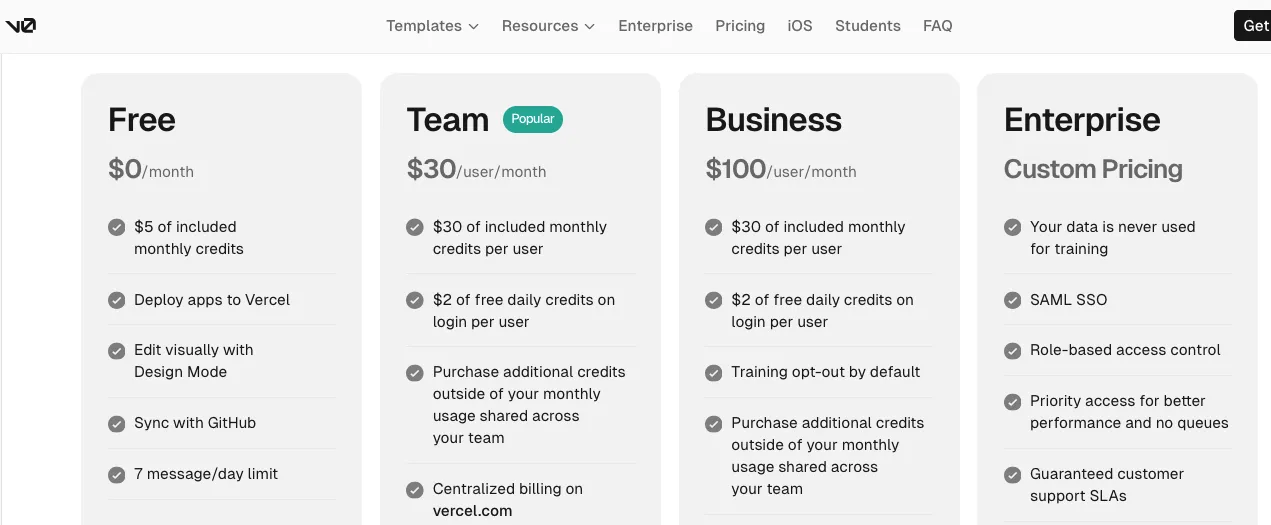
Team Plan: $30/user/month
The Team plan costs $30 per user per month and includes $30 in monthly credits per user. This plan is built for teams that want shared projects, collaboration, centralized billing, and team-wide usage tracking.
This makes the most sense for agencies, SaaS teams, design teams, and frontend developers who regularly use V0 to create product screens, dashboards, landing pages, and frontend components.
Business Plan: $100/user/month
The Business plan costs $100 per user per month and includes $30 in monthly credits per user. The main difference is that it adds stronger privacy and control features, including data opt-out.
This plan is better suited for companies that care more about privacy, team controls, and business-level usage than simple UI experimentation.
Enterprise Plan: Custom Pricing
V0 also offers an Enterprise plan with custom pricing. This is mainly for larger companies that need advanced controls, shared credit pools, SAML SSO, better security, and enterprise-level support.
Replit Pricing
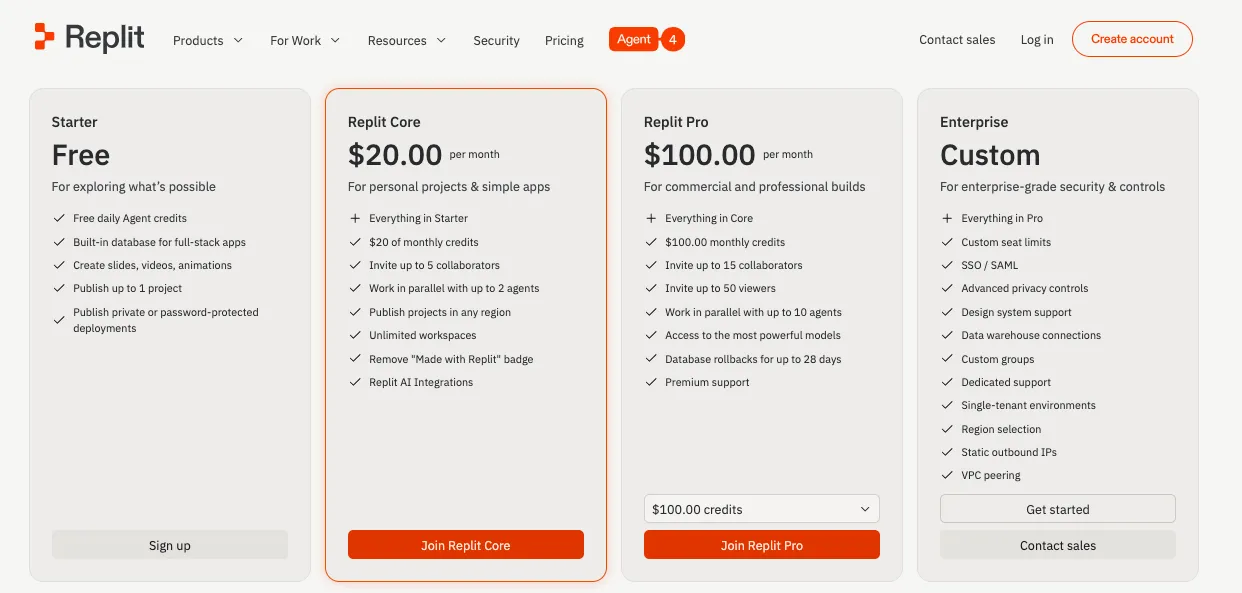
Starter Plan: Free
Replit’s Starter plan is free and is made for exploring the platform. It includes free daily Agent credits, a built-in database for full-stack apps, and the ability to publish up to one project.
This is a good starting point for beginners, students, and solo builders who want to test Replit before paying. The limitation is that serious app building, more advanced Agent work, third-party connectors, and unlimited publishing usually require an upgrade.
Replit Core: $25/month or $20/month billed annually
Replit Core costs $25 per month if paid monthly, or $20 per month when billed annually. It includes $25 in monthly credits, up to 5 collaborators, up to 2 agents working in parallel, unlimited workspaces, Replit AI Integrations, and the option to remove the “Made with Replit” badge.
This is the plan most solo builders, founders, and small teams will look at first if they want to use Replit as a real AI app builder instead of just a free coding workspace.
Replit Pro: $100/month or $95/month billed annually
Replit Pro costs $100 per month if paid monthly, or $95 per month when billed annually. It includes $100 in monthly credits, up to 15 collaborators, up to 50 viewers, up to 10 agents working in parallel, access to Replit’s most powerful models, and database rollbacks for up to 28 days.
This plan is better for commercial projects, agencies, startup teams, and serious builders who rely on Replit for frequent app development, testing, deployment, and AI-assisted coding.
Enterprise Plan: Custom Pricing
Replit also offers an Enterprise plan for larger teams that need stronger security, admin controls, governance, support, and company-level deployment workflows.
V0 vs Replit Pricing Comparison Table
| Pricing Factor | V0 | Replit | Better Choice |
|---|---|---|---|
| Free plan | $0/month with $5 monthly credits | Free Starter plan with daily Agent credits and 1 published project | Tie |
| Main paid plan | Team at $30/user/month | Core at $25/month or $20/month billed annually | Replit |
| Higher plan | Business at $100/user/month | Pro at $100/month or $95/month billed annually | Depends on team needs |
| Credits | Free: $5, Team: $30/user, Business: $30/user | Core: $25 monthly credits, Pro: $100 monthly credits | Depends on usage |
| Best for UI work | Stronger value for frontend screens and React components | Useful, but less UI-focused | V0 |
| Best for full app building | May need extra tools for backend, auth, and database | Better value for building and publishing working apps | Replit |
| Collaboration pricing | Team pricing is per user | Core and Pro include collaborator limits | Replit |
| Enterprise pricing | Custom | Custom | Tie |
| Best for beginners | Good for testing UI generation | Better for learning, coding, and publishing small projects | Replit |
| Best for startups | Good for product UI and frontend speed | Better for MVPs that need backend and deployment | Replit |
Which One Is Cheaper?
V0
V0 can be cheaper if your main goal is UI generation. If you only need landing pages, app screens, dashboards, or React components, the free plan or Team plan may be enough depending on your usage.
But V0 can become more expensive indirectly when your project needs a backend, database, authentication, hosting, or production setup. In that case, you may also need tools like Vercel, Supabase, Clerk, Firebase, Neon, or other services.
Replit
Replit looks more expensive than V0 if you only compare UI generation. But it gives you more than frontend code. You’re paying for the browser-based workspace, AI Agent, app publishing, database support, integrations, collaboration, and full project development.
For a real MVP, Replit may offer better value because you can build, run, test, debug, and deploy from one platform.
Pricing Verdict
Choose V0 if:
You mainly want to create polished UI, React components, landing pages, dashboards, and frontend prototypes.
V0 is usually the better pricing choice when your work is design-first and you already have a separate setup for backend, hosting, authentication, and deployment.
Choose Replit if:
You want to build a working app with backend logic, database features, authentication, APIs, deployment, and AI coding help.
Replit is usually the better pricing choice when your goal is to create and publish a real app from one workspace.
Best Practical Answer
If you only need beautiful UI, V0 may give you better value.
If you need a working app, Replit is usually the better investment.
And if you’re building a serious MVP, the smartest workflow may be to use V0 for polished frontend screens and Replit for building, testing, debugging, and deploying the actual app.
Not Sure About V0 or Replit? Try These Alternatives
If V0 feels too focused on frontend UI, or Replit feels more like a coding workspace than a simple AI app builder, these three alternatives are worth considering.
1. Vitara.ai
⭐Best For
Vitara.ai is best for founders, startups, and teams that want to build full-stack web or mobile apps from simple prompts.
Why It’s a Good Alternative
Vitara.ai gives you a more complete vibe coding workflow where you can describe your idea and move toward a working software product faster. It’s a strong option if you want something that feels more app-focused than V0 and more beginner-friendly than a traditional coding setup.

Where It Fits Better
Choose Vitara.ai if you want an AI full-stack app builder that helps with product building, not just UI generation or code editing.
Use AI prompts to build React apps, Supabase backends, and downloadable full-stack projects.
Launch Your App with Vitara.ai →
2. Lovable
⭐Best For
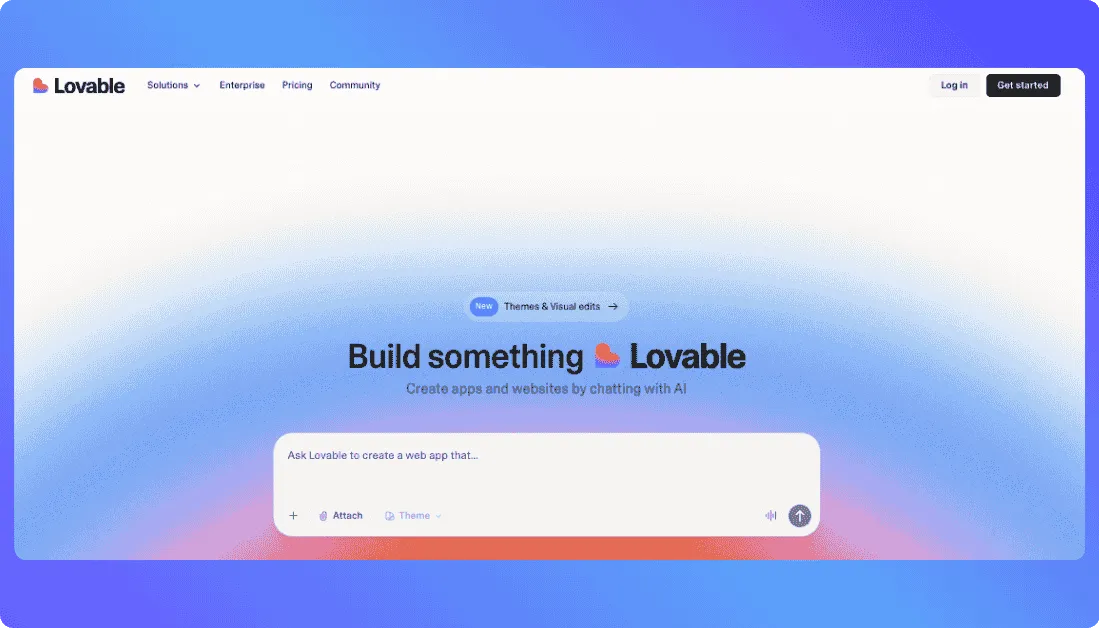
Lovable is best for people who want to turn ideas into full-stack web apps using natural language.
Why It’s a Good Alternative
Lovable is easier to understand for non-technical founders and solo builders. It can help with frontend, backend, database setup, and deployment, which makes it useful for building SaaS MVPs, dashboards, internal tools, and early product prototypes.
Where It Fits Better
Choose Lovable if you want a no code AI app builder that feels more guided than Replit and more full-stack than V0.
Also Read:
Thinking about using Lovable? These will help:
Best Lovable Alternatives
Lovable pricing Explained
3. Bolt.new
⭐Best For
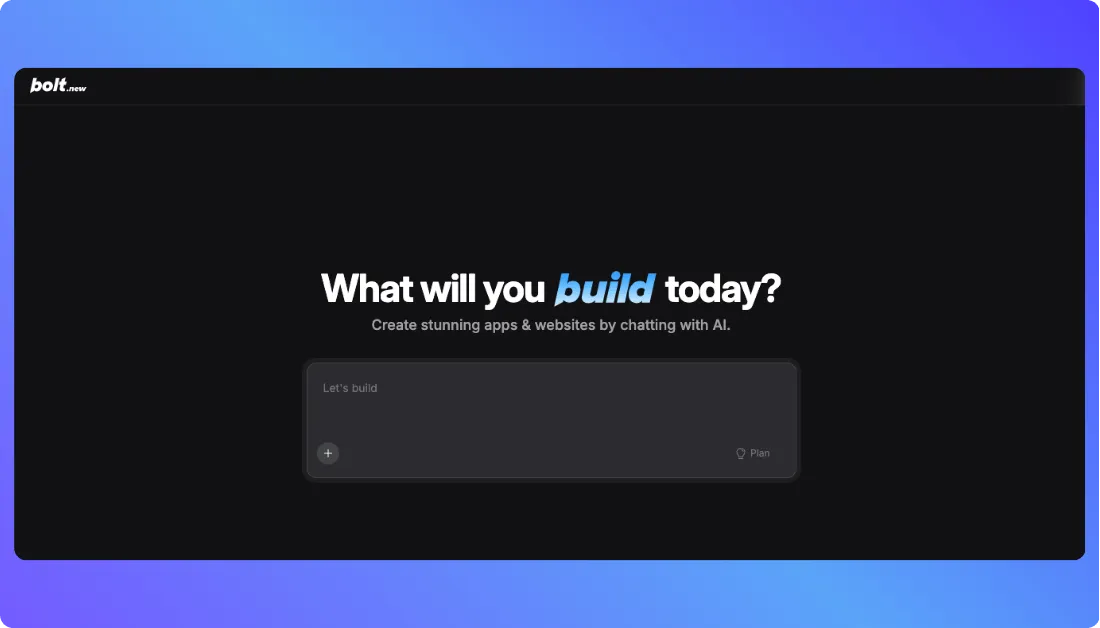
Bolt.new is best for developers, technical founders, and builders who want to create web apps directly from the browser.
Why It’s a Good Alternative
Bolt.new gives you a fast prompt-to-app workflow with code editing, preview, and deployment in one place. It’s a good middle ground between V0’s frontend speed and Replit’s full coding environment.
Where It Fits Better
Choose Bolt.new if you want a browser-based AI coding assistant that can help you build apps quickly without setting up a local development environment.
Also Read:
Before you choose Bolt.new, make sure you’ve seen this:
Top Bolt.new Alternatives
Bolt.new pricing Explained
My Final Thoughts
V0 and Replit are both strong AI development tools, but they’re not trying to solve the same problem.
V0 is the better choice if your main focus is UI. It helps you create clean landing pages, dashboards, app screens, and React components without spending hours on layout and design. If you already work with Next.js, Tailwind, shadcn/ui, or Vercel, V0 can save a lot of frontend time.
Replit makes more sense when you want to build something that actually works. It gives you a full coding workspace in the browser, so you can create backend logic, connect databases, fix errors, test features, and deploy your app from one place.
So, the simple answer is this:
Choose V0 if you want better-looking UI faster.
Choose Replit if you want to build and ship a working app faster.
For many founders, solo builders, and startup teams, the best workflow may not be V0 vs Replit at all. Use V0 to design polished frontend screens, then use Replit to build the real app behind those screens.
That way, you get the best of both: a product that looks good and actually works.
Also Read Related Tool Comparisons:
Hostinger Horizons vs Lovable
RapidNative vs Emergent
V0 vs Lovable
Base44 vs Vitara.ai
FAQs About V0 vs Replit
1. Is V0 better than Replit?
V0 is better if your main goal is to create polished UI, landing pages, dashboards, or React components quickly.
Replit is better if you want to build a working app with backend logic, database features, APIs, and deployment. So, the better tool depends on what you’re trying to build.
2. Is Replit better than V0?
Replit is better for full-stack app development. That means it’s more useful when your app needs frontend, backend, database, authentication, and hosting in one place.
V0 is still stronger for frontend design quality, especially if you’re working with React, Next.js, Tailwind, or shadcn/ui.
3. Which is better for beginners, V0 or Replit?
Replit is usually better for beginners who want to build and run complete apps because everything works inside the browser.
V0 is also beginner-friendly, but mostly for creating UI. If you only want to design screens or generate frontend code, V0 feels easier.
4. Which is better for building an MVP?
Replit is better for building a working MVP because it helps with app logic, database setup, testing, debugging, and deployment.
V0 is better for creating the visual side of an MVP, like the landing page, dashboard, pricing page, or app interface.
5. Can V0 build full-stack apps?
V0 can help with app code and frontend workflows, but it’s still strongest as a UI and frontend generation tool.
For serious backend work, database logic, authentication, or production app setup, you’ll usually need other tools alongside V0.
6. Can Replit build full-stack apps?
Yes. Replit is better suited for full-stack apps because it gives you a complete coding workspace in the browser.
You can build frontend pages, backend logic, APIs, database-connected features, and deploy your project from one place.
7. Which tool has better UI design?
V0 has better UI design output in most cases.
It’s built for generating modern, clean, responsive interfaces using React, Tailwind, and shadcn/ui. Replit can create UI too, but it usually needs more prompting and manual polishing.
8. Which tool is better for developers?
V0 is useful for frontend developers who want to move faster with layouts, components, and interface ideas.
Replit is more useful for developers who want a full online coding environment with files, terminal, preview, AI help, and deployment.
9. Which tool is better for non-technical founders?
Replit is better if the founder wants to build a working app or MVP without setting up a local development environment.
V0 is better if the founder wants to visualize the product idea first through landing pages, dashboards, or app screens.
10. Can I use V0 and Replit together?
Yes, and this is actually one of the smartest workflows.
You can use V0 to create the UI, then bring that code into Replit to connect backend logic, database features, authentication, and deployment.
11. Which is cheaper, V0 or Replit?
V0 may be cheaper if you only need UI generation.
Replit may offer better value if you want to build, test, and deploy a real app from one workspace. The final cost depends on how much AI usage, hosting, collaboration, and app development work you need.
12. Should I choose V0 or Replit?
Choose V0 if your main goal is to design better-looking frontend screens faster.
Choose Replit if your main goal is to build and ship a working app faster.
For many real projects, using both can make the most sense: V0 for the interface, Replit for the actual app.
What’s New?