What is Rocket.new? A Deep Dive into the Builder
Rocket.new continues to stand out as one of the most talked-about AI app builders in 2026. Whether you’re a solo founder testing an MVP, a developer who wants to launch faster, or a business owner building internal tools without a full engineering team, Rocket.new makes a bold promise: describe your idea once, and get a production-ready full-stack app in minutes.
This expert guide breaks down Rocket.new’s features, latest workflow, pricing, and practical use cases so you can decide whether it’s the right AI app builder for your workflow today.
What Is Rocket.new?
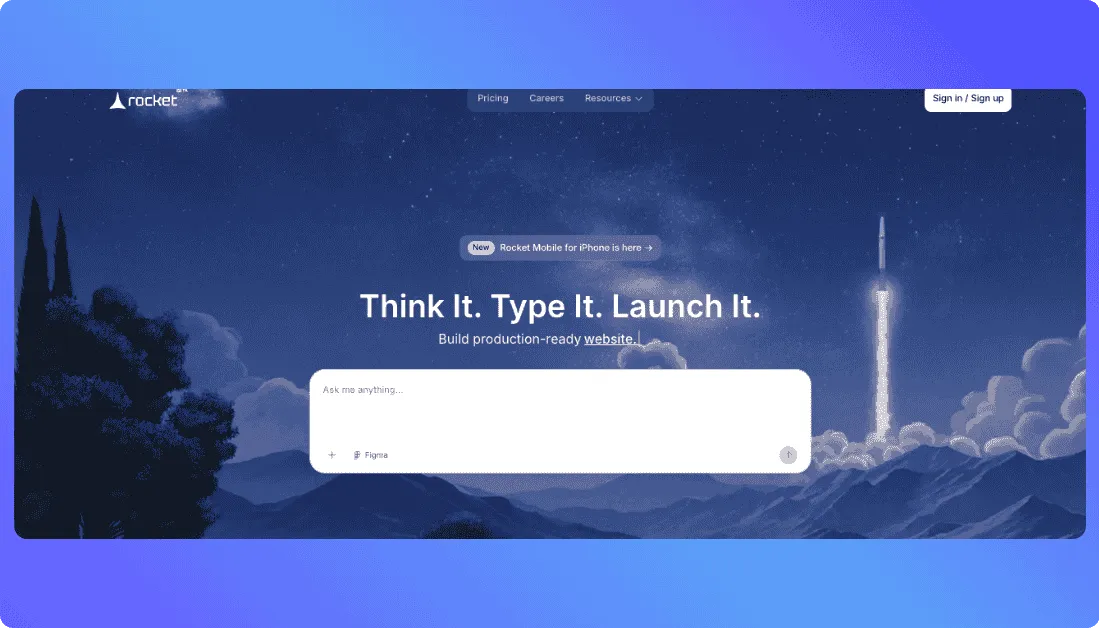
Rocket.new is an AI app development platform that turns plain-English prompts into real web and mobile apps you can preview, edit, launch, and push to GitHub. Unlike older no-code builders that lean on drag-and-drop blocks, Rocket.new focuses on generating full apps with UI, backend logic, data handling, integrations, and production-ready code in one flow.
When you describe your idea (“Build me a CRM with deals, contacts, and activity logs”), Rocket.new can generate:
- Frontend and screens for your app’s user experience
- Backend setup with database schemas, authentication, and API endpoints
- Integrations for services like payments, OpenAI, and other connected tools
- Live preview so you can test flows and make visual changes as you build
- Editable code you can push to GitHub, with one-way sync for most projects and two-way sync for Next.js projects
That ability to move from a single prompt to a working full-stack app is a big reason Rocket.new is getting attention from founders, agencies, and developers who want to skip setup work without getting stuck inside a closed visual builder.
Key highlights (adapted for Rocket.new):
- No traditional drag-and-drop-first workflow; everything can start from a natural-language prompt
- Full-stack app generation that includes UI, backend logic, data storage, and integrations
- Built for fast shipping with live preview, instant web launch, and app publishing paths
- Supports database setup, authentication, API creation, and connected services like Supabase
- Lets you refine apps from ideas, Figma designs, templates, images, URLs, or remix links
- Gives you editable project code with GitHub support and code ownership built into the pitch
Also Read Other Vibe Coding Tools:
How Rocket.new Works (Step-by-Step)
This core flow for Rocket.new follows the platform’s actual build process and the way its docs explain project creation, preview, editing, and launch.
Step 1: describe your project
You sign in and start with a prompt field in Rocket.
You type something like:
“Build a multi-tenant project management app with Kanban boards, user roles, and PostgreSQL.”
Rocket reads the request, understands the product idea, and starts shaping the app from that prompt. You can also begin from a template, a Figma file, or other imported inputs depending on your workflow.
Step 2: initial app generation
Rocket generates:
- Screens and interface structure
- Components and layout styling
- Backend setup through Supabase
- Database schema, auth, and API logic
- A live preview you can test right away
The preview opens inside Rocket so you can click through the app, test flows, and spot issues before publishing.
Step 3: customize via chat
You can ask:
“Add drag-and-drop to the board.”
“Create an activity timeline for each task.”
“Add dark mode.”
“Fix the layout issues in the pricing grid.”
Rocket applies those changes through its command and chat-style workflow, which is built around editing, refining, and iterating directly from natural-language instructions.
Step 4: publish or export
You can:
- Deploy your web app to a live URL
- Connect Netlify and use a custom domain
- Sync your codebase to GitHub
- Download mobile builds or publish mobile apps with Rocket-generated Flutter code
Use Cases for Rocket.new
Great fit for:
✔ Founders building MVPs fast
✔ Agencies doing rapid prototyping
✔ Developers who want to skip setup work
✔ Teams building dashboards and internal tools
✔ Businesses launching web apps with auth and payments
✔ Creators building landing pages, websites, and e-commerce stores
✔ Product teams turning Figma designs into real apps
✔ Anyone who wants to ship mobile apps with Flutter faster
Not ideal for:
✖ Completely non-technical users who may struggle when prompts need refinement
✖ Teams that need highly custom backend architecture from day one
✖ Large enterprise systems with deep compliance and edge-case workflows
✖ Projects that require pixel-perfect manual UI control everywhere
✖ Apps with very complex offline logic or unusual infrastructure needs
✖ Teams that want full framework freedom before the project even starts
Limitations of Rocket.new
1. Pricing and tokens can get expensive
Rocket.new is fast, but costs can rise when you keep asking it to fix, change, or rebuild parts of your app. That’s because many actions use tokens.
Reddit users have raised this issue too:
Bottom line: it can be good for MVPs, but heavy editing can get expensive.
2. Changes can break other parts
This is common with AI app builders. You fix one feature, and another part of the app may stop working.
- One update can affect other screens
- Bigger apps need manual checking
- Complex logic still needs human review
3. UI control is still limited
Rocket.new helps you build fast, but it does not give the same design control as a manual low-code or custom-coded workflow.
- Harder to get pixel-perfect design
- Advanced UI tweaks may need extra work
- Some teams move to GitHub for final polishing
4. Debugging is not always easy
Rocket.new can generate real code, but fixing bugs can still be difficult, especially in larger apps.
- AI code can feel messy in places
- Repeated edits can create confusion
- Deployment and integration issues may need manual fixes
Another Reddit discussion that reflects this general concern:
Source: Reddit
Rocket.new Pricing (March 2026)
Free Plan – $0
- 1M one-time tokens
- 2 Figma-to-code screens
- No monthly renewal
- Basic access to the platform
Great for testing Rocket.new or building a very small prototype.
Personal Plan – $25/month
- 5M monthly tokens
- Up to 6 Figma-to-code screens
- Refuels available anytime
- Better for solo builders and small projects
This is a practical entry plan, but it can get expensive if you iterate a lot.
Rocket Plan – $50/month
- 10M monthly tokens
- 500K bonus tokens per month
- Up to 12 Figma-to-code screens
- Refuels available anytime
- Better for MVPs and active app building
This is a better fit for people who plan to build and test more seriously.
Booster Plan – $100/month
- 20M monthly tokens
- 2M bonus tokens per month
- Up to 25 Figma-to-code screens
- Built for heavier usage
- Better for bigger workflows and teams
Enterprise – Custom
- Custom pricing
- Higher-volume usage options
- Team and business-focused support
- Custom needs based on scale
Pricing Summary
Rocket.new looks simple on the surface, but your real cost depends on how often you edit, regenerate, and refine the app. If your workflow includes lots of retries, design changes, or prompt-based fixes, token usage can rise faster than expected.
Final Thoughts
Rocket.new makes app building feel a lot more accessible, especially for founders, solo builders, and small teams that want to move fast. You describe the idea, refine it with prompts, and get a working product much faster than a traditional setup.
At the same time, it’s not magic. It works best when you treat it like a speed tool, not a full replacement for product thinking, testing, and human review.
FAQs About Rocket.new
What is Rocket.new used for?
Rocket.new is used to build web and mobile apps with AI. You can describe your idea in plain English, and it helps generate the app’s frontend, backend, database setup, and other core parts.
Do you need coding skills to use Rocket.new?
No, you don’t need to be a developer to get started. Still, some coding knowledge helps a lot when you want to fine-tune features, fix issues, or polish the final product.
Can Rocket.new build real apps or just prototypes?
Rocket.new can build real working apps, not just mockups. Many people use it for MVPs, internal tools, landing pages, dashboards, and even mobile app projects.
Is Rocket.new good for beginners?
Yes, Rocket.new is beginner-friendly compared to traditional development tools. The main challenge starts when your app gets more complex and needs better prompts, debugging, or custom logic.
How is Rocket.new different from traditional no-code builders?
Traditional no-code builders usually depend on drag-and-drop blocks. Rocket.new is more prompt-driven, which means you describe what you want and the AI helps generate and update the app for you.
What’s New?