What is Lovable AI: Complete Guide With Real Life Project
Artificial intelligence is no longer a backstage tool. It is rewriting the script for how software gets built. In 2024, over 70% of development teams report using AI-assisted tools, reducing build times from months to days. This shift is not just about speed. It is redefining who can create and what is possible.
Lovable AI stands out in this new era. It is a conversational, text-to-app builder that turns plain language into working, full-stack applications including frontend, backend, and database. No drag-and-drop and no steep coding barrier. Just a streamlined path from idea to deployment.

In this guide, we will explore how Lovable AI works, its key features, and real-world use cases. You will get a step-by-step build tutorial, a candid look at its limitations, comparisons with top competitors, and practical tips to get the most out of it whether you are a beginner or a seasoned developer.
What is Lovable AI?
Lovable AI is a type of app builder called a text to app or conversational platform. You tell it what you want in plain language, and it writes the code for you. There is no need to drag and drop elements or learn complex coding.
You start with a simple prompt that explains your idea. Lovable AI understands your request, creates the frontend and backend, and gives you full access to the code. You can use it as it is or change it to fit your needs.
This makes Lovable AI useful for both developers who want to work faster and beginners who want to turn ideas into real apps without spending months learning to code.
You might like reading this:
What is Emergent AI? A Deep Dive into the AI App Builder
How Lovable AI Works?
Lovable AI works by combining a modern tech stack with an easy, chat-based interface. For the frontend, it uses React and Vite. This gives you fast performance and a smooth user experience. For the backend, it connects to Supabase, which handles the database, authentication, and storage.
When you give Lovable AI a prompt, it generates real, human-readable code. You can open this code, read it, and edit it. Nothing is hidden inside a “black box,” so you always know how your app works.
The entire process happens through a simple chat interface. You type your requests, and Lovable AI responds with updates to your app. You can refine features, fix issues, or add new functions by just sending another message. This makes building an app feel more like a conversation than a technical project.
Who Should Use Lovable AI
Lovable AI serves a wide range of creators and teams who want to build apps faster and with less friction. It supports modern approaches like vibe coding and adapts to different skill levels and project needs, making it a versatile choice for many scenarios.
- Freelancers and agencies: Build Minimum Viable Products for clients in days instead of weeks
- Startups: Validate business ideas quickly before investing heavily in full development
- IT departments: Create custom internal tools to improve workflows and efficiency
- Designers and entrepreneurs: Turn concepts into functional apps without coding skills
- Developers: Accelerate workflow by generating boilerplate code and focusing on complex features
Key Features of Lovable AI
Lovable AI comes with a set of features that make app development faster, more flexible, and accessible to a wide range of users. Each feature is designed to remove friction while keeping you in control of the final product.
Full-Stack Application Generation: From one clear prompt, Lovable AI builds both the frontend and backend. You get a functional user interface and a working database with logic, ready to run.
Seamless Supabase Integration: Supabase handles your database, authentication, and storage. This means secure user logins, reliable data management, and file handling without extra setup.
GitHub Integration and Code Ownership: All generated code can be exported to your GitHub repository. You own it completely, making it easy to track changes, collaborate, and maintain version control.
AI-Powered Customization and Debugging: You can refine features, add new ones, or fix issues by simply asking the AI in the chat interface. This reduces the time spent on trial and error.
Built-in Publishing: Deploy your app directly from Lovable AI without needing third-party hosting services. Your project can go live in minutes.
Extensibility with Code: Unlike many no-code tools, Lovable AI produces editable code. You can extend it with your own logic and integrate advanced functionality when needed.
Step-by-Step Tutorial: Building a “Smart Reading List” App with Lovable AI
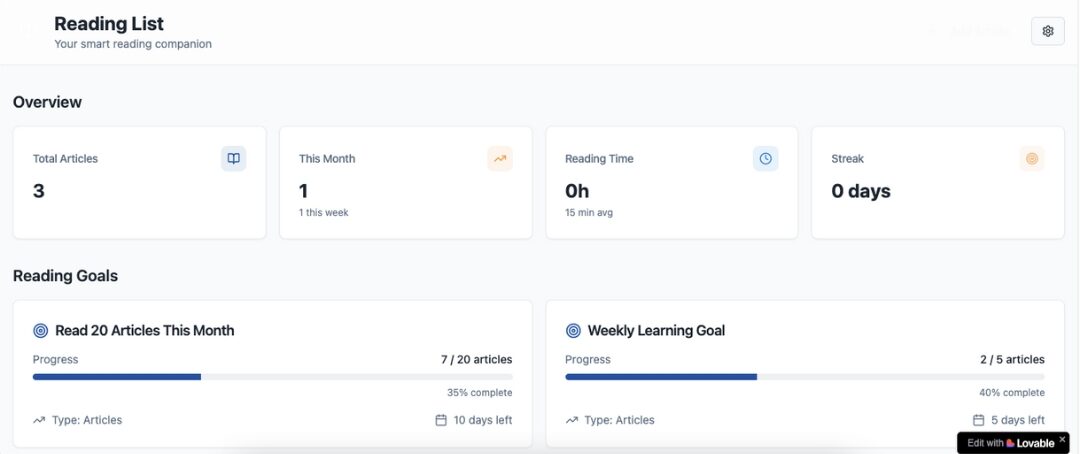
Building a “Smart Reading List” app with Lovable AI is a great way to see how quickly an idea can turn into a functional tool. This app will let users save articles, add notes, set reading goals, and receive reminders.
Step 1: The Initial Prompt and Project Setup
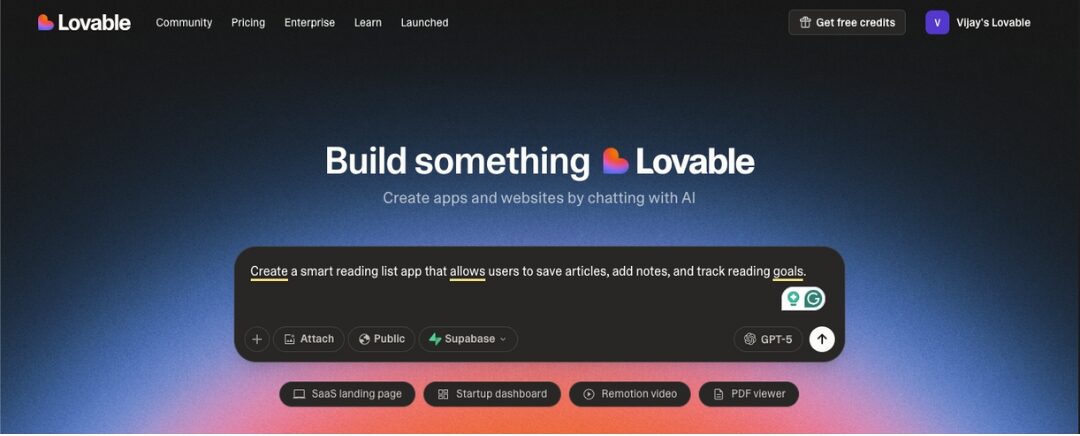
Start with a clear prompt such as: “Create a smart reading list app that allows users to save articles, add notes, and track reading goals.”
- Sign up for a free Lovable AI account
- Paste your prompt into the chat interface and let Lovable AI generate the base project
Step 2: Connect to the Backend with Supabase
- Set up a Supabase account and create a new project
- Add database tables for articles, notes, and categories
- Connect Supabase to your Lovable AI project for data storage and retrieval
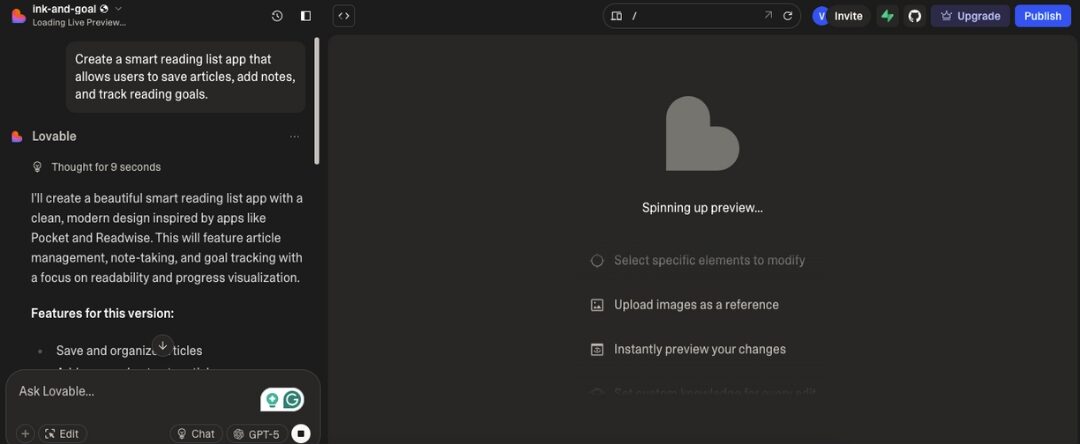
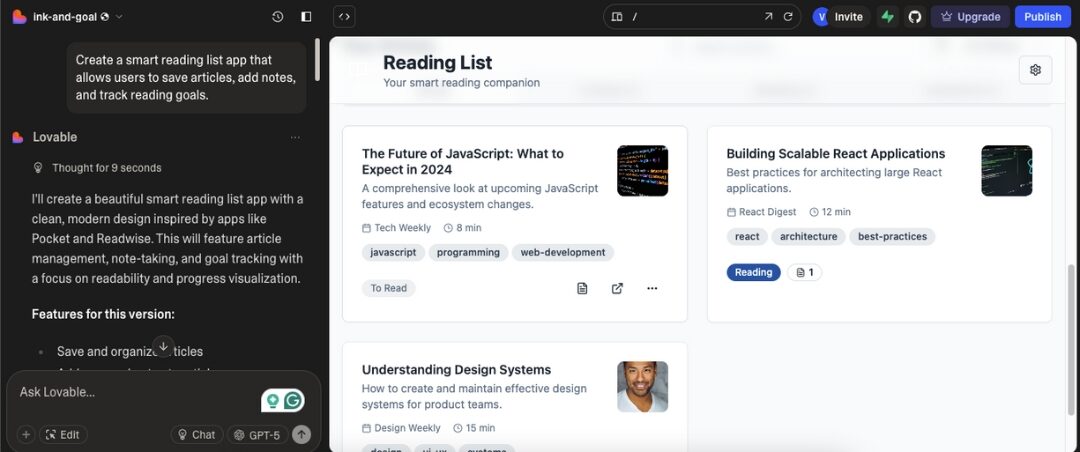
Step 3: Build Core Features with AI Prompts
- Add a form to submit new articles with title, link, and category
- Display the saved articles in a clean, scrollable list
- Create a note-taking feature for each article so users can save comments or summaries
Step 4: Add User Authentication
- Ask Lovable AI to implement login and signup features using Supabase authentication
- Ensure users can only see and manage their own saved articles and notes
Step 5: Implement Advanced Features
- Email Reminders: Use Supabase cloud functions to send daily or weekly reminders of articles to read
- Paid Subscriptions: Integrate Stripe to offer a premium plan with unlimited article storage or exclusive features
Step 6: Publish and Make it a Progressive Web App (PWA)
- Deploy directly from Lovable AI to make the app live
- Enable PWA settings so users can install it on their phone or desktop for quick access
Use Cases: What Can You Build with Lovable AI?
Lovable AI can be used to create many types of applications, each serving different needs and audiences. Its flexibility allows both individuals and teams to move from idea to launch quickly.
Internal tools:
Build inventory management systems, employee directories, or project dashboards that make everyday operations smoother.
For example, an inventory app can track stock levels in real time, while a project dashboard can centralize tasks, deadlines, and team updates. These tools save time and reduce errors, especially in growing businesses.
Marketplaces and directories:
Create niche job boards, local business listings, or product directories with advanced search and filter options. This is ideal for entrepreneurs targeting specific communities or industries. You can quickly launch a platform where users can browse, submit, and manage listings without building everything from scratch.
Client portals:
Develop secure areas for clients to log in, view project updates, download deliverables, and communicate directly with your team. A well-designed portal improves transparency and strengthens client relationships by keeping all project information in one place.
Personal projects:
Turn personal ideas into reality, such as habit trackers, recipe organizers, or personal CRM systems. These projects are perfect for learning, experimenting, or creating tools you can share with friends, family, or a niche audience.
MVPs for startups:
Test a business idea without large upfront costs. Lovable AI lets startups create Minimum Viable Products quickly, gather user feedback, and iterate based on real data. This reduces risk and helps founders decide whether to scale or pivot.
Limitations of Lovable AI Platform
Lovable AI is powerful, but it has a few limitations to keep in mind.
Not a “no-code” magic wand: Some coding knowledge helps with editing, debugging, and deployment.
UI and UX customization: Designs are functional but may lack professional polish.
Prompt sensitivity: Clear, specific prompts produce better results than vague instructions.
Security responsibilities: You must handle authentication, permissions, and data protection.
Lovable AI Pricing
Lovable AI offers tiered pricing built around a smart credit system. Each plan gives you a different monthly credit allowance, plus features suited to your scale whether you are experimenting solo or building with a team.
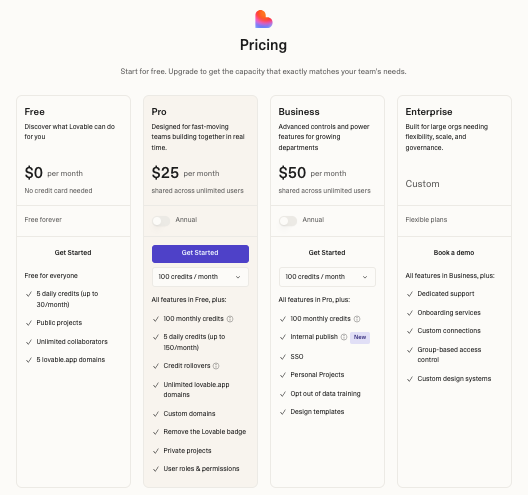
Free Plan — $0/month:
- 5 daily credits, up to 30 per month
- Public projects only, unlimited collaborators
- Great for exploring and building lightweight demos
Pro Plan — $25/month (annual):
- 100 credits per month, plus 5 daily credits (up to 150)
- Create private projects, assign roles and permissions
- Connect custom domains, remove Lovable branding badge, rollover unused credits
Business Plan — $50/month (annual):
- Includes Pro features, plus SSO and personal projects within workspaces
- Option to opt out of data training and build reusable design templates
Enterprise Plan — Custom pricing:
- All Business features plus dedicated support, onboarding services, custom integrations, and group-based access control
- Ideal for large organizations needing scalable and secure workflows

Lovable AI Alternatives
Lovable AI is a strong choice for building apps quickly, but it is not the only tool in the market. Several platforms offer similar AI-driven development features, each with its own strengths. If you are exploring options, here are the top five Lovable alternatives worth considering.
| Platform | Key Features | Best For | Pricing Overview |
|---|---|---|---|
| Vitara.ai | Text-to-code tool with modern stack options and vibe coding | Builders who value flexibility and scale | Free tier; Build plan at ~$20/mo; Elevate at ~$50/mo |
| Bolt | Prompt-driven full-stack app builder with Supabase, Stripe | Rapid MVP creation and experimentation | Tiered plans starting at ~$9/mo, scaling up to $200+ for heavy use |
| Cursor | AI-powered code editor integrated into VS Code; Bugbot for errors | Deep code editing and AI-assisted workflows | Free hobby plan; Pro ~$16–$20/mo; Business ~$32/user/mo; Bugbot ~$40/mo |
| Windsurf | AI-first IDE with Cascade agent and deep context awareness | Seamless AI coding within familiar IDEs | Free tier with limited credits; Pro ~$15/mo for 500 credits; enterprise plans available |
| V0 by Vercel | Visual-first generator for Tailwind and React interfaces | Designers and frontend developers | Free tier (200 credits); Basic ~$10/mo; Standard ~$30/mo; Premium ~$50/mo |
Conclusion
Lovable AI has carved out a space in the fast-moving world of AI-powered development. It lets you turn a simple idea into a functional, full-stack application in minutes, making it a strong choice for developers, startups, and teams who want speed without sacrificing code ownership. Its conversational workflow, GitHub integration, and ability to generate clean, editable code give creators the freedom to focus on building features that matter.
However, if your project needs even more flexibility and advanced AI capabilities, Vitara.ai is worth a close look. It blends natural language app generation with vibe coding tools and deeper customization options, making it ideal for complex or large-scale builds. With its powerful processing and scalability, Vitara.ai can handle projects that push beyond MVPs, giving you room to innovate without hitting platform limits.
Frequently Asked Questions (FAQs)
Do I need any coding experience to use Lovable AI?
Not necessarily. Lovable AI is designed for beginners and non-technical creators, letting you build apps through plain-language prompts. However, having some coding knowledge helps when you want to customise or extend the generated code.
What kinds of projects can I build with Lovable AI?
You can build everything from landing pages and prototypes to fully functional web applications. It supports internal tools, client portals, directories, dashboards, and other full-stack use cases.
How does Lovable AI generate the app behind the scenes?
The platform uses a conversational interface where you describe your idea. Based on your prompts, it builds the frontend and backend using modern frameworks like React, Vite, and Supabase. You receive complete, human-readable code you can edit as needed.
Can I export or own the code that Lovable AI generates?
Yes. Lovable AI gives you full access to your code and allows you to export it to GitHub. You maintain complete ownership and can continue development outside the platform.
What are the typical limitations of Lovable AI?
Some limitations include less-polished default UI designs, sensitivity to prompt quality, and the need for manual coding when handling complex logic or highly customised features. Production-level apps may still require developer oversight.
Does Lovable AI handle backend services like authentication, storage, or payments?
Yes, Lovable AI does handle backend services like authentication, storage and payments by integrating with backend platforms and APIs.
Can I scale the app or deploy it for production?
Absolutely. Since you own the code, you can deploy it on your preferred hosting provider and scale it as your user base grows. For large-scale production applications, you may need to optimise or extend the generated architecture.
How does pricing work on Lovable AI?
Pricing is structured around a credit-based system with multiple tiers suited to different project sizes and user needs. Here’s how the plans break down:
- Free Plan ($0/month): Includes basic usage with a limited daily credit allowance, supporting public projects and general exploration.
- Pro Plan (~$25/month when billed annually): Offers a substantially higher monthly credit quota, allows private projects, custom domains, removes platform branding, and enables teams to collaborate.
- Business Plan (~$50/month when billed annually): Includes everything in the Pro Plan plus SSO (single sign-on), personal workspaces, and opt-out of data-training.
- Enterprise Plan (custom pricing): Tailored to larger organisations, this plan provides advanced support, onboarding services, custom integrations, group-based access controls, and enterprise-grade workflows.
Are there alternatives to Lovable AI?
Yes. Several AI-powered app builders offer similar capabilities, each with its own strengths depending on your workflow, customization needs, and the type of projects you want to build. Popular alternatives include Vitara.ai, Bolt, Cursor, Windsurf, and V0 by Vercel.