Features You Can Instantly Add to Your Law Firm Website with Vitara

Service Pages

Create pages for family law, criminal defense, personal injury, immigration, or business law

Practice Area Filters

Help visitors find legal services by case type, location, or urgency

Legal Resource Pages

Add guides, FAQs, and helpful content for common client questions

Attorney Profiles

Showcase lawyer bios, experience, education, and bar admissions

Client Testimonials

Display reviews and client feedback to build trust

Case Result Highlights

Share selected outcomes with clear disclaimers where needed

Awards & Certifications

Add recognitions, memberships, and legal associations

Client Intake Forms

Collect case details before the first consultation

Free Consultation Forms

Let potential clients request a call or meeting

Case Evaluation Forms

Capture legal issue details in a structured format

Lead Qualification Questions

Ask simple questions to understand client needs faster

Urgent Case Alerts

Highlight time sensitive legal matters for quick response

Contact Forms

Add simple forms for enquiries and consultation requests

Live Chat Hooks

Connect your preferred chat tool for quick client support

Client Portal

Give clients a secure place to view updates and documents

Document Upload

Let clients upload case files, IDs, contracts, or evidence

Appointment Timeline

Show consultation dates, follow ups, and case milestones

Secure Inquiry Flow

Collect sensitive information through structured forms

Saved Enquiries

Allow returning visitors to continue their previous request

Client Notifications

Send updates for consultation requests and form submissions

Attorney Directory

Manage profiles for partners, associates, and legal staff

Practice Area Management

Add, edit, or remove legal service pages anytime

Inquiry Pipeline

Track leads from new enquiry to consultation booked

Task Reminders

Create follow up reminders for calls and client responses

Consultation Notes

Store basic notes from client enquiries and meetings

Referral Source Tracking

See whether enquiries came from search, ads, referrals, or social media

Office Location Pages

Create pages for each branch, city, or service area

Role Management

Control access for lawyers, admins, and marketing teams

Content Library

Reuse attorney bios, service sections, and FAQ blocks across pages

SEO Settings

Edit page titles, meta descriptions, and clean URLs

Redirect Manager

Fix broken links and protect your search rankings

Form Routing

Send enquiries to the right lawyer, team, or inbox

Webhooks

Trigger actions in your CRM, email tool, or legal software

API Ready

Connect your website with custom systems or third party tools

Audit Logs

Track important changes across pages, forms, and settings

Smart Feature Hints

Auto suggest labels for new law firm website features

How to Use the Law Firm Website Builder

See how Vitara takes your input and turns it into a complete law firm website with practice area pages, attorney profiles, intake forms, and consultation tools ready to go live in minutes.

1

Give the Prompt

Share details about your law firm, legal services, attorneys, and ideal clients so Vitara knows exactly what kind of website to create for you.

2

Generate

Watch Vitara generate a full law firm website with service pages, attorney sections, client intake forms, and consultation flows directly from your prompt.

3

Review

Check your website layout, legal service details, forms, and contact flow, then make quick edits if you want to adjust anything.

4

Publish

Go live with your law firm website and start getting client inquiries, consultation requests, and qualified leads right away.

Key Features That Make Vitara Perfect for Building Law Firm Websites

All in One Law Firm Website Platform

Build your law firm website from frontend to backend, fully hosted and ready for potential clients to contact your firm.

  • Full Site Generation

    Create homepage sections, practice area pages, attorney profiles, forms, and website logic in one go.

  • Hosting Included

    Skip servers, plugins, or technical setup. Your law firm website runs on built in infrastructure.

  • Unified System

    Frontend, backend, forms, data, and admin access connect out of the box, so everything works together.

Build with Simple Prompts

Just describe the kind of law firm website you want and Vitara turns it into a working site for your legal practice.

  • From Text to Law Firm Website

    Write a prompt like “law firm website with personal injury services, attorney profiles, and a free consultation form.”

  • AI Handles Layout and Logic

    No fixed templates. You get a custom structure built around your services, lawyers, and client intake flow.

  • Live On Screen Results

    Watch your law firm website take shape in real time as you refine your prompt.
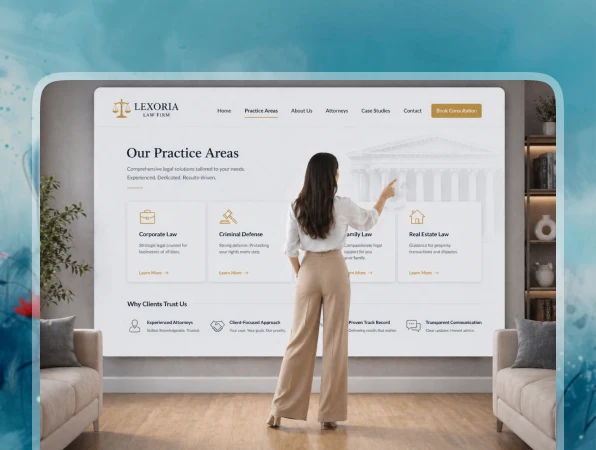
Smart Legal Service Pages

Auto generate practice area pages with clean layouts, clear service details, and client friendly content sections.

  • Clear Service Details

    Each page can explain legal services, common case types, consultation options, and client next steps.

  • Easy Navigation

    Let visitors explore services by practice area, location, case type, or urgency.

  • Simple Updates

    Add, edit, or remove legal service pages anytime with a quick prompt or manual change.
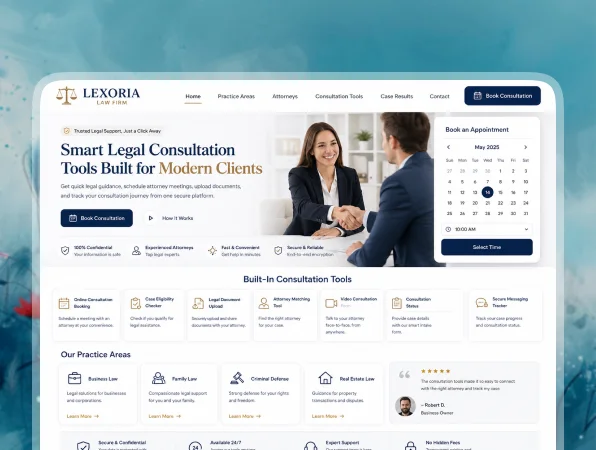
Consultation Requests Built Right In

Let potential clients request calls, book meetings, or ask for case evaluations directly from your website.

  • Consultation Forms

    Clients can choose a legal service, share their concern, and request a preferred contact time.

  • Instant Alerts

    Your team gets notified for every new enquiry, consultation request, or case evaluation form.

  • Calendar Friendly Flows

    Connect consultation requests with your calendar flow to reduce missed calls and scheduling confusion.

Automatic Client Intake

Turn website visitors into qualified legal leads with structured forms and smart intake flows.

  • Custom Intake Forms

    Forms can adapt to your services, such as family law, immigration, criminal defense, or business law.

  • Smart Inquiry Routing

    Send enquiries to the right attorney, legal team, or office inbox automatically.

  • CRM Friendly Setup

    Connect forms with tools like HubSpot, Zapier, or your internal system so leads move into your pipeline.

Instant Site Tuning

Tweak layouts, pages, forms, and content without rebuilding your law firm website from scratch.

  • Change the Look in Seconds

    Swap hero sections, rearrange blocks, or adjust styling just by updating your prompt.

  • Edit Legal Pages Fast

    Update attorney bios, service copy, testimonials, forms, or office details whenever things change.

  • Real Time Preview

    See every change update live so you can fine tune the experience before you publish.

FAQs About the Law Firm Website Builder

Yes. You describe your law firm website in simple language, and Vitara generates the design, pages, forms, and backend flow for you. You can keep improving the website with prompts instead of writing code.

Absolutely. You can:
  • Adjust layouts and sections
  • Add or remove practice area pages
  • Update attorney profiles
  • Change website copy, images, and CTAs
  • Edit the generated code if you want deeper control

It works well for:
  • Solo attorneys
  • Small and mid sized law firms
  • Personal injury law firms
  • Family law firms
  • Immigration lawyers
  • Criminal defense attorneys
  • Business and corporate law firms
If your law firm needs a professional website with service pages, attorney details, and client inquiry forms, Vitara is a strong fit.

Yes. Vitara can generate consultation request forms, case evaluation forms, and client intake forms based on your legal services. You can collect details like case type, contact information, preferred meeting time, and basic case notes.

Yes. Vitara can generate backend logic that connects with APIs, CRMs, calendars, email tools, and automation platforms. Advanced integrations may need developer support, but Vitara helps create the structure faster.

That’s easy to manage. You can:
  • Add new practice area pages
  • Update attorney bios
  • Change office details
  • Edit testimonials and FAQs
  • Create new landing pages for specific legal services
This helps your law firm website stay updated without rebuilding it from scratch.

Yes. You can control page titles, meta descriptions, URLs, headings, and content sections for every legal service page. This helps your website target searches like “family lawyer website,” “personal injury attorney near me,” or “law firm website builder.”

Yes. You can recreate your current website structure with a prompt and improve it with cleaner layouts, better forms, and updated content. You can migrate pages like home, about, practice areas, attorney profiles, blog, and contact page step by step.

Yes. A solo attorney can build a simple website with service pages and a contact form. A larger law firm can add multiple attorneys, office locations, lead routing, intake forms, and CRM connections. Vitara adjusts to your website needs as your firm grows.

Know what’s trending in AI-powered web app development

Hostinger Horizon vs Lovable

Hostinger Horizons vs Lovable: Which AI App Builder Should You Choose?

19 minutes read
Chat-Based AI App Buildders

Chat-Based AI App Builders to Create Web Apps Without Coding

10 minutes read
RapidNative vs Emergent

RapidNative vs Emergent: Which Is the Best AI App Builder?

24 minutes read