Features You Can Instantly Add to Your Artist Website with Vitara

Artwork Gallery

Display paintings, prints, digital art, or sculptures in clean visual grids

Portfolio Filters

Filter work by style, medium, collection, year, or availability

Featured Artwork

Highlight your best pieces on the homepage

Collection Pages

Group artworks by series, theme, exhibition, or project

Online Art Store

Sell originals, prints, posters, or digital downloads from your website

Commission Forms

Let visitors request custom artwork with clear project details

Price Display

Show artwork pricing, quote based pricing, or enquiry only options

Payment Integration

Connect payment tools for smooth artwork purchases

Sold Artwork Labels

Mark unavailable pieces while keeping them in your portfolio

Limited Edition Prints

Promote numbered prints, signed editions, or special releases

Promo Banners

Highlight new collections, exhibitions, or seasonal art offers

Newsletter Signup

Collect emails from collectors, fans, and gallery visitors

Artist Blog

Share studio updates, process stories, and behind the scenes posts

Social Proof

Show collector reviews, press mentions, and gallery features

Exhibition Highlights

Promote upcoming shows, events, and art fair participation

Lead Magnets

Offer art catalogs, lookbooks, or wallpapers to grow your email list

Contact Forms

Let buyers, galleries, and collectors reach you easily

Live Chat Hooks

Plug in your favorite chat tool for quick visitor conversations

Inquiry Routing

Send artwork, commission, or gallery enquiries to the right inbox

Artwork Wishlist

Let visitors save and compare favorite pieces

Collector Portal

Give repeat buyers a simple place to view enquiries and purchases

Artwork Documents

Share certificates, invoices, and artwork care notes securely

Availability Alerts

Notify visitors when new work or prints become available

Artist Profile

Introduce your story, style, background, and creative journey

Booking Calendar

Let visitors book studio visits, consultations, or art calls

Artwork Recommendations

Suggest similar pieces based on style, color, or collection

Purchase Timeline

Show clear steps from enquiry to payment and delivery

Artwork Inventory

Manage artwork status, pricing, size, and stock in one place

Commission Tracker

Track custom artwork requests from enquiry to delivery

Client Notes

Save collector preferences, project details, and follow up notes

Studio Task Reminders

Stay on top of packaging, shipping, calls, and updates

Quote Builder

Create and send custom artwork or commission quotes quickly

Role Management

Control access for artists, assistants, gallery teams, or partners

Content Library

Reuse sections across artwork pages, blogs, and landing pages

SEO Settings

Edit titles, meta descriptions, image alt text, and page slugs

Redirect Manager

Fix broken links and protect your search visibility

Form Routing

Send artwork, commission, and press enquiries to the right place

Audit Logs

Track important changes across your artist website

Smart Feature Hints

Auto suggest labels for new artist website features

Artwork Label Ideas

Suggest labels like original, print, sold, reserved, or new collection

How to Use the Artist Website Builder

See how Vitara takes your input (prompts) and turns it into a complete artist website with artwork galleries, portfolio pages, and commission tools ready to go live in minutes.

1

Give the Prompt

Share details about your art style, medium, collections, and the kind of audience you want to attract so Vitara knows exactly what kind of website to create for you.

2

Generate

Watch Vitara generate a full-featured artist website with artwork galleries, portfolio sections, commission forms, and online store pages directly from your prompt.

3

Review

Go through your website’s layout, artwork displays, and enquiry flows, then make quick edits if you want to adjust visuals, descriptions, or sections.

4

Publish

Go live with your artist website and start showcasing your work, getting commission requests, and selling your artwork right away.

Key Features That Make Vitara Perfect for Building Artist Websites
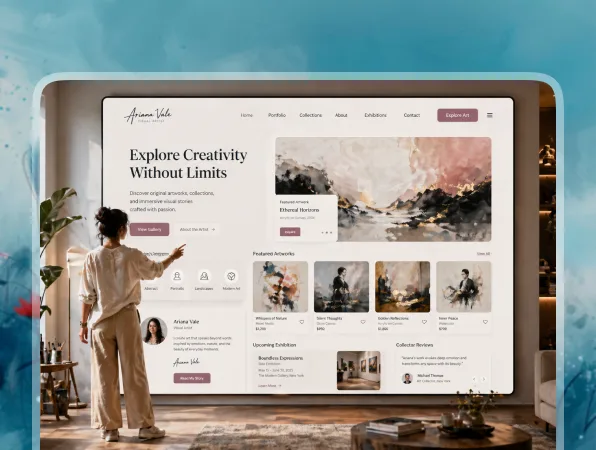
All in One Artist Platform

Build your artist website from frontend to backend, fully hosted and ready for collectors, galleries, and buyers to explore.

  • Full Site Generation

    Create portfolio pages, artwork galleries, commission forms, contact pages, and selling flows in one go.

  • Hosting Included

    Skip servers, plugins, and technical setup. Your artist website runs on built in infrastructure.

  • Unified System

    Frontend, backend, forms, artwork data, and enquiries all connect out of the box.
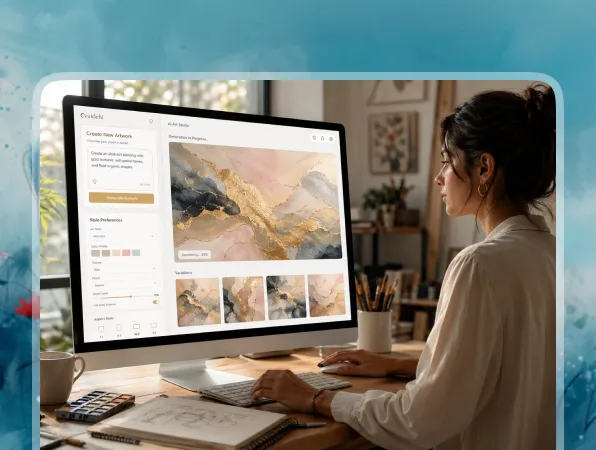
Build with Simple Prompts

Describe your art style, collections, and website needs, and Vitara turns it into a working artist website.

  • From Text to Artist Website

    Write a prompt like “artist website with abstract painting gallery, commission form, and online store.”

  • AI Handles Layout and Logic

    You don’t get a basic template. You get a custom structure built around your art, audience, and goals.

  • Live-On-Screen Results

    Watch your artist website take shape in real time as you refine your prompt.
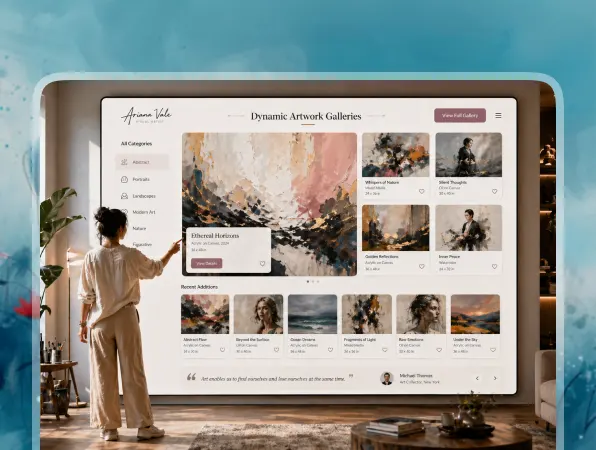
Smart Artwork and Portfolio Pages

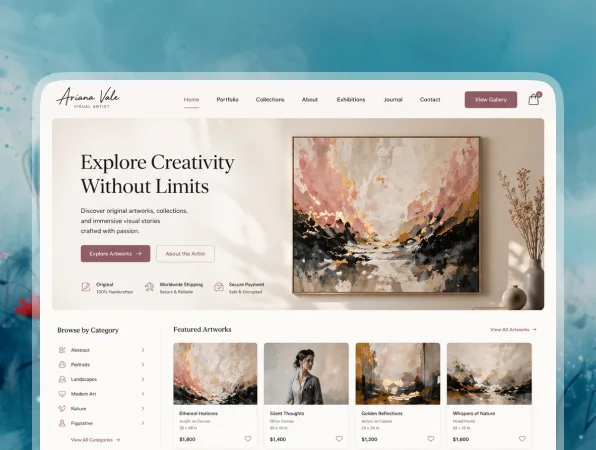
Auto generate clean artwork galleries with filters, visual layouts, and detailed artwork pages.

  • Rich Artwork Details

    Each artwork page can include title, size, medium, price, story, availability, and purchase details.

  • Filterable Results

    Let visitors sort artwork by style, medium, collection, price, size, or availability.

  • Easy Updates

    Add new art, mark pieces as sold, or update collections with a quick prompt or simple manual change.
Commission Requests Built Right In

Let visitors request custom artwork, portraits, murals, prints, or special projects directly from your site.

  • Custom Commission Forms

    Buyers can share size, style, budget, deadline, reference notes, and contact details.

  • Instant Alerts

    You get notified whenever someone sends an artwork enquiry or commission request.

  • Studio Friendly Flows

    Keep enquiries organized so you can follow up with collectors, galleries, and clients faster.

Sell Artwork from Your Website

Turn visitors into buyers with artwork pages, price details, enquiry forms, and payment ready flows.

  • Artwork Enquiry Forms

    Let collectors ask about originals, prints, shipping, framing, or availability.

  • Smart Lead Routing

    Send sales enquiries, commission requests, and gallery messages to the right inbox automatically.

  • CRM Friendly Setup

    Connect tools like HubSpot or Zapier so collector leads move into your existing workflow.

Instant Site Tuning

Tweak layouts, pages, galleries, and forms without rebuilding your artist website from scratch.

  • Change the Look in Seconds

    Swap hero sections, rearrange blocks, or adjust styling just by updating your prompt.

  • Edit Artwork Fast

    Update descriptions, prices, photos, categories, or availability whenever your collection changes.

  • Real Time Preview

    See every change update live before you publish your artist website.
FAQs About the Artist Website Builder Vitara

Yes. You describe what you want in natural language, and Vitara generates the design, pages, galleries, and logic for you. You can keep improving the site with prompts instead of writing code.

Absolutely. You can:
  • Adjust layouts and sections
  • Add or remove artwork galleries, bio pages, and forms
  • Change copy, images, colors, and CTAs
For advanced users, the generated code can also be edited.

It’s ideal for:
  • Painters
  • Photographers
  • Digital artists
  • Illustrators
  • Sculptors
  • Mixed media artists
  • Independent studios
If you need a portfolio, artwork gallery, commission form, or online art selling page, it’s a strong fit.

Yes. Vitara can help you create artwork pages, pricing sections, enquiry forms, and payment ready flows. You can showcase originals, prints, limited editions, or digital artwork and guide buyers toward purchase or enquiry.

That’s where AI based building helps a lot. You can:
  • Add new artwork pages
  • Update prices and availability
  • Mark artwork as sold or reserved
  • Create collection pages for new releases
You don’t need to rebuild the website every time your portfolio changes.

Yes. You can control SEO basics like page titles, meta descriptions, URLs, headings, and image alt text. This helps your artwork pages, artist bio, portfolio sections, and collection pages appear for searches like “abstract artist portfolio” or “custom portrait artist.”

You can. If you already have an artist website, you can recreate the structure with a prompt like “rebuild my artist portfolio website with artwork galleries, commission forms, and online store pages.” Then you can move your images, copy, and artwork details into the new layout.

It does. A solo artist can build a simple portfolio website with a gallery, bio, and contact form. A larger studio can add multiple collections, commission workflows, enquiry routing, artwork sales pages, and backend tools.

Know what’s trending in AI-powered web app development

Retool Review

Retool Review 2026: Is It Worth It for Building Internal Tools?

7 minutes read
Wix Review

Wix Review 2026: Is Wix Worth It? Pros, Cons, Pricing & Verdict

6 minutes read
Balsamiq Review

Balsamiq Review 2026: Features, Pricing, Pros, Cons & Is It Worth It?

6 minutes read