Bolt New Pricing 2026: Plans, Tokens, Cost & Best Alternatives
If you are going to try Bolt.new but confused about its complex pricing system then this guide is for you. I have tried and tested few projects in Bolt.new. While testing and creating i saw some pricing pattern that i think new users should be aware of.
At a glance, the pricing looks straightforward. There’s a free plan, a Pro plan at around $25 per month, a Teams plan, and an Enterprise option. But once you start building real apps, things like token consumption, debugging cycles, and repeated prompts start to matter a lot more than the monthly fee.

This article breaks it all down in a way that actually makes sense. No outdated numbers. No vague explanations. Just a clear look at how Bolt.new pricing works today, what each plan really gives you, and which option makes the most sense based on how you plan to use it.
What is Bolt.new?
Bolt.new is an AI app builder that lets you create websites, apps, and prototypes by chatting with AI. Instead of starting from scratch in a local coding setup, you describe what you want, and Bolt helps generate, edit, test, and improve the project inside one browser-based workspace.
It is designed to make app building faster for people who want to move from idea to working product without dealing with too much setup or tool switching.
A Simple Guide to How Bolt.new Pricing Works
Bolt.new pricing looks simple at first, but there’s more going on once you start building real projects. It does not work like a basic flat-fee software subscription where you pay one amount and use everything without limits.
The first part is the subscription itself. Bolt.new currently offers four pricing levels: Free at $0, Pro at $25 per month, Teams at $30 per member per month, and Enterprise with custom pricing. Each plan unlocks a different level of access, including things like:
- private sharing
- file upload limits
- branding removal
- custom domains
- collaboration controls
- advanced admin features
The second part is token usage, and this is where many users get confused. In Bolt.new, tokens are closely tied to how the AI works with your project files. As your app gets larger or you go through more prompt and debug cycles, token usage can rise quickly.
The free plan comes with a 300,000 daily token limit and 1 million monthly tokens, while Pro starts at 10 million monthly tokens with no daily cap. Paid plans also allow unused tokens to roll over to the next month for one additional month, as long as the subscription stays active.
Let’s break down the current Bolt.new plans in a way that actually makes sense.
Bolt.new Subscription Plans: Free, Pro, Teams, and Enterprise
| Plan | Monthly Price | Yearly Price (per month) | Best For | Key Features |
|---|---|---|---|---|
| Free | $0 | $0 | Beginners, learners, early testing | Public and private projects, 300K daily tokens, 1M monthly tokens, hosting, unlimited databases, Bolt branding |
| Pro | $25 per month | Approximately $18 per month with annual billing | Solo builders, freelancers, founders | No daily token limit, starts at 10M monthly tokens, no branding, custom domains, SEO boosting, AI image editing |
| Teams | $30 per member per month | Approximately $27 per member per month with annual billing | Agencies, product teams, startups | Everything in Pro, plus centralized billing, access controls, organization sharing, private NPM support |
| Enterprise | Custom | Custom | Large businesses | SSO, audit logs, compliance support, SLAs, governance controls, onboarding, dedicated support |
The Free plan is a good starting point if you want to test Bolt.new without spending anything. You can work on both public and private projects, host websites, and use the platform enough to understand how the workflow feels. The main tradeoff is that the token limits are tighter, file uploads are capped at 10MB, and Bolt branding stays on published websites.
The Pro plan is where Bolt.new starts feeling more practical for serious solo work. You get a larger monthly token allowance, no daily token limit, 100MB file uploads, private site sharing, custom domains, SEO boosting, and no Bolt branding. For people building client projects, MVPs, or more polished products, this is the plan that gives enough room to move without running into the free plan’s walls too quickly.
The Teams plan is built for collaboration. It includes everything in Pro, then adds centralized billing, team-level access management, granular admin controls, organization sharing, and support for private NPM registries. One useful detail here is that tokens are not shared across the team. Each paid member gets their own monthly token allotment, which makes usage easier to track at the individual level.
Enterprise is for larger businesses that need security, governance, and procurement support. It includes features like SSO, audit logs, compliance support, custom workflows, SLAs, flexible billing options, and hands-on onboarding. So while Bolt.new pricing starts off looking creator-friendly, it also has a structure that can scale into team and business use cases.
How Bolt New Tokens Work
Here’s the simple way to understand it:
- Tokens are the usage unit behind Bolt.new’s AI workflow. They are not just based on how many prompts you send. They are also tied to how Bolt syncs your project files and context with the AI.
- As your project gets bigger, each message can use more tokens. A small landing page usually consumes fewer tokens than a larger app with many files, components, and revisions.
- This is why two users on the same Bolt.new plan can have very different experiences. One user may build light projects and stay within limits easily, while another may burn through tokens faster because of debugging, rewrites, and repeated iterations.
- The Free plan includes 300,000 daily tokens and 1 million monthly tokens. This is enough for testing, learning, and smaller builds, but it can feel limited once projects become more complex.
- The Pro plan starts with 10 million monthly tokens and removes the daily token cap. That gives solo builders much more room to work without running into daily limits.
- Paid plans also allow unused tokens to roll over for one extra month, as long as the subscription stays active. That makes the pricing a little more flexible for people whose usage changes month to month.
- On the Teams plan, tokens are not shared across the whole team. Each paid member gets their own token allotment. That helps prevent one person’s heavy usage from affecting everyone else.
- What this really means is that Bolt new pricing is not only about the monthly fee. It is also about how often you build, how large your projects are, and how many AI-assisted changes you make during the month.
What Bolt New Charges You Beyond the Plan
Here’s where many users get surprised. The monthly plan price is only one part of the picture. Your real experience with Bolt new pricing is also shaped by how fast you consume tokens while building. Bolt explains that token usage is heavily connected to syncing your project files with the AI, so bigger and more complex projects can use more tokens per message.
Here are the main things Bolt.new effectively charges you for beyond the base plan:
- Heavy token usage
The more you build, edit, regenerate, and debug, the more tokens your project can consume. Larger project context usually means higher token usage per message. - Bigger project complexity
Bolt directly says larger projects use more tokens per message because of file system syncing. So a real app with many files can cost more to maintain than a simple prototype. - More team members
On the Teams plan, pricing is charged per member per month. So your cost rises as your team grows, even though tokens are allocated individually rather than pooled. - Advanced publishing needs
Features like custom domains, private sharing, branding removal, and stronger hosting limits are tied to paid plans, not the free one. So if you want a more polished public-facing product, the base free plan usually will not be enough. - Larger file upload needs
The free plan has a 10MB upload limit, while Pro raises that to 100MB. If your workflow includes heavier assets, that limitation can push you toward a paid plan faster. - Business-grade admin and security requirements
Features like centralized billing, admin controls, SSO, audit logs, compliance support, procurement options, and governance tools are only available in higher plans like Teams and Enterprise.
Also Read:
Bolt New Competitors and Alternatives for Building AI-powered Apps
Which Bolt new Plan Is Right for You?
Choosing the right Bolt.new plan really comes down to how you build, how often you use AI inside your workflow, and whether you are working alone or with a team. On paper, the plans look simple. In practice, the right choice depends on how quickly you burn through tokens, whether you need client-ready publishing features, and how much collaboration or admin control you need.
- Choose the Free plan if you are just testing Bolt.new, learning how vibe coding works, or building small personal experiments. It gives you public and private projects, hosting, unlimited databases, 300K daily tokens, and 1M monthly tokens, which is enough for early exploration.
- Choose the Pro plan if you are a solo builder, freelancer, indie hacker, or founder working on real projects more seriously. Pro removes the daily token cap, starts at 10M monthly tokens, removes Bolt branding, adds custom domains, increases file uploads to 100MB, and unlocks features like SEO boosting and AI image editing.
- Choose the Teams plan if multiple people need to build, manage, and ship together. It includes Pro features plus centralized billing, team-level access controls, organization sharing, and private NPM registry support. It is a better fit for agencies, startup teams, and product teams that need structure around collaboration.
- Choose Enterprise if your business needs stronger security, compliance support, audit logs, SSO, procurement flexibility, SLAs, or dedicated support. This plan is clearly built for larger businesses with governance and scaling needs rather than casual builders.
- The best plan for most serious solo users is usually Pro. It is the point where Bolt.new starts feeling less like a trial tool and more like a real production workspace, especially if you want polished public projects and more breathing room on tokens.
- The best plan for beginners is Free, but only if you are comfortable with limits. Once your projects get larger, your prompts become more iterative, or your publishing needs become more professional, you will likely outgrow it faster than expected.
- The best plan for growing businesses is not always about features alone. It is also about predictability. If your team needs separate token allotments, role control, and cleaner billing, Teams makes more sense than trying to manage several disconnected Pro subscriptions.
What Real Users Are Saying About Bolt new on Different Forums
One of the best ways to understand how Bolt new pricing feels in real life is to read what users say after they actually spend time and tokens on it. I looked through multiple Reddit discussions, and the same themes keep showing up. People like the speed in the early stages, but they get more critical when projects grow, debugging drags on, or token usage starts feeling unpredictable. Here are five patterns that come up again and again.
Big projects start burning too many tokens per prompt
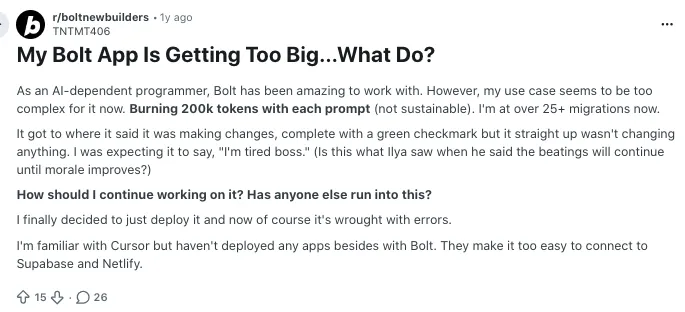
One Reddit user said Bolt had been amazing for AI assisted building, but once the app got more complex, the experience changed fast. They described their project as getting too big for Bolt and said each prompt was burning around 200K tokens, which they called “not sustainable.” That is a strong signal that users often feel good about Bolt in the early phase, then start worrying about cost once the codebase grows.
Source of Information: Reddit
Many users do not feel the paid plan is worth it for heavier builds
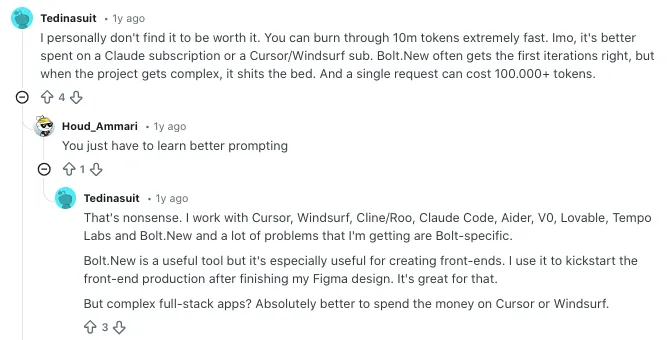
In another thread asking whether the subscription is worth it, one user gave a very blunt answer. They said Bolt can burn through 10M tokens extremely fast, that a single request can cost 100,000 plus tokens, and that the tool often performs well in the first few iterations but struggles once the project becomes more complex. That kind of feedback matters because it ties pricing frustration directly to real project depth, not just casual complaints about cost.
Source of Information: Reddit
Repeated errors make token costs feel worse
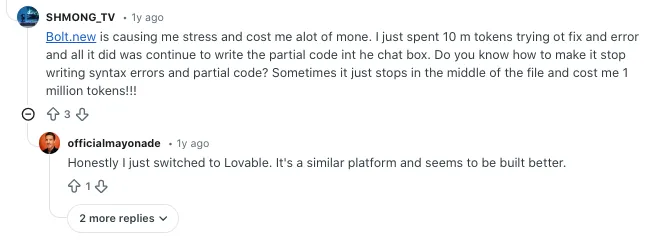
A separate Reddit post focuses less on the subscription price itself and more on the feeling of wasting tokens while fixing mistakes. The user said they had spent 10M tokens trying to fix one error and that Bolt kept producing syntax errors or incomplete code. This is the kind of complaint that hits pricing perception hard. People usually do not mind paying for progress. They mind paying when the same issue keeps coming back and each retry drains more tokens.
Source of Information: Reddit
Power users can go through massive token volumes
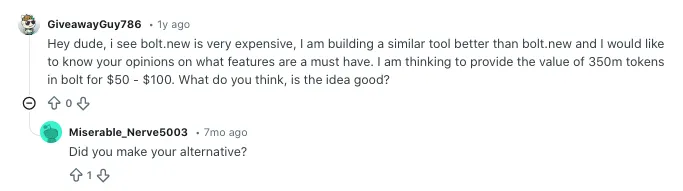
There are also users who push Bolt hard and show just how big token usage can get in serious workflows. In one Reddit thread, a user said they work on two to four projects at the same time and estimated needing around 350M tokens per month. That does not mean every user will consume anywhere near that amount, but it shows why Bolt pricing can feel very different depending on how deeply someone relies on it. Light users and heavy builders are almost living in two different pricing realities.
Source of Information: Reddit
Comparing Bolt new with its Alternatives: Bolt new vs Vitara vs Lovable AI vs Replit
Looking at Bolt new pricing alone does not tell the full story. These tools may all sit under the vibe coding or AI app builder umbrella, but they price usage very differently. Bolt uses tokens, Vitara uses credits, Lovable uses credits plus usage based Cloud + AI, and Replit mixes subscription tiers with monthly credits and separate publishing costs. So the better question is not just which one is cheaper. It is which one gives the best value for the kind of building you actually do.
Here is the quick comparison table:
| Feature / Tool | Bolt.new | Vitara | Lovable AI | Replit |
|---|---|---|---|---|
| Starting Price | Free plan, Pro at $25 per month, Teams at $30 per member per month | Free plan, Build at $20 per month, Scale at $50 per month | Pro at $25 per month, Business at $50 per month, Enterprise custom | Starter free, Core at $20 per month billed annually, Pro at $95 per month billed annually |
| Free Plan | Yes | Yes | Pricing focuses on paid tiers, but free usage exists through credits and references | Yes |
| Best For | Solo builders and teams who want prompt to app workflows with hosting and deployment | Cost conscious builders who want prompt based building with code download | Teams that want collaborative app building with shared credits and publishing controls | Developers and serious builders who want AI plus traditional coding control |
| AI Usage Model | Token based | Credit based | Credit based plus usage based Cloud and AI | Monthly credits plus separate publishing costs |
| Frontend / Build Style | Browser based AI builder for apps and websites | Prompt driven AI powered development platform | Real time collaborative AI app builder | Browser IDE with agent, code editing, and deployments |
| Collaboration | Teams plan with centralized billing and access controls | Not deeply detailed on pricing page | Shared across unlimited users with roles and permissions | Up to 5 collaborators on Core, up to 15 on Pro |
| Branding Removal | Yes on paid plans | Not clearly highlighted | Yes on Pro | Yes on Core and above |
| Custom Domains | Yes on Pro and above | Yes on Build and above | Yes on Pro and above | Available, but deployment costs are separate |
| Code Access / Export | Builder oriented with editable projects | Edit and download code on Build and above | Project ownership supported but less emphasis on export | Full code centric workflow |
| Enterprise Option | Yes | Custom solution via sales | Yes | Yes |

Recommend to Also Read:
Replit Pricing Explained
Windsurf Pricing Explained
Base44 Pricing Explained
Final Thoughts
Bolt.new pricing is easy to understand on the surface, but the real value depends on how you use the platform. The plan price gives you the starting point, but tokens, project size, debugging cycles, and team needs shape the actual cost over time. That is why Bolt.new can feel like a smart investment for one user and an expensive choice for another.
Frequently Asked Questions
How much does Bolt.new cost?
Bolt.new has a Free plan at $0, a Pro plan starting at $25 per month billed monthly, a Teams plan at $30 per member per month, and an Enterprise plan with custom pricing.
Is Bolt.new free to use?
Yes. Bolt.new offers a free plan that includes public and private projects, website hosting, unlimited databases, a 300K daily token limit, and 1M tokens per month.
What does the Bolt.new Pro plan include?
The Pro plan includes no daily token limit, starts at 10M tokens per month, removes Bolt branding, supports private sharing, custom domains, SEO boosting, 100MB uploads, expanded database options, and AI image editing.
How do Bolt.new tokens work?
Bolt says most token usage is tied to syncing your project’s file system with the AI. That means larger and more complex projects usually use more tokens per message than smaller projects.
Do unused Bolt.new tokens roll over?
Yes, but only on paid plans. Paid tokens roll over for one additional month as long as your subscription remains active. Free plan tokens do not roll over.
Can you cancel Bolt.new anytime?
Yes. You can cancel at any time, and your plan will remain active until the end of the billing cycle before switching to the free tier.
Does Bolt.new offer yearly pricing?
Bolt supports annual billing with discounts in some cases. Exact yearly pricing may vary depending on plan and billing options.
Can you buy more tokens on Bolt.new?
Yes. Users can upgrade to higher plans or purchase additional tokens depending on their subscription level.
Are tokens shared on the Teams plan?
No. Each team member gets their own token allotment. Tokens are not shared across the team.
Which Bolt.new plan is best for most users?
The Free plan is good for beginners. The Pro plan works best for serious solo builders. Teams is better for collaboration and structured workflows.
What is the best alternative to Bolt.new?
The best alternative depends on how you want to build. Vitara is a strong choice if you want simpler credit-based pricing and code download flexibility. Lovable AI works well for teams that need collaboration and shared access. Replit is better for developers who want deeper control and a more traditional coding environment.
What’s New?