What is CodeGPT? A Deep Dive into the AI Coding Assistant
CodeGPT has quickly become one of the most talked-about AI coding assistants in 2025 and heading into 2026. Whether you’re a solo developer looking to speed up your side project, a team lead juggling multiple repos, or just someone trying to make sense of legacy code at 2 AM, CodeGPT promises one thing: write a natural language prompt, get context-aware, intelligent code suggestions right where you’re working.
But beyond the buzz, what exactly is CodeGPT? How does it actually help developers? What’s changed with its latest capabilities, and is it really better than tools like Copilot or ChatGPT?
This guide breaks it all down. You’ll get a clear, no-nonsense explanation of what CodeGPT is, how it works inside your editor, what makes it different (and honestly, better in some ways), and what kind of developers are actually getting value out of it, backed by real use cases and feature deep dives.
What is CodeGPT?
CodeGPT is an AI-powered coding assistant that lives inside your IDE and helps you write, understand, and refactor code using simple natural language prompts. It’s like having a supercharged coding buddy who knows your project context and can instantly generate, explain, or clean up code on the spot. Built for both solo devs and teams, CodeGPT works with your own API keys and gives you the flexibility to choose which AI models you want to use.
You Should Know other Vibe Coding Tools:
What is Codev?
Key Features of CodeGPT AI Coding Assistance
CodeGPT isn’t just a simple autocomplete tool. It’s packed with features that genuinely help you write, explore, and maintain code in ways that feel natural and intuitive. Here’s a closer look at the features that make it a go-to tool for modern developers.
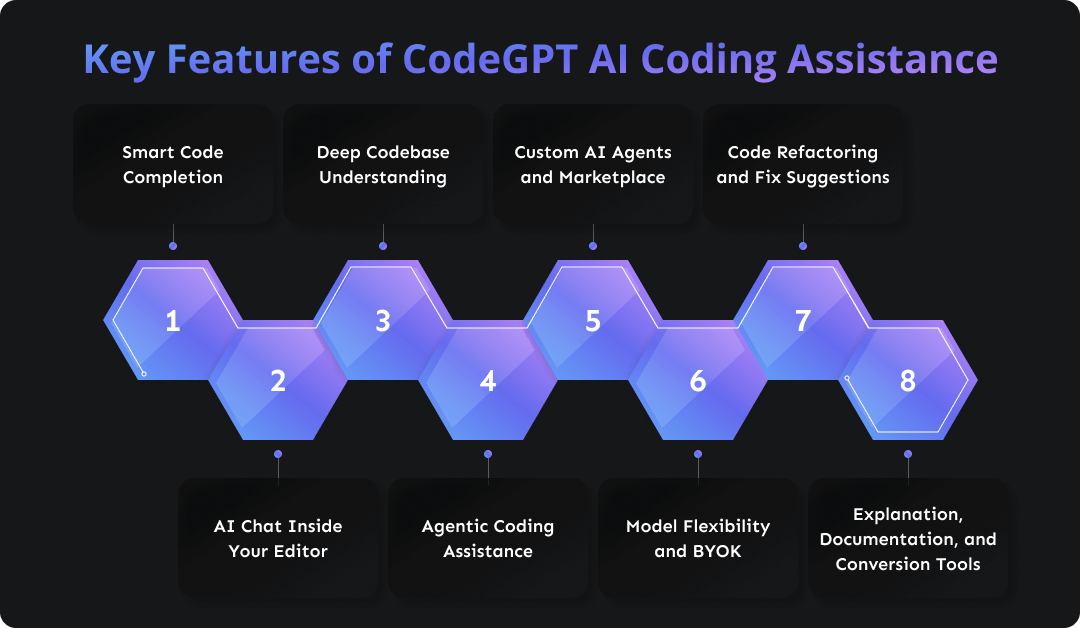
Smart Code Completion
As you type, CodeGPT suggests complete lines or even whole functions that match the context of your project folder and coding style. It supports multiple AI model choices, so you’re not locked into one option.
AI Chat Inside Your Editor
Instead of switching tabs to ask a separate chat tool, you can ask questions directly where you code. You get explanations for snippets, advice on fixes, or help understanding tricky logic.
Deep Codebase Understanding
CodeGPT goes beyond local context. It builds a knowledge graph of your entire project, so suggestions, refactors, and answers are based on real relationships between files, functions, and dependencies.
Agentic Coding Assistance
This is a big one. You can create or use AI agents that don’t just autocomplete but plan and perform multi-step tasks like editing files, creating tests, or restructuring code across your project. That turns repetitive work into something the AI can handle.
Custom AI Agents and Marketplace
Need help with a specific language or framework? CodeGPT offers a marketplace of specialized agents for tasks like Python automation, Django helpers, SQL insights, and more. You can pick what fits your workflow or build your own.
Model Flexibility and BYOK
You decide which AI models you want to use. Connect your own API keys from providers like OpenAI, Anthropic, Google, or even local models for privacy-first setups and cost control.
Code Refactoring and Fix Suggestions
Highlight a block of code and ask CodeGPT to help you clean it up or fix bugs. It doesn’t just point out problems but suggests concrete changes.
Explanation, Documentation, and Conversion Tools
Need comments, documentation, or even a translation of code from one language to another? CodeGPT can draft those for you based on what it sees in your project.
Pros and Cons of CodeGPT AI
Like any tool, CodeGPT comes with its strengths and trade-offs. Here’s a quick, honest breakdown to help you decide if it fits your workflow.
✅ Pros of CodeGPT
Context-Aware Coding: Understands your full codebase, not just the current file, for smarter, more relevant suggestions.
Flexible Model Support: Use your own API key and switch between models like OpenAI, Anthropic, and others.
In-Editor Chat: Ask for explanations, fixes, or new code without ever leaving your IDE.
Agent System: Perform multi-step coding tasks using customizable AI agents that go beyond autocomplete.
Custom Workflows: Easily build your own agents tailored to specific languages, tools, or company codebases.
Privacy and Control: Local model support and BYOK give you more control over data and cost.
Fast Setup: Get started in minutes with simple installation and seamless IDE integration.
❌ Cons of CodeGPT
Steeper Learning Curve for Agents: Setting up custom agents or fine-tuning workflows may take time if you’re new to the platform.
Model Quality Depends on Provider: Output varies depending on which LLM you connect, and not all are equally strong for every task.
Not Beginner-Focused: While powerful, it’s designed with developers in mind, so non-coders may feel lost.
Limited UI or Visual Tools: Unlike no-code/low-code platforms, CodeGPT doesn’t offer visual editors or drag-and-drop builders.
Still Evolving: New features are being added quickly, but that means some tools or workflows might still feel in beta.
CodeGPT Plans & Pricing
When it comes to pricing, CodeGPT gives you options that fit just about any situation, whether you’re tinkering on a weekend project or leading a team building production software.
Free Plan
This is where most people start. You get access at $0 per month, and it’s designed for beginners, students, or anyone curious to explore AI coding without spending a dime. You can connect your own AI provider key, try chat and agent features, and use up to 30 interactions and 200 code completions each month. It’s a great way to feel out how CodeGPT works in your workflow.
BYOK Plan (Bring Your Own Key)
If you start coding regularly with AI, the BYOK plan is usually the next step. Priced around $8 per seat per month when billed monthly (a bit cheaper if you pay annually), this plan removes interaction limits using your own API keys. That means unlimited agent tasks, unlimited auto-complete, and access to full agent history for the last 24 hours. It’s ideal for solo developers or freelancers who want steady AI support.
Teams Plan
For teams building together, the Teams plan sits at around $30 per seat per month on a monthly billing cycle. You get everything from BYOK plus advanced features like multiple custom AI agents, knowledge graphs for large codebases, team management tools, longer history, and collaborative context sharing. It gives you the space to scale AI-assisted coding across your whole squad.
Enterprise & Custom Solutions
If your company has specific security, deployment, or integration needs, CodeGPT offers custom pricing and enterprise support. These plans include single sign-on, SOC 2 Type II compliance, self-hosted options, and hands-on onboarding to tailor the platform for your workflow.

Final Thoughts
CodeGPT isn’t just another AI tool. It’s a serious coding assistant built for real-world development. Whether you’re writing fresh code, cleaning up legacy logic, or just trying to move faster without sacrificing quality, it fits naturally into your workflow and grows with you as your projects scale.
It’s not perfect, and it’s not magic, but when used well, CodeGPT can take a lot of the grunt work off your plate. If you’re someone who spends hours inside an IDE, it’s absolutely worth trying to see how much time and brain space you can save.
What’s New?