Bolt.new vs Replit: Which AI App Builder Is Better in 2026?
If you are trying to turn an app idea into a working product, you are probably asking one very practical question.
Which AI app builder will actually help me build and launch faster?
Bolt.new and Replit are two popular platforms known for turning natural-language prompts into working applications.
But they focus on solving slightly different problems.
Bolt.new is designed for quickly generating polished JavaScript-based web and mobile apps, while Replit is a broader cloud development platform that combines AI app generation with coding, databases, collaboration, and flexible deployment options.
Which makes it difficult to pick just one tool!
In this in-depth comparison, I’ll break down Bolt.new vs Replit across the factors that directly affect how quickly and reliably you can build an application, including:
- App generation speed and ease of use
- Frontend, backend, and database capabilities
- Code editing and debugging flexibility
- Deployment, collaboration, and mobile app support
- Pricing and real-world usability
PS: I’ll also introduce you to Vitara.ai, another AI app builder for turning ideas into working products.
It gives you another option for building and refining apps in one place, without forcing you to choose between a simple prompt-to-app builder and a more technical development environment.
Let’s get into the comparison!

Turn your app idea into a working web or mobile product with AI prompts, React frontend, Supabase backend, and editable code.
Start Building with Vitara.ai →
Bolt.new vs. Replit: A Quick Side-by-Side Comparison
Before we get into the details, here’s a quick TL;DR of what we’ve explained in this comparison.
1. Vitara.ai: Sits between Bolt.new and Replit, offering prompt-based full-stack development with React, a Supabase backend, GitHub integration, code editing, and support for web and mobile apps.
2. Bolt.new: A fast AI app builder for creating polished JavaScript-based web and mobile apps. It includes hosting, databases, GitHub support, and a simple prompt-first workflow.
3. Replit: Combines an AI app builder with a complete cloud development environment. It works well when you need broader language support, built-in databases, collaboration, and more control over deployment.
| Comparison | Bolt.new | Vitara.ai | Replit |
|---|---|---|---|
| Ranking | ⭐ 2nd Runner-Up | 🏆 Winner | ⭐ 1st Runner-Up |
| Starting Price | Paid plans from $25/month | Paid plans from $20/month | Paid plans from $20/month when billed annually |
| Free Plan | ✔ Available | ✔ Available | ✔ Available |
| App Generation | ✔ Full-stack web app generation | ✔ Full-stack web and mobile app generation | ✔ Full-stack AI app generation |
| Database and Authentication | ✔ Built-in database and hosting | ✔ Supabase database and authentication | ✔ Built-in database and authentication |
| GitHub Integration | ✔ Available | ✔ Available | ✔ Available |
| Code Control | ✔ Direct code editing | ✔ Editable and downloadable code | ✔ Full cloud IDE and code editing |
| Mobile App Development | ✔ Supported | ✔ Supported | ✔ Supported |
| Programming Language Support | ✘ Limited to JavaScript-based backends | ✘ No broad multi-language backend support | ✔ Broad programming-language support |
| Deployment and Collaboration | ✔ Built-in deployment | ✔ Streamlined app-building workflow | ✔ Flexible publishing and collaboration |
| Main Limitation | Less suitable for non-JavaScript backends | Limited support for multiple backend languages | May feel more technical for complete beginners |
| Best For | Building polished JavaScript apps and prototypes quickly | Building full-stack apps from prompts in one streamlined platform | Developing, deploying, and maintaining more complex applications |
Bolt.new vs Replit: Feature Comparison
To choose between Bolt.new and Replit, you need to look at how each AI app builder performs during a real development workflow, not just what appears on its feature page.
Both platforms can turn a natural-language prompt into a working application.
But they approach the process differently.
Bolt.new focuses on helping you generate JavaScript-based web and mobile apps through a simple, prompt-first interface. Replit combines AI app generation with a broader cloud development environment where you can plan, code, test, debug, and publish different types of software.
Those differences become more noticeable once you move beyond the first prompt and start adding real features.
In this Bolt.new vs Replit comparison, I’ll cover:
1. Ease of Use and Learning Curve
2. AI App Generation and Prompt Handling
3. Frontend Design and UI Customization
4. Backend, Database, and Authentication
5. Code Editing and Debugging
6. Deployment and Hosting
7. Mobile App Development
8. Collaboration and Platform Integrations
9. Pricing Plans
1. Bolt.new vs Replit: Which Is Easier to Use?
An AI app builder should reduce the amount of setup between your idea and your first working version.
If you need to understand servers, development environments, package managers, and deployment settings before building anything, the tool isn’t doing enough for a beginner.
So I compared how Bolt.new and Replit handle the first few stages of app development.
Here’s what you should know.
Bolt.new
Bolt.new offers the simpler starting experience.
You open the platform, describe the website or application you want, and click Build now. Bolt then creates the project files, installs the required packages, and displays the result in a live browser preview.
You don’t need to choose a server, configure a local development environment, or install a code editor before you begin.
Bolt’s official quick-start guide uses a single prompt to create a web app with login, saved favorites, and a database. The guide estimates around 10 to 15 minutes for the complete walkthrough, with the initial build taking roughly five minutes. Actual build times can vary based on the prompt and features requested.
The basic workflow looks like this:
- Describe the app you want to build
- Let Bolt generate the project
- Test the result inside the live preview
- Request changes through follow-up prompts
- Open the code editor when you need more control
This works well for non-technical founders, marketers, product managers, and freelancers who want to create a landing page, dashboard, booking app, or SaaS prototype without learning a traditional development workflow first.
Bolt also includes an Enhance prompt option. It can take a short request and turn it into a more detailed instruction before the build begins. This is helpful when you know what you want but aren’t sure how to describe the pages, components, or visual direction clearly.
But the simple interface doesn’t mean every prompt will work perfectly.
Bolt recommends adding features in smaller steps, explaining exactly what should change, and identifying files or components that shouldn’t be touched. As the project becomes larger, prompting requires more care because the AI needs to understand more of the existing code before making each change.
There is also a browser limitation.
Bolt works best on a desktop computer using Chrome or another Chromium-based browser. Mobile browsers aren’t fully supported, so this isn’t a tool you’ll comfortably use for serious app development from your phone.
Also Read:
Want to see how compares to other tools?
Top Bolt.new Alternatives
Best Replit Alternatives
Replit
Replit has made its onboarding much easier, but the platform still exposes more of the software development process.
You start inside the Project Editor, describe what you want to build, and let Replit Agent create the application. The editor brings Agent chat, app preview, project files, database tools, secrets, publishing settings, and other development controls into one workspace.
For a beginner, the initial experience is still approachable:
- Select the type of project you want
- Enter a plain-language prompt
- Review the plan created by Agent
- Watch the application take shape
- Test it inside the Preview window
- Publish it when it’s ready
Replit’s own quick-start guide estimates that a small running-tracker app can be built and published in about ten minutes. It also encourages users to describe the context, visual direction, required screens, sample data, and responsive behavior in the first prompt.
Here’s where Replit feels different from Bolt.new.
Replit gives you more development controls from the beginning. You can inspect files, work with a shell, manage your database, review Agent changes, restore checkpoints, and select different publishing options.
That control becomes useful when you’re building a more complicated app.
However, it can also make the interface feel busier if you only want to generate a simple website or prototype. A complete beginner may need time to understand the difference between a development preview, a published app, an Agent checkpoint, a database, and a deployment.
Replit’s Plan mode helps reduce some of that confusion. You can ask Agent to brainstorm the project, create a task list, and explain the proposed architecture without changing your code. Once the plan looks right, you can approve it and move into Build mode.
This is better suited to users who want the AI to explain what it’s about to build rather than immediately generating code.
Winner: Bolt.new
Bolt.new wins on ease of use because the interface keeps the first build focused on one simple action: describe your idea and generate the app.
You can still view and edit the source code, but you don’t need to interact with the more technical parts of the platform unless something goes wrong.
Replit is beginner-friendly compared with a traditional cloud IDE, but it gives you more tools, settings, and development concepts to understand.
Choose Bolt.new if you want the shortest path from prompt to preview.
Choose Replit if you’re comfortable with a slightly steeper learning curve in exchange for more control over how the application is built and managed.
Vitara.ai: Why It Can Outperform Both for Beginners
Vitara.ai takes a more guided approach by using a fixed modern development stack.
It generates React code for the frontend—the screens and buttons your users interact with—and uses Supabase for backend features such as data storage, authentication, real-time updates, and automatically generated APIs.
That gives beginners a few practical advantages:
- You don’t need to select a frontend framework
- You don’t need to choose and configure a separate database
- You can generate both frontend and backend features from prompts
- You can edit the generated code when needed
- You can download the source code and continue working elsewhere
Vitara.ai can feel simpler than Replit because it doesn’t expose as many language and infrastructure choices. It can also be more structured than Bolt.new for users who specifically want a React and Supabase application rather than choosing from different JavaScript frameworks and database options.
The platform includes a limited free Starter tier. Its Build plan costs $20 per month and includes 100 monthly credits, code editing and downloading, custom-domain support, and faster AI processing.
For a non-technical founder who wants to build a web or mobile app without deciding how every part of the technology stack should work, Vitara.ai offers a focused middle ground.
2. Bolt.new vs Replit: Which Offers Better AI App Generation and Prompt Handling?
Generating the first screen is easy for most AI app builders.
The real test begins when you ask the tool to create several connected pages, add user accounts, store data, change an existing feature, and fix something without breaking the rest of the application.
That’s where prompt handling matters.
So I compared how Bolt.new and Replit plan projects, interpret instructions, manage follow-up requests, and handle longer builds.
Bolt.new
Bolt.new is built around direct prompt-to-app generation.
You can describe a website, SaaS dashboard, booking system, mobile application, online store, CRM, or project management tool, and Bolt will generate the underlying JavaScript code and show you a working preview. It supports JavaScript-based frontend frameworks and Node.js for backend development.
For the first build, this approach feels fast.
You can include instructions covering:
- The type of application
- The pages you need
- The preferred visual style
- User login and account features
- Database requirements
- Forms and navigation
Bolt can also improve the prompt before generating anything. This is useful when your original request is too broad, such as “build a project management app,” and needs more detail around user roles, pages, workflows, and design.
The challenge appears during longer conversations.
Bolt’s own prompting guide recommends adding individual features one at a time instead of overwhelming the AI with one large list. It also suggests telling Bolt which files to focus on, specifying what shouldn’t change, and regularly managing the context it receives.
For example, instead of writing:
Improve the dashboard and make everything look better.
A clearer prompt would be:
Update only the analytics cards on the dashboard. Improve their spacing, add comparison percentages, and keep the navigation, data table, and mobile layout unchanged.
That extra detail reduces the chance of Bolt changing a working part of the app while fixing something else.
Bolt also lets you create project-level and system-level instructions. These can tell the AI which libraries to use, how components should be structured, and which design rules it should follow throughout the project.
But here’s the cost-related trade-off.
Bolt uses tokens to process your prompts and synchronize the project files with the AI. Its pricing page explains that larger projects generally consume more tokens per message because more of the file system needs to be included as context.
The Free plan includes a daily limit of 300,000 tokens and a monthly limit of one million tokens. Bolt Pro starts at $25 per month with ten million monthly tokens and no daily token limit.
That is usually enough to explore the platform, but repeated debugging and broad change requests can use the allowance faster than expected.
Replit
Replit Agent takes a more structured approach to app generation.
Instead of only responding to the latest prompt, Agent can help plan the project, break the work into tasks, write code, explain what it changed, test the application, and debug problems.
Plan mode is one of the biggest differences.
Before generating the app, you can ask Agent to:
- Clarify missing requirements
- Compare possible approaches
- Create a structured task list
- Suggest an application architecture
- Identify database and authentication needs
- Explain how features will connect
Nothing is changed until you approve the plan and switch to Build mode.
This is helpful for a full-stack SaaS product where several features depend on each other.
For example, a subscription dashboard may require user authentication, account roles, Stripe payments, database tables, protected pages, and an admin area. Planning those pieces before generating code can reduce the amount of rework later.
Replit Agent 4 can also run multiple tasks in parallel, work with collaborators, and create more than web applications. It supports mobile apps, dashboards, AI tools, designs, slides, and other project types.
Another useful feature is the checkpoint system.
When Agent completes meaningful stages of the project, Replit can save the code, project files, AI conversation context, and connected database state. If a later prompt causes a problem, you can return to an earlier checkpoint instead of manually reversing every change.
This gives Replit an advantage during longer development sessions.
However, the more structured workflow can feel slower when your goal is only to create a quick landing page or visual prototype. Replit may show plans, task progress, tool calls, and development details that a beginner doesn’t always need.
Its pricing is also based on credits rather than a fixed number of prompts.
Replit Starter is free and provides daily Agent credits, a built-in database, and one published project. Replit Core costs $25 per month, or $20 per month when billed annually, and includes $25 in monthly credits. Replit Pro costs $100 monthly, or $95 per month when billed annually, with $100 in monthly credits and access to more powerful models.
Your actual usage depends on the type of Agent mode, the complexity of the task, and the cloud resources your project consumes.
Winner: It’s a Tie
The better option depends on what you’re asking the AI to build.
Choose Bolt.new if: You want to enter a prompt and get a working JavaScript app or polished prototype as quickly as possible.
Choose Replit if: You want the AI to plan a larger project, manage connected tasks, create checkpoints, and support a longer development workflow.
Bolt.new feels faster and more direct during the first few prompts.
Replit offers stronger planning and recovery tools once the application becomes more complicated.
Vitara.ai: Why It Can Outperform Both for Focused Full-Stack Builds
Vitara.ai reduces the number of technical decisions the AI needs to make.
The platform uses React for the application interface and Supabase for backend services. This gives the AI a predictable foundation for generating pages, APIs, database features, and authentication from the same prompt.
What makes this approach useful:
- The frontend and backend are generated together
- Supabase provides authentication and database support
- Prompt-based changes can update relevant parts of the project
- Generated code remains editable
- GitHub integration is available for version control
You aren’t asking the AI to choose among several backend languages, database systems, or deployment architectures.
For many SaaS MVPs, dashboards, membership apps, and client portals, that narrower setup may help the build stay more consistent.
Vitara.ai may feel limiting if you need a Python backend, a custom server runtime, or a different frontend framework.
But when you already want React and Supabase, the fixed stack removes choices that would otherwise slow down a non-technical builder.
3. Bolt.new vs Replit: Which Creates Better Frontend Designs?
The first thing most users notice about an AI-generated app is the interface.
A working database won’t save a product if the dashboard looks unfinished, the mobile layout breaks, or every page feels like the same generic template.
So I looked at how Bolt.new and Replit handle UI generation, visual editing, responsive layouts, and design consistency.
Bolt.new
Frontend generation is one of Bolt.new’s strongest areas.
You can describe the design in plain words, reference a visual style, upload supporting files, or connect an existing design source. Bolt then generates the interface as editable code rather than a static mockup.
Bolt works especially well when the prompt includes clear visual guidance, such as:
- A clean SaaS dashboard with compact data cards
- A mobile-friendly booking interface
- A dark finance app with accessible chart labels
- A landing page using a specific typography style
- A customer portal based on an existing component library
The platform also supports preloaded design systems. These give Bolt rules for colors, typography, spacing, and component styles, helping the generated interface stay more consistent across multiple pages.
For paid teams, Bolt can work with a company’s own design system.
When a design system is selected, Bolt uses the actual components and guidelines as references during generation. This is useful for product teams that don’t want AI-generated buttons, forms, and navigation elements to drift away from their existing brand.
You can use Bolt with:
- Preloaded design systems
- Custom component libraries
- Figma frames
- Screenshots and image references
- Google Stitch designs
Bolt’s Figma workflow lets you paste a Figma frame URL and generate a functional version of the design. You can then add interactions, database storage, user accounts, and other application features.
Here’s the limitation.
Access to your own team design system sits inside Bolt’s Teams plan, which currently costs $30 per member each month when billed monthly. The free and Pro plans can still generate interfaces, but advanced brand and component governance is aimed at teams.
You’ll also get better results when the initial prompt explains the intended layout, audience, responsive behavior, and visual hierarchy. A vague request may produce a usable interface, but it can still look generic.
Replit
Replit now gives users more control over design before and after the application is generated.
Its Design Canvas acts as a visual workspace where you can create mockups, compare different design directions, place screens next to each other, and turn an approved direction into a working application. The Canvas is available on all plans, although converting designs into full apps requires a paid plan.
You can bring design references into Replit in several ways:
- Import a Figma frame as a React application
- Paste a Figma link into Agent chat
- Upload a screenshot and ask Agent to recreate it
- Generate several visual directions on the Canvas
Replit also includes a Visual Editor.
Instead of using another prompt to change a heading, adjust spacing, replace an image, or update a color, you can select the element in the preview and edit it directly. Simple visual changes update the source code without consuming AI credits.
This is helpful when the app is almost right and you only need small adjustments.
For example, you can:
- Rewrite button or heading text
- Change colors with a visual picker
- Adjust padding and margins
- Modify layout alignment
- Replace an image
- Edit the interface without finding the correct code file
Complex changes are passed back to Agent.
This makes Replit more approachable for a founder or designer who wants visual control but doesn’t want to manually edit React components or CSS.
The trade-off is that Replit’s design workflow has more moving parts.
You may move between the Canvas, Preview, Visual Editor, Agent chat, and code editor. That flexibility is useful for a product team, but it may feel heavier than Bolt.new when you only want to generate a polished first version quickly.
Winner: Bolt.new wins by a small edge
Bolt.new is better suited to fast, frontend-heavy app generation.
Its prompt-first workflow, component-based design systems, Figma support, and direct path from interface to functional JavaScript app make it a strong option for landing pages, SaaS dashboards, customer portals, and visual MVPs.
Replit is close.
Its Canvas and Visual Editor provide more hands-on control, especially when you want to compare mockups or make small visual changes without spending AI credits.
Choose Bolt.new if the quality and speed of the first generated interface matter most.
Choose Replit if you want a broader visual workspace where you can explore ideas, make direct edits, and then continue into a complete development environment.
Vitara.ai: Why It Can Outperform Both for Simpler UI-to-Backend Workflows
Vitara.ai generates responsive React interfaces and connects them to a Supabase backend in the same environment.
This works well for applications where the interface needs to connect directly to real data, such as:
- SaaS dashboards
- Internal business tools
- Customer portals
Instead of generating a visual prototype first and deciding how to connect the backend later, Vitara.ai is designed to create the frontend, APIs, database features, and authentication as parts of the same application.
You can also request design changes through prompts or edit the source code manually. Paid users can download the code and continue refining the React interface in another editor.
Vitara.ai doesn’t currently document the same depth of design-system tooling that Bolt.new offers, and its visual design workspace isn’t presented as broadly as Replit’s Canvas.
Where it stands out is simplicity.
It’s better suited to users who care less about exploring several mockup directions and more about getting a responsive React interface connected to a working Supabase backend without managing separate tools.
4. Bolt.new vs Replit: Which Offers Better Backend, Database, and Authentication?
A polished interface is only one part of a working application.
Once users need to create accounts, save information, upload files, make payments, or access private dashboards, the app needs a backend.
The backend is the part that handles data and business logic behind the screens your users see.
So I compared how Bolt.new and Replit support databases, authentication, file storage, API keys, server-side code, and other features required for full-stack app development.
Bolt.new
Bolt.new is often described as a frontend-only AI website builder.
That description is now outdated.
Bolt Cloud gives you a built-in database whenever your project needs persistent data. You can ask Bolt to create a feature such as saved projects, customer profiles, order history, or user preferences, and the AI can create the required tables and connect them to the application. Bolt currently includes unlimited databases on both its Free and Pro plans.
Inside the database area, you can view and manage:
- Tables and stored records
- Registered application users
- Authentication settings
- File storage
- Server functions
- Secrets and environment values
- Database and authentication logs
This means you can build more than a static landing page.
For example, Bolt can help you create a project management app where users sign in, create projects, invite team members, upload documents, and store tasks in a database.
Authentication is also built into Bolt Cloud.
You can allow users to register with an email address, require email confirmation, add Google sign-in, and create password-reset flows. Bolt’s authentication settings also let you configure the website addresses users can return to after logging in or resetting a password.
You can prompt Bolt to add features such as:
- Email signup and login
- Google authentication
- Password recovery
- Protected dashboard pages
- User roles and permissions
- Account-specific database records
Bolt also includes server functions.
A server function runs sensitive code away from the user’s browser. This is helpful when your app needs to process a Stripe payment, receive a webhook, call an external AI service, send a transactional email, or check whether a user has permission to complete an action.
Here’s a simple example.
Suppose you’re building an AI content app that connects to an external language model. You shouldn’t place the private API key inside the frontend code because visitors could potentially see it.
Instead, Bolt can store the key as a secret and call the external API through a server function. The private value remains outside the browser while the application still receives the result it needs.
Bolt gives you logs for checking what happens behind the scenes. These include database queries, authentication activity, storage operations, server function requests, and related errors. There is also a security audit that can identify issues such as missing row-level security policies or unsafe database permissions.
That’s a much more complete backend setup than many older Bolt.new comparisons suggest.
But there is still an important limitation.
Bolt focuses on JavaScript-based web technologies and Node.js backends. It works well for common SaaS features, dashboards, marketplaces, membership sites, and CRUD applications, but it isn’t designed for someone who specifically needs a Python, Go, Ruby, or Java backend.
Its server functions are also designed for focused backend tasks such as API requests, webhooks, payments, and secure data processing.
They shouldn’t be confused with having an unrestricted, dedicated server that continuously runs a bot, worker, or memory-heavy background process.
Replit
Replit approaches backend development through a broader cloud development environment.
Its built-in database is a fully managed SQL database. SQL is a common way of storing structured information in tables, such as users, subscriptions, orders, appointments, and product records.
You can ask Replit Agent to add a database, create the table structure, and update the application so it can save and retrieve information. You can also open the database tool yourself to inspect tables, run queries, and manage the database schema.
Replit’s database tool includes:
- A visual interface for exploring tables
- SQL query support
- Database schema management
- Secure database connection variables
- Checkpoint-based database restoration
- 20 GB of included development database storage per app
Database restoration is especially helpful while building.
If Agent changes a table incorrectly or a new feature damages your development data, you can return the database to an earlier Agent checkpoint. Replit Pro also lists database rollbacks for up to 28 days as part of its current plan.
Replit provides two built-in authentication paths.
Replit Auth lets users sign in with an existing Replit account. It requires very little setup, but the login experience is connected to Replit.
Clerk Auth creates a dedicated authentication setup for your application. Your users create accounts inside your product, and you get more control over the branding, login methods, and appearance of the sign-in flow.
This gives you more choice based on the type of application you’re building.
Replit Auth can work for a student project, internal prototype, or application aimed at existing Replit users.
Clerk Auth is generally a better fit when you’re launching a customer-facing SaaS product and don’t want users to need a Replit account.
Replit can connect authenticated users to database records automatically. This helps you build features such as:
- Personal dashboards
- Subscription-based access
- Admin and member roles
- User-specific settings
- Saved documents or projects
For files, Replit provides App Storage.
You can use it to handle images, videos, documents, profile pictures, and other uploads that need to remain available after the application is published. Agent can create the storage buckets and connect the upload workflow to authentication and access-control rules.
Replit also has a Secrets tool for storing database strings, API keys, tokens, and passwords as encrypted environment variables instead of hard-coding them into the project. These secrets can be made available at the application or account level and shared with collaborators when needed.
Here’s where Replit has an advantage.
Its database, authentication, file storage, shell, secrets, code editor, and publishing controls live inside the same full development workspace. A developer can ask Agent to create the feature and then inspect or modify every part manually.
The trade-off is that Replit exposes more technical decisions.
You may need to understand how tables relate to each other, how environment variables work, which authentication option fits your app, and how development data differs from production data.
For a beginner building a simple app, that may feel like more control than they need.
Winner: Replit
Replit wins this category by a small margin.
It offers a mature SQL database workspace, two authentication options, built-in file storage, encrypted secrets, database checkpoints, and more control over the code connecting each service.
It’s better suited to applications that may grow into more complicated software with custom backend logic.
That said, Bolt.new is no longer far behind.
Choose Bolt.new if you’re building a JavaScript-based SaaS MVP, customer portal, booking platform, or dashboard and want the database and authentication to be handled with minimal setup.
Choose Replit if you want deeper backend control, more authentication flexibility, database recovery tools, or a development environment that can support a wider range of application architectures.
Why Vitara.ai Can Outperform Both for React and Supabase Apps
Vitara.ai uses a more predictable full-stack setup.
Its frontend is generated with React, while Supabase handles backend services such as the database, authentication, real-time updates, and automatically generated APIs.
That fixed combination can be helpful if you don’t want the AI making a new technology decision for every project.
With Vitara.ai, you can use prompts to generate:
- User signup and login
- Database-backed forms
- Real-time dashboards
- Account-specific content
- APIs connecting the frontend and database
Supabase also gives developers a separate backend interface where they can inspect tables, authentication users, storage, and access policies.
This makes Vitara.ai a practical option for founders who want a recognizable backend platform without manually connecting it to the generated frontend.
The main trade-off is flexibility.
Vitara.ai works best when React and Supabase already fit your project. It may feel restrictive if you want a different frontend framework, a non-Supabase database, or a custom backend written in another programming language.
But for a typical SaaS MVP, client portal, membership platform, or real-time dashboard, the focused stack can remove a lot of unnecessary setup.
Build apps with React UI, Supabase database, authentication, APIs, and real-time backend support from natural language prompts.
Build Full-Stack with Vitara.ai →
5. Bolt.new vs Replit: Which Offers Better Code Editing and Debugging?
AI can generate code quickly.
But generated code doesn’t always work exactly as expected.
A button may stop responding, a database query may fail, or fixing one page may accidentally break another part of the application.
That’s why code access, error logs, version history, and recovery tools matter once you move beyond the first working prototype.
Bolt.new
Bolt.new gives you direct access to the source code behind your application.
You can switch from Preview to Code View and open, edit, create, or delete individual files. Once you save a change, Bolt rebuilds the project so you can check the result in the browser preview.
This is helpful when you already know what needs changing.
For example, you can manually update:
- Button labels and page copy
- Component styles
- Form validation messages
- API request logic
- React component behavior
Manual code changes don’t use AI tokens.
That makes Code View useful for small fixes that would be wasteful to send through another prompt, especially when your project has become large enough that every AI request consumes more context.
Bolt also gives you several ways to guide the AI more precisely.
You can target a specific file, lock files that shouldn’t be changed, or highlight an exact section of code and ask Bolt to explain or modify it. This reduces the chance of a focused request changing unrelated parts of the project.
Suppose the checkout form works, but the coupon validation is broken.
Instead of writing:
Fix the checkout.
You can highlight the coupon function and write:
Check why this function rejects valid coupons. Keep the payment flow and checkout layout unchanged.
That gives Bolt a much smaller area to investigate.
For debugging, Bolt recommends adding logs to the relevant code path, reproducing the problem, and reviewing the browser console. You can then paste the error output into the chat so the AI has something specific to investigate rather than guessing.
Bolt also includes a terminal inside the development environment.
Technical users can run package commands, inspect project dependencies, and use command-line utilities without moving the project to a local computer.
If a prompt makes the application worse, Bolt provides version history.
You can preview earlier versions, rename important backups, and restore the project to a previous point. Restoring an older version through Bolt’s history doesn’t consume tokens.
However, there is one detail you need to be careful about.
Bolt’s quick-start documentation warns that direct edits made in Code View may not be covered by its prompt-based version history. If you’re making important manual changes, connecting the project to GitHub or downloading a backup gives you a safer recovery path.
Bolt’s GitHub integration automatically backs up project changes, supports branches, and lets you continue development outside the platform. Branches can be created and switched inside Bolt, although merging them still happens through GitHub.
My take?
Bolt gives you enough code access and recovery tools for a JavaScript MVP.
But as the codebase becomes larger, debugging still requires you to understand error messages, project structure, browser logs, and the relationship between files. The AI can help, but it can’t remove the need to test every important workflow.
Replit
Replit gives you a more complete coding and debugging environment.
The Project Editor includes a file editor, Preview window, Console, Shell, Secrets tool, Git tools, and resource monitoring. You can arrange these tools in separate panes and view the application beside the code while you work.
Each tool handles a different part of debugging:
- Preview lets you test the web app and inspect browser behavior.
- Console shows logs and errors produced by the running application.
- Shell lets you run commands, install packages, and inspect the environment.
- File editor gives you direct control over the source code.
- Git pane tracks changes and connects the project to version control.
- Agent can review errors and attempt fixes.
Replit’s Preview tool also includes browser debugging capabilities. You can inspect console output and run JavaScript within the context of the application, which is useful when checking frontend errors or testing values during development.
You can fix an issue manually or give Agent the logs and ask it to investigate.
For example:
The profile form returns a 500 error after submission. Read the Console output, inspect the related server route, and explain the cause before changing any code.
This approach is more useful than repeatedly asking the AI to “try again.”
Replit’s checkpoint system is another major advantage.
Agent automatically creates checkpoints at meaningful stages of the build. A checkpoint can preserve project files, installed packages, application configuration, Agent context, and the development database state.
If a later request damages the app, you can:
1. Open the Agent history.
2. Review what changed at each checkpoint.
3. Preview the earlier state.
4. Roll back the files and Agent context.
5. Choose whether to restore the development database.
Replit can also roll forward to a later checkpoint if you return too far. This is useful when you want to compare two versions without permanently losing the newer one.
One limitation is that the standard checkpoint rollback doesn’t automatically restore your production database.
It can restore the development database when selected, but production data requires its own recovery process. That distinction matters once real customers are using the application.
Replit also provides file-level history for manual edits.
You can inspect earlier versions of an individual file, compare changes, and recover edits without rolling back the entire application. Its File History currently keeps a 30-day record for direct editor changes.
For smaller visual changes, the Visual Editor can update text, colors, spacing, images, and other interface details directly in the source code without sending the change through Agent.
This gives Replit three different ways to make changes:
- Prompt Agent
- Edit the code manually
- Use the Visual Editor
That flexibility is useful for developers and mixed technical teams.
The downside is that Replit’s debugging environment may feel overwhelming to someone who has never used a terminal, console, Git history, or database tools.
Agent can explain these areas, but the platform still feels closer to a professional cloud IDE than a basic no-code AI app builder.
AI-assisted fixes may also consume credits because Replit’s Agent pricing is based on the amount of work needed to complete a request. A simple bug fix generally costs less than a large repair involving several connected features.
Winner: Replit
Replit clearly wins for code editing and debugging.
Bolt.new gives you editable source code, a terminal, browser logs, version history, and GitHub integration. That is enough for many prototypes and smaller JavaScript applications.
Replit goes further with a complete editor, Console, Shell, browser debugging tools, file history, Git integration, and checkpoints that can preserve both the project and its development database.
Choose Bolt.new if you want a simpler environment and expect most changes to happen through prompts.
Choose Replit if you want to inspect errors, run commands, compare versions, restore complete project states, and debug the application like a traditional developer.
Why Vitara.ai Can Be a Better Middle Ground for Code Ownership
Vitara.ai gives users access to the code it generates.
Its official product information says you can edit the source code inside the browser-based environment or export it to another editor. Vitara also connects with GitHub for version control, collaboration, and continuous deployment.
This gives you several ways to continue after the initial AI build:
- Make prompt-based changes inside Vitara
- Edit the React code manually
- Send the project to GitHub
- Download the source code
- Continue development in another code editor
There is an important pricing detail.
Manual code editing and downloading are listed as features of Vitara.ai’s Build plan, which currently costs $20 per month and includes 100 monthly credits. The free Starter plan is mainly intended for testing prompt-based development with limited credits.
Vitara’s main strength here is portability.
You can use the AI app builder to create the initial React and Supabase project, then move into GitHub or a local editor when you need deeper technical control.
However, Vitara’s public product documentation doesn’t describe an integrated debugging workspace with the same level of detail as Replit’s Shell, Console, browser tools, and full-project checkpoints.
So it sits between the two.
It provides more obvious code ownership and export flexibility than a closed no-code builder, but Replit remains the stronger option when advanced debugging tools are your main priority.
6. Bolt.new vs Replit: Which Offers Better Deployment and Hosting?
Building an app is only useful if other people can access it.
Deployment is the process of taking the application from the development workspace and publishing it on the internet.
For a simple project, that may only require a public web address.
For a more complicated product, you may need a custom domain, server logs, automatic scaling, scheduled jobs, or a server that stays active around the clock.
Bolt.new
Bolt.new makes deployment simple.
Every user can publish a project through Bolt Hosting and receive a free web address ending in .bolt.host. You don’t need to create a separate hosting account or manually upload the application files.
The publishing workflow is straightforward:
1. Open the project.
2. Select Publish.
3. Review any security warnings.
4. Publish the current version.
5. Open the generated public link.
Bolt can check the project for database security issues before publishing. If the platform finds a problem, you can ask Bolt to help fix it before making the application live.
The Free plan currently includes:
- A .bolt.host web address
- Up to 10 GB of monthly bandwidth
- Up to 333,333 monthly web requests
- Website hosting
- Unlimited databases
- Bolt branding on published projects
These allowances are shared across the sites published from the same Bolt account. If a Free account reaches its monthly hosting limit, its sites stop serving traffic until the allowance resets.
Bolt Pro costs $25 per month when billed monthly.
It increases the hosting allowance to 30 GB of bandwidth and one million web requests, removes Bolt branding, supports custom domains, and allows pay-as-you-go usage when a site exceeds the included traffic limits.
Paid users can connect a domain they already own or purchase one through Bolt.
If you return to the Free plan, the domain remains in your account, but you can’t republish the project to that custom domain until you upgrade again.
Bolt also provides built-in traffic analytics on paid hosting plans.
You can view information such as unique visitors, page views, popular pages, and bandwidth usage without installing another analytics service.
This works well for:
- Landing pages
- SaaS MVPs
- Customer portals
- Booking applications
- Dashboards
- JavaScript-based web products
You aren’t locked into Bolt Hosting.
A project connected to GitHub can be deployed through another hosting provider, and Bolt continues to support Netlify as an alternative publishing option.
But here’s where Bolt’s hosting model may feel limiting.
Bolt’s deployment tools are focused on web applications, databases, and server functions. Its official hosting options don’t provide a comparable range of dedicated, always-running, and scheduled deployment types to those documented by Replit.
That may not matter for a normal website or request-based SaaS app.
It matters much more when you’re building a Discord bot, persistent API service, scheduled data-processing workflow, or memory-heavy background worker.
Replit
Replit gives you more deployment choices.
Instead of using one publishing model for every application, you can select a deployment type based on how the software needs to run.
Replit currently offers four main options:
- Static Deployment: For landing pages, portfolios, documentation, and frontend sites that don’t need a running backend server.
- Autoscale Deployment: For web apps and APIs that should automatically add or reduce computing resources as traffic changes.
- Reserved VM Deployment: For applications that need a dedicated server running continuously.
- Scheduled Deployment: For scripts and background tasks that should run at specific times.
A Reserved VM is particularly useful for:
- Chat and Discord bots
- Always-on API servers
- Persistent connections
- Memory-intensive background tasks
The application receives dedicated computing resources and continues running rather than waiting for an incoming web request to start.
Scheduled Deployments solve a different problem.
You can define a command and a schedule, and Replit will run the task automatically. This can be used for daily reports, database cleanup, recurring API requests, data processing, or scheduled business automation.
Autoscale works better for normal web applications with changing traffic.
Replit can increase resources while visitors are using the app and reduce them during quieter periods. You can also configure machine power and set a maximum number of instances to control scaling.
Published applications receive a free address ending in .replit.app.
You can connect a custom domain to Autoscale, Reserved VM, and Static Deployments. Scheduled tasks don’t have public-domain settings because they run commands rather than serving a normal website.
Replit’s monitoring tools also go deeper.
Depending on the deployment type and plan, you can inspect:
- Real-time application logs
- CPU usage
- Memory usage
- Request duration
- HTTP status codes
- Traffic sources
- App uptime
Published App Monitoring is available on paid plans and can notify you when an application goes down. Replit can also send Agent to review the affected logs and code before suggesting a fix.
There is one hosting detail developers need to understand.
Files written directly to a published app’s local filesystem aren’t treated as permanent storage and can be reset during publishing. User uploads and persistent data should go into Replit Database or App Storage instead.
Replit’s pricing is also less predictable than Bolt’s fixed hosting allowance.
Replit Core costs $25 per month, or $20 per month when billed annually, and includes $25 in monthly credits. Those credits can be used toward Agent work and cloud services, while additional deployment costs depend on the selected machine type, runtime, and usage.
That gives you more infrastructure flexibility, but it also means you need to monitor resource spending.
Winner: Replit
Replit wins for deployment flexibility.
It gives you separate options for static websites, traffic-based web applications, always-running servers, and scheduled background work.
That makes it better suited to bots, automations, APIs, full-stack SaaS products, and applications with less conventional runtime requirements.
Bolt.new is easier when your goal is to publish a JavaScript web app quickly.
Its free .bolt.host address, built-in database, security checks, and simple publishing workflow remove most hosting setup.
Choose Bolt.new if you want the fastest path from a generated web app to a public URL.
Choose Replit if your application needs an always-on process, scheduled task, adjustable compute resources, deeper monitoring, or more control over how the server runs.
Why Vitara.ai Can Outperform Both for a Portable Deployment Workflow
Vitara.ai combines built-in deployment with GitHub-based portability.
Its platform generates the React frontend and Supabase backend, while its GitHub integration supports version control, collaboration, and continuous deployment. Users also retain ownership of the source code and can download it for deployment elsewhere.
This gives you two practical paths.
You can build and deploy the application through Vitara.ai, or export the project and host it through another service connected to GitHub.
Vitara’s Build plan costs $20 per month and includes custom-domain support, code editing, and code downloading. Its Scale plan costs $50 per month and raises the monthly allowance from 100 to 250 credits.
This works well if you want:
- A React application
- A Supabase backend
- A custom domain
- GitHub version control
- The option to move the code elsewhere
Vitara.ai doesn’t present the same range of deployment types as Replit.
It isn’t the obvious choice for an always-on bot, custom virtual machine, or scheduled background process.
Where it stands out is the balance between convenience and ownership.
You can use one AI development platform to generate the frontend and backend, publish the project, connect it to GitHub, and download the source code without committing your entire workflow to one hosting provider.
7. Bolt.new vs Replit: Which Is Better for Mobile App Development?
Building a mobile-friendly website isn’t the same as building a native mobile app.
A responsive website opens inside a browser. A native app can be installed on a phone, access mobile features, and appear in the Apple App Store or Google Play Store.
Both Bolt.new and Replit use Expo and React Native to make mobile app development more approachable.
But the path from prompt to app-store release is different on each platform.
Bolt.new
Bolt.new can generate cross-platform mobile apps through its Expo integration.
Expo lets you use one React Native codebase for iPhone, Android, and web instead of building separate versions in Swift and Kotlin.
You need to tell Bolt that you want a mobile app in your first prompt.
For example:
Build a mobile meal-planning app where users can save recipes, create weekly plans, and generate shopping lists.
Bolt warns that converting an existing web project into a mobile app later isn’t straightforward. Starting with the correct project type gives the AI a better foundation for mobile navigation, screen sizes, touch interactions, and device testing.
Once Bolt generates the application, you can test it on your phone through Expo Go.
The basic process looks like this:
1. Open the mobile project in Bolt.
2. Select the Device Preview option.
3. Open Expo Go on your phone.
4. Scan the QR code.
5. Test the app on a real device.
This is helpful because a mobile app can look fine inside a desktop preview and still feel awkward on a phone.
Buttons may be too small. Navigation can feel cramped. Forms may be difficult to complete with one hand. Testing through Expo Go helps you find those issues earlier.
Bolt can help you build mobile features such as:
- User signup and login
- Database-backed profiles
- Workout, finance, or habit tracking
- Push-style interface flows
- In-app subscriptions through RevenueCat
- API connections and AI features
When you’re ready to publish, Bolt gives you control over the source code and Expo configuration.
However, the final app-store workflow requires more manual work outside Bolt.
For iOS and Android publishing, Bolt’s official guide asks you to download the project, open it in a local code editor, install the Expo command-line tools, configure the app, and create production builds through Expo Application Services.
For an iPhone release, you’ll need to:
- Create an Apple Developer account
- Configure the Expo project
- Generate an iOS build
- Send it to TestFlight
- Complete the App Store listing
- Submit the app for Apple’s review
For Android, you’ll build an APK or AAB file through Expo, upload it to Google Play Console, create a store listing, and submit it for review.
This gives developers plenty of control.
But a complete beginner may find the handoff from Bolt to local Expo tools confusing. The app generation happens inside the browser, while the final release process moves into command-line tools and separate developer dashboards.
You also need to consider external app-store costs.
Apple requires a paid developer membership for App Store distribution, and Google charges its own registration fee for Play Store publishing. Those charges come from Apple and Google, not from Bolt.
My take?
Bolt.new works well for mobile MVPs when you’re comfortable using Expo or have a developer who can handle the final build and submission process.
It can generate the core React Native application quickly, but it doesn’t completely remove the technical work required to launch in both stores.
Replit
Replit also builds mobile applications with React Native and Expo.
You can start from the Replit home screen, describe the app, and select Mobile app as the project type. Agent then creates the project structure and gives you a mobile preview inside the Project Editor.
Replit gives you several ways to test the application:
- Use the iOS Simulator inside the Project Editor
- Use the Android Emulator
- Scan a QR code and open the app in Expo Go
- Publish a preview URL for testers
- Test the app directly from a physical phone
That makes it easier to check the app at different stages.
You can use the built-in simulator for quick visual checks, then move to a real phone when you need to test touch behavior, navigation, loading speed, or device-specific problems.
Replit Agent can also add backend features to the mobile app.
You can ask it to connect:
- Replit Database
- User authentication
- App Storage
- Stripe payments
- AI models
- Third-party connectors
Replit’s current mobile workflow supports full-stack mobile applications rather than limiting you to a collection of static screens.
For example, you could ask Agent to build a fitness coaching app with:
- Member accounts
- Saved workout plans
- Progress photos
- Subscription payments
- An admin dashboard
- AI-generated exercise recommendations
The frontend runs through React Native, while the database, server logic, and integrations remain connected to the Replit project.
Here’s where Replit becomes easier for less technical builders.
Its mobile publishing flow is more closely connected to the Project Editor. You can prepare an iOS build, send it to TestFlight, and move the approved version toward the App Store through a guided process. Apple still reviews and distributes the final app, and you still need an Apple Developer membership.
Replit also lets you publish a public preview link with a QR code.
This is useful when you want to show a working mobile prototype to:
- Investors
- Clients
- Test users
- Product team members
They can open the preview through Expo Go without waiting for a full app-store review.
Replit’s RevenueCat integration is another useful option for mobile products.
RevenueCat helps manage app-store subscriptions and in-app purchases. Replit Agent can use the integration to help set up paid mobile features and connect them to the application.
That said, mobile development still isn’t completely automatic.
You need to test the app on actual devices, prepare store graphics and descriptions, follow Apple and Google policies, review privacy requirements, and fix any issues found during app-store review.
Agent can speed up the coding work, but it can’t guarantee that an app will be approved.
Winner: Replit wins by a small edge
Both platforms can generate cross-platform mobile apps with Expo and React Native.
Bolt.new gives you clear support for iOS, Android, and web, but its documented app-store process requires downloading the project and working with Expo’s command-line tools outside Bolt.
Replit keeps more of the mobile workflow inside its Project Editor. Its simulator, device preview, full-stack services, TestFlight workflow, and RevenueCat support make it easier to move from an idea to a testable mobile product.
Choose Bolt.new if you’re comfortable exporting the code and handling the final Expo workflow yourself.
Choose Replit if you want a more guided mobile-development environment with previews, backend services, and app-store preparation in one workspace.
Why Vitara.ai May Be Better for a Simpler Web and Mobile Stack
Vitara.ai is built for both web and mobile application development.
It generates the interface with React and connects the application to Supabase for database storage, authentication, real-time updates, and APIs. Vitara also states that users can build mobile applications and the backend that powers them from the same platform.
This fixed stack can work well for mobile products such as:
- Customer portals
- Booking applications
- Membership products
- Mobile dashboards
You don’t need to decide which frontend framework or backend service to use before starting.
Vitara handles the initial structure, while you keep the ability to inspect, edit, download, and deploy the generated source code.
Its main limitation is the amount of public technical guidance available for app-store publishing.
Bolt and Replit provide detailed Expo and store-submission documentation. Vitara’s public product pages confirm mobile support, but they don’t explain the complete iOS and Android release process with the same level of detail.
That makes Vitara.ai a practical option for creating a mobile-ready product and its backend.
For a heavily regulated, hardware-dependent, or advanced native mobile app, you may still need a React Native developer to review the generated project and manage the final release.
8. Bolt.new vs Replit: Which Offers Better Collaboration and Integrations?
AI app building is often presented as a solo activity.
But real products rarely stay with one person.
A founder may need a developer to fix the backend. A designer may need to update the interface. A client may only need preview access. A product manager may want to review changes without editing the code.
That makes collaboration more than a simple share button.
You need clear permissions, version control, project history, integration access, and a way for several people to work without constantly overwriting one another.
Bolt.new
Bolt.new supports shared project editing on paid plans.
You can invite someone by email or share a project link, then decide what they’re allowed to do. Bolt currently offers three main access levels:
- Viewer: Can open, preview, and duplicate the project
- Editor: Can view code, access environment variables, prompt Bolt, and edit files
- Co-owner: Can manage collaborators, publish the project, and control the live site
The Co-owner role is limited to members of the same Bolt team. External collaborators can generally be invited as Viewers or Editors.
Editors and co-owners can work in the same project at the same time.
They can see when another person is typing, edit the source code, and use the shared project chat. Bolt uses the tokens belonging to the person who submits the prompt rather than charging every AI request to the project owner.
There is one important restriction.
Every Bolt project uses one shared chat thread, and Bolt processes only one prompt at a time.
If a teammate is asking Bolt to update the dashboard, another person needs to wait before submitting a separate prompt. This helps reduce conflicting AI changes, but it also limits how much parallel work a team can complete through Agent.
Manual code editing can still happen collaboratively.
But compared with a task-based system where several AI agents work on isolated features, Bolt’s collaboration model feels closer to people sharing one AI-building session.
Integration ownership also stays centralized.
Collaborators can access shared database content and bring in designs through Figma or Google Stitch. However, only the project owner can manage the GitHub connection and MCP servers. Changes made by collaborators may wait to sync with GitHub until the owner returns to the project.
That owner-controlled workflow can protect important integrations.
It may also slow down a developer who needs to manage branches, repository settings, or external connectors while the owner is unavailable.
Bolt’s standard product integrations include:
- GitHub for version control and backups
- Figma and Google Stitch for design input
- Expo for mobile development
- Stripe for payments and subscriptions
- Supabase as an optional database provider
- Netlify as an alternative hosting option
Bolt also supports MCP connectors.
MCP is a standard that lets an AI tool access approved data and actions from another platform. Bolt includes built-in connections for services such as Notion, Linear, and GitHub, while custom MCP servers can connect tools like Slack or Google Workspace.
This opens up more practical workflows.
For example, Bolt could read requirements from a Notion page, use Linear issues as project context, or work with GitHub issues and pull requests while generating the app.
However, each active connector gives Bolt more information to process.
Bolt warns that leaving too many connectors and tools active may slow the AI, reduce output quality, and increase token consumption.
For formal teams, Bolt offers a dedicated Teams plan.
It includes:
- Centralized billing
- Team-level access management
- Admin and user-provisioning controls
- Organization-wide sharing
- Private NPM registry support
- Design-system guidance
- Team templates
- Integration controls
The Teams plan currently costs $30 per member each month when billed monthly. Each paid member receives an individual token allowance; team members don’t draw from one shared token pool.
That per-member model is easy to understand, but costs rise directly with the size of the team.
A five-person Bolt team on the monthly Teams plan would have a base subscription cost of $150 per month before any extra token or hosting charges.
Replit
Replit is built around collaborative development.
You can invite people to one project or create a Team Workspace where members have access across several projects. Workspace admins handle membership, settings, and billing from one place.
Inside an individual project, teammates can work at the same time.
Each person can open a separate Agent thread and create a task without interrupting someone else’s conversation. The tasks appear on a shared Kanban board, where the team can see what is being planned, built, reviewed, and applied.
This creates a more practical division of work.
For example:
- One person can build the dashboard interface.
- Another can create the database and API routes.
- A third can add subscription payments.
- Someone else can test the mobile layout.
Each task works in an isolated copy of the project. When it’s ready, a team member can review and apply the changes to the main version. Replit handles straightforward conflicts and gives the team a place to resolve more complicated ones.
Replit Core allows up to five collaborators and currently supports a limited number of active Agent tasks.
Replit Pro increases the allowance to 15 collaborators, up to 50 viewers, and as many as ten parallel Agent tasks. The current pricing page also lists up to two parallel agents for Core.
That is a meaningful advantage over Bolt’s one-prompt-at-a-time project chat.
The team can build separate features through Agent without waiting in a single queue.
Replit also shows cursor presence and which files teammates are viewing. Developers can edit the same project through the code editor, Shell, Git tools, and Agent rather than limiting collaboration to prompts.
Its Git and GitHub support is more complete inside the development environment.
Replit lets you:
- Import public or private GitHub repositories
- Commit and push changes
- Create and switch branches
- Merge branches
- Review visual differences
- Resolve merge conflicts
- Use the full Git command line
This works well for development teams that already use GitHub and don’t want the AI app builder to replace their existing code-review process.
Replit’s integration system is also broader.
Its Connectors platform launched with 24 prebuilt app integrations, and Replit has continued adding connectors and MCP servers. Paid plans can use connectors for external services such as Stripe, Figma, Google tools, and other business platforms.
There are three general ways Replit connects outside services:
1. Managed integrations: Replit provides and operates the service connection.
2. Connectors: You sign into an external platform and reuse that connection in projects.
3. External integrations: Agent configures another service using your API keys.
This gives you more flexibility than depending only on a few fixed integrations.
The Stripe integration is a good example.
You can ask Agent to add products, one-time payments, or subscriptions. Replit creates a Stripe sandbox for testing, connects the required data models, and lets you move to a real Stripe account when the product is ready.
Replit can also build custom automations that respond to webhooks, run on schedules, and connect several tools in one workflow.
For example:
- A Jira update can trigger an SMS.
- A Google Drive upload can create a Notion page.
- A GitHub event can send a Slack notification.
- A scheduled job can summarize new data with an AI model.
You retain the source code behind those automations and can modify their logic directly.
The trade-off is complexity.
Replit gives you more collaboration and integration options, but someone still needs to manage permissions, shared credentials, usage limits, branches, and production access.
A small founder-led project may not need all of that.
Winner: Replit
Replit wins for both collaboration and integration depth.
Bolt.new supports real-time project sharing, roles, team workspaces, GitHub, design tools, Stripe, Supabase, and MCP connectors.
But its AI collaboration is limited by one shared chat and one processed prompt at a time.
Replit lets teammates create separate Agent threads, manage work through a shared task board, run parallel Agent tasks, and use full Git workflows in the same cloud environment.
Choose Bolt.new if a small team needs to review and edit the same JavaScript project through a simpler shared workspace.
Choose Replit if several developers, designers, or product team members need to work on different parts of the application at the same time.
Why Vitara.ai Can Work Better for a Smaller Product Team
Vitara.ai focuses its collaboration workflow around GitHub.
The platform generates React and Supabase code, then connects with GitHub for version control, team collaboration, and continuous deployment.
This is useful when your team already has a familiar process:
1. Generate the first version in Vitara.ai.
2. Send the project to GitHub.
3. Review changes through branches or pull requests.
4. Continue editing in Vitara or another development environment.
5. Deploy through your preferred GitHub-connected service.
You keep ownership of the code and can download it when you need to move the project elsewhere.
Vitara doesn’t publicly document a collaborative Agent system as detailed as Replit’s shared task board and parallel Agent threads.
Vitara.ai pricing page also doesn’t list specific seat limits, viewer roles, workspace permissions, or per-member charges for the Build and Scale plans.
That may feel limiting for a large development department.
But it can make the platform easier for a founder, freelancer, agency, or small product team that wants AI generation without introducing another complicated collaboration system.
The team can use Vitara.ai for prompt-based building and keep GitHub as the main source of truth.
9. Bolt.new vs Replit: Which Offers More Cost-Effective Pricing?
Pricing is where AI app builders become difficult to compare.
A $20 or $25 subscription doesn’t tell you what the final application will cost.
You also need to consider:
- AI generation usage
- Hosting and server resources
- Database storage
- Traffic and bandwidth
- Team access
- Extra credits or tokens
- Third-party services
- App-store and domain charges
Bolt.new uses tokens for AI work.
Replit combines subscription credits with usage charges for Agent, publishing, databases, and other cloud resources.
So the cheapest plan on paper may not be the cheapest platform for your project.
The prices below were checked against the official pricing pages in July 2026.
Bolt.new
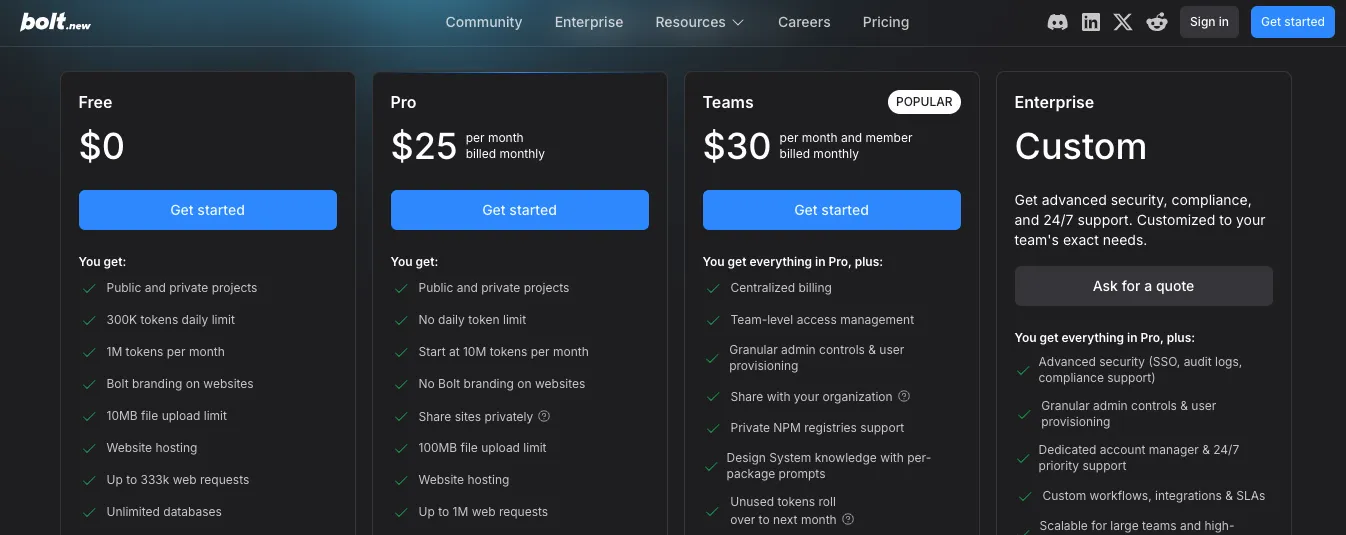
Bolt.new pricing has four main options: Free, Pro, Teams, and Enterprise.
Bolt Free
Price: $0
The Free plan includes:
- 300,000 tokens per day
- One million tokens per month
- Public and private projects
- Website hosting
- Up to 333,000 monthly web requests
- Unlimited databases
- A 10 MB upload limit
- Bolt branding on published websites
This is enough to test the AI app builder, generate a small application, and publish a basic project without entering payment details.
The daily limit matters.
Even when monthly tokens remain available, you can’t use more than 300,000 tokens in one day. A large generation or repeated debugging session may force you to wait until the daily allowance resets.
Free hosting also has traffic limits, and published sites display Bolt branding.
Bolt Pro
Price: $25 per month when billed monthly
Pro starts with ten million monthly tokens and removes the daily token cap.
It also includes:
- Public and private projects
- Up to one million monthly web requests
- Custom-domain support
- Private site sharing
- No Bolt branding
- A 100 MB upload limit
- Expanded database capacity
- A choice of database provider
- AI image editing
- Token rollover for one additional month
Bolt states that unused paid tokens can remain valid for up to two months while the subscription stays active.
This makes Pro the realistic starting point for a solo founder or freelancer working on a serious MVP.
The plan includes app generation, hosting, databases, and a custom domain in one subscription.
But tokens aren’t the same as prompts.
The amount used by one request depends partly on the size of the project. Bolt needs to synchronize more files with the AI as the application grows, so a small text change can become more expensive later in the build.
You can reduce that cost by making manual edits, using targeted prompts, and limiting the project context.
Bolt Teams
Price: $30 per member each month when billed monthly
Teams includes everything in Pro, plus:
- Centralized billing
- Shared team workspaces
- Access-management controls
- User provisioning
- Organization-wide sharing
- Private NPM registry support
- Team design-system knowledge
Each paid member has an individual token allowance.
Tokens aren’t pooled between the members of the team.
Here’s what that means in practice:
| Team Size | Base Monthly Cost |
|---|---|
| 2 members | $60 |
| 5 members | $150 |
| 10 members | $300 |
These figures cover the subscription seats before any extra usage or third-party costs.
A per-member plan works well when everyone actively builds and needs their own token allowance.
It becomes expensive when several stakeholders only need occasional access or review permissions.
Bolt Enterprise
Enterprise uses custom pricing.
It adds features such as SSO, audit logs, data-governance controls, custom integrations, priority support, and tailored billing.
Bolt’s pricing works best when:
- You’re building JavaScript-based web apps
- Your hosting needs are straightforward
- You want a predictable monthly token allowance
- You don’t need a dedicated server or scheduled deployment
- Most of the team actively uses AI generation
The potential cost problem appears as the application grows.
Larger projects use more context, extra team members require paid seats, and high-traffic websites may exceed the included hosting allowances.
Replit
Replit currently offers Starter, Core, Pro, and Enterprise.
Its subscription includes credits that can be spent across Agent and cloud services.
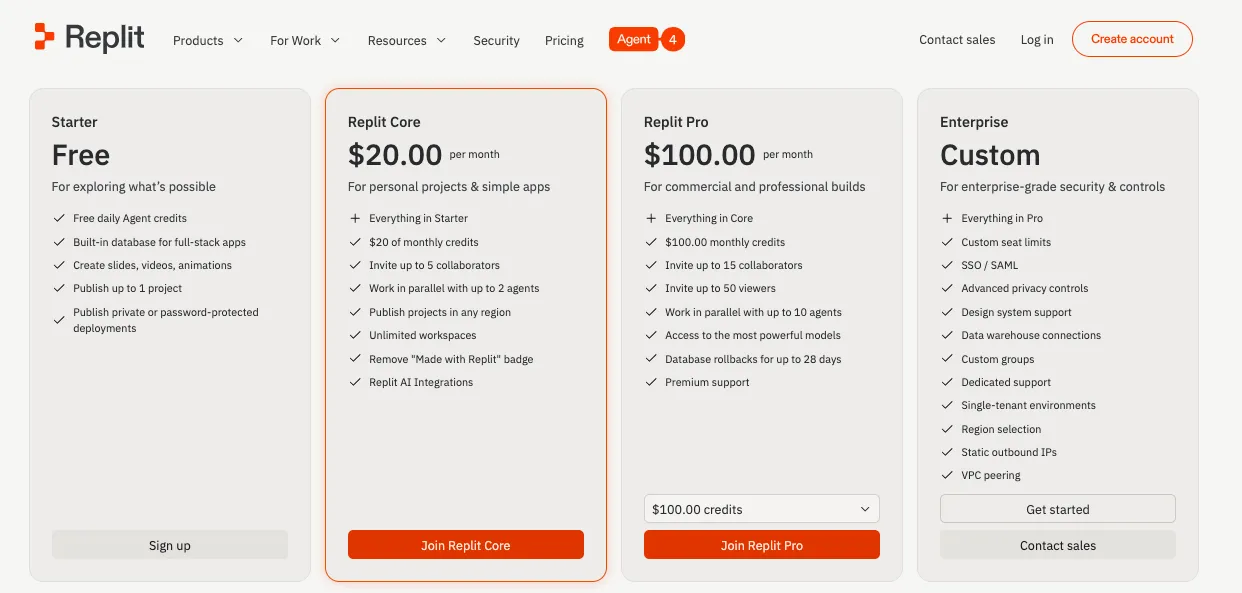
This means your monthly allowance may cover AI generation, deployments, database use, storage, and network activity rather than being reserved for prompts alone.
Replit Starter
Price: Free
Starter includes:
- Daily Agent credits
- A built-in database
- One published project
- Private or password-protected publishing
- Lite build for smaller AI changes
- Limited monthly cloud credits
The free published application expires after 30 days but can be republished. Starter projects also display Replit branding.
Starter is useful for learning, prototyping, and testing the Project Editor.
It isn’t ideal for a growing product that needs several published apps, larger Agent tasks, or predictable long-term infrastructure.
Replit Core
Price: $25 per month, or $20 per month when billed annually
Core includes $25 in monthly credits.
It also gives you:
- Up to five collaborators
- Up to two parallel agents
- Unlimited workspaces
- Publishing in different regions
- Replit AI Integrations
- Full Build modes
- Plan Mode
- Unlimited published projects
- Removal of the Replit badge
The monthly credits are applied to paid Replit services. Once the included credits are used, pay-as-you-go charges can begin if they’re enabled.
Core is more than an AI-message subscription.
It covers the broader development environment, including collaboration and publishing options.
This can make it good value for a small technical team because up to five collaborators are included without separate seat charges.
However, those people share the available credits.
If several builders use Agent heavily or the application consumes regular server resources, the $25 credit allowance may run out quickly.
Replit Pro
Price: $100 per month, or $95 per month when billed annually
Pro currently includes:
- $100 in monthly credits
- Up to 15 collaborators
- Up to 50 viewers
- Up to ten parallel agents
- Access to more capable models
- Turbo mode
- One-month credit rollover
- Database recovery for up to 28 days
- Premium support
Pro replaced Replit’s older small-team plan and doesn’t charge separately for each of the included builder seats.
For a ten-person team, the $100 monthly base price can be less expensive than Bolt Teams at $30 per member.
But this isn’t a direct one-to-one comparison.
Replit’s team shares a pooled credit allowance, while Bolt members receive their own token allocations. The real value depends on how often each person uses Agent and how much infrastructure the applications consume.
Replit Enterprise
Enterprise uses custom pricing and includes:
- Custom seat limits
- SSO and SAML
- Advanced privacy controls
- Design-system support
- Custom groups
- Single-tenant environments
- Region controls
- Static outbound IPs
- VPC peering
This plan is aimed at organizations that need tighter identity, network, privacy, and governance controls.
Here’s the part that makes Replit pricing harder to predict.
The subscription credits cover several different types of usage.
You may spend them on:
- Agent work
- Autoscale compute
- Reserved virtual machines
- Scheduled tasks
- Database storage
- App Storage
- Data transfer
- AI integrations
Autoscale apps can cost very little when they receive limited traffic because the service can stop charging for compute while idle. Reserved virtual machines cost more consistently because their resources stay active.
This flexibility is useful.
But you need to monitor the Usage dashboard and set spending controls so an unexpected traffic spike, long Agent task, or always-running service doesn’t create a surprise bill.
Winner: It’s a Tie
Bolt.new and Replit use different pricing models, so there isn’t one universal winner.
Choose Bolt.new if: You’re a solo builder creating a JavaScript web app and want AI generation, hosting, databases, and custom-domain support inside one $25 monthly plan.
Choose Replit if: You need a broader cloud-development platform, several included collaborators, multiple runtime choices, or applications that require scheduled and always-running services.
Bolt is usually easier to estimate for a small web MVP.
Replit becomes more cost-effective when a team uses its included collaborator seats or when the project needs infrastructure Bolt doesn’t provide directly.
The trade-off is that Replit’s final cost is more closely tied to actual Agent and cloud-resource use.
Why Vitara.ai Can Be More Cost-Effective for Early-Stage Builders
Vitara.ai uses a simpler three-plan structure.
Starter
Price: Free
The Starter plan includes:
- Five credits per day
- Twenty one-time credits
- Prompt-based AI assistance
- No payment commitment
The pricing page describes it as an exploration plan rather than a full long-term development tier.
Build
Price: $20 per month
Build includes:
- 100 monthly credits
- Faster AI processing
- Manual code editing
- Code downloading
- Custom-domain support
- Everything included in Starter
This is the plan most solo founders and freelancers would likely need for a real project because source-code editing, download access, and custom domains sit behind the paid tier.
Scale
Price: $50 per month
Scale includes everything in Build and raises the allowance to 250 monthly credits.
Vitara positions this plan for professionals and teams with heavier usage. Custom plans are available when the standard credit allowances aren’t enough.
Here is how the starting paid plans compare:
| Pricing Factor | Bolt.new Pro | Replit Core | Vitara.ai Build |
|---|---|---|---|
| Monthly Price | $25 | $25 | $20 |
| Annual Discount Shown | Available | $20/month effective | Not listed |
| AI Usage Model | Tokens | Shared credits | Credits |
| Included AI Allowance | Starts at 10M tokens | $25 in monthly credits | 100 monthly credits |
| Code Editing | Included | Included | Included |
| Code Download/Export | Included | Included | Included |
| Custom Domain | Included | Included with publishing | Included |
| Database Stack | Bolt Database or Supabase | Replit Database | Supabase |
| Team Collaboration | Paid sharing; Teams priced per member | Up to 5 on Core | GitHub-based workflow |
| Best For | JavaScript web apps | Flexible cloud development | React and Supabase MVPs |
These usage units can’t be compared directly.
Ten million Bolt tokens, $25 in Replit credits, and 100 Vitara credits measure different types of work. The table helps compare the plan structure, not the number of AI changes you’ll receive.
Vitara.ai is the lowest-priced starting paid option of the three at $20 per month. It includes code editing, source-code downloading, and a custom domain without requiring the $25 entry price of Bolt Pro or the monthly version of Replit Core.
It also gives you a fixed React and Supabase stack.
That can reduce external setup costs when those technologies already match your project.
You don’t need to separately choose a frontend framework, connect an unrelated database, or rebuild the authentication system in another tool.
Vitara.ai may be the better-value option if:
- You’re building a React and Supabase application
- You want source-code access from a lower-priced plan
- You need a custom domain
- You want a clearer jump from $20 to $50
- You don’t need Replit’s dedicated runtime options
- You don’t need Bolt’s larger token allowances or team design-system features
But pricing shouldn’t be the only deciding factor.
Vitara’s 100 monthly credits may not be enough for a long or highly iterative build. Its pricing page doesn’t give a detailed breakdown of how many credits common development tasks consume, so the practical value will depend on the size and complexity of your application.
For a focused SaaS MVP, dashboard, booking platform, or customer portal using React and Supabase, Vitara.ai offers the most affordable paid starting point.
For a large multi-language application, complex cloud infrastructure, or a team running several parallel Agent tasks, Replit may justify the higher price.
For fast JavaScript-based generation with generous token allowances and built-in web hosting, Bolt.new may still give a solo builder more room to iterate.
Bolt.new is fast. Replit gives deep control. Vitara.ai helps you build focused full-stack apps with AI, editable code, GitHub support, and a $20/month Build plan.
Explore Vitara.ai →
My Final Thoughts
Bolt.new and Replit are both capable AI app builders, but they’re built for different types of users.
Bolt.new is the better choice if you want to generate a polished JavaScript web app quickly with minimal setup. Replit is better suited to developers and teams that need broader language support, deeper debugging tools, flexible deployments, and more control over long-term development.
Vitara.ai sits between the two. It’s a strong option for founders who want a simpler React and Supabase workflow with editable code and a lower starting price.
For a fast web MVP, choose Bolt.new. For a more complex or persistent application, choose Replit. For a focused full-stack build without too much technical setup, Vitara.ai is worth considering.
Want to compare more tools before deciding? Read these next:
FAQs About Bolt.new vs Replit
Is Bolt.new better than Replit?
Bolt.new is better for quickly building polished JavaScript apps. Replit is better for complex projects requiring broader language support, advanced debugging, and flexible deployment.
Which is easier for beginners, Bolt.new or Replit?
Bolt.new has the simpler interface and faster prompt-to-preview workflow.
Replit offers more control, but beginners may need time to understand its development tools.
Is Bolt.new or Replit cheaper?
Both paid plans start around $25 monthly. Bolt uses tokens, while Replit combines subscription credits with usage-based cloud costs.
Can Bolt.new build full-stack applications?
Yes. Bolt.new supports:
- Databases
- Authentication
- File storage
- Server functions
- Hosting
However, its backend development is focused on JavaScript and Node.js.
Is Replit suitable for production applications?
Replit can host production apps using autoscaling, reserved servers, or static deployment.
You’ll still need to review security, performance, backups, and generated code.
Does Bolt.new support Python?
No. Bolt.new focuses on JavaScript-based technologies and Node.js backends.
Choose Replit when your application specifically requires Python.
Which is better for building a SaaS MVP?
Bolt.new works well for a fast JavaScript SaaS MVP.
Replit is better when the product needs complex backend logic, scheduled tasks, or persistent servers.
Can I export code from Bolt.new and Replit?
Yes. Both platforms let you access your source code, connect projects to GitHub, and continue development in another code editor.
Can I move a Bolt.new project to Replit?
Yes.
- Connect Bolt.new to GitHub
- Import the repository into Replit
- Install dependencies
- Update platform-specific database or deployment settings
Which platform offers better databases and authentication?
Replit offers more backend flexibility and database control.
Bolt.new provides a simpler built-in setup that works well for common SaaS applications and customer portals.
Is Bolt.new only for frontend development?
No. Bolt.new now includes databases, authentication, storage, server functions, secrets, and hosting.
Its main restriction is JavaScript-based backend development.
Which is better for mobile app development?
Both support Expo and React Native.
Replit offers a more guided testing and publishing workflow, while Bolt.new provides strong generation with greater manual setup during app-store submission.
Which platform is better for developers?
Replit is generally better for developers because it includes a complete code editor, terminal, console, Git tools, database controls, and multiple deployment options.
Which platform is better for non-technical founders?
Bolt.new is easier for founders who want fast results with fewer development decisions.
Replit becomes more useful when the product grows technically complex.
Can Bolt.new or Replit build apps without coding?
Yes, both can generate applications from prompts.
However, understanding basic code and testing becomes helpful when fixing errors or preparing a serious product for launch.
Does Replit support more programming languages than Bolt.new?
Yes. Replit supports many programming languages and project types.
Bolt.new mainly focuses on JavaScript frameworks and Node.js backend applications.
Which is better for background jobs and automations?
Replit is better for:
- Scheduled tasks
- Always-running bots
- Background processes
- Persistent API servers
Bolt server functions are better suited to request-based backend tasks.
Do Bolt.new and Replit offer free plans?
Yes. Both offer free plans for testing app generation and building small projects, but their AI usage, hosting, and publishing limits differ.
Can teams collaborate inside Bolt.new and Replit?
Both support collaboration.
Replit offers stronger parallel development and task management, while Bolt.new provides a simpler shared project experience with roles and real-time editing.
Is Vitara.ai a good alternative to Bolt.new and Replit?
Vitara.ai is worth considering when you want a focused React and Supabase stack, editable source code, GitHub support, and a lower-priced starting plan.
What’s New?