Best AI Tool for Freelancers to Create Web Apps in Under an Hour
Building a web app used to feel like a full project by itself.
You had to plan the layout, write frontend code, connect a backend, set up a database, add authentication, fix bugs, test the app, and then figure out deployment. For freelancers, that can easily turn a simple client request into days of work.
That’s exactly why AI app builders are getting so much attention right now.
A good AI web app builder can help you move from a rough idea to a working first version much faster. Instead of starting with a blank screen, you describe what you want to build, and the tool helps generate the structure, pages, code, and core functionality.
For freelancers, this matters a lot. You’re usually working with tight deadlines, limited budgets, and clients who want to see progress quickly. You may not always need a huge development setup just to create a client portal, dashboard, booking app, internal tool, or SaaS MVP.
That’s where Vitara AI fits in.
Vitara is an AI-powered vibe coding tool built to help users create websites, mobile apps, and the backend that powers them from one platform. It uses natural language prompts to generate full-stack applications, which means it can help with both the visible part of your app and the behind-the-scenes logic that makes it work.
So if you’re looking for the best AI tool for freelancers to create web apps in under an hour, Vitara is one of the most practical options to look at.

Turn your freelance project idea into a working web app with React frontend, Supabase backend, and downloadable code.
Start Building with Vitara.ai →
Why Freelancers Need Faster AI Web App Builders
Freelancers don’t just sell code or design. They sell outcomes.
A client doesn’t usually care how many files you created, which framework you used, or how complex the backend was. They care about whether the app works, solves their problem, and gets delivered on time.
That’s why speed has become such a big advantage.
A freelancer who can turn a client brief into a working prototype in one hour has a serious edge over someone who needs a few days just to prepare the first version. It doesn’t mean you should skip quality. It means you can reach the testing and feedback stage much faster.
The problem is that traditional web app development has too many moving parts.
You need a frontend, which is the part users see. You need a backend, which handles data, users, and app logic. You may need a database to store information. You may need authentication so users can log in. You may need API connections if the app talks to other tools. Then you still have to deploy everything so the client can actually use it.
Even no-code tools can take time. As Zapier points out in its AI app builder research, building apps still involves data planning, interface design, app logic, testing, hosting, deployment, and maintenance. Raw AI-generated code is often only a starting point unless you use a dedicated app-building platform.
This is where a focused AI app builder for freelancers can be helpful.
Instead of jumping between a code editor, database tool, hosting platform, design tool, and AI chatbot, you can use one AI-powered app development platform to get the first working version ready faster.
For a freelancer, that can help in a few ways:
You can test client ideas before spending days on development.
You can show a working MVP during a proposal or discovery call.
You can build dashboards, portals, and internal tools without starting from zero.
You can handle revisions faster because changes can be made through prompts.
You can spend more time solving the client’s actual problem instead of setting up the same technical foundation again and again.
That’s the real promise of an AI tool like Vitara. It’s not just about writing code faster. It’s about reducing the boring setup work that slows freelancers down.
What Makes an AI Tool Good for Freelancers?
Not every AI app builder is useful for freelance work.
Some tools are good for simple landing pages but struggle when you need real app logic. Some are great for developers but confusing for beginners. Some generate attractive screens but leave you stuck when it’s time to connect data, users, or backend features.
So before calling any tool the best AI tool for freelancers, it’s worth looking at what actually matters in real projects.
1. It Should Save Time, Not Add More Steps
The whole point of using an AI web app builder is to move faster.
If a tool asks you to configure too many things before you can build anything, it starts feeling like traditional development again. Freelancers need something that helps them start quickly, describe the app clearly, and get a useful first version without spending hours setting up the environment.
This is especially helpful when you’re working on smaller client projects, MVPs, lead management tools, service dashboards, or quick internal apps.
The best AI app builder should help you skip the blank-page stage.
2. It Should Understand Prompts Properly
Prompt quality matters a lot.
If you type, “Build a client portal for a freelance agency with login, project tracking, invoices, and file uploads,” the tool should understand the main idea. It should not just create a pretty homepage and ignore the actual app features.
A good prompt-to-app builder should understand user roles, pages, forms, dashboards, data fields, and basic workflows.
You’ll notice this very quickly when testing any AI development platform. If the first output is close to what you asked for, the tool saves time. If you have to explain the same thing ten different ways, the tool becomes frustrating.
3. It Should Build More Than Just the UI
A nice-looking interface is useful, but it’s not enough.
Freelancers often need to build apps that actually do something. A client portal should let users log in. A dashboard should display data. A booking app should save appointments. A SaaS MVP should support user actions, not just show static cards on a page.
That means the AI tool should help with frontend and backend.
In simple words, frontend is what people see on the screen. Backend is the part that stores data, handles logic, manages users, and keeps the app working behind the scenes.
This is one reason Vitara stands out. It is positioned as a full-stack AI app builder that can generate frontend and backend code from natural language prompts. Its website mentions support for React frontend, Supabase backend, APIs, databases, authentication, and prompt-based app changes.
For freelancers, that’s more useful than a tool that only creates a design mockup.
4. It Should Be Easy to Edit
Client work rarely ends with the first version.
A client may say:
“Can we add a search filter?”
“Can you make the dashboard cleaner?”
“Can we add a login page?”
“Can we show project status by color?”
“Can you make this work better on mobile?”
This is where editing flexibility becomes important.
A good AI software development tool should let you make changes quickly without rebuilding everything from scratch. Prompt-based editing is useful here because you can describe the change in plain language and let the tool update the app.
For freelancers, this can make revisions feel less painful. You still need to review the output, but you’re not manually rewriting every small piece of code.
5. It Should Give You Control Over the Code
This is a big one.
Some no-code AI app builders are easy to use, but they can feel limiting when a project grows. You may not get full access to the code. You may struggle to customize advanced features. You may also feel locked into the platform.
Vitara takes a different approach. It describes itself as a vibe coding tool, not a traditional no-code tool. It generates real code that users can inspect, edit, export, and deploy. Vitara also says users maintain ownership of their code and data.
That matters for freelancers because client projects often need flexibility.
Maybe you want to edit the code manually. Maybe your client wants to host it somewhere else. Maybe a developer needs to review the app later. Having access to real code gives you more room to work.
From booking apps to SaaS MVPs, Vitara helps freelancers create full-stack apps from simple prompts.
Try Vitara for Freelance Projects →
Why Vitara Is the Best AI Tool for Freelancers to Build Web Apps Fast
Vitara works well for freelancers because it focuses on one of the hardest parts of app development: turning an idea into a working product structure quickly.
It’s not just an AI chatbot that gives you code snippets. It’s designed as an AI-powered full-stack development platform where you can describe what you want to build and generate a web or mobile app with frontend and backend support.
That makes it especially useful for freelancers who want to create web apps quickly without spending hours connecting different tools.
Let’s say a client asks for a simple project management portal.
In a traditional workflow, you might need to create the React frontend, design the dashboard, set up routing, connect Supabase or another database, create authentication, build forms, write backend logic, test everything, and then deploy it.
With Vitara, the starting point becomes much faster. You can describe the app in natural language and let the tool generate the structure. Vitara’s DevStack includes React for the frontend, Supabase for the backend, browser-based development with zero configuration, and GitHub integration for version control and collaboration.
That combination is useful because freelancers usually don’t want to waste time setting up the same foundation again and again.
React helps create modern, responsive user interfaces. Supabase helps with backend needs like authentication, database storage, real-time data, and APIs. GitHub integration helps if you want to manage versions, collaborate with another developer, or keep the project organized.
The real benefit is speed with control.
Many beginner-friendly tools are fast but limited. Many developer tools are powerful but slow for non-technical users. Vitara sits in a practical middle area. It helps beginners describe what they want in plain language, but it also gives more technical users access to real code.
That’s why it makes sense for different types of freelancers.
A freelance web developer can use Vitara to speed up the first draft of a client app.
A freelance designer can use it to turn UI ideas into working prototypes.
A freelance marketer can build internal tools, campaign dashboards, or lead tracking apps.
A freelance consultant can create client portals or simple SaaS-style tools without hiring a full development team.
Of course, you still need to test the app. AI-generated apps should always be reviewed before you deliver them to a client. You’ll want to check the forms, user flows, database fields, mobile responsiveness, login system, and any sensitive data handling.
But even with that review step, Vitara can help you reach a usable first version much faster than building everything manually.
What Can Freelancers Build with Vitara in Under an Hour?
The phrase “under an hour” works best when we’re talking about first versions, MVPs, prototypes, and simple client-ready tools.
A complex enterprise SaaS product with advanced permissions, payment logic, analytics, admin controls, and security reviews will take longer. That’s normal. AI can speed up the process, but it doesn’t remove the need for planning and testing.
Where Vitara becomes very useful is in fast app creation.
Here are some practical examples.
Client Portals
A client portal is one of the most useful web apps freelancers can build.
Agencies, consultants, coaches, accountants, and service providers often need a simple place where clients can log in, view project updates, upload files, check invoices, or send requests.
With Vitara, you can prompt the tool to create a client dashboard, admin dashboard, login page, project list, file section, and status tracking flow.
This is helpful if you want to offer more than a basic website. A portal feels more valuable because it gives the client a working system, not just online pages.
Booking Apps
Freelancers can also use Vitara to build booking apps for service businesses.
Think of tutors, fitness trainers, salons, consultants, clinics, photographers, and repair services. Many of these businesses need a simple app where users can choose a service, select a time, submit details, and receive confirmation.
A booking app may need forms, availability fields, customer records, and an admin view. Instead of building all of that manually, you can start with a detailed prompt and let Vitara generate the first version.
Dashboards and Internal Tools
Internal tools are another strong use case.
A small business may need a dashboard to track leads, orders, tasks, revenue, inventory, support tickets, or employee requests. These tools don’t always need a fancy design. They need to be clear, useful, and easy to update.
Vitara can help freelancers create AI dashboards and internal tools faster because it supports full-stack app generation. That means you’re not limited to static pages. You can build tools that store and display real data.
SaaS MVPs and Product Prototypes
If you work with startup founders, this is where things get interesting.
Many founders don’t need a perfect product on day one. They need a working MVP to test an idea, show investors, collect user feedback, or validate demand.
Vitara can help freelancers build SaaS MVPs from prompts, especially when the idea includes common app features like user login, dashboards, forms, data tables, settings pages, and admin views.
This is useful if you offer MVP development services. You can move faster, show progress earlier, and spend more time improving the product instead of setting up the same technical base every time.
Mobile-Friendly Web Apps
Freelancers also need to think about mobile users.
A web app that looks fine on desktop but breaks on mobile can hurt the client experience. Vitara mentions responsive UI support through React and modern tooling, which is useful for building apps that work across screen sizes.
For client work, this matters because many users will open dashboards, booking pages, or portals from their phones.
That’s why a good AI website builder or AI app builder should not only generate pages quickly. It should also help create layouts that feel usable on different devices.
How to Build a Web App with Vitara in Under an Hour
The easiest way to use Vitara is to treat it like a product-building partner.
You don’t want to start with a vague prompt like “build me an app.” That usually gives the AI too much room to guess. Instead, give it the kind of brief you would give to a developer or product designer.
The clearer your idea, the better the first version will be.
Step 1: Start with a Specific App Idea
Before opening Vitara, write down what you want the app to do.
For example, instead of saying:
“Create a client portal.”
Make it more specific:
“Create a client portal for freelancers where clients can log in, view project updates, upload files, check invoice status, and send feedback.”
That second prompt gives the AI more direction. It explains the user, the main purpose, and the core features.
This is helpful because AI app builders work better when you describe the workflow, not just the app name.
A freelancer can use this method for different types of projects, such as:
- Client portals
- Booking apps
- Admin dashboards
- Lead tracking systems
- SaaS MVPs
- Internal business tools
- Project management apps
- Simple CRM tools
- Inventory dashboards
- Service request apps
You don’t need to plan every small detail at the start, but you should know the main problem the app is solving.
Step 2: Write a Clear Prompt
Once you know the idea, turn it into a detailed prompt.
Here’s a sample prompt you can use inside Vitara:
“Build a responsive web app for freelancers to manage client projects. The app should include user login, a client dashboard, an admin dashboard, a project list, task status tracking, file upload section, invoice tracking, and a simple messaging area. Use a clean modern design. Make the layout mobile-friendly.”
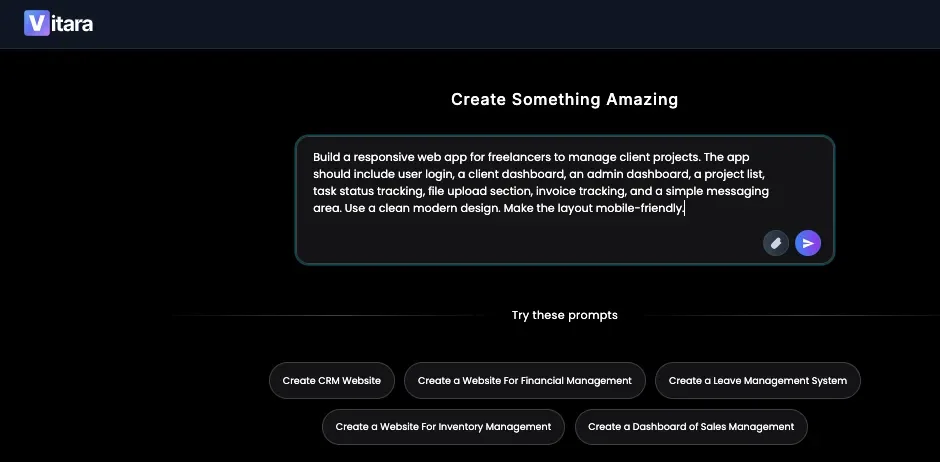
This kind of prompt works well because it covers the main parts of the app:
- Who the app is for
- What the app should do
- Which pages it needs
- Which features should be included
- What the design should feel like
- Whether it should work on mobile
Vitara is built around natural language prompts, so this is the main skill you need to get better results. Its platform is positioned around turning ideas into web and mobile apps with frontend, backend, and app logic support.
Step 3: Let Vitara Generate the First Version
After you enter the prompt, Vitara can generate the first structure of the app.
This is where you’ll usually see the main pages, UI sections, navigation, forms, dashboards, and app flow come together.
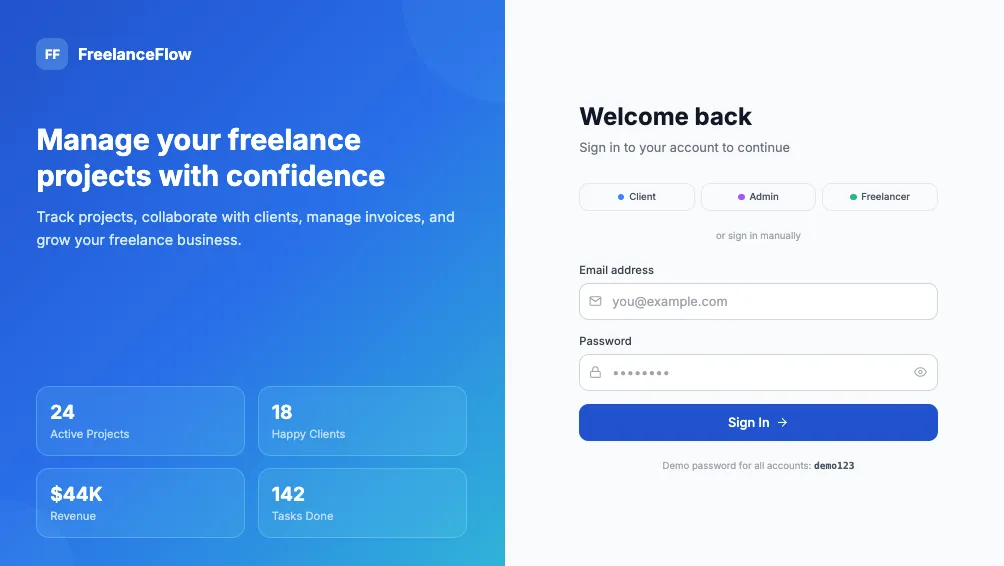
For freelancers, this is the part that saves the most time.
Instead of spending the first few hours setting up folders, installing packages, creating components, writing boilerplate code, and connecting basic app logic, you can start from a working base.
That doesn’t mean the first version will be perfect. It means you’re no longer staring at a blank screen.
You now have something you can test, edit, and show to a client.
Step 4: Review the App Like a Freelancer, Not Just a User
Once Vitara creates the app, don’t just look at whether it looks nice.
Review it like someone who has to deliver it to a client.
Check the main pages.
Click through the navigation.
Test the forms.
Look at the dashboard layout.
Check whether the app works on mobile.
See if the user flow makes sense.
Ask yourself: “Would my client understand this without me explaining every part?”
That question matters. Freelance projects are not only about building features. They’re about making the final product usable for the client and their customers.
If the app feels confusing, use prompt-based editing to improve it.
Step 5: Use Follow-Up Prompts to Improve the App
This is where Vitara becomes more useful than a basic website builder.
You can keep refining the app by asking for changes in plain language.
For example:
“Add a search filter to the project list.”
“Create a separate admin dashboard for managing clients.”
“Make the invoice section show paid, pending, and overdue invoices.”
“Add a dark mode option.”
“Make the dashboard cards smaller on mobile.”
“Add a status badge for each task.”
“Create a cleaner sidebar navigation.”
“Add a client feedback form on each project page.”
This feels much closer to how freelancers actually work.
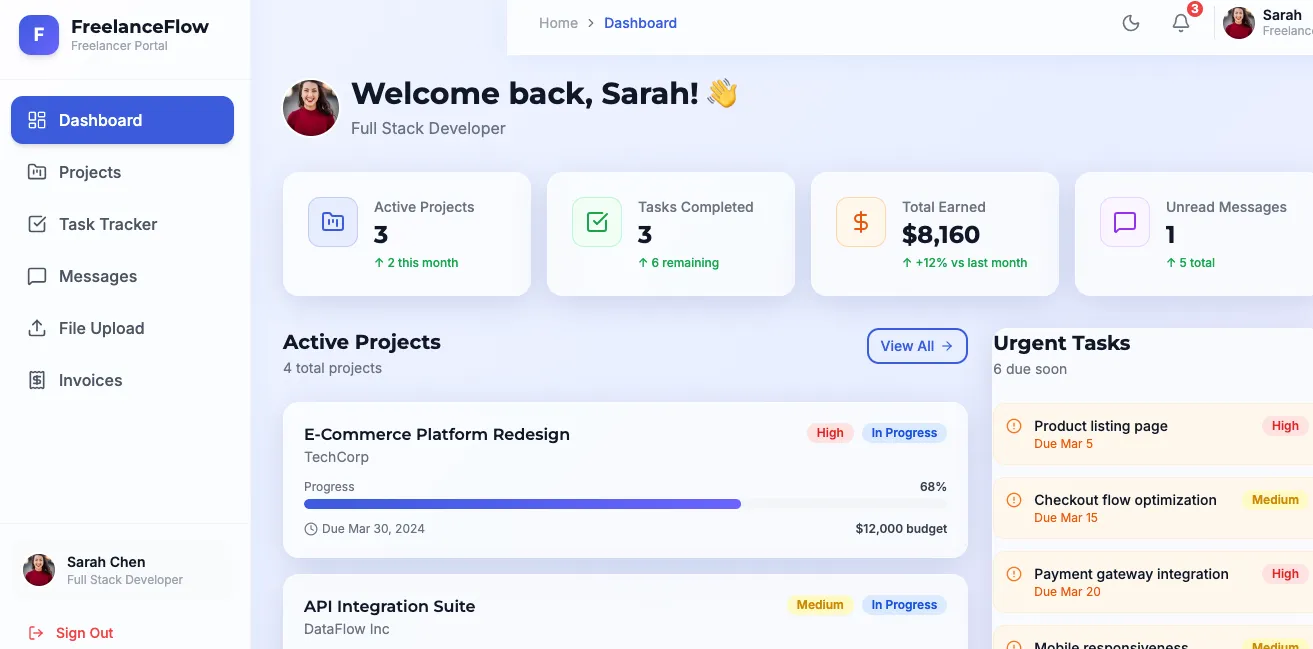
Clients rarely give perfect requirements on the first call. They see the first version, then they ask for edits. A prompt-based app development workflow makes those edits faster because you can describe the change instead of rebuilding the whole section manually.
Step 6: Export, Edit, or Deploy the App
Once the first version looks solid, you can move toward delivery.
This is where code ownership becomes important.
Vitara positions itself as a vibe coding tool that gives users editable and downloadable code, along with GitHub integration and support for developer workflows.
That is useful for freelancers because you may want to:
Continue editing the app manually
Share the project with another developer
Store the project in GitHub
Deploy it for client review
Hand the code over to a client
Improve the app after the first version
A lot of no-code tools are easy at the start but limiting later. Vitara is more flexible because it gives you a path from prompt-based creation to real code control.
That’s one of the biggest reasons it works well for freelance web app projects.
Vitara vs No-Code Builders vs AI Code Assistants
There are many tools that claim to help people build apps faster.
Some are traditional no-code tools. Some are AI code editors. Some are AI website builders. Some are full-stack AI app builders.
The best choice depends on what you’re trying to build.
If you only need a simple landing page, a basic AI website builder may be enough.
If you’re an experienced developer and want help writing code inside your existing project, an AI code editor like Cursor or Windsurf may make more sense.
But if you’re a freelancer who wants to build a working web app from a prompt, Vitara fits a more practical middle ground.
| Feature | Traditional No-Code Builders | AI Code Assistants | Vitara AI |
|---|---|---|---|
| Best for | Simple apps and workflows | Developers writing code faster | Freelancers building web apps and MVPs |
| Coding required | Usually low | Usually yes | Minimal to start |
| Frontend generation | Yes, but often template-based | Yes, if you guide it | Yes |
| Backend support | Depends on the tool | Requires setup | Built into the workflow |
| Database support | Often limited or platform-specific | Manual setup | Supabase-backed workflow |
| Code ownership | Often limited | Yes | Yes |
| Prompt-based creation | Sometimes | Yes, but code-focused | Yes |
| Good for beginners | Usually yes | Not always | Yes |
| Good for developers | Sometimes limiting | Yes | Yes, especially for faster starting points |
| Best use case | Basic business tools | Real coding workflows | Full-stack web and mobile app creation |
The main difference is that Vitara is not only trying to help you design screens. It is built to help create full-stack applications, which means the app can include both the user-facing interface and the backend that powers it. Vitara’s official positioning highlights web apps, mobile apps, and backend creation from one platform.
That makes it a better fit for freelancers who need more than a static website.
A no-code builder may be fine if the project is simple and the client does not need much customization.
An AI code assistant may be better if you already have coding skills and want help inside an existing codebase.
Vitara works best when you want to move from idea to working app quickly, while still keeping more control than a locked no-code platform usually gives you.
Why Vitara Works Well for Freelancers Specifically
Freelancers need tools that help them move faster without making the final project feel cheap or unfinished.
That’s the balance Vitara tries to offer.
It gives you the speed of an AI app builder, but it also gives you more technical control than a basic no-code AI app builder. This matters because freelance projects can start small but grow quickly.
A client may first ask for a simple dashboard. Then they may ask for user login. Then they may want file uploads, payment tracking, admin controls, or API connections. If your tool can’t grow with the project, you may hit a wall.
Vitara is useful because it can help freelancers handle the early version quickly and still leave room for deeper customization later.
It Helps You Deliver Faster First Drafts
The first version of a web app usually takes the most setup time.
You have to decide the structure, create the pages, connect basic logic, and make the app look presentable. Vitara helps reduce that early workload.
For freelancers, this means you can show clients something real much faster.
A working prototype is usually more useful than a long explanation. Clients understand better when they can click through the app, see the dashboard, test the form, and imagine how it will work in their business.
It Helps You Sell Higher-Value Services
A normal website project is useful, but a working web app usually feels more valuable.
If you can offer client portals, internal dashboards, MVPs, booking systems, and custom business tools, you can position yourself above freelancers who only build static websites.
Vitara can help with that shift.
You’re not just saying, “I’ll build your website.”
You can say, “I can help you create a working tool for your business.”
That sounds more valuable because it solves a real workflow problem.
It Works for Both Beginners and Technical Freelancers
This is another strong point.
If you’re not deeply technical, Vitara gives you a way to build apps through prompts. You can describe the idea, generate a first version, and refine it step by step.
If you are technical, you can use Vitara to speed up your workflow. You’re not replacing your skills. You’re reducing repetitive work and getting to the custom parts faster.
That makes Vitara useful for different freelancer profiles:
- Freelance developers who want faster MVP builds
- Freelance designers who want working prototypes
- Freelance marketers who need dashboards and campaign tools
- Freelance consultants who want client portals
- Small agencies that need to build client apps quickly
- Startup freelancers who help founders validate product ideas
It Reduces Tool Switching
One hidden problem in freelance work is tool switching.
You may use one tool for design, another for code, another for the database, another for authentication, another for deployment, and another for client feedback.
That slows you down.
Vitara helps by bringing more of the app-building workflow into one place. You can prompt, generate, edit, connect backend logic, work with code, and move toward deployment with less setup friction.
That doesn’t mean you’ll never use other tools. But it does mean you can get much further before needing a complicated development stack.
Realistic Limitations: What to Check Before Delivering an AI-Built App
Vitara can help you build faster, but you should still treat AI-generated apps with care.
This is true for every AI software development tool.
An AI app builder can create a strong first version, but it doesn’t remove your responsibility as a freelancer. Before you deliver anything to a client, you need to test it properly.
Here’s what you should check.
Test the Main User Flow
Go through the app like a real user.
If it’s a booking app, try booking a service.
If it’s a client portal, try logging in and viewing a project.
If it’s a dashboard, check whether the data layout makes sense.
If it’s a SaaS MVP, test the main action users are supposed to take.
The app should not only look good. It should feel clear and usable.
Review Forms and Data
Forms are easy to overlook.
Check whether fields are saving correctly. Make sure required fields are marked properly. Test what happens when a user submits incomplete information. Look at how the app handles errors.
If the app stores client data, invoice details, bookings, files, or user information, test that part carefully.
Check Authentication
If your app includes login, signup, user roles, or admin access, spend extra time reviewing authentication.
In simple words, authentication is the system that controls who can access the app.
For a prototype, basic authentication may be enough. For a client-facing product, you need to be more careful. Make sure users can only access the parts they’re supposed to see.
Review Mobile Responsiveness
A web app should work on different screen sizes.
Open the app on mobile, tablet, and desktop. Check whether buttons are easy to tap, tables are readable, forms fit the screen, and navigation doesn’t break.
This matters a lot for client portals, booking apps, dashboards, and internal tools because users may open them from anywhere.
Don’t Skip Security Review for Serious Projects
If the app handles sensitive data, payments, private files, customer records, or business information, get a proper technical review before launching it publicly.
AI can speed up development, but it should not replace careful testing.
Vitara is great for building quickly, but freelancers should still review the generated output before calling it production-ready. This honest approach will also make your clients trust you more.
Who Should Use Vitara?
Vitara is best for freelancers who want to build web apps, mobile apps, MVPs, dashboards, client portals, and internal tools faster than traditional development allows.
You’ll probably like Vitara if:
- You build apps for clients
- You create MVPs for startup founders
- You want to offer more than basic websites
- You need a faster way to create dashboards and portals
- You understand app ideas but don’t want to write everything from scratch
- You’re a developer who wants to speed up the first version
- You’re a designer who wants to turn ideas into working prototypes
- You’re a freelancer who wants to test client ideas quickly
Vitara may not be the best fit if you only need a simple one-page website. In that case, a basic AI website builder may be faster.
It may also feel like too much if you don’t want to test, edit, or review anything. AI app builders are powerful, but they still need human judgment.
For serious production apps, you should also have a developer review the code, security, database structure, and deployment setup.
Is Vitara Worth Using for Freelancers?
Yes, Vitara is worth using if you want to build real app projects faster.
Its biggest strength is that it helps freelancers go beyond simple page generation. You can use it as an AI full-stack app builder to create web apps, mobile apps, backend logic, dashboards, portals, and MVPs from prompts.
That makes it more useful than a basic AI website builder if your goal is to build something interactive.
It is especially strong for:
- SaaS MVPs
- Freelance client portals
- Business dashboards
- Booking apps
- Internal tools
- Product prototypes
- Mobile-friendly web apps
- Startup idea validation
The main thing to remember is this: Vitara should help you build the first version faster, not make you careless.
Use it to save time. Use it to move faster. Use it to test ideas. But still review the output before sending it to a client.
That’s the best way to use any AI development platform.
Use Vitara to create web apps, dashboards, portals, and MVPs without starting from scratch.
Start Building with Vitara.ai →
Final Verdict: Best AI Tool for Freelancers to Create Web Apps in Under an Hour
Vitara is one of the best AI tools for freelancers who want to create web apps in under an hour because it focuses on speed, full-stack app generation, and real project flexibility.
It helps you turn a prompt into a working app structure, then refine that app through follow-up instructions. It supports web and mobile app creation, backend workflows, editable code, and a development process that feels practical for freelancers.
For a freelancer, that combination is valuable.
You can build faster first drafts.
You can offer better client deliverables.
You can create MVPs without starting from scratch.
You can work with real code instead of being fully locked into a closed no-code system.
You can turn client ideas into something they can actually click, test, and understand.
If your goal is to build simple websites, Vitara may be more than you need. But if your goal is to create working web apps, dashboards, portals, SaaS MVPs, or internal tools, Vitara is a strong tool to try.
For freelancers who want to build faster and offer more valuable app development services, Vitara is a practical choice.
Want to compare more tools before deciding? Read these next:
AI Tools for Students
AI Tools for Healthcare
Vibe coding tools for Enterprises
FAQs
What is the best AI tool for freelancers to create web apps?
Vitara is a strong option for freelancers because it helps users create web apps, mobile apps, and backend systems from natural language prompts. It is useful for building MVPs, dashboards, client portals, booking apps, and internal tools faster than traditional development.
Can I create a web app with AI in under an hour?
Yes, you can create a first version of a web app in under an hour if the app is simple enough. Tools like Vitara can help you generate the structure, pages, UI, backend flow, and core features quickly. More complex apps will still need extra testing, editing, and security review.
Is Vitara a no-code AI app builder?
Vitara is better described as a vibe coding tool or AI-powered full-stack development platform. It lets users build apps from prompts, but it also gives more code control than many traditional no-code tools. Vitara’s own website positions it around creating web apps, mobile apps, and backend systems with AI.
Can freelancers use Vitara without coding?
Yes, freelancers can start with Vitara using natural language prompts. You can describe the app you want to build and let the tool generate the first version. That said, basic technical understanding is still helpful when reviewing the app, testing features, and preparing it for client delivery.
What kind of apps can I build with Vitara?
You can use Vitara to build client portals, booking apps, dashboards, admin panels, SaaS MVPs, internal tools, project management apps, mobile-friendly web apps, and product prototypes. It is best suited for projects where you need more than a simple static website.
Is Vitara good for freelance developers?
Yes, Vitara can be helpful for freelance developers because it speeds up the early development stage. Instead of manually creating the same app foundation every time, developers can generate a starting point and then customize the code as needed.
Is Vitara good for beginners?
Vitara can be beginner-friendly because it uses prompts instead of forcing users to start with code. Beginners can describe what they want in plain language. The learning curve comes later, when they need to test the app, understand the generated structure, and make sure everything works correctly.
Does Vitara support frontend and backend development?
Vitara positions itself as a full-stack AI app builder, which means it helps with both frontend and backend creation. Its site highlights web apps, mobile apps, backend support, React frontend, Supabase backend, editable code, and GitHub workflows.
Should I use Vitara or a normal AI website builder?
Use a normal AI website builder if you only need a landing page, portfolio, blog, or basic business website.
Use Vitara if you want to build a working web app with features like login, dashboards, forms, database storage, client portals, admin panels, or SaaS MVP functionality.
Do AI-generated web apps need testing?
Yes. Always test AI-generated web apps before delivering them to a client. Check the forms, login system, database actions, mobile layout, user roles, navigation, and any sensitive data handling. AI can help you build faster, but the final quality still depends on careful review.
What’s New?