Base44 vs Vitara.ai: One-to-One Comparison
If choosing between Base44 and Vitara.ai feels confusing, you’re not alone.
Base44 gives you a no-code AI app builder where you can describe an idea, generate an app, use built-in backend features, manage data, add authentication, connect integrations, and publish without touching much code.
Whereas Vitara.ai combines AI app building with full-stack development support, React frontend, Supabase backend, editable code, downloadable code, GitHub workflow, custom domain support, and web and mobile app creation from one platform.
Both platforms can help you move from idea to working app.
But the difference starts showing when you compare
- code ownership
- backend flexibility
- mobile app support
- developer handoff
- how much control you actually get once your app grows beyond the first version.
I spent time studying both platforms by checking their app-building flow, pricing structure, backend approach, code control, mobile app support, and how each tool fits real product development needs.
Here is what stood out, feature by feature.
Base44 vs Vitara.ai: Quick Feature Breakdown
Don’t have much time to read?
I put together what we concluded in this comparison.
| Feature | Base44 | Vitara.ai | Who Wins? |
|---|---|---|---|
| Best For | Users who want a no code AI app builder with built in backend, database, auth, hosting, and quick publishing | Founders, developers, startups, and teams who want to build full stack web and mobile apps with real code control | Vitara.ai for serious app building, Base44 for quick no code apps |
| Pricing | Free plan, Starter at $16 per month, Builder at $40 per month, Pro at $80 per month, Elite at $160 per month, billed annually | Free Starter, Build at $20 per month with 100 credits, Scale at $50 per month with 250 credits | Vitara.ai |
| Free Plan | 25 message credits per month and 100 integration credits per month | 5 credits per day and 20 one time credits | Vitara.ai for daily usage, Base44 for monthly testing |
| App Building Style | Prompt driven no code app creation with visual editing and built in services | Vibe coding platform that generates full stack web and mobile applications from prompts | Vitara.ai |
| Frontend Development | App UI generated inside Base44 with responsive visual editing | React frontend with modern tooling out of the box | Vitara.ai |
| Backend Support | Managed backend with data management, authentication, backend functions, hosting, and NoSQL database | Supabase backend with authentication, real time subscriptions, and automatic APIs | Vitara.ai for backend flexibility, Base44 for built in simplicity |
| Code Editing | In app code edits available across paid plans | Editable generated code inside Vitara’s development environment | Vitara.ai |
| Code Ownership and Export | Code export available as ZIP, GitHub export requires Builder plan or higher | Users maintain ownership of code and data, with the ability to download and deploy code | Vitara.ai |
| GitHub Integration | Available from Builder plan and above | GitHub integration for version control, collaboration, and deployment workflows | Tie, but Vitara.ai feels more developer friendly |
| Mobile App Support | Apps adapt to mobile views, and users can ask the AI to adjust mobile layout | Builds web and mobile applications using natural language prompts | Vitara.ai |
| Custom Domain | Available from Builder plan and above | Included in the $20 per month Build plan | Vitara.ai |
| Integrations | Strong built in integrations including LLMs, file uploads, image tools, email, SMS, and database queries | Better suited for teams that want app logic, backend APIs, and code level customization | Base44 for built in integrations, Vitara.ai for product control |
| Scalability | Works well for quick apps and hosted workflows, but teams may depend more on Base44’s managed environment | Stronger path for scaling because teams can inspect, edit, export, and continue development outside the platform | Vitara.ai |
| Developer Handoff | Possible through code export and GitHub, mainly stronger on higher plans | Easier to hand off because Vitara.ai generates editable code with React and Supabase structure | Vitara.ai |
| Best Long Term Choice | Good for quick internal apps, prototypes, and business tools | Better for SaaS MVPs, production apps, mobile first products, and teams that want ownership | Vitara.ai |

Build web and mobile apps with AI prompts, React frontend, Supabase backend, and downloadable code.
Base44 vs Vitara.ai Feature Comparison
I’m not here to throw a lazy “Vitara.ai is better than Base44” line at you.
Because both tools can work, depending on what you’re trying to build.
Base44 is useful when you want a no-code AI app builder that gives you a quick way to create apps with built-in backend, database, authentication, hosting, and integrations. It removes a lot of setup work, which makes it attractive for non-technical users and teams that want to launch something fast. Base44 also supports code export and GitHub export on Builder plan or higher, according to its documentation.
Vitara.ai takes a different path. It focuses on building web and mobile apps with AI while giving users more control over the actual product structure. Vitara positions itself as a platform for creating websites, mobile applications, and the backend that powers them. It also highlights React frontend, Supabase backend, GitHub integration, editable code, downloadable code, and custom domain support in its product and pricing pages.
So let’s walk through each feature one by one and see how Base44 and Vitara.ai compare in real app-building use cases.
- App Building Experience Comparison
- Full-Stack Development Comparison
- Frontend and UI Development Comparison
- Backend and Database Comparison
- Code Ownership and Export Comparison
- Mobile App Development Comparison
- GitHub and Developer Workflow Comparison
- Integrations Comparison
- Pricing and Usage Limit Comparison
- Scalability and Long-Term Product Control Comparison
App Building Experience Comparison: Base44 or Vitara.ai?
When you’re choosing an AI app builder, the first thing you notice is how quickly it turns your idea into something usable.
That’s where Base44 gets a lot of attention.
You can describe the app you want, and Base44 helps generate the app structure, pages, backend logic, database, and deployment flow. This works well when you want to create internal tools, admin dashboards, client portals, workflow apps, or small business apps without setting up the stack yourself.
Base44
Base44 feels more no-code from the start.
You tell it what to build, review the result, ask for changes, and publish the app. For someone who does not want to think about frontend frameworks, backend setup, APIs, or deployment, that is a clear advantage.
It is especially useful for:
- quick business apps
- internal tools
- workflow dashboards
- admin panels
- simple MVPs
- non-technical users who want to avoid code
But there is a tradeoff.
The more serious your app becomes, the more you start caring about how the app is structured, how clean the code is, how much you can edit, and whether your team can continue development outside the platform.
That’s where Base44 can start feeling more controlled by the platform.
Vitara.ai
Vitara.ai also starts with prompts, but the direction feels more product-focused.
Instead of only helping you create a no-code app quickly, Vitara.ai gives you a stronger path toward building full-stack web and mobile apps with real code behind them. It is better suited for founders, developers, startup teams, and product builders who want AI speed without giving up technical control.
Vitara.ai is useful when you want to build:
- SaaS MVPs
- customer portals
- marketplaces
- mobile app ideas
- booking platforms
- dashboards with real data
- full-stack apps with backend logic
- products that may later need developer handoff
The workflow feels more practical for people who care about what happens after the first version.
Because the first generated app is only the beginning. You still need to edit screens, fix logic, connect data, improve UX, test flows, deploy, and scale. Vitara.ai feels stronger in that second phase.
Verdict
Base44 is good if your main goal is to create a working no-code app fast.
Vitara.ai is better if you want to build an app that can grow into a real product.
For quick experiments, Base44 works well. For full-stack app development with better control, Vitara.ai is the stronger choice.
Full-Stack Development Comparison
A lot of AI app builders promise to build full apps.
But “full app” can mean different things.
Sometimes it means a nice-looking frontend with basic data storage. Sometimes it means a complete application with frontend, backend, authentication, database, APIs, deployment flow, and code that a developer can actually continue working on.
That difference matters.
Base44
Base44 includes backend capabilities inside the platform.
Its backend platform covers serverless functions, authentication, database management, and hosting, so users can build full-stack apps without managing infrastructure directly.
That is helpful for non-technical users.
You do not need to choose a backend provider. You do not need to configure hosting. You do not need to wire every service manually. Base44 handles many of these pieces inside its own environment.
This makes Base44 strong for:
- no-code full-stack apps
- internal business tools
- forms and dashboards
- apps with login and data storage
- fast hosted prototypes
- workflow automation apps
But the ease comes with a question.
How much control do you want over the stack?
If your app grows, you may want more visibility into the frontend, backend, database structure, deployment options, and future engineering workflow. Base44 gives you a lot, but much of the experience still sits inside its managed platform.
Vitara.ai
Vitara.ai is stronger for users who want AI-generated full-stack apps with a clearer technical foundation.
Vitara.ai highlights React frontend and Supabase backend in its ecosystem. That matters because both are familiar to modern development teams. React gives you a widely used frontend foundation. Supabase gives you backend services like authentication, database, real-time features, and APIs.
This is helpful when you want to build something that does not feel trapped inside a black box.
Vitara.ai is a better fit for:
- full-stack SaaS products
- production-focused MVPs
- web and mobile applications
- apps that need backend flexibility
- apps that need future developer work
- teams that want code they can understand and extend
The platform gives users a better bridge between vibe coding and actual software development.
You can start with a prompt, but you’re not stuck at the prompt level forever.
Verdict
Base44 gives you built-in full-stack convenience.
Vitara.ai gives you full-stack development with stronger control over the product foundation.
If you want the simplest managed route, Base44 works. If you want a full-stack AI app builder that feels more suitable for serious product development, Vitara.ai wins.
Create full-stack apps with AI prompts, React UI, Supabase backend, and code you can edit.
Frontend and UI Development Comparison
The frontend is where users judge your app first.
Even if the backend works, a weak interface can make the product feel unfinished. So the frontend output matters a lot in any Base44 vs Vitara.ai comparison.
Base44
Base44 can generate user interfaces from prompts and lets users make changes through AI instructions and visual editing.
That makes the frontend experience easy for beginners.
You can ask it to create a dashboard, landing page, form, admin screen, CRM-style layout, or mobile-responsive view. You can then keep refining the design through chat.
This works well when you want:
- clean screens quickly
- business app layouts
- simple dashboards
- forms and data tables
- responsive pages
- quick UI changes without coding
But the output can depend heavily on prompt quality.
If you give vague instructions, the app may look generic. If your product needs a specific design system, advanced UI states, custom components, or pixel-level control, you may need more technical editing.
That is not a deal breaker, but it does matter for teams building user-facing products.
Vitara.ai
Vitara.ai has a stronger frontend story because it works with React-style app development.
React matters because it is one of the most common frontend technologies used by startups, agencies, and software teams. A React frontend is easier for developers to understand, improve, refactor, and connect with modern tooling.
That gives Vitara.ai an advantage when the frontend needs to move beyond basic screens.
Vitara.ai is better suited for:
- polished SaaS dashboards
- customer-facing web apps
- mobile-friendly app interfaces
- reusable UI components
- developer-friendly frontend code
- long-term frontend customization
If a founder builds an MVP today and hires a developer tomorrow, a React-based frontend gives that developer a familiar starting point.
That is the real value.
You are not just getting screens. You are getting a frontend structure that can continue moving.
Verdict
Base44 is good for fast UI generation and simple app screens.
Vitara.ai is better when frontend quality, React code, customization, and future development matter.
If you want a quick interface, Base44 is enough. If you want a frontend that can grow with the product, Vitara.ai is ahead.
Backend and Database Comparison
Backend is where many AI app builders start to show their limits.
A nice UI can impress you in the first hour. But the backend decides whether the app can handle real users, real data, authentication, permissions, workflows, and business logic.
Base44
Base44 gives you a built-in backend.
Its backend platform includes serverless functions, authentication, database management, and hosting. That means you can build apps without manually setting up backend infrastructure.
For many users, this is convenient.
You can focus on the app idea while Base44 handles a lot of the technical plumbing in the background.
Base44 backend works well for:
- apps with user login
- simple data-driven tools
- internal dashboards
- business workflow apps
- real-time mobile apps with live data sync
- automation workflows
The main advantage is speed.
The main concern is control.
When your backend sits inside a managed system, you need to understand how much you can customize, export, monitor, extend, and maintain later. That becomes more important once your app handles sensitive data, complex permissions, advanced workflows, or growing traffic.
Vitara.ai
Vitara.ai uses a more familiar backend direction with Supabase.
Supabase gives teams a PostgreSQL-based backend foundation with authentication, database, real-time features, and APIs. Vitara’s positioning around Supabase backend makes it more attractive for developers and product teams that want a real backend structure instead of a fully hidden one.
That helps in practical situations.
For example, if you’re building a SaaS CRM, you may need users, workspaces, roles, subscriptions, activity logs, and customer records. A Supabase-backed structure gives developers a clearer way to inspect and improve how the data works.
Vitara.ai works better for:
- database-driven products
- SaaS applications
- apps with authentication
- apps with real-time data needs
- apps that need API-driven workflows
- products that may need developer maintenance later
This is where Vitara.ai feels less like a simple app generator and more like an AI software development platform.
Verdict
Base44’s built-in backend is convenient and beginner-friendly.
Vitara.ai’s Supabase backend gives stronger long-term flexibility and developer confidence.
If you want backend setup handled for you, Base44 is useful. If you want a backend your team can understand, scale, and extend, Vitara.ai is better.
Code Ownership and Export Comparison
This is one of the biggest parts of the Base44 vs Vitara.ai debate.
Because building an app fast is great.
But owning the code matters even more when the app becomes important.
Base44
Base44 does support code export.
Its documentation says users can export the project as a ZIP file from the code view. It also says users can export to GitHub, but GitHub export requires a Builder plan or higher.
That is useful.
It means Base44 is not only a closed no-code tool. You can access code and move it into external workflows, at least on supported plans.
Base44 code export helps when you want to:
- review generated files
- share code with developers
- move the app into GitHub
- work outside Base44
- continue the project with external tools
But there is one thing to watch.
Code export is not the same as full development freedom from day one. You still need to check how clean the exported code is, how easy it is to run, and how comfortable your developers feel taking it forward.
Vitara.ai
Vitara.ai makes code control one of its stronger selling points.
Vitara’s pricing pages and alternative pages highlight code editing, code download, custom domain support, GitHub integration, and code ownership. Its Build plan includes code edit and download, custom domain, and faster AI processing.
That gives Vitara.ai a clear advantage for founders and teams who do not want to get locked into one platform.
This matters when:
- you want to hire developers later
- you want to inspect the generated code
- you want to edit the product deeply
- you want to deploy in your own workflow
- you want control over your app and data
- you want to avoid platform dependency
Code ownership gives you leverage.
You can start fast with AI, but you can still move like a real software team when the product grows.
Verdict
Base44 offers code export and GitHub export, which makes it stronger than many basic no-code tools.
Vitara.ai still wins because it makes editable and downloadable code a core part of its app-building promise, especially for users who care about long-term product ownership.
If code control is a serious factor, Vitara.ai is the safer choice.
Mobile App Development Comparison
Mobile support is tricky in AI app builders.
Some tools say they support mobile apps, but they actually mean responsive web apps. Some let you wrap your web app for mobile stores. Some focus on native-style app experiences.
So the details matter.
Base44
Base44 supports mobile experiences, but its documentation gives an important detail.
Base44 says users on Builder plan or higher can export the app code to GitHub or download it as a ZIP. After that, users can use third-party tools like Capacitor, PWABuilder, or Trusted Web Activities to wrap the app’s URL or exported code for mobile app stores. Native-only features like push notifications must be set up separately.
That means Base44 can help you move toward mobile distribution, but some mobile-specific work happens outside Base44.
Base44 is useful for:
- responsive web apps
- mobile-friendly internal tools
- app store wrapping through third-party tools
- simple mobile business apps
- web-based mobile experiences
This can work well for many projects.
But if your app needs heavy native behavior, offline usage, push notifications, device APIs, or deeper mobile customization, you need to plan for extra work.
Vitara.ai
Vitara.ai positions itself directly around building web and mobile apps with AI.
Its homepage says Vitara.ai is a single platform to create websites, mobile applications, and the backend that powers them.
That gives Vitara.ai a stronger mobile-first message.
It is better for users who want to start with an AI prompt and create an app that can work across web and mobile product ideas.
Vitara.ai is a better fit for:
- mobile-first MVP ideas
- startup app concepts
- customer portals
- booking apps
- marketplace apps
- SaaS apps with mobile users
- products that need web and mobile direction together
The difference is not only “can it show on mobile?”
The real question is whether the platform fits your product roadmap.
Vitara.ai feels better for teams that want mobile app creation as part of the product plan, not as an afterthought.
Verdict
Base44 can support mobile experiences, especially through responsive design and third-party wrapping.
Vitara.ai is better positioned for users who want to build web and mobile apps from one AI app development platform.
For simple mobile-friendly tools, Base44 can work. For broader mobile app development goals, Vitara.ai is better.
GitHub and Developer Workflow Comparison
GitHub matters when your app becomes serious.
It gives developers version control, collaboration, code review, deployment workflows, and a safer way to keep improving the product.
Base44
Base44 supports GitHub export, but the documentation says users need a Builder plan or higher to export to GitHub.
That is a good feature.
It helps users move from AI-generated app building into a more standard development workflow.
Base44 GitHub export is useful for:
- sharing code with developers
- keeping versions of your project
- moving the project into external tools
- preparing for custom development
- working beyond the Base44 editor
But the GitHub workflow feels more like an export path.
You build inside Base44, then export when you need external development.
That is fine for many teams, but developers may still need to inspect the generated structure and decide how much cleanup the project needs.
Vitara.ai
Vitara.ai’s GitHub and code-control story feels more aligned with developer workflows from the beginning.
Vitara positions itself around editable code, downloadable code, GitHub integration, and flexible deployment.
That matters because the target user is not only someone who wants “an app generated.”
The target user may be:
- a founder building an MVP
- a developer moving faster with AI
- an agency creating apps for clients
- a product team validating a new idea
- a startup preparing for future engineering
Vitara.ai makes more sense when you want AI to speed up development, not replace the whole development workflow with a closed system.
That is a subtle but important difference.
Verdict
Base44 supports GitHub export, which is useful.
Vitara.ai feels more developer-friendly because code editing, download, ownership, and GitHub workflow sit closer to the core product experience.
If your team cares about development handoff, version control, and long-term code work, Vitara.ai wins.
Integrations Comparison
Integrations can make or break an app builder.
A simple app may only need forms and a database. A real business app may need payments, email, file uploads, AI models, CRMs, analytics, storage, and third-party APIs.
Base44
Base44 has a strong integration story.
Its documentation explains that custom OpenAPI integrations can be registered at the workspace level from an OpenAPI specification. The AI builder and frontend code can call those integrations through Base44’s integration system, while secrets stay protected through the backend.
That is practical.
It means Base44 can help users connect apps with external services without manually exposing sensitive credentials in the browser.
Base44 integrations are useful for:
- AI features
- file uploads
- external APIs
- email and SMS tools
- payment-related workflows
- database queries
- automation workflows
- business app connections
This makes Base44 helpful for non-technical teams that want integrations handled inside the app-building environment.
Vitara.ai
Vitara.ai’s integration strength comes from its full-stack structure.
Because Vitara.ai gives users editable code, backend support, and a more developer-friendly stack, teams can build and customize integrations at the code level when needed.
This matters when your app needs more than a plug-and-play integration.
For example, a SaaS product may need:
- custom API logic
- payment workflows
- user role permissions
- webhook handling
- CRM sync
- custom admin actions
- event-based automation
- third-party data pipelines
Vitara.ai works better when integrations need to become part of the product architecture, not just an add-on.
That is the key difference.
Base44 makes integrations easier inside the platform. Vitara.ai gives more room to customize how those integrations actually work.
Verdict
Base44 is stronger for built-in and workspace-level integrations.
Vitara.ai is stronger when integrations need deeper code-level control and long-term customization.
If you want quick plug-in style connections, Base44 is good. If your product needs custom workflows and developer flexibility, Vitara.ai is better.
Pricing and Usage Limit Comparison
Pricing looks simple at first.
Then you start building, regenerating, editing, testing, exporting, connecting integrations, and checking usage limits.
That is when the real cost starts showing.
Base44
Base44 has a free plan and paid plans across Starter, Builder, Pro, and Elite tiers.
Its pricing page explains that if users reach daily or monthly limits, they may need to wait or upgrade to a higher plan with increased limits.
Base44 pricing can work well for users who want to start small.
But once your app building becomes active, you need to look closely at:
- message credits
- integration credits
- daily limits
- monthly limits
- GitHub export access
- custom domain access
- app usage requirements
- higher plan features
This is where Base44 may become more expensive for serious builders.
The lower plan looks attractive, but important features may push users toward higher tiers.
Vitara.ai
Vitara.ai keeps pricing easier to understand.
Its Starter plan is free and includes 5 credits per day plus 20 one-time credits. The Build plan costs $20 per month and includes 100 monthly credits, code editing, code download, custom domain support, and faster AI processing. The Scale plan costs $50 per month and includes 250 monthly credits.
This makes Vitara.ai attractive for users who want core product-building features without jumping too high in price.
Vitara.ai gives strong value because the $20 Build plan includes:
- 100 monthly credits
- code editing
- code download
- custom domain support
- faster AI processing
- better control over the app
That is a strong offer for founders and builders who care about ownership.
You can start free, test the platform, and move to a paid plan when you need more control.
Verdict
Base44 has a lower entry paid plan, but key capabilities may depend on higher tiers and usage limits.
Vitara.ai gives better value for users who want code editing, code download, and custom domain support at a practical price.
For serious app builders, Vitara.ai wins on pricing value.
Scalability and Long-Term Product Control Comparison
The first version of an AI-generated app is exciting.
But the second, third, and fourth versions matter more.
That is where scalability shows up.
Base44
Base44 is useful when you want to move quickly from idea to app.
It gives you a managed environment, built-in backend, hosting, authentication, integrations, and publishing support. That helps small teams build without worrying about infrastructure.
Base44 can scale well for certain use cases, especially:
- internal tools
- simple dashboards
- hosted business apps
- workflow automation tools
- data-driven company apps
- prototypes that need quick launch
But if you plan to turn the app into a serious SaaS product, you need to think about long-term control.
Ask questions like:
- Can developers comfortably maintain the code?
- Can you move the app outside the platform?
- Can you customize backend logic deeply?
- Can you control deployment later?
- Can you extend the app without fighting the platform?
Base44 gives you export options, which helps. But the overall experience still starts from a managed no-code builder.
Vitara.ai
Vitara.ai is better for long-term product control.
It gives users a stronger path from AI-generated app to real product because it focuses on editable code, downloadable code, React frontend, Supabase backend, GitHub workflow, and flexible development.
That combination matters when your app needs to grow.
Vitara.ai is better for:
- SaaS MVPs
- startup products
- mobile app ideas
- custom client apps
- long-term product roadmaps
- apps that need developer handoff
- apps that need custom backend logic
- teams that want less platform dependency
This is where Vitara.ai pulls ahead.
It does not only help you create the first version. It gives you more control over what happens after that.
And that is usually where serious products win or fail.
Verdict
Base44 is strong for fast app creation inside a managed environment.
Vitara.ai is stronger for users who want to build, own, edit, export, and grow their apps with more control.
If you only need a quick app, Base44 can get the job done. If you’re building something you may actually scale, Vitara.ai is the better choice.
Turn your idea into a web or mobile app with editable code, backend support, and custom domains.
Base44 vs Vitara.ai: Pricing and Cost Efficiency
First, let’s weigh both Base44 and Vitara.ai’s pricing.
Top five aspects you might want to evaluate:
- What is the base monthly price?
- Which plan gives enough credits for regular app building?
- Are code editing, code download, GitHub, and custom domain included?
- Does the pricing justify the features I can actually use?
- And, am I paying more once my app moves beyond a simple prototype?
Base44: Pricing and Cost Efficiency
Base44 gives you multiple pricing options, starting from a free plan and going up to Elite and Enterprise-level support.
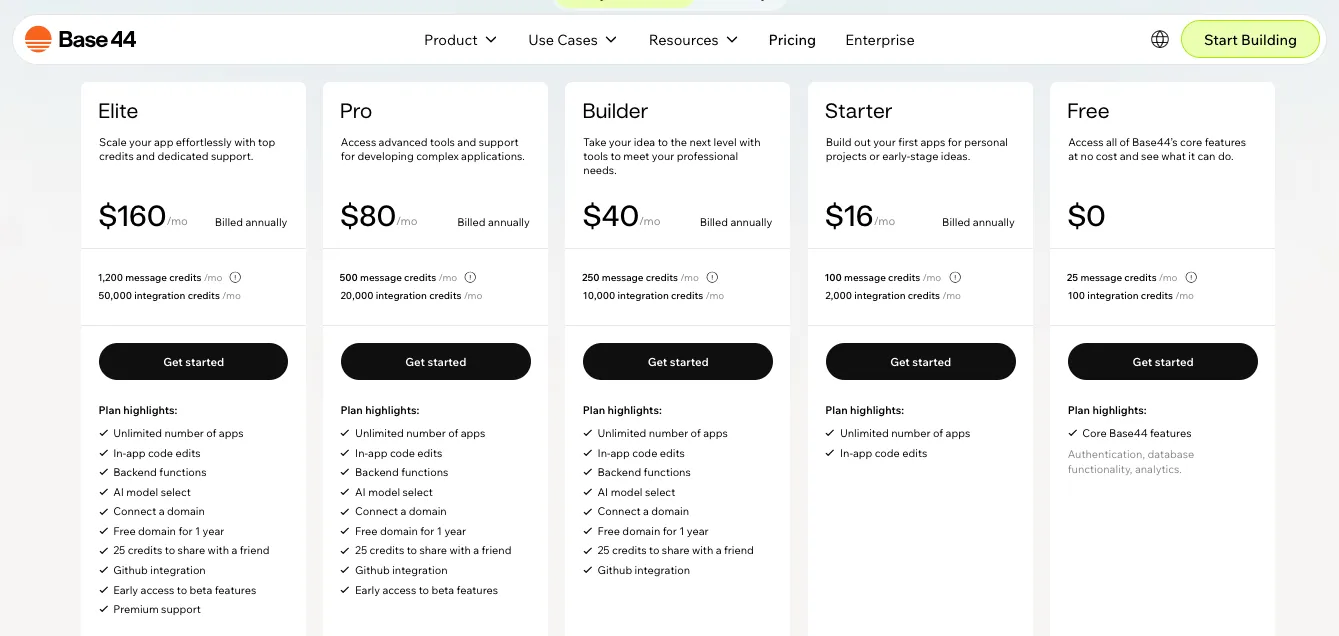
Coming to its pricing, Base44 currently lists these plans on its official pricing page:
- Free: $0 with 25 message credits per month and integration credits
- Starter: $16/month billed annually, with 100 message credits per month and 2,000 integration credits per month
- Builder: $40/month billed annually, with 250 message credits per month and 10,000 integration credits per month
- Pro: $80/month billed annually, with 500 message credits per month and 20,000 integration credits per month
- Elite: $160/month billed annually, with 1,200 message credits per month and 50,000 integration credits per month
- Enterprise: custom plan with dedicated architect and account support
Base44’s Free plan gives access to core Base44 features, including authentication, database functionality, and analytics. Its paid plans include unlimited apps and in-app code edits, while Builder and higher plans add backend functions, domain connection, free domain for one year, credits to share with a friend, and GitHub integration. Pro and Elite add higher usage limits, early access to beta features, and Elite also includes premium support.
But here’s the part you should watch closely.
Base44 starts cheaper than Vitara.ai at the paid entry level. The Starter plan is $16/month when billed annually. But if you want custom domain, backend functions, and GitHub integration, the Builder plan is where Base44 becomes more useful for serious product work.
So, is Base44 affordable for you?
Let me show you with some quick pros and cons so you can decide:
Pros
- Free plan available for testing Base44
- Starter plan starts at $16/month billed annually
- Unlimited apps included in paid plans
- In-app code edits included in paid plans
- Builder plan includes backend functions
- Builder plan and higher include custom domain and GitHub integration
- Pro and Elite plans give higher message and integration credit limits
- Enterprise option is available for larger teams that need custom support
Cons
- Custom domain starts from the Builder plan
- GitHub integration starts from the Builder plan
- Builder plan costs $40/month when billed annually
- Pro costs $80/month when billed annually
- Elite costs $160/month when billed annually
- Message credits can run out if you build, test, and regenerate often
- Integration credits matter when your app uses LLMs, file uploads, image tools, email, SMS, database queries, or other connected actions
- If you hit daily or monthly limits, you need to wait or upgrade
There are no clear “hidden” costs on Base44’s pricing page.
But the real cost depends on how often you build, regenerate, test, connect integrations, publish apps, and use advanced features.
My take:
For quick no-code app building, Base44’s Starter plan looks affordable.
But for serious app builders who need custom domain, backend functions, and GitHub workflow, the useful plan starts at $40/month.
That makes Base44 more expensive once your app moves from a simple idea to a real product.
Vitara.ai: Pricing and Cost Efficiency
Vitara.ai keeps pricing simpler.
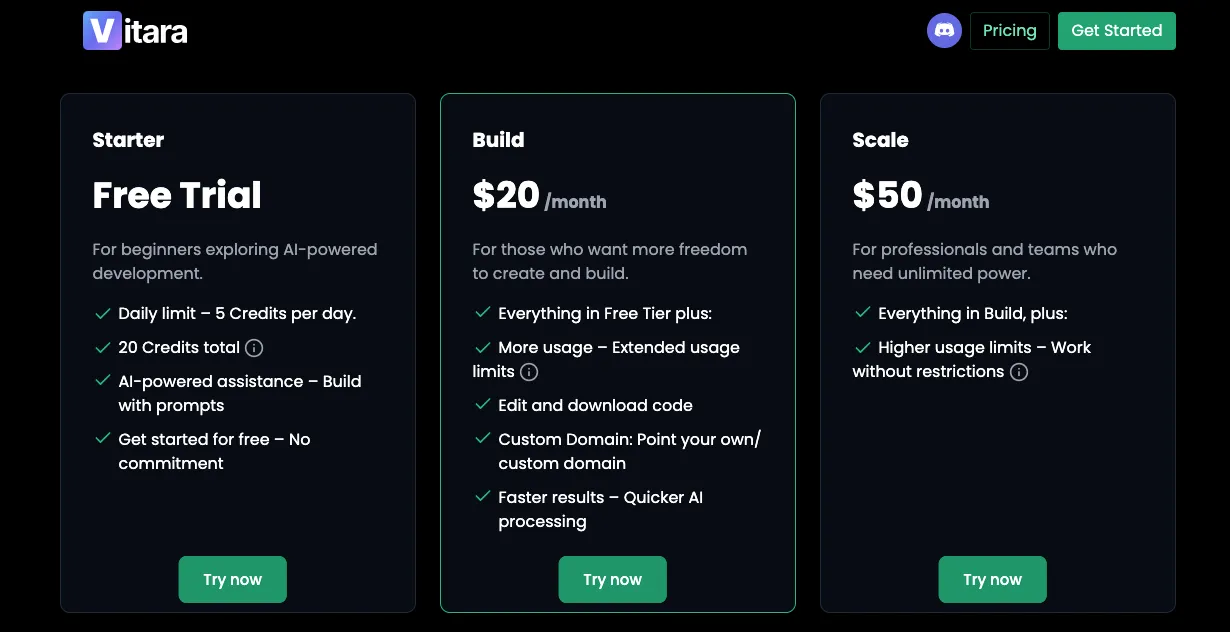
Vitara.ai currently lists these plans on its official pricing page:
- Starter: free plan for beginners, with 5 credits per day and 20 one-time credits
- Build: $20/month with 100 monthly credits, code editing, code download, custom domain, and faster AI processing
- Scale: $50/month with 250 monthly credits and everything in Build
- Custom plan: tailored plan for users who need more than the standard plans offer
This is where Vitara.ai feels more cost-efficient.
You do not need to jump to a $40/month plan just to get code download or custom domain support. The $20/month Build plan already gives you the features most founders, developers, and product teams care about when building a real app.
Pros
- Free Starter plan available
- 5 credits per day plus 20 one-time credits in the Starter plan
- Build plan costs $20/month
- Build plan includes 100 monthly credits
- Edit and download code included in Build
- Custom domain included in Build
- Faster AI processing included in Build
- Scale plan gives 250 monthly credits at $50/month
- Custom solution available for larger or special usage needs
Cons
- Base44 has a lower paid entry plan at $16/month billed annually
- Vitara.ai does not show a lower annual discount on the pricing page
- Heavy builders may need the Scale plan sooner
- Custom pricing details are not publicly listed
- Teams with very high usage may need to contact sales
What I liked about Vitara.ai’s pricing is how direct it feels.
You pay $20/month and get the features that matter for real app ownership: editable code, downloadable code, and custom domain support.
That’s a strong value if you’re building a SaaS MVP, web app, mobile app, internal tool, or client project that may need developer handoff later.
I also like that Vitara.ai does not make code control feel like a high-tier feature.
That alone makes the pricing feel more founder-friendly.
| Aspect | Base44 | Vitara.ai | Which is Better? |
|---|---|---|---|
| Free Plan | Free plan with 25 message credits per month | Starter plan with 5 credits per day and 20 one time credits | Vitara.ai |
| Lowest Paid Plan | Starter at $16 per month billed annually | Build at $20 per month | Base44 |
| Mid Level Plan | Builder at $40 per month billed annually | Scale at $50 per month | Tie |
| Higher Plans | Pro at $80 per month and Elite at $160 per month billed annually | Custom plan available through sales | Base44 for published tiers, Vitara.ai for flexible custom needs |
| Code Editing | Included in paid plans | Included in Build plan | Tie |
| Code Download | Available through Base44 code export flow | Included in Build plan | Vitara.ai |
| Custom Domain | Starts from Builder plan at $40 per month | Included in Build plan at $20 per month | Vitara.ai |
| GitHub Workflow | Starts from Builder plan | GitHub workflow support is part of Vitara.ai’s developer friendly positioning | Tie |
| Usage Model | Message credits plus integration credits | Simple monthly credit model | Vitara.ai |
| Best Pricing Fit | Quick no code apps and users who want more published pricing tiers | Builders who want code control and custom domain at a lower cost | Vitara.ai |
| Long Term Value | Good, but useful product features may push users to higher plans | Better value for founders, developers, and product teams | Vitara.ai |
Verdict
Base44 is cheaper at the lowest paid entry point.
But Vitara.ai gives better value where it matters most.
For $20/month, Vitara.ai gives you code editing, code download, custom domain support, faster AI processing, and 100 monthly credits. Base44’s $16/month Starter plan is good for early app building, but custom domain and GitHub integration start from the $40/month Builder plan.
If you only want to test a simple no-code app, Base44 can work.
If you want better cost efficiency for long-term product building, Vitara.ai wins this round.
Verdict? Build Faster With Base44, Build With More Control Using Vitara.ai
Both Base44 and Vitara.ai are strong AI app builders.
But when you compare them across:
Code ownership, full-stack flexibility, mobile app direction, developer workflow, and long-term product control, Vitara.ai pulls ahead.
It stands out especially in:
- Editable and downloadable code
- React frontend for modern app development
- Supabase backend for database, auth, and APIs
- Custom domain support on the Build plan
- A better path from AI-generated MVP to real product
Base44 is a good choice for users who want a simple no-code app builder.
It works well for quick internal tools, business dashboards, workflow apps, and early prototypes.
But once your app starts becoming more serious, Vitara.ai gives you more room to keep building without feeling boxed in.
It gives you AI app building with code control, backend flexibility, GitHub-friendly workflow, and web and mobile app creation from one platform.
For founders, developers, agencies, and startup teams that want to build SaaS MVPs, client apps, mobile-first products, or full-stack web apps, Vitara.ai is the more complete option today.
Base44 still works well if you want a fast no-code platform with built-in backend, database, hosting, and app publishing.
But the control and long-term product-building gap becomes clear when you compare what you get beyond the first generated version.
Frequently Asked Questions
1. Which tool is more beginner-friendly, Base44 or Vitara.ai?
Base44 is more beginner-friendly for users who want a no-code style experience. You can describe your app in plain English and let the platform handle structure, design, logic, and built-in setup. That makes it easier for non-technical users who want to build quick apps without thinking about code.
Vitara.ai is still easy to use, but it is better for users who want AI app building with more control over frontend, backend, code editing, and long-term product development.
2. Which tool is better for full-stack app development?
Vitara.ai is better for full-stack app development because it focuses on generating frontend and backend code from prompts. It is built for users who want to create web and mobile apps with editable source code, backend logic, APIs, databases, and authentication.
Base44 also supports full app creation with backend and app logic, but it feels more like a managed no-code AI app builder. That works well for fast app creation, but Vitara.ai gives more room when the app needs real development control.
3. Is Vitara.ai a good Base44 alternative?
Yes. Vitara.ai is a strong Base44 alternative for founders, developers, agencies, and product teams that want more code ownership and full-stack flexibility.
Choose Vitara.ai if you want:
- Editable code
- Code download
- Web and mobile app creation
- Full-stack development from prompts
- Better developer handoff
- More control after the first app version
4. Which is more affordable, Base44 or Vitara.ai?
Base44 has a lower entry paid plan, but Vitara.ai gives better value for serious app builders.
Base44’s paid plans include Free, Starter, Builder, Pro, Elite, and Enterprise options. Its Starter plan starts at a lower price, but important features like custom domain and GitHub integration sit higher in the plan structure.
Vitara.ai’s Build plan starts at $20/month and includes 100 monthly credits, code editing, code download, custom domain support, and faster AI processing. That makes Vitara.ai more cost-efficient for users who want to build apps they can own, edit, and scale.
5. Which tool gives better code ownership?
Vitara.ai gives better code ownership.
Vitara.ai clearly says users maintain full ownership of their code and data, and users can download and deploy their code. It also allows users to edit generated code inside the platform or export it to their preferred editor.
Base44 supports app building and code-related workflows, but Vitara.ai makes code control a stronger part of its core positioning.
6. Which tool is better for building SaaS MVPs?
Vitara.ai is better for SaaS MVPs because SaaS products usually need more than a quick app screen.
A SaaS MVP may need:
- User login
- Dashboards
- Role-based access
- Database workflows
- Subscription logic
- Admin panels
- API connections
- Developer handoff later
Base44 can help you launch fast, but Vitara.ai is better when the MVP needs to grow into a real product with editable code and backend flexibility.
7. Should I choose Base44 or Vitara.ai for internal tools?
Choose Base44 if you want a quick internal tool without much technical setup. It works well for simple dashboards, back-office tools, customer portals, and productivity apps.
Choose Vitara.ai if your internal tool may later need custom logic, code changes, integrations, mobile support, or developer maintenance. Vitara.ai is better when the tool needs to become part of a larger business workflow.
8. Which tool is better for developers?
Vitara.ai is better for developers.
Developers usually care about code quality, editability, backend structure, version control, deployment flexibility, and long-term maintainability. Vitara.ai supports this mindset because it generates real frontend and backend code, allows manual editing, and lets users download and deploy their code.
Base44 is easier for non-developers, but Vitara.ai feels more practical for developers who want AI speed without giving up control.
9. Which tool is better for non-technical founders?
Base44 is easier for non-technical founders who want to build a quick app with minimal setup.
But Vitara.ai is better for non-technical founders who are thinking beyond the first prototype. If you want to build a SaaS MVP, raise feedback from users, hire developers later, or keep control over your code, Vitara.ai is the safer long-term choice.
10. Can I build mobile apps with Vitara.ai and Base44?
Yes, both tools can help with mobile app experiences, but they approach it differently.
Vitara.ai positions itself as a platform for building web and mobile applications using natural language prompts.
Base44 helps users build apps and websites without coding experience, and the final app can work well for many web-based and mobile-friendly use cases.
For mobile-first product ideas, Vitara.ai is the better choice because its positioning is stronger around web and mobile app development together.
11. Does Vitara.ai allow code download?
Yes. Vitara.ai allows users to edit and download code on the Build plan. The official pricing page lists “Edit and download code” under the Build plan, along with custom domain support and faster AI processing.
That makes Vitara.ai useful for users who want to start with AI and continue development outside the platform when needed.
12. Is Base44 only a no-code tool?
Base44 is mainly positioned as a platform that lets users build apps and websites without coding experience. It helps users turn ideas into working apps using natural language, while handling structure, design, and logic inside the platform.
That makes it useful for no-code and low-code users. But if your goal is to own and customize the generated code deeply, Vitara.ai is the better fit.
13. Which is better for agencies, Base44 or Vitara.ai?
Vitara.ai is better for agencies that build client apps and need more control over code, backend setup, custom domains, and handoff.
Base44 can work for agencies that want to create simple apps quickly. But client projects often need changes after launch. They may also need developer access, code download, custom workflows, and future maintenance. Vitara.ai fits that agency workflow better.
14. Should I switch from Base44 to Vitara.ai?
Switch to Vitara.ai if you want:
- More control over your generated app
- Editable and downloadable code
- Full-stack web and mobile app development
- Better developer handoff
- Custom domain support at a lower paid tier
- A stronger path from prototype to real product
Stay with Base44 if you only need quick no-code app creation and do not care much about code-level control.
15. What is the final verdict on Base44 vs Vitara.ai?
Base44 is better for users who want a simple no-code AI app builder for quick business apps, internal tools, and early prototypes.
Vitara.ai is better for users who want to build full-stack web and mobile apps with code ownership, backend flexibility, code editing, code download, and stronger long-term control.
For quick experiments, Base44 works well. For serious app building, Vitara.ai is the better choice.
What’s New?