Features You Can Instantly Add to Your Event Website with Vitara

RSVP Forms

Collect guest details, attendance status, and special requests

Ticket Options

Create free, paid, VIP, or early access tickets

Payment Collection

Accept secure online payments for event registrations

Event Landing Pages

Create polished pages for launches, parties, and live events

Agenda Sections

Show schedules, sessions, and timing in a clear layout

Speaker Profiles

Highlight speakers, hosts, performers, or panel guests

Venue Details

Add maps, directions, parking info, and entry instructions

Hero Banners

Promote your event with bold visuals and key details

Photo Galleries

Show past event moments or promotional images

Video Highlights

Embed teaser videos, trailers, or recap clips

Custom Branding

Match your event theme with colors, fonts, and style

Countdown Blocks

Build urgency as your event date gets closer

Promo Sections

Highlight offers, announcements, or limited-time ticket deals

Social Proof

Show reviews, testimonials, sponsor logos, or attendee counts

Contact Forms

Capture attendee, sponsor, or partner inquiries fast

Email Updates

Send reminders, confirmations, and event announcements

Live Chat Hooks

Connect your preferred chat widget for quick support

Notification Bars

Share urgent updates like venue changes or deadline reminders

Waitlist Forms

Collect interest when tickets or seats fill up

FAQ Blocks

Answer common questions before people reach out

Attendee Dashboard

Give guests one place to view their event details

Session RSVP

Let people reserve spots for talks, workshops, or meetups

Saved Tickets

Help attendees access their registrations anytime

Calendar Add-Ons

Let guests save the event to their personal calendar

Guest Profiles

Store attendee info, preferences, and registration history

Event Reminders

Keep guests informed before the event starts

Mobile Access

Make it easy to view schedules and tickets on any device

Guest List Management

Track registrations, approvals, and attendee details

Check-In Support

Speed up entry with organized guest records

Sponsor Sections

Showcase brand partners and event supporters

Team Profiles

Introduce organizers, coordinators, or event managers

Lead Capture

Collect interest from sponsors, vendors, or future attendees

Vendor Notes

Keep track of booth, setup, and partner requirements

Event Drafts

Prepare pages before publishing them live

Multi-Event Setup

Manage different events from one website structure

Smart Feature Hints

Auto-suggest labels for new event website features

How to Use the Event Website Builder?

See how Vitara takes your input (prompts) and turns it into a complete event website with landing pages, RSVP forms, and ticketing tools ready to go live in minutes.

1

Give the Prompt

Share details about your event, audience, and schedule so Vitara knows exactly what kind of site and event pages to create for you.

2

Generate

Watch Vitara generate a full-featured event website with landing pages, agenda sections, RSVP forms, and ticketing flows directly from your prompt.

3

Review

Look through your site’s layout, event details, and registration flows, then make quick edits on the spot if you want to tweak anything.

4

Publish

Go live with your event website and start getting RSVPs, registrations, and ticket sales right away.

Key Features That Make Vitara Perfect for Building Event Websites

End-to-End Website

All-in-One Event Platform

Build your event website from frontend to backend, fully hosted and ready for attendees to register or buy tickets.

  • Full Site Generation

    Full Site Generation Create landing pages, event sections, RSVP forms, ticketing flows, and logic in one go.

  • Hosting Included

    Hosting Included Skip dealing with servers or plugins — your event site runs on built-in infrastructure.

  • Unified System

    Unified System Frontend, backend, registrations, and data all connect out of the box, so everything just works.

Prompt-Based Building

Build with Simple Prompts

Just describe the kind of event website you want and Vitara turns it into a working event site.

  • From Text to Event Website

    Write a prompt like “event website with RSVP form, agenda, and ticketing.”

  • AI Handles Layout and Logic

    No generic templates. You get a custom structure built around your event flow.

  • Live-On-Screen Results

    Watch your event site take shape in real time as you refine your prompt.

Dynamic Event Pages

Smart Event Page Creation

Auto-generate event pages with clean layouts, sections, and structured content.

  • Rich Event Details

    Each page includes schedule, speakers, venue info, and key highlights.

  • Structured Layouts

    Organize agendas, sessions, and announcements in a clear flow.

  • Easy Updates

    Edit event details, timings, or sections anytime with a quick prompt or manual change.
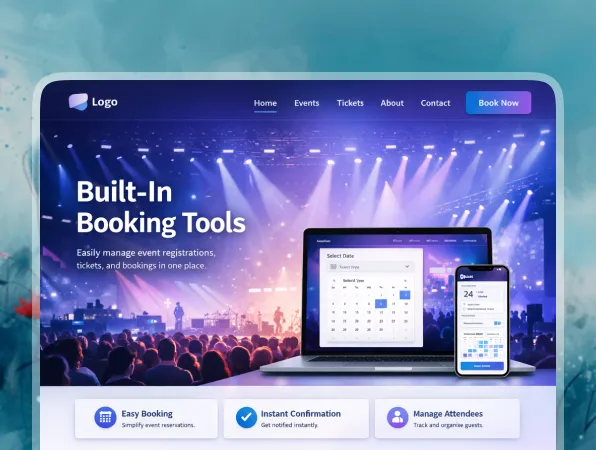
Built-In Registration & Ticketing

Registrations Built Right In

Let attendees RSVP, register, or grab tickets directly from your site.

  • Flexible RSVP Forms

    Guests can confirm attendance, select sessions, and share preferences.

  • Instant Alerts

    Get notified whenever someone registers or buys a ticket.

  • Smooth Checkout Flows

    Enable easy ticket purchases without sending users to external tools.

Attendee Engagement

Agenda & Session Pages

Display event schedules, sessions, and timelines in a simple format.

  • Speaker & Host Profiles

    Introduce speakers, performers, or organizers clearly.

  • Event Updates

    Share announcements, reminders, or last-minute changes quickly.

  • Interactive Experience

    Give attendees a clear, engaging way to explore your event.

Instant Customization

Instant Site Tuning

Adjust layouts, pages, and features without rebuilding your event website.

  • Change the Look in Seconds

    Update banners, sections, or branding just by editing your prompt.

  • Edit Event Details Fast

    Modify schedules, tickets, or content whenever things change.

  • Real-Time Preview

    See every change update live before you publish your event site.
FAQs About the Event Website Builder

Yes. You describe what you want in natural language, and Vitara generates the design, pages, and logic for you. You can keep refining with more prompts instead of touching code directly.

Yes, you can customize it after Vitara generates it. You can:
  • Adjust layouts and sections
  • Add or remove pages
  • Update event details, schedules, and speaker content
  • Change copy, images, and CTAs
  • Edit the generated code for deeper control

It works well for conferences, webinars, workshops, corporate events, and even small gatherings, basically anything that needs registration, schedules, or ticketing.

Yes. Vitara can generate backend logic that connects to external tools and APIs, and you can prompt it to scaffold integration points. Advanced integrations may still require a developer, but Vitara does a lot of the heavy lifting to set up the structure.

If your event details change often, you can update everything quickly. You can:
  • Edit schedules, sessions, or timings anytime
  • Update ticket types, pricing, or availability
  • Change speaker info, venue details, or content
  • Add new sections or announcements with a simple prompt

Yes. You can control SEO basics like page titles, meta descriptions, URLs, and headings for every event page. The builder makes it easy to create structured schedules, speaker pages, and event landing pages, which search engines can understand clearly. Over time, those optimized pages can rank for phrases like “event website builder with RSVP” or “AI event registration website builder,” and bring in organic traffic naturally.

You can. If you already have an event website on another platform, you can recreate your structure with a prompt like “copy my current site map and rebuild it with modern layouts and RSVP forms.” Then you can migrate content page by page, or paste your copy and media into the new event layouts. Many teams use this flow to upgrade an outdated site into a faster, cleaner AI-built event website without starting from zero.

It does. If you’re running a single event, you can launch a simple event website with a landing page, RSVP form, and schedule in very little time. If you’re part of a larger team, you can go deeper with multiple event pages, ticketing flows, guest management, and integrations. The same AI event website builder adjusts to your setup, so it keeps working as your events grow.

Know what’s trending in AI-powered web app development

Retool Review

Retool Review 2026: Is It Worth It for Building Internal Tools?

7 minutes read
Wix Review

Wix Review 2026: Is Wix Worth It? Pros, Cons, Pricing & Verdict

6 minutes read
Balsamiq Review

Balsamiq Review 2026: Features, Pricing, Pros, Cons & Is It Worth It?

6 minutes read