A complete guide to Replit pricing in 2026

Update including Replit’s Feb 2026 pricing changes, Agent costs, and real-world feedback from active users.
Replit’s a powerhouse for building, coding, and deploying apps right from your browser, but figuring out what it’ll actually cost? That’s where things get murky. Between plans, add-ons, and usage fees, the pricing can feel more like a puzzle than a straight answer.
That’s exactly what we’re going to break down. We’ll walk through every Replit plan, decode what’s worth paying for, and flag the hidden costs most people miss. By the end, you’ll know exactly what you’re signing up for and what to avoid.

What is Replit?
Replit is an online vibe coding platform that lets you build, run, and ship software straight from your browser. You don’t need to install anything or mess with local setups. Open a project, start coding, and see it run in real time.
It works for beginners and experienced developers alike. You can write code solo, collaborate with a team, use built‑in AI tools for help, and even deploy apps to the web. That all‑in‑one setup is what makes Replit so popular, and also why its pricing can feel confusing at first.
You Should Also Read: Top Replit Alternatives
A Simple Guide to How Replit Pricing Works
Replit doesn’t just charge a flat monthly fee and call it a day. Their pricing is built around two main parts: your subscription plan and your usage-based costs. That means what you pay depends not just on the plan you pick, but also on how you actually use the platform.
First, there’s your subscription. This gives you access to core features like private projects, AI tools, and extra performance. Then there’s the usage part, like deploying apps, keeping them always on, or running AI-powered features. These can stack up fast if you’re not keeping an eye on them.
Let’s break it down in a way that actually makes sense.
Replit Subscription Plans: Free, Core, Teams, and Enterprise
Replit offers a few different plans, each built for a different kind of user. Whether you’re just playing around with code or running serious projects with a team, there’s a plan that fits.
Here’s a quick look at how they stack up:
| Plan | Monthly Price | Yearly Price (per month) | Best For | Key Features |
|---|---|---|---|---|
| Starter | Free | Free | Beginners and learners | 1 app, limited AI, free Agent credits, public projects |
| Core | $25 per month | $20 per month | Solo developers and indie creators | $25 in usage credits, latest AI models, live hosting, long builds, no badge |
| Teams | $40 per user per month | $35 per user per month | Development teams and small organizations | All Core features, $40 usage credits, team seats, private deployments |
| Enterprise | Custom pricing | Custom pricing | Large companies | SSO, SCIM, viewer seats, advanced controls, dedicated support |
The Starter plan is great if you’re just testing the waters. You can publish one app, explore AI features in a limited way, and try Replit’s editor without spending a dime.
If you’re working on personal or freelance projects, Core gives you more room to build. You get usage credits every month, private apps, better AI access, and full control over your published projects. And if you want to remove the “Made with Replit” tag, this is where that happens.
The Teams plan is built for collaboration. You get everything from Core, plus role-based access, billing control, and private deployments. Each team member gets usage credits too, which is great for keeping costs predictable.
Enterprise is custom all the way. If you’re dealing with sensitive data, complex workflows, or need deeper integration, this plan adds SSO, advanced privacy tools, and support built for scale.
The New Replit Pricing Structure (February 2026)
Replit now uses four main tiers for its 2026 pricing: Starter, Core, Pro, and Enterprise. The older Teams plan is being phased out and replaced by the new Pro plan for small teams, with changes rolling out from 24 February 2026.
Starter
Monthly: Free
Yearly: Free
Starter includes:
- Free daily Agent credits for small tasks
- Free credits for basic AI integrations
- Up to 1 published app at a time
- Limited Agent intelligence and features
- A sandbox to explore the IDE and platform
Core
Monthly: $20/month
Yearly: $17/month when billed annually
Core includes:
- 25 dollars in monthly usage credits for Agent, deployments, and databases
- Unlimited public and private workspaces
- Up to 5 collaborators per workspace (added in the 2026 update)
- Access to more capable AI models and autonomous long builds
- Ability to remove the “Made with Replit” badge on apps
Core is the realistic starting point for solo builders, freelancers, and anyone running small production apps.
Pro
Monthly: $100/month
Yearly: $95/month when billed annually
Pro includes:
- Support for up to 15 builders on a single plan, with no per-seat pricing
- Tiered monthly credit options with bulk discounts
- Credit rollover for one month if you don’t use everything
- Access to Turbo Mode and the most capable Agent models
- Priority support with faster response times
- Enhanced collaboration features and clearer team vs personal workspaces
Pro is designed for small teams and agencies that are shipping real products and pushing Agent hard.
Enterprise
Monthly: Custom pricing
Yearly: Custom pricing
Enterprise includes:
- SSO and SAML support for secure logins
- SCIM provisioning and advanced user management
- Higher limits on CPU, memory, and storage
- Dedicated support, onboarding, and custom invoicing
- Security and compliance features for larger businesses
Enterprise is the tier you choose when you need tight governance, compliance, and multi-team coordination.
How AI Credits Work Inside These Plans
Replit’s AI tools are powerful, but they aren’t unlimited. You get a set amount of AI credits each month, and every time you use the AI, you spend some of those credits.
Here’s how it works:
- Included monthly credits
Core users get $25 in credits, and Teams users get $40 per user. These refresh every month. - Used for AI-powered features
Credits are spent when you use Ghostwriter or Replit Agent to generate code, debug, explain errors, or ask for help. - Bigger tasks cost more
A small edit might use a tiny amount of credits. Asking the AI to build a full feature or write complex code uses more. - No rollover
Unused credits disappear at the end of the month. You can’t save them for later. - Still usable after the limit
If you use up your credits, you can keep going, but you’ll be billed for the extra usage.
What Replit Charges You Beyond the Plan
Your Replit subscription isn’t the full story. There’s a second layer to the pricing: pay-as-you-go usage costs. These start showing up when you go past what your plan includes, and that can happen quickly if you’re running live apps or using a lot of AI features.
Let’s break down some of the main things you might pay extra for:
1. Always-On Apps
If you want an app that keeps running even when you’re logged out, you’ll need to pay for always-on deployment. This is useful for bots, APIs, or anything that needs to stay live all the time.
2. Reserved VM Deployments
This gives you consistent performance by reserving CPU and memory just for your app. It’s great for heavier or production-ready builds, but it costs more than basic hosting.
3. Autoscale Deployments
If your app gets traffic spikes or the workload changes often, autoscale helps it adjust automatically. You’re charged based on the resources your app uses while it’s running.
4. Extra Usage Credits
Paid plans include monthly usage credits, like $25 for Core or $40 for Teams. If you go over that limit, you’ll get billed for the extra usage. Credits cover things like hosting, builds, AI tasks, and compute time.
5. AI Agent and Model Usage
The Core plan gives you access to newer AI models, but it runs on a credit system. Bigger prompts, code completions, or debugging help will use more credits. If you go over, you can still use it, but you’ll be charged for what you use.
Which Replit Plan Is Right for You?
Not sure which plan to pick? Here’s a quick guide to help you choose the one that actually fits your needs.
- Starter (Free): Great for students, hobby coders, or anyone just trying Replit for the first time. You can build public projects, explore basic AI, and get a feel for the platform without spending anything.
- Core: Best for solo developers, indie makers, and freelancers. If you need private projects, faster compute, AI credits, and the ability to remove the “Made with Replit” badge, this is your plan.
- Teams: Ideal for small dev teams or agencies working together. You get shared Repls, role-based access, centralized billing, and enough monthly credits for group usage.
- Enterprise: Made for large companies or organizations with stricter security, compliance, or support needs. This plan is fully customizable with features like SSO, SCIM, and dedicated onboarding.
What Real Users Are Saying About Replit on Different Forums
What Real Users Are Saying About Replit on Reddit
One of the clearest ways to understand how Replit’s pricing feels in real life is to watch users react in public threads. I went through multiple Reddit discussions where people share bills, usage patterns, and switching decisions. Here’s what keeps coming up again and again.
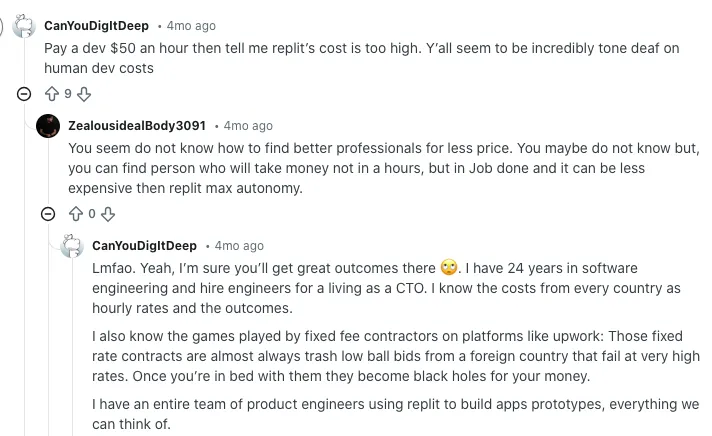
Big surprise bills and “this is not sustainable”
Several long-time users share screenshots and stories of bills jumping from manageable to shocking. One user says they were getting charged around 50 dollars every other day and ended up with a bill close to 2,500 dollars for a project. Another compares Replit costs to Claude, saying Replit ended up roughly 800x more expensive in their case, at around 180 dollars a day. For these users, the conclusion is blunt: good tool, but pricing feels unsustainable.
Source of information: Reddit
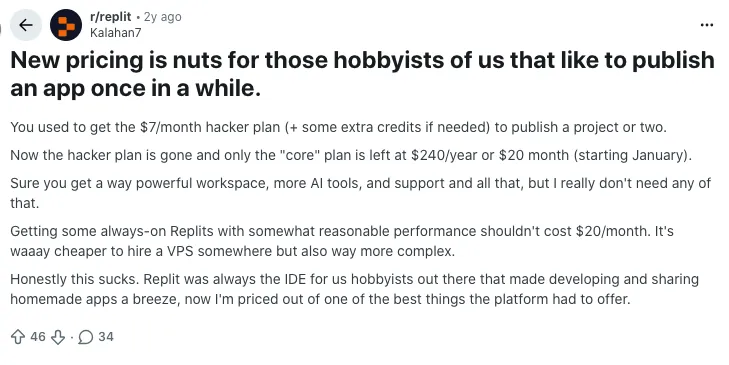
Hobbyists feel priced out after plan changes
A lot of frustration comes from people who used Replit casually. One popular thread talks about the old 7 dollars per month “Hacker” plan being enough to publish a project or two. Now, the same kind of publishing requires at least the Core plan at about 20 dollars per month or 240 dollars per year, which many hobbyists simply do not need or want to pay for. They feel the new structure pushes occasional users out of the ecosystem.
Source of information: Reddit
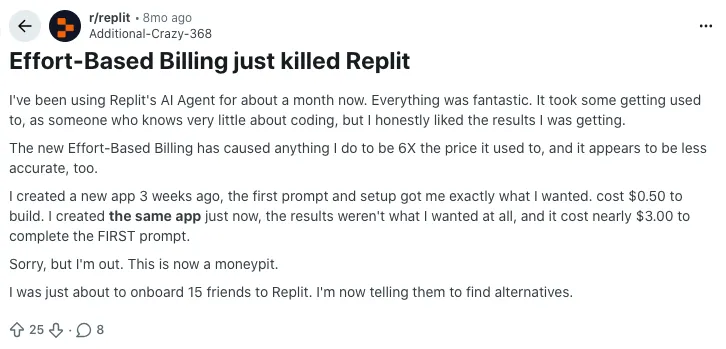
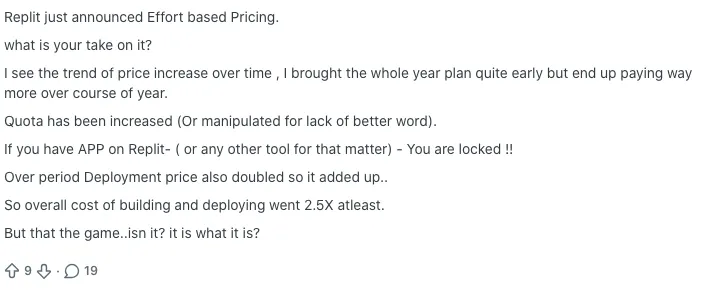
Effort-based billing and Agent runs can multiply costs
Multiple posts focus specifically on Replit’s “effort-based” pricing for the AI Agent. One user reports that after the change, the same type of app build went from about 0.50 dollars to nearly 3 dollars for the first prompt alone, and they estimate their overall usage cost increased around six times. Others say they feel forced into larger yearly plans, only to see how much value they actually get from the credits shrink over time. The common feeling: the model is powerful, but the new billing feels like a money pit.
Source of information: Reddit
Another discussion adds that deployment pricing and quotas changed in ways that made total costs roughly 2.5x higher for one user, who also notes the feeling of being “locked in” once apps run in production.
Source of information: Reddit
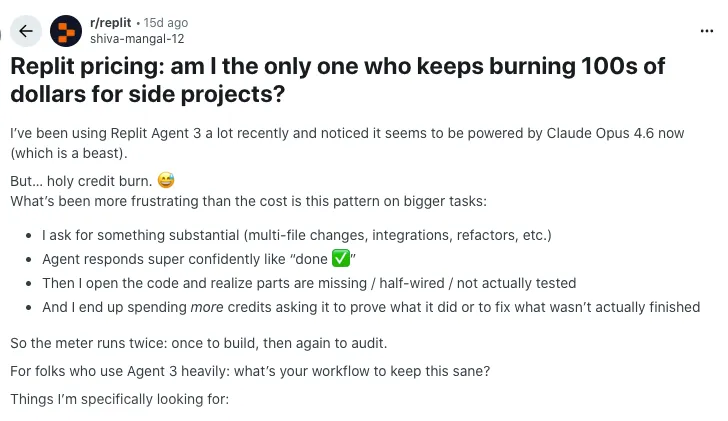
Agent 3 can burn credits twice: once to “build,” again to audit
In one widely shared question thread, a user describes using Agent 3 heavily and noticing what they call “holy credit burn.” They ask the Agent for large changes across multiple files. The Agent confidently replies that everything is done, but when they check the code, parts are missing or half-wired. Then they have to spend more credits asking the Agent to show what really changed, run tests, and fix gaps. For them, the meter effectively runs twice: once to build, then again to verify.
Source of information: Reddit
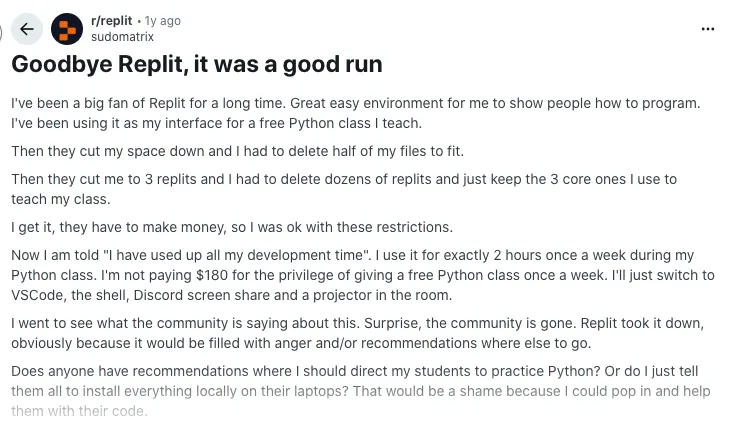
Long-time fans and educators are walking away
Not every post comes from a new user. One detailed story comes from someone who had used Replit for years to teach a free Python class. They liked the platform, accepted earlier cuts to storage and the free tier, and kept adapting. But after hitting new “development time” limits and facing a price tag they saw around 180 dollars just to keep teaching once a week, they decided to move their entire workflow to local tools and other online IDEs instead. The tone is disappointed rather than angry: they still think Replit is a strong tool, but no longer viable for their use case.
Source of information: Reddit
Comparing Replit with its Alternatives: Replit vs Vitara vs Base44 AI vs Bolt AI
Here is the quick comparison table:
| Feature / Tool | Replit | Vitara AI | Base44 AI | Bolt AI |
|---|---|---|---|---|
| Starting Price | Free plan, $20 per month Core, $35 Teams billed annually | Free plan, $20 per month Build, $50 per month Elevate | Free plan, $20 per month Starter, up to around $160 per month Elite | Free plan, around $18 per month Pro, around $27 per month Teams |
| Best For | Developers and learners who want full coding plus AI help | Builders who want prompt to full app with editable code | Non technical founders and rapid MVPs | Developers who want AI to scaffold real code |
| AI Capabilities | AI assistant helps write and refactor code inside the IDE | AI generates frontend and backend code from prompts | AI builds full apps from prompts with backend included | Prompt to app builds with editable code output |
| Coding Approach | Browser IDE with real code control | Prompt driven vibe coding with exportable code | Low code or no code vibe coding with backend included | Browser based IDE with AI assist |
| Frontend Stack | Supports many languages and frameworks | React frontend with backend generation | Responsive visual editor with code export | React and Tailwind with editable code |
| Backend Support | Replit DB or external integrations | Built in backend with code export | Built in backend and database | Includes backend scaffold and database |
| Deployment | Replit Deploy with scaling options | Instant deployment with code export | Auto deployment included | Deploy to Vercel or self host |
| Database Options | Replit DB or external providers | Backend with database support | Backend with managed database | PostgreSQL and Prisma options |
| Team and Collaboration | Teams plan with shared workspaces | Team features with code versioning | Multi user editing and collaboration | Team billing and role based access |
| Code Export | Yes, full editable code | Yes, full code export | Yes on paid tiers | Yes, editable code output |
| Learning Curve | Moderate, code centric but accessible | Easy for non coders with room to scale | Very easy, visual and prompt based | Easy setup but code knowledge helpful |
| Version Control | GitHub integration | Native GitHub sync | GitHub integration possible | GitHub integration available |
| Customization Level | Deep control over logic and libraries | High with full code access | Medium with prompt based customization | High with editable generated code |
You Should Know Other Vibe Coding Tools Pricing:

Final Thoughts
Replit gives you a powerful, all-in-one coding platform with flexible pricing, but it’s not always easy to understand where the costs come from. Once you break it down into plans, credits, and usage, it gets a lot clearer, and you can actually choose what fits your workflow without overpaying.
If you’re comparing Replit to tools like Vitara, Base44, or Bolt AI, it really comes down to how hands-on you want to be. Replit is made for developers who want control. The others lean more toward fast builds with fewer code decisions. Either way, knowing how pricing works helps you build smarter.
Frequently Asked Questions
Is Replit better than Vitara AI for full-stack development?
It depends on what you need. Replit is great if you want full control over your code and environment. Vitara AI, on the other hand, is better if you want to generate full-stack apps quickly from AI prompts and then edit the code afterward.
Can I export full code from Base44 AI and Bolt AI?
Yes, both tools let you export your code, but the export feature is only available on paid plans. Base44 gives you frontend and backend code, while Bolt AI allows you to edit and export React and backend scaffolding.
Which platform is best for non-coders or beginners?
Base44 AI is often the easiest for non-technical users. It has a visual editor and prompt-based flow that feels more like using a website builder. Replit is better if you’re comfortable writing some code or want to learn.
Does Replit include backend hosting and database support?
Yes, Replit has built-in hosting through its Deploy feature, and it offers a simple Replit Database for small apps. For more advanced projects, you can integrate external databases or use reserved VMs.
What’s the most affordable AI app builder for teams?
Bolt AI and Replit Teams are both good options. Bolt AI Teams starts around $27 per user per month. Replit Teams is $35 per user monthly (or $40 monthly if billed monthly), and it includes usage credits and collaboration tools.
Which tool has the best AI code generation?
Replit’s Ghostwriter and Agent are strong options if you want AI inside a real coding environment. Vitara and Bolt are more focused on generating full features from prompts. If you want fast scaffolding, go with Vitara or Bolt. If you want help while coding, Replit is better.
What’s New?